1
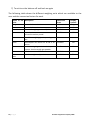
6.0 CALIBRATION Calibration may be required when the balance is initially installed or moved to a new location. Over time and use, mechanical deviations may occur so it is recommended that you calibrate you balance regularly for peak performance. Before calibrating your should make sure you have the correct weights. The weights should be known to an accuracy that is appropriate for the balance being calibrated, for example, OIML Class M1 type or ASTM E617 Class 4. If you do not have the correct weights do not attempt calibration. Model CQT 202 Calibrat
ion 100g Weight Or 200g CQT 251 CQT 601 200g Or 400g Or 600g 100g Or 200g CQT 1501 500g Or 1000g Or 1500g CQT 2601 1000g Or 2000g CQT 2000 1000g Or 2000g CQT 5000 1000g Or 3000g or 5000g 1) To enter into the calibration parameter turn the balance off, press [Tare] and [Unit] keys at the same time and switch on the balance after 3 seconds release [tare] and [unit] keys . 2) The display will show UnLOAD remove any objects from the pan. 3) Press the [Tare] key to enter a zero value. 4) The value last used for calibration will be displayed (see above table). To select a different calibration weight, press the [Unit] key. 5) Once you have selected the calibration weight to be used press the [Tare] key. 6) LOAD will be displayed, place the calibration weight on the pan. 7) Once the stable sign is shown press the [Tare] key. 8) If the weight is within 5% of the last calibration value the display will show PASS and exit the calibration mode. If the calibration is not successful the display will show FAIL and exit the calibration mode, if the calibration fails try it again. 14 | P a g e © Adam Equipment Company 2008