1
Welcome
Your LightSPEED LES-391 SoundPak is a compact, portable amplification
system that will provide clear sound between an instructor and student.
The transmitter is conveniently stored in the carrying case of the LES-391.
The instructor speaks into a lightweight, comfortable headset microphone
that is connected to a small transmitter. Just plug in the mic, turn on the
transmitter and SoundPak and you’re ready to go!
Did I Get Everything?
The LES-391 SoundPak system is made up of the 380 receiver/amplifier that
fits into a carrying case (with a compartment divider), the 370T transmitter, the TK-250 headset microphone, rechargable batteries (6-AA inside the
SoundPak, and one AA for the transmitter), the BC-370 Wall Charger (370T),
the BC-1A Wall Charger (LES-391), and this user guide.
Before You Begin
This system ships with rechargable batteries. For proper operation, it is
important that the batteries in both 370T and LES-391 be charged overnight. Power switches for both units should be in the OFF position during
charging. The 370T transmitter is recharged by using the BC-370 wall charger
with charger cord. The SoundPak is recharged by using the BC-1A wall charger. Optimum charging time is 8-10 hours. Charging indicator LEDs should
light when proper connection is made.
4. Rotate the volume knob on the
370T to approximately mid-way
(you may need to adjust this later
depending on the volume of the
teacher’s voice). Slide the power
switch all the way to the left to the
ON position (note the center,
MUTE position).
Hearing Static:
5. With the front of the LES-391
TK-250 Headset Microphone
facing the student, turn on the
LES-391 power switch by rotating the “Power/Vol” switch clockwise
until it clicks on. Continue to rotate the volume knob clockwise until the
desired volume is achieved. CAUTION: If you increase volume too
much, feedback may occur (a howling sound). To eliminate this
problem, decrease the volume level and/or move the TK-250 farther
away from the LES-391.
• If you have access to another microphone, try it in the 370T. If it works,
your original microphone may need to be repaired. If the system checks
out okay, and you still hear some occasional static or popping, you may be
experiencing radio frequency interference (RFI). If the microphone is okay,
and you think it may be interference, try switching the channel to the other
frequency and see if the interference goes away. Confirm that your
frequency is not being duplicated by another wireless FM system within the
building. Continued RFI may require exchanging your system for one with
a different frequency.
6. To conserve transmitter battery life, the LES-391should be turned off
when not being used.
Features
Dual Channel
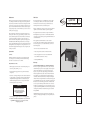
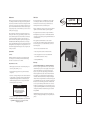
BC-1A Wall Charger with SoundPak
Daily Set Up - IT’S EASY!
1. After being fully charged, remove the charging cords from the 370T and
the LES-391.
2. Check that the frequency on the 370T and the LES-391 match (for
example, both set on A or both set on B). These channel switches are
located on the side of the 370T and on the top of the LES-391.
3. Insert the TK-250 plug into the mic jack on the top of the 370T and
position the TK-250 along the left jaw line. Proper positioning is
achieved by running the headband over the top of the left ear, around
the back of the head (not over the top), and then over the right ear. The
microphone element should be about an inch from the left corner of
the mouth with the rounded portion of the element (under the wind
screen) facing towards the mouth. The TK-250 boom is adjustable. If the
headband needs to be resized this can be done by grasping both ends of the
wire headband and either stretching it farther apart or rolling the loop into
a tighter circle. The band is made of steel wire and should easily adjust to
various head sizes.
• Confirm the the TK-250 cable is inserted securely into the 370T.
• Check battery contacts. Clean if necessary.
• If static occurs only when wiggling the TK-250 cord, determine whether
the static is coming from the cable or the 370T jack by firmly holding
the plug into the jack and moving the cord along its length.
Low Volume:
• Check volume level on LES-391 and adjust as necessary. Clockwise
adjustment of the volume knob will increase volume.
• If volume is too low, check to be sure that the batteries are properly
charged in the 370T and the SoundPak.
The LES-391 comes equipped with two frequency channels. Select the frequency that works best for the classroom. Be sure that both the 370T and the
LES-391 are on the same frequency.
Sound Fades In and Out (Drop Out):
Microphone Input
• Test the 370T with a fully charged AA battery.
The LES-391 is equipped with a microphone jack on the top. This supplies
bias voltage in the event that it is needed.
• Make sure the batteries in the LES-391 are properly charged as well.
Headphone Output
BC-370 Wall Charger with 370T
• Test the 370T with a fully charged AA battery.
The LES-391 has a headphone jack on the side of the unit that allows private
listening.
• Check volume level on the 370T. Normal levels should be achieved with
the volume knob set in the middle. If the teacher has a quiet voice, it may
need to be set at a higher level.
No Sound From Speaker:
Micro Link Compatibility
• Check the LES-391 volume level.
The LES-391 frequencies are designed to be compatible with MicroLink*
frequencies. (* ™ of Phonak Group)
• Confirm the 370T and SoundPak have matching frequencies.
(A with A or B with B)
A hand-held wireless microphone is available, please contact Lightspeed for more
information.
• Confirm the TK-250 cable is securely inserted into the 370T.
Troubleshooting
Please go through this checklist before calling LightSPEED Technologies
Service Department. Note: Most problems associated with wireless FM systems are
directly related to low battery power. Check the batteries and chargers.
Battery Check:
• Confirm batteries are charged each night. With proper charging,
batteries should last about one school year.
• Confirm charging LED is on while charging.
• Be sure the 370T and LES-391 are turned off while charging.
• Confirm the 370T power switch is turned on and that its power
LED is lit.
• Confirm that the LES-391 is turned on and that the power LED is lit.
• Confirm that there are no headphones plugged into the headphone jack.
[ caution! ]
Do not attempt to charge alkaline
batteries̶they can overheat and
expand, creating a significant hazard
and damaging equipment.