1
INSTRUCTIONS
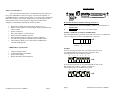
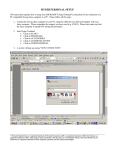
What is a TecCD Player?
8 7 6 5 4 3 2 1
The TecCD from Technovision® is an industrial CD player based on a
heavy duty CDROM drive and power supply. It provides the capability of
AUTOMATICALLY repeating specific tracks (1..15) or the entire CD through
DIP switch settings. Users can also sample specific tracks through external
button selections. The TecCD can also be triggered by motion sensors,
computers or multimedia controllers like the PC2 or KPC1.
•
•
•
•
•
•
•
•
Dipswitch selectable disc or track repeat (Tracks 1 to 15).
Built in 5-watt amplifier with mono output (channel selectable) and
volume control.
Speaker connectors.
Stereo line output on 3.5mm connector.
RS232 control on a DB25F connector.
SR compatible with Pioneer PD-103 consumer CD player.
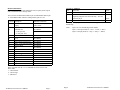
4x4 matrixed keypad port with DIPswitch selectable lockout.
Track indicator outputs (1x8 or 4x4 modes) with DIPswitch
selectable flashing mode.
-
LINE
ON
+
•
•
•
•
SR
1
DIP SWITCH
EXTERNAL CONTROL
Do not turn the unit on until the following has been set.
1.
2.
Attach the Line Audio Out (LINE) to amplifier or attach speaker to
Speaker Out.
DIPswitches must be set to your mode settings.
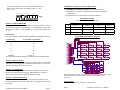
Switches 1-4 TRACK VALUE (0= ENTIRE DISC)
The first 4 DIPswitches set the track value. DIP 1 has a value of 1, DIP 2 has a
value of 2, DIP 3 has a value of 4 and DIP 4 has a value of 8.
ON ↓
VALUE
CDROM Drive Specifications:
8
8
4
2
1
Examples
If you are selecting the entire disc, you would set the track value
to 0. Meaning DIP 1 thru 4 are off, and if you want to keep
repeating this mode you set DIP6 on (repeat).
8 7 6 5 4 3 2 1
Long life brushless motor.
100,000 POH (Duty 20%) MTBF.
Powered tray loading.
Double shell dust-sealed mechanism.
ON ↓
If you need to repeat track 10, you would turn DIP 2(value 2) and
DIP 4(value 8) on. Value 2 + Value 8 = TRACK 10.
You would also have to turn DIP6 on for repeat.
8 7 6 5 4 3 2 1
ON ↓
VALUE
Technovision TecCD User’s Manual
Page 3
Page 4
8
2
Technovision TecCD User’s Manual