1
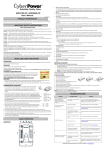
TROUBLE SHOOTING
Problem
Possible Cause
Solution
Full-time surge protection outlets stop
providing power to equipment. Circuit breaker
button is projecting from the side of the unit.
Circuit breaker has tripped due
to an overload.
Turn the UPS off and unplug at least one piece of equipment. Wait 10 seconds, reset
the circuit breaker by depressing the button, and then turn the UPS on.
The UPS does not perform
expected runtime.
Battery not fully charged.
Recharge the battery by leaving the UPS plugged in.
Battery is slightly worn out.
Contact Panamax about replacement batteries at www.panamax.com
The unit failed a self test.
Turn the UPS off. Wait 10 seconds and then turn the UPS on.
The unit is not connected to an
AC outlet.
The unit must be connected to a 110/120v 60Hz outlet
The battery is worn out.
Contact Panamax about replacement batteries at www.panamax.com
Mechanical problem.
Contact Panamax at www.panamax.com
The USB cable is not
connected.
Connect the USB cable to the UPS unit and an open USB port on the back of the
computer. You must use the cable that came with the unit.
The USB cable is connected to
the wrong port.
Check the back of the computer for an additional USB port. Move the cable to this
port.
The unit is not providing
battery power.
Shutdown your computer and turn the UPS off. Wait 10 seconds and turn the UPS
back on. This should reset the unit.
The UPS will not turn on.
UPS Software Program is inactive
(all icons are gray).
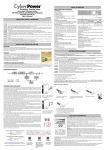
TECHNICAL SPECIFICATIONS
ESTIMATED RUNTIME IN MINUTES
Capacity.......................................................... 850VA / 510W
Input Voltage on Utility................................... 90V to 140V
Input Frequency.............................................. 60 Hz ± 3 Hz
On-Battery Output Voltage..............................120Vac ± 5%
Transfer Time.................................................. 4ms Typical
Max. Load for UPS Outlets............................. 850VA / 510W
Max. Load for Full-Time
Surge Protection outlets (9 Outlets)...............12 Amps
On-Battery Output Wave Form ...................... Simulated Sine Wave Form
Operating Temperature ................................. + 32°F to 95° F / 0° C to 35° C
Operating Relative Humidity........................... 0 to 95% NON-CONDENSING
Size (L x W x H)..............................................10.24" x 4.33" x 8.70" 26.0 x 11.0 x 22.6cm
Net Weight .................................................... 15.8 lbs
Typical Battery Recharge Time....................... 8 hours typical from total discharge
Typical Battery Life.........................................3 to 6 years, depending on number of
discharge/recharge cycles
Battery Type................................................... Spill-proof, Maintenance-free, sealed lead-acid
Safety Approvals............................................ UL1778(UPS), cUL107., FCC/DoC Class B
DLP TV (260 Watts)...............................................................6 Minutes
HD Gaming Console.............................................................12 Minutes
Satellite Receiver / Cable Box...............................................80 Minutes
Media Player.........................................................................80 Minutes
DVR / TiVo®........................................................................120 Minutes
DEFINITIONS FOR ILLUMINATED LCD INDICATORS
POWER ON
WIRING FAULT
ALARM
CONDITION
On
On
Off
Normal
On
On / Off
2 beeps per 30 seconds
Utility failure—The UPS is providing battery power to the battery power supplied outlets.
On
On / Off
Rapid beeps
Utility failure—The UPS is providing battery power.The rapid beeps mean that the battery will run out of
charge within a few minutes.
On
On / Off
Long Beeps
Battery overload—Occurs in the battery power-supplied outlets. Turn off the UPS and unplug at least one
piece of equipment from the UPS. Wait 10 seconds, press the circuit breaker reset button, then turn the
UPS on.
On
On
None
Electrical wiring fault—This means there’s a wiring problem within the utility AC power outlet. A wiring
problem could be a bad ground, missed ground, or reversed wiring. You should disconnect all equipment
from the outlet and have it checked by an electrician.
1690 Corporate Circle, Petaluma, CA 94954 • 707-283-5900 • www.panamax.com
4.
INS00853 REV. A 10-08