1
User Manual
Bass Roll-off Switch
The Revelation power supply features a bass roll-off switch to help reduce proximity effect. Proximity effect is distortion that often occurs when a sound source is too
close to the mic. Some microphone patterns boost bass as you get closer to the
microphone; cardioid mics, for instance, tend to boost bass. The bass roll-off switch
reduces the low frequencies for a more full range sound.
Phase Switch
The Revelation also includes a phase switch which allows you to reverse the polarity
of the microphone signal by 180 degrees. This can help minimize phase issues when
recording with multiple microphones.
Variable Pattern Control Knob
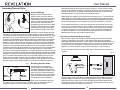
The Revelation features a continuously variable pattern selector located on the Revelation power supply. This knob allows you to alter the polar pickup pattern of the microphone from omni-directional to figure eight, and everything in between. This can be
done with the microphone turned on without causing any damage to the unit; however,
it is recommended that you mute your speakers when changing to a new pattern. To
change the polar pattern, simply rotate the knob to customize the microphone’s pickup
pattern for your specific recording application. After rotating the knob to a new polar
pattern, it will take a few seconds for the capsule to charge back up. During these few
seconds, we recommend muting your speakers because you will hear static. Keep in
mind that there is no single right way to finding the perfect sound. Experimentation with
different patterns in different recording situations will be the key.
One of the most popular polar patterns, a cardioid
microphone picks up sound
from the front of the microphone, less sound from the sides, and has good rejection of
sound to the back of the microphone. The cardioid pattern is well suited for situations
when you want to pickup specific sound sources like a guitar within an ensemble and
is recommended for recording applications where the acoustics are good but not
perfect. For instance, a cardioid pattern is less likely to pick up ambient noise from
computers and recording equipment.
An omni-directional
microphone picks up sound equally from all sides of the microphone. Omni-directional microphones are recommended for environments with excellent
acoustics as they tend to pick up ambient noise. This pattern is well suited for picking up
sound from a wider recording area. Omni-directional mics are less sensitive to plosives,
handling noise, and proximity effect.
Commonly referred to as bi-directional, the figure 8 pattern
will pick up sounds
from the front and back sides of the microphone with equal sensitivity while maintaining
a large amount of rejection 90° off access. Figure-8 patterns are the most susceptible to
proximity effect and are commonly used in “mid-size” stereo recording setups.
Ground Lift Switch
A ground loop is unwanted interference that can be created when multiple electronic
3
devices improperly share a common ground. The Revelation includes a Ground
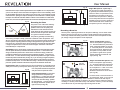
Lift switch to help prevent such occurrences. If a ground loop is audible (usually
a 50-60Hz humming noise), the ground lift switch on the front of the power supply
should be set to the ‘lift’ position.
-10dB Pad
The Revelation can be used in very loud sonic environments without significant
distortion. If you hear distortion from the microphone, engage the “-10dB pad”
on the rear of the microphone to the -10dB position. You may also move the
microphone farther away from the sound source.
Shockmount
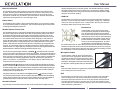
The Revelation comes with a custom shockmount specifically designed to handle its large
size. Shockmounts decouple the microphone
from the mic stand and the environment and can
minimize floor noise as well as noise induced by
people handling the microphone stand. Shockmounts should be considered “standard equipment” for all recording applications. To mount
the Revelation in the shockmount, first attach
the shockmount to the mic stand. With one hand, hold the Revelation microphone
inside the basket of the shockmount with the threaded base of the mic resting on
the retaining nut at the bottom. With your other hand, rotate the retaining nut until
the microphone is securely attached to the shockmount.
Microphone Cables
The microphone cable can have a profound effect
on the sound of any microphone. Even the finest microphones will sound poor if the interconnect cable
allows noise to enter or causes distortion and loss of
information. We highly recommend exclusively using
the Mogami® cables supplied with your Revelation.
Care
Dust and foreign material can degrade the performance of a microphone over
time so always store the unit in its case.
Grill
The Revelation microphone uses a single layer mesh grill. This design minimizes standing waves and harmonic distortion. Because this type of grill
leaves little protection between the user of the microphone and the capsule,
we highly recommend using a pop filter. Use of a pop filter will help protect
your microphone’s sensitive capsule, keeping it free from moisture caused by
saliva and breath condensation.
4