1
Indicators
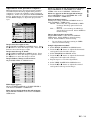
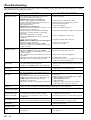
The following offers solutions to possible problems. If a problem persists, turn the projector off and consult your
dealer.
AUTO POSITION
POWER indicator
POWER
MUTE
COMPUTER
LAMP indicator
SOURCE
LAMP
VOLUME
TEMP indicator
VIDEO
TEMP
MENU
ENTER
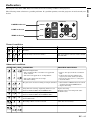
Normal condition
POWER LAMP TEMP
Steady
red
Off
Off
➝
➝
Steady
green
Blinking
green
Off
Steady
green
Steady
green
Off
CONDITION
Notes
Stand-by
Lamp stand-by (about for 1 minute)
The power button cannot be used to switch
ON and OFF
The POWER is ON. (Normal condition)
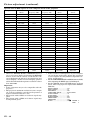
Abnormal condition
POWER LAMP TEMP
➝
➝
Steady
green
Steady
green
Blinking
red
➝
➝
Steady
red
Off
Blinking
red
CONDITION
POSSIBLE SOLUTIONS
Unusual temperature
• The ventilation slits or air filter is clogged with
• Remove the object from the ventilation
dust or debris.
• The fan has stopped due to an impediment.
• Pull out the power plug andremove the
• The room temperature is too high.
• The filter is dirty.
• Relocate the projector to a cooler place.
• Clean the filter.
slits.
object. If you cannot, consult your dealer.
Off
The protection circuit is working or lamp is abnormal. • Wait until the LAMP indicator is turned
off, then press the POWER button.
• Replace the lamp.
Off
Lamp duration warning. (Lightning duration total
about 1, 500 hours.When the POWER is ON.)
Blinking
red
Off
Lamp duration warning. (Lightning duration total
about 1, 500 hours.When the POWER is OFF.)
Steady
red
Off
Lamp duration warning. (Lightning duration total
about 2,000 hours.)
Blinking
green/red
Off
Off
➝
➝
Steady
or
Steady
or
Blinking
green/red
➝
➝
➝
➝
Blinking
Blinking
➝
➝
Steady
red
Blinking
green
Steady
green
Blinking
green/red
Steady
red
Steady
red
➝
➝
➝
➝
➝
➝
Replace the lamp.
Exchange with a new lamp if the same
problem recurs.
The lamp or filter cover is not closed.
Close the cover correctly.
Abnormal.
Contact your dealer.
EN – 25
ENGLISH
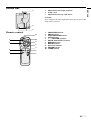
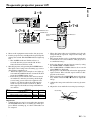
The projector has three LED Indicators which shows the working condition of the projector.