1
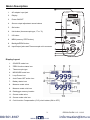
Keypad Descriptions and Operation
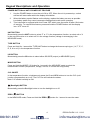
POWER BUTTON and AUTO POWER OFF FEATURE
1.
Use the POWER button to turn the unit ON or OFF. When the unit is powered up, a short
self-test will ensue after which the display will stabilize.
2.
When the battery symbol flashes on the display, replace the battery as soon as possible.
Low battery power may cause inaccurate readings and erratic meter operation.
3.
This instrument is equipped with Auto Power OFF which turns the meter off after 10 minutes
of inactivity. To override this feature; press and hold the POWER button until the display
icon “ATP” turns off.
UNIT BUTTON
Momentarily press the UNIT button to select °F or °C in the temperature function, to select mA or %
in the current function or to select mV/V in the voltage function (voltage is autoranging in the
MEASURE mode)
TYPE BUTTON
Press and Hold for 1 second the TYPE/UNIT button to change the thermocouple type (J, K, T, E, C,
R, S, N or mV) in the temperature function.
I/O BUTTON
Momentarily press the I/O button to select either SOURCE (output) or MEASURE (input).
MODE BUTTON
Press and Hold the MODE / I/O button for 1 second in the MEASURE mode to select the
measurement function (temperature, voltage, current, or current with loop power).
CJC ON/OFF
In the temperature function, simultaneously press the IO and MEM buttons to turn the CJC (cold
junction compensation) on or off. The CJC icon will indicate the status.
Note: CJC should normally be ON.
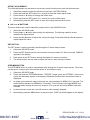
(Backlight) BUTTON
Momentarily press the Backlight button to turn the backlight on or off.
ZERO (
) BUTTON
In the MEASURE mode, Press and Hold the ZERO (
800.561.8187
4
www.
.com
) button for 1 second to zero the meter.
PRC30-EU-EN V1.2 01/13
[email protected]