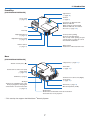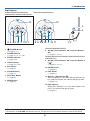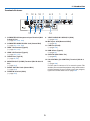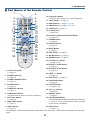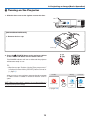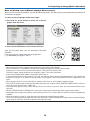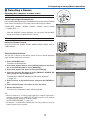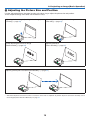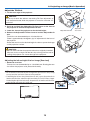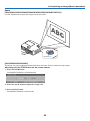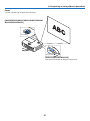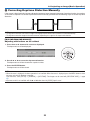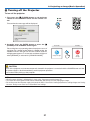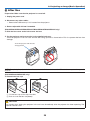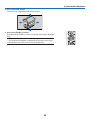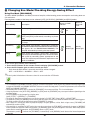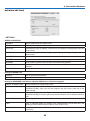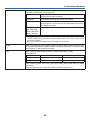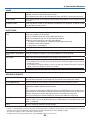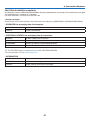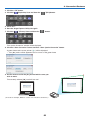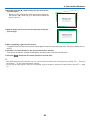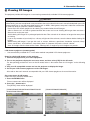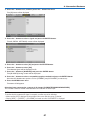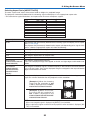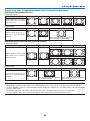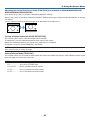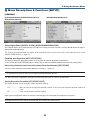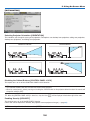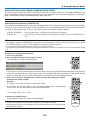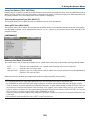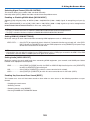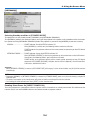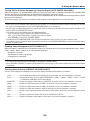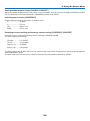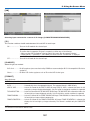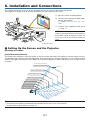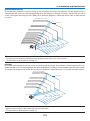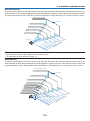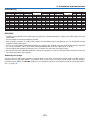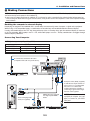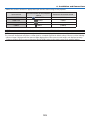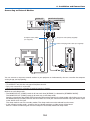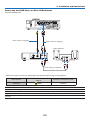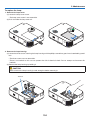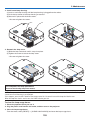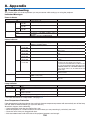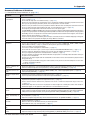
1
Projector M403W/M363W/M323W/ M403X/M363X/M323X/M283X/ M353WS/M303WS/M333XS/ M403H/M323H User’s Manual The M403W, M303WS and M323H are not distributed in North America. Model No. NP-M403W, NP-M363W, NP-M323W, NP-M403X, NP-M363X, NPM323X, NP-M283X, NP-M353WS, NP-M303WS, NP-M333XS, NPM403H, NP-M323H Ver.1 6/15 • DLP is a trademark of Texas Instruments. • Apple, Mac, Mac OS, and MacBook are trademarks of Apple Inc. registered in the U.S. and other countries. • App Store is a service mark of Apple Inc. • iOS is a trademark or registered trademark of Cisco in the U.S. and other countries and is used under license. • Microsoft, Windows, Windows Vista, Internet Explorer, .NET Framework and PowerPoint are either a registered trademark or trademark of Microsoft Corporation in the United States and/or other countries. • Intel and Intel Core are trademarks of Intel Corporation in the U.S. and/or other countries. • MicroSaver is a registered trademark of Kensington Computer Products Group, a division of ACCO Brands. • Virtual Remote Tool uses WinI2C/DDC library, © Nicomsoft Ltd. • The terms HDMI and HDMI High-Definition Multimedia Interface, and the HDMI Logo are trademarks or registered trademarks of HDMI Licensing LLC in the United States and other countries. • Trademark PJLink is a trademark applied for trademark rights in Japan, the United States of America and other countries and areas. • Wi-Fi®, Wi-Fi Alliance®, and Wi-Fi Protected Access (WPA, WPA2)® are registered trademarks of the Wi-Fi Alliance. • Blu-ray is a trademark of Blu-ray Disc Association • CRESTRON and ROOMVIEW are registered trademarks of Crestron Electronics, Inc. in the United States and other countries. • Ethernet is either a registered trademark or trademark of Fuji Xerox Co., Ltd. • Google Play and Android are trademarks of Google Inc. • Other product names and company logos mentioned in this user’s manual may be the trademarks or registered trademarks of their respective holders. • GPL/LGPL Software Licenses The product includes software licensed under GNU General Public License (GPL), GNU Lesser General Public License (LGPL), and others. For more information on each software, see “readme.pdf” inside the “about GPL&LGPL” folder on the supplied CDROM. NOTES (1)The contents of this user’s manual may not be reprinted in part or whole without permission. (2)The contents of this user’s manual are subject to change without notice. (3)Great care has been taken in the preparation of this user’s manual; however, should you notice any questionable points, errors or omissions, please contact us. (4)Notwithstanding article (3), NEC will not be responsible for any claims on loss of profit or other matters deemed to result from using the Projector. Important Information Safety Cautions Precautions Please read this manual carefully before using your NEC projector and keep the manual handy for future reference. CAUTION To turn off main power, be sure to remove the plug from power outlet. The power outlet socket should be installed as near to the equipment as possible, and should be easily accessible. CAUTION TO PREVENT SHOCK, DO NOT OPEN THE CABINET. THERE ARE HIGH-VOLTAGE COMPONENTS INSIDE. REFER SERVICING TO QUALIFIED SERVICE PERSONNEL. This symbol warns the user that uninsulated voltage within the unit may be sufficient to cause electrical shock. Therefore, it is dangerous to make any kind of contact with any part inside of the unit. This symbol alerts the user that important information concerning the operation and maintenance of this unit has been provided. The information should be read carefully to avoid problems. WARNING: TO PREVENT FIRE OR SHOCK, DO NOT EXPOSE THIS UNIT TO RAIN OR MOISTURE. DO NOT USE THIS UNIT’S PLUG WITH AN EXTENSION CORD OR IN AN OUTLET UNLESS ALL THE PRONGS CAN BE FULLY INSERTED. DOC Compliance Notice (for Canada only) This Class B digital apparatus complies with Canadian ICES-003. Machine Noise Information Regulation - 3. GPSGV, The highest sound pressure level is less than 70 dB (A) in accordance with EN ISO 7779. Disposing of your used product EU-wide legislation as implemented in each Member State requires that used electrical and electronic products carrying the mark (left) must be disposed of separately from normal household waste. This includes projectors and their electrical accessories or lamps. When you dispose of such products, please follow the guidance of your local authority and/or ask the shop where you purchased the product. After collecting the used products, they are reused and recycled in a proper way. This effort will help us reduce the wastes as well as the negative impact such as mercury contained in a lamp to the human health and the environment at the minimum level. The mark on the electrical and electronic products only applies to the current European Union Member States. For EU: The crossed-out wheeled bin implies that used batteries should not be put to the general household waste! There is a separate collection system for used batteries, to allow proper treatment and recycling in accordance with legislation. According the EU directive 2006/66/EC, the battery can’t be disposed improperly. The battery shall be separated to collect by local service. i Important Information WARNING TO CALIFORNIA RESIDENTS: Handling the cables supplied with this product will expose you to lead, a chemical known to the State of California to cause birth defects or other reproductive harm. WASH HANDS AFTER HANDLING. RF Interference (for USA only) WARNING The Federal Communications Commission does not allow any modifications or changes to the unit EXCEPT those specified by NEC Display Solutions of America, Inc. in this manual. Failure to comply with this government regulation could void your right to operate this equipment. This equipment has been tested and found to comply with the limits for a Class B digital device, pursuant to Part 15 of the FCC Rules. These limits are designed to provide reasonable protection against harmful interference in a residential installation. This equipment generates, uses, and can radiate radio frequency energy and, if not installed and used in accordance with the instructions, may cause harmful interference to radio communications. However, there is no guarantee that interference will not occur in a particular installation. If this equipment does cause harmful interference to radio or television reception, which can be determined by turning the equipment off and on, the user is encouraged to try to correct the interference by one or more of the following measures: • • • • Reorient or relocate the receiving antenna. Increase the separation between the equipment and receiver. Connect the equipment into an outlet on a circuit different from that to which the receiver is connected. Consult the dealer or an experienced radio / TV technician for help. For UK only: In UK, a BS approved power cord with moulded plug has a Black (five Amps) fuse installed for use with this equipment. If a power cord is not supplied with this equipment please contact your supplier. Important Safeguards These safety instructions are to ensure the long life of your projector and to prevent fire and shock. Please read them carefully and heed all warnings. Installation • Do not place the projector in the following conditions: - Outdoors - on an unstable cart, stand, or table. - near water, baths, or damp rooms. - in direct sunlight, near heaters, or heat radiating appliances. - in a dusty, smoky or steamy environment. - on a sheet of paper or cloth, rugs or carpets. • Do not install and store the projector in the below circumstances. Failure to do so may cause of malfunction. - In powerful magnetic fields. - In corrosive gas environment. • If you wish to have the projector installed on the ceiling: - Do not attempt to install the projector yourself. - The projector must be installed by qualified technicians in order to ensure proper operation and reduce the risk of bodily injury. - In addition, the ceiling must be strong enough to support the projector and the installation must be in accordance with any local building codes. - Please consult your dealer for more information. ii Important Information WARNING • Do not use any other object than the projector’s sliding lens cover to cover the lens while the projector is on. Doing so can cause the object to get extremely hot, and possibly resulting in a fire or damage due to the heat emitted from the light output. • Do not cover the lens with the lens cap or equivalent while the projector is on. Doing so can lead to melting of the cap due to the heat emitted from the light output. • Do not place any objects, which are easily affected by heat, in front of the projector lens. Doing so could lead to the object melting from the heat that is emitted from the light output. • Do not spray flammable gas to get rid of dust and dirt that accumulate in the lens. Doing so could cause a fire. Place the projector in a horizontal position The tilt angle of the projector should not exceed 10 degrees, nor should the projector be installed in any way other than the desktop and ceiling mount, otherwise lamp life could decrease dramatically. 10˚ Fire and Shock Precautions • Ensure that there is sufficient ventilation and that vents are unobstructed to prevent the build-up of heat inside your projector. Allow at least 4 inches (10cm) of space between your projector and a wall. • Do not try to touch the exhaust vent on the right front (when seen from the front) as it can become heated while the projector is turned on and immediately after the projector is turned off. Parts of the projector may become temporarily heated if the projector is turned off with the POWER button or if the AC power supply is disconnected during normal projector operation. Use caution when picking up the projector. • Prevent foreign objects such as paper clips and bits of paper from falling into your projector. Do not attempt to retrieve any objects that might fall into your projector. Do not insert any metal objects such as a wire or screwdriver into your projector. If something should fall into your projector, disconnect it immediately and have the object removed by a qualified service personnel. • Do not place any objects on top of the projector. • Do not touch the power plug during a thunderstorm. Doing so can cause electrical shock or fire. • The projector is designed to operate on a power supply of 100-240V AC 50/60 Hz. Ensure that your power supply fits this requirement before attempting to use your projector. • Do not look into the lens while the projector is on. Serious damage to your eyes could result. • Keep any items such as magnifying glass out of the light path of the projector. The light being projected from the lens is extensive, therefore any kind of abnormal objects that can redirect light coming out of the lens, can cause unpredictable outcome such as fire or injury to the eyes. iii Important Information • Do not place any objects, which are easily affected by heat, in front of a projector exhaust vent. Doing so could lead to the object melting or getting your hands burned from the heat that is emitted from the exhaust vent. • Do not splash water over the projector. Doing so can cause electrical shock or fire. If the projector gets wet, turn off the projector, unplug the power cord and have the projector serviced by a qualified service personnel. • Handle the power cord carefully. A damaged or frayed power cord can cause electric shock or fire. - Do not use any power cord other than the one supplied with the projector. - Do not bend or tug the power cord excessively. - Do not place the power cord under the projector, or any heavy object. - Do not cover the power cord with other soft materials such as rugs. - Do not heat the power cord. - Do not handle the power plug with wet hands. • Turn off the projector, unplug the power cord and have the projector serviced by a qualified service personnel under the following conditions: - When the power cord or plug is damaged or frayed. - If liquid has been spilled into the projector, or if it has been exposed to rain or water. - If the projector does not operate normally when you follow the instructions described in this user’s manual. - If the projector has been dropped or the cabinet has been damaged. - If the projector exhibits a distinct change in performance, indicating a need for service. • Disconnect the power cord and any other cables before carrying the projector. • Turn off the projector and unplug the power cord before cleaning the cabinet or replacing the lamp. • Turn off the projector and unplug the power cord if the projector is not to be used for an extended period of time. • When using a LAN cable (only models with the RJ-45 LAN port): For safety, do not connect to the terminal for peripheral device wiring that might have excessive voltage. CAUTION • Do not use the tilt-foot for purposes other than originally intended. Misuses such as gripping the tilt-foot or hanging on the wall can cause damage to the projector. • Do not send the projector in the soft case by parcel delivery service or cargo shipment. The projector inside the soft case could be damaged. • Select [HIGH] in Fan mode if you continue to use the projector for consecutive days. (From the menu, select [SETUP] → [OPTIONS(1)] → [FAN MODE] → [HIGH].) • Do not turn off the AC power for 60 seconds after the lamp is turned on and while the POWER indicator is blinking blue. Doing so could cause premature lamp failure. Remote Control Precautions • Handle the remote control carefully. • If the remote control gets wet, wipe it dry immediately. • Avoid excessive heat and humidity. • Do not short, heat, or take apart batteries. • Do not throw batteries into fire. • If you will not be using the remote control for a long time, remove the batteries. • Ensure that you have the batteries’ polarity (+/−) aligned correctly. • Do not use new and old batteries together, or use different types of batteries together. • Dispose of used batteries according to your local regulations. iv Important Information Note for US Residents The lamp in this product contains mercury. Please dispose according to Local, State or Federal Laws. Lamp Replacement • Use the specified lamp for safety and performance. • To replace the lamp, follow all instructions provided on page 133. • Be sure to replace the lamp when the message [THE LAMP HAS REACHED THE END OF ITS USABLE LIFE. PLEASE REPLACE THE LAMP.] appears. If you continue to use the lamp after the lamp has reached the end of its usable life, the lamp bulb may shatter, and pieces of glass may be scattered in the lamp case. Do not touch them as the pieces of glass may cause injury. If this happens, contact your dealer for lamp replacement. A Lamp Characteristic The projector has a discharge lamp for special purposes as a light source. A lamp has a characteristic that its brightness gradually decreases with age. Also repeatedly turning the lamp on and off will increase the possibility of its lower brightness. The actual lamp life may vary depending upon the individual lamp, the environmental conditions and usage. CAUTION: • DO NOT TOUCH THE LAMP immediately after it has been used. It will be extremely hot. Turn the projector off and then disconnect the power cord. Allow at least one hour for the lamp to cool before handling. • When removing the lamp from a ceiling-mounted projector, make sure that no one is under the projector. Glass fragments could fall if the lamp has been burned out. About High Altitude mode • Set [FAN MODE] to [HIGH ALTITUDE] when using the projector at altitudes approximately 5500 feet/1700 meters or higher. Using the projector at altitudes approximately 5500 feet/1700 meters or higher without setting to [HIGH ALTITUDE] can cause the projector to overheat and the protector could shut down. If this happens, wait a couple minutes and turn on the projector. • Using the projector at altitudes less than approximately 5500 feet/1700 meters and setting to [HIGH ALTITUDE] can cause the lamp to overcool, causing the image to flicker. Switch [FAN MODE] to [AUTO]. • Using the projector at altitudes approximately 5500 feet/1700 meters or higher can shorten the life of optical components such as the lamp. About Copyright of original projected pictures: Please note that using this projector for the purpose of commercial gain or the attraction of public attention in a venue such as a coffee shop or hotel and employing compression or expansion of the screen image with the following functions may raise concern about the infringement of copyrights which are protected by copyright law. [ASPECT RATIO], [KEYSTONE], Magnifying feature and other similar features. Turkish RoHS information relevant for Turkish market EEE Yonetmeliğine Uygundur. This device is not intended for use in the direct field of view at visual display workplaces. To avoid incommoding reflections at visual display workplaces this device must not be placed in the direct field of view. v Important Information Power management function The projector has power management functions. To reduce power consumption, the power management functions (1 and 2) are factory preset as shown below. To control the projector from an external device via a LAN or serial cable connection, use the on-screen menu to change the settings for 1 and 2. 1. STANDBY MODE (Factory preset: NORMAL) To control the projector from an external device, select [NETWORK STANDBY] for [STANDBY MODE]. NOTE: • When [NORMAL] is selected for [STANDBY MODE], the following terminals and functions will not work: MONITOR OUT terminal, AUDIO OUT terminal, USB-B port, LAN functions, Mail Alert function, DDC/CI (Virtual Remote Tool) 2. AUTO POWER OFF (Factory preset: 1 hour) To control the projector from an external device, select [OFF] for [AUTO POWER OFF]. NOTE: • When [1:00] is selected for [AUTO POWER OFF], you can enable the projector to automatically turn off in 60 minutes if there is no signal received by any input or if no operation is performed. Health precautions to users viewing 3D images Before viewing, be sure to read health care precautions that may be found in the user’s manual included with your LCD shutter eyeglasses or your 3D compatible content such as DVDs, video games, computer's video files and the like. To avoid any adverse symptoms, heed the following: • Do not use LCD shutter eyeglasses for viewing any material other than 3D images. • Allow a distance of 2 m/7 feet or greater between the screen and a user. Viewing 3D images from too close a distance can strain your eyes. • Avoid viewing 3D images for a prolonged period of time. Take a break of 15 minutes or longer after every hour of viewing. • If you or any member of your family has a history of light-sensitive seizures, consult a doctor before viewing 3D images. • While viewing 3D images, if you get sick such as nausea, dizziness, queasiness, headache, eyestrain, blurry vision, convulsions, and numbness, stop viewing them. If symptoms still persist, consult a doctor. • View 3D images from the front of the screen. Viewing from an angle may cause fatigue or eyestrain. Model Number of Wireless LAN unit Wireless LAN unit is an optional item. To find the appropriate model to your area, please visit the company website: URL: http://www.nec-display.com/global/support/index.html vi Table of Contents Important Information. ........................................................................................... i 1. Introduction............................................................................................................1 ❶ What’s in the Box?...........................................................................................................1 ❷ Introduction to the Projector............................................................................................2 Congratulations on Your Purchase of the Projector...................................................2 Features you’ll enjoy:.................................................................................................2 About this user’s manual............................................................................................3 Comparative Table of Main Features.........................................................................4 ❸ Part Names of the Projector............................................................................................5 Front/Top....................................................................................................................5 Rear...........................................................................................................................6 Front/Top....................................................................................................................7 Rear...........................................................................................................................7 Top Features..............................................................................................................8 Terminals Features....................................................................................................9 ❹ Part Names of the Remote Control...............................................................................10 Battery Installation...................................................................................................11 Remote Control Precautions....................................................................................11 Operating Range for Wireless Remote Control........................................................11 ❺ Software Included on CD-ROM.....................................................................................12 2. Projecting an Image (Basic Operation)................................................13 ❶ Flow of Projecting an Image..........................................................................................13 ❷ Connecting Your Computer/Connecting the Power Cord...............................................14 ❸ Turning on the Projector................................................................................................15 Note on Startup screen (Menu Language Select screen)........................................16 ❹ Selecting a Source........................................................................................................17 Selecting the computer or video source..................................................................17 ❺ Adjusting the Picture Size and Position.........................................................................18 Adjust the Tilt Foot...................................................................................................19 Zoom........................................................................................................................20 Focus.......................................................................................................................21 ❻ Correcting Keystone Distortion Manually......................................................................22 Adjusting with buttons on the cabinet......................................................................22 Adjusting with the remote control.............................................................................23 ❼ Optimizing Computer Signal Automatically...................................................................26 Adjusting the Image Using Auto Adjust....................................................................26 ❽ Turning Up or Down Volume..........................................................................................26 ❾ Turning off the Projector................................................................................................27 ❿ After Use.......................................................................................................................28 3. Convenient Features. .....................................................................................29 ❶ Turning off the Image and Sound..................................................................................29 ❷ Freezing a Picture.........................................................................................................29 ❸ Magnifying a Picture......................................................................................................29 ❹ Changing Eco Mode/Checking Energy-Saving Effect ..................................................31 Using Eco Mode [ECO MODE]................................................................................31 vii Table of Contents Checking Energy-Saving Effect [CARBON METER]...............................................32 ❺ Preventing the Unauthorized Use of the Projector [SECURITY]........................................33 ❻ Using the Computer Cable (VGA) to Operate the Projector (Virtual Remote Tool).......36 ❼ Operating Your Computer’s Mouse Functions from the Projector’s Remote Control via the USB Cable (Remote Mouse Function)........................................................... 42 ❽ Projecting Your Computer’s Screen Image from the Projector via the USB Cable (USB Display)..........................................................................................................43 ❾ Controlling the Projector by Using an HTTP Browser...................................................45 ❿ Controlling the Projector over a LAN (PC Control Utility Pro 4/Pro 5).............................. 52 ⓫ Projecting Your Computer’s Screen Image from the Projector over a LAN (Image Express Utility Lite)..................................................................................................56 Starting Image Express Utility Lite from a USB Memory or SD Card......................59 Downloading Image Express Utility Lite via the HTTP server..................................60 ⓬ Projecting an Image from an Angle (Geometric Correction Tool in Image Express Utility Lite)................................................................................................................63 What you can do with GCT......................................................................................63 Projecting an Image from an Angle (GCT)...............................................................63 ⓭ Viewing 3D Images........................................................................................................66 ⓮ Connecting Your Microphone.........................................................................................70 ⓯ Projecting photos or documents saved on the smartphone over a wireless LAN (Wireless Image Utility)............................................................................................71 ⓰ Simultaneously project images received from multiple terminal units...........................72 4. Using the Viewer...............................................................................................73 ❶ What you can do with the Viewer...................................................................................73 ❷ Projecting images stored in a USB memory device......................................................75 5. Using On-Screen Menu. ................................................................................81 ❶ Using the Menus............................................................................................................81 ❷ Menu Elements..............................................................................................................82 ❸ List of Menu Items.........................................................................................................83 ❹ Menu Descriptions & Functions [SOURCE]..................................................................86 COMPUTER............................................................................................................86 HDMI1 and 2............................................................................................................86 VIDEO......................................................................................................................86 USB-A (Viewer)........................................................................................................86 LAN..........................................................................................................................86 USB-B (USB Display)..............................................................................................86 ❺ Menu Descriptions & Functions [ADJUST]....................................................................87 [PICTURE]...............................................................................................................87 [IMAGE OPTIONS]..................................................................................................90 ❻ Menu Descriptions & Functions [SETUP]......................................................................95 [GENERAL]..............................................................................................................95 [MENU]....................................................................................................................98 [INSTALLATION]....................................................................................................100 [OPTIONS(1)]........................................................................................................102 [OPTIONS(2)]........................................................................................................104 viii Table of Contents [3D]........................................................................................................................107 Setting up the Projector for a Wired LAN Connection [WIRED LAN].....................109 Setting up the Projector for a Wireless LAN Connection (with the optional USB Wireless LAN Unit equipped) [WIRLESS LAN]......................................................110 ❼ Menu Descriptions & Functions [INFO.]......................................................................112 [USAGE TIME].......................................................................................................112 [SOURCE(1)].........................................................................................................113 [SOURCE(2)].........................................................................................................113 [WIRED LAN].........................................................................................................113 [WIRELESS LAN]..................................................................................................114 [VERSION(1)]........................................................................................................114 [VERSION(2)]........................................................................................................114 [OTHERS]..............................................................................................................115 ❽ Menu Descriptions & Functions [RESET]....................................................................116 Returning to Factory Default [RESET]...................................................................116 6. Installation and Connections...................................................................117 ❶ Setting Up the Screen and the Projector.....................................................................117 Selecting a Location..............................................................................................117 Throw Distance and Screen Size...........................................................................120 ❷ Making Connections....................................................................................................122 Connecting Your Computer....................................................................................122 Connecting an External Monitor............................................................................124 Connecting Your DVD Player or Other AV Equipment............................................125 Connecting Component Input................................................................................126 Connecting HDMI Input.........................................................................................127 Connecting to a Wired LAN...................................................................................128 Connecting to a Wireless LAN...............................................................................129 7. Maintenance......................................................................................................132 ❶ Cleaning the Lens.......................................................................................................132 ❷ Cleaning the Cabinet...................................................................................................132 ❸ Replacing the Lamp....................................................................................................133 8. Appendix..............................................................................................................136 ❶ Troubleshooting...........................................................................................................136 Indicator Messages................................................................................................136 Common Problems & Solutions.............................................................................137 If there is no picture, or the picture is not displayed correctly.................................138 ❷ Specifications..............................................................................................................139 ❸ Cabinet Dimensions....................................................................................................145 Attaching the Optional Cable Cover (NP05CV).....................................................147 ❹ Pin Assignments of D-Sub COMPUTER Input Terminal.............................................148 ❺ Compatible Input Signal List........................................................................................149 ❻ PC Control Codes and Cable Connection...................................................................150 ❼ Troubleshooting Check List..........................................................................................151 ❽ TCO Certification.........................................................................................................153 ❾ REGISTER YOUR PROJECTOR! (for residents in the United States, Canada, and Mexico)..................................................................................................................154 ix 1. Introduction ❶ What’s in the Box? Make sure your box contains everything listed. If any pieces are missing, contact your dealer. Please save the original box and packing materials if you ever need to ship your projector. Projector [M403W/M363W/M323W/M403X/M363X/ M323X/M283X/M403H/M323H] Power cord (US: 7N080236/7N080242) (EU: 7N080022/7N080028) Soft case (24BS8391) The M353WS/M303WS/M333XS do not come with a soft case. [M353WS/M303WS/M333XS] Computer cable (VGA) (7N520089) Power cord (US: 7N080240/7N080243) (EU: 7N080027/7N080029) Remote control (7N901052) Batteries (AAA × 2) For North America only Limited warranty For customers in Europe: You will find our current valid Guarantee Policy on our Web Site: www.nec-display-solutions.com • Important Infomation (For North America: 7N8N6051) (For Other countries than North America: 7N8N6051 and 7N8N6061) • Quick Setup Guide (7N8N6071)/(7N8N6081) NEC Projector CD-ROM User’s manual (PDF) and the utility software (7N952231) • In this manual, M403W is explained mainly. • However, the appearance of the projector is slightly different between M403W, M363W, M323W, M403X, M363X, M323X, M283X, M403H, and M323H, the projector cabinet illustration of M403W, M363W, M323W, M403X, M363X, M323X, M283X is used for explanations. 1 1. Introduction ❷ Introduction to the Projector This section introduces you to your new projector and describes the features and controls. Congratulations on Your Purchase of the Projector This projector is one of the very best projectors available today. The projector enables you to project precise images up to 300 inches (150 inches for short throw models) across (measured diagonally) from your PC or Mac computer (desktop or notebook), VCR, DVD player, or document camera. You can use the projector on a tabletop or cart, you can use the projector to project images from behind the screen, and the projector can be permanently mounted on a ceiling*1. The remote control can be used wirelessly. *1 Do not attempt to mount the projector on a ceiling yourself. The projector must be installed by qualified technicians in order to ensure proper operation and reduce the risk of bodily injury. In addition, the ceiling must be strong enough to support the projector and the installation must be in accordance with any local building codes. Please consult your dealer for more information. Features you’ll enjoy: • 0.15 W (100-130 V AC)/0.32 W (200-240 V AC) in standby condition with energy saving technology Selecting [NORMAL] for [STANDBY MODE] from the menu can put the projector in power-saving mode. NORMAL: 0.15W(100-130V AC)/0.32W(200-240V AC) NETWORK STANDBY: 2.6W(100-130V AC)/2.9W(200-240V AC) • Carbon Meter This feature will show energy-saving effect in terms of CO2 emission reduction (kg) when the projector’s [ECO MODE] is set to [AUTO ECO], [NORMAL], or [ECO]. The amount of CO2 emission reduction will be displayed in the confirmation message at the time of power-off and in the INFO of the on-screen menu. • Lamp life up to 8000 hours Using in Eco Mode allows you to prolong the projector’s lamp life up to 8000 hours (up to 3500 hours in ECO MODE OFF). M283X: up to 10000 up hours (up to 4500 hours in ECO MODE OFF). • No filter replacement required Since the projector has no filters, filter replacement is not required. • Two HDMI input terminals provide digital signal The two HDMI inputs provide HDCP compatible digital signals. The HDMI input also supports audio signal. • 20 W built-in speaker for an integrated audio solution /mic input supprted Powerful 20 watt monaural speaker provides volume need for large rooms a dynamic or condenser mic can be used. • The supplied remote control allows you to assign a CONTROL ID to the projector Multiple projectors can be operated separately and independently with the same single remote control by assigning an ID number to each projector. • Auto vertical keystone correction Auto Keystone feature allows the projector to detect its tilt and correct vertical distortion automatically. • USB Display Using a commercially available USB cable (compatible with USB 2.0 specifications) to connect the computer with the projector allows you to send your computer screen image to the projector without the need of a traditional computer cable (VGA). 2 1. Introduction • Integrated RJ-45 terminal for wired networking capability along with wireless networking capabilities An RJ-45 terminal is standard. An optional USB Wireless LAN Unit is required for wireless LAN connection. • Software programs (User Supportware) contained in the supplied CD-ROM The supplied NEC Projector includes three programs: Virtual Remote Tool, Image Express Utility Lite (for Windows/ Mac OS), PC Control Utility Pro 4 (for Windows)/5 (for Mac OS). Image Express Utility Lite (for Windows) can be started from a commercially available USB memory or SD card without the need of installing on your computer. • Audio transfer capability (for Windows only) Image Express Utility Lite allows you to send the computer’s screen image and audio to the projector over a network or USB connection. * Audio transfer capability is available only when the computer connects with the projector in peer-to-peer network. • Quick start (11 seconds*), Quick Power Off, Direct Power Off 11 seconds* after turning on the power, the projector is ready to display PC or video images. The projector can be put away immediately after the projector is powered down. No cool down period is required after the projector is turned off from the remote control or cabinet control panel. The projector has a feature called "Direct Power Off". This feature allows the projector to be turned off (even when projecting an image) by using the Main Power Switch or disconnecting the AC power supply. To turn off the AC power supply when the projector is powered on, use a power strip equipped with a switch and a breaker. * The quick start time is effective only when [STANDBY MODE] is set to [NETWORK STANDBY] in the on-screen message. • AUTO POWER ON and AUTO POWER OFF features The DIRECT POWER ON, AUTO POWER ON(COMP.), AUTO POWER OFF, and OFF TIMER features eliminate the need to always use the POWER button on the remote control or projector cabinet. • Preventing unauthorized use of the projector Enhanced smart security settings for keyword protection, cabinet control panel lock, security slot, and security chain opening to help prevent unauthorized access, adjustments and theft deterrence. • High resolution up to WUXGA High resolution display - up to WUXGA compatible, XGA (M403X/M363X/M323X/M283X/M333XS)/WXGA (M403W/ M363W/M323W/M353WS/M303WS) /Full HD (M403H/M323H) native resolution. • 3D Images supported The projector provides 3D images to a user wearing commercially available 3D eyeglasses. • CRESTRON ROOMVIEW compatibility The projector supports CRESTRON ROOMVIEW, allowing multiple devices connected in the network to be managed and controlled from a computer or controller. About this user’s manual The fastest way to get started is to take your time and do everything right the first time. Take a few minutes now to review the user’s manual. This may save you time later on. At the beginning of each section of the manual you’ll find an overview. If the section doesn’t apply, you can skip it. 3 1. Introduction Comparative Table of Main Features The main features vary depending on the model as follows. Standard Models with Wide Panel Native Aspect Ratio Native Resolution (dots × lines*1) Screen Size Projection Distance Light output *2 *3 in OFF for ECO MODE Lamp Replacement Time (average) Lamp Model Lamp Wattage (AC) Zoom Focus M403W M363W 16:10 Wide M323W Standard Models M403X WXGA (1280 × 800) M363X M323X 4:3 Standard Short-Throw Models with Wide Panel M283X XGA (1024 × 768) M353WS M303WS 16:10 Wide 4000 lumens 3600 lumens 3200 lumens 60" - 150" 35–627 inches/0.89–15.9 m 4000 lumens 3500/8000 3600 lumens 3200 lumens Full HD Models M403H M323H 16:9 Hi-Vision WXGA (1280 × 800) XGA (1024 Full HD (1920 x 1080) × 768) 30" - 300" 29–531 inches/0.75–13.5 m ShortThrow Model M333XS 4:3 Standard 22–58 inches/0.57–1.5 m 2800 lumens 3500 lumens 3000 lumens OFF for ECO MODE/ON for ECO MODE (H) 4500/10000 30" - 300" 27–70 inches/ 0.68–1.8 m 3300 lumens 29-554 inches/ 0.74−14.08 m 4000 lumens 3500/8000 NP30LP NP29LP NP28LP NP30LP NP29LP NP28LP NP27LP NP30LP NP28LP NP30LP 270 W 250 W 225 W 270 W 250 W 225 W 200 W 270 W 225 W 270 W Using the manual zoom lever Using the [DIGITAL ZOOM] function from the menu Using the manual focus lever Using the manual focus ring 3200 lumens Using the manual zoom lever Using the manual focus ring For further details on the specifications, see pages 139 to 141, 143. *1 Effective pixels are more than 99.99%. *2 This is the light output value (lumens) when the [PRESET] mode is set to [HIGH-BRIGHT]. If any other mode is selected as the [PRESET] mode, the light output value may drop slightly. *3 Compliance with ISO21118-2005 TIP: The model name is located on the cabinet. 4 1. Introduction ❸ Part Names of the Projector Front/Top [M403W/M363W/M323W/M403X/M363X/M323X/M283X/M403H/M323H] Light Sensor (→ page 96) Controls (→ page 8) Zoom Lever (→ page 20) Focus Ring (→ page 21) Port Cover for Optional USB Wireless LAN Unit When using the optional USB Wireless LAN Unit, first remove the cover. (→ page 130) Lens Lens Cover Adjustable Tilt Foot (→ page 19) Security chain opening Attach an anti-theft device. The security chain opening accepts security wires or chains up to 0.18 inch/4.6 mm in diameter. Adjustable Tilt Foot Lever (→ page 19) Remote Sensor (→ page 11) Exhaust Vent Heated air is exhausted from here. Opening and closing the lens cover Slide the lens cover to the right to uncover the lens. To cover the lens, slide the lens cover to the left. NOTE: • The lens cover works in conjunction with the AV-MUTE function. Closing the lens cover will turn off the image and sound during normal projector operation; opening it will restore the image and sound. With the lens cover closed the image and sound is turned off, however the lamp is still lit. If the projector stays this way for about 2 hours, it will turn off automatically. • Do not pull the lens cover with excessive force or apply strong pressure in either the up or down direction. Doing so can cause damage to the lens cover sliding mechanism! 5 1. Introduction Rear [M403W/M363W/M323W/M403X/M363X/M323X/M283X/M403H/M323H] Built-in Security Slot ( Lamp Cover (→ page 133) )* Intake Vent (→ page 132) Connection for cable cover (Left) Screw holes (→ page 147) Terminals (→ page 9) Connection for cable cover (Right) Screw holes (→ page 147) AC Input Connect the supplied power cord’s three-pin plug here, and plug the other end into an active wall outlet. (→ page 14) Rear Feet (→ page 19) Monaural Speaker (20 W) Model name Model name is indicated on the label sealed on the bottom face of the projector. * This security slot supports the MicroSaver ® Security System. 6 1. Introduction Front/Top [M353WS/M303WS/M333XS] Light Sensor (→ page 96) Controls (→ page 8) Focus Lever (→ page 21) Port Cover for Optional USB Wireless LAN Unit When using the optional USB Wireless LAN Unit, first remove the cover. (→ page 130) Lens Lens Cap Adjustable Tilt Foot (→ page 19) Security chain opening Attach an anti-theft device. The security chain opening accepts security wires or chains up to 0.18 inch/4.6 mm in diameter. Adjustable Tilt Foot Lever (→ page 19) Remote Sensor (→ page 11) Exhaust Vent Heated air is exhausted from here. Rear [M353WS/M303WS/M333XS] Built-in Security Slot ( Lamp Cover (→ page 133) )* Intake Vent (→ page 132) Connection for cable cover (Left) Screw holes (→ page 147) Terminals (→ page 9) Connection for cable cover (Right) Screw holes (→ page 147) AC Input Connect the supplied power cord’s three-pin plug here, and plug the other end into an active wall outlet. (→ page 14) Rear Feet (→ page 19) Monaural Speaker (20 W) Model name Model name is indicated on the label sealed on the bottom face of the projector. * This security slot supports the MicroSaver ® Security System. 7 1. Introduction Top Features M403W/M363W/M323W/M403X/ M363X/M323X/M283X/M403H/M323H M353WS/M303WS/M333XS 12 12 4 3 8 9 6 5 13 7 10 11 1. (POWER) Button (→ page 15, 27) 2. POWER Indicator (→ page 14, 15, 27, 136) 3. STATUS Indicator (→ page 136) 8 9 6 5 13 7 10 11 1, 2 [M353WS/M303WS/M333XS] 9. ▲▼◀▶ / Volume Buttons ◀▶ / Keystone Buttons ▲▼ (→ page 22, 26, 81) [M403W/M363W/M323W/M403X/M363X/M323X/M283X/ M403H/M323H] 4. LAMP Indicator (→ page 133, 136) 9. ▲▼◀▶ / Volume Buttons ◀▶ / Keystone Button ▼ ( ) (→ page 22, 26, 81) 5. ECO Button (→ page 31) 10.ENTER Button (→ page 81) 6. SOURCE Button (→ page 17) 11.EXIT Button (→ page 81) 7. AUTO ADJ. Button (→ page 26) 12.Wireless LAN Indicator ( ) When the projector is turned on with the optional wireless LAN unit inserted, the indicator will light up blue. (→ page 129) 8. MENU Button (→ page 81) 13.ECO Indicator When [ECO MODE] is set to the other options than [OFF], this indicator will light up green. (→ page 31) NOTE: • All the buttons except ▲▼◀▶ will light when pressed. The light will turn off if no button operation is made for 90 seconds. 8 1. Introduction Terminals Features 11 12 5 10 7 13 8 9 1. COMPUTER IN/ Component Input Terminal (Mini D-Sub 15 Pin) (→ page 122, 124, 126) 2. COMPUTER AUDIO IN Mini Jack (Stereo Mini) (→ page 122, 124, 126) 3. HDMI 1 IN Terminal (Type A) (→ page 122, 127) 4. HDMI 2 IN Terminal (Type A) (→ page 122, 127) 5. USB-B Port (Type B) (→ page 42, 43) 6. MONITOR OUT (COMP.) Terminal (Mini D-Sub 15 Pin) (→ page 124) 7. AUDIO OUT Mini Jack (Stereo Mini) (→ page 124) 8. VIDEO IN Terminal (RCA) (→ page 125) 6 2 1 3 4 14 9. VIDEO AUDIO IN L/MONO, R (RCA) (→ page 125) 10.MIC Input Jack (Monaural Mini) (→ page 70) 11.LAN Port (RJ-45) (→ page 128) 12.USB-A Port (Type A) (→ page 75) 13.3D SYNC (Mini DIN 3 Pin) (→ page 66) 14.PC CONTROL [PC CONTROL] Terminal (D-Sub 9 Pin) (→ page 150) Use this port to connect a PC or control system. This enables you to control the projector using serial communication protocol. If you are writing your own program, typical PC control codes are on page 150. 9 1. Introduction ❹ Part Names of the Remote Control 1 3 2 5 8 9 11 15 16 19 18 22 23 24 27 33 10.DisplayPort Button (This button does not work in this series of projectors) 11.VIDEO Button (→ page 17) 4 6 7 10 13 12 14 20 17 21 26 28 25 29 30 12.USB-A Button (→ page 17, 75, 86) 13.USB-B Button (→ page 17, 86, 123) 14.LAN Button (→ page 17) 15.ID SET Button (→ page 101) 16.Numeric Keypad Button/CLEAR Button (→ page 101) 17.FREEZE Button (→ page 29) 18.AV-MUTE Button (→ page 29) 19.MENU Button (→ page 81) 20.EXIT Button (→ page 81) 21. Button (→ page 81) 31 32 22.ENTER Button (→ page 81) 23.D-ZOOM (+)(–) Button (→ page 29, 30) 24.MOUSE L-CLICK Button* (→ page 42) 25.MOUSE R-CLICK Button* (→ page 42) 1. Infrared Transmitter (→ page 11) 26.PAGE / Button (→ page 42) 2. POWER ON Button (→ page 15) 27.ECO Button (→ page 31) 3. POWER STANDBY Button (→ page 27) 28.KEYSTONE Button (→ page 23) 4. SOURCE Button (→ page 17) 29.PICTURE Button (→ page 87, 89) 5. COMPUTER 1 Button (→ page 17) 30.VOL. (+)(–) Button (→ page 26) 6. COMPUTER 2 Button (This button does not work in this series of projectors) 31.ASPECT Button (→ page 92) 7. AUTO ADJ. Button (→ page 26) 8. HDMI 1/MHL Button (→ page 17) 32.FOCUS/ZOOM Button The ZOOM button will display the DIGITAL ZOOM bar. (→ page 20, 95) The FOCUS button does not work on this series of projectors. 9. HDMI 2 Button (→ page 17) 33.HELP Button (→ page 112) * The MOUSE L-CLICK and MOUSE R-CLICK buttons work only when a USB cable is connected with your computer. 10 1. Introduction Battery Installation 1 Press firmly and slide the battery cover off. 2 Install new batteries (AAA). Ensure that you have the batteries’ polarity (+/−) aligned correctly. 3 Slip the cover back over the batteries until it snaps into place. Do not mix different types of batteries or new and old batteries. EN OP EN OP Remote Control Precautions • • • • • • • • • Handle the remote control carefully. If the remote control gets wet, wipe it dry immediately. Avoid excessive heat and humidity. Do not short, heat, or take apart batteries. Do not throw batteries into fire. If you will not be using the remote control for a long time, remove the batteries. Ensure that you have the batteries’ polarity (+/−) aligned correctly. Do not use new and old batteries together, or use different types of batteries together. Dispose of used batteries according to your local regulations. Operating Range for Wireless Remote Control 22 feet/7 m Remote control Remote sensor on projector cabinet Remote control 22 feet/7 m • The infrared signal operates by line-of-sight up to a distance of about 22 feet/7 m and within a 60-degree angle of the remote sensor on the projector cabinet. • The projector will not respond if there are objects between the remote control and the sensor, or if strong light falls on the sensor. Weak batteries will also prevent the remote control from properly operating the projector. 11 1. Introduction ❺ Software Included on CD-ROM Names and Features of Bundled Software Programs Name of software program Virtual Remote Tool (Windows only) Features This is a software program used to control the power ON/OFF and source selection of the projector from your computer by using the supplied computer cable (VGA) and others. Only via serial connection it is also used to send an image to the projector and register it as the logo data of the projector. After registering it, you can lock the logo to prevent it from changing. (→ page 36) Name of software program Features Image Express Utility Lite • This is a software program used to project your computer’s screen or sound from the computer over the USB cable or the wired/wireless network. The computer cable (VGA) is not required. (→ page 56) • This software program can be used to control the power ON/OFF and source selection of the projector from your computer. • The Geometric Correction Tool (GCT) function allows you to correct distortion of images projected on a curved wall. (→ page 63) Image Express Utility Lite for Mac OS • This is a software program used to project your computer's screen over the wired/wireless network. The computer cable (VGA) is not required. (→ page 56, 61) • This software program can be used to control the power ON/OFF and source selection of the projector from your computer. * “Audio transmission”, “USB Display”, and “GCT” functions are not supported by Mac. Name of software program Features PC Control Utility Pro 4 PC Control Utility Pro 5 (for Mac OS) This is a software program used to operate the projector from the computer when the computer and the projector are connected with LAN (wired or wireless) or a serial cable. (→ page 52) NOTE: • Image Express Utility Lite does not support "Meeting Mode" in Image Express Utility 2.0 included with our other models. Download Service and Operating Environment Please visit our website about operating environment and download service for each software: Visit URL: http://www.nec-display.com/dl/en/index.html Download - Projector → Software & Driver 12 2. Projecting an Image (Basic Operation) This section describes how to turn on the projector and to project a picture onto the screen. ❶ Flow of Projecting an Image Step 1 • Connecting your computer / Connecting the power cord (→ page 14) Step 2 • Turning on the projector (→ page 15) Step 3 • Selecting a source (→ page 17) Step 4 • Adjusting the picture size and position (→ page 18) • Correcting keystone distortion [KEYSTONE] (→ page 22) Step 5 • Adjusting a picture and sound - Optimizing a computer signal automatically (→ page 26) - Turning up or down volume (→ page 26) Step 6 • Making a presentation Step 7 • Turning off the projector (→ page 27) Step 8 • After use (→ page 28) 13 2. Projecting an Image (Basic Operation) ❷ Connecting Your Computer/Connecting the Power Cord 1. Connect your computer to the projector. This section will show you a basic connection to a computer. For information about other connections, see “6. Installation and Connections” on page 122. Connect the computer cable (VGA) between the projector’s COMPUTER IN terminal and the computer’s port (mini D-Sub 15 Pin). Turn two thumb screws of both terminals to fix the computer cable (VGA). 2. Connect the supplied power cord to the projector. First connect the supplied power cord’s three-pin plug to the AC IN terminal of the projector, and then connect the other plug of the supplied power cord in the wall outlet. The projector’s power indicator will light red* (standby mode). See the Power Indicator section.(→ page 136) COMPUTER IN To wall outlet Make sure that the prongs are fully inserted into both the AC IN terminal and the wall outlet. CAUTION: Parts of the projector may become temporarily heated if the projector is turned off with the POWER button or if the AC power supply is disconnected during normal projector operation. Use caution when picking up the projector. 14 2. Projecting an Image (Basic Operation) ❸ Turning on the Projector 1. Slide the lens cover to the right to uncover the lens. [M353WS/M303WS/M333XS] 1. Remove the lens cap. Lens cap 2. Press the (POWER) button on the projector cabinet or the POWER ON button on the remote control. The POWER indicator will turn to blue and the projector will become ready to use. TIP: • When the message “Projector is locked! Enter your password.” is displayed, it means that the [SECURITY] feature is turned on. (→ page 33) After you turn on your projector, ensure that the computer or video source is turned on and that the lens cover is open. NOTE: When no input signal is present, the no-signal guidance is displayed (factory menu setting). Standby Blinking Power On Steady red light Blinking blue light Steady blue light (→ page 136) 15 2. Projecting an Image (Basic Operation) Note on Startup screen (Menu Language Select screen) When you first turn on the projector, you will get the Startup menu. This menu gives you the opportunity to select one of the menu languages. To select a menu language, follow these steps: 1. Use the ▲, ▼, ◀ or ▶ button to select one of the languages from the menu. 2. Press the ENTER button to execute the selection. After this has been done, you can proceed to the menu operation. If you want, you can select the menu language later. (→ [LANGUAGE] on page 84 and 97) NOTE: • When turning off the power supply and then back on by using a power strip or breaker. Allow a minimum of 1 second between turning off the main power supply and turning it back on again. Failing to do so could result in no power to the projector. (There will be no stand-by LED) Should this happen, unplug the power cord and plug it in again. Turn on the main power. • If one of the following things happens, the projector will not turn on. • If the internal temperature of the projector is too high, the projector detects abnormal high temperature. In this condition the projector will not turn on to protect the internal system. If this happens, wait for the projector’s internal components to cool down. • When the lamp reaches its end of usable life, the projector will not turn on. If this happens, replace the lamp. • If the STATUS indicator lights orange with the power button pressed, it means that the [CONTROL PANEL LOCK] is turned on. Cancel the lock by turning it off. (→ page 100) • If the lamp fails to light, and if the STATUS indicator flashes on and off in a cycle of six times, wait a full minute and then turn on the power. • While the POWER indicator is blinking blue in short cycles, the power cannot be turned off by using the power button. • Immediately after turning on the projector, screen flicker may occur. This is normal. Wait 3 to 5 minutes until the lamp lighting is stabilized. • When the projector is turned on, it may take some time before the lamp light becomes bright. • If you turn on the projector immediately after the lamp is turned off or when the temperature is high, the fans run without displaying an image for some time and then the projector will display the image. 16 2. Projecting an Image (Basic Operation) ❹ Selecting a Source Selecting the computer or video source NOTE: Turn on the computer or video source equipment connected to the projector. Detecting the Signal Automatically Press the SOURCE button once. The projector will search for the available input source and display it. The input source will change as follows: COMPUTER → HDMI1 → HDMI2 → VIDEO → USB-A → LAN → USB-B → COMPUTER → ... • With the SOURCE screen displayed, you can press the SOURCE button a few times to select the input source. TIP: If no input signal is present, the input will be skipped. Using the Remote Control Press any one of the COMP1, HDMI1, HDMI2, VIDEO, USB-A, LAN, or USB-B buttons. Selecting Default Source You can set a source as the default source so that it will be displayed each time the projector is turned on. 1. Press the MENU button. The menu will be displayed. 2. Press the ▶ button twice to select [SETUP] and press the ▼ button or the ENTER button to select [GENERAL]. 3. Press the ▶ button four times to select [OPTIONS(2)]. 4. Press the ▼ button five times to select [DEFAULT SOURCE SELECT] and press the ENTER button. The [DEFAULT SOURCE SELECT] screen will be displayed. (→ page 105) 5. Select a source as the default source, and press the ENTER button. 6. Press the EXIT button a few times to close the menu. 7. Restart the projector. The source you selected in step 5 will be projected. TIP: • When the projector is in Standby mode, applying a computer signal from a computer connected to the COMPUTER IN input will power on the projector and simultaneously project the computer’s image. ([AUTO POWER ON(COMP.)] → page 105) • On Windows 7, a combination of the Windows and P keys allows you to set up external display easily and quickly. 17 2. Projecting an Image (Basic Operation) ❺ Adjusting the Picture Size and Position Use the adjustable tilt foot, the zoom function or the focus ring to adjust the picture size and position. In this chapter drawings and cables are omitted for clarity. Adjusting the throw angle (the height of an image) [Tilt foot] (→ page 19) Adjusting the left and right tilt of an image [Rear foot] (→ page 19) Finely adjusting the size of an image [Zoom function] (→ page 20) Adjusting the focus [Focus function] (→ page 21) Adjusting the keystone correction [KEYSTONE]* (→ page 22) * Automatic Keystone Correction function is turned on at the time of shipment. To perform keystone correction manually, see “6. Correcting Keystone Distortion Manually” on page 22. 18 2. Projecting an Image (Basic Operation) Adjust the Tilt Foot 1. Lift the front edge of the projector. CAUTION: Do not try to touch the exhaust vent during Tilt Foot adjustment as it can become heated while the projector is turned on and after it is turned off. 1 2. Push up and hold the Adjustable Tilt Foot Lever on the front of the projector to extend the adjustable tilt foot. 2 3. Lower the front of the projector to the desired height. Adjustable Tilt Foot 4. Release the Adjustable Tilt Foot Lever to lock the Adjustable tilt foot. Adjustable Tilt Foot Lever The tilt foot can be extended up to 2 inches/52 mm. There is approximately 10 degrees (up) of adjustment for the front of the projector. Rotate the rear foot to the desired height in order to square the image on the projection surface. CAUTION: • Do not use the tilt-foot for purposes other than originally intended. Misuses such as using the tilt foot to carry or hang (from the wall or ceiling) the projector can cause damage to the projector. 3 Adjusting the left and right tilt of an image [Rear foot] • Rotate the rear foot. The rear foot can be extended up to 1 inch/26.5 mm. Rotating the rear foot allows the projector to be placed horizontally. NOTE: • Do not extend the rear foot beyond its height limit (0.8 inch/21.5 mm). Doing so may cause the rear foot to come out of the projector. • If extending the left rear foot (viewed from the rear) causes the protrusion to interfere with the floor, extend the right rear foot by 0.5 inch/12 mm or longer. If extending the right rear foot causes the protrusion to interfere with the floor, extend the left rear foot by 0.3 inch/8 mm. Rear feet Up 19 Down 2. Projecting an Image (Basic Operation) Zoom [M403X/M363X/M323X/M283X/M403W/M363W/M323W/M403H/M323H] Use the ZOOM lever to adjust the image size on the screen. Zoom Lever [M333XS/M353WS/M303WS] The image size can be adjusted electronically from the menu. To do so, follow the steps below. Adjusting with the ZOOM button on the remote control 1. Press the ZOOM button. The DIGITAL ZOOM bar will be displayed. 2. Press the ◀ or ▶ button to adjust the image size. 3. Press the EXIT button. The DIGITAL ZOOM bar will be closed. 20 2. Projecting an Image (Basic Operation) Focus Use the FOCUS ring to obtain the best focus. [M403X/M363X//M323X/M283X/M403W/M363W/ M323W/M403H/M323H] Focus Ring Focus Lever [M333XS/M353WS/M303WS] Use the FOCUS lever to obtain the best focus. 21 2. Projecting an Image (Basic Operation) ❻ Correcting Keystone Distortion Manually If the screen is tilted vertically, keystone distortion becomes large. Automatic Keystone Correction function is turned on at the time of shipment. To correct keystone distortion manually, proceed with the following steps to correct keystone distortion. NOTE: • The Keystone correction can cause an image to be slightly blurred because the correction is made electronically. • The Keystone correction range can be made narrower, depending on a signal or its aspect ratio selection. [M353WS/M303WS/M333XS] Adjusting with buttons on the cabinet 1. Press the ▲ or ▼ button with no menus displayed. The keystone bar will be displayed. 2. Use the ▲ or ▼ to correct the keystone distortion. The keystone bar will be closed after a period of time. 3. Press the ENTER button. The keystone bar will be closed. NOTE: • When the menu is displayed, the above operation is not available. When the menu is displayed, press the MENU button to close the menu and start the Keystone correction. From the menu, select [SETUP] → [GENERAL] → [KEYSTONE]. The changes can be saved with [KEYSTONE SAVE]. (→ page 95) • Keystone control is not available with the ▲ or ▼ button when the [USB-B] input is used. 22 2. Projecting an Image (Basic Operation) Adjusting with the remote control 1. Press the KEYSTONE button. The Keystone bar will be displayed. 2. Use the ◀ or ▶ button to correct the keystone distortion. Adjust so that the right and left sides are parallel. 3. Press the EXIT button. The Keystone bar will be closed. 23 2. Projecting an Image (Basic Operation) [M403W/M363W/M323W/M403X/M363X/M323X/M283X/M403H/M323H] 1. Press the ▼ ( ) button on the projector cabinet with no menus displayed. The Keystone screen will be displayed on the screen. • Press the KEYSTONE button when using the remote control. 2. Press the ▼ button to select [VERTICAL] and then use the ◀ or ▶ so that the left and right sides of the projected image are parallel. Screen frame * Adjust the vertical keystone distortion. 3. Align the left (or right) side of the screen with the left (or right) side of the projected image. • Use the shorter side of the projected image as the base. • In the right example, use the left side as the base. Align left side 4. Press the ▲ button to select [HORIZONTAL] and then use the ◀ or ▶ so that the top and bottom sides of the projected image are parallel. • Adjust the horizontal keystone distortion. 5. Repeat steps 2 and 4 to correct keystone distortion. 24 Projected area 2. Projecting an Image (Basic Operation) 6. After completing Keystone correction, press the EXIT button. The Keystone screen will disappear. • To perform Keystone correction again, press the ▼ button to display the Keystone screen and repeat above steps 1 to 6. 25 2. Projecting an Image (Basic Operation) ❼ Optimizing Computer Signal Automatically Adjusting the Image Using Auto Adjust Optimizing a computer image automatically. (COMPUTER) Press the AUTO ADJ. button to optimize a computer image automatically. This adjustment may be necessary when you connect your computer for the first time. [Poor picture] [Normal picture] NOTE: Some signals may take time to display or may not be displayed correctly. • If the Auto Adjust operation cannot optimize the computer signal, try to adjust [HORIZONTAL], [VERTICAL], [CLOCK], and [PHASE] manually. (→ page 90, 91) ❽ Turning Up or Down Volume Sound level from the speaker can be adjusted. Increase volume Decrease volume TIP: When no menus appear, the ◀ and ▶ buttons on the projector cabinet work as a volume control. NOTE: • Volume control is not available with the ◀ or ▶ button when an image is magnified by using the D-ZOOM (+) button or when the menu is displayed. • Volume control is not available with the ◀ or ▶ button when VIEWER is used. TIP: The [BEEP] sound volume cannot be adjusted. To turn off the [BEEP] sound, from the menu, select [SETUP] → [OPTIONS (1)] → [BEEP] → [OFF]. 26 2. Projecting an Image (Basic Operation) ❾ Turning off the Projector To turn off the projector: 1. First, press the (POWER) button on the projector cabinet or the STANDBY button on the remote control. The confirmation message will be displayed. 2. Secondly, press the ENTER button or press the (POWER) or the STANDBY button again. The cooling fans stop operating when the projector turns off and goes into standby mode. When in standby mode, the POWER indicator will light red and the STATUS indicator will light green approx. for 10 seconds and then will light off when [NORMAL] is selected for [STANDBY MODE]. Power On Standby Steady blue light Steady red light CAUTION: Parts of the projector may become temporarily heated if the projector is turned off with the POWER button or if the AC power supply is disconnected during normal projector operation. Use caution when picking up the projector. NOTE: • While the power indicator is blinking blue in short cycles, the power cannot be turned off. • You cannot turn off the power for 60 seconds immediately after turning it on and displaying an image. • Do not disconnect the AC power supply to the projector within 10 seconds of making adjustment or setting changes and closing the menu. Doing so can cause loss of adjustments and settings. 27 2. Projecting an Image (Basic Operation) ❿ After Use Preparation: Make sure that the projector is turned off. 1. Unplug the power cord. 2. Disconnect any other cables. • Remove the USB memory if it is inserted into the projector. 3. Retract adjustable tilt foot if extended. (M403W/M363W/M323W/M403X/M363X/M323X/M283X/M403H/M323H only) 4. Slide the lens cover to the left to cover the lens. 5. Put the projector and accessories in the supplied soft case. Place the projector in the soft case with the lens facing upward as shown below. This is to prevent the lens from damage. Insert the projector with the lens facing upward NOTE: When placing the projector in the soft case, retract the tilt foot and the rear feet. Failure to do so may case damage to the projector. (M353WS/M303WS/M333XS only) 4. Reattach the lens cap 1 2 ① Put the lens cap on the top of the lens. ② Push to cover the lens completely. CAUTION: Use caution when putting the projector in the soft case immediately after the projector has been operating. The projector cabinet is hot. 28 3. Convenient Features ❶ Turning off the Image and Sound Press the AV-MUTE button to turn off the image and sound for a short period of time. Press again to restore the image and sound. The projector’s power-saving function will work 10 seconds after the image is turned off. As a result, the lamp power will be reduced. NOTE: • Even though the image is turned off, the menu still remains on the screen. • Sound from the AUDIO OUT jack (Stereo mini) can be turned off. • Even when the power-saving function works, the lamp power may be restored to its original level temporarily. • To restore the image, even if you press the AV-MUTE button immediately after the start of the power-saving function, the lamp brightness may not be restored to its original level. ❷ Freezing a Picture Press the FREEZE button to freeze a picture. Press again to resume motion. NOTE: • The image is frozen but the original video is still playing back. • With Image Express Utility including USB Display, pressing the FREEZE button will eliminate sound temporarily during display of freezed image. ❸ Magnifying a Picture You can magnify the picture up to four times. NOTE: The maximum magnification may be less than four times depending on the signal. To do so: 1. Press the D-ZOOM (+) button to magnify the picture. To move the magnified image, use the ▲,▼,◀ or ▶ button. 29 3. Convenient Features 2. Press the ▲▼◀▶ button. The area of the magnified image will be moved 3. Press the D-ZOOM (−) button. Each time the D-ZOOM (−) button is pressed, the image is demagnified. NOTE: • The image will be magnified or demagnified at the center of the screen. • Displaying the menu will cancel the current magnification. 30 3. Convenient Features ❹ Changing Eco Mode/Checking Energy-Saving Effect Using Eco Mode [ECO MODE] The ECO MODE (NORMAL and ECO) increases lamp life, while lowering power consumption and cutting down on CO2 emissions. Four brightness modes of the lamp can be selected: [OFF], [AUTO ECO], [NORMAL] and [ECO] modes. [ECO MODE] Description [OFF] The lamp brightness is 100%. Status of LAMP indicator [AUTO ECO] Lamp power consumption will be controlled between [OFF] and [ECO] automatically according to picture level. NOTE: A bright gradation may be less visible depending on the image. [NORMAL] Lamp power consumption. (approx.81% brightness on M403W/M403X/M353WS/M333XS/M403H/M323H and approx. 76% on M363W/M363X/M303WS) The lamp life will extend by lowering the lamp power. [ECO] Lamp power consumption (approx. 60% brightness). The lamp life will extend longer than the one on NORMAL mode by controlling power appropriate for the lamp. The maximum power becomes equivalent to the power in NORMAL. Status of ECO indicator Off Off Steady Green light Steady Green light To turn on the [ECO MODE], do the following: 1. Press the ECO Button on the remote control to display [ECO MODE] screen. 2. Press the ECO button again to select a mode you wish. • Each time the ECO button is pressed, the choices will be changed: OFF → AUTO ECO → NORMAL → ECO → OFF TIP: • The leaf symbol at the bottom of the menu shows the current selection of ECO mode. NOTE: • The ECO MODE and DYNAMIC CONTRAST features control the lamp power. Some pictures may become extremely bright when using both ECO MODE and DYNAMIC CONTRAST features to control the lamp power. To avoid this phenomena, turn off the ECO MODE and DYNAMIC CONTRAST. • Immediately after the menu item is selected for [ECO MODE], the screen may flicker. This is not malfunction. • Using the projector in the [AUTO ECO], [NORMAL], or [ECO] mode for [ECO MODE] may cause poor halftones depending on the projected image. • The [ECO MODE] can be changed by using the menu. Select [SETUP] → [GENERAL] → [ECO MODE]. • The lamp life remaining and lamp hours used can be checked in [USAGE TIME]. Select [INFO.] →[USAGE TIME]. • The projector is always in [NORMAL] for 90 seconds after the lamp is turned on and while the POWER indicator is blinking green. The lamp condition will not be affected even when [ECO MODE] is changed. • After a lapse of 1 minute from when the projector displays no-signal guidance, a blue, black or logo screen, [ECO MODE] will automatically switch to [ECO]. • If the projector is overheated in [OFF] mode, there may be a case where the [ECO MODE] automatically changes to [NORMAL] mode to protect the projector. When the projector is in [NORMAL] mode, the picture brightness decreases. When the projector comes back to normal temperature, the [ECO MODE] returns to [OFF] mode. Thermometer symbol [ ] indicates the [ECO MODE] is automatically set to [NORMAL] mode because the internal temperature is too high. 31 3. Convenient Features Checking Energy-Saving Effect [CARBON METER] This feature will show energy-saving effect in terms of CO2 emission reduction (kg) when the projector’s [ECO MODE] is set to [AUTO ECO], [NORMAL], or [ECO]. This feature is called as [CARBON METER]. There are two messages: [TOTAL CARBON SAVINGS] and [CARBON SAVINGS-SESSION]. The [TOTAL CARBON SAVINGS] message shows the total amount of CO2 emission reduction from the time of shipment up to now. You can check the information on [USAGE TIME] from [INFO.] of the menu. (→ page 112) The [CARBON SAVINGS-SESSION] message shows the amount of CO2 emission reduction between the time of changing to ECO MODE immediately after the time of power-on and the time of power-off. The [CARBON SAVINGSSESSION] message will be displayed in the [POWER OFF/ ARE YOU SURE?] message at the time of power-off. TIP: • The formula as shown below is used to calculate the amount of CO2 emission reduction. Amount of CO2 emission reduction = (Power consumption in OFF for ECO MODE − Power consumption in AUTO ECO/NORMAL/ ECO for ECO MODE) × CO2 conversion factor.* When the image is turned off with the AV-MUTE button or with the lens cover closed, the amount of CO2 emmission reduction will also increase. * Calculation for amount of CO2 emission reduction is based on an OECD publication “CO2 Emissions from Fuel Combustion, 2008 Edition”. • The [TOTAL CARBON SAVINGS] is calculated based on savings recorded in 15 minutes intervals. • This formula will not apply to the power consumption which is not affected by whether [ECO MODE] is turned on or off. 32 3. Convenient Features ❺ Preventing the Unauthorized Use of the Projector [SECURITY] A keyword can be set for your projector using the Menu to avoid operation by an unauthorized user. When a keyword is set, turning on the projector will display the Keyword input screen. Unless the correct keyword is entered, the projector cannot project an image. • The [SECURITY] setting cannot be cancelled by using the [RESET] of the menu. To enable the Security function: 1. Press the MENU button. The menu will be displayed. 2. Press the ▶ button twice to select [SETUP] and press the ▼ button or the ENTER button to select [GENERAL]. 3. Press the ▶ button to select [INSTALLATION]. 4. Press the ▼ button three times to select [SECURITY] and press the ENTER button. The OFF/ON menu will be displayed. 5. Press the ▼ button to select [ON] and press the ENTER button. The [SECURITY KEYWORD] screen will be displayed. 6. Type in a combination of the four ▲▼◀▶ buttons and press the ENTER button. NOTE: A keyword must be 4 to 10 digits in length. The [CONFIRM KEYWORD] screen will be displayed. 33 3. Convenient Features 7. Type in the same combination of ▲▼◀▶ buttons and press the ENTER button. The confirmation screen will be displayed. 8. Select [YES] and press the ENTER button. The SECURITY function has been enabled. To turn on the projector when [SECURITY] is enabled: 1. Press the POWER button. The projector will be turned on and display a message to the effect that the projector is locked. 2. Press the MENU button. 3. Type in the correct keyword and press the ENTER button. The projector will display an image. NOTE: The security disable mode is maintained until the main power is turned off or unplugging the power cord. 34 3. Convenient Features To disable the SECURITY function: 1. Press the MENU button. The menu will be displayed. 2. Select [SETUP] → [INSTALLATION] → [SECURITY] and press the ENTER button. The OFF/ON menu will be displayed. 3. Select [OFF] and press the ENTER button. The SECURITY KEYWORD screen will be displayed. 4. Type in your keyword and press the ENTER button. When the correct keyword is entered, the SECURITY function will be disabled. NOTE: If you forget your keyword, contact your dealer. Your dealer will provide you with your keyword in exchange for your request code. Your request code is displayed in the Keyword Confirmation screen. In this example [NB52-YGK8-2VD6-K585-JNE6-EYA8] is a request code. 35 3. Convenient Features ❻ Using the Computer Cable (VGA) to Operate the Projector (Virtual Remote Tool) Using the utility software “Virtual Remote Tool” included on the companion NEC Projector CD-ROM, Virtual Remote screen (or toolbar) can be displayed on your computer screen. This will help you perform operations such as projector’s power on or off and signal selection via the computer cable (VGA), serial cable, or LAN connection. Only via serial connection it is also used to send an image to the projector and register it as the logo data of the projector. After registering it, you can lock the logo to prevent it from changing. Control Functions Power On/Off, signal selection, picture freeze, picture mute, audio mute, Logo transfer to the projector, and remote control operation on your PC. Virtual Remote screen Toolbar This section provides an outline of preparation for use of Virtual Remote Tool. For information on how to use Virtual Remote Tool, see Help of Virtual Remote Tool. (→ page 41) Step 1: Install Virtual Remote Tool on the computer. (→ page 37) Step 2: Connect the projector to the computer. (→ page 39) Step 3: Start Virtual Remote Tool. (→ page 40) TIP: • Virtual Remote Tool can be used with a LAN and a serial connection. USB connection is not supported by Virtual Remote Tool. • For update information on Virtual Remote Tool, visit our website: http://www.nec-display.com/dl/en/index.html 36 3. Convenient Features NOTE: • When [COMPUTER] is selected from your source selection, the Virtual Remote screen or the toolbar will be displayed as well as your computer screen. • Use the supplied computer cable (VGA) to connect the COMPUTER IN terminal directly with the monitor output terminal of the computer to use Virtual Remote Tool. Using a switcher or other cables than the supplied computer cable (VGA) may cause failure in signal communication. VGA cable terminal: Pin Nos. 12 and 15 are required for DDC/CI. • Virtual Remote Tool may not work depending on your computer’s specifications and version of graphic adapters or drivers. • To run Virtual Remote Tool on Windows 8, “Microsoft .NET Framework Version 2.0” is required. The Microsoft .NET Framework Version 2.0, 3.0 or 3.5 is available from Microsoft’s web page. Download and install the it on your computer. • Logo data (graphics) that can be sent to the projector with Virtual Remote Tool has the following restrictions: (Only via serial) - File size: Less than 768 KB - Image size (resolution): M403X/M363X/M323X/M283X/M333XS: Horizontal 1024 × vertical 768 dots or less M403W/M363W/M323W/M353WS/M303WS: Horizontal 1280 x vertical 800 dots or less M403H/M323H : Horizontal 1920 × vertical 1080 dots or less • To put the default "NEC logo" back in the background logo, you need to register it as the background logo by using the image file (M403W/M363W/M323W/M353WS/M303WS: NEC_logo2011_1280x800.bmp, M403X/M363X/M323X/M283X/M333XS: NEC_logo2011_XGA.bmp, M403H/M323H: NEC_logo2012_1920x1080.bmp)inclulded on the supplied NEC Projector CD-ROM. TIP: • The projector’s COMPUTER IN terminal supports DDC/CI (Display Data Channel Command Interface). DDC/CI is a standard interface for bidirectional communication between display/projector and computer. Step 1: Install Virtual Remote Tool on the computer NOTE: • To install Virtual Remote Tool, the Windows user account must have “Administrator” privilege. • Exit all running programs before installing Virtual Remote Tool. If another program is running, the installation may not be completed. 1 Insert the accompanying NEC Projector CD-ROM into your CD-ROM drive. The menu window will be displayed. 37 3. Convenient Features TIP: If the menu window will not be displayed, try the following procedure. For Windows 7 1. Click “start” on Windows. 2. Click “All Programs” → “Accessories” → “Run”. 3. Type your CD-ROM drive name (example: “Q:\”) and “LAUNCHER.EXE” in “Name”. (example: Q:\ LAUNCHER.EXE) 4. Click “OK”. The menu window will be displayed. 2 Click “Install Virtual Remote Tool” on the menu window. The installation will start. When the installation is complete, the Welcome window will be displayed. 3 Click “Next”. “END USER LICENSE AGREEMENT” screen will be displayed. Read “END USER LICENSE AGREEMENT” carefully. 4 If you agree, click “I accept the terms in the license agreement” and then click “Next”. • Follow the instructions on the installer screens to complete the installation. • When the installation is complete, you will return to the menu window. 38 3. Convenient Features TIP: Uninstalling Virtual Remote Tool Preparation: Exit Virtual Remote Tool before uninstalling. To uninstall Virtual Remote Tool, the Windows user account must have “Administrator” privilege. 1 Click “Start” and then “Control Panel”. The Control Panel window will be displayed. 2 Click “Uninstall a program” under “Programs” The “Programs and Features” window will be displayed. 3 Select Virtual Remote Tool and click it. 4 Click “Uninstall/Change” or “Uninstall”. • When the “User Account Control” windows is displayed, click “Continue”. Follow the instructions on the screens to complete the uninstallation. Step 2: Connect the projector to the computer 1 Use the supplied computer cable (VGA) to connect the COMPUTER IN terminal of the projector directly with the monitor output terminal of the computer. 2 Connect the supplied power cord to the AC IN terminal of the projector and the wall outlet. The projector is in the standby condition. Supplied computer cable (VGA) COMPUTER IN AC IN Power cord (supplied) To wall outlet TIP: • When Virtual Remote Tool starts for the first time, “Easy Setup” window will be displayed to navigate your connections. 39 3. Convenient Features Step 3: Start Virtual Remote Tool Start using the shortcut icon • Double-click the shortcut icon on the Windows Desktop. Start from the Start menu • Click [Start] → [All Programs] or [Programs] → [NEC Projector User Supportware] → [Virtual Remote Tool] → [Virtual Remote Tool]. When Virtual Remote Tool starts for the first time, “Easy Setup” window will be displayed. Follow the instructions on the screens When “Easy Setup” is completed, the Virtual Remote Tool screen will be displayed. NOTE: • When [NORMAL] is selected for [STANDBY MODE] from the menu, the projector cannot be turned on via the computer cable (VGA) or network (wired LAN/wireless LAN) connection. TIP: • The Virtual Remote Tool screen (or Toolbar) can be displayed without displaying “Easy Setup” window. To do so, click to place a check mark for “ Do not use Easy Setup next time” on the screen at Step 6 in “Easy Setup”. 40 3. Convenient Features Exiting Virtual Remote Tool 1 Click the Virtual Remote Tool icon on the Taskbar. The pop-up menu will be displayed. 2 Click “Exit”. The Virtual Remote Tool will be closed. Viewing the help file of Virtual Remote Tool • Displaying the help file using the taskbar 1 Click the Virtual Remote Tool icon on the taskbar when Virtual Remote Tool is running. The pop-up menu will be displayed. 2. Click “Help”. The Help screen will be displayed. • Displaying the help file using the Start Menu. 1. Click “Start” → “All programs” or “Programs” → “NEC Projector User Supportware” → “Virtual Remote Tool” → and then “Virtual Remote Tool Help” in this order. The Help screen will be displayed. 41 3. Convenient Features ❼ Operating Your Computer’s Mouse Functions from the Projector’s Remote Control via the USB Cable (Remote Mouse Function) The built-in remote mouse function enables you to operate your computer’s mouse functions from the supplied remote control when the projector is connected to a computer via a commercially available USB cable (compatible with USB 2.0 specifications). The Remote Mouse function works for the COMPUTER input while the computer screen is displayed. The Remote Mouse function will not work while you freeze or magnify an image. - Using the USB cable to connect the projector and the computer will also start USB Display function. USB cable (not supplied) USB-B AC IN To wall outlet NOTE: • A USB cable must support the USB 2.0 Specifications. • The mouse function can be used with the following operating systems: Windows 8, Windows 7, or Windows Vista • Wait at least 5 seconds after disconnecting the USB cable before reconnecting it and vice versa. The computer may not identify the USB cable if it is repeatedly connected and disconnected in rapid intervals. • Connect the projector to the computer with a USB cable after starting the computer. Failure to do so may fail to start the computer. Operating your computer’s mouse from the remote control You can operate your computer’s mouse from the remote control. PAGE ▽/△ Button���������������������������scrolls the viewing area of the window or to move to the previous or next slide in PowerPoint on your computer. ▲▼◀▶ Buttons������������������������������moves the mouse cursor on your computer. MOUSE L-CLICK/ENTER Button������works as the mouse left button. MOUSE R-CLICK Button������������������works as the mouse right button. NOTE: • When you operate the computer using the ▲▼◀ or ▶ button with the menu displayed, both the menu and the mouse pointer will be affected. Close the menu and perform the mouse operation. TIP: You can change the Pointer speed on the Mouse Properties dialog box on the Windows. For more information, see the user documentation or online help supplied with your computer. 42 3. Convenient Features ❽ Projecting Your Computer’s Screen Image from the Projector via the USB Cable (USB Display) Using a commercially available USB cable (compatible with USB 2.0 specifications) to connect the computer with the projector allows you to send your computer screen image to the projector for displaying. Power On/Off and source selection of the projector can be done from your computer without connecting a computer cable (VGA). NOTE: • USB Display uses functions of Image Express Utility Lite contained on NEC Projector CD-ROM (→ page 56). Starting USB Display, however, will not install Image Express Utility Lite on your computer. This is because USB Display executes the projector’s program only. • When Image Express Utility Lite is installed to both your computer and the projector, the one installed to your computer always start even if it is older version than the one installed to the projector. If audio transfer capability and other features will not work, try uninstalling Image Express Utility Lite from your computer. This will allow you to use all the features. • USB Display will not work in [NORMAL] of [STANDBY MODE]. To use USB Display, select [NETWORK STANDBY] for [STANDBY MODE]. (→ page 104) • When USB Display is used, the sound is output from the COMPUTER AUDIO IN Mini Jack (Stereo Mini). Image and sound may not be synchronized. 1. Start the computer. 2. Connect the projector’s power cord to the wall outlet and put the projector into standby condition. • Open the projector’s lens cover or lens cap. 3. Use the USB cable to connect the computer with the projector. USB cable (not supplied) USB-B AC IN Power cord (supplied) To wall outlet The message “The projector is in standby mode. Connect it?” will be displayed on the computer screen. • The control window of Image Express Utility Lite will be displayed on the top of the screen. NOTE: Depending on the computer setting, the “AutoPlay” window may be displayed when the computer detects the connection to the projector. If this happens, click the “Start USB Display” window. 4. Click “Yes”. The projector will turn on and the message “The projector is getting ready. Please wait.” will be displayed on the computer screen. This message will disappear in a few seconds. 43 3. Convenient Features 5. Operate the control window. (6) (1) (2) (3) (4) (5) (1) (Source)��� Selects an input source of the projector. (2) (Picture)��� Turns on or off AV-MUTE (Picture mute), FREEZE (Freeze a picture), display, and GCT (geometric correction tool). Refer to page 63 about GCT. (3) (Sound)���� Turns on or off AV-MUTE (Sound mute), play the sound and control the volume. (4) (Others)���� Uses for “Update”, “HTTP Server”*, “Settings” and “Information”. (5) (Project)��� Enables to change the screen display pattern, to hide/display images transmitted by each terminal, interruption prohibition/accept interruption and finishing the USB Display. * The HTTP Server cannot be selected when a USB cable is connected. It also enables to power off the projector at the same time with finishing the USB Display. NOTE: • When the USB cable is connected, you can not select to change below: - Screen size for presentation - menu indication (hide/indicate) - Interruption prohibition/accept interruption (6) (Help)����������� Displays the help of Image Express Utility Lite. 44 3. Convenient Features ❾ Controlling the Projector by Using an HTTP Browser Overview The HTTP Server function provides settings and operations for: 1. Setting for wired/wireless network (NETWORK SETTINGS) To use wireless LAN connection, the optional USB Wireless LAN Unit is required. (→ page 129) To use wired/wireless LAN connection, connect the projector to the computer with a commercially available LAN cable. (→ page 128) 2. Setting Alert Mail (ALERT MAIL) When the projector is connected to a wired/wireless network, lamp replace time or error messages will be sent via e-mail. 3. Operating the projector Power on/off, selecting input, volume control and picture adjustments are possible. 4. Setting PJLink PASSWORD and AMX BEACON 5. Allowing Image Express Utility Lite to be downloaded and copied to your USB memory This device uses “JavaScript” and “Cookies” and the browser should be set to accept these functions. The setting method will vary depending on the version of browser. Please refer to the help files and the other information provided in your software. Two ways of access to the HTTP server function are available: • Start the Web browser on the computer via the network connected to the projector and enter the following URL : http://<the projector’s IP address> /index.html • Use Image Express Utility Lite contained on the supplied NEC Projector CD-ROM. TIP: The factory setting IP address is [DHCP ON]. NOTE: • To use the projector in a network, consult with your network administrator about network settings. • The display’s or button’s response can be slowed down or operation may not be accepted depending the settings of your network. Should this happen, consult your network administrator. The projector may not respond if its buttons are repeatedly pressed in rapid intervals. Should this happen, wait a moment and repeat. If you still can’t get any response, turn off and back on the projector. • If the PROJECTOR NETWORK SETTINGS screen does not appear in the web browser, press the Ctrl+F5 keys to refresh your web browser (or clear the cache). Preparation before Use Connect the projector to a commercially available LAN cable before engaging in browser operations. (→ page 128) Operation with a browser that uses a proxy server may not be possible depending on the type of proxy server and the setting method. Although the type of proxy server will be a factor, it is possible that items that have actually been set will not be displayed depending on the effectiveness of the cache, and the contents set from the browser may not be reflected in operation. It is recommended that a proxy server not be used unless it is unavoidable. 45 3. Convenient Features Handling of the Address for Operation via a Browser Regarding the actual address that is entered for the address or entered to the URL column when operation of the projector is via a browser, the host name can be used as it is when the host name corresponding to the IP address of the projector has been registered to the domain name server by a network administrator, or the host name corresponding to the IP address of the projector has been set in the “HOSTS” file of the computer being used. Example 1: When the host name of the projector has been set to “pj.nec.co.jp”, access is gained to the network setting by specifying http://pj.nec.co.jp/index.html for the address or the entry column of the URL. Example 2: When the IP address of the projector is “192.168.73.1”, access is gained to the network setting by specifying http://192.168.73.1/index.html for the address or the entry column of the URL. PROJECTOR ADJUSTMENT POWER: This controls the power of the projector. ON������������������������� Power is switched on. OFF������������������������ Power is switched off. VOLUME: This controls the volume of the projector. ▲��������������������������� Increases the volume adjustment value. ▼��������������������������� Decreases the volume adjustment value. AV-MUTE: This controls the mute function of the projector. PICTURE ON���������� Mutes the video. PICTURE OFF��������� Cancels the video muting. SOUND ON������������ Mutes the audio. SOUND OFF����������� Cancels the audio muting. ALL ON������������������ Mutes each of the video, and audio functions. ALL OFF����������������� Cancels the muting of each of the video, and audio functions. 46 3. Convenient Features PICTURE: Controls the video adjustment of the projector. BRIGHTNESS ▲���� Increases the brightness adjustment value. BRIGHTNESS ▼���� Decreases the brightness adjustment value. CONTRAST ▲�������� Increases the contrast adjustment value. CONTRAST ▼�������� Decreases the contrast adjustment value. COLOR ▲�������������� Increases the color adjustment value. COLOR ▼�������������� Decreases the color adjustment value. HUE ▲������������������� Increases the hue adjustment value. HUE ▼������������������� Decreases the hue adjustment value. SHARPNESS ▲����� Increases the sharpness adjustment value. SHARPNESS ▼����� Decreases the sharpness adjustment value. • The functions that can be controlled will vary depending on the signal being input to the projector. (→ page 89) SOURCE SELECT: This switches the input terminal of the projector. COMPUTER����������� Switches to the COMPUTER IN terminal. HDMI 1������������������ Switches to the HDMI 1 IN terminal. HDMI 2������������������ Switches to the HDMI 2 IN terminal. VIDEO�������������������� Switches to the VIDEO IN terminal. USB-A�������������������� Switches to the data on the USB memory device. LAN������������������������ Switches to a LAN signal. USB-B�������������������� Switches to the USB-B Port. PROJECTOR STATUS: This displays the condition of the projector. LAMP LIFE REMAINING�����Displays the remaining life of the lamp as a percentage. LAMP HOURS USED�����������Displays how many hours the lamp has been used. ERROR STATUS������������������Displays the status of errors occurring within the projector. LOG OFF: Logging off your projector and returning to the authentication screen (LOGON screen). 47 3. Convenient Features NETWORK SETTINGS • SETTINGS WIRED or WIRELESS SETTING Set for wired LAN or for wireless LAN. APPLY Apply your settings to wired LAN or wireless LAN. DHCP ON Automatically assign IP address, subnet mask, and gateway to the projector from your DHCP server. DHCP OFF Set IP address, subnet mask, and gateway to the projector assigned by your network administrator. IP ADDRESS Set your IP address of the network connected to the projector. SUBNET MASK Set your subnet mask number of the network connected to the projector. GATEWAY Set the default gateway of the network connected to the projector. AUTO DNS ON DHCP server will automatically assign IP address of DNS server connected to the projector. AUTO DNS OFF Set your IP address of DNS server connected to the projector. Setting for WIRED LAN ENABLE Turn on wired LAN connection DISABLE Turn off wired LAN connection Setting for WIRELESS LAN (with the optional USB Wireless LAN Unit equipped) SIMPLE ACCESS POINT Set the projector for simple access point. MODE Available channels vary depending on the country and region. When you select [INFRASTRUCTURE], make sure that the projector and your access point are on the same channel. CHANNEL Available channels vary depending on the country and region. When you select [INFRASTRUCTURE], the access point same with the wireless LAN is selected automatically. PROFILE 1/PROFILE 2 Two settings can be set for wireless LAN connection. Select PROFILE 1 or PROFILE 2. SSID Enter an identifier (SSID) for wireless LAN. Communication can be done only with equipment whose SSID matches SSID for your wireless LAN. SITE SURVEY Displays a list of available SSIDs for wireless LAN on site. Select an SSID which you can access. 48 3. Convenient Features SECURITY TYPE Turn on or off the encryption mode for secure transmission. When turn on the encryption mode, set WEP key or encrypted key. DISABLE Will not turn on the encryption feature. Your communications may be monitored by someone. WEP 64 bit Uses 64-bit datalength for secure transmission. WEP 128 bit Uses 128-bit datalength for secure transmission. This option will increase privacy and security when compared to use of 64-bit datalength encryption. WPA PSK-TKIP/ WPA PSK-AES/ WPA2 PSK-TKIP/ WPA2 PSK-AES These options provide stronger security than WEP. NOTE: • The WEP settings must be the same as communication devices such as PC or access point in your wireless network. • When you use WEP, your image transmission speed will slow down. INDEX Select encryption key when selecting [WEP 64 bit] or [WEP 128 bit] in [SECURITY TYPE]. When [WEP 64bit] or [WEP 128bit] is selected for [SECURITY TYPE], the WEP key is fixed to “1” and cannot be changed. KEY When selecting [WEP 64 bit] or [WEP 128 bit] in [SECURITY TYPE]: Enter WEP key. Select Characters (ASCII) Hexadecimal digit (HEX) WEP 64 bit Up to 5 characters Up to 10 characters WEP 128 bit Up to 13 characters Up to 26 characters When selecting [WPA PSK-TKIP], [WPA PSK-AES], [WPA2 PSK-TKIP] or [WPA2 PSK-AES]: Enter encryption key. Key length must be 8 or greater and 63 or less. 49 3. Convenient Features • NAME PROJECTOR NAME Enter a name for your projector so that your computer can identify the projector. A projector name must be 16 characters or less. TIP: Projector name will not be affected even when [RESET] is done from the menu. HOST NAME Enter the hostname of the network connected to the projector. A host name must be 15 or less. DOMAIN NAME Enter the domain name of the network connected to the projector. A domain name must be 60 characters or less. • ALERT MAIL ALERT MAIL (English only) This option will notify your computer of lamp replace time or error messages via e-mail when using wireless or wired LAN. Placing a checkmark will turn on the Alert Mail feature. Clearing a checkmark will turn off the Alert Mail feature. Sample of a message to be sent from the projector: The lamp is at the end of its usable life. Please replace the lamp. Projector Name: NEC Projector Lamp Hours Used: 100 [H] SENDER’S ADDRESS Enter sender’s address. SMTP SERVER NAME Enter the SMTP server name to be connected to the projector. RECIPIENT’S ADDRESS 1,2,3 Enter your recipient’s address. Up to three addresses can be entered. TEST MAIL Send a test mail to check whether your settings are correct or not NOTE: • If you execute a test, you may not receive an Alert mail. Should this happen, check if network settings are correct. • If you entered an incorrect address in a test, you may not receive an Alert mail. Should this happen, check if the Recipient’s Address is correct. SAVE Click this button to reflect the above settings. • NETWORK SERVICE PJLink PASSWORD Set a password for PJLink*. A password must be 32 characters or less. Do not forget your password. However, if you forget your password, consult with your dealer. HTTP PASSWORD Set a password for HTTP server. A password must be 10 characters or less. AMX BEACON Turn on or off for detection from AMX Device Discovery when connecting to the network supported by AMX’s NetLinx control system. TIP: When using a device that supports AMX Device Discovery, all AMX NetLinx control system will recognize the device and download the appropriate Device Discovery Module from an AMX server. Placing a checkmark will enable detecting the projector from AMX Device Discovery. Clearing a checkmark will disable detecting the projector from AMX Device Discovery. Image Express Utility Lite Click “DOWNLOAD” to display the download page from which the EXE file of Image Express Utility Lite can be downloaded to your USB memory connected to your computer. (→ page 60) SAVE Click this button to reflect the above settings. * What is PJLink? PJLink is a standardization of protocol used for controlling projectors of different manufacturers. This standard protocol is established by Japan Business Machine and Information System Industries Association (JBMIA) in 2005. The projector supports all the commands of PJLink Class 1. Setting of PJLink will not be affected even when [RESET] is done from the menu. 50 3. Convenient Features CRESTRON ROOMVIEW compatibility The projector supports CRESTRON ROOMVIEW, allowing multiple devices connected in the network to be managed and controlled from a computer or a controller. For more information, visit http://www.crestron.com <Setting Procedure> Access to the HTTP server function, and make necessary settings for [CRESTRON] in [NETWORK SETTINGS]. • ROOMVIEW for managing from the computer. DISABLE Disables ROOMVIEW. ENABLE Enables ROOMVIEW. • CRESTRON CONTROL for managing from the controller. DISABLE Disables CRESTRON CONTROL. ENABLE Enables CRESTRON CONTROL. IP ADDRESS Set your IP address of CRESTRON SERVER. IP ID Set your IP ID of CRESTRON SERVER. TIP: The CRESTRON settings are required only for use with CRESTRON ROOMVIEW. For more information, visit http://www.crestron.com • INFORMATION WIRED LAN Display a list of settings of wired LAN connection. WIRELESS LAN Display a list of settings of wireless LAN connection. UPDATE Reflect settings when they are changed. 51 3. Convenient Features ❿ Controlling the Projector over a LAN (PC Control Utility Pro 4/ Pro 5) Using the utility software “PC Control Utility Pro 4” and “PC Control Utility Pro 5” included on the companion NEC Projector CD-ROM, the projector can be controlled from a computer over a LAN. PC Control Utility Pro 4 is a program compatible with Windows. (→ this page) PC Control Utility Pro 5 is a program compatible with Mac OS. (→ page 54) Control Functions Power On/Off, signal selection, picture freeze, picture mute, audio mute, adjusting, error message notification, event schedule. Screen of PC Control Utility Pro 4 This section provides an outline of preparation for use of PC Control Utility Pro 4/Pro 5. For information on how to use PC Control Utility Pro 4/Pro 5, see Help of PC Control Utility Pro 4/Pro 5. (→ page 54, 55) Step 1: Install PC Control Utility Pro 4/Pro 5 on the computer. Step 2: Connect the projector to a LAN. Step 3: Start PC Control Utility Pro 4/Pro 5. • To run PC Control Utility Pro 4 on Windows 8.1 and Windows 8, “Microsoft .NET Framework Version 2.0” is required. The Microsoft .NET Framework Version 2.0, 3.0 or 3.5 is available from Microsoft’s web page. Download and install the it on your computer. TIP: • PC Control Utility Pro 4 can be used with a serial connection. Using on Windows Step 1: Install PC Control Utility Pro 4 on the computer NOTE: • To install or uninstall the program, the Windows user account must have [Administrator] privilege. • Exit all running programs before installation. If another program is running, the installation may not be completed. 1 Insert the accompanying NEC Projector CD-ROM into your CD-ROM drive. The menu window will be displayed. 52 3. Convenient Features TIP: If the menu window will not be displayed, try the following procedure. For Windows 7: 1. Click “start” on Windows. 2. Click “All Programs” → “Accessories” → “Run”. 3. Type your CD-ROM drive name (example: “Q:\”) and “LAUNCHER.EXE” in “Name”. (example: Q:\ LAUNCHER.EXE) 4. Click “OK”. the menu window will be displayed. 2 Click “PC Control Utility Pro 4” on the menu window. The installation will start. When the installation is complete, the Welcome window will be displayed. 3 Click “Next”. “END USER LICENSE AGREEMENT” screen will be displayed. Read “END USER LICENSE AGREEMENT” carefully. 4 If you agree, click “I accept the terms in the license agreement” and then click “Next”. • Follow the instructions on the installer screens to complete the installation. • When the installation is complete, you will return to the menu window. TIP: • Uninstalling PC Control Utility Pro 4 To uninstall PC Control Utility Pro 4, do the same procedures stated as in “Uninstalling Virtual Remote Tool”. Read “Virtual Remote Tool” as “PC Control Utility Pro 4” (→ page 39) 53 3. Convenient Features Step 2: Connect the projector to a LAN. Connect the projector to the LAN by following the instructions in “Connecting to a Wired LAN” (→ page 128), “Connecting to a Wireless LAN” (→ page 129) and “9. Controlling the Projector by Using an HTTP Browser” (→ page 45) Step 3: Start PC Control Utility Pro 4 Click “Start” → “All programs” or “Programs” → “NEC Projector User Supportware” → “PC Control Utility Pro 4” → “PC Control Utility Pro 4”. NOTE: • For the Schedule function of the PC Control utility Pro 4 to work, you must have your computer running and not in standby/ sleep mode. Select “Power Options” from the “Control Panel” in Windows and disable its standby/sleep mode before running the scheduler. [Example] For Windows 7: Select “Control Panel” → “System and Security” → “Power Options” → “Change when the computer sleeps” → “Put the computer to sleep” → “Never”. NOTE: • When [NORMAL] is selected for [STANDBY MODE] from the menu, the projector cannot be turned on via the network (wired LAN/ wireless LAN) connection. TIP: Viewing the Help of PC Control Utility Pro 4 • Displaying the Help file of PC Control Utility Pro 4 while it is running. Click “Help (H)” → “Help (H) …” of window of PC Control Utility Pro 4 in this order. The pop-up menu will be displayed. • Displaying the help file using the Start Menu. Click “Start” → “All programs” or “Programs” → “NEC Projector User Supportware” → “PC Control Utility Pro 4” → “PC Control Utility Pro 4 Help”. The Help screen will be displayed. Using on Mac OS Step 1: Install PC Control Utility Pro 5 on the computer 1. Insert the accompanying NEC Projector CD-ROM in your Mac CD-ROM drive. The CD-ROM icon will be displayed on the desktop. 2. Double-click the CD-ROM icon. The CD-ROM window will be displayed. 3. Double-click the “Mac OS X” folder. 4. Double-click “PC Control Utility Pro 5.pkg”. The installer will start. 5. Click “Next”. “END USER LICENSE AGREEMENT” screen will be displayed. 6. Read “END USER LICENSE AGREEMENT” and click “Next”. The confirmation window will be displayed 7. Click “I accept the terms in the license agreement”. Follow the instructions on the installer screens to complete the installation. 54 3. Convenient Features NOTE: Uninstalling PC Control Utility Pro 5 1.Put the "PC Control Utility Pro 5" folder to the Trash icon. 2.Put the configuration file of PC Control Utility Pro 5 to the Trash icon. The configuration file is located in "/Users/<your user name>/Application Data/NEC Projector User Supportware/PC Control Utility Pro 5". Step 2: Connect the projector to a LAN Connect the projector to the LAN by following the instructions in “Connecting to a Wired LAN” (→ page 128), “Connecting to a Wireless LAN” (→ page 129) and “❾ Controlling the Projector by Using an HTTP Browser” (→ page 45) Step 3: Start PC Control Utility Pro 5 1. Open your Applications folder in Mac OS. 2. Click the “PC Control Utility Pro 5” folder. 3. Click the “PC Control Utility Pro 5” icon. PC Control Utility Pro 5 will start. NOTE: • For the Schedule function of the PC Control utility Pro 5 to work, you must have your computer running and not in sleep mode. Select “Energy Saver” from the “System Preferences” in Mac and disable its sleep mode before running the scheduler. • When [NORMAL] is selected for [STANDBY MODE] from the menu, the projector cannot be turned on via the network (wired LAN/ wireless LAN) connection. TIP: Viewing the Help of PC Control Utility Pro 5 • Displaying the Help file of PC Control Utility Pro 5 while it is running. • From the menu bar, click “Help” → “Help” in this order. The Help screen will be displayed. • Displaying the Help using the Dock 1. Open “Application Folder” in Mac OS. 2. Click the “PC Control Utility Pro 5” folder. 3. Click the “PC Control Utility Pro 5 Help” icon. The Help screen will be displayed. 55 3. Convenient Features ⓫ Projecting Your Computer’s Screen Image from the Projector over a LAN (Image Express Utility Lite) Using Image Express Utility Lite contained on the supplied NEC Projector CD-ROM allows you to send the computer’s screen image and sound to the projector over a USB cable or a wired or wireless LAN. Image Express Utility Lite is a program compatible with Windows. Image Express Utility Lite for Mac OS is a program compatible with Mac OS. (→ page 61) This section will show you an outline about how to connect the projector to a LAN and to use Image Express Utility Lite. For the operation of Image Express Utility Lite, see the help of Image Express Utility Lite. Step 1: install Image Express Utility Lite on the computer. Step 2: Connect the projector to a LAN. Step 3: Start Image Express Utility Lite. TIP: • Image Express Utility Lite (for Windows) can be started from most commercially available removable media such as USB memory devices or SD cards without the need to install on your computer. (→ page 59) What You can Do with Image Express Utility Lite • Image transmission (for Windows and Mac OS) • The screen of your computer can be sent to the projector via a wired or wireless network without a computer cable (VGA). • Audio transfer capability (for Windows only) • Image Express Utility Lite allows you to send the computer’s screen image and audio to the projector over wired/ wireless LAN or USB connection. • When the computer screen is projected on the projector's full screen, the projector outputs the computer sound. • USB Display (for Windows only) • Computer’s screen image and audio can be projected via a USB cable, without connecting a computer cable (VGA). • Just connecting the computer and the projector over a USB cable will make the USB Display function available (Plug & Play) even without installing Image Express Utility Lite on the computer. (→ page 43) • Geometric Correction Tool [GCT] (for Windows only) See “⓬ Projecting an Image from an Angle (Geometric Correction Tool in Image Express Utility Lite)”. 56 3. Convenient Features Using on Windows Step 1: install Image Express Utility Lite on the computer. NOTE: • To install or uninstall the program, the Windows user account must have “Administrator” privilege. • Exit all running programs before installation. If another program is running, the installation may not be completed. • Image Express Utility Lite will be installed to the system drive of your computer. If the message “There is not enough free space on destination” is displayed, free up enough space (about 100 MB) to install the program. 1. Insert the accompanying NEC Projector CD-ROM into your CD-ROM drive. The menu window will be displayed. TIP: If the menu window will not be displayed, try the following procedure. For Windows 7: 1. Click “start” on Windows. 2. Click “All Programs” → “Accessories” → “Run”. 3. Type your CD-ROM drive name (example: “Q:\”) and “LAUNCHER.EXE” in “Name”. (example: Q:\ LAUNCHER.EXE) 4. Click “OK”. The menu window will be displayed. 2. Click “Installing Image Express Utility Lite” on the menu window. The installation will start. “END USER LICENSE AGREEMENT” screen will be displayed. Read “END USER LICENSE AGREEMENT” carefully 3. If you agree, click “I agree.” and then click “Next”. • Follow the instructions on the installer screens to complete the installation. • When the installation is complete, you will return to the menu window. When the installation is complete, a completion message will be displayed. 4. Click “OK”. This completes the installation. TIP: • Uninstalling Image Express Utility Lite To uninstall Image Express Utility Lite, do the same procedures stated as in “Uninstalling Virtual Remote Tool”. Read “Virtual Remote Tool” as “Image Express Utility Lite” (→ page 39) Step 2: Connect the projector to a LAN. Connect the projector to the LAN by following the instructions in “Connecting to a Wired LAN” (→ page 128), “Connecting to a Wireless LAN” (→ page 129) and “9. Controlling the Projector by Using an HTTP Browser” (→ page 45) 57 3. Convenient Features Step 3: Start Image Express Utility Lite. 1. On Windows, click “Start” → “All programs” → “NEC Projector UserSupportware” → “Image Express Utility Lite” → “Image Express Utility Lite”. Image Express Utility Lite will start. The select window for network connection will be displayed 2. Select Network and click “OK”. The select window for destination will show a list of connectable projectors. 3. Place a check mark for projectors to be connected, and then click “Connect”. • When one or more projectors are displayed, from the menu on the projector, select [INFO.] → [WIRELESS LAN] → [IP ADDRESS]. When connecting with the projector is established, you can operate the control window to control the projector. (→ page 44) NOTE: • When [NORMAL] is selected for [STANDBY MODE] from the menu, the projector that is turned off will not be displayed in the select window for destination TIP: Viewing the “Help” file of Image Express Utility Lite • Displaying the Help file of Image Express Utility Lite while it is running. Click the [?] (help) icon on the control window. The Help screen will be displayed. • Displaying the Help file of GCT while it is running. Click “Help” → “Help” on the edit window. The Help screen will be displayed. • Displaying the help file using the Start Menu. Click “Start” → “All programs” or “Programs” → “NEC Projector User Supportware” → “Image Express Utility Lite” → “Image Express Utility Lite Help”. The Help screen will be displayed. 58 3. Convenient Features Starting Image Express Utility Lite from a USB Memory or SD Card Image Express Utility Lite can be started from commercially available removable media such USB memory or SD cards if it is copied beforehand. This will eliminate the trouble of installing Image Express Utility Lite to your computer. 1. Copy Image Express Utility Lite to removable media. Copy all the folders and files (total size approx. 6MB) from the “IEU_Lite (removable-media)” folder in the supplied NEC Projector CD-ROM to the root directory of your removable media. 2. Insert your removable media into your computer. The “AutoPlay” screen will be displayed on your computer. TIP: • If the “AutoPlay” screen is not displayed, open the folder from “Computer”. 3. Click “Open folder to view files” The IEU_Lite.exe, other folder, and files will be displayed. 4. Double-click the “IEU_Lite.exe” ( ) icon. Image Express Utility Lite will start. 59 3. Convenient Features Downloading Image Express Utility Lite via the HTTP server Downloading procedure when the projector is connected to the Internet. 1. Access the HTTP server. (→ page 45) 2. Select the “NETWORK SETTINGS” tab and then the “NETWORK SERVICE” tab. 3. Click “DOWNLOAD” for “Image Express Utility Lite”. The download page will be displayed. 4. Place a checkmark for IEU_Lite (removable-media).zip and/or gct.ngm. 5. Click “DOWNLOAD”. 6. Choose a folder where you want to download the file and click “SAVE”. (A folder in your computer is recommeded.) The downloading will start. After the downloading is completed, make sure that the file is placed in the destination folder. Supported OS: • • • • • • • • • • • • • • • • Windows 8.1 (32-bit/64-bit) Windows 8.1 Pro (32-bit/64-bit) Windows 8.1 Enterprise (32-bit/64-bit) Windows 8 (32-bit/64-bit) Windows 8 Pro (32-bit/64-bit) Windows 8 Enterprise (32-bit/64-bit) Windows 7 Home Basic (32-bit/64-bit) Windows 7 Home Premium (32-bit/64-bit) Windows 7 Professional (32-bit/64-bit) Windows 7 Ultimate (32-bit/64-bit) Windows 7 Enterprise (32-bit/64-bit) Windows Vista Home Basic (32-bit/64-bit) Windows Vista Home Premium (32-bit/64-bit) Windows Vista Business (32-bit/64-bit) Windows Vista Ultimate (32-bit/64-bit) Windows Vista Enterprise (32-bit/64-bit) Starting IEU Lite (removable-media).zip and gct.ngm 1. Extract the downloaded IEU Lite (removable-media) zip file into your removable media. 2. Double-click the IEU Lite.exe icon in the IEU Lite (removable-media) folder. • If you downloaded gct.ngm too, move gct.ngm to the same folder where IEU_Lite_GCT.exe is placed. • To use the Geometric Correction Tool function (GCT) of Image Express Utility lite together with a video cable, double-click the “IEU_Lite_GCT.exe” icon. When GCT correction data (*.ngm) is saved in the same folder where IEU_Lite_GCT.exe is placed, the data will be automatically used without the need of LAN connection. 60 3. Convenient Features Using on Mac OS Step 1: Install Image Express Utility Lite for Mac OS on the computer 1. Insert the accompanying NEC Projector CD-ROM in your Mac CD-ROM drive. The CD-ROM icon will be displayed on the desktop. 2. Double-click the CD-ROM icon. The CD-ROM window will be displayed. 3. Double-click the “Mac OS X” folder. 4. Double-click “Image Express Utility Lite.dmg”. in the "Image Express Utility Lite" folder. The “Image Express Utility Lite” window will be displayed. 5. Drag and drop the “Image Express Utility Lite” folder to your Applications folder in Mac OS. NOTE: Uninstalling Image Express Utility Lite 1.Put the "Image Express Utility Lite" folder to the Trash icon. 2.Put the configuration file of Image Express Utility Lite to the Trash icon. The configuration file is located in "/Users/<your user name>/Library/Preferences/jp.necds.Image-Express-Utility-Lite.plist". Step 2: Connect the projector to a LAN Connect the projector to the LAN by following the instructions in “Connecting to a Wired LAN” (→ page 128), “Connecting to a Wireless LAN” (→ page 129) and “❾ Controlling the Projector by Using an HTTP Browser” (→ page 45) Step 3: Start Image Express Utility Lite for Mac OS 1. Open your Applications folder in Mac OS. 2. Double-click the “Image Express Utility Lite” folder. 3. Double-click the “Image Express Utility Lite” icon. When Image Express Utility Lite for Mac OS starts, the select window for destination will be displayed. 61 3. Convenient Features • At the first time of startup, “END USER LICENSE AGREEMENT” screen will be displayed before the select window for destination is displayed. Read “END USER LICENSE AGREEMENT” and select “I accept the terms in the license agreement”, and click “OK”. 4. Select a projector to be connected, and then click “Connect”. Your desktop screen will be displayed on the projector. TIP: Viewing the Help of Image Express Utility Lite for Mac OS • From the menu bar, click “Help” → “Image Express Utility Lite Help” while Image Express Utility is running. The Help screen will be displayed 62 3. Convenient Features ⓬ Projecting an Image from an Angle (Geometric Correction Tool in Image Express Utility Lite) The Geometric Correction Tool (GCT) function allows you to correct distortion of images projected even from an angle. What you can do with GCT • The GCT feature includes the following three functions • 4-point Correction: You can fit a projected image within the border of the screen easily by align the four corners of an image to the ones of the screen. • Multi-point Correction: You can correct a distorted image on the corner of a wall or irregular shaped screen by using many separated screens to correct the image as well as 4-point Correction. • Parameters Correction: You can correct a distorted image by using a combination of transformational rules prepared in advance. This section will show an example for use with 4-point Correction. For information about “Multi-point Correction” and “Parameters Correction”, see the help file of Image Express Utility Lite. (→ page 58) • Your correction data can be stored in the projector or your computer which can be restored when necessary. • The GCT function is available with a USB cable, wired or wireless LAN connection, and video cable. Projecting an Image from an Angle (GCT) This section will show an example for use with USB Display (using a USB cable to connect a computer and the projector). • The USB Display function will automatically display the control window • For a video cable or LAN connection, install and start Image Express Utility Lite in your computer beforehand. (→ page 56) Preparation: Adjust the projector position or the zoom so that the projected image can cover the whole screen area. 1. Click the “ ” (Others) icon and then the “ ” (Options) button. Options window will be displayed. 2. Click the check box “Use the multiple connection feature” and then clear the check mark. 63 3. Convenient Features 3. Click the “OK” button. 4. Click the “ ”(Projection) icon and then the “ ”(Exit) button. 5. Click “Yes”. 6. Start the Image Express Utility Lite again. 7. Click the “ ” (Picture) icon and then the “ ” button. The “4-point Correction” window will be displayed. 8. Click the “Start Correction” button and then “Start 4-point Correction” button. A green frame and a mouse pointer ( ) will be displayed. • Four [ • ] marks will be appeared at four corners of the green frame 9. Use the mouse to click the [ • ] mark of which corner you wish to move. The currently selected [ • ] mark will turn red. (In the above example, Windows screens are omitted for clarification.) 64 3. Convenient Features 10.Drag the selected [ • ] mark to the point you wish to correct and drop it. • When you click somewhere within the project image area, the nearest [ • ] mark will go to the position where the mouse cursor is. 11.Repeat Step 9 and 10 to correct the distortion of the projected image. 12.After completing, right-click the mouse. The green frame and the mouse pointer will disappear from the projected image area. This will complete the correction. 13.Click the “X” (close) button on the “4-point Correction” window. The “4-point Correction” window will disappear and the 4-point correction will take effect. 14.Click the “ ” button on the control window to exit the GCT. TIP: • After performing the 4-point correction, you can save the 4-point correction data to the projector by clicking “File” → “Export to the projector…” on the “4-point Correction” window. • See the Help of Image Express Utility Lite for operating “4-point Correction” window and other functions than GCT. (→ page 58) 65 3. Convenient Features ⓭ Viewing 3D Images The projector provides 3D images to a user wearing commercially available LCD shutter eyeglasses. CAUTION Health precautions Before viewing, be sure to read health care precautions that may be found in the user’s manual included with your LCD shutter eyeglasses or your 3D compatible content such as DVDs, video games, computer’s video files and the like. To avoid any adverse symptoms, heed the following: • Do not use LCD shutter eyeglasses for viewing any material other than 3D images. • Allow a distance of 2 m/7 feet or greater between the screen and a user. Viewing 3D images from too close a distance can strain your eyes. • Avoid viewing 3D images for a prolonged period of time. Take a break of 15 minutes or longer after every hour of viewing. • If you or any member of your family has a history of light-sensitive seizures, consult a doctor before viewing 3D images. • While viewing 3D images, if you get sick such as nausea, dizziness, queasiness, headache, eyestrain, blurry vision, convulsions, and numbness, stop viewing them. If symptoms still persist, consult a doctor. • View 3D images from the front of the screen. Viewing from an angle may cause fatigue or eyestrain. LCD shutter eyeglasses (recommended) • Use commercially available DLP® Link or other method compatible LCD shutter eyeglasses. Steps for viewing 3D images on the projector 1. Connect the projector to your video equipment. 2. Turn on the projector, display the on-screen menu, and then select [ON] for the 3D mode. For the operating procedure to turn on the 3D mode, refer to “On-screen menu for 3D images” on the following page. 3. Play your 3D compatible content and use the projector to display the image. 4. Put on your LCD shutter eyeglasses to view 3D images. Also refer to the user’s manual accompanied with your LCD shutter eyeglasses for more information. On-screen menu for 3D images Follow the steps to display the 3D menu. 1. Press the MENU button. The on-screen menu will be displayed. 2. Press the ▷ button twice. The [SETUP] menu will be displayed. [M403W/M363W/M323W/M403X/M363X/M323X/ M283X/M403H/M323H] [M353WS/M303WS/M333XS] 66 3. Convenient Features 3. Press the ▽ button once, and then press the ▷ button five times. The [3D] menu will be displayed 4. Press the ▽ button to select a signal and press the ENTER button. The 3D (DETAIL SETTINGS) screen will be displayed. 5. Press the ▽ button to select [3D] and press the ENTER button. 6. Press the ▽ button to select [ON]. The selected signal will be displayed in 3D. 7. Press the ▽ button to [GLASSES] and press the ENTER button. The [GLASSES] setting screen will be displayed. 8. Press the ▽ button to select a compatible eyeglass method and press the ENTER button. Set other 3D-related menu options such as [FORMAT] and [L/R INVERT] as necessary. 9. Press the MENU button once. The menu will disappear. Selecting input connected to a source of 3D images [COMPUTER/HDMI1/HDMI2/VIDEO] This function switches the 3D mode between ON and OFF for each input. NOTE: To confirm that the supported 3D signal is accepted, use either way of the following: • Make sure that [3D] is displayed in the top right of the screen after the source is selected. • Display [INFO.] → [SOURCE] → [3D SIGNAL] and make sure that “SUPPORTED” is displayed. 67 3. Convenient Features To view 3D images, see page 66. Select [COMPUTER], [HDMI1], [HDMI2], or [VIDEO]. NOTE: • The maximum distance for viewing 3D images is 10 m/394 inches from the screen surface under the following restrictions: - Brightness on the projector: 2000 lumens or greater - Screen gain: 1 - Viewing position: Facing straight towards the screen center - Outside light: None - LCD shutter eyeglasses: DLP® Link compatible 3D eyeglasses • If 3D content is played back on your computer and the performance is poor it may be caused by the CPU or graphics chip. In this case you may have difficulty seeing the 3D images as they were intended. Check to see if your computer meets the requirements provided in your user’s manual included with your 3D content. • The DLP® Link compatible LCD shutter eyeglasses allow you to view 3D images by receiving synch signals, which are included in left eye and right eye images, reflected from the screen. Depending on environments or conditions such as the ambient brightness, screen size or viewing distance, the LCD shutter eyeglasses may fail to receive synch signals, causing poor 3D images. • When the 3D mode is enabled, the Keystone correction range will be narrower. • When the 3D mode is enabled, the following settings are invalid. [WALL COLOR], [PRESET], [REFERENCE], [COLOR TEMPERATURE] • Refer to the [SOURCE] screen under the [INFO.] menu for information on whether the input signal is 3D compatible. • Signals other than those listed in “Compatible Input Signal List” on page 149 will be out of range or will be displayed in 2D. Using a 3D emitter This projector can be used to watch videos in 3D using commercially-available active shutter-type 3D eyewear. In order to synchronize the 3D video and eyewear, a commercially-available 3D emitter needs to be connected to the projector (on the projector side). The 3D eyewear receives information from the 3D emitter and performs opening and closing on the left and right. 3D eyewear and 3D emitter preparations Please use an active shutter-type 3D eyewear that conforms with the VESA standard. A commercially-available RF type made by Xpand is recommended. 3D eyewear������������ Xpand X105-RF-X2 3D emitter�������������� Xpand AD025-RF-X1 Connect your 3D emitter to the 3D SYNC terminal of the projector. NOTE: • Use an active shutter 3D eyewear (compliance with VESA) • Check the operating conditions described in the user manual of the Blu-ray player. • Please connect the DIN terminal of the 3D emitter to the 3D SYNC of the projector. • The 3D eyewear allows videos to be viewed in 3D by receiving synchronized optical signals output from the 3D emitter. As a result, the 3D image quality may be affected by conditions such as the brightness of the surroundings, screen size, viewing distance, etc. • When playing a 3D video software on a computer, the 3D image quality may be affected if the computer CPU and graphics chip performance are low. Please check the required operating environment of the computer that is stated in the operating manual attached to the 3D video software. 68 3. Convenient Features Troubleshooting on viewing 3D images If images will not be displayed in 3D or 3D images appear as 2D, check the following table. Also refer to the user’s manual accompanied with your 3D content or LCD shutter eyeglasses. Possible causes Solutions • The content you are playing back is not compatible with 3D. • Play back a content compatible with 3D. • The 3D mode was turned off for the selected source. • Use the projector’s menu to turn on 3D mode for the selected source. (→ page 107) • You are not using our recommended LCD shutter eyeglass- • Use our recommended LCD shutter eyeglasses. (→ page 66) es. • If the shutter of your LCD shutter eyeglasses cannot synchronize with the currently projected source, the following are possible causes: - Your LCD shutter eyeglasses are not switched on. • Switch on your LCD shutter eyeglasses. For using a 3D emitter: • Use an active shutter-type 3D eyewear and 3D emitter recommended. - The battery in the LCD shutter eyeglasses ran down. • Recharge the battery or replace it. - The correct eyeglass method is not selected. • Change the eyeglass method for 3D by using the menu.. (→ page 107) • Move closer to the screen until the viewer gets 3D images. - The viewing distance between the viewer and the screen is • Or use the projector’s menu to select [NON-INVERT] for [L/R too far. INVERT]. • Keep light sources or other projectors away from the viewer. - There are bright light sources or other projectors near the • Do not look toward a bright light source. viewer. • Or use the projector’s menu to select [NON-INVERT] for [L/R INVERT]. • If your computer is not set for 3D viewing, the following are possible causes: - Your computer does not meet the requirements for 3D view- • Check to see if your computer meets the requirements provided ing. in your user’s manual included with your 3D content. - Your computer is not set for 3D output. • Set your computer for 3D output. For using a 3D emitter: - There is an obstacle between the optical receiver of the 3D • Please remove the obstacle. eyewear and the 3D emitter. - The 3D format of the 3D video contents is not supported. • Please check with the company selling the 3D video contents. 69 3. Convenient Features ⓮ Connecting Your Microphone Connecting a commercially available dynamic or condenser microphone to the MIC input jack allows you to output your mic sound from the built-in speaker. Sound from COMPUTER, HDMI 1, HDMI 2, and VIDEO audio inputs or sound of USB-A/LAN input will be heard from the speaker with your microphone voice. Type of microphone can be selected. From the menu, select [SETUP] → [INSTALLATION] → [MIC SELECT] (→ page 102) Microphone sensitivity can be adjusted. From the menu, select [SETUP] → [INSTALLATION] → [MIC GAIN]. (→ page 102) NOTE: • Do not connect an audio signal to the MIC input jack. Doing so may cause excessively loud sound, resulting in a damage to the speaker. • If there is no signal when either HDMI input is selected, sound output may not work. • With the HDMI1, HDMI2, USB Display (USB-B), or network (LAN) port selected, the sound of the microphone will not be output if there is no digital audio signal present. In this case, from the on-screen menu, select [SETUP] → [OPTIONS(1)] → [AUDIO SELECT] → [COMPUTER]. This will output sound of your microphone. MIC Dynamic mic or condenser mic 70 3. Convenient Features ⓯ Projecting photos or documents saved on the smartphone over a wireless LAN (Wireless Image Utility) Utilizing the Wireless Image Utility, it enables to transfer photos and documents saved on terminals as a smartphone or a tablet to the projector via the wireless LAN and project them. There are two kinds of Wireless Image Utility software one for Android and another for iOS that can be downloaded from Google Play or App Store. For Android http://www.nec-display.com/dl/en/pj_android/wiu_for-android.html For iOS http://www.nec-display.com/dl/en/pj_ios/wiu_for-ios.html 71 3. Convenient Features ⓰ Simultaneously project images received from multiple terminal units The projector receives images transferred from multiple terminal units (Max. 16 units) and projects them on the screen dividing it (Max. 4 × 4) at the same time. • If various terminal units such as a computer, a smartphone, and a tablet are connected with the projector in the network, it enables to transfer images saved on each terminal to the projector and to project them. • You can connect terminal units in multiple OS (Windows, Mac OS, Android, and iOS) with the projector simultaneously. A B Simultaneous display C D Simultaneous connection A B C Transmit D E Stop • Install the application software “Image Express Utility Lite”, included in the CD-ROM supplied with the projector on computers. (→ page 56) • For a smartphone and a tablet, download the application “Wireless Image Utility” from our web site and install it on these. (→ page 71) Connect the projector with the network first and then boot up the Image Express Utility Lite for operation. • Every time pressing ▲ or ▼ button on the remote control, displayed screen will switch from/to the full-screen display to/from the divided screen display. • If ◀ or ▶ button on the remote control is pressed in the state of projection in the full-screen display, it enables to change the terminal to display. About detailed information of the Image Express Utility Lite, please refer to the HELP file. NOTE: • This projector only supports the [FREE mode] and does not support the [MANAGED mode]. • This projector does not support the User's name indication. 72 4. Using the Viewer ❶ What you can do with the Viewer The Viewer has the following features. • When a commercially available USB memory that stores image files is inserted into the USB-A port (Type A) of the projector, the Viewer allows you to view the image files on the USB memory. Even if no computer is available, presentations can be conducted simply with the projector. • Supported graphic format is JPEG. • The Viewer displays the thumbnail screen (JPEG Exif only) on which you can jump to any specific image you wish to project. • There are two ways of playback for slideshow: manual playback and auto playback. The interval time can be changed in auto playback. • The order of displaying images can be set by name, date or size. Ascending or descending order can be selected. • Images can be rotated by 90 degrees during playback. 73 4. Using the Viewer NOTE • The USB-A port of the projector does not support USB hub. • The following operations by using the buttons on the projector are not possible when the VIEWER screen such as the slide screen and the thumbnail screen is displayed. - Keystone correction by using the ▲/▼ button - Auto Adjustment by using the AUTO ADJ. button - Volume control with the ◀ or ▶ button To perform Keystone correction or Source selection during display of the Viewer, press the MENU button twice to display the menu and operate Viewer from the menu. • Freezing picture by using the FREEZE button on the remote control is not possible when the VIEWER screen such as the slide screen and the thumbnail screen is displayed. • Executing [RESET] → [ALL DATA] from the menu will return the settings for the Viewer toolbar to the factory default. • USB memory - Be sure to use a USB memory device formatted with the FAT32 or FAT16 file system. The projector does not support NTFS formatted USB memory. If the projector does not recognize your USB memory, check if the format is supported. To format your USB memory in your computer, refer to the document or help file that comes with your Windows. - We do not warrant that the USB-A port of the projector will support all USB memories in the market. • Supported images - Supported file format for Viewer are as follows. We do not warrant all the images are supported for Viewer. Images other than mentioned in the table may not be supported. Image type Extension JPEG JPG/JPEG Description Baseline/Exif are supported - Slideshow, effect, and sound effect set with PowerPoint cannot be played back. - Image can be displayed at a resolution up to 10000 × 10000 pixels. - Even if images are met by the above conditions, there may be some images which cannot be played back. - More than 200 icons (total number of image file icons and folder icons) cannot be displayed in a thumbnail screen. - Long file/folder name will be limited to the specified length. This can be shown by bracket added. - If one folder has many files, it takes some time to play back. • If a single folder contains too many files, switching images will take time. To shorten switching time, reduce the number of images contained in a single folder. TIP: Exchangeable image file format (Exif) is a standard image file format used by digital cameras with the addition of specific shooting data. 74 4. Using the Viewer ❷ Projecting images stored in a USB memory device This section explains the basic operation of the Viewer. The explanation provides the operational procedure when the Viewer toolbar (→ page 79) is set to the factory default. • Starting the Viewer........................................................................below • Removing the USB memory from the projector........................ page 77 • Exiting the Viewer..................................................................... page 77 Preparation: Before starting the Viewer, store images to the USB memory using your computer. Starting the Viewer 1. Turn on the projector. (→ page 15) 2. Insert the USB memory into the USB-A port of the projector. • Do not remove the USB memory from the projector while it’s LED flashes. Doing so may corrupt the data. 3. Press the SOURCE button on the projector cabinet. The Viewer start screen will be displayed. • Press the USB-A button on the remote control. 75 4. Using the Viewer 4. Press the ENTER button. The thumbnail screen will be displayed. (→ page 78) 5. Use the ▲▼◀ or ▶ button to select an icon. • The → (arrow) symbol on the right indicates there are more pages. pressing the PAGE ▽ (page down) button will show the next page: pressing the PAGE △ (page up) will show the previous page. 6. Press the ENTER button. The selected slide will be displayed. • When a folder icon is selected, icons contained in the folder will be displayed. 7. Press the ▶ button to select the next slide. The slide on the right will be displayed. • The ◀ or ▶ button can be used to select the next (right) slide or the previous (left) slide in the thumbnail screen. • Pressing the MENU button during display of the thumbnail screen, the slide screen, or the slideshow screen will display the toolbar. The toolbar is used to select or rotate an slide. (→ page 79) 8. Press the EXIT button when the toolbar is not displayed. The thumbnail screen will be displayed. • Another way to display the thumbnail screen is to press the ENTER button. • To close the toolbar, press the MENU button to return to the SOURCE list, and press the MENU button again to close the SOURCE list. 76 4. Using the Viewer Removing the USB memory from the projector 1. Select the VIEWER start screen. Press the EXIT button with no menu displayed. 2. Remove the USB memory from the projector. Make sure that the LED on the USB memory is not flashing before removing the USB memory. NOTE: If you remove the USB memory from the projector with a slide displayed, the projector may not operate correctly. If this happens, turn off the projector and unplug the power cord. Wait 3 minutes, then connect the power cord, and turn on the projector. Exiting the Viewer 1. Press the MENU button with the slide screen or the thumbnail screen displayed. The control bar or the pop-up menu will be displayed. 2. Press the MENU button again. The on-screen menu will be displayed. 3. Select a source other than [USB-A] and press the ENTER button. The Viewer will be exited. TIP: To exit the Viewer using the remote control, select a source other than [USB-A]. 77 4. Using the Viewer Parts of each screen The Viewer has four screens. (1) Viewer start screen (5) (2) (3) Thumbnail screen (6) (4) (7) (9) Slide screen/ (11) Slideshow screen (8) (10) (12) Name Description (1) Viewer start screen This screen will be displayed first when you select the Viewer. (2) USB icon This icon indicates that the USB memory is inserted into the projector. (3) Thumbnail screen This screen will show a list of folders and image files stored in the USB memory. The JPEG Exif files will be displayed in thumbnail screen only. • The maximum number of image files or folders within one page is different depending on the model. M403X/M363X/M323X/M283X/M333XS are 5 by 4 M403W/M363W/M323W/M353WS/M303WS are 6 by 4 M403H and M323H are 8 by 5 (4) Cursor The cursor is used to select (highlight) the folder or image file by using ▲▼◀▶ button. (5) Back icon This icon is used to return to the upper (parent) folder. (6) Folder icon This icon shows that the USB memory has folders. (7) Page up (Page down) icon This icon shows further folders or image files are available in the next (previous) page. Use the ▶ button to go to the next (previous) row. The PAGE ▽ or PAGE △ on the remote control is used to go to the next or previous page directly. (8) Thumbnail toolbar This toolbar is used in the thumbnail screen. Pressing the MENU button will display this toolbar. (→ page 79) (9) Slide screen This screen is used for manual playback. The selected image will be displayed in full screen. (10) Slide toolbar This toolbar is used in the slide screen. Pressing the MENU button will display this toolbar. (→ page 80) (11) Slideshow screen This screen is used for auto playback. The slides will be changed automatically. (12) Slideshow toolbar This toolbar is used in the slideshow screen. Pressing the MENU button will display this toolbar. (→ page 80) 78 4. Using the Viewer Using the toolbar 1. Press the MENU button. The toolbar will be displayed. The SOURCE screen will be displayed as Viewer connection screen. 2. Use the ◀ or ▶ button to select an item and use the ▲ or ▼ button to select its available option. When the cursor is placed, the selected item will be changed to yellow. The ▲ or ▼ shows more available choices. 3. Press the ENTER button. The selected item will be displayed. 4. Press the MENU button two times. The toolbar will be closed and the SOURCE list will be displayed. Press the MENU button again to close the SOURCE list. Thumbnail toolbar (1) Menu Options (2) (3) (4) Description (1) Back — Goes back to the previous image. When the cursor reaches the top left of the screen, it will go to the previous page. (2) Forward — Goes to the next image. When the cursor reaches the bottom right of the screen, it will go to the next page. (3) Display Closes the menu and returns to the thumbnail screen. Closes the menu and starts the slideshow from the highlighted item. Closes the menu and displays the slide screen. (4) Order Displays the icons alphabetically by name. (number before alphabet) Displays the icons in descending order of file size. Displays the icons in the order of creation date 79 4. Using the Viewer Slide toolbar (1) Menu Options (1) Display (2) (3) (4) Description Closes the menu and switches to the slide screen. Closes the menu and displays the thumbnail screen. Closes the menu and starts the slideshow from the highlighted item. (2) Image display Closes the menu and displays the image in its actual size. Closes the menu and displays the image in the projector’s maximum resolution. (3) Clockwise rotation — Close the menu and rotate the image 90°clockwise (4) Counterclockwise rotation — Close the menu and rotate the image 90°counter clockwise Slideshow toolbar (1) Menu Options (2) (3) (4) (5) Description (1) Stop — Closes the menu and changes to the slide screen. (2) Back — Goes back to the previous image. (3) Forward — Goes to the next image. (4) Interval Specifies interval time when playing back the slides. (5) Repeat Repeats to play back the images in the folder. Returns to the thumbnail screen. TIP: • A picture icon at the center of the screen shows that the file cannot be displayed in the slide screen or thumbnail screen. • Slide toolbar setting for rotation will be cancelled if the folder is moved from one place to another. 80 5. Using On-Screen Menu ❶ Using the Menus NOTE: The on-screen menu may not be displayed correctly while interlaced motion video image is projected. 1. Press the MENU button on the remote control or the projector cabinet to display the menu. NOTE: The commands such as ENTER, EXIT, ▲▼, ◀▶ in the bottom show available buttons for your operation. 2. Press the ◀▶ buttons on the remote control or the projector cabinet to display the submenu. 3. Press the ENTER button on the remote control or the projector cabinet to highlight the top item or the first tab. 4. Use the ▲▼ buttons on the remote control or the projector cabinet to select the item you want to adjust or set. You can use the ◀▶ buttons on the remote control or the projector cabinet to select the tab you want. 5. Press the ENTER button on the remote control or the projector cabinet to display the submenu window. 6. Adjust the level or turn the selected item on or off by using the ▲▼◀▶ buttons on the remote control or the projector cabinet. Changes are stored until adjusted again. 7. Repeat steps 2 -6 to adjust an additional item, or press the EXIT button on the remote control or the projector cabinet to quit the menu display. NOTE: When a menu or message is displayed, several lines of information may be lost, depending on the signal or settings. 8. Press the MENU button to close the menu. To return to the previous menu, press the EXIT button. 81 5. Using On-Screen Menu ❷ Menu Elements Tab Slide bar Solid triangle Available buttons Source Highlight Radio button Wireless symbol ECO mode symbol High Altitude symbol Off Timer remaining time Thermometer symbol Key Lock symbol Menu windows or dialog boxes typically have the following elements: Highlight�����������������������������Indicates the selected menu or item. Solid triangle����������������������Indicates further choices are available. A highlighted triangle indicates the item is active. Tab��������������������������������������Indicates a group of features in a dialog box. Selecting on any tab brings its page to the front. Radio button�����������������������Use this round button to select an option in a dialog box. Source��������������������������������Indicates the currently selected source. Off Timer remaining time����Indicates the remaining countdown time when the [OFF TIMER] is preset. Slide bar�����������������������������Indicates settings or the direction of adjustment. ECO mode symbol��������������Indicates ECO MODE is set. Key Lock symbol����������������Indicates the [CONTROL PANEL LOCK] is enabled. Thermometer symbol���������Indicates the [ECO MODE] is forcibly set to [ON] mode because the internal temperature is too high. High Altitude symbol����������Indicates the [FAN MODE] is set to [HIGH ALTITUDE] mode. Wireless symbol�����������������Indicate the wireless LAN connection is enabled. 82 5. Using On-Screen Menu ❸ List of Menu Items Some menu items are not available depending on the input source. Menu Item Default * COMPUTER SOURCE HDMI1 * HDMI2 * VIDEO * USB-A * LAN * USB-B * * PRESET REFERENCE DETAIL SETTINGS PICTURE ADJUST * GAMMA CORRECTION*1 SCREEN SIZE*2 COLOR TEMPERATURE COLOR ENHANCEMENT DYNAMIC CONTRAST Options 1–8 HIGH-BRIGHT, PRESENTATION, VIDEO, MOVIE, GRAPHIC, sRGB, NATURAL, DICOM SIM. DYNAMIC, NATURAL, BLACK DETAIL * LARGE, MEDIUM, SMALL * 5000, 6500, 7800, 9300 * OFF, LOW, MEDIUM, HIGH * OFF, ON CONTRAST 64 BRIGHTNESS 64 SHARPNESS 8 COLOR 64 HUE 32 RESET CLOCK * PHASE * HORIZONTAL * VERTICAL OVERSCAN IMAGE OPTIONS * AUTO * ASPECT RATIO * POSITION (Not available on M403W/ M363W/M323W/M353WS/M303WS/ M403H/M323H) NOISE REDUCTION TELECINE DIGITAL ZOOM (M353WS/M303WS/ M333XS) AUTO KEYSTONE (VERTICAL only) 0 OFF 2-2/2-3 AUTO KEYSTONE SETUP GENERAL ECO SETTINGS * *1 *2 *3 80 to 100 OFF, ON HORIZONTAL*3 VERTICAL OFF, ON OFF, WHITEBOARD, BLACKBOARD, BLACKBOARD (GRAY), LIGHT YELLOW, LIGHT BLUE, LIGHT ROSE OFF, AUTO ECO, NORMAL, ECO OFF ECO MODE AUTO ECO OPTIONS AUTO DIM ROOM LIGHT SENSING NORMAL OPTION CONSTANT BRIGHTNESS ECO OPTION CONSTANT BRIGHTNESS OFF, LOW, MEDIUM, HIGH OFF, 2-2/2-3 AUTO, 2-2 ON, 2-3 ON ON OFF WALL COLOR −16 to 16 100 0 KEYSTONE SAVE AUTO, OFF, ON M403X/M363X/M323X/M283X/M333XS: AUTO, 4:3, 16:9, 15:9, 16:10, WIDE ZOOM, NATIVE M403W/M363W/M323W/M353WS/M303WS/M403H/M323H: AUTO, 4:3, 16:9, 15:9, 16:10, LETTERBOX, NATIVE AUTO ECO OFF OFF, 0:01, 0:03, 0:10, 0:20 OFF OFF, ON OFF OFF, ON OFF OFF, ON CLOSED CAPTION OFF OFF TIMER OFF OFF, CAPTION1, CAPTION2, CAPTION3, CAPTION4, TEXT1, TEXT2, TEXT3, TEXT4 OFF, 0:30, 1:00, 2:00, 4:00, 8:00, 12:00, 16:00 The asterisk (*) indicates that the default setting varies depending on the signal. The [GAMMA CORRECTION] item is available when an item other than [DICOM SIM.] is selected for [REFERENCE]. The [SCREEN SIZE] item is available when [DICOM SIM.] is selected for [REFERENCE]. The [HORIZONTAL] item is not available on M353WS, M303WS, and M333XS. 83 5. Using On-Screen Menu Menu Item Default GENERAL LANGUAGE ENGLISH MENU COLOR SELECT SOURCE DISPLAY ID DISPLAY ECO MESSAGE DISPLAY TIME BACKGROUND 3D CAUTION MESSAGE ORIENTATION CONTROL PANEL LOCK SECURITY COMMUNICATION SPEED INSTALLATION CONTROL ID NUMBER CONTROL ID CONTROL ID TEST PATTERN MIC SELECT MIC GAIN FAN MODE COLOR ON ON OFF AUTO 45 SEC BLUE ON DESKTOP FRONT OFF OFF 38400bps 1 OFF DYNAMIC MIC 2 AUTO COLOR SYSTEM VIDEO HDMI SETTINGS SETUP AUDIO SELECT HDMI1 VIDEO LEVEL HDMI2 VIDEO LEVEL HDMI1 HDMI2 LAN USB B BEEP STANDBY MODE DIRECT POWER ON AUTO POWER ON(COMP.) AUTO POWER OFF* OPTIONS(2) AUTO, NORMAL, ENHANCED HDMI1, COMPUTER HDMI2, COMPUTER LAN, COMPUTER USB B, COMPUTER OFF, ON NORMAL, NETWORK STANDBY OFF, ON OFF, ON OFF, 0:05, 0:10, 0:15, 0:20, 0:30, 1:00 LAST, AUTO, COMPUTER, HDMI1, HDMI2, VIDEO, USB-A, LAN, USB-B LAST L/R INVERT 3D GLASSES WIRED LAN WIRELESS LAN NORMAL HDMI1 HDMI2 LAN USB B ON NORMAL OFF OFF 1:00 0.505 $ VIDEO WIRED LAN AUTO, NORMAL, ENHANCED CARBON CONVERT CURRENCY CURRENCY CONVERT 3D GLASSES COMPUTER FORMAT L/R INVERT 3D GLASSES HDMI1 FORMAT HDMI2 SETTINGS RECONNECT PROFILE RECONNECT OFF, ON CROSS HATCH DYNAMIC MIC, CONDENSER MIC 0 to 15 AUTO, HIGH, HIGH ALTITUDE AUTO, NTSC3.58, NTSC4.43, PAL, PAL-M, PAL-N, PAL60, SECAM NORMAL DEFAULT SOURCE SELECT 3D 1 to 254 M403X/M363X/ M323X/M283X/ M333XS/M403H/ M323H: OFF OFF, ON M403W/M363W/ M323W/M353WS/ M303WS: ON WXGA MODE OPTIONS(1) AUTO Options ENGLISH, DEUTSCH, FRANÇAIS, ITALIANO, ESPAÑOL, SVENSKA, 日本語 DANSK, PORTUGUÊS, ČEŠTINA, MAGYAR, POLSKI, NEDERLANDS, SUOMI NORSK, TÜRKÇE, РУССКИЙ, , Ελληνικά, 中文, 한국어 ROMÂNĂ, HRVATSKI, БЪЛГАРСКИ, INDONESIA, हिन्दी, , 繁體中文, TIẾNG ViỆT ไทย, COLOR, MONOCHROME OFF, ON OFF, ON OFF, ON MANUAL, AUTO 5 SEC, AUTO 15 SEC, AUTO 45 SEC BLUE, BLACK, LOGO OFF, ON DESKTOP FRONT, CEILING REAR, DESKTOP REAR, CEILING FRONT OFF, ON OFF, ON 4800bps, 9600bps, 19200bps, 38400bps FORMAT L/R INVERT 3D GLASSES L/R INVERT $, €, JP¥, RMB¥ OFF DLP® Link SIDE BY SIDE NON-INVERT OFF DLP® Link OFF, ON DLP® Link, OTHERS SIDE BY SIDE, TOP AND BOTTOM, FRAME SEQUENTIAL NON-INVERT, INVERT OFF, ON DLP® Link, OTHERS AUTO, FRAME PACKING, SIDE BY SIDE, TOP AND AUTO BOTTOM NON-INVERT NON-INVERT, INVERT OFF OFF, ON DLP® Link DLP® Link, OTHERS AUTO, FRAME PACKING, SIDE BY SIDE, TOP AND AUTO BOTTOM NON-INVERT NON-INVERT, INVERT OFF, ON OFF DLP® Link DLP® Link, OTHERS NON-INVERT NON-INVERT, INVERT ENABLE DISABLE, ENABLE DHCP: ON DHCP, IP ADDRESS, SUBNET MASK, GATEWAY, AUTO DNS: OFF AUTO DNS, DNS DISABLE DISABLE, SIMPLE ACCESS POINT, PROFILE1, PROFILE2 *AUTO POWER OFF: This item can be selected only when [NORMAL] is selected for [STANDBY MODE]. 84 5. Using On-Screen Menu Menu Item Default LAMP LIFE REMAINING USAGE TIME LAMP HOURS USED TOTAL CARBON SAVINGS TOTAL COST SAVINGS RESOLUTION HORIZONTAL FREQUENCY SOURCE(1) VERTICAL FREQUENCY SYNC TYPE SYNC POLARITY SCAN TYPE SIGNAL TYPE VIDEO TYPE SOURCE(2) BIT DEPTH VIDEO LEVEL 3D SIGNAL IP ADDRESS WIRED LAN SUBNET MASK GATEWAY MAC ADDRESS INFO. IP ADDRESS SUBNET MASK GATEWAY MAC ADDRESS WIRELESS LAN SSID NETWORK TYPE SECURITY CHANNEL SIGNAL LEVEL VERSION(1) VERSION(2) FIRMWARE DATA FIRMWARE2 PROJECTOR NAME HOST NAME MODEL NO. OTHERS SERIAL NUMBER LAN UNIT TYPE CONTROL ID (when [CONTROL ID] is set) CURRENT SIGNAL RESET ALL DATA CLEAR LAMP HOURS 85 Options 5. Using On-Screen Menu ❹ Menu Descriptions & Functions [SOURCE] COMPUTER Selects the computer connected to your COMPUTER input terminal signal. NOTE: When the component input signal is connected to the COMPUTER IN terminal, select [COMPUTER] respectively. HDMI1 and 2 Selects the HDMI compatible equipment connected to your HDMI 1 or HDMI 2 IN terminal. VIDEO Selects what is connected to your VIDEO input-VCR, DVD player or document camera. USB-A (Viewer) This feature enables you to make presentations using a USB memory that contains slides. (→ page 73 “4. Using the Viewer”) LAN Selects a signal from the LAN port (RJ-45) or the installed USB wireless LAN unit (optional). USB-B (USB Display) Selects the computer connected to the USB-B port (type B) by using a commercially available USB cable. (→ page 43) 86 5. Using On-Screen Menu ❺ Menu Descriptions & Functions [ADJUST] [PICTURE] [PRESET] This function allows you to select optimized settings for your projected image. You can adjust neutral tint for yellow, cyan or magenta. There are seven factory presets optimized for various types of images. You can also use [DETAIL SETTINGS] to set user adjustable settings to customize each gamma or color. Your settings can be stored in [PRESET 1] to [PRESET 7]. HIGH-BRIGHT�������� Recommended for use in a brightly lit room. PRESENTATION����� Recommended for making a presentation using a PowerPoint file. VIDEO�������������������� Recommended for typical TV program viewing. MOVIE������������������� Recommended for movies. GRAPHIC��������������� Recommended for graphics. sRGB��������������������� Standard color values NATURAL��������������� Well-balanced brightness and color setting. DICOM SIM.���������� Recommended for DICOM simulation format. NOTE: • The [DICOM SIM.] option is for training/reference only and should not be used for actual diagnosis. • DICOM stands for Digital Imaging and Communications in Medicine. It is a standard developed by the American College of Radiology (ACR) and the National Electrical Manufacturers Association (NEMA). The standard specifies how digital image data can be moved from system to system. • Screen flicker may happen depending on the projected image. To avoid this, from the on-screen menu select [ADJUST] → [PICTURE] → [PRESET] and set to one of the items other than [HIGH-BRIGHT] and [PRESENTATION]. [DETAIL SETTINGS] 87 5. Using On-Screen Menu Storing Your Customized Settings [REFERENCE] This function allows you to store your customized settings in [PRESET 1] to [PRESET 7]. First, select a base preset mode from [REFERENCE], then set [GAMMA CORRECTION], [SCREEN SIZE], [COLOR TEMPERATURE], [COLOR ENHANCEMENT], and [DYNAMIC CONTRAST]. HIGH-BRIGHT�������� Recommended for use in a brightly lit room. PRESENTATION����� Recommended for making a presentation using a PowerPoint file. VIDEO�������������������� Recommended for typical TV program viewing. MOVIE������������������� Recommended for movies. GRAPHIC��������������� Recommended for graphics. sRGB��������������������� Standard color values. NATURAL��������������� Well-balanced brightness and color setting. DICOM SIM.���������� Recommended for DICOM simulation format. Selecting Gamma Correction Mode [GAMMA CORRECTION] Each mode is recommended for: DYNAMIC�������������� Creates a high-contrast picture. NATURAL��������������� Natural reproduction of the picture. BLACK DETAIL������� Emphasizes detail in dark areas of the picture. NOTE: This function is not available when [DICOM SIM.] is selected for [DETAIL SETTINGS]. Selecting Screen Size for DICOM SIM [SCREEN SIZE] This function will perform gamma correction appropriate for the screen size. LARGE������������������� For screen size of 150" MEDIUM���������������� For screen size of 100" SMALL������������������� For screen size of 50" NOTE: This function is available only when [DICOM SIM.] is selected for [DETAIL SETTINGS]. Adjusting Color Temperature [COLOR TEMPERATURE] This option allows you to select the color temperature of your choice. NOTE: When [PRESENTATION] or [HIGH-BRIGHT] is selected in [REFERENCE], this function is not available. Enhancing the Color [COLOR ENHANCEMENT] This function allows you to adjust the color density of the image. The color of the image will become deeper in the order of “LOW”, “MEDIUM” and “HIGH” as the image will become darker. With [OFF] selected, the COLOR ENHANCEMENT function will not work. Adjusting Brightness and Contrast [DYNAMIC CONTRAST] This function allows you to adjust the contrast ratio optically. To increase the contrast ratio, select [ON]. NOTE: • The [DYNMIC CONTRAST] item cannot be selected in the following cases: - When [CONSTANT BRIGHTNESS] is enabled with [ON] selected for [ECO MODE] from [ECO SETTINGS]. - When [ON] is selected for [3D] while images are projected. • The ECO MODE and DYNAMIC CONTRAST features control the lamp power. Some pictures may become extremely bright when using both ECO MODE and DYNAMIC CONTRAST features to control the lamp power. To avoid this phenomena, turn off the ECO MODE and DYNAMIC CONTRAST. 88 5. Using On-Screen Menu [CONTRAST] Adjusts the intensity of the image according to the incoming signal. [BRIGHTNESS] Adjusts the brightness level or the back raster intensity. [SHARPNESS] Controls the detail of the image. [COLOR] Increases or decreases the color saturation level. [HUE] Varies the color level from +/− green to +/− blue. The red level is used as reference. Input signal COMPUTER/HDMI (RGB) COMPUTER/HDMI (COMPONENT) VIDEO/COMPONENT USB-A/LAN/USB-B CONTRAST Yes Yes Yes Yes BRIGHTNESS Yes Yes Yes Yes SHARPNESS Yes Yes Yes Yes COLOR No Yes Yes No HUE No Yes Yes No Yes = Adjustable, No = Not adjustable [RESET] The settings and adjustments for [PICTURE] will be returned to the factory settings with the exception of the following; Preset numbers and [REFERENCE] within the [PRESET] screen. The settings and adjustments under [DETAIL SETTINGS] within the [PRESET] screen that are not currently selected will not be reset. 89 5. Using On-Screen Menu [IMAGE OPTIONS] Adjusting Clock and Phase [CLOCK/PHASE] This allows you to manually adjust CLOCK and PHASE. CLOCK������������������� Use this item to fine tune the computer image or to remove any vertical banding that might appear. This function adjusts the clock frequencies that eliminate the horizontal banding in the image. This adjustment may be necessary when you connect your computer for the first time. PHASE������������������� Use this item to adjust the clock phase or to reduce video noise, dot interference or cross talk. (This is evident when part of your image appears to be shimmering.) Use [PHASE] only after the [CLOCK] is complete. NOTE: The [CLOCK] and [PHASE] items are available for RGB signals only. 90 5. Using On-Screen Menu Adjusting Horizontal/Vertical Position [HORIZONTAL/VERTICAL] Adjusts the image location horizontally and vertically. NOTE: The [HORIZONTAL] and [VERTICAL] items are not available for VIDEO, HDMI1, HDMI2, USB-A, LAN, and USB-B. - An image can be distorted during the adjustment of [CLOCK] and [PHASE]. This is not malfunction. - The adjustments for [CLOCK], [PHASE], [HORIZONTAL], and [VERTICAL] will be stored in memory for the current signal. The next time you project the signal with the same resolution, horizontal and vertical frequency, its adjustments will be called up and applied. To delete adjustments stored in memory, from the menu, you select [RESET] → [CURRENT SIGNAL] or [ALL DATA] and reset the adjustments. Selecting Overscan Percentage [OVERSCAN] This allows you to set the appropriate overscan for an incoming signal. AUTO��������������������� Display an appropriately overscanned image (factory setting). OFF������������������������ Does not overscan the image. ON������������������������� Overscans the image. NOTE: • The [OVERSCAN] item cannot be selected when VIDEO signals are used or when [NATIVE] is selected for [ASPECT RATIO]. 91 5. Using On-Screen Menu Selecting Aspect Ratio [ASPECT RATIO] The term “aspect ratio” refers to the ratio of width to height of a projected image. The projector automatically determines the incoming signal and displays it in its appropriate aspect ratio. • This table shows typical resolutions and aspect ratios that most computers support. VGA SVGA XGA WXGA WXGA WXGA+ SXGA SXGA+ UXGA WUXGA Resolution 640 × 480 800 × 600 1024 × 768 1280 × 768 1280 × 800 1440 × 900 1280 × 1024 1400 × 1050 1600 × 1200 1920 × 1200 Options Aspect Ratio 4:3 4:3 4:3 15:9 16:10 16:10 5:4 4:3 4:3 16:10 Function AUTO The projector will automatically determine the incoming signal and display it in its aspect ratio. (→ next page) The projector may erroneously determine the aspect ratio depending on its signal. If this occurs, select the appropriate aspect ratio from the following. 4:3 The image is displayed in 4:3 aspect ratio. 16:9 The image is displayed in 16:9 aspect ratio. 15:9 The image is displayed in 15:9 aspect ratio. 16:10 The image is displayed in 16:10 aspect ratio. WIDE ZOOM (M403X/M363X/M323X/ M283X/M333XS) The image is stretched left and right. Parts of the displayed image are cropped at the left and right edges and therefore not visible. LETTERBOX (M403W/M363W/ M323W/M353WS/ M303WS/M403H/ M323H) The image of a letterbox signal is stretched equally in the horizontal and vertical directions to fit the screen. Parts of the displayed image are cropped at the top and bottom edges and therefore not visible. NATIVE The projector displays the current image in its true resolution when the incoming computer signal has a lower resolution than the projector’s native resolution. [Example 1] When the incoming signal with the resolution of 800 × 600 is displayed on the M403X/ M363X/M323X/M283X/M333XS: [Example 2] When the incoming signal with the resolution of 800 × 600 is displayed on the M403W/M363W/M323W/M353WS/ M303WS/M403H/M323H: NOTE: • When a non-computer signal is displayed, the [NATIVE] is not available. • When a signal with a higher resolution than the projector’s native resolution is displayed, [NATIVE] is not available. 92 5. Using On-Screen Menu Sample image when the appropriate aspect ratio is automatically determined M403X/M363X/M323X/M283X/M333XS [Computer signal] Aspect ratio of incoming signal 4:3 5:4 4:3 Letterbox 16:9 15:9 16:10 Sample image when the appropriate aspect ratio is automatically determined [Video signal] Aspect ratio of incoming signal Squeeze Sample image when the aspect ratio is automatically determined NOTE: To display a squeezed signal properly, select [16:9] or [WIDE ZOOM]. M403W/M363W/M323W/M353WS/M303WS/M403H/M323H [Computer signal] Aspect ratio of incoming signal 4:3 5:4 16:9 15:9 16:10 M403W/M363W/M323W/M353WS/M303WS Sample image when the appropriate aspect ratio is automatically determined M403H/M323H [Video signal] Aspect ratio of incoming signal Sample image when the aspect ratio is automatically determined 4:3 Letterbox Squeeze NOTE: To display a letterbox signal prop- NOTE: To display a squeezed signal properly, select [LETTERBOX]. erly, select [16:9]. TIP: • Image position can be adjusted vertically using [POSITION] when the [16:9], [15:9], or [16:10] aspect ratios are selected. • The term “letterbox” refers to a more landscape-oriented image when compared to a 4:3 image, which is the standard aspect ratio for a video source. The letterbox signal has aspect ratios with the vista size “1.85:1” or cinema scope size “2.35:1” for movie film. • The term “squeeze” refers to the compressed image of which aspect ratio is converted from 16:9 to 4:3. 93 5. Using On-Screen Menu Adjusting the Vertical Position of Image [POSITION] (not available on M403W/M363W/M323W/ M353WS/M303WS/M403H/M323H) (only when [16:9], [15:9], or [16:10] is selected for [ASPECT RATIO]) When [16:9], [15:9], or [16:10] is selected in [ASPECT RATIO], the image is displayed with black borders on the top and bottom. You can adjust the vertical position from the top to the bottom of the black area. Turning on Noise Reduction [NOISE REDUCTION] This function allows you to select the level of noise reduction. The projector is set to the optimized level for each signal at the factory. Select your preference item for your signal when video noise is noticeable. The options are [OFF], [LOW], [MEDIUM], and [HIGH]. NOTE: This feature is not available for the RGB signal. Noise reduction set to off gives best image quality by way of higher bandwidth. Noise reduction set to on softens the image. Setting Telecine Mode [TELECINE] This function allows you to convert motion picture film images into video. The process adds additional frames to the picture in order to increase the frame rate. NOTE: This feature is available only when an SDTV signal is selected. OFF������������������������ Turns off the TELECINE mode. 2-2/2-3 AUTO�������� Detects pull-down correction method. 2-2 ON������������������� Uses 2-2 pull-down correction method 2-3 ON������������������� Uses 2-3 pull-down correction method 94 5. Using On-Screen Menu ❻ Menu Descriptions & Functions [SETUP] [GENERAL] [M403W/M363W/M323W/M403X/M363X/M323X/ M283X/M403H/M323H] [M353WS/M303WS/M333XS] Using Digital Zoom [DIGITAL ZOOM] (M353WS/M303WS/M333XS) This feature allows you to electronically fine adjust the image size on the screen. Use the ◀ or ▶ button to large or reduce the projected image. TIP: To adjust the projected image size roughly, move the projector away or closer to the screen. To fine adjust the zoom, use the [DIGITAL ZOOM] function. (→ page 20) Enabling Auto Keystone [AUTO KEYSTONE] This feature allows the projector to detect its tilt and correct vertical distortion automatically. To turn on the AUTO KEYSTONE feature, select [ON]. To adjust the KEYSTONE feature manually, select [OFF]. Correcting Horizontal and Vertical Keystone Distortion Manually [KEYSTONE] You can correct horizontal and vertical distortion manually. (→ page 22) NOTE: • The [HORIZONTAL] keystone item is not available on M353WS/M303WS/M333XS. TIP: When this option is highlighted, pressing the ENTER button will display its slide bar for adjustment. Saving Keystone Correction [KEYSTONE SAVE] This option enables you to save your current keystone settings. OFF������������������������ Does not save current keystone correction settings. It will return your keystone correction settings to “zero”. ON������������������������� Saves current keystone correction settings Saving your change once affects all sources. The changes are saved when the projector is turned off. NOTE: When [AUTO KEYSTONE] is set to [ON], [KEYSTONE SAVE] is not available. Next time you turn on the power, the AUTO KEYSTONE function will work and the data stored with [KEYSTONE SAVE] will be invalid. 95 5. Using On-Screen Menu Using the Wall Color Correction [WALL COLOR] This function allows for quick adaptive color correction in applications where the screen material is not white. NOTE: • Selecting [WHITEBOARD] reduces lamp brightness. • The [WALL COLOR] item cannot be selected when [ON] is selected for [3D] while images are projected. Setting various items related to lamp brightness [ECO SETTINGS] This option allows you to decrease the power consumption or to prolong the lamp life by controlling the lamp brightness. ECO MODE The ECO MODE increases lamp life, while lowering power consumption and cutting down on CO2 emissions. Four brightness modes of the lamp can be selected: [OFF], [AUTO ECO], [NORMAL] and [ECO] modes. (→ page 31) NOTE: The [OFF] item is automatically selected for [ECO MODE] when [ON] is selected [3D] while images are projected. AUTO ECO OPTIONS Set options when [AUTO ECO] is selected for [ECO MODE]. AUTO DIM ROOM LIGHT SENSING OFF The AUTO DIM feature will not work. 0:01, 0:03, 0:10, 0:20 (min.) This option will automatically dim the lamp light when no input signal is present for a certain period time: 0:01, 0:03, 0:10, and 0:20 (minutes). When it reaches the preset time, the lamp brightness will decrease to about 30% immediately after the screen becomes dim for a moment. Changing images will return to its original brightness. OFF The sensor will not work. ON The sensor will detect ambient brightness and control the lamp brightness. If the projector is placed in a dark room, the lamp brightness will automatically decrease. NOTE: The brightness cannot be changed when [CEILING REAR] or [CEILING FRONT] is selected for [ORIENTATION]. NORMAL OPTION Set the option when [NORMAL] is selected for [ECO MODE]. CONSTANT BRIGHTNESS: OFF������������������������ The CONSTANT BRIGHTNESS feature will not work. The lamp brightness will gradually decrease over long periods of time. ON������������������������� The lamp brightness will increase according to the lamp use of time and will be kept at the lamp brightness equivalent to the brightness at NORMAL. After the lamp brightness reaches the maximum, the lamp brightness will gradually decrease over long periods of time. 96 5. Using On-Screen Menu ECO OPTION Set the option when [ECO] is selected for [ECO MODE]. CONSTANT BRIGHTNESS: OFF������������������������ The CONSTANT BRIGHTNESS feature will not work. The lamp brightness will gradually decrease over long periods of time. ON������������������������� The lamp brightness will increase according to the lamp use of time and will be kept at the lamp brightness equivalent to the brightness at ECO. After the lamp brightness reaches the maximum, the lamp brightness will gradually decrease over long periods of time. The lamp brightness will be kept longer than at NORMAL. Setting Closed Caption [CLOSED CAPTION] This option sets several closed caption modes that allow text to be superimposed on the projected image of Video. OFF������������������������ This exits the closed caption mode. CAPTION 1-4��������� Text is superimposed. TEXT 1-4���������������� Text is displayed. NOTE: • The closed caption is not available under the following conditions: - when messages or menus are displayed. - when an image is magnified, frozen, or muted. • Portions of superimposed text or closed caption may be truncated. If that happens, try to place the superimposed text or closed caption within the screen. • The projector does not support optional extended characters for closed captioning. Using Off Timer [OFF TIMER] 1. Select your desired time between 30 minutes and 16 hours: OFF, 0:30, 1:00, 2:00, 4:00, 8:00, 12:00, 16:00. 2. Press the ENTER button on the remote control. 3. The remaining time starts counting down. 4. The projector will turn off after the countdown is complete. NOTE: • To cancel the preset time, set [OFF] for the preset time or turn off the power. • When the remaining time reaches 3 minutes before the projector is turned off, the [THE PROJECTOR WILL TURN OFF WITHIN 3 MINUTES] message will be displayed on the bottom of the screen. Selecting Menu Language [LANGUAGE] You can choose one of 29 languages for on-screen instructions. NOTE: Your setting will not be affected even when [RESET] is done from the menu. 97 5. Using On-Screen Menu [MENU] Selecting Menu Color [COLOR SELECT] You can choose between two options for menu color: COLOR and MONOCHROME. Turning On / Off Source Display [SOURCE DISPLAY] This option turns on or off input name display such as COMPUTER, HDMI1, HDMI2, VIDEO, USB-A, LAN, USB-B, to be displayed on the top right of the screen. When no input signal is present, the no-signal guidance prompting you to check for an available input will be displayed at the center of the screen. When the [USB-A] or [LAN] item is selected for [SOURCE], the no-signal guidance will not be displayed. Turning ON/OFF Control ID [ID DISPLAY] ID DISPLAY����������� This option turns on or off the ID number which is displayed when the ID SET button on the remote control is pressed. Turning On / Off Eco Message [ECO MESSAGE] This option turns on or off the following messages when the projector is turned on. The Eco Message prompts the user to save energy. When [OFF] is selected for [ECO MODE], you will get a message to prompt you to select [AUTO ECO], [NORMAL], or [ECO] for [ECO MODE]. When [AUTO ECO], [NORMAL], or [ECO] is selected for [ECO MODE] To close the message, press any one of the buttons. The message will disappear if no button operation is done for 30 seconds. When [OFF] is selected for [ECO MODE] Pressing the ENTER button will display the [ECO MODE] screen. (→ page 31) To close the message, press the EXIT button. 98 5. Using On-Screen Menu Selecting Menu Display Time [DISPLAY TIME] This option allows you to select how long the projector waits after the last touch of a button to turn off the menu. The preset choices are [MANUAL], [AUTO 5 SEC], [AUTO 15 SEC], and [AUTO 45 SEC]. The [AUTO 45 SEC] is the factory preset. Selecting a Color or Logo for Background [BACKGROUND] Use this feature to display a blue/black screen or logo when no signal is available. The default background is [BLUE]. NOTE: • If the [LOGO] item is selected for [BACKGROUND] with the [LAN] or [USB-B] source selected, the [LOGO] item will be selected regardless of its selection. • When [SOURCE DISPLAY] is turned on, the no-signal guidance prompting you to check for an available input will be displayed at the center of the screen regardless of its selection. • Your setting will not be affected even when [RESET] is done from the menu. [3D CAUTION MESSAGE] This selects whether to display a caution message or not when switching to a 3D video. The default condition when shipped from the factory is ON. OFF������������������������ The 3D caution message screen will not be displayed. ON������������������������� The 3D caution message screen will be displayed when switching to a 3D video.Press the ENTER button to cancel the message. • The message will disappear automatically after 60 seconds or when other buttons are pressed. If it disappears automatically, the 3D caution message will be displayed again when switching to a 3D video. 99 5. Using On-Screen Menu [INSTALLATION] Selecting Projector Orientation [ORIENTATION] This reorients your image for your type of projection. The options are: desktop front projection, ceiling rear projection, desktop rear projection, and ceiling front projection. DESKTOP FRONT CEILING REAR DESKTOP REAR CEILING FRONT Disabling the Cabinet Buttons [CONTROL PANEL LOCK] This option turns on or off the CONTROL PANEL LOCK function. NOTE: • This CONTROL PANEL LOCK does not affect the remote control functions. • When the control panel is locked, pressing and holding the SOURCE button on the projector cabinet for about 10 seconds will change the setting to [OFF]. TIP: When the [CONTROL PANEL LOCK] is turned on, a key lock icon [ ] will be displayed at the bottom right of the menu. Enabling Security [SECURITY] This feature turns on or off the SECURITY function. Unless the correct keyword is entered, the projector cannot project an image. (→ page 33) NOTE: Your setting will not be affected even when [RESET] is done from the menu. 100 5. Using On-Screen Menu Selecting Communication Speed [COMMUNICATION SPEED] This feature sets the baud rate of the PC Control port (D-Sub 9P). It supports data rates from 4800 to 38400 bps. The default is 38400 bps. Select the appropriate baud rate for your equipment to be connected (depending on the equipment, a lower baud rate may be recommended for long cable runs). NOTE: Your selected communication speed will not be affected even when [RESET] is done from the menu. Setting ID to the Projector [CONTROL ID] You can operate multiple projectors separately and independently with the single remote control that has the CONTROL ID function. If you assign the same ID to all the projectors, you can conveniently operate all the projectors together using the single remote control. To do so, you have to assign an ID number to each projector. CONTROL ID NUMBER�������Select a number from 1 to 254 you wish to assign to your projector. CONTROL ID�����������������������Select [OFF] to turn off the CONTROL ID setting and select [ON] to turn on the CONTROL ID setting. NOTE: • When [ON] is selected for [CONTROL ID], the projector cannot be operated by using the remote control that does not support the CONTROL ID function. (In this case the buttons on the projector cabinet can be used.) • Your setting will not be affected even when [RESET] is done from the menu. • Pressing and holding the ENTER button on the projector cabinet for 10 seconds will display the menu for canceling the Control ID. Assigning or Changing the Control ID 1. Turn on the projector. 2. Press the ID SET button on the remote control. The CONTROL ID screen will be displayed. If the projector can be operated with the current remote control ID, the [ACTIVE] will be displayed. If the projector cannot be operated with the current remote control ID, the [INACTIVE] will be displayed. To operate the inactive projector, assign the control ID used for the projector by using the following procedure (Step 3). 3. Press one of numeric keypad buttons while pressing and holding the ID SET button on the remote control. Example: To assign “3”, press the “3” button on the remote control. No ID means that all the projectors can be operated together with a single remote control. To set “No ID”, enter “000” or press the CLEAR button. TIP: The range of IDs is from 1 to 254. 4. Release the ID SET button. The updated CONTROL ID screen will be displayed. NOTE: • The IDs can be cleared in a few days after the batteries are run down or removed. • Accidentally pressing any one of the buttons of the remote control will clear currently specified ID with batteries removed. 101 ID SET 5. Using On-Screen Menu Using Test Pattern [TEST PATTERN] Displays the test pattern to check for image distortion at the time of the projector setup. Press the ENTER button to display the test pattern; press the EXIT button to close the test pattern and return to the menu. Menu operation and keystone correction are not possible when the test pattern is displayed. Selecting Microphone Type [MIC SELECT] This feature allows you to select dynamic or condenser type for your microphone. Setting MIC Gain [MIC GAIN] This feature allows you to adjust your microphone sensitivity when it is connected to the MIC input jack of the projector. Microphone volume can be adjusted with the VOL. (+) or (−) button on the remote control or the ◀ or ▶ on the projector cabinet. [OPTIONS(1)] Selecting Fan Mode [FAN MODE] This option allows you to select three modes for fan speed: Auto mode, High speed mode, and High Altitude mode. AUTO��������������������� The built-in fans automatically run at a variable speed according to the internal temperature. HIGH���������������������� The built-in fans run at high speed. HIGH ALTITUDE����� The built-in fans run at a high speed. Select this option when using the projector at altitudes approximately 5500 feet/1700 meters or higher. When you wish to cool down the temperature inside the projector quickly, select [HIGH]. NOTE: • It is recommended that you select High speed mode if you use the projector non-stop for consecutive days. • Set [FAN MODE] to [HIGH ALTITUDE] when using the projector at altitudes approximately 5500 feet/1700 meters or higher. • Using the projector at altitudes approximately 5500 feet/1700 meters or higher without setting to [HIGH ALTITUDE] can cause the projector to overheat and the protector could shut down. If this happens, wait a couple minutes and turn on the projector. • Using the projector at altitudes less than approximately 5500 feet/1700 meters and setting to [HIGH ALTITUDE] can cause the lamp to overcool, causing the image to flicker. Switch [FAN MODE] to [AUTO]. • Using the projector at altitudes approximately 5500 feet/1700 meters or higher can shorten the life of optical components such as the lamp. • Your setting will not be affected even when [RESET] is done from the menu. 102 5. Using On-Screen Menu Selecting Signal Format [COLOR SYSTEM] This feature allows you to select video standards manually. Normally select [AUTO]. Select the video standard from the pulldown menu. Enabling or Disabling WXGA Mode [WXGA MODE] Selecting [ON] will give priority to WXGA (1280 × 768)/WUXGA (1920 × 1080) signals in recognizing an input signal. When [WXGA MODE] is set to [ON], XGA (1024 × 768)/UXGA (1600 × 1200) signals may not be recognized on M403X/M363X/M323X/M283X/M333XS. In this case, select [OFF]. NOTE: • The [OFF] is selected at the time of shipment of M403X/M363X/M323X/M283X/M333XS/M403H/M323H. • The [ON] is selected at the time of shipment of M403W/M363W/M323W/M353WS/M303WS. Setting HDMI1/2 [HDMI SETTINGS] Make the settings for each video level when connecting HDMI equipment such as a DVD player. VIDEO LEVEL��������� Select [AUTO] to automatically detect video level. If automatic detection may not work well, select [NORMAL] to disable the [ENHANCED] feature of your HDMI equipment or select [ENHANCED] to improve image contrast and increase detail in the dark areas. NOTE: • If the projector does not reflect the settings for your HDMI equipment such as a DVD player connected to the HDMI 1 IN or HDMI 2 IN terminal, select the HDMI1 or HDMI2 input source again on the projector. Setting Audio [AUDIO SELECT] Make the settings for each audio level when connecting HDMI equipment, your network, and USB-B port. Select between each equipment and computer. HDMI��������������������� Select [HDMI1] or [HDMI2] to switch the HDMI 1 or HDMI 2 IN digital audio signal or select [COMPUTER] to switch the COMPUTER input audio signal. LAN������������������������ Select [LAN] or [COMPUTER] to switch the source connected to the network. USB-B�������������������� Select [USB-B] or [COMPUTER] to switch the source connected over the USB cable (USB-B). Enabling Key Sound and Error Sound [BEEP] This feature turns on or off the button sound or alarm when an error occurs or the following operations are performed. - Displaying the main menu - Switching sources - Resetting data by using [RESET] - Pressing POWER ON or STANDBY button 103 5. Using On-Screen Menu [OPTIONS(2)] Selecting Standby condition in [STANDBY MODE] The projector has two standby modes: [NORMAL] and [NETWORK STANDBY]. The [NORMAL] mode is the mode that allows you to put the projector in the power-saving condition which consumes less power than the [NETWORK STANDBY] mode. The projector is preset for the [NORMAL] mode at the factory. NORMAL�����������������������������POWER indicator: Red light/STATUS indicator: Off When [NORMAL] is selected, only the following buttons and feature will work: POWER button on the projector cabinet and the remote control, and powering on from PC Control command. NETWORK STANDBY����������POWER indicator: Orange light/STATUS indicator: Off When [NETWORK STANDBY] is selected, the projector can be turned on over a wired LAN connection and only the following buttons, port, and features will work: POWER button on the projector cabinet and the remote control, powering on from PC Control command, AUTO POWER ON(COMP.), LAN port, wireless LAN unit (optional), Virtual Remote Tool, LAN feature, and Mail Alert feature. Important: - When [NETWORK STANDBY] is selected, [AUTO POWER OFF] will turn grey in color and be disabled, and [0:15] will be selected automatically. NOTE: • Even when [NORMAL] or [NETWORK STANDBY] is selected for [STANDBY MODE], power on or off can be done by using the PC CONTROL port. • The power consumption in the standby mode will not be included in calculating CO2 emission reduction. • Your setting will not be affected even when [RESET] is done from the menu. Enabling Direct Power On [DIRECT POWER ON] Turns the projector on automatically when the power cord is inserted into an active power outlet. This eliminates the need to always use the POWER button on the remote control or projector cabinet. 104 5. Using On-Screen Menu Turning On the Projector By Applying Computer Signal [AUTO POWER ON(COMP.)] When the projector is in Standby mode, applying a computer signal from a computer connected to the COMPUTER IN input will power on the projector and simultaneously project the computer’s image. This functionality eliminates the need to always use the POWER button on the remote control or the projector cabinet to power on the projector. To use this function, first connect a computer to the projector and the projector to an active AC input. NOTE: • Make sure to use the computer cable supplied with this projector. If a commercially available computer cable that does not have No. 9 pin for the Hotplug signal is used, [AUTO POWER ON(COMP)] is not functioned. • Disconnecting a computer signal from the computer will not power off the projector. We recommend using this function in combination of the AUTO POWER OFF function. • This function will not be available under the following conditions: - when a component signal is applied to the COMPUTER IN terminal - when a Sync on Green RGB signal or composite sync signal is applied - when [NORMAL] is selected for [STANDBY MODE]. • To enable the AUTO POWER ON(COMP.) after turning off the projector, wait 3 seconds and input a computer signal. If a computer signal is still present when the projector is turned off, the AUTO POWER ON(COMP.) will not work and the projector remains in standby mode. Enabling Power Management [AUTO POWER OFF] When this option is selected you can enable the projector to automatically turn off (at the selected time: 5min., 10min., 15min., 20min., 30min., 60min.) in one of the below conditions. - No signal is received. - The thumbnail screen is displayed. - No operation is performed. NOTE: • This item can be selected only when [NORMAL] is selected for [STANDBY MODE]. • When [NETWORK STANDBY] is selected, [AUTO POWER OFF] will turn grey in color and be disabled and [0:15] will be selected automatically. Selecting Default Source [DEFAULT SOURCE SELECT] You can set the projector to default to any one of its inputs each time the projector is turned on. LAST���������������������� Sets the projector to default to the previous or last active input each time the projector is turned on. AUTO��������������������� Searches for an active source in order of COMPUTER → HDMI1 → HDMI2 → VIDEO → USB-A → USB-B → COMPUTER and displays the first found source. COMPUTER����������� Displays the computer signal from the COMPUTER IN terminal every time the projector is turned on. HDMI1������������������� Displays the digital source from the HDMI 1 IN terminal every time the projector is turned on. HDMI2������������������� Displays the digital source from the HDMI 2 IN terminal every time the projector is turned on. VIDEO�������������������� Displays the Video source from the VIDEO IN terminal every time the projector is turned on. USB-A�������������������� Displays slides or plays back movie files from the USB memory device every time the projector is turned on. LAN������������������������ Displays a signal from LAN port (RJ-45) or the USB Wireless LAN Unit. USB-B�������������������� Displays the computer signal from the USB-B port every time the projector is turned on. 105 5. Using On-Screen Menu Setting carbon footprint factor [CARBON CONVERT] Adjusts the carbon footprint factor in the carbon saving calculation. The initial setting is 0.505[kg-CO2/kWh] based on the CO2 Emissions from Fuel Combustion (2008 Edition) published by OECD. Selecting your currency [CURRENCY] Displays electricity pricing (available in 4 currency units). $���������������������������� US Dollar €��������������������������� EU Euro JP¥������������������������ Japanese Yen RMB¥�������������������� Chinese Yuan Changing currency setting and currency convert setting [CURRENCY CONVERT] Changes currency setting and currency convert setting for CARBON METER. The initial setting are as follows: US Dollar��������������� 0.11 [$/kWh] EU Euro����������������� 0.19 [€/kWh] Japanese Yen��������� 20 [¥/kWh] Chinese Yuan��������� 0.48 [¥/kWh] The initial settings for US dollar, EU Euro, and Japanese Yen are based on “Energy Prices and Taxes (second quarter 2010” published by OECD. The initial setting for Chinese Yuan is based on “Chinese Data File (2010)” published by JETRO. 106 5. Using On-Screen Menu [3D] Selecting input connected to a source of 3D images [COMPUTER/HDMI1/HDMI2/VIDEO] [3D] This function switches the 3D mode between ON and OFF for each input. ON������������������������� Turns on the 3D mode for the selected input. NOTE: To confirm that the supported 3D signal is accepted, use either way of the following: • Make sure that [3D] is displayed in the top right of the screen after the source is selected. • Display [INFO.] → [SOURCE] → [3D SIGNAL] and make sure that “SUPPORTED” is displayed. OFF������������������������ Turns off the 3D mode for the selected input. [GLASSES] Select 3D glasses method. DLP® Link�������������� For 3D eyeglasses (ones manufactured by XPAND are recommended) or DLP® Link compatible LCD shutter eyeglasses. Others�������������������� For other LCD shutter eyeglasses such as IR or wired LCD shutter types. [FORMAT] Sets 3D format. NOTE: This option will not work for VIDEO source. AUTO����������������������������������Automatically selects the appropriate format. The supported format is HDMI 3D only. SIDE BY SIDE���������������������Selects this format for the SIDE BY SIDE 3D image. SIDE BY SIDE is a format that stores the left and right eye images displayed horizontally. Only the half of the horizontal resolution is supported TOP AND BOTTOM�������������Selects this format for the TOP AND BOTTOM 3D image. TOP AND BOTTOM is a format that stores the left and right eye images displayed vertically. Only the half of the vertical resolution is supported. FRAME PACKING����������������Selects this format for the FRAME PACKING 3D image. FRAM PACKING is a format that stores the left and right eye images without compression. FRAME SEQUENTIAL����������Selects this format for the FRAME SEQUENTIAL 3D image. FRAME SEQUENTIAL is a format that displays the left and right eye images alternately. This format is available only for COMPUTER input. NOTE: This function will not work for VIDEO source. 107 5. Using On-Screen Menu [L/R INVERT] Change the setting if you have difficulty seeing 3D images. NON-INVERT��������� Normal setting. INVERT������������������ Changes the order of displaying the images for left eye and right eye. 108 5. Using On-Screen Menu Setting up the Projector for a Wired LAN Connection [WIRED LAN] Important • Consult with your network administrator about these settings. • When using a wired LAN connection, connect a LAN cable (Ethernet cable) to the LAN port (RJ-45) of the projector. (→ page 128) TIP: The network settings you make will not be affected even when [RESET] is done from the menu. [WIRED LAN] [SETTINGS] [DISABLE] Wired LAN connection will be turned off. [ENABLE] Wired LAN connection will be turned on. [DHCP] ON�������������������������� IP address, subnet mask, and gateway will be automatically assigned to the projector from your DHCP server. OFF������������������������� Specify IP address, subnet mask, and gateway assigned by your network administrator. [IP ADDRESS] Set your IP address of the network connected to the projector. [SUBNET MASK] Set your subnet mask number of the network connected to the projector. [GATEWAY] Set the default gateway of the network connected to the projector. [AUTO DNS] ON�������������������������� DHCP server will automatically assign IP address of DNS server connected to the projector. OFF������������������������� Set your IP address of DNS server connected to the projector. [RECONNECT] Retry to connect the projector to a network. 109 5. Using On-Screen Menu Setting up the Projector for a Wireless LAN Connection (with the optional USB Wireless LAN Unit equipped) [WIRLESS LAN] Important • Consult with your network administrator about these settings. • When using a wireless LAN connection, attach the optional USB Wireless LAN to the projector. (→ page 129) [PROFILE] [DISABLE] Wireless LAN connection will be turned off [SIMPLE ACCESS POINT] Set the projector for simple access point. Selecting [SIMPLE ACCESS POINT] will allow the projector to create an infrastructure network. The IP address of the projector will be set automatically. Select "Obtain an IP Address Automatically" to set the IP address of a connected computer. [PROFILE 1] Up to two settings for the USB wireless LAN unit can be stored in memory of the projector. (→ page 48) To recall the settings from memory, select [PROFILE 1] or [PROFILE 2] from [PROFILE]. [PROFILE 2] [RECONNECT] Retry to connect the projector to a network. Try this if you have changed [PROFILE]. When you connect with your computer to save your profile and select "Automatically connect when within range" from the Properties tab of Wireless Network in Windows for your selected profile, your wireless LAN will be accessed under the following conditions: • at the time of turning on the computer or the projector • when the notebook type is within the range of the projector's wireless LAN can be achieved. Data transmission between wireless LAN and wired LAN is not possible. In the [SIMPLE ACCESS POINT] mode, you can connect up to 20 terminals. However, recommended number of terminals is approx. 10 for normal operation. 110 5. Using On-Screen Menu Hints on How to Set Up LAN Connection To set up the projector for a LAN connection: Access the HTTP server function to display the web browser (→ page 45) and select [NETWORK SETTINGS] → [SETTINGS] → [WIRELESS LAN] → [PROFILE 1] or [PROFILE 2]. Two settings can be set for the USB Wireless LAN Unit. Next select [SETTINGS] for your selected profile, and set [ENABLE] or [DISABLE] for [DHCP], [IP ADDRESS], [SUBNET MASK], and [GATEWAY]. Last click [SAVE]. To reflect changes, click the [SETTING] tab and then click [APPLY]. (→ page 48) To recall LAN settings stored in the profile number: To use [PROFILE 1] or [PROFILE 2] set on the HTTP server, from the projector’ menu, select [SETUP] → [WIRELESS LAN] → [PROFILE] → [PROFILE 1] or [PROFILE 2]. Last select [YES] and press the ENTER button. (→ page 110) To connect a DHCP server: From the projector menu, select [SETUP] → [WIRED LAN] → [SETTINGS] → [DHCP] → [ON] and press the ENTER button. To specify IP address without using the DHCP server, use the HTTP server function. (→ page 45) To set only for wireless LAN (NETWORK TYPE and WEP/WPA): Access the HTTP server function to display the web browser (→ page 45) and select [NETWORK SETTINGS] → [SETTINGS] → [WIRELESS LAN] → [PROFILE 1] or [PROFILE 2]. Make necessary settings for [SETTINGS] and click [SAVE]. From the projector menu, select [SETUP] → [WIRELESS LAN] → [PROFILE] → [PROFILE 1] or [PROFILE 2]. To select an SSID: Access the HTTP server function to display the web browser (→ page 45) and select [NETWORK SETTINGS] → [SETTINGS] → [WIRELESS LAN] → [CONNECTION] → [SITE SURVEY] and select the ID. If you do not use [SITE SURVEY], type the SSID in [CONNECTION]. (→ page 48) To receive lamp replacement time or error messages via e-mail: Access the HTTP server function to display the web browser (→ page 45) and select [NETWORK SETTINGS] → [ALERT MAIL], and set [SENDER’S ADDRESS], [SMTP SERVER NAME], and [RECIPIENT’S ADDRESS]. Last, click [SAVE]. (→ page 50) 111 5. Using On-Screen Menu ❼ Menu Descriptions & Functions [INFO.] Displays the status of the current signal and lamp usage. This item has six pages. The information included is as follows: TIP: Pressing the HELP button on the remote control will show the [INFO.] menu items. [USAGE TIME] [LAMP LIFE REMAINING] (%)* [LAMP HOURS USED] (H) [TOTAL CARBON SAVINGS] (kg-CO2) [TOTAL COST SAVINGS]($) * The progress indicator shows the percentage of remaining bulb life. The value informs you of the amount of lamp usage. When the remaining lamp time reaches 0, the LAMP LIFE REMAINING bar indicator changes from 0% to 100 Hours and starts counting down. If the remaining lamp time reaches 0 hours, the projector will not turn on. • The message to the effect that the lamp should be replaced will be displayed for one minute when the projector is turned on and when the POWER button on the projector or the STANDBY button on the remote control is pressed. To dismiss this message, press any button on the projector or the remote control. M403W M403X M353WS M333XS M403H M323H M363W M363X M323W M323X M303WS M283X OFF 3500H 3500H 3500H 4500H Lamp life (H) AUTO ECO NORMAL 3500H to 5000H 6000H ECO 8000H OFF 100% Brightness by mode AUTO ECO NORMAL ECO OFF thru Approx. 81% Approx. 60% ECO 3500H to 6500H 3500H to 7000H 5000H 8000H Approx. 74% 5500H 8000H Approx. 76% 4500H to 8000H 6000H 10000H Approx. 78% • [TOTAL CARBON SAVINGS] This displays the estimated carbon saving information in kg. The carbon footprint factor in the carbon saving calculation is based on the OECD (2008 Edition). (→ page 32) 112 5. Using On-Screen Menu [SOURCE(1)] [RESOLUTION] [VERTICAL FREQUENCY] [SYNC POLARITY] [HORIZONTAL FREQUENCY] [SYNC TYPE] [SCAN TYPE] [SOURCE(2)] [SIGNAL TYPE] [BIT DEPTH] [3D SIGNAL] [VIDEO TYPE] [VIDEO LEVEL] [WIRED LAN] [IP ADDRESS] [GATEWAY] [SUBNET MASK] [MAC ADDRESS] 113 5. Using On-Screen Menu [WIRELESS LAN] [IP ADDRESS] [GATEWAY] [SSID] [SECURITY] [SIGNAL LEVEL] [SUBNET MASK] [MAC ADDRESS] [NETWORK TYPE] [CHANNEL] [VERSION(1)] [FIRMWARE] Version [DATA] Version [VERSION(2)] [FIRMWARE2] Version 114 5. Using On-Screen Menu [OTHERS] [PROJECTOR NAME] [HOST NAME] [MODEL NO.] [SERIAL NUMBER] [LAN UNIT TYPE] [CONTROL ID] (when [CONTROL ID] is set) 115 5. Using On-Screen Menu ❽ Menu Descriptions & Functions [RESET] Returning to Factory Default [RESET] The RESET feature allows you to change adjustments and settings to the factory preset for a (all) source (s) except the following: [CURRENT SIGNAL] Resets the adjustments for the current signal to the factory preset levels. The items that can be reset are: [PRESET], [CONTRAST], [BRIGHTNESS], [COLOR], [HUE], [SHARPNESS], [ASPECT RATIO], [HORIZONTAL], [VERTICAL], [CLOCK], [PHASE], [OVERSCAN], [NOISE REDUCTION], and [TELECINE]. [ALL DATA] Reset all the adjustments and settings for all the signals to the factory preset. All items can be reset EXCEPT [LANGUAGE], [BACKGROUND], [SECURITY], [COMMUNICATION SPEED], [CONTROL ID], [STANDBY MODE], [FAN MODE], [CARBON CONVERT], [CURRENCY], [CURRENCY CONVERT], [LAMP LIFE REMAINING], [LAMP HOURS USED], [TOTAL CARBON SAVINGS], [WIRED LAN], and [WIRELESS LAN]. To reset the lamp usage time, see “Clearing Lamp Hour Meter [CLEAR LAMP HOURS]” below. Clearing Lamp Hour Meter [CLEAR LAMP HOURS] Resets the lamp clock back to zero. Selecting this option displays submenu for a confirmation. Select [YES] and press the ENTER button. NOTE: Elapsed time of the lamp use will not be affected even when [RESET] is done from the menu. NOTE: The projector will turn off and go into standby mode when you continue to use the projector for another 100 hours after the lamp has reached the end of its life. In this condition you cannot clear the lamp hour meter on the menu. If this happens, press the HELP button on the remote control for 10 seconds to reset the lamp clock back to zero. Do this only after replacing the lamp. 116 6. Installation and Connections This section describes how to set up your projector and how to connect video and audio sources. Your projector is simple to set up and use. But before you get started, you must first: ① Set up a screen and the projector. 1 ② Connect your computer or video equipment to the projector. (→ page 122, 124, 125, 126, 127, 128) ③ Connect the supplied power cord. (→ page 14) NOTE: Ensure that the power cord and any other cables are disconnected before moving the projector. When moving the projector or when it is not in use, cover the lens with the sliding lens cover. 3 2 To the wall outlet. ❶ Setting Up the Screen and the Projector Selecting a Location [M403X/M363X/M323X/M283X] The further your projector is from the screen or wall, the larger the image. The minimum size the image can be is approximately 30" (0.76 m) measured diagonally when the projector is roughly 48 inches (1.2 m) from the wall or screen. The largest the image can be is 300" (7.6 m) when the projector is about 499 inches (12.7 m) from the wall or screen. Screen Size (Unit: cm/inch) 609.6(W)�457.2(H) / 240(W)�180(H) 30 Screen Size 0" 406.4(W)�304.8(H) / 160(W)�120(H) 20 0" 304.8(W)�228.6(H) / 120(W)�90(H) 203.2(W)�152.4(H) / 80(W)�60(H) 162.6(W)�121.9(H) / 64(W)�48(H) " " 40 33 12 1" .7 / 49 8" " ) 8. ch 24 /in 3/ m 19 6. 0/ D is ta nc e (U ni t: 5. 1 4. " 2/ 16 4" " 13 97 3/ 3. 2. 5/ Lens center 1. 2/ 47 1. " 6/ 64 " 8" 8" 4/ 30" 0" 0" 80 60 81.3(W)�61.0(H) / 32(W)�24(H) 12 10 121.9(W)�91.4(H) / 48(W)�36(H) 61.0(W)�45.7(H) / 24(W)�18(H) 15 0" 243.8(W)�182.9(H) / 96(W)�72(H) TIP: • The distances are indicated by intermediate values between tele and wide. Use as a rule of thumb. • For more details on throw distance, see page 120. 117 6. Installation and Connections [M403W/M363W/M323W] The further your projector is from the screen or wall, the larger the image. The minimum size the image can be is approximately 30" (0.76 m) measured diagonally when the projector is roughly 41 inches (1.0 m) from the wall or screen. The largest the image can be is 300" (7.6 m) when the projector is about 423 inches (10.7 m) from the wall or screen. Screen Size (Unit: cm/inch) 646.2(W)�403.9(H) / 254(W)�159(H) 30 Screen Size 0" 430.8(W)�269.2(H) / 170(W)�106(H) 20 0" 323.1(W)�201.9(H) / 127(W)�79(H) 15 0" 258.5(W)�161.5(H) / 102(W)�64(H) 12 215.4(W)�134.6(H) / 85(W)�53(H) 172.3(W)�107.7(H) / 68(W)�42(H) " 60 10 0" .7 /4 22 " " ch 21 7" /in 3/ 16 5. m 2/ t: D is ta nc e (U ni " 82 11 2. 2. 8/ 1/ " 54 4. 1 3. " 5/ 13 9" " 40 0/ 4/ 1. 1. Lens center ) 0" 7. 1/ 30" " 40 28 64.6(W)�40.4(H) / 25(W)�16(H) 0" 80 129.2(W)�80.8(H) / 51(W)�32(H) 86.2(W)�53.8(H) / 34(W)�21(H) 0" 10 TIP: • The distances are indicated by intermediate values between tele and wide. Use as a rule of thumb. • For more details on throw distance, see page 120. [M333XS] The further your projector is from the screen or wall, the larger the image. The minimum size the image can be is approximately 60" (1.52 m) measured diagonally when the projector is roughly 27 inches (0.68 m) from the wall or screen. The largest the image can be is 150" (3.8 m) when the projector is about 69 inches (1.8 m) from the wall or screen. Screen Size (Unit: cm/inch) 304.8(W)�228.6(H) / 120(W)�90(H) 15 0" 243.8(W)�182.9(H) / 96(W)�72(H) Screen Size 12 0" 203.2(W)�152.4(H) / 80(W)�60(H) 10 0" 162.6(W)�121.9(H) / 64(W)�48(H) 80 " 121.9(W)�91.4(H) / 48(W)�36(H) 60 " 4/ 1. .5 /in 45 2/ m 1. 9/ 0. D is ta nc e (U ni t: 0. 7/ 26 .6 " 36 " " 55 " 1. ch 8/ ) 69. 2" Lens center TIP: • Digital Zoom can result in a blurry image due to the electronic zoom. • For more details on throw distance, see page 120. 118 6. Installation and Connections [M353WS/M303WS] The further your projector is from the screen or wall, the larger the image. The minimum size the image can be is approximately 60" (1.52 m) measured diagonally when the projector is roughly 22 inches (0.6 m) from the wall or screen. The largest the image can be is 150" (3.8 m) when the projector is about 58 inches (1.5 m) from the wall or screen. Screen Size (Unit: cm/inch) 323.1(W)�201.9(H) / 127(W)�79(H) 15 0" 258.5(W)�161.5(H) / 102(W)�64(H) Screen Size 12 0" 215.4(W)�134.6(H) / 85(W)�53(H) 10 0" 172.3(W)�107.7(H) / 68(W)�42(H) 80 " 129.2(W)�80.8(H) / 51(W)�32(H) 60 " 46 .3 " " 2/ .3 0. m 8/ 1/ /in 1. " 38 .3 30 " .2 22 D is ta nc e (U ni t: 0. 6/ ch 1.5/ ) 58. 3" Lens center TIP: • Digital Zoom can result in a blurry image due to the electronic zoom. • For more details on throw distance, see page 120. [M403H/M323H] The further your projector is from the screen or wall, the larger the image. The minimum size the image can be is approximately 30" (0.76m) measured diagonally when projector is roughly 41 inches (1.0m) from the wall or screen. The largest the image can be is 300" (7.62m) when the projector is about 436 inches (11.1m) from the wall or screen. Screen Size (Unit: cm/inch) 664(W)�374(H) / 261(W)�147(H) 30 Screen Size 0" 443(W)�249(H) / 174(W)�98(H) 20 0" 332(W)�187(H) / 131(W)�74(H) 15 0" 266(W)�149(H) / 105(W)�59(H) 12 0" 10 0 90 " 80 " " 221(W)�125(H) / 87(W)�49(H) 199(W)�112(H) / 78(W)�44(H) 177(W)�100(H) / 70(W)�39(H) 60 6" " ) 7. 4/ ch 21 /in m 3" 5. 5/ 17 4/ 4. 3" 14 6/ D is ta nc e (U ni t: 3. 3. 3/ 12 9" 4" " 11 9/ 2. " 86 2/ 2. 4/ 56 Lens center 1. 1. 0/ 41 " 6" 29 0" 30" " 40 119 .1 /4 3 89(W)�50(H) / 35(W)�20(H) 66(W)�37(H) / 26(W)�15 (H) 11 133(W)�75(H) / 52(W)�29(H) 6. Installation and Connections Throw Distance and Screen Size The following shows the proper relative positions of the projector and screen. Refer to the table to determine the position of installation. Distance Chart C B = Vertical distance between lens center and screen center C = Throw distance D = Vertical distance between lens center and screen bottom (top of screen for ceiling application) α = Throw angle Screen center B Lens center α NOTE: The values in the tables are design values and may vary. D Screen bottom [M403X/M363X/M323X/M283X] Diagonal inch mm 30 762 40 1016 60 1524 80 2032 90 2286 100 2540 120 3048 150 3810 200 5080 300 7620 Screen Size Width inch mm 24 610 32 813 48 1219 64 1626 72 1829 80 2032 96 2438 120 3048 160 4064 240 6096 Height inch mm 18 457 24 610 36 914 48 1219 54 1372 60 1524 72 1829 90 2286 120 3048 180 4572 B inch 12 16 23 31 35 39 47 59 78 117 mm 297 396 594 792 892 990 1188 1486 1981 2971 inch 35 47 72 97 109 122 146 183 245 369 wide mm 892 1206 1833 2461 2775 3088 3716 4658 6228 9367 C - inch 60 81 123 165 186 207 249 312 417 627 tele mm 1523 2056 3123 4192 4725 5258 6324 7925 10594 15931 D inch 3 4 5 7 8 9 11 14 18 27 mm 69 91 137 183 206 228 274 343 457 685 wide degree 17.6 17.5 17.5 17.5 17.5 17.5 17.5 17.5 17.5 17.5 mm 50 67 100 133 151 167 200 250 333 500 wide degree 17.6 17.6 17.5 17.5 17.5 17.5 17.5 17.5 17.5 17.5 α - tele degree 10.5 10.5 10.5 10.5 10.5 10.5 10.5 10.5 10.5 10.5 [M403W/M363W/M323W] Diagonal inch mm 30 762 40 1016 60 1524 80 2032 90 2286 100 2540 120 3048 150 3810 200 5080 300 7620 Screen Size Width inch mm 25 646 34 862 51 1292 68 1723 76 1939 85 2154 102 2585 127 3231 170 4308 254 6462 Height inch mm 16 404 21 538 32 808 42 1077 48 1212 53 1346 64 1615 79 2019 106 2692 159 4039 Screen Size Width inch mm 48 1219 64 1626 80 2032 96 2438 120 3048 Height inch mm 36 914 48 1219 60 1524 72 1829 90 2286 B inch 10 13 20 26 30 33 40 50 66 99 mm 252 336 504 672 756 840 1008 1260 1680 2520 inch 29 40 61 82 92 103 124 155 208 312 wide mm 749 1015 1547 2080 2346 2611 3144 3942 5273 7936 C - inch 50 68 104 139 157 175 211 264 353 531 tele mm 1278 1731 2636 3541 3995 4447 5353 6708 8971 13497 [M333XS] Diagonal inch mm 60 1524 80 2032 100 2540 120 3048 150 3810 B inch 24 32 41 49 61 mm 617 823 1029 1235 1543 inch 27 36 46 55 69 C wide mm 675 915 1156 1396 1757 mm 160 214 267 320 400 α wide degree 40.8 40.8 40.7 40.7 40.7 mm 120 160 199 239 299 α wide degree 40.9 40.8 40.8 40.7 40.7 D inch 6 8 11 13 16 [M353WS/M303WS] Diagonal inch mm 60 1524 80 2032 100 2540 120 3048 150 3810 Screen Size Width inch mm 51 1292 68 1723 85 2154 102 2585 127 3231 Height inch mm 32 808 42 1077 53 1346 64 1615 79 2019 B inch 21 27 34 41 52 mm 524 698 873 1047 1309 inch 22 30 38 46 58 C wide mm 565 769 973 1177 1482 120 D inch 5 6 8 9 12 D inch 2 3 4 5 6 7 8 10 13 20 α - tele degree 10.5 10.5 10.5 10.5 10.5 10.5 10.5 10.5 10.5 10.5 6. Installation and Connections [M403H/M323H] Diagonal inch mm 30 762 40 1016 60 1524 80 2032 90 2286 100 2540 120 3048 150 3810 200 5080 300 7620 Screen Size Width inch mm 26 664 35 886 52 1328 70 1771 78 1992 87 2214 105 2657 131 3321 174 4428 261 6641 Height inch mm 15 374 20 498 29 747 39 996 44 1121 49 1245 59 1494 74 1868 98 2491 147 3736 C B inch 9.7 12.9 19.4 25.9 29.1 32.3 38.8 48.5 64.7 97.0 mm 246.4 328.6 492.9 657.2 739.3 821.5 985.8 1232.2 1642.9 2464.4 wide inch mm 29 744 40 1017 61 1562 83 2107 94 2379 104 2651 126 3196 158 4014 212 5376 319 8101 D tele - inch 52 71 108 145 164 182 220 275 368 554 mm 1324 1796 2742 3687 4159 4632 5577 6994 9356 14082 inch 2.3 3.1 4.7 6.3 7.0 7.8 9.4 11.7 15.7 23.5 mm 59.6 79.5 119.3 159.1 178.9 198.8 238.6 298.2 397.7 596.5 wide degree 17.9 17.6 17.3 17.2 17.1 17.1 17.0 17.0 16.9 16.9 α - tele degree 10.2 10.1 10.0 10.0 10.0 10.0 9.9 9.9 9.9 9.9 WARNING * Installing your projector on the ceiling must be done by a qualified technician. Contact your NEC dealer for more information. * Do not attempt to install the projector yourself. • Only use your projector on a solid, level surface. If the projector falls to the ground, you can be injured and the projector severely damaged. • Do not use the projector where temperatures vary greatly. The projector must be used at temperatures between 41°F (5°C) and 104°F (40°C) (Eco mode selected automatically at 95°F to 104°F/35°C to 40°C). • Do not expose the projector to moisture, dust, or smoke. This will harm the screen image. • Ensure that you have adequate ventilation around your projector so heat can dissipate. Do not cover the vents on the side or the front of the projector. Reflecting the Image Using a mirror to reflect your projector’s image enables you to enjoy a much larger image when a smaller space is required. Contact your NEC dealer if you need a mirror system. If you’re using a mirror system and your image is inverted, use the MENU and ▲▼◀▶ buttons on your projector cabinet or your remote control to correct the orientation. (→ page 100) 121 6. Installation and Connections ❷ Making Connections NOTE: When using with a notebook PC, be sure to connect the projector and notebook PC while the projector is in standby mode and before turning on the power to the notebook PC. In most cases the output signal from the notebook PC is not turned on unless connected to the projector before being powered up. * If the screen goes blank while using your remote control, it may be the result of the computer’s screen-saver or power management software. Enabling the computer’s external display Displaying an image on the notebook PC’s screen does not necessarily mean it outputs a signal to the projector. When using a PC compatible laptop, a combination of function keys will enable/disable the external display. Usually, the combination of the “Fn” key along with one of the 12 function keys gets the external display to come on or off. For example, NEC laptops use Fn + F3, while Dell laptops use Fn + F8 key combinations to toggle through external display selections. Connecting Your Computer NOTE: Signals supported by Plug & Play (DDC2) COMPUTER IN analog Yes INPUT HDMI 1 IN digital Yes HDMI 2 IN digital Yes HDMI 2 IN A commercially available USB cable (compatible with USB 2.0 specifications) HDMI 1 IN USB-B COMPUTER IN AUDIO IN Computer cable (VGA) (supplied) To mini D-Sub 15-pin terminal on the projector. It is recommended that you use a commercially available distribution amplifier if connecting a signal cable longer than the cable supplied. Stereo mini-plug audio cable (not supplied) HDMI cable (not supplied) Use High Speed HDMI® Cable. 122 NOTE: For Mac, use a commercially available pin adapter (not supplied) to connect to your Mac’s video port. 6. Installation and Connections • Select the source name for its appropriate input terminal after turning on the projector. Input terminal SOURCE button on the projector cabinet Button on the remote control COMPUTER IN COMPUTER (COMP1) HDMI 1 IN HDMI1 HDMI1 HDMI 2 IN HDMI2 HDMI2 USB-B USB-B (USB-B) NOTE: The projector is not compatible with video decoded outputs of the NEC ISS-6020 switcher. NOTE: An image may not be displayed correctly when a Video source is played back via a commercially available scan converter. This is because the projector will process a video signal as a computer signal at the default setting. In that case, do the following. * When an image is displayed with the lower and upper black portion of the screen or a dark image is not displayed correctly: Project an image to fill the screen and then press the AUTO ADJ. button on the remote control or the projector cabinet. 123 6. Installation and Connections Connecting an External Monitor AUDIO OUT MONITOR OUT(COMP.) COMPUTER IN AUDIO IN Computer cable (VGA) (supplied) Computer cable (VGA) (not supplied) Stereo mini-plug audio cable (not supplied) You can connect a separate, external monitor to your projector to simultaneously view on a monitor the computer analog image you’re projecting. NOTE: • The AUDIO OUT mini jack does not support Headphone terminal. • Daisy chain connection is not possible. • When audio equipment is connected, the projector speaker is disabled. Monitor out and sleep mode: • The MONITOR OUT (COMP.) terminal will not work when [NORMAL] is selected for [STANDBY MODE]. The MONITOR OUT (COMP.) terminal will work only in the sleep mode. Applying a signal from the COMPUTER IN terminal will put the projector in the sleep mode, which allows you to use the MONITOR OUT(COMP.) terminal and the AUDIO OUT mini jack. Sound from the MIC input jack will be output to the AUDIO OUT mini jack. The sleep mode is one of the standby modes. The sleep mode cannot be selected from the menu. • In the network standby mode, sound for the last viewed computer or video source will be heard. BNC-to- D-SUB converted signal will not be output in the standby mode and sleep mode. 124 6. Installation and Connections Connecting Your DVD Player or Other AV Equipment Connecting Video Input VIDEO IN AUDIO IN Video cable (not supplied) Audio cable (not supplied) Audio equipment Audio cable (not supplied) • Select the source name for its appropriate input terminal after turning on the projector. Input terminal VIDEO IN SOURCE button on the projector cabinet Button on the remote control (VIDEO) VIDEO NOTE: The AUDIO IN L and R jacks (RCA) are shared between the Video inputs. NOTE: Refer to your VCR owner’s manual for more information about your equipment’s video output requirements. NOTE: An image may not be displayed correctly when a Video source is played back in fast-forward or fast-rewind via a scan converter. 125 6. Installation and Connections Connecting Component Input AUDIO IN Stereo mini plug - to - RCA audio cable (not supplied) COMPUTER IN 15-pin - to - RCA (female) × 3 cable adapter (ADP-CV1E) Audio Equipment Component video RCA × 3 cable (not supplied) DVD player Audio cable (not supplied) • Select the source name for its appropriate input terminal after turning on the projector. Input terminal COMPUTER IN SOURCE button on the projector cabinet COMPUTER Button on the remote control (COMP1) NOTE: Refer to your DVD player’s owner’s manual for more information about your DVD player’s video output requirements. 126 6. Installation and Connections Connecting HDMI Input You can connect the HDMI output of your DVD player, hard disk player, Blu-ray player, or notebook type PC to the HDMI IN terminal of your projector. NOTE: The HDMI IN terminal supports Plug & Play (DDC2B). HDMI 1 IN HDMI 2 IN HDMI cable (not supplied) Use High Speed HDMI® Cable. Audio Equipment Audio cable (not supplied) Input terminal SOURCE button on the projector cabinet Button on the remote control HDMI 1 IN HDMI1 HDMI1 HDMI 2 IN HDMI2 HDMI2 TIP: For users of audio video equipment with an HDMI terminal: Select “Enhanced” rather than “Normal” if HDMI output is switchable between “Enhanced” and “Normal”. This will provide improved image contrast and more detailed dark areas. For more information on settings, refer to the instruction manual of the audio video equipment to be connected. • When connecting the HDMI IN terminal of the projector to the DVD player, the projector’s video level can be made settings in accordance with the DVD player’s video level. In the menu select [HDMI SETTINGS] → [VIDEO LEVEL] and make necessary settings. • If the HDMI input sound cannot be heard, in the menu select [HDMI SETTINGS] → [AUDIO SELECT] → [HDMI1] or [HDMI2]. 127 6. Installation and Connections Connecting to a Wired LAN The projector comes standard with a LAN port (RJ-45) which provides a LAN connection using a LAN cable. To use a LAN connection, you are required to set the LAN on the projector menu. Select [SETUP] → [WIRED LAN]. (→ page 109). Example of LAN connection Example of wired LAN connection Server Hub LAN cable (not supplied) NOTE: Use a Category 5 or higher LAN cable. 128 6. Installation and Connections Connecting to a Wireless LAN The USB Wireless LAN Unit also provides a wireless LAN connection. To use a wireless LAN connection, you are required to assign an IP address to the projector. Important: • If you use the projector with the USB Wireless LAN Unit in the area where the use of wireless LAN equipment is prohibited, remove the USB Wireless LAN Unit from the projector. • Buy the appropriate USB Wireless LAN Unit for your country or area. NOTE: • When the projector is turned on with the optional wireless LAN unit inserted, the indicator will light up blue and the green LED on the USB Wireless LAN Unit flashes to show that the USB Wireless LAN Unit is working. • Your computer’s wireless LAN adapter (or unit) must be complied with Wi-Fi (IEEE802.11b/g/n) standard. Flow of Setting Wireless LAN Step 1: Attach the USB Wireless LAN Unit to the projector. Step 2: Connect the computer to the projector via wired LAN. (→ page 128) Use the computer’s browser to display the projector’s HTTP server. (→ page 45) Step 3: Use an HTTP server to set the wireless LAN. (→ page 48) Access the HTTP server function to set [NETWORK SETTINGS] → [SETTINGS] → [WIRELESS] → [SIMPLE ACCESS POINT], [PROFILE1] or [PROFILE2]. NOTE: • To use the HTTP server function, the projector must be connected to a network. First use the wired LAN to connect the projector to a network and then use the HTTP server to set the wireless LAN. • After setting the wireless LAN by using the HTTP server, set [NETWORK SETTINGS] → [SETTINGS] → [WIRED] → [DISABLE] When switching to set on the projector after connecting to the wireless LAN: Use the menu to set the wireless LAN connection for the projector. (→ page 110) Select [DISABLE], [PROFILE1] or [PROFILE2] you set from the HTTP server. Attaching the USB Wireless LAN Unit NOTE: • The USB Wireless LAN Unit must be inserted into the USB Wireless LAN Unit port in the correct direction. It cannot be inserted in the reverse direction. If the USB Wireless LAN Unit is inserted in the reverse direction with excessive force applied, the USB port may break. • Before touching the USB Wireless LAN Unit, touch a metallic object (such as a door knob or aluminum window frame) to discharge the static electricity from your body. • Always insert or remove the USB Wireless LAN unit when the main power is turned off. Failure to do so may cause projector malfunction or damage to the USB wireless LAN unit. If the projector will not work correctly, turn off the projector, disconnect the power cord, and then connect it again. • Do not insert other USB devices into the USB Wireless LAN unit port. Do not insert the USB Wireless LAN unit into the USB-B port (Type B). 129 6. Installation and Connections Prepare a Phillips screw driver beforehand. 1. Press the POWER button to turn off the projector and set it into standby condition, and disconnect the power cord. 2. Remove the USB (LAN) port cover. Loosen the screw securing the port cover. • The screw is not removable. 3. Slowly insert the USB Wireless LAN Unit into the USB (LAN) port. Remove the cap from the USB Wireless LAN Unit, and then insert it with the surface (side of indicator) facing outward. Keep the cap for later use. NOTE: Do not force to insert the USB Wireless LAN Unit. 4. Put the USB (LAN) port cover back into place. Insert the catch of the USB (LAN) port cover into the groove of the projector cabinet, and then tighten the screw to secure the port cover. To remove the USB Wireless LAN Unit, disconnect the power cord and use the above procedure. NOTE: • The green LED on the USB Wireless LAN Unit flashes to show that Wireless LAN Unit is working. If the USB Wireless LAN Unit is incorrectly attached, the blue LED will not flash. • Do not press the button on the USB Wireless LAN Unit. The button will not work with this model. 130 6. Installation and Connections Example of wireless LAN connection (Network Type → Wireless LAN PROFILE 1 or PROFILE 2) PC with wireless LAN card inserted USB Wireless LAN Unit Wireless access point Wired LAN 131 PC with built-in wireless LAN function 7. Maintenance This section describes the simple maintenance procedures you should follow to clean the lens, the cabinet, and to replace the lamp. ❶ Cleaning the Lens WARNING • Do not spray flammable gas to get rid of dust and dirt that accumulate in the lens. Doing so could cause a fire. • Turn off the projector before cleaning. • The projector has a plastic lens. Use a commercially available plastic lens cleaner. • Do not scratch or mar the lens surface as a plastic lens is easily scratched. • Never use alcohol or glass lens cleaner as doing so will cause damage to the plastic lens surface. ❷ Cleaning the Cabinet Turn off the projector, and unplug the projector before cleaning. • Use a dry soft cloth to wipe dust off the cabinet. If heavily soiled, use a mild detergent. • Never use strong detergents or solvents such as alcohol or thinner. • When cleaning the vents or the speaker using a vacuum cleaner, do not force the brush of the vacuum cleaner into the slits of the cabinet. Vacuum the dust off the vents. • Clogged vents may cause a rise in the internal temperature of the projector, resulting in malfunction. • Do not scratch or hit the cabinet with your fingers or any hard objects • Contact your dealer for cleaning the inside of the projector. NOTE: Do not apply volatile agent such as insecticide on the cabinet, the lens, or the screen. Do not leave a rubber or vinyl product in prolonged contact with it. Otherwise the surface finish will be deteriorated or the coating may be stripped off. 132 7. Maintenance ❸ Replacing the Lamp When the lamp reaches the end of its life, the LAMP indicator in the cabinet will blink red and the message “THE LAMP HAS REACHED THE END OF ITS USABLE LIFE. PLEASE REPLACE THE LAMP.” will appear (*). Even though the lamp may still be working, replace the lamp to maintain the optimal projector performance. After replacing the lamp, be sure to clear the lamp hour meter. (→ page 116) CAUTION • DO NOT TOUCH THE LAMP immediately after it has been used. It will be extremely hot. Turn the projector off and then disconnect the power cord. Allow at least one hour for the lamp to cool before handling. • Use the specified lamp for safety and performance. To order the replacement lamp, specify your lamp type. Replacement lamp: NP30LP: M403W/M403X/M353WS/M333XS/M403H/M323H NP29LP: M363W/M363X NP28LP: M323W/M323X/M303WS NP27LP: M283X • DO NOT REMOVE ANY SCREWS except one lamp cover screw and three lamp housing screws. You could receive an electric shock. • Do not break the glass on the lamp housing. Keep finger prints off the glass surface on the lamp housing. Leaving finger prints on the glass surface might cause an unwanted shadow and poor picture quality. • The projector will turn off and go into standby mode when you continue to use the projector for another 100 hours after the lamp has reached the end of its life. If this happens, be sure to replace the lamp. If you continue to use the lamp after the lamp reaches the end of its life, the lamp bulb may shatter, and pieces of glass may be scattered in the lamp case. Do not touch them as the pieces of glass may cause injury. If this happens, contact your NEC dealer for lamp replacement. *NOTE: This message will be displayed under the following conditions: • for one minute after the projector has been powered on • when the (POWER) button on the projector cabinet or the STANDBY button on the remote control is pressed To turn off the message, press any button on the projector cabinet or the remote control. Optional lamp and tools needed for replacement: • Phillips screwdriver (plus-head) • Replacement lamp Flow of Replacing the Lamp Step 1. Replace the lamp Step 2. Clear the lamp usage hours (→ page 116) 133 7. Maintenance To replace the lamp: 1. Remove the lamp cover. (1)Loosen the lamp cover screw • The lamp cover screw is not removable. (2)Push and slide the lamp cover off. 2. Remove the lamp housing. (1)Loosen the three screws securing the lamp housing until the phillips screwdriver goes into a freewheeling condition. • The three screws are not removable. • There is an interlock on this case to prevent the risk of electrical shock. Do not attempt to circumvent this interlock. (2)Remove the lamp housing by holding it. CAUTION: Make sure that the lamp housing is cool enough to before removing it. Interlock 134 7. Maintenance 3. Install a new lamp housing. (1)Insert a new lamp housing until the lamp housing is plugged into the socket. (2)Push the top center of the lamp housing to secure it. (3)Secure it in place with the three screws. • Be sure to tighten the screws. 4. Reattach the lamp cover. (1)Slide the lamp cover back until it snaps into place. (2)Tighten the screw to secure the lamp cover. • Be sure to tighten the screw. This completes the lamp replacement. Go on to the clearing lamp hour meters. NOTE: When you continue to use the projector for another 100 hours after the lamp has reached the end of its life, the projector cannot turn on and the menu is not displayed. If this happens, press the HELP button on the remote control for 10 seconds to reset the lamp clock back to zero. When the lamp time clock is reset to zero, the LAMP indicator goes out. To clear the lamp usage hours: 1. Place the projector where you use it. 2. Plug the power cord into the wall outlet, and then turn on the projector. 3. Clear the lamp usage hours. From the menu, select [RESET] → [CLEAR LAMP HOURS] and reset the lamp usage hours. 135 8. Appendix ❶ Troubleshooting This section helps you resolve problems you may encounter while setting up or using the projector. Indicator Messages Power Indicator Indicator Condition Off Blinking light Blue 0.5 sec On, 0.5 sec Off 2.5 sec On, 0.5 sec Off Orange 0.5 sec On, 0.5 sec Off Steady light Blue Orange Red Projector Condition The main power is off The projector is getting ready to turn on. – Wait for a moment. Off Timer is enabled. – The projector is cooling down. Wait for a moment. Note The projector is turned on. – The projector is [NETWORK STANDBY] mode or – sleep mode*. [NORMAL] is selected for [STANDBY MODE] – Status Indicator Indicator Condition Off Blinking light Steady light Projector Condition Note Power on or Standby ([NORMAL] or [NETWORK – STANDBY] for [STANDBY MODE]) Red 1 cycle (0.5 sec Lamp cover error or lamp housing error Replace the lamp cover or lamp housing correctly. On, 2.5 sec Off) 2 cycle (0.5 sec Temperature error The projector is overheated. Move the projector to a On, 0.5 sec Off) cooler location. 3 cycle (0.5 sec Power error Power unit is not working properly. Contact your On, 0.5 sec Off) dealer. 4 cycle (0.5 sec Fan error Fans will not work correctly. On, 0.5 sec Off) 6 cycle (0.5 sec Lamp error Lamp fails to light. Wait a full minute and then turn On, 0.5 sec Off) on again. Orange 1 cycle (0.5 sec Network conflict Both the built-in wired LAN and the wireless LAN cannot be On, 2.5 sec Off) connected to the same network at the same time. To use both built-in wired LAN and wireless LAN at the same time, connect them to different networks. When the projector is in NORMAL STANDBY mode or NETWORK STANDBY mode, even if a network conflict occurs, the STATUS indicator will not blink orange. Green Re-firing the lamp (The projector is cooling down.) The projector is re-firing. Wait for a moment. Green In transition to STANDBY MODE. (The projector is in – NORMAL or sleep mode) Orange CONTROL PANEL LOCK is on. You have pressed cabinet button when Control Panel Lock is on. CONTROL ID error Remote control ID and projector ID are not matched. Lamp Indicator Indicator Condition Off Blinking light Red Steady light Red Green Projector Condition Normal Lamp has reached its end of life. Lamp replacement message will be displayed. Lamp has been used beyond its limit. The projector will not turn on until the lamp is replaced. [ECO MODE] is set to [AUTO ECO], [NORMAL] or [ECO] – Replace the lamp. Note Replace the lamp. – * For more information on "sleep mode", see page 124. Over-Temperature Protection If the temperature inside the projector rises too high, the over-temperature protector will automatically turn off the lamp with the STATUS indicator blinking (2-cycle On and Off.) Should this happen, do the following: • Unplug the power cord after the cooling fans stop. • Move the projector to a cooler location if the room where you are presenting is particularly too warm. • Clean the vents if they are clogged with dust. • Wait about 60 minutes until the inside of the projector becomes cool enough. 136 8. Appendix Common Problems & Solutions (→ “Power/Status/Lamp Indicator” on page 136.) Problem Check These Items Does not turn on or shut down • Check that the power cord is plugged in and that the power button on the projector cabinet or the remote control is on. (→ pages 14, 15) • Ensure that the lamp cover is installed correctly. (→ page 135) • Check to see if the projector has overheated. If there is insufficient ventilation around the projector or if the room where you are presenting is particularly warm, move the projector to a cooler location. • Check to see if you continue to use the projector for another 100 hours after the lamp has reached the end of its life. If so, replace the lamp. After replacing the lamp, reset the lamp hours used. (→ page 116) • The lamp may fail to light. Wait a full minute and then turn on the power again. • Set [FAN MODE] to [HIGH ALTITUDE] when using the projector at altitudes approximately 5500 feet/1700 meters or higher. Using the projector at altitudes approximately 5500 feet/1700 meters or higher without setting to [HIGH ALTITUDE] can cause the projector to overheat and the projector could shut down. If this happens, wait a couple minutes and turn on the projector. (→ page 102) If you turn on the projector immediately after the lamp is turned off, the fans run without displaying an image for some time and then the projector will display the image. Wait for a moment. Will turn off • Ensure that the [OFF TIMER] or [AUTO POWER OFF] is off. (→ page 97, 105) No picture • Use the input select button on the remote control to select your source (COMPUTER, HDMI1, HDMI2, VIDEO, USB-A, LAN, or USB-B). (→ page 17) If there is still no picture, press the button again. • Ensure your cables are connected properly. • Use menus to adjust the brightness and contrast. (→ page 89) • Ensure that the lens cover is open. (or lens cap is removed on M353WS/M303WS/M333XS) (→ page 5, 15) • Reset the settings or adjustments to factory preset levels using the [RESET] in the Menu. (→ page 116) • Enter your registered keyword if the Security function is enabled. (→ page 33) • Be sure to connect the projector and notebook PC while the projector is in standby mode and before turning on the power to the notebook PC. In most cases the output signal from the notebook PC is not turned on unless connected to the projector before being powered up. * If the screen goes blank while using your remote control, it may be the result of the computer’s screen-saver or power management software. • See also the next page. Picture suddenly becomes dark • Check if the projector is in the Forced ECO mode because of too high ambient temperature. If this is the case, lower the internal temperature of the projector by selecting [HIGH] for [FAN MODE]. (→ page 102) Color tone or hue is unusual • Check if an appropriate color is selected in [WALL COLOR]. If so, select an appropriate option. (→ page 96) • Adjust [HUE] in [PICTURE]. (→ page 89) Image isn’t square to the screen • Reposition the projector to improve its angle to the screen. (→ page 18) • Use the Keystone correction function to correct the trapezoid distortion. (→ page 22) Picture is blurred • Adjust the focus. (→ page 21) • Reposition the projector to improve its angle to the screen. (→ page 18) • Ensure that the distance between the projector and screen is within the adjustment range of the lens. (→ page 117) • Condensation may form on the lens if the projector is cold, brought into a warm place and is then turned on. Should this happen, let the projector stand until there is no condensation on the lens. Flicker appears on screen • Set [FAN MODE] to other than [HIGH ALTITUDE] mode when using the projector at altitudes approximately 5500 feet/1700 meters or lower. Using the projector at altitudes less than approximately 5500 feet/1700 meters and setting to [HIGH ALTITUDE] can cause the lamp to overcool, causing the image to flicker. Switch [FAN MODE] to [AUTO]. (→ page 102) Image is scrolling vertically, horizontally or both • Check the computer’s resolution and frequency. Make sure that the resolution you are trying to display is supported by the projector. (→ page 149) • Adjust the computer image manually with the Horizontal/Vertical in the [IMAGE OPTIONS]. (→ page 91) Remote control does not work • Install new batteries.(→ page 11) • Make sure there are no obstacles between you and the projector. • Stand within 22 feet (7 m) of the projector. (→ page 11) Indicator is lit or blinking • See the POWER/STATUS/LAMP Indicator. (→ page 136) Cross color in RGB mode • Press the AUTO ADJ. button on the projector cabinet or the remote control. (→ page 26) • Adjust the computer image manually with [CLOCK]/[PHASE] in [IMAGE OPTIONS] in the menu. (→ page 90) For more information contact your dealer. 137 8. Appendix If there is no picture, or the picture is not displayed correctly. • Power on process for the projector and the PC. Be sure to connect the projector and notebook PC while the projector is in standby mode and before turning on the power to the notebook PC. In most cases the output signal from the notebook PC is not turned on unless connected to the projector before being powered up. NOTE: You can check the horizontal frequency of the current signal in the projector’s menu under Information. If it reads “0kHz”, this means there is no signal being output from the computer. (→ page 113 or go to next step) • Enabling the computer’s external display. Displaying an image on the notebook PC’s screen does not necessarily mean it outputs a signal to the projector. When using a PC compatible laptop, a combination of function keys will enable/disable the external display. Usually, the combination of the “Fn” key along with one of the 12 function keys gets the external display to come on or off. For example, NEC laptops use Fn + F3, while Dell laptops use Fn + F8 key combinations to toggle through external display selections. • Non-standard signal output from the computer If the output signal from a notebook PC is not an industry standard, the projected image may not be displayed correctly. Should this happen, deactivate the notebook PC’s LCD screen when the projector display is in use. Each notebook PC has a different way of deactivate/reactivate the local LCD screens as described in the previous step. Refer to your computer’s documentation for detailed information. • Image displayed is incorrect when using a Mac When using a Mac with the projector, set the DIPswitch of the Mac adapter (not supplied with the projector) according to your resolution. After setting, restart your Mac for the changes to take affect. For setting display modes other than those supported by your Mac and the projector, changing the DIP switch on a Mac adapter may bounce an image slightly or may display nothing. Should this happen, set the DIP switch to the 13" fixed mode and then restart your Mac. After that, restore the DIP switches to a displayable mode and then restart the Mac again. NOTE: A Video Adapter cable manufactured by Apple Inc. is needed for a MacBook which does not have a mini D-Sub 15-pin terminal. • Mirroring on a MacBook * When using the projector with a MacBook, output may not be set to 1024 × 768 unless “mirroring” is off on your MacBook. Refer to owner’s manual supplied with your Mac computer for mirroring. • Folders or icons are hidden on the Mac screen Folders or icons may not be seen on the screen. Should this happen, select [View] → [Arrange] from the Apple menu and arrange icons. 138 8. Appendix ❷ Specifications This section provides technical information about projector’s performance. [M403W/M363W/M323W/M403X/M363X/M323X/M283X] Optical Model Number Projection System Resolution*1 Lens Lamp Light Output*2*3 Contrast Ratio*3 (full white: full black) Image Size (Diagonal) Projection Distance (Min.–Max.) Projection Angle NP-M403W NP-M363W Single DLP® chip (0.65", aspect 16:10) NP-M323W NP-M403X NP-M363X Single DLP® chip (0.55", aspect 4:3) NP-M323X NP-M283X 225W AC (171W in NORMAL) (135W in ECO) 3200 lumens 200W AC (160W in NORMAL) (120W in ECO) 2800 lumens 1280 × 800 pixels (WXGA) Manual zoom and focus Zoom Ratio = 1.7 F2.4–3.1/f = 17.09–29.05 mm 270 W AC 250 W AC 225W AC (219 W in NOR(189 W in NOR(171W in NORMAL) MAL) MAL) (162 W in ECO) (150 W in ECO) (135W in ECO) 4000 lumens 3600 lumens 3200 lumens NORMAL: 81% NORMAL: 76% ECO: 60%*4 10000:1 with DYNAMIC CONTRAST ON 1024 × 768 pixels (XGA) 30–300 inches/0.76 m–7.6 m (16:10) 30–300 inches/0.76 m–7.6 m (4:3) 29"–312" (wide) / 50"–531" (tele) 0.75–7.94 m (wide) / 1.28–13.5 m (tele) 35"–369" (wide) / 60"–627" (tele) 0.89–9.37 m (wide) / 1.52–15.93 m (tele) 10.5° (wide)/17.5°–17.6° (tele) 10.5° (wide)/17.5°–17.6° (tele) 270 W AC (219 W in NORMAL) (162 W in ECO) 4000 lumens NORMAL: 81% 250 W AC (189 W in NORMAL) (150 W in ECO) 3600 lumens NORMAL: 76% *1 Effective pixels are more than 99.99%. *2 This is the light output value (lumens) when the [PRESET] mode is set to [HIGH-BRIGHT]. If any other mode is selected as the [PRESET] mode, the light output value may drop slightly. *3 Compliance with ISO21118-2012 *4 The maximum power becomes equivalent to power in ECO (ECO MODE). Electrical Model Number Inputs NP-M403W NP-M363W NP-M323W NP-M403X NP-M363X 1 × RGB/Component (D-Sub 15 P), 2 × HDMI Type A (19P, HDMI® Terminal) HDCP supported*5, 1 × Video (RCA), 1 × (L/R) RCA Audio, 1 × Stereo Mini Audio 1 × RGB (D-Sub 15P), 1 × Stereo Mini Audio 1 × PC Control Port (D-Sub 9P) 1 × RJ-45 (10BASE-T/100BASE-TX) IEEE 802.11 b/g/n (optional USB Wireless LAN Unit required) NP-M323X NP-M283X Outputs PC Control Wired LAN Port Wireless LAN Port (Optional) USB Port 1 × Type A, 1 × Type B MIC Input 1 × Monaural Mini Audio Color Reproduc- 10-bit signal processing (1.07 billion colors) (USB-A, LAN: 16.7 million colors) tion *5 HDMI® (Deep Color, LipSync, 3D) with HDCP What is HDCP/HDCP technology? HDCP is an acronym for High-bandwidth Digital Content Protection. High bandwidth Digital Content Protection (HDCP) is a system for preventing illegal copying of video data sent over a High-Definition Multimedia Interface (HDMI). If you are unable to view material via the HDMI input, this does not necessarily mean the projector is not functioning properly. With the implementation of HDCP, there may be cases in which certain content is protected with HDCP and might not be displayed due to the decision/intention of the HDCP community (Digital Content Protection, LLC). Video: Deep Color; 8/10/12-bit, LipSync Audio: LPCM; up to 2 ch, sample rate 32/44.1/48 KHz, sample bit; 16/20/24-bit *6 An image with higher or lower resolution than the projector’s native resolution (M403X/M363X/M323X/M283X: 1024 × 768 / M403W/M363W/M323W: 1280 × 800) will be displayed with Advanced AccuBlend. 139 8. Appendix Model Number Compatible Signals*6 Horizontal Resolution Scan Rate Sync Compatibility Built-in Speaker Power Requirement Input Current Power ECO MODE Consump- OFF NORMAL tion (Typical ECO value) NP-M403W NP-M363W NP-M323W NP-M403X NP-M363X NP-M323X NP-M283X Analog: VGA/SVGA/XGA/WXGA/Quad-VGA/SXGA/SXGA+/WXGA+/WXGA++/UXGA/WSXGA+/HD/Full HD/WUXGA/Mac13"/Mac16"/Mac 19"/Mac 21"/Mac 23" Component: 480i/480p/720p/1080i (60Hz), 576i/576p/1080i (50Hz), DVD Progressive (50/60Hz) Digital: VGA/SVGA/XGA/WXGA/Quad-VGA/SXGA/SXGA+/WXGA+/WXGA++/WSXGA+/HDTV (1080p)/HDTV (1080i)/HDTV (720p)/ SDTV(480p)/SDTV(576p)/SDTV(480i)/SDTV(576i) 3D: For PC XGA/1280 × 720/WXGA, For Video SDTV (480i), For HDMI-1.4a 720p (Frame Packing)/ 1080p (Frame Packing)/1080i (Side by Side (Half))/720p (Top and Bottom)/1080p (Top and Bottom) 540 TV lines: NTSC/NTSC4.43/PAL/PAL-M/PAL-N/PAL60 300 TV lines: SECAM Horizontal: 15 kHz to 100 kHz (RGB: 24 kHz or over) Vertical: 50 Hz to 120 Hz (HDMI: 50 Hz to 85 Hz) Separate Sync 20 W (monaural) 100–240 V AC, 50/60Hz 3.9 - 1.6 A 3.6 - 1.5 A 3.3 -1.4 A 338W (100-130 V) 316W (100-130 V) 283W (100-130 V) 320W (200-240 V) 301W (200-240 V) 269W (200-240 V) 276W (100-130 V) 240W (100-130 V) 218W (100-130 V) 264W (200-240 V) 229W (200-240 V) 208W (200-240 V) 221W (100-130 V) 205W (100-130 V) 186W (100-130 V) 210W (200-240 V) 197W (200-240 V) 179W (200-240 V) STANDBY 2.6W (100-130 V)/ 2.9W (200-240 V) (NETWORK STANDBY) STANDBY 0.15W (100-130 V)/0.32W (200-240 V) (NORMAL) 3.9 - 1.6 A 338W (100-130 V) 320W (200-240 V) 276W (100-130 V) 264W (200-240 V) 221W (100-130 V) 210W (200-240 V) 3.6 - 1.5 A 316W (100-130 V) 301W (200-240 V) 240W (100-130 V) 229W (200-240 V) 205W (100-130 V) 197W (200-240 V) 3.3 -1.4 A 283W (100-130 V) 269W (200-240 V) 218W (100-130 V) 208W (200-240 V) 186W (100-130 V) 179W (200-240 V) 3.0 - 1.2 A 255W (100-130 V) 242W (200-240 V) 207W (100-130 V) 197W (200-240 V) 170W (100-130 V) 162W (200-240 V) NP-M403X NP-M363X NP-M323X NP-M283X Mechanical Model Number Installation Orientation Dimensions Weight Environmental Considerations Regulations NP-M403W NP-M363W NP-M323W Desktop/Front, Desktop/Rear, Ceiling/Front, Ceiling/Rear 14.5" (W) × 3.8" (H) × 11.3" (D) /368 mm (W) × 97.5 mm (H) × 286 mm (D) (not including protrusions) 7.7 lbs/3.5 kg 7.5 lbs/3.4 kg 7.7 lbs/3.5 kg 7.5 lbs/3.4 kg Operational Temperatures : 41° to 104°F (5° to 40°C), (ECO mode selected automatically at 95°F to 104°F/35°C to 40°C) 20% to 80% humidity (non-condensing) Storage Temperatures : 14° to 122°F (-10° to 50°C), 20% to 80% humidity (non-condensing) Operating altitude: 0 to 2400 m/8000 feet (Set [FAN MODE] to [HIGH ALUTITUDE] when using the projector at altitudes approximately 1700 meters /5500 feet) UL/C-UL Approved (UL 60950-1, CSA 60950-1) Meets DOC Canada Class B requirements Meets FCC Class B requirements Meets AS/NZS CISPR.22 Class B Meets EMC Directive (EN55022, EN55024, EN61000-3-2, EN61000-3-3) 140 8. Appendix [M353WS/M303WS/M333XS] Optical Model Number Projection System NP-M353WS Single DLP® chip (0.65", aspect 16:10) Resolution*1 Lens 1280 × 800 pixels (WXGA) Digital zoom and manual focus Digital Zoom Ratio = 1.2 F2.4/ f=6.5 mm 270 W AC 225 W AC (219 W in NORMAL) (171 W in NORMAL) (162 W in ECO) (135 W in ECO) 3500 lumens 3000 lumens NORMAL: 81% NORMAL: 76% ECO: 60%*4 10000:1 with DYNAMIC CONTRAST ON Lamp Light Output*2*3 Contrast Ratio*3 (full white: full black) Image Size (Diagonal) 60–150 inches/1.52 m–3.81 m (16:10) Projection Distance (Min.–Max.) Projection Angle NP-M303WS NP-M333XS Single DLP® chip (0.55", aspect 4:3) 1024 × 768 pixels (XGA) 270 W AC (219 W in NORMAL) (162 W in ECO) 3300 lumens NORMAL: 81% 22.2–58.3 inches/0.57–1.48 m 60–150 inches/1.52 m–3.81 m (4:3) 26.6–69.2 inches/0.68–1.76 m 40.7°–40.9° 40.7°–40.8° *1 Effective pixels are more than 99.99%. *2 This is the light output value (lumens) when the [PRESET] mode is set to [HIGH-BRIGHT]. If any other mode is selected as the [PRESET] mode, the light output value may drop slightly. *3 Compliance with ISO21118-2012 *4 The maximum power becomes equivalent to power in ECO (ECO MODE). Electrical Model Number Inputs Outputs PC Control Wired LAN Port Wireless LAN Port (Optional) USB Port MIC Input Color Reproduction Compatible Signals*6 Horizontal Resolution Scan Rate NP-M353WS NP-M303WS NP-M333XS 1 × RGB/Component (D-Sub 15 P), 2 × HDMI Type A (19P, HDMI® Terminal) HDCP supported*5, 1 × Video (RCA), 1 × (L/R) RCA Audio, 1 × Stereo Mini Audio 1 × RGB (D-Sub 15P), 1 × Stereo Mini Audio 1 × PC Control Port (D-Sub 9P) 1 × RJ-45 (10BASE-T/100BASE-TX) IEEE 802.11 b/g/n (optional USB Wireless LAN Unit required) 1 × Type A, 1 × Type B 1 × Monaural Mini Audio 10-bit signal processing (1.07 billion colors) (USB-A, LAN: 16.7 million colors) Analog: VGA/SVGA/XGA/WXGA/Quad-VGA/SXGA/SXGA+/WXGA+/WXGA++/UXGA/WSXGA+/HD/ Full HD/WUXGA/Mac13"/Mac16"/Mac 19"/Mac 21"/Mac 23" Component: 480i/480p/720p/1080i (60Hz), 576i/576p/1080i (50Hz), DVD Progressive (50/60Hz) Digital: VGA/SVGA/XGA/WXGA/Quad-VGA/SXGA/SXGA+/WXGA+/WXGA++/WSXGA+/HDTV (1080p)/ HDTV (1080i)/HDTV (720p)/SDTV(480p)/SDTV(576p)/SDTV(480i)/SDTV(576i) 3D: For PC XGA/1280 × 720/WXGA, For Video SDTV (480i), For HDMI-1.4a 720p (Frame Packing)/ 1080p (Frame Packing)/1080i (Side by Side (Half))/720p (Top and Bottom)/1080p (Top and Bottom) 540 TV lines: NTSC/NTSC4.43/PAL/PAL-M/PAL-N/PAL60 300 TV lines: SECAM Horizontal: 15 kHz to 100 kHz (RGB: 24 kHz or over) Vertical: 50 Hz to 120 Hz (HDMI: 50 Hz to 85 Hz) *5 HDMI® (Deep Color, LipSync, 3D) with HDCP What is HDCP/HDCP technology? HDCP is an acronym for High-bandwidth Digital Content Protection. High bandwidth Digital Content Protection (HDCP) is a system for preventing illegal copying of video data sent over a High-Definition Multimedia Interface (HDMI). If you are unable to view material via the HDMI input, this does not necessarily mean the projector is not functioning properly. With the implementation of HDCP, there may be cases in which certain content is protected with HDCP and might not be displayed due to the decision/intention of the HDCP community (Digital Content Protection, LLC). Video: Deep Color; 8/10/12-bit, LipSync Audio: LPCM; up to 2 ch, sample rate 32/44.1/48 KHz, sample bit; 16/20/24-bit *6 An image with higher or lower resolution than the projector’s native resolution (M333XS: 1024 × 768 / M353WS/M303WS: 1280 × 800) will be displayed with Advanced AccuBlend. 141 8. Appendix Model Number Sync Compatibility Built-in Speaker Power Requirement Input Current Power ECO Consump- MODE OFF tion NORMAL (Typical value) ECO NP-M353WS Separate Sync 20 W (monaural) 100–240V AC, 50/60Hz 3.9-1.6A 338W (100-130V) 320W (200-240V) NP-M303WS NP-M333XS 3.3-1.4A 283W (100-130V) 269W (200-240V) 3.9-1.6A 338W (100-130V) 320W (200-240V) 276W (100-130V) 218W (100-130V) 264W (200-240V) 208W (200-240V) 221W (100-130V) 186W (100-130V) 210W (200-240V) 179W (200-240V) STANDBY 2.6 W(100-130V)/2.9 W (200-240V) (NETWORK STANDBY) STANDBY 0.15W (100-130V)/0.32W (200-240V) (NORMAL) 276W (100-130V) 264W (200-240V) 221W (100-130V) 210W (200-240V) Mechanical Model Number Installation Orientation Dimensions Weight Environmental Considerations Regulations NP-M353WS NP-M303WS Desktop/Front, Desktop/Rear, Ceiling/Front, Ceiling/Rear NP-M333XS 14.5" (W) × 3.9" (H) × 11.3" (D) /368 mm (W) × 98 mm (H) × 286 mm (D) (not including protrusions) M353WS/M333XS: 8.2 lbs/3.7 kg M303WS: 8.0 lbs/3.6 kg Operational Temperatures : 41° to 104°F (5° to 40°C), (ECO mode selected automatically at 95°F to 104°F/35°C to 40°C) 20% to 80% humidity (non-condensing) Storage Temperatures : 14° to 122°F (-10° to 50°C), 20% to 80% humidity (non-condensing) Operating altitude: 0 to 2400m/8000 feet (Set [FAN MODE] to [HIGH ALUTITUDE] when using the projector at altitudes approximately 1700 meters /5500 feet) UL/C-UL Approved (UL 60950-1, CSA 60950-1) Meets DOC Canada Class B requirements Meets FCC Class B requirements Meets AS/NZS CISPR.22 Class B Meets EMC Directive (EN55022, EN55024, EN61000-3-2, EN61000-3-3) 142 8. Appendix [M403H/M323H] Optical Model Number Projection System Resolution*1 Lens Lamp Light Output*2*3 Contrast Ratio*3 (full white: full black) Image Size (Diagonal) Projection Distance (Min.–Max.) Projection Angle NP-M403H Single DLP® chip (0.65", aspect 16:9) NP-M323H 1920 X 1080 pixels (Full HD) Manual zoom and focus Zoom Ratio = 1.7 F=2.4 - 3.2, f=18.0 - 30.6mm 270 W AC (219 W in NORMAL) (162 W in ECO) 4000 lumens NORMAL: 81% ECO: 60%*4 10000:1 with DYNAMIC CONTRAST ON 3200 lumens 8000:1 with DYNAMIC CONTRAST ON 30–300 inches/0.76 m–7.6 m (16:9) 29"-319" (wide) / 52"-554" (tele) 0.75m-8.10m (wide) / 1.32m-14.08m (tele) 16.9°-17.9° (wide) / 9.9°-10.2° (tele) *1 Effective pixels are more than 99.99%. *2 This is the light output value (lumens) when the [PRESET] mode is set to [HIGH-BRIGHT]. If any other mode is selected as the [PRESET] mode, the light output value may drop slightly. *3 Compliance with ISO21118-2012 *4 The maximum power becomes equivalent to power in ECO (ECO MODE). Electrical Model Number Inputs Outputs PC Control Wired LAN Port Wireless LAN Port (Optional) USB Port MIC Input Color Reproduction Compatible Signals*6 NP-M403H 1 × RGB/Component (D-Sub 15 P), 2 × HDMI Type A (19P, HDMI® Terminal) HDCP supported*5, 1 × Video (RCA), 1 × (L/R) RCA Audio, 1 × Stereo Mini Audio 1 × RGB (D-Sub 15P), 1 × Stereo Mini Audio 1 × PC Control Port (D-Sub 9P) 1 × RJ-45 (10BASE-T/100BASE-TX) IEEE 802.11 b/g/n (optional USB Wireless LAN Unit required) NP-M323H 1 × Type A, 1 × Type B 1 × Monaural Mini Audio 10-bit signal processing (1.07 billion colors) (USB-A, LAN: 16.7 million colors) Analog: VGA/SVGA/XGA/WXGA/Quad-VGA/SXGA/SXGA+/WXGA+/WXGA++/UXGA/WSXGA+/HD/Full HD/WUXGA/Mac13"/Mac16"/Mac 19"/Mac 21"/Mac 23" Component: 480i/480p/720p/1080i (60Hz), 576i/576p/1080i (50Hz), DVD Progressive (50/60Hz) Digital: VGA/SVGA/XGA/WXGA/Quad-VGA/SXGA/SXGA+/WXGA+/WXGA++/WSXGA+/HDTV (1080p)/HDTV (1080i)/HDTV (720p)/ SDTV(480p)/SDTV(576p)/SDTV(480i)/SDTV(576i) 3D: For PC XGA/1280 × 720/WXGA, For Video SDTV (480i), For HDMI-1.4a 720p (Frame Packing)/ 1080p (Frame Packing)/1080i (Side by Side (Half))/720p (Top and Bottom)/1080p (Top and Bottom) *5 HDMI® (Deep Color, LipSync, 3D) with HDCP What is HDCP/HDCP technology? HDCP is an acronym for High-bandwidth Digital Content Protection. High bandwidth Digital Content Protection (HDCP) is a system for preventing illegal copying of video data sent over a High-Definition Multimedia Interface (HDMI). If you are unable to view material via the HDMI input, this does not necessarily mean the projector is not functioning properly. With the implementation of HDCP, there may be cases in which certain content is protected with HDCP and might not be displayed due to the decision/intention of the HDCP community (Digital Content Protection, LLC). Video: Deep Color; 8/10/12-bit, LipSync Audio: LPCM; up to 2 ch, sample rate 32/44.1/48 KHz, sample bit; 16/20/24-bit *6 An image with higher or lower resolution than the projector’s native resolution (1920 × 1080) will be displayed with Advanced AccuBlend. 143 8. Appendix Model Number Horizontal Resolution Scan Rate Sync Compatibility Built-in Speaker Power Requirement Input Current Power ECO MODE Consump- OFF NORMAL tion (Typical ECO value) NP-M403H 540 TV lines: NTSC/NTSC4.43/PAL/PAL-M/PAL-N/PAL60 300 TV lines: SECAM Horizontal: 15 kHz to 100 kHz (RGB: 24 kHz or over) Vertical: 50 Hz to 120 Hz (HDMI: 50 Hz to 85 Hz) Separate Sync NP-M323H 20 W (monaural) 100–240 V AC, 50/60Hz 3.9 - 1.6 A 338W (100-130 V) 320W (200-240 V) 276W (100-130 V) 264W (200-240 V) 221W (100-130 V) 210W (200-240 V) STANDBY 2.6W (100-130 V)/ 2.9W (200-240 V) (NETWORK STANDBY) STANDBY 0.15W (100-130 V)/0.32W (200-240 V) (NORMAL) Mechanical Model Number Installation Orientation Dimensions Weight Environmental Considerations Regulations NP-M403H Desktop/Front, Desktop/Rear, Ceiling/Front, Ceiling/Rear NP-M323H 14.5" (W) × 3.9" (H) × 11.3" (D) /368 mm (W) × 97.5 mm (H) × 286 mm (D) (not including protrusions) 8.2 lbs (3.7 kg) Operational Temperatures : 41° to 104°F (5° to 40°C), (ECO mode selected automatically at 95°F to 104°F/35°C to 40°C) 20% to 80% humidity (non-condensing) Storage Temperatures : 14° to 122°F (-10° to 50°C), 20% to 80% humidity (non-condensing) Operating altitude: 0 to 2400 m/8000 feet (Set [FAN MODE] to [HIGH ALUTITUDE] when using the projector at altitudes approximately 1700 meters /5500 feet) UL/C-UL Approved (UL 60950-1, CSA 60950-1) Meets DOC Canada Class B requirements Meets FCC Class B requirements Meets AS/NZS CISPR.22 Class B Meets EMC Directive (EN55022, EN55024, EN61000-3-2, EN61000-3-3) For additional information visit: US : http://www.necdisplay.com/ Europe : http://www.nec-display-solutions.com/ Global : http://www.nec-display.com/global/index.html For information on our optional accessories, visit our website or see our brochure. The specifications are subject to change without notice. 144 8. Appendix ❸ Cabinet Dimensions [M403W/M363W/M323W/M403X/M363X/M323X/M283X/M403H/M323H] 291 (11.46) Unit: mm (inch) 368 (14.5) 98 (3.9) 108 (4.3) Lens center 107.5 (4.23) 80 (3.15) 200 (7.87) 130 (5.12) 150 (5.91) Lens center Holes for ceiling mount 175 (6.89) 145 8. Appendix [M353WS/M303WS/M333XS] 286(11.3) 291 (11.5) Unit: mm (inch) 368 (14.5) 98 (3.9) 108 (4.3) Lens center 134 (5.3) 80 (3.2) 200 (7.9) 130 (5.2) 150 (5.9) Lens center Holes for ceiling mount 175 (6.9) 146 8. Appendix Attaching the Optional Cable Cover (NP05CV) An optional cable cover (NP05CV) is available for hiding cables. CAUTION: • Be sure to tighten the screws after attaching the cable cover. Failure to do so may cause the cable cover to come off and fall, resulting in injury or damage to the cable cover. • Do not put bundled cables in the cable cover. Failure to do so may damage the power cord, resulting a fire. • Do not force excessive pressure to the cable cover. Doing so may cause damage to the cable cover, resulting in injury. Attaching the cable cover Attach the cable cover after installing the projector on the ceiling and connecting cables. Tool needed for attaching: • Phillips screwdriver (plus-head) 1. Align two tabs on the outside of the cable cover with grooves of the projector and push the top end. • At the same time two tabs on the inside of the cable cover will be engaged in the responding grooves of the projector. NOTE: • Be careful not to get cables caught in between the cable cover and the projector. 2. Tighten the cable cover screws. • Be sure to tighten the screws. 2 1 2 1 Removing the cable cover 1. Loosen the cable cover screws until the Phillips screwdriver goes into a freewheeling condition 1 1 2. Remove the cable cover. Push up the cable cover slightly and rotate it to release. 147 8. Appendix ❹ Pin Assignments of D-Sub COMPUTER Input Terminal Mini D-Sub 15 Pin Terminal 6 11 12 13 14 15 7 8 9 10 1 2 3 4 5 Signal Level Video signal : 0.7Vp-p (Analog) Sync signal : TTL level Pin No. 1 2 3 4 5 6 7 8 9 10 11 12 13 14 15 RGB Signal (Analog) Red Green or Sync on Green Blue Ground Ground Red Ground Green Ground Blue Ground Hot plug Sync Signal Ground No Connection Bi-directional DATA (SDA) Horizontal Sync or Composite Sync Vertical Sync Data Clock COMPUTER IN NOTE: Pin Nos. 12 and 15 are required for DDC/CI. 148 Cr Y Cb YCbCr Signal Cr Ground Y Ground Cb Ground 8. Appendix ❺ Compatible Input Signal List Analog RGB Signal VGA SVGA XGA WXGA Quad-VGA SXGA SXGA+ WXGA+ WXGA++ UXGA WSXGA+ HD Full HD WUXGA MAC 13" MAC 16" MAC 19" MAC 21" MAC 23" HDMI Resolution (dots) Aspect Ratio 640 × 480 4:3 800 × 600 4:3 1024 × 768 *1 4:3 1280 × 768 *2 15:9 1280 × 800 *2 16:10 1360 × 768 *3 16:9 1366 × 768 *3 16:9 1280 × 960 4:3 1280 × 1024 5:4 1400 × 1050 4:3 1440 × 900 16:10 1600 × 900 *3 16:9 1600 × 1200 *4 4:3 1680 × 1050 16:10 1280 × 720 16:9 1920 × 1080 16:9 1920 × 1200 *5 16:10 640 × 480 4:3 832 × 624 4:3 1024 × 768 4:3 1152 × 870 4:3 1280 × 1024 5:4 Refresh Rate (Hz) 60/72/75/85 56/60/72/75/85 60/70/75/85 60 60 60 60 60/75 60/75 60 60 60 60 60 60 60 60 67 75 75 75 65 Resolution (dots) Aspect Ratio 1920 × 1080 *6 16:9 1920 × 1080 *6 16:9 1280 × 720 16:9 720 × 480 4:3/16:9 720 × 576 4:3/16:9 720 × 480 4:3/16:9 720 × 576 4:3/16:9 Refresh Rate (Hz) 50/60 50/60 50/60 60 50 60 50 Signal VGA SVGA XGA WXGA Quad-VGA SXGA SXGA+ WXGA+ WXGA++ WSXGA+ HDTV (1080p) HDTV (1080i) HDTV (720p) SDTV (480p) SDTV (576p) SDTV (480i) SDTV (576i) Signal Resolution (dots) For PC Signal*7 XGA 1024 × 768 HD 1280 × 720 WXGA 1280 × 800 HDTV (1080p) 1920 × 1080 For Video Signal*10 SDTV (480i) 720 × 480 NTSC PAL PAL60 SECAM Aspect Ratio 4:3 4:3 4:3 4:3 Signal Resolution (dots) Structure: Frame Packing 1080p 1920 × 1080 720p 1280 × 720 Structure: Side by Side (Half) 1080i 1920 × 1080 Structure: Top and Bottom 1080p 1920 × 1080 720p 1280 × 720 Refresh Rate (Hz) 60 50 60 50 *1Native resolution on XGA model (M403X/M363X/M323X/M283X/ M333XS) *2Native resolution on WXGA model (M403W/M363W/M323W/ M353WS/M303WS) *3The projector may fail to display these signals correctly when [AUTO] is selected for [ASPECT RATIO] in the on-screen menu. The factory default is [AUTO] for [ASPECT RATIO]. To display these signals, select [16:9] for [ASPECT RATIO]. 50 Aspect Ratio Refresh Rate (Hz) 4:3 16:9 16:10 16:9 60*8/120*9 60*8/120*9 60*8/120*9 60 4:3/16:9 60 Aspect Ratio Refresh Rate (Hz) 16:9 16:9 23.98/24 50/59.94/60 16:9 50/59.94/60 16:9 16:9 23.98/24 50/59.94/60 HDMI 3D Composite Video Signal Refresh Rate (Hz) 60 60 60 60 60 60 60 60 60 60 60 60 50/60 50/60 50/60 60 50 60 3D Component Signal HDTV (1080p) HDTV (1080i) HDTV (720p) SDTV (480p) SDTV (576p) SDTV (480i) SDTV (576i) Resolution (dots) Aspect Ratio 640 × 480 4:3 800 × 600 4:3 1024 × 768 *1 4:3 1280 × 768 *2 15:9 1280 × 800 *2 16:10 1366 × 768 16:9 1280 × 960 4:3 1280 × 1024 5:4 1400 × 1050 4:3 1440 × 900 16:10 1600 × 900 16:9 1680 × 1050 16:10 1920 × 1080 *6 16:9 1920 × 1080 *6 16:9 1280 × 720 16:9 720 × 480 4:3/16:9 720 × 576 4:3/16:9 720 × 480 4:3/16:9 (1440) 720 × 576 4:3/16:9 (1440) *4 WXGA MODE: OFF *5 WXGA MODE: ON *6 Native resolution on M403H/M323H *7: HDMI signals are included. *8 60 Hz signals are supported for Side by Side, Top and Bottom, and Frame Sequential. *9 120Hz signals are supported for Frame Sequential only. *10Video signal (SDTV 480i) is supported for Frame Sequential only. NOTE: • An image with higher or lower resolution than the projector’s native resolution (M403X/M363X/M323X/M283X/M333XS: 1024 × 768 / M403W/M363W/M323W/M353WS/M303WS: 1280 × 800 / M403H/M323H: 1920 × 1080) will be displayed with Advanced AccuBlend. • Sync on Green and Composite sync signals are not supported. • Signals other than those specified in the table above may not be displayed correctly. If this should happen, change the refresh rate or resolution on your PC. Refer to Display Properties help section of your PC for procedures. 149 8. Appendix ❻ PC Control Codes and Cable Connection PC Control Codes Function Code Data POWER ON 02H 00H 00H 00H 00H 02H POWER OFF 02H 01H 00H 00H 00H 03H INPUT SELECT COMPUTER 02H 03H 00H 00H 02H 01H 01H 09H INPUT SELECT HDMI 1 02H 03H 00H 00H 02H 01H A1H A9H INPUT SELECT HDMI 2 02H 03H 00H 00H 02H 01H A2H AAH INPUT SELECT VIDEO 02H 03H 00H 00H 02H 01H 06H 0EH INPUT SELECT USB-A 02H 03H 00H 00H 02H 01H 1FH 27H INPUT SELECT LAN 02H 03H 00H 00H 02H 01H 20H 28H INPUT SELECT USB-B 02H 03H 00H 00H 02H 01H 22H 2AH PICTURE MUTE ON 02H 10H 00H 00H 00H 12H PICTURE MUTE OFF 02H 11H 00H 00H 00H 13H SOUND MUTE ON 02H 12H 00H 00H 00H 14H SOUND MUTE OFF 02H 13H 00H 00H 00H 15H NOTE: Contact your local dealer for a full list of the PC Control Codes if needed. Cable Connection Communication Protocol Baud rate�����������������������������������������38400 bps Data length��������������������������������������8 bits Parity�����������������������������������������������No parity Stop bit��������������������������������������������One bit X on/off��������������������������������������������None Communications procedure..............Full duplex NOTE: Depending on the equipment, a lower baud rate may be recommended for long cable runs. PC Control Terminal (D-SUB 9P) To TxD of PC To RxD of PC To GND of PC 1 2 6 3 7 4 8 5 9 To RTS of PC To CTS of PC NOTE 1: Pins 1, 4, 6 and 9 are no used. NOTE 2: Jumper “Request to Send” and “Clear to Send” together on both ends of the cable to simplify cable connection. NOTE 3: For long cable runs it is recommended to set communication speed within projector menus to 9600 bps. 150 8. Appendix ❼ Troubleshooting Check List Before contacting your dealer or service personnel, check the following list to be sure repairs are needed also by referring to the “Troubleshooting” section in your user’s manual. This checklist below will help us solve your problem more efficiently. * Print this page and the next page for your check. Frequency of occurrence always sometimes (How often?_____________________) other (__________________) Power No power (POWER indicator does not light blue) See also “Status Indicator (STATUS)”. Power cord’s plug is fully inserted into the wall outlet. Lamp cover is installed correctly. Lamp Hours Used (lamp operation hours) was cleared after lamp replacement. No power even though you press and hold the POWER button. Shut down during operation. Power cord’s plug is fully inserted into the wall outlet. Lamp cover is installed correctly . [AUTO POWER OFF] is turned off (only models with the [AUTO POWER OFF] function). [OFF TIMER] is turned off (only models with the [OFF TIMER] function). Video and Audio No image is displayed from your PC or video equipment to the projector. Still no image even though you connect the projector to the PC first, then start the PC. Enabling your notebook PC’s signal output to the projector. • A combination of function keys will enable/disable the external display. Usually, the combination of the “Fn” key along with one of the 12 function keys turns the external display on or off. No image (blue or black background, no display). Still no image even though you press the AUTO ADJUST button. Still no image even though you carry out [RESET] in the projector’s menu. Signal cable’s plug is fully inserted into the input terminal A message appears on the screen. ( _____________________________________________ ) The source connected to the projector is active and available. Still no image even though you adjust the brightness and/or the contrast. Input source’s resolution and frequency are supported by the projector. Image is too dark. Remains unchanged even though you adjust the brightness and/or the contrast. Image is distorted. Image appears to be trapezoidal (unchanged even though you carry out the [KEYSTONE] adjustment). Parts of the image are lost. Still unchanged even though you press the AUTO ADJUST button. Still unchanged even though you carry out [RESET] in the projector’s menu. Image is shifted in the vertical or horizontal direction. Horizontal and vertical positions are correctly adjusted on a computer signal. Input source’s resolution and frequency are supported by the projector. Some pixels are lost. Image is flickering. Still unchanged even though you press the AUTO ADJUST button. Still unchanged even though you carry out [RESET] in the projector’s menu. Image shows flickering or color drift on a computer signal. Still unchanged even though you change [FAN MODE] from [HIGH ALTITUDE] to [AUTO]. Image appears blurry or out of focus. Still unchanged even though you checked the signal’s resolution on PC and changed it to projector’s native resolution. Still unchanged even though you adjusted the focus. No sound. Audio cable is correctly connected to the audio input of the projector. Still unchanged even though you adjusted the volume level. AUDIO OUT is connected to your audio equipment (only models with the AUDIO OUT terminal). Other Remote control does not work. No obstacles between the sensor of the projector and the remote control. Projector is placed near a fluorescent light that can disturb the infrared remote controls. Batteries are new and are not reversed in installation. 151 Buttons on the projector cabinet do not work (only models with the [CONTROL PANEL LOCK] function) [CONTROL PANEL LOCK] is not turned on or is disabled in the menu. Still unchanged even though you press and hold the EXIT button for a minimum of 10 seconds. 8. Appendix In the space below please describe your problem in detail. Information on application and environment where your projector is used Projector Installation environment Model number: Screen size: inch Serial No.: Screen type: White matte Beads Polarization Date of purchase: Lamp operating time (hours): Throw distance: Wide angle High contrast feet/inch/m Eco Mode: OFF AUTO ECO Orientation: Ceiling mount Desktop NORMAL ECO Power outlet connection: Connected directly to wall outlet Information on input signal: Horizontal synch frequency [ ] kHz Vertical synch frequency [ ] Hz Synch polarity H (+) (−) V (+) (−) Synch type Separate Composite Connected to power cord extender or other (the number of connected equipment______________) Connected to a power cord reel or other (the number of connected equipment______________) Computer Sync on Green Manufacturer: STATUS Indicator: Steady light Orange Green Model number: Flashing light [ ]] cycles Notebook PC / Desktop Remote control model number: Native resolution: Refresh rate: Video adapter: Other: Projector PC DVD player Video equipment VCR, DVD player, Video camera, Video game or other Signal cable Manufacturer: NEC standard or other manufacturer’s cable? Model number: Model number: Length: inch/m Distribution amplifier Model number: Switcher Model number: Adapter Model number: 152 8. Appendix ❽ TCO Certification Some models in this product family are TCO certified. All TCO certified models have the TCO mark on the marking plate (on the bottom of the product). To see a list of our TCO certified projectors and their TCO Certification (in English only), visit our website at http://www.nec-display.com/ap/en_projector/tco/index.html The TCO certification, designed by TCO Development, is an international environmental and ergonomics standard for IT equipment. In some cases we may post a list of TCO certified models on our website before the TCO mark is placed on the product. This difference in timing is related to the date certification is received compared with the projectors manufacturing date. 153 8. Appendix ❾ REGISTER YOUR PROJECTOR! (for residents in the United States, Canada, and Mexico) Please take time to register your new projector. This will activate your limited parts and labor warranty and InstaCare service program. Visit our web site at www.necdisplay.com, click on support center/register product and submit your completed form online. Upon receipt, we will send a confirmation letter with all the details you will need to take advantage of fast, reliable warranty and service programs from the industry leader, NEC Display Solutions of America, Inc. 154 © NEC Display Solutions, Ltd. 2015 7N952231