1
Technical Information
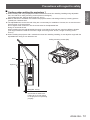
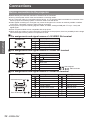
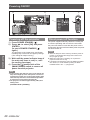
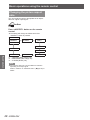
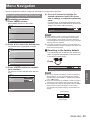
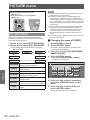
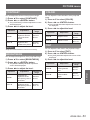
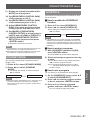
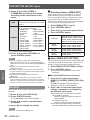
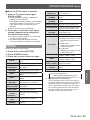
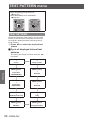
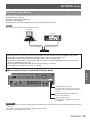
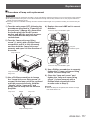
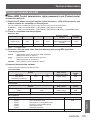
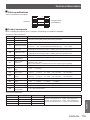
REMOTE 2 IN terminal
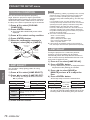
Using the [REMOTE 2 IN] terminal provided on the connection terminals of the main unit, it is possible to operate
the projector from a control panel etc. furnished in a distant location where infrared remote control signal cannot
be received.
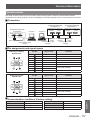
Remote control
External control
Remote control/External control
Standby
ON
LAMP
RGB1
VIDEO
RGB2
S-VIDEO
DVI-D
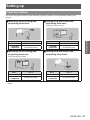
Projector set up in a meeting room
Control panel located in a different room
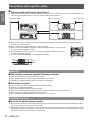
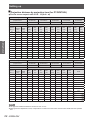
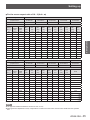
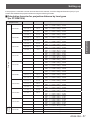
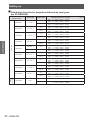
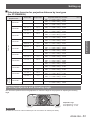
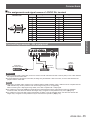
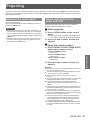
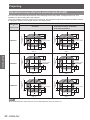
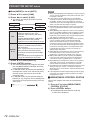
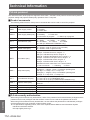
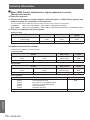
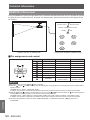
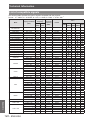
JJPin assignments and control
D-Sub 9-pin (Outside view)
Pin No.
Signal name
Open (H)
Short (L)
GND
POWER
RGB1
RGB2
VIDEO
S-VIDEO
DVI
SHUTTER
—
OFF
Other
Other
Other
Other
Other
OFF
Controlled by
remote control
GND
ON
RGB1
RGB2
VIDEO
S-VIDEO
DVI
ON
Controlled by
external contact
RST/SET
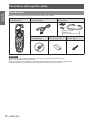
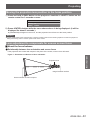
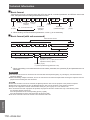
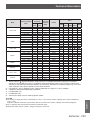
Attention
and
when controlling.
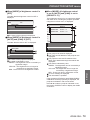
zz Be sure to short-circuit Pins
and pin
are short-circuited, the following buttons on the projector's control panel and on the remote control
zz When pin
cannot be used.
<POWER ON ( I )> button, <SHUTTER> button
In addition, the RS-232C commands and network functions that correspond to these functions cannot be used either.
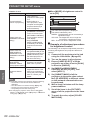
and pin
are short-circuited and then any one of pins
to
is short-circuited to pin , the following buttons
zz When pin
on the projector's control panel and on the remote control cannot be used.
<POWER> button, <INPUT SELECT> buttons (RGB1, RGB2, DVI-D, SDI, VIDEO, S-VIDEO), <SHUTTER> button
In addition, the RS-232C commands and network functions that correspond to these functions cannot be used either.
zz The above is explanation in the case where “REMOTE2 MODE” of “PROJECTOR SETUP” (Æpage 84) is set to
“STANDARD”.
Appendix
120 - ENGLISH