1
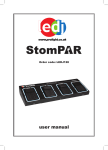
LEDJ MB-2 Foot controller
Safety
Overview (top)
Overview (back)
Operations
If the MB-2 Foot Controller is being used in conjunction with the HBR-1D controller ensure the On/Off
switch on the rear panel of the foot controller is set to the “OFF” position.
Static colour selection mode:
To activate this mode, press the “MODE” foot switch so the “R” LED indicator is lit, now use the “UP”
and “DOWN” foot switches to select the desired colour. To blackout the unit, press the “BLACKOUT”
foot switch and press it again to return it to the previous setting.
Sound active mode:
To activate this mode, press the “MODE” foot switch so the “G” LED indicator is lit, now the unit will
work to the music. If you require to blackout the unit at any point, press the “BLACKOUT” foot switch
and press it again to return it to the previous setting.
If the Foot Controller is being used in conjunction with the HBR-1D controller use the Speed/Dim/Sens
slider to adjust the sound sensitivity level.
Built-in programmes:
To activate this mode, press the “MODE” foot switch so the “Y” LED indicator is lit, now use the “UP”
and “DOWN” foot switches to select the desired built-in programme. To blackout the unit, press the
“BLACKOUT” foot switch and press it again to return it to the previous setting.
If the Foot Controller is being used in conjunction with the HBR-1D controller use the Speed/Dim/Sens
slider to adjust the chase speed.
Full on mode:
To set the unit to Full On you can press and hold down for 3 seconds any of the four foot switches, this
will give Full ON “WHITE”. To return to the previous setting press the “MODE” foot switch. When Full On
is activated you can still use the “BLACKOUT” foot switch.