1
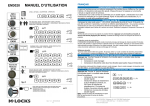
OPERATING INSTRUCTIONS EM2050&EM3550 INNOVATIVE - GLOBAL - SOLUTIONS Manager Instructions Activate user in dual mode - Enter user code ♪♪ Press and hold key “1” until double signal. - Enter manager code ♪♪ - Enter user ID 1-9 ♪♪ - Enter user code ♪♪ Repeat user code ♪♪ For example: activate user 2: user 1 has been activated with 1-1-1-1-1-1 and the manager code is 1-2-3-4-5-6. 1-1-1-1-1-1 ♪♪ Press “1” till ♪♪ 1-2-3-4-5-6 ♪♪ 2 ♪♪ 2-2-2-2-2-2 ♪♪ 2-2-2-2-2-2 ♪♪ Disable/enable users (bulk) not active in dual mode! Press and hold key “2” until double signal. The light remains on during the following actions. - Enter manager code ♪♪ All users are disabled. Delete users Press and hold key “3” until double signal. The light remains on during the following actions. - Enter manager code ♪♪ - Enter user ID ♪♪ User is deleted. For example: “3” till double signal and light stays on. Manager code 1-2-3-4-5-6 ♪♪ User ID 1 ♪♪ For example: ♪♪ ♪♪ ♪♪ ♪♪ ♪♪ ♪♪ ♪♪ ♪♪ To enable all users repeat procedure. For example: ♪♪ ♪♪ ♪♪ To activate user again please refer to function ‘activate user’ Please note that new user code differs from prevs code!! Time delay Press and hold key “9” until double signal. The light remains on during the following actions. - Enter manager code ♪♪ - Enter time delay and open window time - Repeat values ♪♪ For example: “9” till double signal and light stays on Manager code 1-2-3-4-5-6 ♪♪ 2612 for 26minutes time delay and 12minutes open window ♪♪. Repeat values ♪♪ For example: ♪♪ ♪♪ ♪♪ ♪♪ Note: decreasing the time delay value can only be done in open window time. Increasing can be done at any time. Note: decreasing the time delay value can only be done in open window time. Increasing can be done at any time 7 M-LOCKS BV, Vlijtstraat 40, NL-7005 BN Doetinchem Tel: +31 314 376876 Fax: +31 314 376 878 [email protected] www.m-locks.com