1
Using the VA-680D Digital Audio Delay
5
Using the VA-680D Digital Audio Delay
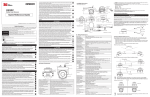
To adjust a lip sync error when using a scaler, use the VA-680D, as the
example in Figure 2 illustrates:
1. Connect the audio output of the DVD players to the S/PDIF and/or
OPTICAL INPUTS (inputs 1 to 4) on the VA-680D.
2. Connect the S/PDIF and/or OPTICAL OUTPUTS on the VA-680D to
the audio input on the audio receiver (for example an AV receiver).
3. Connect the 12V DC power adapter1 to the power socket and connect the
adapter to the mains electricity.
4. Press an INPUT SELECTOR button1 (1 to 4) to select the desired source
to switch to the outputs2.
5. Set the Delay Control, as section 5.1 describes.
AV Receiver
To a Scaler
and then
to Plasma
Display
AV Receiver
DVD
Player
DVD
Player
DVD
Player
DVD
Player
Figure 2: Connecting the VA-680D Digital Audio Delay
1 Not shown in Figure 2
2 Both outputs are available
4
KRAMER: SIMPLE CREATIVE TECHNOLOGY