1
Rain Master Irrigation Systems
DX2 User Manual
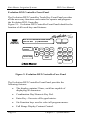
Evolution DX2 Controller Front Panel
The Evolution DX2 Controller Touch Key Front Panel provides
all the necessary functions and control to operate and program
the Evolution DX2 Controller.
Figure 2-1: Evolution DX2 Controller Front Panel identifies the
location of all touch keys and features.
REMOTE
CONTROL
SAT 09:15:11AM VALID PGM: NONE
05/01/93 WK1 [F1]=MAIN MENU
CONTRAST
PROGRAM
ON/OFF
Ï
Ð
LANGUAGE
F1
F4
F2
F5
F3
SAT
7
8
9
F6
WED
4
THU
5
FRI
6
QUIT
SUN MON TUE
1
2
3
0
ENTER
Figure 2: Evolution DX2 Controller Face Panel
The Evolution DX2 Controller Front Panel provides the
following features:
•
The display contains 2 lines, each line capable of
displaying 40 characters.
•
Combination Day/Numeric Key Pad.
•
Enter Key - Executes all keypad entries.
•
Six Function keys used to select all program menus.
•
Full Range Display Contrast Control.
Page 10
Chapter 2: System Basics