1
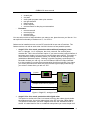
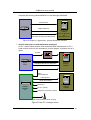
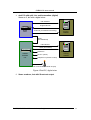
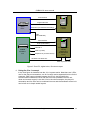
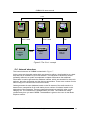
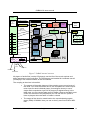
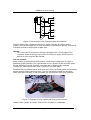
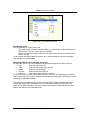
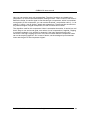
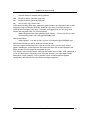
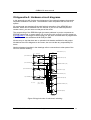
CABAN 6.0 users manual MIXER CABAN stereo audio in Faderstart or Faders joystick interface joystick interface or or midi interface midi 1 CABAN audio out (single or multi) Fader panel Red light CD players Recorder & PPM music tracks on local HD Shoutcast output LAN Shoutcast server DNAS LAN music tracks on LAN Audio players Music Explorer remote control Database Cart Wall remote PC Token interpreter Play-out automation Tools Tools Tools Tools mixer audio out Hardware box (optional) midi midi 2 Clock CABAN PC external feed tuner telephone transmitter 1 transmitter 2 Figure 7 CABAN internal structure All players of audio files (not the CD players) use the info of the music explorer and token interpreter to play audio files. The CD players are intended for incidental use will just display a list of track numbers of the CD inserted. The coupling to the mixer is threefold: The outputs of the audio players will be routed to one or more inputs of the mixer. You have the choice here to use a separate PC audio output/ mixer input for each individual player (for analogue mixers) or use a single audio output/mixer input for all players (for digital mixers) In the latter case you can use the fader panel of Caban (direct or via Midi) to set control the volumes of the players and you can use the PFL option to listen to players when the fader in Caban is closed. The output of the mixer is routed back to the recorder/peak program meter (PPM) of CABAN. Here you can on-the-fly record to PCM or MP3 files. © 2005, 2013 Michel Nieuwenhuizen, all rights reserved 14