1
Getting Started
Quick Start Multi-Sensor Pro
PC Brand Subject to Change Without Notice
Training
Training is available with the purchase of a unit, and one hour of technical assistance is
offered after purchase.
Software
The software included with the MULTI-SENSOR PRO is installed and ready to go to work
for you.
Quick Start Procedure
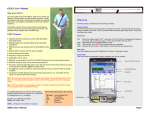
1. With the cable supplied plug the USB end into PC USB port (left edge view) then plug
the other end of the cord into the control unit, and then plug the multi-sensor antenna
into the control unit. Plug the battery connector into the control unit
2. Turn on UMPC or laptop computer (left edge view) and start software
3. Allow a few moments for the programs to communicate with each other
A. Click on recommended resolution of 800X480 (if not preset)
B. Using stick point button or stylus move over Multi-Sensor Pro shortcut and left click
(front view)
4. When it’s ready, click Connect then click Start, now you may begin scanning
5. Keep antenna parallel and as close to the ground as possible and scan in the
same direction as where you started, without rotating the antenna for best results.
Mouse right click
Mouse left click
Front view
Stick point (Mouse or touch pad)
Front Edge View
Stylus Compartment (pen)
Docking Port
Software Keyboard
Launch Pad
Left Edge View
Right Edge View
...
DC In
WLAN On/Off
...
SAS
..
USB Port
USB Port
Audio In/Out
Volume Up/Down
Power Hold
Detailed PC information supplied on pages 4 and 5
3