1
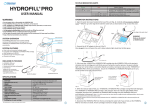
STATUS INDICATOR LIGHTS
SWITCHING FROM AC TO DC SOLAR OR WIND POWER OPTIONS
Green
on
on 1 second, off 1 second
Red
on
on 1 second, off 1 seconds
System Status
HYDROSTIK cartridge is full
Waiing to fill HYDROSTIK cartridge
HYDROSTIK cartridge is being filled
Add water or empty waste water tank
HYDROFILL can be powered by using the standard (included) AC to DC power cable (b), or can be
connected to renewable power sources such as solar PV or small wind turbines. Both sources should
include a batery buffer to regulate power supplied to the HYDROFILL.
Recommended Solar PV system set-up:
-Min. 25W-40W Solar PV panels with batery charge controller (not included)
-11V - 14.4V / 5Ah batery (not included)
-DC cable (plug compaible to HYDROFILL DC socket) (not included)
OPERATION INSTRUCTIONS
1. Open the water tank cover located at the top of the unit (Fig. A). Carefully add de-ionized or disilled
water** EXACTLY up to the ridge level inside the water tank as shown below in Fig. B. Close the cover.
Recommended wind turbine system set-up:
-Min. 40W wind turbine with batery charge controller (not included)
-11V - 14.4V / 5Ah batery (not included)
-DC cable (plug compaible to HYDROFILL DC socket) (not included)
Ridge
The ridge is the
water level
Fig. A
Fig. B
WARNING:
Only use de-ionized
or disilled water.
40W wind turbine
25W-40W solar panels
HYDROFILL
wind-charge
controller
2. Connect the AC-DC adapter to the unit (Fig. C).
Once plugged in to an AC point, the unit’s status indicator light should start to flash green.
solar charge
controller
DC cable
DC cable
Fig. C
AC-DC adapter (b)
11-14.4V batery
3. Fully insert the HYDROSTIK cartridge into the HYDROFILL unit by turning it clockwise into the cartridge
port unil firmly secured. During the inserion process, the green indicator light may turn red to indicate
a connecion (Fig D), but coninue turning to make sure the HYDROSTIK is firmly secured (Fig E). Secure
the HYDROSTIK ightly to the unit, but be careful not to apply excessive force.
status indicator light
will switch from
green to red
Fig. D
USEFUL INFORMATION / MAINTENANCE
AC cord
11-14.4V batery
HYDROSTIK
Solid H2 storage
Only use de-ionized or disilled water.
4-6 hours of operaion will normally be required to fully charge an empty HYDROSTIK.
The HYDROFILL can sill run and generate hydrogen even if the LED status indicator light alternates
between red for 1 second and off for 3 seconds, but HYDROSTIK charging time will be slower.
If the LED status indicator light alternates red for 1 second and off for 1 second, check the water level
of the water tank and waste water tank. Either add water to the water tank or remove water from the
waste water tank as required. Follow set up instrucions carefully.
connect HYDROSTIK
unil firmly secured
Fig. E
4. While the indicator light is RED, your HYDROSTIK cartridge is being filled with hydrogen. The HYDROSTIK
cartridge is fully charged when the indicator lights GREEN. When completed, disconnect the HYDROSTIK
cartridge from the HYDROFILL (turn ani-clockwise to disconnect).
TROUBLESHOOTING
1. The LED status indicator light does not flash green ater the power supply cord is connected.
SOLUTION: Check the connecion between the AC-DC adapter and the power supply.
Note: 1. It will be normal to hear short bursts or puffs during the refilling procedure, due to water being purged from the system
from ime to ime.
2. It will be normal to hear the sound of air being released when the HYDROSTIK is disconnected from the HYDROFILL.
5. Disconnect the HYDROFILL from the AC and empty the water tank if you will not use the HYDROFILL for
more than one week. If more cartridges need to be charged, repeat step 3.
DC cable
2
3