1
Battery Replacement
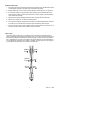
When the low battery symbol
appears on the display, replace
the meter’s battery (9V). The battery compartment is located
behind the panel that surrounds the meter’s trigger. Open the
compartment by pressing the release button (1) and then pulling
the panel (2) down from the trigger area. Replace the 9V battery
and close the battery compartment cover.
1
2
Data Logger
Storing Data: The thermometer is capable of storing up to 100
data points.
Infrared: To store data from an infrared reading,
1.
Pull and Hold the trigger
2.
Press the MODE button until LOG appears in the lower left corner of the display; a
log location number will be displayed. If no temperature has been recorded in the
displayed LOG location, 4 dashes will appear in the lower right corner.
3.
Aim the unit at the target area you want to record, and press the laser/backlight
button. The recorded temperature will appear in the lower right corner.
4.
To select another log location, press the up and down keys.
Recalling Data: To recall stored data after the unit shuts off,
1.
Press the MODE button until LOG appears in the lower left corner. A LOG location
number will be shown below LOG, and the stored temperature for that location will
be display.
2.
To move to another LOG location, press the UP and Down keys.
Log Clear Function: To clear the memory,
The “Log clear” function allows you to quickly clear all logged data points. This function
can only be used when the unit is in the LOG mode.
1.
While in LOG mode, press the trigger, and then press the “down” arrow button until
LOG location “0” is displayed. Note: This can only be done when the trigger is
pulled. LOG location “0”cannot be accessed, by using the “up” arrow button.
2.
When LOG location “0” shows in the display, press and release the laser/backlight
button, then press and release the up arrow key. A tone will sound, and the LOG
location will automatically change to “1”, signifying that all data locations have been
cleared.
6
42570 V1.2 8/09