1
ServSensor V4P
1) Introduction
1. What is ServSensor V4P?
The ServSensor V4P integrates over 10 years of environmental monitoring experience with the latest solid
state camera technology to push the boundaries of disaster protection. Now you can sense and see
problems before they lead to business disruptions. It is a high speed, accurate, intelligent monitoring
device, featuring a completely embedded host and Linux Operating System. The design is based on our
successful sensorProbe8L and cameraProbe8, but with improved hardware. This unit includes video
digitizing capability, so you can connect your own cameras through the rear panel connectors.
Black Box has prided itself on bringing a low cost, easy to use monitoring solution to market with the
ServSensor V4P.
2. How to use this manual
This manual is meant to provide the user with a step by step guide on how to configure and set up their
unit. It utilizes screen shots in an effort to make things simpler for the user to follow. It is split up into
sections that form “mini tutorials”. These cover the basic set up and common configurations of the unit,
and give an introduction to its most useful features.
At the end of the manual there is a FAQ section that provides some further in-depth information regarding
specific set ups and answers some commonly asked questions. If you need any further information or help
with using your unit then please contact us on [email protected] and one of our technical support
staff will be only too pleased to help you with any information you require.
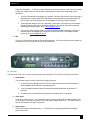
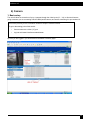
3. Front and rear panels
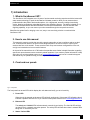
Fig 1. Front panel
The front panel has several LEDs which display the units status and notify you as to its activity.
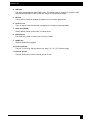
1. Power LED
When the unit is powered up the power LED will be lit continuously. If the power LED is flashing then it
indicates a problem with the CPU. If you notice this then please contact us on [email protected]
2. Ethernet LED
The activity and Link100 LEDs indicate network connectivity and activity. The Link100 LED will light
up when there is a network connection present. The activity LED will flash when there is network traffic
being sent or received by the unit.
3. Status / Online LEDs
4