1
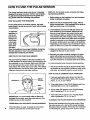
HOW TO USE THE PULSE SENSOR
The unique headband-style pulse sensor is specially
designed for greater accuracy,comfort, and durability.
To get the best performance from the pulse sensor, please read the following Instructions.
DISPLAY). For the best results, remember the following importantguidelines:
1. Before putting on the headband, rub your forehead
bdefly to stimulate circulation.
HOW TO ADJUST THE HEADBAND
For the pulse sensor to function properly, the headband should fit snugly around your head, without being
uncomfortable.
2. Make sure that the headband fits snugly, without
being uncomfortable. If the headband is too loose or
tight, your pulse may not be detected.
3. The headband must be worn with the sensor window cantered on your forehead. Make sure that
there is no hair between the sensor window and
your forehead. Make-up applied to the forehead
may interfere with pulse readings. Note: If the pulse
sensor does not detect your pulse when the sensor
window is centered on your forehead, try positioning
the sensor window above your dght or left eyebrow.
Depending on the shape of your forehead, it may be
easier to detect your pulse from a different position.
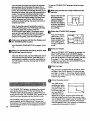
To adjust the
headband, inserf the adjustment tab
through one
of the holes
in the headband. Note:
Each time
you exerclse, the headband may expend slightly during the
first few minutes of use. It may be necessary to
readjust the headband periodically.
HOW TO PUT ON THE PULSE SENSOR
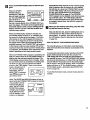
Rub your forehead briefly to stimulate circulation. Put
on the headband as shown below, with the sensor window centered on your forehead. Make sure that there
is no hair between the sensor window and your forehead. Attach the clothes clip to your collar. The clothes
clip will reduce the movement of the pulse sensor wire,
helping to ensure accurate pulse readings.
4. Make sure that the pulse sensor wire is fully
plugged into the jack on the console.
5. Because your pulse constantly changes, the pulse
sensor will sample your pulse every few seconds.
When you first put on the pulse sensor, it may take
up to ten seconds for an accurate pulse to be shown.
6. Avoid excessive head movement dudng exercise.
7. The sensorwindow should be cleaned weekly when
the treadmillis used regularly.Moisten a cotton swab
with water, and carefully wipe the sensor window.
HOW TO SOLVE COMMON PULSE PROBLEMS
Sensor
Window
1. If you are weadng the pulse sensor and the NO
PULSE DETECTED indicator lights, refer to guidelines 2, 3, 4, 5, 6, and 7 above.
2. If the pulse shown in the PULSE display seems excessively high or low, refer to guideline 5.
Clothes
/
IMPORTANT: To avoid static build-up that may
damage the console, wear the pulse sensor only
while you are on the treadmill.
GUIDELINES FOR ACCURATE PULSE READINGS
8
The instructions on page 12 explain how the pulse
sensor is used with the console (see PULSE
3. If error code "E5" appears in the PULSE display,
refer to guidelines 2, 3, 4, 5, 6, and 7.
4. If the letters =PLS" appear in the PULSE display,
refer to guidelines 2, 3, 4, 5, 6, and 7.
CLEANING THE PULSE SENSOR AND HEADBAND
Remove the headband from the pulse sensor. Wipe
the pulse sensor with a damp cloth; never immerse
the pulse sensor in water. Hand wash the headband
in mild detergent, gently wring it out, and let it air dry.