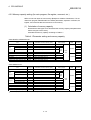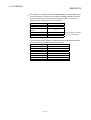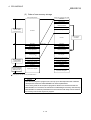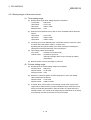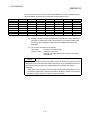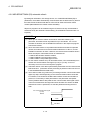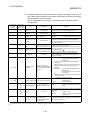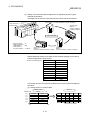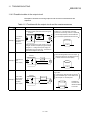
1
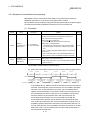
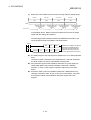
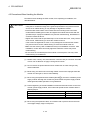
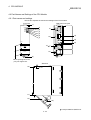
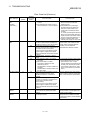
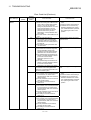
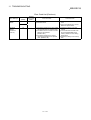
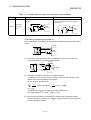
QCPU-A(A Mode)
User's Manual
Mitsubishi Programmable
Logic Controller
Q02CPU-A
Q02HCPU-A
Q06HCPU-A
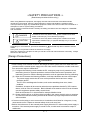
• SAFETY PRECAUTIONS •
(Read these precautions before using.)
When using Mitsubishi equipment, thoroughly read this manual and the associated manuals
introduced in the manual. Also pay careful attention to safety and handle the module properly.
These precautions apply only to Mitsubishi equipment. Refer to the CPU module user’s manual for a
description of the PC system safety precautions.
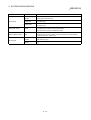
These • SAFETY PRECAUTIONS • classify the safety precautions into two categories: "DANGER"
and "CAUTION".
!
DANGER
! CAUTION
Procedures which may lead to a dangerous condition and cause
death or serious injury if not carried out properly.
Procedures which may lead to a dangerous condition and cause
superficial to medium injury, or physical damage only, if not carried
out properly.
Depending on circumstances, procedures indicated by ! CAUTION may also be linked to serious
results.
In any case, it is important to follow the directions for usage.
Store this manual in a safe place so that you can take it out and read it whenever necessary. Always
forward it to the end user.
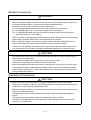
[Design Precautions]
!
DANGER
• Install a safety circuit external to the PC that keeps the entire system safe even when there are
problems with the external power supply or the PC main module. Otherwise, trouble could result
from erroneous output or malfunction.
(1) Configure the following circuits outside the PC: emergency stop circuit, protection circuit,
interlocking circuit for opposite operations such as forward and reverse operations, and
interlocking circuit for machine damage prevention such as upper/lower limit for positioning.
(2) When the PC detects the following problems, it will stop calculation and turn off all output.
The power supply module has an over current protection device and over voltage
protection device.
The PC CPUs self-diagnostic functions, such as the watchdog timer error, detect
problems.
In addition, all output will be turned on when there are problems that the PC CPU cannot
detect, such as in the I/O controller. Build a failsafe circuit exterior to the PC that will make
sure the equipment operates safely at such times.
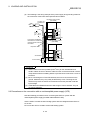
Refer to the Section 8.1 in this manual for example failsafe circuits.
(3) Output could be left on or off when there is trouble in the output module’s relay or transistor.
So, build an external monitoring circuit that will monitor any single output that could cause
serious trouble.
• If current over the rating or over-current due to a load short-circuit flows for a long term, it may
cause smoke or fire. Prepare an external safety circuit, such as a fuse.
• Build a circuit that turns on the external power supply when the PC main module power supply is
turned on. If the external power supply is turned on first, it could result in erroneous output or
malfunction.
A-1
[Design Precautions]
!
DANGER
• When there are communication faulty with the data link, the communication faulty station will
enter the following condition. Build an interlock circuit into the PC program that will make sure
the system operates safely by using the communication state information.
Not doing so could result in erroneous output or malfunction.
(1) For the data link data, the data prior to the communication error will be held.
(2) The MELSECNET (II, /B, /10) remote I/O station will turn all output off.
(3) The MELSECNET/MINI-S3 remote I/O station will hold the output or turn all output off
depending on the E.C. mode setting.
Refer to manuals for corresponding data link system for how to detect the communication faulty
station and the operation status when a communication error occurred.
• When configuring a system, do not leave any slots vacant on the base. Should there be any
vacant slots, always use a blank cover (A1SG60) or dummy module (A1SG62).
If the cover is not attached, the module's internal parts may be dispersed when a short-circuit
test is performed or overcurrent/overvoltage is accidentally applied to the external I/O area.
!
CAUTION
• Do not bunch the control wires or communication cable with the main circuit or power wires, or
install them close to each other.
They should be installed 100mm (3.94 inch) or more from each other.
Not doing so could result in noise that would cause malfunction.
• When controlling items like lamp load, heater or solenoid valve using an out put module, large
current (approximately ten times greater than that present in normal circumstances) may flow
when the output is turned OFF ON. Take measures such as replacing the module with one
having sufficient rated current.
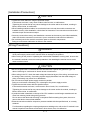
[Installation Precautions]
!
CAUTION
• Use the PC in the environment given in the general specification section of the manual.
Using the PC outside the range of the general specifications may result in electric shock, fire, or
malfunction or may damage or degrade the product.
• Before mounting the module, securely insert the projection at the bottom of the module into the
fixing hole on the base module.
(The AnS series module must be tightened to the base module at the specified tightening
torque.)
An improperly mounted module may result in malfunction, failure, or falling.
Excessive screw tightening may cause falling due to the breakage of the screw or module,
short-circuit, or malfunction.
A-2
[Installation Precautions]
!
CAUTION
• Tighten the screw within the range of specified torque.
If the screws are loose, it may result in fallout, short circuits, or malfunctions.
Tightening the screws too far may cause damage to the screw and/or the module, resulting in
fallout, short circuits, or malfunction.
• When installing extension cables, be sure that the base unit and the module connectors are
installed correctly. After installation, check them for looseness. Poor connections could result in
erroneous input and erroneous output.
• Correctly connect the memory card installation connector to the memory card. After installation,
make sure that the connection is not loose. A poor connection could result in malfunction.
• Do not directly touch the module’s conductive parts or electronic components.
Doing so could cause malfunction or failure in the module.
[Wiring Precations]
!
DANGER
• Completely turn off the external power supply when installing or wiring. Not completely turning
off all power supply could result in electric shock or damage to the product.
• When turning on the power or operating the module after installation or wiring work, be sure that
the module’s terminal covers are correctly attached. Not attaching the terminal covers could
result in electric shock.
!
CAUTION
• Be sure to ground the FG terminals and LG terminals with a special PC ground of Type 3 or
above. Not doing so could result in electric shock or malfunction.
• When wiring in the PC, check the rated voltage and terminal layout of the wiring, and make sure
the wiring is done correctly. Connecting a power supply that differs from the rated voltage or
wiring it incorrectly may cause fire or breakdown.
• Do not connect multiple power supply modules in parallel.
Doing so could cause overheating, fire, or damage to the power supply module.
• Tighten the terminal screws with the specified torque.
If the terminal screws are loose, it could result in short circuits, fire, or malfunction.
Tightening the screws too far may cause damage to the screw and/or the module, resulting in
fallout, short circuits, or malfunction.
• A protective label is attached on the top of the CPU module to avoid foreign materials such as
wires from entering inside during wiring process.
Do not remove the label until the wiring is completed. Before starting the system, be sure to
remove the label to ensure heat radiation.
• External connections shall be crimped or pressure welded with the specified tools, or correctly
soldered.
For information regarding the crimping and pressure welding tools, refer to the I/O module’s user
manual. Imperfect connections could result in short circuit, fires, or malfunction.
A-3
[Starting and Maintenance Precautions]
!
DANGER
• Do not touch the terminals while power is on. Doing so could cause shock or malfunction.
• Correctly connect the battery. Also, do not change, disassemble, heat, place in fire, short circuit,
or solder the battery.
Mishandling of the battery can cause overheating or cracks which could result in injury and fires.
• Make sure to switch all phases of the external power supply off before cleaning or re-tightening
screws. If you do not switch off the external power supply, it will cause electric shock.
If the screws are loose, it may result in fallout, short circuit, or malfunction. Tightening the
screws too far may cause damages to the screws and/or the module, resulting in fallout, short
circuits, or malfunction.
!
CAUTION
• Carefully read manuals and confirm that it is safe enough before performing on-line operations
which require to connect peripheral devices to an operating CPU module. (especially when
modifying a program, performing forced output, or modifying the operation status.)
Misoperation may damage the module or cause accidents.
• Do not disassemble or rebuild the module.
It may cause accidents, malfunction, injury, or fire.
• When using a cellular phone, keep it 25 cm or more away from the PC.
Otherwise, malfunction may result.
• Make sure to switch all phases of the external power supply off before mounting or removing the
module. If you do not switch off the external power supply, it will cause failure or malfunction of
the module.
[Disposal Precautions]
!
CAUTION
• Disposing of this product, treat it as industrial waste.
A-4
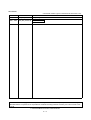
REVISIONS
* The manual number is given on the bottom left of the back cover.
Print Date
* Manual Number
Revision
Dec., 1999
Mar., 2000
SH (NA) 080065-A First printing
SH (NA) 080065-B Addition of model
QA1S33B
Japanese Manual Version SH-080066-B
This manual does not imply guarantee or implementation right for industrial ownership or implementation of other rights.
Mitsubishi Electric Corporation is not responsible for industrial ownership problems caused by use of the contents of this
manual.
1999 MITSUBISHI ELECTRIC CORPORATION
A-5
INTRODUCTION
Thank you for choosing a Mitsubishi MELSEC-Q Series General Purpose Programmable Controller.
Before using your new PC, please read this manual thoroughly to gain an understanding of its functions so you
can use it properly.
Please forward a copy of this manual to the end user.
CONTENTS
1. OVERVIEW
1- 1 to 1- 2
1.1 Features ................................................................................................................................................... 1- 2
2. SYSTEM CONFIGURATION
2- 1 to 2- 16
2.1 System Configuration............................................................................................................................... 2- 1
2.2 Precautions when configuring the system .............................................................................................. 2- 2
2.2.1 Hardware ........................................................................................................................................... 2- 2
2.2.2 Software package.............................................................................................................................. 2- 3
2.2.3 Precautions when using GPP function software packages and A8PU peripheral devices which are
not compatible with AnU ................................................................................................................... 2- 6
2.3 System Equipment................................................................................................................................... 2- 7
2.4 System Configuration Overview ............................................................................................................. 2- 15
2.4.1 QCPU-A (A mode) system............................................................................................................... 2- 16
3. GENERAL SPECIFICATION
3- 1 to 3- 2
4. CPU MODULE
4- 1 to 4- 38
4.1 Performance Specification....................................................................................................................... 4- 1
4.1.1 Overview of operation processing .................................................................................................... 4- 3
4.1.2 Operation processing of RUN, STOP, PAUSE, and STEP RUN.................................................... 4- 5
4.1.3 Operation processing upon momentary power failure..................................................................... 4- 7
4.1.4 Self-diagnosis .................................................................................................................................... 4- 8
4.1.5 Device list ......................................................................................................................................... 4- 10
4.2 Parameter Setting Ranges ..................................................................................................................... 4- 11
4.2.1 List of parameter setting range ........................................................................................................ 4- 11
4.2.2 Memory capacity setting (for main program, file register, comment, etc.) ..................................... 4- 13
4.2.3 Setting ranges of timer and counter ................................................................................................ 4- 16
4.2.4 I/O devices........................................................................................................................................ 4- 18
4.2.5 I/O allocation of special function modules ....................................................................................... 4- 18
4.2.6 MELSECNET/MINI (S3) automatic refresh..................................................................................... 4- 19
4.3 Function List ............................................................................................................................................ 4- 23
4.4 Functions added to QCPU-A .................................................................................................................. 4- 25
4.4.1 Boot operation from standard ROM................................................................................................. 4- 25
4.4.2 Usage of 1ms timer .......................................................................................................................... 4- 28
A-6
4.4.3 Sequence accumulation time processing........................................................................................ 4- 31
4.5 Precautions When Handling the Module................................................................................................ 4- 33
4.6 Part Names and Settings of the CPU Module........................................................................................ 4- 34
4.6.1 Part names and settings .................................................................................................................. 4- 34
4.6.2 Switch operation after program write............................................................................................... 4- 37
4.6.3 Latch clear operation........................................................................................................................ 4- 37
4.6.4 Installation and removal of memory card during power on............................................................. 4- 37
5. POWER SUPPLY MODULE
5- 1 to 5- 4
5.1 Specifications ........................................................................................................................................... 5- 1
5.2 Name and Setting of Each Part ............................................................................................................... 5- 3
5.2.1 Name of each part of different power supply modules is provided below....................................... 5- 3
6. BASE MODULE AND EXPANSION CABLE
6- 1 to 6- 6
6.1 Specifications of Base Modules............................................................................................................... 66.2 Specifications of Expansion Cable .......................................................................................................... 66.3 Part Names of Base Module.................................................................................................................... 66.4 Setting the Expansion Stage Numbers ................................................................................................... 67. MEMORY CARD AND BATTERY
1
2
3
5
7- 1 to 7- 8
7.1 Specifications of Memory Card................................................................................................................ 77.2 Specifications of Battery (for CPU module and memory card)............................................................... 77.3 Handling the Memory Card...................................................................................................................... 77.4 Part Names of Memory Card................................................................................................................... 77.5 Insertion/Removal of the Memory Card .................................................................................................. 77.6 Inserting Batteries (for CPU module and memory card)......................................................................... 77.7 Battery Replacement ............................................................................................................................... 77.7.1 Battery service life ............................................................................................................................. 77.7.2 Battery replacement procedure ........................................................................................................ 78. EMC DIRECTIVE AND LOW-VOLTAGE INSTRUCTION
1
1
2
2
3
4
5
6
7
8- 1 to 8- 12
8.1 Requirements for Compliance to EMC Directive .................................................................................... 8- 1
8.1.1 Standards on EMC Directive ............................................................................................................ 8- 1
8.1.2 Control cabinet .................................................................................................................................. 8- 2
8.1.3 Cables................................................................................................................................................ 8- 3
8.1.4 Power supply module........................................................................................................................ 8- 6
8.1.5 Ferrite core ........................................................................................................................................ 8- 7
8.1.6 Noise filter (power supply line filter).................................................................................................. 8- 7
8.2 Requirement to Conform to the Low-Voltage Instruction ....................................................................... 8- 8
8.2.1 Standard applied for MELSEC-AnS ................................................................................................. 8- 8
8.2.2 Precautions when using the MELSEC-AnS series PC .................................................................... 8- 8
8.2.3 Power supply..................................................................................................................................... 8- 9
8.2.4 Control box ....................................................................................................................................... 8- 10
8.2.5 Module installation............................................................................................................................ 8- 10
A-7
8.2.6 Grounding......................................................................................................................................... 8- 11
8.2.7 External wiring .................................................................................................................................. 8- 11
9. LOADING AND INSTALLATION
9- 1 to 9- 22
9.1 Module Installation ................................................................................................................................... 9- 1
9.1.1 Precautions on handling modules .................................................................................................... 9- 1
9.1.2 Precautions on the base module installation.................................................................................... 9- 2
9.1.3 Installing/removing the dust-protective cover................................................................................... 9- 5
9.1.4 Installing/removing modules ............................................................................................................. 9- 6
9.1.5 Setting expansion stages for the expansion base module ............................................................. 9- 10
9.1.6 Connecting/disconnecting the expansion cable.............................................................................. 9- 12
9.2 Concept of Fail-safe Circuit..................................................................................................................... 9- 15
9.3 Installation Environment.......................................................................................................................... 9- 18
9.4 Calculation Method of Heat Amount Generated by the PC................................................................... 9- 18
9.5 Wiring the power supply.......................................................................................................................... 9- 20
9.6 Precautions on the Connection with an Uninterruptible Power Supply (UPS)...................................... 9- 22
10. MAINTENANCE AND INSPECTION
10- 1 to 10- 4
10.1 Routine Inspection ............................................................................................................................... 10- 2
10.2 Periodic Inspection............................................................................................................................... 10- 3
11. TROUBLESHOOTING
11- 1 to 11- 22
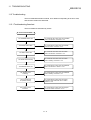
11.1 Fundamentals of Troubleshooting....................................................................................................... 11- 1
11.2 Troubleshooting ................................................................................................................................... 11- 2
11.2.1 Troubleshooting flowchart............................................................................................................. 11- 2
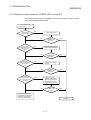
11.2.2 Flowchart for actions when the "POWER" LED is turned OFF ................................................... 11- 3
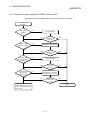
11.2.3 Flowchart for actions when the "MODE" LED turns OFF ............................................................ 11- 4
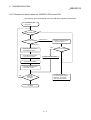
11.2.4 Flowchart for actions when the "RUN" LED is turned OFF ......................................................... 11- 5
11.2.5 Flowchart for actions when the "RUN" LED is flashing................................................................ 11- 6
11.2.6 Flowchart for actions when the "ERROR" LED is turned ON...................................................... 11- 7
11.2.7 Flowchart for actions when the "ERROR" LED is flashing .......................................................... 11- 8
11.2.8 Flowchart for actions when the output module's output load does not turn ON ......................... 11- 9
11.2.9 Flowchart for actions when the program cannot be written........................................................ 11- 10
11.3 Error Code List .................................................................................................................................... 11- 11
11.3.1 Procedure to read an error code ................................................................................................. 11- 11
11.3.2 Error code list ............................................................................................................................... 11- 11
11.4 Possible Troubles with I/O Modules ................................................................................................... 11- 20
11.4.1 Troubles with the input circuit and the countermeasures ........................................................... 11- 20
11.4.2 Possible troubles in the output circuit .......................................................................................... 11- 22
A-8
APPENDICES
APP- 1 to APP- 69
Appendix 1 Instruction List........................................................................................................................APP- 1
Appendix 2 Lists of Special Relays and Special Registers .....................................................................APP- 9
Appendix 2.1 List of special relays........................................................................................................APP- 9
Appendix 2.2 Special relays for link .....................................................................................................APP- 20
Appendix 2.3 Special registers ............................................................................................................APP- 23
Appendix 2.4 Special registers for link.................................................................................................APP- 40
Appendix 3 Peripheral Devices................................................................................................................APP- 45
Appendix 4 Precautions When the Existing Sequence Programs Are Diverted for the QCPU-A.........APP- 46
Appendix 4.1 Instructions with different specifications........................................................................APP- 46
Appendix 4.2 Special relays and special registers with different specifications.................................APP- 47
Appendix 4.3 Parameter setting...........................................................................................................APP- 48
Appendix 4.4 I/O control method .........................................................................................................APP- 49
Appendix 4.5 Microcomputer program ................................................................................................APP- 50
Appendix 4.6 Processing of the index register ....................................................................................APP- 50
Appendix 5 List of Instruction Processing Time ......................................................................................APP- 51
Appendix 6 Dimensions ...........................................................................................................................APP- 65
Appendix 6.1 Dimensions of CPU module ..........................................................................................APP- 65
Appendix 6.2 Power supply modules ..................................................................................................APP- 66
Appendix 6.3 Dimensions of base module ..........................................................................................APP- 67
A-9
About Manuals
The following manuals are also related to this product.
In necessary, order them by quoting the details in the tables below.
Related Manuals
Manual Number
Manual Name
(Model Code)
ACPU Programming Manual (Fundamentals)
Describes programming methods necessary for creating programs, device names, parameters, program
types, memory area configuration, and so on.
(Sold separately)
IB-66249
(13J740)
ACPU Programming Manual (Common Instructions)
Describes how to use the sequence instruction, basic instructions, applied instructions and
microcomputer programs.
(Sold separately)
IB-66250
(13J741)
AnSHCPU/AnACPU/AnUCPU Programming Manual (Dedicated Instructions)
Describes instructions that have been expanded for Q02CPU-A, Q02HCPU-A, and Q06HCPU-A.
(Sold separately)
IB-66251
(13J742)
AnACPU/AnUCPU Programming Manual (AD57 Instructions)
Describes dedicated instructions for A2USHCPU-S1 to control the AD57 (S1)/AD58 controller module.
(Sold separately)
AnACPU/AnUCPU Programming Manual (PID Instructions)
Describes dedicated instructions for A2USHCPU-S1 to perform the PID control.
IB-66257
(13J743)
IB-66258
(Sold separately)
(13J744)
MELSAP-II (SFC) Programming Manual
Describes the specifications, functions, instructions, and programming methods for SFC programming
using MELSAP II. (Sold separately)
(Sold separately)
AnS Module type I/O User's Manual
IB-66361
(13JF40)
IB-66541
Describes the specification of the compact building block type I/O module.
A - 10
(Sold separately)
(13JE81)
Abbreviations and generic names used in this manual
In this manual, the following abbreviations and generic names are used to explain
about QCPU-A unless explicitly instructed.
Abbreviation/generic name
Q02CPU-A
Q02HCPU-A
Q06HCPU-A
QCPU-A
CC-Link
AnNCPU
AnACPU
AnUCPU
QnACPU
ACPU
QCPU
A mode
Q mode
Description
Abbreviation for Q02CPU-A general-purpose programming logic controller
Abbreviation for Q02HCPU-A general-purpose programming logic controller
Abbreviation for Q06HCPU-A general-purpose programming logic controller
Generic name for Q02CPU-A, Q02HCPU-A, and Q06HCPU-A
Abbreviation for Control & Communication link system
Generic name for A0J2HCPU, A1SCPU, A1SCPU-S1, A1SCPUC24-R2, A1SHCPU,
A1SJCPU, A1SJCPU-S3, A1SJHCPU, A1SJHCPU-S8, A1NCPU, A2CCPU,
A2CCPUC24, A2CCPUC24-PRF, A2CJCPU, A2NCPU, A2NCPU-S1, A2SCPU,
A2SCPU-S1, A2SHCPU, A2USHCPU-S1, and A1FXCPU
Generic name for A2ACPU, A2ACPU-S1, A2ACPUP21/R21, A2ACPUP21/R21-S1,
A3ACPUP21/R21, A3NCPU, and A3ACPU
Generic name for A2UCPU, A2UCPU-S1, A2ASCPU, A2ASCPU-S1, A2ASCPU-S30,
A2USHCPU-S1, A3UCPU, and A4UCPU
Generic name for Q2ACPU,Q2ACPU-S1, Q2ASCPU, Q2ASCPU-S1, Q2ASHCPU,
Q2ASHCPU-S1, Q3ACPU, Q4ACPU, and Q4ARCPU
Generic name for AnNCPU, AnACPU, and AnUCPU
Generic name for Q02CPU-A, Q02HCPU-A, and Q06HCPU-A
Generic name for Q02CPU, Q02HCPU, Q06HCPU, Q12HCPU, and Q25HCPU
Microsoft Windows, Microsoft Windows NT, Microsoft Visual Basic, Microsoft Visual C++, and MS-DOS are
registered trademarks of Microsoft Corporation, USA.
PC98-NX is a registered trademark of NEC Corporation.
Other company names and product names appear in the text are registered trademarks or trademarks of
their respective companies.
A - 11
MEMO
A - 12
1 OVERVIEW
MELSEC-Q
1. OVERVIEW
1
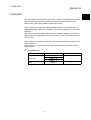
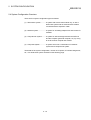
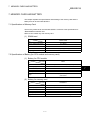
This User's Manual describes the performance, functions, and handling method of the
QCPU-A general purpose PC, as well as the specifications and handling of the
memory card, power supply module and the base module.
The programming modules and software packages have to be compatible with the
upgraded A2UCPU, A2UCPU-S1, A3UCPU, and A4UCPU (abbreviated as AnUCPU
hereafter).
When the conventional programming modules and software packages are used, the
usable range varies depending on the model of the CPU (PC model name). (Refer to
Section 2.2.3.)
Refer to the list of components in Section 2.3 for various modules which can be used
with the QCPU-A.
Refer to Section 2.2.1 for the special function modules which have limited range of
usable devices.
(1) Supplied parts
Item Name
Type name
Quantity
Q02CPU-A
CPU module
Q02HCPU-A
1
Q06HCPU-A
Battery
Q6BAT
1-1
1
1 OVERVIEW
MELSEC-Q
1.1 Features
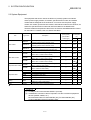
QCPU-A (A mode) has the following features when compared with the A2USHCPUS1.
(1) Faster operation processing
QCPU-A offers significantly faster operation processing than that of A2USHCPUS1.
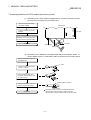
Item
Q02CPU-A
Q02HCPU-A, Q06HCPU-A
A2USHCPU-S1
Operation processing
speed 1
79ns
34ns
90ns
1: I/O processing: At refresh or LD instruction
(2) Larger program capacity
With Q06HCPU-A, the program capacity can be expanded.
Moreover, Q06HCPU-A allows the creation of sub programs.
Item
Program capacity
Q06HCPU-A
A2USHCPU-S1
30k steps (Main program)
+
30k steps (Sub program)
30k step
(3) More actual I/O points
QCPU-A offers 4096 actual I/O points, 4 times that of A2USHCPU-S1.
Item
Q02CPU-A, Q02HCPU-A,Q06HCPU-A
A2USHCPU-S1
4096
1024
Actual I/O points
(4) More expansion stages
Up to 7 stages of expansion base module can be added.
(5) Faster communication speed with peripheral devices
The communication speed with peripheral devices is considerably improved than
that of A2USHCPU-S1.
Item
Q02CPU-A, Q02HCPU-A, Q06HCPU-A
Communication
speed (kbps)
115.2
1
A2USHCPU-S1
9.6
1: Designate 9.6kbps when using GPP of SW3D5C-GPPW or earlier.
1-2
2 SYSTEM CONFIGURATION
MELSEC-Q
2. SYSTEM CONFIGURATION
This chapter describes the system configuration of QCPU-A, precautions for the use of
the system, and system equipment.
2.1 System Configuration
2
This section describes the device configuration in the QCPU-A system, the
configuration of peripheral devices, and the overview of the system configuration.
(1) Device configuration in the QCPU-A system
MITSUBISHI
LITHIUM BATTERY
MITSUBISHI
Memory card 1
(Q2MEM-1MBS)
QCPU-A
(Q02CPU-A, Q02HCPU-A,
Q06HCPU-A)
Battery
(Q6BAT)
Basic base module
(QA1S33B, QA1S35B, QA1S38B)
Q series power supply, I/O, or
intelligent function modules
1 The operation is not guaranteed
for the use of commercially
available memory cards.
Expansion of AnS series modules
QA1S6 expansion base module
(QA1S65B, QA1S68B)
Expansion cable
(QC06B, QC12B, QC30B,
QC50B, QC100B)
AnS series power supply, I/O, or
special function modules
2-1
2 SYSTEM CONFIGURATION
MELSEC-Q
2.2 Precautions when configuring the system
The precautions when configuring the QCPU-A (A mode) system are as follows:
2.2.1 Hardware
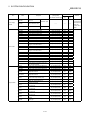
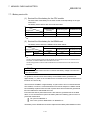
(1) A total of 64 I/O modules or special function modules at maximum can be
mounted to each of the basic base module or the expansion base module.
(2) Up to seven expansion base modules can be connected in the system.
(Up to eight modules when the basic base module is included.)
(3) The total length of the expansion cable should be 13.2 m or less.
(4) The following modules have some limitations for the number of modules to be
mounted.
Module
No. of mountable modules
MELSECNET/10 network module
A1SJ71LP21, A1SJ71BR11
Up to 4 modules
MELSECNET(II)/B data link module
A1SJ71AP21, A1SJ71AR21, A1SJ71AT21B
Up to 2 modules
UP to 4 modules in total
Interruption module: A1SI61
1 module
AnS series special function module
Up to 6 modules in total
: Applies to the following modules. Modules other than the followings do not have any limitations.
Ethernet interface module: A1SJ71E71B2-S3 (-B5-S3)
Calculating machine link module: A1SJ71UC24-R2 (-R4/-PRF)
CC-Link module (in intelligent mode): A1SJ61BT11
Interface module for data transmission: A1SJ71CMO-S3
Intelligent communication module: A1SD51S
ID interface module: A1SD21-S1
JEMANET (JPCN-1) master module: A1SJ71J92-S3 (only when GET/PUT service is used)
(5) The accessible device range will be limited when the following modules are used:
Accessible device range in CPU
Target module
Device
MELSECNET(II) data link module:
A1SJ71AP21, A1SJ71AR21
MELSECNET/B data link module:
A1SJ71AT21B
JEMANET interface module:
A1SJ71J92-S3
Accessible range
Input (X), output (Y)
X/Y0~7FF
Internal relay (M)
M0~8191
Latch relay (L)
M0~8191
Link relay (B)
B0~FFF
Timer (T)
T0~2047
Counter (C)
C0~1023
Data register (D)
D0~6143
Link register (W)
W0~FFF
Annunciator (F)
F0~2047
(6) Among the graphic operation terminal GOT series, the GOT-A900/800 series can
be used; however, bus connection is not available.
2-2
2 SYSTEM CONFIGURATION
MELSEC-Q
(7) It is recommended that the network and data link modules are mounted to the
basic base module.
When these modules are mounted to the expansion base module, the link refresh
time will become longer than the case where they are mounted to the basic base
module.
2.2.2 Software package
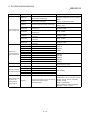
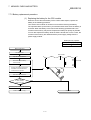
(1) Type name setting when starting the GPP function software
package
The following table shows the GPP function software package that can be used
to create the QCPU-A (A mode) program, and the PC type setting at startup.
When using SW4D5C-GPPW, select the PC type from Q02(H)-A or Q06H-A
according to the CPU to be used.
When using the peripheral devices and GPP function software package of
SW3D5C-GPPW or earlier, specify the PC type name as "A4U". If "A4U" is not
found in PC type names, specify "A3A." If both "A4U" and "A3A" are not found,
specify "A3H."
Note that when "A4U" is specified, the available device range will be limited.
Peripheral device Software package type name to start system
Q06HCPU-A
Q02(H)-A
Q06H-A
SW3D5 -GPPW or earlier
A4U
A4U
SW NX-GPPA
A4U
A4U
SW4D5C-GPPW or later
PC9801
SW0N-GPPA
SW4D5C-GPPW or later
DOS/V
Type name setting for PC CPU
Q02(H)CPU-A
SW3D5 -GPPW or earlier
SW IVD-GPPA
SW0RX-GPPA
A3A
A3A
Q02(H)-A
Q06H-A
A4U
A4U
A3A
A3A
A4U
A7PHP
SW0SRX-GPPA
SW SRXV-GPPA
A4U
A7HGP
SW HX-GPPA
A4U
A4U
SW3GP-GPPA
A3H
A3H
SW4GP-GPPA
A3A
A3A
SW1GP-GPPAU
A4U
A4U
SW3-GPPA, SW-3GP-GPPA
A3H
A3H
SW4GP-GPPA
A3A
A3A
SW1GP-GPPAU
A4U
A4U
A6PHP
A6GPP
A7LMS
A75LMS
SW0SRX-GPPA
A3A
A3A
SW SRXV-GPPA
A4U
A4U
SW SRXV-GPPA
A4U
A4U
2-3
2 SYSTEM CONFIGURATION
MELSEC-Q
POINTS
(1) Old software packages other than listed above cannot be used.
(2) To construct MELSECNET/10 network system with QCPU-A (A mode), use the
AnU-compatible GPP function software package (which includes "A4U" in its
PC type name).
You cannot construct a network with the GPP function software package which
is not compatible with AnU (which does not include "A4U" in its PC type name).
(3) Communication with GPPW at 115.2kbps may not be available depending on
the peripheral devices. In such a case, select the lower communication speed.
(4) When using Q02(H)CPU-A and conventional peripheral devices and setting the
PC type as "A4U," designate the main program setting to 28k steps or less with
parameters. When "Main + parameter" is written with the PC with the setting of
29k steps or more, "Cannot communicate with PC" is displayed and writing to
the CPU is disabled.
(5) Sub programs cannot be used with Q02(H)CPU-A. When using conventiona
peripheral devices and setting the PC type as "A4U," do not specify any sub
programs. If sub programs are specified, "Cannot communicate with PC" is
displayed.
With Q06HCPU, sub program 1 can be used, but sub programs 2 and 3
cannot.
When sub program 2 or 3 is specified, the same message above is displayed.
2-4
2 SYSTEM CONFIGURATION
MELSEC-Q
(2) Utility package
(a) None of the following utility packages for A6GPP/A6PHP can be used:
• SW
• SW
• SW
• SW
• SW
• SW
• SW
-AD57P
-UTLP-FN0
-UTLP-FN1
-UTLP-PID
-SIMA
-UTLP-FD1
-SAPA
The packages marked with can execute
the same functions using the dedicated
instructions. Refer to AnACPU/AnUCPU
Programming Manual (Dedicated
Instruction) for details.
REMARK
The characters generators and canvas, which are necessary for AD57(S1), are
created on the peripheral device using the SW -AD57P.
POINTS
(1) Packages which access the QCPU-A by specifying a device in the utility
package can specify only in the device range for A3ACPU or A3HCPU
equivalent. (Refer to Section 2.2.3.)
(2) Use an AnU-compatible utility package to use the device range for the QCPUA. (Example: SW1IVD-SAP2, etc.)
2-5
2 SYSTEM CONFIGURATION
MELSEC-Q
2.2.3 Precautions when using GPP function software packages and A8PU peripheral
devices which are not compatible with AnU
When the QCPU-A is started up using a GPP function software package not
compatible with AnU (the PC model name is "A3A" or "A3H") or from an A8PU
peripheral device (including A7PU and P7PUS), the usable device range is limited as
follows:
(1) Usable device range
Item
System FD peripheral
AnACPU-compatible module
device Modules whose PC model for system FD
startup is "A3A"
Instruction (sequence/basic/
application/dedicated)
Program capacity
A3HCPU-compatible module
A8PU
Modules whose PC model for system FD
startup is "A3H"
A7PU/
A7PUS
All instructions can be used.
A maximum of 14k steps can be used for the main program.
X/Y0 to 7FF can be used.
(X/Y800 to 1FFF cannot be used.)
X/Y0 to 7FF can be used.
(X/Y800 to 1FFF cannot be used.)
M, L, S relay
M/L/S0 to 8191 can be used.
M/L/S0 to 2047 can be used.
(M/L/S2048 to 8191 cannot be used.)
Link relay (B)
B0 to BFFF can be used
(B1000 to B1FFF cannot be used.)
B0 to B3FF can be used.
(B400 to B1FFF cannot be used.)
Timer (T)
T0 to T2047 can be used.
T0 to T255 can be used.
(T256 to T2047 cannot be used.)
Counter (C)
C0 to C1023 can be used.
C0 to C255 can be used.
(C256 to C1023 cannot be used.)
Data register (D)
D0 to D6143 can be used.
(D6144 to D8191 cannot be used.)
D0 to D1023 can be used.
(D1024 to D8191 cannot be used.)
Link register (W)
W0 to WFFF can be used.
(W1000 to W1FFF cannot be used.)
W0 to W3FF can be used.
(W400 to W1FFF cannot be used.)
Annunciator (F)
F0 to F2047 can be used.
F0 to F255 can be used.
(F256 to F2047 cannot be used.)
V, V1 to V6, Z, and Z1 to Z6 can be used.
V and Z can be used.
(V1 to V6 and Z1 to Z6 cannot be used.)
I/O device points (X/Y)
Index register (V, Z)
Expanded comment
Latch (power failure
compensation) range
I/O assignment
A maximum of 3968 points
The device range shown above can be latched.
Number of I/O occupied points and the
module model can be registered.
Unusable
The device range shown above can be latched.
Number of I/O occupied points can be
registered.
(1) The device range other than listed above is the same as that of QCPU-A.
(2) Refer to the operation manual of each peripheral device for available
functions.
2-6
2 SYSTEM CONFIGURATION
MELSEC-Q
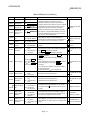
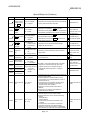
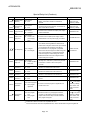
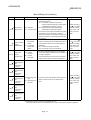
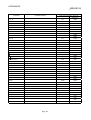
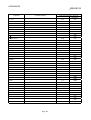
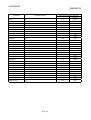
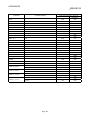
2.3 System Equipment
The equipment that can be used in the QCPU-A (A mode) system is as follows.
Use the power supply module, I/O module, special function module, and network
module that are designed for the AnS series. You cannot use the power supply
module, I/O module, special function module, and network module for the Q series, as
well as the special function module and network module for the Q2AS series.
The base module and expansion cable for the AnS series and A6SIM-X64Y64 cannot
be used either. For details, refer to Q Series Data Book.
Item
CPU module
Memory card
Current
consumption
(A)
Number of occupied
points (points)
[I/O allocation
module type]
DC5V
DC24V
Q02CPU-A
Program capacity: 28k steps, I/O points: 4096,
Processing speed for basic instruction: 79ns
—
0.60
—
Q02HCPU-A
Program capacity: 28k steps, I/O points: 4096,
Processing speed for basic instruction: 34ns
—
0.64
—
Q06HCPU-A
Program capacity: 30k steps × 2 (Main/sub), I/O points:
4096, Processing speed for basic instruction: 34ns
—
0.64
—
Type name
Description
—
—
—
QA1S33B
AnS series module mounting base (power supply
module + CPU + 3 slots for other module)
—
0.107
—
QA1S35B
AnS series module mounting base (power supply
module + CPU + 5 slots for other module)
—
0.117
(0.086)
—
QA1S38B
AnS series module mounting base (power supply
module + CPU + 8 slots for other module)
—
0.118
(0.086)
—
QA1S65B
AnS series module mounting base (power supply
module + 5 slots for other module)
—
0.117
(0.088)
—
QA1S68B
AnS series module mounting base (power supply
module + 8 slots for other module)
—
0.118
(0.090)
—
QC06B
0.6-m expansion base cable
—
—
QC12B
1.2-m expansion base cable
—
—
QC30B
3.0-m expansion base cable
—
—
QC50B
5.0-m expansion base cable
—
—
QC100B
10.0-m expansion base cable
—
—
Battery
Q6BAT
Battery for retaining the contents of program memory
and devices in case of power failure
—
—
—
Cable
QC30R2
Communication cable for peripheral devices
—
—
—
Basic base module
Q2MEM-1MBS SRAM type: 1 MB
Expansion base module
Expansion cable
: The parenthesized values are for those products not provided for CE mark.
POINTS
(1) A USB port cannot be used with QCPU-A (A mode).
(2) A RS232/422 conversion cable is required to use the conventional peripheral
devices (A6GPP, A8PUJ, etc.).
Recommended cable: FA-CNV2402CBL (2m), FA-CNV2405CBL (5m)
Contact: Mitsubishi Electric Engineering Corp.
2-7
2 SYSTEM CONFIGURATION
Item
Mode
A1S61PN
MELSEC-Q
Current consumption
Number of occupied
points (points)
5VDC
24VDC
[I/O allocation module type]
(A)
(A)
Description
5VDC, 5A
100/200VAC input
Power supply
module
Input module
A1S62PN
5VDC, 3A/24VDC, 0.6A
A1S63P
5VDC, 5A
——
——
——
24VDC input
A1SX10
16-point 100VAC input module
16 [16 input points]
0.05
——
A1SX10EU
16-point 100VAC input module
16 [16 input points]
0.05
——
A1SX20
16-point 200VAC input module
16 [16 input points]
0.05
——
A1SX20EU
16-point 200VAC input module
16 [16 input points]
0.05
——
A1SX30
16-point 12/24VDC, 12/24VAC input module
16 [16 input points]
0.05
——
A1SX40
16-point 12/24VDC input module
16 [16 input points]
0.05
——
A1SX40-S1
16-point 24VDC input module
16 [16 input points]
0.05
——
A1SX40-S2
16-point 24VDC input module
16 [16 input points]
0.05
——
A1SX41
32-point 12/24VDC input module
32 [32 input points]
0.08
——
A1SX41-S1
32-point 24VDC input module, high-speed
sink type, connector included
32 [32 input points]
0.120
——
A1SX41-S2
32-point 24VDC input module
32 [32 input points]
0.08
——
A1SX42
64-point 12/24VDC input module
64 [64 input points]
0.09
——
A1SX42-S1
64-point 24VDC input module, high-speed
sink type, connector included
64 [64 input points]
0.160
——
A1SX42-S2
64-point 24VDC input module
64 [64 input points]
0.09
——
A1SX71
32-point 5/12VDC input module
32 [32 input points]
0.075
——
A1SX80
16-point 12/24VDC sink/source input module
16 [16 input points]
0.05
——
A1SX80-S1
16-point 24VDC sink/source input module
16 [16 input points]
0.05
——
A1SX80-S2
16-point 24VDC sink/source input module
16 [16 input points]
0.05
——
A1SX81
32-point 12/24VDC sink/source input module
32 [32 input points]
0.08
——
A1SX81-S2
32-point 24VDC sink/source input module
32 [32 input points]
0.08
——
A1SX82-S1
64-point 24VDC input module, sink/source
type, connector included
64 [64 input points]
0.160
——
A1SY10
16-point relay contact output module (2A)
16 [16 output points]
0.12
0.09
A1SY10EU
16-point relay contact output module (2A)
16 [16 output points]
0.12
0.09
A1SY14EU
12-point relay contact output module (2A)
16 [16 output points]
0.12
0.10
A1SY18A
8-point relay contact output module (2A) for
independent contacts
16 [16 output points]
0.24
0.075
A1SY18AEU
8-point relay contact output module (2A) for
independent contacts
16 [16 output points]
0.24
0.075
A1SY22
16-point Triac output module (0.6A)
16 [16 output points]
0.27
(200VAC)
0.004
A1SY28EU
8-point Triac output module (0.6A)
16 [16 output points]
0.27
——
A1SY28A
8-point Triac output module (1A)
All points independent
16 [16 output points]
0.11
——
A1SY40
16-point 12/24VDC transistor output module
(0.1A) sink type
16 [16 output points]
0.27
0.016
A1SY41
32-point 12/24VDC transistor output module
(0.1A) sink type
32 [32 output points]
0.50
0.016
A1SY42
64-point 12/24VDC transistor output module
(0.1A) sink type
64 [64 output points]
0.93
0.016
A1SY50
16-point 12/24VDC transistor output module
(0.5A) sink type
16 [16 output points]
0.12
0.12
A1SY60
16-point 24VDC transistor output module (2A)
sink type
16 [16 output points]
0.12
0.015
A1SY60E
16-point 12DCV transistor output module (1A)
source type
16 [16 output points]
0.20
0.01
Output module
2-8
Remark
Installed in the
power supply slot
of the basic base
module and
expansion base
module.
2 SYSTEM CONFIGURATION
Item
Mode
MELSEC-Q
Current consumption
Number of occupied
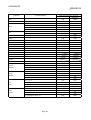
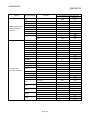
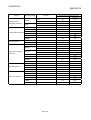
points (points)
5VDC
24VDC
[I/O allocation module type]
(A)
(A)
Description
A1SY68A
8-point 5/12/24/48VDC transistor output
module sink/source type
All points independent
16 [16 output points]
0.13
——
A1SY71
32-point 5/12VDC transistor output module
(0.016A) sink type
32 [32 output points]
0.40
0.15
A1SY80
16-point 12/24VDC transistor output module
(0.8A) source type
16 [16 output points]
0.12
0.04
A1SY81
32-point 12/24VDC transistor output module
(0.1A) source type
32 [32 output points]
0.50
0.016
A1SY81EP
32-point 12/24VDC transistor output module
(0.1/0.05A) source type
32 [32 output points]
0.50
0.016
A1SY82
32-point 12/24VDC output module (0.1 A),
source type, connector and fuse included
64 [64 output points]
0.930
0.016
A1SH42
32-point 12/24VDC input module 32-point
12/24VDC transistor output module(0.1A) sink
type
32 [32 output points]
0.50
0.008
A1SH42-S1
32-point 24VDC input/32-point 24VDC output
module (0.1 A), connector and fuse included
32 [32 output points]
0.500
0.008
A1SX48Y18
8-point 24VDC input module
8-point relay contact output module
16 [16 output points]
0.085
0.045
A1SX48Y58
8-point 24VDC input module
8-point 12/24VDC transistor output module
16 [16 output points]
0.06
0.06
Dynamic input
module
A1S42X
16/32/48/64 points
12/24VDC dynamic input module
Specified number of points
[Input specified number of
points]
0.08
——
Dynamic output
module
A1S42Y
16/32/48/64 points
12/24VDC dynamic output module
Specified number of points
[Output specified number
of points]
0.10
0.008
Blank cover
A1SG60
Dust-proof cover for unused slot
Output module
I/O hybrid module
Dummy module
A1SG62
16-point, 32-point, 48-point, or 64-point
selectable module
16 [Empty]
——
——
Specified number of points
[Input specified number of
points]
——
——
——
——
——
——
——
——
A6CON1
Soldering type
A6CON2
Solderless type
A6CON3
Press-fit type
A6CON1E
Soldering type
A6CON2E
Solderless type
A6CON3E
Press-fit type
Pulse catch
module
A1SP60
16-point input module for short ON-time pulse
input (pulse with a minimum of 0.5ms)
16 [16 output points]
0.055
——
Analog timer
module
A1ST60
8-point analog timer module whose timer
setting value can be changed for different
volumes (0.1 to 1.0s, 1 to 10s, 10 to 60s, 60
to 600s)
16 [16 output points]
0.055
——
Interrupt module
A1SI61
Interrupt module for specifying the interrupt
program (16-point interrupt input)
32 [32 special points]
0.057
——
A1SD61
32-bit signed binary 50kbps, 1 channel
32 [32 special points]
0.35
——
A1SD62
DC input/sink output type
32 [32 special points]
0.14
——
A1SD62D
Differential input/sink output type (preset DC
input)
32 [32 special points]
0.25
——
40-pin connector
37-pin D-sub
connector
High-speed
counter module
A/D converter
module
Temperature/
digital converter
module
A1SD62E
DC input/source output type
32 [32 special points]
0.14
——
A1S64AD
4 to 20mA/0 to 10V 4 analog channels
32 [32 special points]
0.4
——
A1S68AD
Analog input: 8 channels
32 [32 special points]
0.40
——
A1S62RD3
For Pt100 (3-wire type) connection 2 channels
of temperature input
32 [32 special points]
0.54
——
A1S62RD4
For Pt100 (4-wire type) connection 2 channels
of temperature input
32 [32 special points]
0.44
——
A1S68TD
Thermocouple input: 8 channels
32 [32 special points]
0.32
——
2-9
Remark
2 SYSTEM CONFIGURATION
Item
D/A converter
module
Mode
Computer link
module
4 to 20mA/0 to 10V 2 analog output channels
32 [32 special points]
0.8
A1S68DAV
0 to ±10V analog output: 8 channels
32 [32 special points]
0.65
——
A1S68DAI
0 to ±20mA analog output: 8 channels
32 [32 special points]
0.85
——
A1S63ADA
Analog input, 2 channels, simple loop control
is allowed. Analog output, 1 channel
32 [32 special points]
0.8
——
A1S66ADA
Analog input: 4 channels, analog output: 2
channels
64 [64 special points]
0.16
——
A1S64TCTT-S1
Thermocouple input: 4 channels
32 [32 special points]
0.42
——
A1S64TCTTBW-S1
Thermocouple input: 4 channels with heater
disconnection detection function
32 [32 special points]
0.42
——
A1S64TCRT-S1
Pt100 input: 4 channels
32 [32 special points]
0.42
——
32 [32 special points]
0.42
——
A1S62TCTT-S2
Thermocouple input: 2 channels
32 [32 special points]
0.28
——
A1S62TCTTBW-S2
Thermocouple input: 2 channels with heater
disconnection detection function
32 [32 special points]
0.28
——
A1S62TCRT-S2
Pt100 input: 2 channels
32 [32 special points]
0.28
——
Pt100 input: 2 channels with heater
A1S62TCRTBW-S2
disconnection detection function
32 [32 special points]
0.28
——
A1SJ71UC24-R2
Computer link function, RS-232C, 1 channel
32 [32 special points]
0.1
——
A1SJ71UC24-PRF
Computer link function, printer function RS232C, 1 channel
32 [32 special points]
0.1
——
A1SJ71UC24-R4
Computer link function, multidrop link function
RS-422/RS-485, 1 channel
32 [32 special points]
0.1
——
10 Base 2 (for Cheapernet)
32 [32 special points]
0.52
——
10 Base 5 (for Ethernet)
32 [32 special points]
0.35
——
A1SD51S
BASIC (interpreter/compiler) RS-232C, 2
channels RS-422/485, 1 channel
32 [32 special points]
0.4
——
A1SD70
Analog voltage output (0 to ±10V) for 1-axis
positioning control, speed control, and speedpositioning control.
0.3
——
A1SD71-S2
For positioning control, speed control, and
speed-positioning control. Pulse train output,
2-axis (independent, 2-axis simultaneous,
linear interpolation
0.8
——
0.8
——
32 [32 special points]
0.70
——
32 [32 special points]
0.70
——
——
Positioning module A1SD71-S7
ID interface
module
——
Pt100 input: 4 channels with heater
A1S64TCRTBW-S1
disconnection detection function
Ethernet interface A1SJ71E71-B2-S3
module
A1SJ71E71-B5-S3
Intelligent
communication
module
Current consumption
Number of occupied
points (points)
5VDC
24VDC
[I/O allocation module type]
(A)
(A)
Description
A1S62DA
Analog I/O module
Temperature
adjustment
module
MELSEC-Q
For positioning control, setting for manual
pulse output speed can be changed. Pulse
train output, 2-axis (independent, 2-axis
simultaneous, linear interpolation)
A1SD75M1
SSC Net compatible, 1 axis
A1SD75M2
SSC Net compatible, 2 axis
A1SD75M3
SSC Net compatible, 3 axis
A1SD75P1-S3
Pulse train output, 1 axis
A1SD75P2-S3
Pulse train output, 2 axis
A1SD75P3-S3
Pulse train output, 3 axis
48 [First half: 16 empty
points]
[Second half: 32 special
points]
A1SD774M
4-axis motion control module
32 [32 special points]
0.90
A1SJ71ID1-R4
One reader/writer module can be connected.
32 [32 special points]
0.25
0.1
A1SJ71ID2-R4
Two reader/writer modules can be connected.
32 [32 special points]
0.25
0.15
A1SD32D1
One reader/writer module can be connected.
32 [32 special points]
0.25
0.15
A1SD32D2
Two reader/writer modules can be connected.
32 [32 special points]
0.25
0.30
2 - 10
Remark
2 SYSTEM CONFIGURATION
Item
Mode
MELSEC-Q
Current consumption
Number of occupied
points (points)
5VDC
24VDC
[I/O allocation module type]
(A)
(A)
Description
A1SJ71AP21
For the master and local stations of
MELSECNET(II) data link system (for the
optical fiber cable)
32 [32 special points]
0.33
——
A1SJ71AP21-S3
For the master and local stations of
MELSECNET(II) data link system (for the GItype optical fiber cable)
32 [32 special points]
0.33
——
A1SJ71AR21
For the master and local stations of
MELSECNET(II) data link system (for the
coaxial cable)
32 [32 special points]
0.8
——
A1SJ71T21B
For the master and local stations of
MELSECNET/B data link system
32 [32 special points]
0.66
——
A1SJ72T25B
For the remote I/O station of MELSECNET/B
data link system
——
0.3
——
A1SD21-S1
Number of connectable transmitter: 1, Radius
of transmission area: Approx. 50m
32 [32 special points]
0.14
——
Position detection
A1S62LS
module
Absolute position detection by special
detector
32 [32 special points]
0.55
——
PC simple
A1SS91
monitoring module
PC simple monitoring module
16 [16 output points]
0.080
——
MELSECNET(II)
data link module
MELSECNET/B
data link module
Paging module
Memory card
interface module
CC-Link system
master module
Memory card interface module
32 [32 special points]
0.05
A1SJ71LP21
For the control, master, and normal stations of
the MELSECNET/10 data link module system
(For the dual loop SI-type optical fiber cable)
32 [32 special points]
0.65
——
A1SJ71BR11
For the control, master, and normal stations of
the MELSECNET/10 data link module
system (For the single bus coaxial cable)
32 [32 special points]
0.80
——
A1SJ61BT11
For the master and local stations of the CCLink data link system (For the twisted pair
shield cable only.)
32 [32 special points]
0.40
——
A1SJ71PT32-S3
For MELSECNET/MINI-S3 master stations
(max. 64 stations). Performs remote I/O and
remote terminal control of a total of 512 I/O
points.
I/O dedicated mode 32
[32 special points]
0.35
——
I/O dedicated mode 32
[32 special points]
A1SJ71T32-S3
MELSECNET/MINI-S3 master station
Performs remote I/O and remote terminal
control of a maximum 64 stations and a total
of 512 I/O points. (For the twisted pair cable
only.)
0.30
——
A1SJ51T64
MELSECNET-I/O LINK master station.
Controls I/O LINK remote I/O module of a
maximum of 64 stations and a total of 128 I/O
points.
64 [64 output points]
0.115
0.09
——
——
——
MELSECNET/
MINI-S3 master
module
MELSECNET-I/O
LINK master
module
Graphic operation
A900GOT
terminal
A900GOT series
Refer to the manual of each GOT.
2 - 11
Expanded mode 48
[48 special points]
Expanded mode 48
[48 special points]
Access is allowed
within the device
range of the
A3ACPU.
The current
consumption data
is obtained when
A1SD59J-MIF is
mounted.
A1SD59J-S2
MELSECNET/10
data link module
Remark
2 SYSTEM CONFIGURATION
Item
Connector/terminal
block converter unit
Cable for the
connector/terminal
block converter unit
Relay terminal unit
Mode
MELSEC-Q
Contents
Applicable models
A6TBXY36
For the sink-type input module and sink-type
output module. (standard type)
A6TBXY54
For the sink-type input module and sink-type
output module. (2-wire type)
A6TBX70
For the sink-type input module. (3-wire type)
A1SX41(S2), A1SX42(S2), A1SH42,
AX42(S1), AH42
A6TBX36-E
For the source-type input module.
(standard type)
A1SX81(S2), AX82
A6TBY36-E
For the source-type output module.
(standard type)
A1SY81, AY82EP
A6TBX54-E
For the source-type input module.
(2-wire type)
A1SX81(S2), AX82
A6TBY54-E
For the source-type output module.
(2-wire type)
A1SY81, AY82EP
A6TBX70-E
For the source-type input module.
(3-wire type)
A1SX81(S2), AX82
AC05TB
0.5m (1.64 ft.) for the source module
AC10TB
1m (3.28 ft.) for the source module
AC20TB
2m (6.56 ft.) for the source module
AC30TB
3m (9.84 ft.) for the source module
AC50TB
5m (16.40 ft.) for the source module
AC05TB-E
0.5m (1.64 ft.) for the source module
AC10TB-E
1m (3.28 ft.) for the source module
AC20TB-E
2m (6.56 ft.) for the source module
AC30TB-E
3m (9.84 ft.) for the source module
AC50TB-E
5m (16.40 ft.) for the source module
A6TE2-16SRN
For the sink-type output module
AC06TE
0.5m (1.64 ft.) long
AC10TE
1m (3.28 ft.) long
Cable for connecting
AC30TE
the relay terminal unit
AC50TE
AC100TE
Terminal block cover
for the A1S I/O
A1STEC-S
module and the
special module
A1SX41(S2), A1SX42(S2), A1SY41, A1SY42,
A1SH42
AX42(S1), AY42(S1/S3/S4), AH42
A6TBXY36
A6TBXY54
A6TBX70
A6TBX36-E
A6TBY36-E
A6TBX54-E
A6TBY54-E
A6TBX70-E
A1SY41, A1SY42, A1SH42, AY42, AY42-S1,
AY42-S3, AY42-S4, AH42
A6TE2-16SR(N)
3m (9.84 ft.) long
5m (16.40 ft.) long
10m (32.81 ft.) long
A1SX10, A1SX20, A1SX30, A1SX40(S1/S2),
A1SX80(S1/S2), A1SY10, A1SY18A, A1SY22,
Slim-type terminal block cover for the A1S I/O A1SY28A, A1SY40, A1SY50, A1SY60(E),
A1SY68A, A1SY80
module and the special module
A1SX48Y18, A1SX48Y58
(terminal block type).
A1SI61, A1S64AD, A1S62DA, A1S63ADA,
A1S62RD3/4, A1SD61, A1SP60
2 - 12
2 SYSTEM CONFIGURATION
MELSEC-Q
(2) Peripheral devices
Item
Mode
Remark
A6PHP-SET
A6PHP main module
• SW GP-GPPA.............GPP function startup floppy disk for the A series.
• SW GP-GPPK.............GPP function startup floppy disk for the K series.
• SW0-GPPU....................User floppy disk (2DD).
• AC30R4 .........................3m (9.84 ft.)-long RS-422 cable.
Intelligent GPP
A6GPP-SET
• A6GPP main module
• SW GP-GPPA.............GPP function startup floppy disk for the A series.
• SW GP-GPPK.............GPP function startup floppy disk for the K series.
• SW0-GPPU....................User floppy disk (2DD).
• AC30R4 .........................3m (9.84 ft.)-long RS-422 cable.
Composite video cable
AC10MD
• Connection cable for the monitor display of the A6GPP screen.
1m (3.28 ft.)long
AC30R4
3m (9.84 ft.) long
AC300R4
30m (98.43 ft.) long
Plasma hand-held graphic
programmer
RS-422 cable
Connection cable for between the CPU main module and
A6GPP/A6PHP
User floppy disk
SW0-GPPU
2DD-type
Floppy disk for storing user programs (3.5-inch, pre-formatted)
Cleaning floppy disk
SW0-FDC
For A6GPP/A6PHP
Floppy disk for cleaning the floppy disk drive.
Optional keyboard for
A6PHP
A6KB-SET-H
• A6KB keyboard
• AC03R4H..........0.3m (0.98 ft.)-long connection cable between A6KB and A6PHP.
• A6KB-C.............Key sheet for the GPP mode of A6KB.
Optional keyboard for
A6GPP
A6KB-SET
• A6KB keyboard
• AC03R4L ..........0.3m (0.98 ft.)-long connection cable between A6KB and A6GPP.
• A6KB-C.............Key sheet for the GPP mode of A6KB.
Printer
K6PR(S1)
K6PR-K
K7PR(S1)
A7PR
A7NPR
• For printing out program circuit diagrams and various lists.
RS232C cable
AC30R2
Connection cable for between A6GPP/A6PHP and printer (K6PR(S1), K6PR-K,
K7PR(S1), A7PR, A7NPR, and a general-purpose printer with RS-232C interface)
3m (9.84 ft.) long
Printer paper
K6PR-Y
K7PR-Y
Printer paper for K6PR(S1) and K6PR-K. 9-inch paper. 2000 sheets per unit
Printer paper for A7PR and A7NPR. 11-inch paper. 2000 sheets per unit.
Inked ribbon for K6PR (K)
K6PR-R
Replacement inked ribbon for K6PR(S1) and K6PR-K.
Inked ribbon for A7PR
A7PR-R
Replacement inked ribbon for A7PR.
Inked ribbon for A7NPR
A7NPR-R
Replacement inked ribbon for A7NPR.
A7PU
• Read/write of the program is performed by connecting to the CPU main module with
a RS-422 cable (AC30R4, AC300R4). This is equipped with the MT function.
(5VDC 0.4A)
• A7PU comes with a connection cable for between the main module and an audio
cassette recorder.
A7PUS
Read/write of the program is performed by connecting to the CPU main module with
a RS-422 cable (AC30R4-PUS). (5VDC 0.4A)
A8PU
A8UPU
Read/write of the program is performed by connecting to the CPU main module with
a RS-422 cable (AC30R4-PUS, AC20R4-A8PU). (5VDC 0.4A)
Programming module
2 - 13
2 SYSTEM CONFIGURATION
Item
MELSEC-Q
Mode
Remark
AC30R4
AC300R4
Connection cable for between the CPU main module and A7PU.
3m/30m (9.84 ft./98.43 ft.) long
AC30R4-PUS
Connection cable for between the CPU main module and A7PUS, A8PU, A8UPU.
3m (9.84 ft.) long
AC20R4-A8PU
Connection cable for between the CPU main module and A8PU, A8UPU.
2m (6.56 ft.) long
Data access module
A6DU-B
• Used for monitoring the CPU devices, changing the setting values/ current values,
and displaying the operation status. (5VDC 0.23A)
• Connect to the CPU with an AC30R4-PUS cable.
Modem interface module
A6TEL
• An interface module which connects the PC CPU and the modem. Using a
telephone line, the communication is performed between a remote peripheral
device and the CPU. (5VDC 0.2A)
AC30R4
AC300R4
Connection cable for between the CPU main module and A6WU. 3m/30m
(9.84 ft./98.43 ft.) long.
AC03WU
Connection cable for between the A6PHP main module and A6WU. 0.3m (0.98 ft.)
long.
RS-422 cable
RS-422 cable
2 - 14
2 SYSTEM CONFIGURATION
MELSEC-Q
2.4 System Configuration Overview
There are four system configuration types as follows:
(1) Stand-alone system............. A system with a basic base module only, or with a
basic base system and an extension base module
connected with the expansion cable.
(2) Network system ................... A system for controlling multiple PCs and remote I/O
modules.
(3) Computer link system .......... A system for data exchange between the QCPU-A
and the computer (personal computer, etc.) by using
an A1SJ71UC24 computer link module.
(4) Composite system ............... A system which has a combination of a network
system and a computer link system.
The details of the system configuration, number of I/O points, I/O number assignment,
etc., of a stand-alone system are listed on the following page.
2 - 15
2 SYSTEM CONFIGURATION
MELSEC-Q
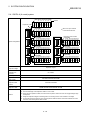
2.4.1 QCPU-A (A mode) system
Power supply
module
11F 13F 15F 17F 19F 1BF 1DF 1FF
O
IU
NT
21F 23F 25F 27F 29F 2BF 2DF 2FF
O
IU
NT
O
IU
NT
31F 33F 35F 37F 39F 3BF 3DF 3FF
Power supply
module
Power supply
module
300 320 340 360 380 3A0 3C0 3E0
51F 53F 55F 57F 59F 5BF 5DF 5FF
600 620 640 660 680 6A0 6C0 6E0
61F 63F 65F 67F 69F 6BF 6DF 6FF
Expansion base module
(QA1S68B)
56 57 58 59 60 61 62 63
Expansion
stage 7
400 420 440 460 480 4A0 4C0 4E0
O
IU
NT
41F 43F 45F 47F 49F 4BF 4DF 4FF
700 720 740 760 780 7A0 7C0 7E0
71F 73F 75F 77F 79F 7BF 7DF 7FF
Expansion stage 7
Max. number of I/O
modules to be
mounted
64 modules
Max. I/O points
4096
QA1S33B, QA1S35B, QA1S38B
Type name of
expansion base
module
QA1S65B, QA1S68B
Type name of
expansion cable
QC06B, QC12B, QC30B, QC50B, QC100B
Caution
500 520 540 560 580 5A0 5C0 5E0
Expansion base module
(QA1S68B)
48 49 50 51 52 53 54 55
Expansion
stage 6
Expansion base module
(QA1S68B)
32 33 34 35 36 37 38 39
Expansion
stage 4
Power supply
module
200 220 240 260 280 2A0 2C0 2E0
Expansion base module
(QA1S68B)
24 25 26 27 28 29 30 31
O
IU
NT
Expansion base module
(QA1S68B)
40 41 42 43 44 45 46 47
Expansion
stage 5
Power supply
module
Power supply
module
O
IU
NT
Expansion
stage 3
Type name of basic
base module
When a 32-point module
is mounted to each slot
100 120 140 160 180 1A0 1C0 1E0
Expansion base module
(QA1S68B)
16 17 18 19 20 21 22 23
Expansion
stage 2
Max. number of
expansion stages
Power supply
module
O
IU
NT
System configuration
Slot No.
Expansion base module
(QA1S68B)
8 9 10 11 12 13 14 15
Expansion
stage 1
Power supply
module
Expansion cable
O
U
T
Basic base module (QA1S38B)
0 1 2 3 4 5 6 7
C 00 20 40 60 80 A0 C0 E0
P
U 1F 3F 5F 7F 9F BF DF FF
(1) Up to seven expansion base modules can be added.
(2) Limit the total length of the expansion cable to 13.2m or less.
(3) When using the expansion cable, do not bind it with or place it close to the main circuit (high-voltage, largecurrent) lines.
(4) Assign the expansion stages in ascending order. Do not assign two or more modules to one stage.
(5) Connect the expansion cable from OUT of the expansion cable connector of the base module to IN of the
connector of the next expansion base module.
2 - 16
3 GENERAL SPECIFICATION
MELSEC-Q
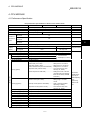
3. GENERAL SPECIFICATION
The general specification common to various modules is shown.
Table 3.1 General specification
Item
Specification
Operation ambient
temperature
0 to 55°C
Storage ambient
temperature
-20 to 75°C
3
Operation ambient
humidity
10 to 90%RH, no condensation
Storage ambient
humidity
10 to 90%RH, no condensation
When there is intermittent vibration
Vibration durability
Conforms to the JIS B
3501 and IEC 61131-2
Frequency
Acceleration
Amplitude
10 to 57Hz
——
0.075mm
(0.003 in.)
57 to 150Hz
9.8m/s2 {1G}
——
When there is continuous vibration
Frequency
Acceleration
Amplitude
10 to 57Hz
——
0.035mm
(0.001 in.)
57 to 150Hz
4.9m/s2 {0.5G}
10 times each in X, Y,
and Z directions
(80 minutes)
——
2
Shock durability
Conforms to the JIS B 3501 and IEC 61131-2 (147 m/s {15G}), 3 times each in 3 directions)
Operation ambiance
No corrosive gas
Operation height
2000m (6562 ft.) or less
Installation area
On the control panel
Over-voltage
category 1
Pollution level
Sweep count
II or less
2
2 or less
1: Indicates the location the device is connected, from the public cable network to the device structure wiring area.
Category II applies to the devices to which the power is supplied from a fixed equipment.
Surge withstand voltage for devices with up to 300V of rated voltage is 2500V.
2: This is an index which indicates the degree of conductive object generation in the environment where the device is used. Pollution level
2 is when only non-conductive pollution occurs. A temporary conductivity caused by condensation must be expected occasionally.
3: Do not use or store the PC in the environment where the pressure is higher than the atmospheric pressure at sea level. Otherwise,
malfunction may result. To use the PC in high-pressure environment, contact your nearest Mitsubishi representative.
3-1
3 GENERAL SPECIFICATION
MELSEC-Q
MEMO
3-2
4 CPU MODULE
MELSEC-Q
4. CPU MODULE
4.1 Performance Specification
The performance specifications of QCPU-A are shown below:
Item
Control method
Q02CPU-A
Q02HCPU-A
Q06HCPU-A
I/O control method
Refresh method (Partial refresh is available with a program.)
Program language
Dedicated language for sequence control (Ladder, list, SFC)
Processing speed (LD instruction)
Number of
instructions
(type)
Program
capacity
(steps)
79 (ns/step)
34 (ns/step)
Sequence
instructions
25
Basic and application
instructions
233
Dedicated
instructions
213
Memory capacity
4
144k bytes of program memory + 144k bytes of standard ROM
Main program
28k steps max.
30k steps max.
Sub program
None
30k steps max.
Set by parameters
I/O device points [X/Y] (points)
8192 (X/Y 0 to 1FFF) (Total points available on programs including remote I/O)
I/O points [X/Y] (points)
4096 (Points can be controlled on basic and expansion base modules)
Device points
Remark
Repeated operation of stored program
Internal relay [M] (points)
7144 (M0 to M999, M2048 to M8191)
Latch relay [L] (points)
1048 (L1000 to L2047)
Total of 8192 are
shared by M, L, and S.
Step relay [S] (points)
0 (None for the initial state)
Link relay [B] (points)
8192 (B0 to B1FFF)
Timer [T] (points)
2048 (Default: 256 points)
• 100ms timer (T0 to T199)...................................Setting time: 0.1 to 3276.7s
• 10ms timer (T200 to T255).................................Setting time: 0.01 to 327.67s
• 100ms retentive timer (None for initial state)......Setting time: 0.1 to 3276.7s
• Expansion timer (T256 to T2047).......................Count value is set by word
device (D, W, and R).
• 1ms timer (None for initial state) ........................Setting time: 0.001 to 32.767s
(The latter half of the retentive
timer can be used by ZHTIME
instruction.)
Counter [C] (points)
1024 (Default: 256 points)
• Normal counter (C0 to C255).............................Setting range: 1 to 32767
counts
• Interrupt counter (None for initial state)..............C224 to C255 are possible
depending on setting.
• Expansion counter (C256 to C1023)..................Count value is set by word
device (D, W, and R).
Data register [D] (points)
8192 (D0 to D8191)
Link register [W] (points)
8192 (W0 to W1FFF)
Annunciator [F] (points)
2048 (F0 to F2047)
File register [R] (points)
8192 (R0 to R8191)
Accumulator [A] (points)
2 (A0, A1)
Index register [V, Z] (points)
14 (V, V1 to V6, Z, Z1 to Z6)
Pointer [P] (points)
256 (P0 to P255)
Interrupt pointer [I] (points)
32 (I0 to I31)
Special relay [M] (points)
256 (M9000 to M9255)
Special register [D] (points)
256 (D9000 to D9255)
4-1
Note that the
available device
range may be
limited depending
on the
programming
software to be
used.
4 CPU MODULE
MELSEC-Q
(Performance specifications--continued)
Item
Q02CPU-A
Q02HCPU-A
Q06HCPU-A
Comment (point)
4032 max. (Can be set in units of 64 points)
Expansion comment (point)
3968 max. (Can be set in units of 64 points)
Output mode selection from STOP
to RUN
Selectable from re-outputting operation status before STOP (default) or starting
output after operation
Self-diagnostic function
Monitoring congestion of operations (watchdog timer: 200ms fixed),
Detection of abnormality in memory, CPU, I/O, or battery
Operation mode at error
Selectable from stop or continue
Latch (power failure compensation)
L1000 to L2047 (default) (Latch range can be set for L, B, T, C, D, and W.)
range
Remote RUN/PAUSE contact
One point set for each of RUN/PAUSE contact from X0 to X1FFF
Print title registration
Available (128 characters)
Keyword registration
Available
I/O assignment
Registration of occupied I/O points and module type name
Step operation
Execute/stop of sequence program operations
Constant scan (ms)
10 to 190 (Can be set in units of 10ms)
Clock function
0.60
Weight (kg)
0.20
Dimensions (mm)
0.64
0.64
0.20
0.20
98 (H) × 27.4 (W) × 89.3 (D)
4-2
Set by parameters
Set by parameters
Set at special
register D9020
Year, month, day, hour, minute, second, day of week (leap year automatic
detection)
Accuracy
– 3.18 to + 5.25s (TYP. + 2.12s)/d at 0 °C
– 3.93 to + 5.25s (TYP. + 1.90s)/d at 25 °C
– 14.69 to + 3.53s (TYP. – 3.67s)/d at 55 °C
Internal current consumption at
5VDC (A)
Remark
4 CPU MODULE
MELSEC-Q
4.1.1 Overview of operation processing
An overview of processing subsequent to starting power supply for QCPU-A to
execution of the sequence program is explained.
QCPU-A's processing may be categorized roughly into the following four kinds:
(1) Initial processing
This is a preprocess to execute sequence operations, and is performed only
once upon power-on or reset.
(a) Resets the I/O module and initialize it.
(b) Initializes the range of data memory for which latch is not set up (sets the bit
device to OFF and the word device to 0).
(c) Allocates I/O address of the I/O module automatically based on the I/O
module number or the position of installation on the extension base module.
(d) Executes the check items for power-on and reset among the PC CPU's selfdiagnosis items (Refer to 4.1.4).
(e) For the control station of the MELSECNET/10 or the master station of
MELSECNET (II)/B, sets the network/link parameter information to the
network/data-link module, and commences the network communication/data
link.
(2) Refresh processing of I/O module
Executes the refresh processing of I/O module. (Refer to the ACPU
Programming Manual (Fundamentals).)
(3) Operation processing of a sequence program
Executes a sequence program from step 0 to the END instruction written in the
PC CPU.
(4) END processing
This is a post-process to finish one cycle of operation processing of the sequence
program and to return the execution of the sequence program to the step 0.
(a) Performs self-diagnosis checks, such as fuse blown, I/O module verification,
and low battery. (Refer to Section 4.1.4.)
(b) Updates the current value of the timer, sets the contact ON/OFF, updates
the current value of the counter and sets the contact to ON. (Refer to the
ACPU Programming Manual (Fundamentals).)
(c) Performs data exchange between PC CPU and computer link module when
there is a data read or write request from a computer link module.
(A1SJ71UC24-R2, AJ71C24(S3), AD51(S3), etc.)
(d) Performs the refresh processing when there is a refresh request from the
network module or link module.
(e) When the trace point setting of sampling trace is by each scan (after the
execution of END instruction), stores the condition of the device for which it
is setup into the sampling trace area.
4-3
4 CPU MODULE
MELSEC-Q
Power-on
Initial processing
• Initialization of I/O module
• Initialization of data memory
• I/O address allocation of I/O module
• Self-diagnosis
• Set link parameter
Refresh processing of I/O module
(only when the I/O control is set up for the
refresh processing)
Operation processing of the sequence program
Step 0
to
Until the execution of END (FEND) instruction
END processing
• Self-diagnosis
• Updating current value of the timer and
counter, and setting the contacts ON/OFF
• Communication with computer link module
• Link refresh processing
• Sampling trace processing
• MELSECNET/MINI-S3 automatic refresh
processing
Figure 4.1 QCPU-A operation processing
4-4
4 CPU MODULE
MELSEC-Q
4.1.2 Operation processing of RUN, STOP, PAUSE, and STEP RUN
The PC CPU has four kinds of operation states: RUN state, STOP state, PAUSE state,
and step operation (STEP RUN) state.
Operation processing of PC CPU in each operation state is explained.
(1) RUN state operation processing
(a) The repetition of sequence program operation in the order from step 0
END (FEND) instruction step 0 is called the RUN state.
(b) When entering the RUN state, the output state escaped by STOP is output
depending on the output mode setting of parameter upon STOP RUN.
(c) Processing time from switching from STOP to RUN until the startup of
sequence program is usually one to three seconds, yet it may vary
depending on the system configuration.
(2) STOP state operation processing
(a) The termination of operation of the sequence program by the use of
RUN/STOP switch or the remote STOP is called the STOP state. (Refer to
Section 4.3.)
(b) When entering the STOP state, it escapes the output state and sets all
output points to OFF. Data memories except for output (Y) are retained.
(3) PAUSE state operation processing
(a) The termination of operation of sequence program while retaining output and
data memories is called the PAUSE state. (Refer to Section 4.3.)
(4) Step operation (STEP RUN) operation processing
(a) Step operation is an operation mode wherein operation processing of a
sequence program can be paused/resumed by each instruction from
peripheral device(s). (Refer to Section 4.3.)
(b) Since an operation processing is paused while retaining the output and data
memories, condition of the execution can be confirmed.
4-5
4 CPU MODULE
MELSEC-Q
(5) Operation processing of PC CPU when RUN/STOP switch is
operated
PC CPU operation
processing
RUN/STOP key
switch operation
RUN
STOP
STOP
RUN
Operation processing of
the sequence program
External output
Data memories
(Y, M, L, S, T, C, D)
Executes up to the END
instruction, then stops.
OS escapes the output
state, and sets all the
output points to OFF.
Maintains the condition
immediately prior to entering the
STOP state.
Starts.
Determined by the output
mode of the parameter
upon STOP
RUN.
Starts operations from the
condition immediately prior to
entering the STOP state.
Remark
POINTS
Whether in the RUN, STOP or PAUSE state, PC CPU is performing the following:
• Refresh processing of I/O module
• Data communication with computer link module
• Link refresh processing.
Thus, even in the STOP or PAUSE state, monitoring or testing I/O with peripheral
devices, reading or writing from a computer link module, and communication with
other stations by MELSECNET are possible.
4-6
4 CPU MODULE
MELSEC-Q
4.1.3 Operation processing upon momentary power failure
The PC CPU detects a momentary power failure when input power voltage supplied to
the power supply module becomes lower than the specified range.
When the PC CPU detects a momentary power failure, following operation processing
is performed.
(1) When a momentary power failure shorter than allowable period of momentary
power failure occurred:
(a) When a momentary power failure occurred, operation processing is
interrupted while the output state is retained.
(b) When the momentary power failure is reset, operation processing will be
continued.
(c) When a momentary power failure occurred and the operation was
interrupted, measurement of the watchdog timer (WDT) continues. For
instance, when the scan time is 190ms and a momentary power failure of
15ms occurs, it causes the watchdog timer error (200ms).
Momentary power failure occurred
END 0
Power supply restoration
END
END
A2USHCPU-S1 interrupts the operation.
Operation processing upon momentary power failure
(2) When a momentary power failure longer than the allowable period of momentary
power failure occurred:
The PC CPU performs the initial start. The operation processing is the same as
power-on or reset operation with the reset switch.
4-7
4 CPU MODULE
MELSEC-Q
4.1.4 Self-diagnosis
Self-diagnosis is a function with which A2USHCPU-S1 diagnoses itself for the
presence of any abnormalities.
(1) Upon turning on the power supply to PC or when an abnormality occurred while
the PC is running, the QCPU-A's self-diagnosis processing prevents malfunctions
of the PC and performs preventive maintenance by detecting the abnormality,
displaying an error display, halting the operation of QCPU-A, and so on.
(2) QCPU-A stores the error occurred last to a special register D9008 as an error
code, and stores further detailed error code to a special register D9091.
(3) Even with the power-off, the latest error information and 15 errors in the past are
stored by battery back-up. With the AnUCPU-supporting system FD, contents of
up to 16 errors can be confirmed from the peripheral devices. Display example
with SWcIVD-GPPA is shown below:
Displays the current error.
Displays the past error history.
(4) When the self-diagnosis detects an error, the module will be in one of the two
modes below:
• Mode wherein operation of the PC is stopped
• Mode wherein operation of the PC continues
In addition, there are errors with which the operation can be selected to stop or to
continue by the parameter setting.
(a) When a stop-operation mode error is detected by the self-diagnosis, the
operation is stopped at the time of detection of the error, and sets the all
outputs(Y) to OFF.
(b) When a continue-operation mode error is detected, the only part of the
program with the error is not executed while the all other part is executed.
Also, in case of I/O module verification error, the operation is continued
using the I/O address prior to the error.
When an error is detected, error generation and error contents are stored in the
special relay (M) and special register (D), so that in case of the continueoperation mode, the program can use the information to prevent any
malfunctions of the PC or devices.
Error descriptions detected by the self-diagnosis are shown in the next page.
REMARK
1 As to the LED display message, the order of priority of the LED display can be
changed if CPU is in the operation mode. (An error code is stored in the special
register).
2 When the special relay M9084 is ON, checking on blown fuse, I/O verification and
the battery are not performed (an error code is not stored in the special register).
3 The "Error display of peripheral device" in the table of self-diagnostic functions
are messages displayed by the PC diagnosis of peripheral devices.
4-8
4 CPU MODULE
MELSEC-Q
Self-diagnostic functions
Diagnosis item
Instruction code check
Diagnosis timing
CPU status
Status of
Error display of peripheral
Error code
"RUN" LED
devices
(D9008)
Upon execution of each instruction
INSTRCT. CODE ERR.
10
PARAMETER ERROR
11
MISSING END INS.
12
CAN’T EXECUTE (P)
13
CHK FORMAT ERR.
14
CAN’T EXECUTE (I)
15
RAM ERROR
20
OPE. CIRCUIT ERR.
21
WDT ERROR
22
END instruction not executed • Upon execution of END instruction
END NOT EXECUTE
24
Main CPU check
MAIN CPU DOWN
26
UNIT VERIFY ERR.
31
FUSE BREAK OFF.
32
CONTROL-BUS ERR.
40
SP. UNIT DOWN
41
LINK UNIT ERROR
42
I/O INT. ERROR
43
SP. UNIT LAY. ERR.
44
SP. UNIT ERROR
46
LINK PARA. ERROR
47
BATTERY ERROR
70
• Upon power-on and reset
Parameter setting check
• Upon switching from (STOP, PAUSE) to
(RUN, STEP-RUN)
• When M9056 or M9057 is ON
Memory error
No END instruction
• Upon switching from (STOP, PAUSE) to
(RUN, STEP-RUN)
• CJ
SCJ
JMP
FOR to NEXT
CALL(P)
Stop
CHG
Flickering
Unable to execute instruction Upon execution of each instruction
• Upon switching from (STOP, PAUSE) to
(RUN, STEP-RUN)
Format (CHK instruction)
Upon switching from (STOP, PAUSE) to
check
(RUN, STEP-RUN)
• When interruption occurred
Unable to execute instruction • Upon switching from (STOP, PAUSE) to
(RUN, STEP-RUN)
CPU error
RAM check
• When M9084 is ON during STOP
Operation circuit check
• Upon power-on and reset
Watchdog error supervision
• Upon execution of END instruction
I/O module verification
I/O error
• Upon power-on and reset
1 (Default: stop)
Fuse blown
1 (Default: operate)
Control bus check
Stop
Flickering
Always
Upon execution of END instruction
Stop
(However, not checked when M9084 or
Flickering
M9094 is ON.)
Upon execution of END instruction
(However, not checked when M9084 or
Operate
M9094 is ON.)
ON
Upon execution of FROM, TO instruction
Special function module error Upon execution of FROM, TO instruction
Special function module error
• Upon power-on and reset
Link module error
• Upon switching from (STOP, PAUSE) to
(RUN, STEP-RUN)
I/O interrupt error
Special function module
allocation error
Special function module error
1 (Default: stop)
Stop
When interruption occur
• Upon power-on and reset
• Upon switching from (STOP, PAUSE) to
(RUN, STEP-RUN)
Upon execution of FROM, TO instructions
Stop
Stop
• Upon power-on and reset
Link parameter error
Battery
Flickering
Operate
Always
Operate
(However, not checked when M9084 is ON.)
Stop
Operation check error
1 (Default: operate)
Flickering
• Upon switching from (STOP, PAUSE) to
(RUN, STEP-RUN)
Low battery
Flickering
ON
Flickering
Flickering
Upon execution of each instruction
Operate
1: Can be changed by the parameter settings of a peripheral device.
2: Displayed as a three-digit trouble code only for errors with the "CHK" instruction.
4-9
ON
OPERATION ERROR
2
[<CHK> ERROR
]
50
4 CPU MODULE
MELSEC-Q
4.1.5 Device list
Usage range of QCPU-A devices is shown below.
Device list
Device
X
Input
Y
Output
X
Input
Y
Output
Special relay
M
Range of usage (points)
Description of device
QCPU-A
Used to supply PC commands and data from peripheral devices such as
push buttons, select switches, limit switches and digital switches.
X, Y
0 to FFF (4096 points)
Used to output control results of a program to external devices such as
solenoids, magnetic switches, signal lights and digital display device.
• Possible to use in a program after the I/O points usage range per each
QCPU-A (described above) to a maximum of 8192 points (external output
is not allowed).
• Objective is to allocate for automatic I/O refresh of MELSECNET/MINI or
for remote I/O of MELSECNET/10.
X, Y
0 to 1FFF (8192 points)
M9000 to 9255 (256 points)
An auxiliary relay used inside a PC set in advance for a specialized use.
An auxiliary relay inside a PC which cannot output directly to external
devices.
Internal relay
M/L/S 0 to 8191 (8192 points)
8192 points as a total of M, L, S
An auxiliary relay inside a PC which cannot output directly to external
devices. Has the power failure compensation function.
L
Latch relay
S
Step relay
B
Link relay
B0 to B1FFF (8192 points)
An internal relay for data link and cannot output to external devices. The
range not setup by link parameters can be used as the internal relay.
F
Annunciator
F0 to F2047 (2048 points)
For fault detection. A fault detection program is created in advance, and if it
becomes ON during RUN, the number is stored in a special register D.
T0 to T2047 (2048 points)
(Register for storing setting value(s) is
required for T256 and later.)
Up-timing-timer. There are four kinds: 100ms timer, 10ms timer, 100ms
retentive timer and 1ms timer.
• 1ms timer: ZHTIME instruction enables 1ms timer using the latter half of the
retentive timer.
C0 to C1023 (1024 points)
(Interrupt counter C224 to C255 fixed.
Register for storing setting value(s) is
required for C256 and later.)
There are two kinds: up-timing counter used in PC programs and interrupt
counter which counts number of interrupts.
Used in the same manner as the internal relay (M). Used as a relays to
indicate the stage number of process stepping program, etc.
100ms timer
10ms timer
T
100ms retentive timer
1ms timer
Counter
C
Interrupt counter
D
Data register
Special register
D0 to D8191 (8192 points)
Memory used to store data inside PC.
D9000 to D9255 (256 points)
Data memory set up in advance for a specialized use.
Register for data link. The range not set by link parameters can be used as a
substitute for a data register.
W
Link register
W0 to W1FFF (8192 points)
R
File register
R0 to R8191 (8192 points)
For expanding the data register. User memory area is used for this.
A
Accumulator
A0, A1 (2 points)
Data register used to store a operation result of basic and application
instructions.
Z V Index register
V, V1 to V6, Z, Z1 to Z6 (14 points)
N
Nesting
N0 to N7 (8 levels)
P
Pointer
P0 to P255 (256 points)
Used for qualification of devices (X, Y, M, L, B, F, T, C, D, W, R, K, H, P)
Indicates nesting structure of master control.
Indicates destination of branch instructions (CJ, SCJ, CALL, JMP).
When an interruption factor is generated, it indicates the destination of the
interrupt program corresponding to the interruption factor.
I
Interrupt pointer
I0 to I31 (32 points)
K
Decimal constant
K-32768 to 32767 (16-bit instruction)
Used to set timer/counter, pointer number, interrupt pointer number, bit
K-2147483648 to 2147483647
device digits, and values for basic and application instructions.
(32-bit instruction)
H
Hexadecimal constant
H0 to FFFF (16-bit instruction)
H0 to FFFFFFFF (32-bit instruction)
Used to set values for basic and application instructions.
4 - 10
4 CPU MODULE
MELSEC-Q
4.2 Parameter Setting Ranges
A list of parameter setting ranges is provided below. User memory allocation contents,
I/O device allocation method and automatic refresh procedure for MELSECNET/MINIS3 are also explained.
4.2.1 List of parameter setting range
Parameters are used for allocating the user memory area inside the memory cassette,
setting various functions and device ranges.
A parameter is usually stored in the first 3k bytes of the user memory area.
Among the parameters, the network parameter for MELSECNET/10 is allocated and
stored after the main sequence program area. (Refer to Section 4.2.2 for details).
As shown in the list below, a default value is given to each parameter.
Even though a default value can be used, parameter value can be changed to a value
suitable for a particular application within a setting range by a peripheral device.
Setting
Item
Setting range
Default value
Q02CPU-A, Q02HCPU-A
Q06HCPU-A
6k steps
1 to 28k steps
(1k steps = in 2k-byte units)
1 to 30k steps
(1k steps = in 2k-byte units)
Contents of sub sequence program
——
——
1 to 30k steps
(1k steps units)
File register
——
Main sequence program capacity
0 to 8k points (1k points = in 2k-byte units)
Expansion file register
——
1 block = 16k bytes
(Block setting for from No.1 to No.8, from No.10 to the end of unused area in
the memory)
[Automatically setup in the unused area in the memory based on the file
register setting.]
Comment capacity
——
0 to 4032 points (64 point unit = in 1k byte units)
[When comment capacity is set up, 1k byte is added to the memory area.]
Expansion comment capacity
——
0 to 3968 points (64 point unit = in 1k byte units)
Status latch
——
Sampling trace
——
No parameter setting
Performed by setting up expansion file registers to store device and result
in each of status latch and sampling trace modes.
Refer to ACPU Programming Manual (Fundamentals).
Link relay (B)
Latch range setting
(power failure
compensation)
Timer (T)
Counter (C)
B0 to B1FFF (unit: 1 point)
T0 to T255 (unit: 1 point)
T256 to T2047 (unit: 1 point)
• Latch:
L1000 to L2047 only.
• None for others.
C0 to C255 (unit: 1 point)
C256 to C1023 (unit: 1 point)
Data register (D)
D0 to D8191 (unit: 1 point)
Link register (W)
W0 to W1FFF (unit: 1 point)
Optical link: maximum 64 stations
Coaxial link: maximum 32 stations
Number of link stations
Link range setting for
MELSECNET/10
I/O (X/Y)
X/Y0 to X/Y1FFF (unit: 16 points)
——
Link relay (B)
B0 to B1FFF (unit:16 points)
Link register (W)
Settings for
internal relay (M)
latch relay (L)
step relay (S)
T0 to T255
W0 to W1FFF (unit: 1 point)
M0 to M999
M2048 to M8191
L1000 to L2047
None for S
T0 to T199 (100ms)
T200 to T255 (10ms)
Timer settings
T256 to T2047
Interrupt counter setting
Counter setting
Points used
M/L/S 0 to 8191
(where M, L, S are continuous numbers)
• 256 points by 100ms, 10ms, and retentive timers (in 8 point units)
• Timers are continuously numbered.
——
• 1792 points by 100ms, 10ms, and retentive timers (in 16 point units)
• Timers are continuously numbered.
• Devices set: D, R, W (Setting required if 257 points or more.)
——
•· Sets whether to use interrupt counter (C224 to C225) or not.
256 points
(C0 to C255)
• 0 to 1024 points (in 16 point units)
• Devices set: D, R, W (Setting required if 257 points or more.)
4 - 11
4 CPU MODULE
MELSEC-Q
Setting
Item
Setting range
Default value
A2USHCPU-S1
I/O number allocation
——
• 0 to 64 points (in 16 point units)
............Input module/output module/special function module/empty slot
• Module model name registration is possible.
Remote RUN/PAUSE contact setting
——
• X0 to X1FFF
• RUN/PAUSE............. 1 point (Setting of PAUSE contact only is not allowed.)
Fuse blown
I/O verification error
Operation modes when
error occurred
Operation error
Special function module
check error
END batch processing
STOP
RUN display mode
Continue
Stop
Stop
No
Yes/No
Re-output operation
status prior to the stop
Output before STOP/after operation
Print title registration
——
Keyword registration
——
Number of link stations
Link range settings for
MELSECNET II
I/O (X/Y)
Link relay (B)
Stop/Continue
Continue
• 128 characters
• Up to 6 characters in hexadecimal (0 to 9, A to F)
• 0 to 64 station(s)
——
Link register (W)
X/Y0 to 3FF (in 16 point units)
• B0 to BFFF (in 16 point units)
• W0 to WFFF (in 1 point units)
Number of supported modules
: 0 to 8
Head I/O number 0 to FE0
(in 10H units)
Link range settings for MELSECNET/MINI,
MELSECNET/MINI-S3
——
Model name registration
: MINI, MINI-S3
Transmission/reception data
: X, M, L, B, T, C, D, W, R, none
(16 point units for bit devices)
Number of retries
: 0 to 32 times
FROM/TO response setting
: Link priority; CPU priority
Data clear setting at faulty station
: Retain/ Clear
Faulty station detection
: M, L, B, T, C, D, W, R, none
(16 point units for bit devices)
Error number
: T, C, D, W, R
Number of total remote stations
: 0 to 64 station(s)
Sending state setting during
communication error
4 - 12
: Test message, OFF data, retain
(sending data)
4 CPU MODULE
MELSEC-Q
4.2.2 Memory capacity setting (for main program, file register, comment, etc.)
QCPU-A has 144k bytes of user memory (RAM) as a standard. Parameters, T/C set
value main program, MELSECNET/10 network parameters, expansion comment, file
register, and comment data are stored in the user memory.
(1) Calculation of memory capacity
Determine the data types to be stored and the memory capacity with parameters
before using the user memory.
Calculate the memory capacity according to Table 4.1.
Table 4.1 Parameter setting and memory capacity
<With Q02CPU-A/Q02HCPU-A>
Item
Parameter
T/C set value
Main
program
Setting unit
—
—
Max. available memory
capacity (bytes)
Calculation of memory capacity (bytes)
3k
3k
1k
1k
Sequence program
1k step
Number of steps × 2
56k
Microcomputer program
1k byte
Preset number of bytes
54k
MELSECNET/10 parameter
—
See note 1.
16k
Expansion comment
1k byte
Preset number of bytes (1k byte = 64 points)
63k
Expansion file register (built-in)
8k points
Number of file register points × 2
128k
File register
1k point
Number of file register points × 2
16k
Comment
1k byte
Preset number of bytes (1k byte = 64 points)
64k
Expansion file register (memory card)
8k points
Number of file register points × 2
302k
Total:
60k
Change into
ROM
Available
Total:
144k
Remark
Dedicated to
SFC
1
Not available
1
<With Q06HCPU-A>
Item
Parameter
T/C set value
Main
program
—
—
Max. available memory
capacity (bytes)
Calculation of memory capacity (bytes)
3k
1k
1k step
Number of steps × 2
60k
Microcomputer program
1k byte
Preset number of bytes
58k
—
See note 1.
16k
T/C set value
1k byte
1k
1k
Sequence program
1k step
Number of steps × 2
58k
Microcomputer program
—
Change into
ROM
Remark
3k
1k
Sequence program
MELSECNET/10 parameter
Sub
program
Setting unit
5k
5k
Expansion comment
1k byte
Preset number of bytes (1k byte = 64 points)
63k
Expansion file register (built-in)
8k points
Number of file register points × 2
128k
File register
1k point
Number of file register points × 2
16k
Comment
1k byte
Preset number of bytes (1k byte = 64 points)
64k
Expansion file register (memory card)
8k points
Number of file register points × 2
302k
1: When the capacity of comment or expansion comment is specified, the system occupies 1k byte for each.
4 - 13
Total:
60k
Available
Dedicated to
SFC
Total:
144k
1
Not available
1
4 CPU MODULE
MELSEC-Q
The capacity for network parameters of MELSECNET/10 changes depending
on the contents set. The area for the network parameters shall be secured in
2k byte units based on the total of capacity for each setting. The memory
capacity of each network parameter is as follows:
Item
Memory capacity (bytes)
Internal data
30
Routing parameter
390
Transfer parameter between
data links
246
Common parameter
2164/module
Refresh parameter
1
92/module
Station specific parameter
1 It is 2722 bytes in case of a
remote master station.
1490/module
The network parameter capacity for MELSECNET/10 is determined from the
total of the memory capacities calculated from above.
Total of the capacity
Capacity for network parameter setting
30 to 2048 bytes
2k bytes
2049 to 4096 bytes
4k bytes
4097 to 6144 bytes
6k bytes
6145 to 8192 bytes
8k bytes
8193 to 10240 bytes
10k bytes
10241 to 12288 bytes
12k bytes
12289 to 14336 bytes
14k bytes
14337 to 16384 bytes
16k bytes
4 - 14
4 CPU MODULE
MELSEC-Q
(2) Order of user memory storage
During RAM operation
During boot operation from ROM
Parameter
T/C setting value (Main)
Main program
MELSECNET/10
network parameter
T/C setting value (Sub)
Memory capacity
of built-in ROM
(144k bytes max.)
Sub program
Unusable
Unused
Parameter
T/C setting value (Main)
Main program
Parameter
T/C setting value (Main)
Main program
MELSECNET/10
network parameter
MELSECNET/10
network parameter
T/C setting value (Sub)
T/C setting value (Sub)
Sub program
Memory capacity
of built-in RAM
(144k bytes max.)
Change into
ROM
1
Boot operation
from ROM
Sub program
Reserved for internal system
when sub program is used
Reserved for internal system
when sub program is used
Expansion comment
Expansion file register
File register
Comment
Expansion comment
Expansion file register
File register
Comment
Expansion file register
Memory capacity of
memory card RAM
(304k bytes max.)
Expansion file register
Expansion file register
1 Sub programs can be used only with Q06HCPU-A.
POINT
Note that the sequence program can use only up to 22k steps when the maximum
16k bytes are used for the MELSECNET/10 network parameters.
The memory area for the sequence program for QCPU-A is the same as that for
MELSECNET/10. Therefore, the remainder of subtracting the memory area used by
MELSECNET/10 network parameters from the maximum 30k steps can be used for
the memory area for the sequence program.
4 - 15
4 CPU MODULE
MELSEC-Q
4.2.3 Setting ranges of timer and counter
(1) Timer setting range
(a) Default values of the timer setting ranges are as follows:
Timer points
: 256 points
100ms timer
: T0 to T199
10ms timer
: T200 to T255
Retentive timer : none
(b) When timer-use points are set to 257 or more, the default values will be as
follows:
100ms timer
: T0 to T199
10ms timer
: T200 to T255
100ms timer
: T256 to T2047
(c) The timer type can be arbitrarily set in continuous numbers, with T0 to T255
in 8 point units, and T256 to T2047 in 16 point units.
By setting the timer points actually to be used, the timer processing time
subsequent to the END instruction can be shortened.
(d) Timer setting values are as follows:
T0 to T255
: constant or word device (D)
T256 to T2047 : word device (D, W, R)
(Allocate a storage device for the set value by setting
parameters.)
(e) Refer to section 4.4.2 for the usage of 1ms timer.
(2) Counter setting range
(a) Default values of counter setting ranges are as follows:
Counter points : 256 points
Normal counter : C0 to C255
Interrupt counter : none
(b) When the counter-use points are set to 256 points or more, the default
values will become as follows:
Normal counter : C0 to C255
Normal counter : C256 to C1024
(c) A counter which can be setup as an interrupt counter must only be in the
range C244 to C255, and any counters outside the range cannot be set up.
Set up is made with parameters in C224 to C255 in one point unit for the
interrupt counter. Any counter in the range C224 to C255 which is not set up
as an interrupt counter can be used as a normal counter.
4 - 16
4 CPU MODULE
MELSEC-Q
The interrupt counters in C224 to C255 are allocated to the interrupt pointers I0 toI31
as shown below, and count the occurrences of interrupts in I0 to I31.
Interrupt pointer Interrupt counter Interrupt pointer Interrupt counter Interrupt pointer Interrupt counter Interrupt pointer Interrupt counter
I0
C224
I8
C232
I1
I2
I16
C240
I24
C248
C225
I9
C233
I17
C241
I25
C249
C226
I10
C234
I18
C242
I26
C250
I3
C227
I11
C235
I19
C243
I27
C251
I4
C228
I12
C236
I20
C244
I28
C252
I5
C229
I13
C237
I21
C245
I29
C253
I6
C230
I14
C238
I22
C246
I30
C254
I7
C231
I15
C239
I23
C247
I31
C255
(d) Counter-use points can be set arbitrarily in 16 point units using continuous
numbers. By setting the counter which points to the number actually used,
the counter processing time subsequent to the END instruction can be
shortened.
(e) The counter set values are as follows:
C0 to C255
: constant or word device (D)
C256 to C1023 : word device (D, W, R)
(Allocate a storage device for the set value by setting
parameters.)
POINT
When timer-use points are set to 257 points or more or counter-use points are set to
256 points or more, the set value storage devices (D, W, R), specified at the time of
timer/counter use point setup, are automatically set in continuous numbers.
<Example>
When timer-use points are set to 512 points and set value storage device is set
to D1000, D equivalent to 256 points (D1000 to D1255) in T256 to T511 become
the devices, with continuous numbers, for the set values
4 - 17
4 CPU MODULE
MELSEC-Q
4.2.4 I/O devices
QCPU-A has 8192 I/O device points (X/Y0 to 1FFF) each for input (X) and output (Y).
There are actual I/O devices and remote I/O devices in this I/O range.
(1) Actual I/O device
This is the device range where an I/O module or special function module can be
installed to the basic base module/extension base module and controlled.
QCPU-A: 4096 points (X/Y0 to FFF)
(2) Remote I/O device
The remote I/O devices, following the actual I/O devices, can be used for the
following objectives:
(a) Allocate to a remote I/O station in the MELSECNET(II) data link system.
(b) Allocate to a remote I/O station in the MELSECNET/10 network system.
(c) Allocate to the reception data storage device or transmission data storage
device in the MELSECNET/MINI-S3's automatic refresh setting.
(d) Use as the substitute to an internal relay.
4.2.5 I/O allocation of special function modules
By registering the model name of the following special function modules upon the I/O
allocation from a peripheral device, dedicated commands for special function modules
can be used.
Model name of special function module
Model name of the module to be set
A1SJ71UC24-R2
A1SJ71C24
A1SJ71UC24-R4
A1SJ71UC24-PRF
A1SJ71PT32-S3
A1SPT32S3
4 - 18
4 CPU MODULE
MELSEC-Q
4.2.6 MELSECNET/MINI (S3) automatic refresh
By setting link information, I/O storage device, etc. of MELSECNET/MINI (S3) to
parameters, the module automatically communicates with the buffer memory area for
the batch refresh send/received data of A1SJ71PT32-S3/AJ71PT32-S3 master
module (abbreviated as the master module hereafter).
Sequence programs can be created using the I/O devices as they are allocated to
send/received by the automatic refresh setting. (The FROM/TO instructions are not
required.)
POINTS
(1) Since up to 8 master modules can be set for automatic refresh by the
parameter, automatic refresh is possible for up to 8 modules. If 9 or more
modules are desired, use the FROM/TO instruction in the sequence program
from the 9th module.
(2) Since automatic refresh is not possible with send/received data for separate
refresh I/O module and for remote terminal modules No.1 to No.14, use the
FROM/TO instruction for them. However, the remote terminal modules shown
below are subject of automatic refresh in a limited area:
• AJ35PTF-R2 RS-232C interface module
• AJ35PT-OPB-M1-S3 mount-type tool box
• AJ35PT-OPB-P1-S3 portable type tool box
(3) For the master modules set up for automatic refresh, CPU automatically turns
ON the link communication start signal Y(n+18) or Y(n+28), so it is not
necessary to turn it on from the sequence program.
(4) Automatic refresh of I/O data is performed by batch after the CPU executes the
END instruction. (Automatic refresh processing is performed when the CPU is
in the RUN/PAUSE/STEP RUN state).
(5) The master module may perform the processing while link communication start
signal Y(n+28) is OFF depending on the remote terminal module connected.
For instance, if the AJ35PTF-R2 RS-232C interface module is used without
protocol, it is necessary to write parameters to the parameter area (buffer
memory address 860 to 929) while the link communication start signal is OFF.
The link communication start signal becomes ON after CPU enters the RUN
state and one scan is performed, so write the parameters during the first 1
scan.
Link communication start signal
Y(n+28)
M9038
1 scan
CPU RUN
4 - 19
4 CPU MODULE
MELSEC-Q
(1) Parameter setting items, setting ranges and contents of automatic refresh, as well
as the buffer memory address of the master module which is used for exchanging
data with QCPU-A are shown below.
Set the parameters for the number of A1SJ71PT32-S3/AJ71PT32-S3 master
modules used.
I/O signal from
the master
module
Buffer memory
address of the
master module
——
——
Number of master
modules
1 to 8 module (s)
• Sets the total number of master modules to be used.
——
——
Head I/O No.
I/O points of CPU
• Sets the head I/O number where the master module is
installed.
——
——
Model classification of
MINI/MINI-S3
Item
Setting range
• MINI or MINI-S3
——
0
Total number of remote
I/O stations
——
110 to 141
Received data storage
device
•X
• M, L, B, T, C, D, W, R, none
(Bit device: multiples of 16)
——
10 to 41
Send data storage
device
•Y
• M, L, B, T, C, D, W, R, none
(Bit device: multiples of 16)
——
1
Number of retries
1
0 to 64 station (s)
0 to 32 times
Link priority, CPU priority
Priority selection of access
to the master module buffer
memory
Description
• MINI ........................... In I/O mode (occupies 32 points)
• MINI-S3 ..................... In expansion mode (occupies 48 points)
• Set only when MINI is set.
• In MINI-S3, the number of master module's initial ROMs
becomes valid, so the setting is not necessary .(When it is set,
the setting is ignored).
• Sets the devices to store received/send data for batch refresh.
• Specify the head number of a device.
• Occupies as the automatic refresh area from the head of the
device for the number of stations (8 points/station × 64 station =
512 points: bit device) 2
• Use of X/Y remote I/O range is recommended for devices.
• Sets the number of retries upon a communication error.
• Error is not output if communication is restored within the
number of retries set.
(1) Link priority........... Link access by MINI-S3 has the priority.
During the link access, FROM/TO is
caused to wait.
• Possible to read out the received data refreshed at the
same timing.
• Maximum (0.3ms + 0.2ms × number of separate refresh
stations) of FROM/TO instruction wait time may be
generated.
(2) CPU priority.......... Access by FROM/TO instruction of CPU
has the priority.
Even during the link access, it interrupts
and accesses.
• Depending on the timing, received data in the midst of I/O
refresh may be read.
• No wait time for FROM/TO instruction.
——
FROM/TO response
specification
——
Data clear specification
for communication faulty Retain, clear (received data)
station
• Retain ........................ Retains the received data for batch and
separate refresh.
• Clear .......................... Sets all points to OFF
——
100
to
103
195
M, L, B, T, C, D, W, R, none
(Bit device: multiples of 16)
• Sets the head device to store the faulty station detection data.
• MINI ........................... occupies 4 words; MINI-S3: occupies 5
words.
——
107
196
to
209
Y(n + 1A)
1
Y(n + 1B)
——
4
Error station detection
Error No.
Line error check setting
(Line error)
T, C, D, W, R
• Test message sending
• OFF data sending
• Transmit data immediately
before line error
• Sets the head device to store the error code on the occurrence
of an error.
• MINI ........................... occupies 1 word;
MINI-S3 ..................... occupies (1 + number of remote terminal
modules) words
• Sets data sending method for verification of error location on
the occurrence of a line error.
1 "n" is determined by the installation location of the master module.
2 When the total number of remote I/O station is odd, add 1 to the station number to obtain storage devices occupied.
4 - 20
4 CPU MODULE
MELSEC-Q
(2) Setting of send/received data storage device is explained using the system
example shown below.
<Example> When device X/Y400 and later are used as remote I/O stations:
A1SJ71PT32-S3
master module
AX41C Station 1 (number of stations occupied: 4 stations)
Y20 to Y3F
X0 to X1F
A1S
A1S
Y41
X41
AJ35TB1-16D
Station 5
(number of stations
occupied: 2 stations)
Q06H
CPU
-A
A1S61P
MELSECNET/MINI
• Head I/O number : 40
• Model classification
(MINI/MINI-S3)
: MINI
• Total number of
remote I/O stations : 11 stations
AJ35TJ-8R
Station 11
(number of stations occupied: 1 station)
AX40Y50C
Station 7
(number of stations occupied: 4 stations)
Sample parameter setting of the GPP function software package for the above
system configuration is shown below:
Number of modules [1] (0-8)
I/O No.
Model
Number of stations
0040
MINI
11
Received
X0400
Send
Y0400
Retries
5
Response
CPU
Data clear
Clear
Detection
Error number
Error
Retain
The storage devices for send/received data for the present system example are
as follows:
(a) Storage device for received data
Master module
QCPU-A
b8 b7
Address b15
b0
110
Station 2
Station 1
111
Station 4
Station 3
112
Station 6
Station 5
113
Station 8
Station 7
114
Station 10
Station 9
115
Station 11
Input area
X40F
X41F
X42F
X43F
X44F
X45F
to
to
to
to
to
to
X408
X418
X428
X438
X448
X458
X407
X417
X427
X437
X447
X457
to
to
to
to
to
to
Used by the system
4 - 21
X400
X410
X420
X430
X440
X450
4 CPU MODULE
MELSEC-Q
1
Set the device number (X400) for b0 of the station 1 as a received data
storage device.
2
The received data storage device occupies from X400 to X45F.
For the present system example, the total number of stations is odd, so
it is occupied for one extra station.
3
The device numbers of input modules connected are as follows:
Stations 1 to 4
AX41C X400 to X41F
Stations 5 to 6
AJ35TB-16D X420 to X42F
Stations 7 to 8
AX40Y50C X430 to X43F
With respect to X440 to X45F, they are simultaneously refreshed, and
set to OFF at any time.
Do not use X440 to X45F in the sequence program.
(b) Send data storage device
Master module
QCPU-A
b8 b7
b0
Address b15
Station 2
Station 1
10
Station 4
Station 3
11
Station 6
Station 5
12
Station 8
Station 7
13
Station 9
Station 10
14
Station 11
15
Output area
Y40F
Y41F
Y42F
Y43F
Y44F
Y45F
to
to
to
to
to
to
Y408
Y418
Y428
Y438
Y448
Y458
Y407
Y417
Y427
Y437
Y447
Y457
to
to
to
to
to
to
Y400
Y410
Y420
Y430
Y440
Y450
Used by the system
1
Set the device number (Y400) for b0 of the station 1 as a send data
storage device.
2
The send data storage device occupies from Y400 to Y45F.
For the present system example, the total number of the stations is odd,
so it occupies for one extra station.
3
The device numbers of output modules connected are as follows:
Stations 9 to 10
AX40Y50C Y400 to Y44F
Station 11
AJ35TJ-8R Y450 to Y457
With respect to Y400 to Y43F and Y458 to Y44F, they are
simultaneously refreshed, but are not output.
POINTS
(1) Set the send and received data storage devices so that device numbers do not
overlap.
When the received data storage device is set to B0 in the system configuration
example, it occupies B0 to B5F as the device range.
Set the send data storage device to B60 or later. When the send data storage
device is set to B60, the device range will be B60 to BBF.
(2) If a bit device is specified as the send/received data storage device, the device
number set must be a multiple of 16.
<Example>
X0, X10 .............X100,...........
M0, M16,...........M256, ..........
B0, B10, ............B100,...........
(3) Device range used is (8 points) × (Number of stations).
When the number of stations is an odd number, extra 8 points are necessary.
4 - 22
4 CPU MODULE
MELSEC-Q
4.3 Function List
Various functions of QCPU-A are explained below.
Function (application)
Description
Outline of setting and operation
Constant scan
Program execution at constant
intervals
Simplified positioning
• Makes the processing time for a single scan in the sequence
program constant.
• Set the processing time within the range of 10ms to 190ms in
10ms units.
• Write to the special register D9020 by the sequence
program
Latch (power failure compensation)
Continuous control by data
retention on power failure
• On power supply failure of 20ms or longer/CPU reset/power
supply off, data contents of the devices for which latches have
been set up in advance are retained.
• Latch-enabled devices: L, B, T, C, D, W
• Latched data are stored in the CPU and backed up by the
batteries of the memory cassette.
• Latch device and latch range are specified by
setting of peripheral device parameters.
Automatic refresh of
MELSECNET/MINI-S3
Simplification of sequence
program
• Performs I/O automatic refresh communication with send/received
data area for the batch refresh of AJ71PT32-S3/A1SJ71PT32-S3
• Performed by setting the automatic refresh
up to a maximum of 8 modules.
• Automatic refresh is executed in a batch after END processing.
parameter of a peripheral device. (Refer to Section
4.2.6.)
• The FROM/TO instruction for I/O in the sequence program
becomes unnecessary. Programming is possible with I/O devices
which are allocated directly.
Remote RUN/STOP
When performing RUN/STOP
control from outside the PC
• When performed with the external input (X),
parameter is set with a peripheral device.
• When PC CPU is in RUN (the key switch is set to RUN), performs
• When performed by a peripheral device, perform in
the PC's STOP/RUN from outside the PC (external input,
the PC test mode.
peripheral devices, computer) with a remote control.
• When performed via a computer link module,
perform using dedicated commands.
PAUSE
• When stopping operation of
CPU while retaining the output
(Y)
• When performing
RUN/PAUSE control from
outside the PC
• Stops the operation processing of PC CPU while retaining the
• Performed by a peripheral device in the PC test
ON/OFF of all the outputs (Y).
mode.
When the operation is stopped by STOP, all the outputs (Y)
• When performed with the external input (X),
are set to OFF.
perform parameter setting with a peripheral device,
• When PC CPU is in RUN (the key switch is set to RUN), performs
set the special relay M9040 to ON with the
the PC's PAUSE/RUN from outside the PC (external input,
sequence program, then perform.
peripheral devices) with a remote control.
Status latch
Carries out operation check
and failure factor check on each
device when debugging
or a failure condition is met.
• With respect to devices to which status latches are set up, when
status latch conditions are met, data contents of the devices are
• Using a peripheral device, set the device to which
stored in the extension file register for status latch area in the
the status latch is performed and the extension file
memory cassette. (Stored data are cleared by the latch clear
register where the data will be stored.
operation).
• Using a peripheral device, monitor the status latch
• The criteria for satisfied condition can be selected from when the
data.
SLT instruction is executed by the sequence program or when the
device value matches the set condition.
Sampling trace
Performs chronological
checking on the behavior
status of devices set up when
debugging or an abnormal
behavior is detected.
• With respect to a device to which the sampling trace is set up, the
• Using a peripheral device, set up the device to
operating condition of the device is sampled for the number of
perform sampling trace, trace point, and the
times specified per scan or per period, and the results are stored
expansion file register where number of times and
in the expansion file register for sampling trace (the data stored
the data will be stored.
are cleared by the latch clear operation).
• Using a peripheral device, monitor the result of
• Sampling trace is performed by the STRA instruction in the
sampling trace.
sequence program.
4 - 23
4 CPU MODULE
Function (application)
MELSEC-Q
Description
Outline of setting and operation
Step operation
Checks conditions of program
execution and behavior during
debugging, etc.
• Executes operations of the sequence program with one of the
conditions (1) to (5) given below, then stops.
(1) Executes by each instruction.
(2) Executes by each circuit block.
(3) Executes by the step intervals and the number of loops.
(4) Executes by the number of loops and break point.
(5) Executes when the device values concur.
• Chooses a stepping operation condition for the
peripheral device and executes.
Clock 1
Program control by clock
data/external display of clock
data
• Executes operation of the clock built into the CPU module.
• Clock data: year, month, day , hour, minute, second, day of the
week
• When the clock data read request (M9028) is ON, the clock data
are read out and stored in D9025 to D9028 by the clock element
after the END processing of the sequence operation.
• The clock element is backed up by the battery of the memory
cassette.
• Sets data for D9025 to D9028 by a peripheral
device, turns M9025 ON, then write to the clock
element.
• Writes to the clock element by the sequence
program. (Dedicated instructions can be used.)
Priority order of LED display
Changing priority order of
display/canceling display
• Writes data as to whether change order/cancel
• Changes the display order of or cancels the ERROR LED
display to D9038 or D9039 by the sequence
displays other than the error display by an operation stop and the
program.
default display items on the LED display device.
Self-diagnostic function
Detection of abnormal CPU
behavior
Preventive maintenance
• When an error that matches one of the self-diagnosis items is
generated at the CPU power on or during RUN, it prevents
malfunctions by stopping the CPU operation and displaying the
error.
• Stores the error code corresponding to the self-diagnosis item.
• There is a self-diagnosis item with which an
operation can be continued or stopped by the
setting of peripheral device parameters.
• Reads out error code with a peripheral device and
performs troubleshooting. (Refer to Section 4.1.4.)
Boot operation from standard ROM
Retains program at power OFF.
• Boot operation is possible by booting parameters and sequence
programs from the standard ROM to the standard RAM at startup.
• Sets DIP switch 3 to ON and turn ON or reset the
module. (BOOT LED turns ON.)
(Refer to section 4.3.3.)
1ms timer
Setting of 1ms timer
• In addition to the conventional high-speed timer (10ms) and lowspeed timer (100ms), a 1ms timer can be used.
• Adds "ZHTIME", a 1ms timer setting instruction, in a
program. (Refer to section 4.3.3.)
Sequence accumulation time
processing
Avoids influence of processing
FROM/TO instruction on
special function modules.
• Uses M9077 and D9077 as interlock to execute
• When the faster scan time affects the processing of FROM/TO
instruction or the scan time for special function modules, a special FROM/TO instruction in the unit of several ms.
(Refer to section 4.3.3.)
relay and special register are used to avoid such problems.
1 Regarding the treatment of the year 2000
The year 2000 is a leap year, and the next day of the 28th of February is February 29th.
With A2USHCPU-S1, the clock element built in the CPU module automatically corrects the date, so resetting the date to the clock element by the user is
not necessary.
If the clock data is read out from PC CPU and used for sequence control, the year data is the last two digits of the year. Thus, depending on the use of the
data, correction of the year data by the sequence program will become necessary.
Year 1999
"99"
Year 2000
"00"
If a decision is made on the last two digits of year data solely by a magnitude comparison command alone, the years 2000 and after will be judged to be
older than the year 1999.
4 - 24
4 CPU MODULE
MELSEC-Q
4.4 Functions added to QCPU-A
This section describes the new functions added to QCPU-A (A mode) which are not
available with A2USHCPU-S1.
4.4.1 Boot operation from standard ROM
Boot operation is enabled by booting parameters and sequence programs from the
standard ROM to the standard RAM at startup.
The boot operation from the standard ROM allows the retention of sequence programs
without using batteries even when the power is OFF.
The procedure of the boot operation from the standard ROM is described below:
(1) Operation methods
There are two methods to operate QCUP-A: The RAM operation uses the
standard RAM. The boot operation uses the standard ROM and boots
parameters and sequence programs from the standard ROM to the standard
RAM at startup.
QCPU-A allows you to check the current operation method by the settings of DIP
switch 3 and M9073. The following table shows the setting combination.
Status of M9073
ON
OFF
Status of DIP
switch 3
OFF
RAM operation
D9076: 0
M9076: OFF
RAM operation
D9076: 0
M9076: OFF
ON
RAM operation
D9076: 1
M9076: OFF
Boot operation from standard ROM
D9076: 2
M9076: ON
(Writing available with standard
ROM)
(a) Procedure to boot program (at startup only)
Boot a program from the standard ROM to the standard RAM.
1
Set DIP switch 3 to ON.
2
Turn ON or reset the module. (BOOT LED turns ON.)
(b) Procedure to write to standard ROM
Write a program from standard RAM to standard ROM.
1
Set DIP switch 3 to ON and turn M9073 ON. "2" is stored in D9076
and "1" is stored in M9076.
2
Start writing to the standard ROM. (M9074 is turned ON.)
3
When writing to the standard ROM is successfully completed, M9075
turns ON and D9075 stores the result of writing to the standard ROM
operation. (M9074 is turned ON.)
4
To repeat writing, turn M9074 OFF once and turn it ON again.
(When M9074 is turned OFF, M9075 is turned OFF.)
4 - 25
4 CPU MODULE
MELSEC-Q
(c) Detailed contents of D9075
The following table shows the detailed contents of special register D9075.
Value in D9075
Description
00H
Successful completion
F1H
RAM operation (Set DIP switch 3 to ON.)
F2H
M9073 is OFF. (Turn M9073 ON.)
F3H
Failed erasing the standard ROM
F4H
Failed writing to the standard ROM
FEH
Checking erasing the standard ROM
FFH
Writing to the standard ROM
(d) Details of special relays during boot operation
The following table shows the details of special relays during boot operation
Special relay
Name
Description
Details
M9073
Setting of writing to standard ROM
OFF: Disables writing to ROM
ON : Enables writing to ROM
To enable writing to the standard ROM, turn this
relay ON.
(DIP switch 3 should be set to ON.)
M9074
Request for writing to standard
ROM
OFF
ROM
When this relay is turned from OFF to ON, writing to
the standard ROM is started.
M9075
Successful completion of writing to
standard ROM
Turns ON when writing to the standard ROM is
OFF: Failed writing to ROM
ON : Successfully completed to successfully completed.
(The writing status is stored in D9075.)
writing to ROM
M9076
Status of writing to standard ROM
OFF: Writing to ROM disabled
ON : Writing to ROM enabled
ON: Starts writing to
Turns ON when writing to standard ROM is enabled.
(Turns ON when DIP switch 3 and M9075 are ON.)
POINTS
(1) Like the conventional A2USHCPU-S1, the available capacity of the standard
memory (file register, comment, etc.) does not increase even if the ROM
operation is selected.
(2) During the ROM operation, the program stored in the standard RAM is
overwritten with the program stored in the ROM.
Before starting the boot operation, be sure to back up the program with
peripheral devices.
(3) The capacity of the standard ROM is 144k bytes, the same as that of the
standard RAM. Writing is disabled when the total capacity of parameters and
programs exceeds 144k bytes. (Comments and file registers cannot be written
to the standard ROM.)
(4) When the attempt is made to boot parameters and programs from the
standard ROM to the standard RAM but the standard ROM does not contain
proper programs, a parameter error occurs. (Detailed error code: 114)
(5) Writing during RUN is performed to the standard RAM. When the boot
operation is used, be sure to write the program which is written to the standard
RAM during RUN also to the standard ROM.
4 - 26
4 CPU MODULE
MELSEC-Q
(2) Configuration of user memory area
The following figure shows the configuration of the user memory area during the
RAM operation and during the boot operation from the standard ROM.
Configuration example of user memory area (in case of Q06HCPU)
(b) During boot operation from ROM
(a) During RAM operation
Parameter
T/C setting value
Main program
MELSECNET/10
network parameter
T/C setting value
Memory capacity
of ROM
(144k bytes max.)
Sub program 1
Unusable
Unused
3k bytes
1k byte
30k steps max.
(60k bytes)
1k byte
30k steps max.
(60k bytes)
Memory capacity
of RAM
(144k bytes max.)
Parameter
T/C setting value
Main program
Change into
ROM
Parameter
T/C setting value
Main program
MELSECNET/10
network parameter
MELSECNET/10
network parameter
T/C setting value
T/C setting value
Sub program1
Sub program1
Reserved for storing P/I addresses
Reserved for storing operation results
Reserved for storing P/I addresses
Reserved for storing operation results
Expansion comment
Expansion file register
File register
Comment
Expansion comment
Expansion file register
File register
Comment
Expansion file register
Expansion file register
4 - 27
Boot operation
from ROM
4 CPU MODULE
MELSEC-Q
4.4.2 Usage of 1ms timer
With QCPU-A, a 1ms timer can be used in addition to the conventional high-speed
timer (10ms) and low-speed timer (100ms).
(1) Usage
Adding "ZHTIME", a 1ms timer setting instruction, in a program enables the use
of a 1ms timer. (The ZHTIME instruction must be written in the main program.)
The ZHTIME instruction is checked at startup and at switching from STOP to
RUN. When this instruction exists in the main program, the 1ms timer can be
used.
If the ZHTIME instruction does not exist in the main program, only the
100ms/10ms timer can be used, and the 1ms timer is disabled.
The number of occupied points is set as the total points of the 100ms timer,
10ms timer, retentive timer, and 1ms timer.
The area for the 1ms timer is reserved following that of the retentive timer.
Consequently, the constant specified with the ZHTIME instruction is designated
as the device number following that of the retentive timer specified by parameters
in the unit of 16 points.
(2) Use example of the ZHTIME instruction
The use example of the ZHTIME instruction is shown below.
Example) When the timer in 1ms is set at T208 and later:
M9037
LEDB
ZHTIME
SUB
K208
Designate the device
in the unit of 16 points.
LEDR
(3) Accuracy of 1ms timer
The following table shows the accuracy of 1ms timer.
Timer type
1ms
Scan time
Accuracy
T < 1ms
+ 2 scan time to - 1 ms
T 1ms
+ 2 scan time to - 1 scan time
4 - 28
4 CPU MODULE
MELSEC-Q
(4) Setting example
The followings are the setting examples with and without the expansion timer:
(a) Setting example when the expansion timer is not used
Number of occupied points: 256 (100ms timer: 120 points, 10ms timer: 40
points, retentive timer: 48 points, 1ms timer: 48 points)
M9037
LEDB
ZHTIME
SUB
K208
LEDR
According to the setting above, the devices designated for the 100ms timer
are T0 to T119, for the 10ms timer are T120 to T159, for the retentive timer
are T160 to T207, and for the 1ms timer are T208 to T255.
4 - 29
4 CPU MODULE
MELSEC-Q
(b) Setting example when the expansion timer is used
Number of occupied points: 512 (100ms timer: 240 points, 10ms timer: 80
points, retentive timer: 80 points, 1ms timer: 112 points)
M9037
LEDB
ZHTIME
SUB
K400
LEDR
According to the setting above, the devices designated for the 100ms timer
are T0 to T239, for the 10ms timer are T240 to T319, for the retentive timer
are T320 to T399, and for the 1ms timer are T400 to T511.
POINTS
Note the following points to use the ZHTIME instruction.
(1) The ZHTIME instruction must be written in the main program.
(2) The ZHTIME instruction must be designated in the unit of 16 points.
(3) The number of occupied points designated in the timer setting by parameters
should include those for the 1ms timer.
(4) When the range for the timer setting by parameters is between T256 and
2047, the initial device number to be used should be set at the item of the
retentive timer between T256 and 2047.
The 100ms timer should be used as the retentive timer.
4 - 30
4 CPU MODULE
MELSEC-Q
4.4.3 Sequence accumulation time processing
With QCPU-A, as the scan time becomes faster, it may affect the processing of
FROM/TO instruction or the scan time for special function modules.
Such problems can be avoided by using the following special relay and special register
as interlock and executing FROM/TO instruction in the unit of several ms.
(1) Procedure
Number
Name
Description
Details
Set by
(Set at)
System
User
M9077
Sequence
ON : Time elapsed
accumulation time
OFF: Time not elapsed
measurement
• Compares the setting value at D9077 with the time elapsed from
the start of measurement (accumulation time) at every scan.
Then, performs the following operations:
Setting value Accumulation time
: Turns M9077 ON and clears the accumulation time.
Setting value > Accumulation time
: Turns M9077 from ON to OFF and clears the accumulation
time. When M9077 is already OFF, clears the accumulation
time.
When 1 to 255 is designated at D9077, M9077 is turned ON at
the first scan.
When a value other than 1 to 255 is designated at D9077, the
value in D9077 is reset to 0 and M9077 is always turned OFF.
D9077
Sequence
accumulation time Accumulation time setting
measurement
• Stores the accumulation time used by M9077.
Setting range: 1 to 255ms (Default: 5ms)
When a value other than 1 to 255 ms is designated, the value in
D9077 is reset to 0.
The operation of M9077 above is shown below:
(a) When 5ms is set at D9077 (The scan time is shorter than the setting value.)
1st scan
2nd scan
3rd scan
4th scan
5th scan
6th scan
4ms
3ms
7ms
5ms
4ms
5ms
M9077
Turns OFF because
accumulation time
is 4 ms.
Internal timer 0
4
0
Remains OFF because Turns ON because
accumulation time
accumulation time
is 3 ms.
is 10 ms.
3
10
0
Remains ON because Turns OFF because Turns ON because
accumulation time
accumulation time accumulation time
is 5 ms.
is 4 ms.
is 10 ms.
5
0
4
0
5
0
In the diagram above, M9077 is ON at the first scan so that the instruction is
executed. At the beginning of the second scan, the accumulation time does
not reach 5 ms. As a result, M9077 turns OFF, the accumulation time is
cleared, and the instruction is not executed. At the end of the second scan,
the accumulation time does not reach 5 ms, so that M9077 remains OFF
and the instruction is not executed. At the end of the third scan, the
accumulation time exceeds 5 ms. As a result, M9077 turns ON, the
accumulation time is cleared, and the instruction is executed at the forth
scan. At the end of the forth scan, the accumulation time exceeds 5 ms, so
that M9077 remains ON and the instruction is executed at the fifth scan. At
the end of the fifth scan, the accumulation time does not reach 5 ms so that
M9077 turns OFF. The accumulation time is cleared and the instruction is
not executed at the sixth scan.
4 - 31
4 CPU MODULE
MELSEC-Q
(b) When 5ms is set at D9077 (The scan time is longer than the setting value.)
1st scan
2nd scan
3rd scan
10ms
10ms
10ms
4th scan
10ms
M9077
Remains ON because
accumulation time
is 10 ms.
10
0
Internal timer 0
Remains ON because
accumulation time
is 10 ms.
10
0
Remains ON because
accumulation time
is 10 ms.
10
0
Remains ON because
accumulation time
is 10 ms.
10
0
In the diagram above, M9077 is always ON when the scan time is always
longer than the setting value (D9077).
The following program example executes the FROM/TO instruction in the
unit of several seconds using M9077 and D9077 above.
M9036
MOV
K5
D9077
M9077
FROM
H0
H1000
D0
K10
Sets the accumulation time as 5ms.
Executes the FROM instruction
only when the interval between
sequence scans becomes 5ms
or more. (Executes it at first scan.)
1: The setting range for the sequence accumulation time is 1 to 255ms (default:
5ms).
The value in D9077 should be in the range between 1 and 255. Otherwise,
the value in D9077 is reset to 0 and M9077 is always OFF.
2: If the instruction signal for the FROM/TO instruction is a pulse signal, the
interlock with M9077 may mask the FROM/TO instruction, disabling
execution. In such a case, keep the instruction signal once in the other
device.
3: If execution order is set to the FROM/TO instruction, adding M9077 may
change the execution order. In such a case, do not use M9077, and make
the execution interval of the FROM/TO instruction longer with a user
program.
4 - 32
4 CPU MODULE
MELSEC-Q
4.5 Precautions When Handling the Module
Precautions when handling the CPU module, from unpacking to installation, are
described below.
CAUTION
• Use the PC in the environment given in the general specifications of this manual.
Using the PC outside the range of the general specifications may result in electric
shock, fire or malfunctioning, or may damage or degrade the module.
• Insert the tabs at the bottom of the module into the mounting holes in the base
module before installing the module, and tighten the module fixed screws with the
specified torque. Improper installation may result in malfunctioning, breakdowns or
cause the module to fall out.
• Tighten the screws with the specified torque. If the screws are loose, it may result in
short circuits, malfunctioning or cause the module to fall out.
If the screws are tightened too much, it may damage the screws and the module
may result in short circuits, malfunctioning or cause the module to fall out.
• Make sure the memory card is installed securely in its installation connector. After
installation, confirm that it is securely tightened. Defective contact may cause
malfunctioning.
• Do not touch the conducted part of the module or electric parts. This may cause
malfunctioning or breakdowns.
(1) Module case, memory card, terminal block connector and pin connector are made
of resin. Do not fall them or apply a strong shock to them.
(2) Do not remove the printed board of each module from its case. Doing so may
cause breakdown.
(3) While wiring, be careful not to let foreign matter such as wire chips get inside the
module. If it does get in, remove it immediately.
(4) When using the expansion base module (QA1S6 B), be sure to install the power
supply module. Although the module may work without the power supply module
under light load, stable operation is not guaranteed.
(5) Perform tightening of module installation screws and terminal screws on the CPU
module, power supply module, I/O module and special function module with the
following torque:
Screw location
Tightening torque range
QCPU-A module fastening screw (M3 × 12)
36 to 48N • cm
AnS series, Module installation screws (M4 screw)
78 to 118N • cm
Terminal screws for power supply module and I/O module (M3.5 screw)
59 to 88N • cm
(6) When using the expansion cable, do not bind it with or place it close to the main
circuit (high-voltage, large-current) lines.
4 - 33
4 CPU MODULE
MELSEC-Q
4.6 Part Names and Settings of the CPU Module
4.6.1 Part names and settings
This section explains the names and settings of the CPU module.
With front cover open
Front face
1)
Q02HCPU
2)
MODE
RUN
ERR.
USER
BAT.
BOOT
MODE
RUN
ERR.
USER
BAT.
BOOT
9)
3)
4)
ON SW
5)
6)
7)
1
2
3
4
5
10)
13)
STOP RUN
14)
RESET L CLR
15)
PULL
USB
11)
1
PULL
12)
RS-232
8)
When opening the cover,
put your finger here.
Side face
16)
17)
19)
18)
1: Not provided for Q02CPU-A.
4 - 34
4 CPU MODULE
No.
MELSEC-Q
Name
Applications
Hook used to fix the module to the base unit.
1) Module fixing hook
(Single-motion installation)
Indicates the mode of the CPU.
2) Mode judging LED
Lit (orange)
: A mode
Lit (green)
: Q mode
Indicates the operating status of the CPU.
3) RUN LED
ON
: During operation in "RUN" or "STEP RUN" mode.
OFF
: During a stop in "STOP", "PAUSE" or "STEP RUN" mode or detection of
error whose occurrence stops operation.
ON
: Detection of self-diagnostic error which will not stop operation, except
battery error.
4) ERROR LED
(When operation continued at error detection is set in the parameter)
OFF
: Normal
Flicker : Detection of error whose occurrence stops operation.
5) USER LED
ON
: Annunciator ON
OFF
: Normal
Flicker : Execution of latch clear
ON
6) BAT. ALARM LED
: Occurrence of battery error due to reduction in battery voltages of CPU
and memory card.
7) BOOT LED
OFF
: Normal
ON
: Execution of boot operation
OFF
: Non-execution of boot operation
8) Module loading lever
Used to load the module to the base unit.
9) Memory card EJECT button
Used to eject the memory card from the CPU.
10) Memory card loading connector Connector used to load the memory card to the CPU.
11) USB connector
2
12) RS-232 connector
Unusable (Usable for Q mode only)
2
Connector for connection with a peripheral device.
Can be connected by RS-232C connection cable (QC30R2).
2: When normally connecting a cable to the USB connector or RS-232 connector, clamp the cable to prevent it from
coming off due to the dangling, moving or carelessly pulling of the cable.
4 - 35
4 CPU MODULE
No.
MELSEC-Q
Name
Applications
Used to set the items for operation of the CPU.
For OS boot designation and RAM/ROM operation, refer to the QCPU-A (A mode)
additional manual.
DIP switches
SW1: Must not be used. Normally OFF.
ON SW
1
13)
(Shipped in OFF position)
SW2: Must not be used. Normally OFF.
(Shipped in OFF position)
2
SW3: RAM/boot operation designation.
3
(Shipped in OFF position)
4
5
ON
: Boot operation
OFF
: RAM operation
SW4: Must not be used. Normally OFF.
(Shipped in OFF position)
SW5: Must not be used. Normally OFF.
(Shipped in OFF position)
14) RUN/STOP switch
RUN
: Executes sequence program operation.
STOP
: Stops sequence program operation.
RESET : Used to perform hardware reset, operation fault rest, operation
initialization, etc.
If this switch is left in the RESET position, the whole system will be reset
15) RESET/L.CLR switch
and the system will not operate properly. After performing reset, always
return this switch to the neutral position.
L.CLR : Used to turn "OFF" or "zero" all data in the parameter-set latch area.
Used to clear the sampling trace and status latch registration.
16) Module fixing screw hole
17) Module fixing hook
Hole for the screw used to fix to the base unit.
(M3 × 12 screw)
Hook used to fix to the base unit.
For connection of battery lead wires.
18) Battery connector pin
(When shipped from the factory, the lead wires are disconnected from the connector
to prevent the battery from consuming.)
19) Battery
Backup battery for use of standard RAM and power failure compensation function.
4 - 36
4 CPU MODULE
MELSEC-Q
4.6.2 Switch operation after program write
(1) When writing a program during STOP of CPU
Write a program during STOP of the CPU in the following procedure.
1) RUN/STOP switch: STOP
RUN LED: OFF................. CPU STOP status Program write
2) RUN/STOP switch: RUN
RUN LED: Flicker ............. CPU STOP status
3) RUN/STOP switch: STOP RUN
RUN LED: ON .................. CPU RUN status
(2) When you wrote a program during RUN
When you wrote a program during RUN of the CPU, do not operate the switch.
POINT
The CPU will not go into the RUN status if you move the key switch to RUN
immediately after writing a program in the STOP status of the CPU. After writing a
program, perform rest with the RESET/L.CLR switch, then move the RUN/STOP
switch to RUN to set the CPU to the RUN status.
4.6.3 Latch clear operation
To perform latch clear, operate the RESET/L.CLR switch in the following procedure.
1) RESET/L.CLR switch: Move the switch to L.CLR several times until the
USER LED flickers.
(Do not move it to RESET.)
USER LED: Flicker.............. Ready for latch clear.
2) RESET/L.CLR switch: Move the switch to L.CLR once more.
USER LED: OFF ................. Latch clear complete.
POINT
Latch clear can be set to be valid or invalid device-by-device by making device
setting in the parameter mode.
4.6.4 Installation and removal of memory card during power-on
Do not install or remove the memory card while power is on.
POINT
If you installed or removed the memory card while power was on, the data within
the memory card may be corrupted.
4 - 37
4 CPU MODULE
MELSEC-Q
MEMO
4 - 38
5 POWER SUPPLY MODULE
MELSEC-Q
5. POWER SUPPLY MODULE
5.1 Specifications
The specification of the power supply module are shown below.
Table 5.1 Power supply module specifications
Item
Performance specifications
A1S61PN
Base installation location
A1S62PN
A1S63P
Power supply module installation slot
24VDC -+30%
100 to 240VAC -+10%
15%
35%
Input power supply
(85 to 264VAC)
Input frequency
——
105VA
41W
Maximum input apparent power
Inrush current
(15.6 to 31.2VDC)
50/60Hz±5%
20A 8ms or less
Output current
rating
81A 1ms or less
5VDC
5A
3A
5A
24VDC
——
0.6A
——
5.5A or above
3.3A or above
5.5A or above
——
0.66A or above
——
Overcurrent
protection
1 5VDC
Overvoltage
protection
2 5VDC
24VDC
5.5 to 6.5V
24VDC
——
Efficiency
65% or above
Allowable period of momentary
power failure 3
20ms or less
1ms or less
Primary-5VDC Between input: batch LG and output: batch FG,
Dielectric
withstand voltage Primary-24VDC 2830VAC rms/3 cycle (altitude 2,000m (6562 ft)
Insulation resistance
Noise durability
Between input: batch LG and
output: batch FG, 500VAC
(5M or above by insulation resistance tester)
500VAC
——
5M or above by insulation resistance tester
By noise simulator with noise voltage of 1,500Vp-p,
By noise simulator with noise voltage of 500Vp-p,
noise width of 1µs, and noise frequency of 25 to
noise width of 1µs, and noise frequency of 25 to
60Hz.
60Hz.
Noise voltage IEC801-4, 2kV
Operation display
LED display (ON for 5VDC output)
Terminal screw size
M3.5 × 7
Applicable wire size
0.75 to 2mm2
Applicable crimp-style terminal
RAV1.25-3.5, RAV2-3.5
Applicable tightening torque
59 to 88N•cm
External dimensions (mm (inch))
Weight (kg)
130 (5.12) × 55 (2.17) × 93.6 (3.69)
0.60
0.60
5-1
0.50
5
5 POWER SUPPLY MODULE
MELSEC-Q
POINTS
1: Overcurrent protection
If the current above the spec value flows in the 5VDC or 24VDC circuit,
overcurrent protection device interrupts the circuit and stops the system
operation. LED display of the power supply module is either OFF or ON dimly,
due to the voltage drop.
When this device is once activated, remove factors of insufficient current
capacity and short-circuit before starting up the system. When the current
restores to the normal value, the system performs the initial start.
2: Overvoltage protection
When 5.5V to 6.5V of overvoltage is applied to the 5VDC circuit, overvoltage
protection device interrupts the circuit and stops the system operation.
LED display of the power supply module turns OFF. To restart the system, turn
OFF the input power supply, then back to ON. The system performs the initial
start.
If the system does not start and LED display remains OFF, the power supply
module needs to be replaced
3: Allowable period of momentary power failure
This indicates allowable period of momentary power failure of PC CPU, and is
determined by the power supply module used. Allowable period of momentary
power failure for a system using A1S63P is the period it takes until the 24VDC
falls below the specified voltage (15.6VDC) after cutting off the primary power
supply of the stabilized power supply, which supplies the 24VDC power to
A1S63P.
5-2
5 POWER SUPPLY MODULE
MELSEC-Q
5.2 Name and Setting of Each Part
5.2.1 Name of each part of different power supply modules is provided below.
(1) A1S61PN
(2) A1S62PN
9)
9)
MELSECA1S61PN
MELSECA1S62PN
1)
POWER
1)
POWER
MITSUBISHI
MITSUBISHI
8)
INPUT
100-240VAC
105VA
50 / 60Hz
8)
OUTPUT
5VDC 5A
INPUT
100-240VAC
105VA
50 / 60Hz
OUTPUT
5VDC 3A
24VDC 0.6A
NC
+24V
2)
NC
24G
3)
(FG)
3)
(FG)
4)
(LG)
4)
(LG)
INPUT
5)
INPUT
5)
100-240VAC
100-240VAC
A1S61PN
A1S62PN
7)
7)
9)
MELSECA1S63P
1)
POWER
MITSUBISHI
8)
INPUT
DC15.6
31.2V
OUTPUT
DC 5V 5A
NC
NC
3)
FG
NC
NC
4)
LG
+24V
INPUT
24G
6)
7)
(3) A1S63P
No.
Name
Usage
1)
2)
3)
4)
"POWER" LED
24VDC/24GDC terminals
FG terminals
LG terminals
5)
Power supply input terminals
6)
7)
8)
9)
Power supply input terminals
Terminal screw
Terminal cover
Module fastening screw
An LED which turns ON when 5VDC power is supplied
Supplies power to the output module that requires 24VDC power supply (through external wiring).
A ground terminal connected to the shielded pattern on the PC board
A ground for power supply filter. With A1S61PN or A1S62PN, the potential is half the input voltage.
A power supply input terminal used to be connected with AC power supply between 100VAC and
200VAC
A power supply input terminal used to be connected with 24VDC power supply
M3.5 × 7
A protective cover for the terminal block
A screw that fastens the module to the base module (M4 screw, tightening torque: 59 to 88 N•cm)
POINTS
(1) Do not use the terminal marked NC in the terminal block.
(2) Be sure to ground LG and FG terminals with Type D (Type 3) or higher
grounding.
5-3
5 POWER SUPPLY MODULE
MELSEC-Q
MEMO
5-4
6 BASE MODULE AND EXPANSION CABLE
MELSEC-Q
6. BASE MODULE AND EXPANSION CABLE
This chapter describes the specifications of the base module (basic base module and
expansion base module) and expansion cable used in the system, as well as the use
standard of the expansion base module.
6.1 Specifications of Base Modules
(1) Specifications of basic base module
Type name
Item
Allowable number of I/O
module to be mounted
QA1S33B
QA1S35B
QA1S38B
3
5
8
Expansion
Available
Applicable module
QCPU-A/AnS series module
Current consumption (A)
0.107
0.117 (0.086)
Mounting hole size
M5 screw hole or
Dimensions
255 (W) × 130 (H) × 51.2 (D)
Weight (kg)
0.118 (0.086)
5.5 hole (for M5 screw)
325 (W) × 130 (H) × 51.2 (D)
430 (W) × 130 (H) × 51.2 (D)
0.75
Accessory
1.00
Installation screw: M5 × 25 (4), DIN rail mounting adapter
: The parenthesized values are for those products not provided for CE mark.
(2) Specifications of expansion base module
Type name
Item
Allowable number of I/O
module to be mounted
6
QA1S65B
QA1S68B
5
8
Expansion
Available
Applicable module
Current consumption (A)
AnS series module
0.117 (0.088)
Mounting hole size
0.118 (0.090)
M5 screw hole or
5.5 hole (for M5 screw)
Dimensions
315 (W) × 130 (H) × 51.2 (D)
420 (W) × 130 (H) × 51.2 (D)
Weight (kg)
0.75
1.00
Accessory
Installation screw: M5 × 25 (4), DIN rail mounting adapter
: The parenthesized values are for those products not provided for CE mark.
6-1
6 BASE MODULE AND EXPANSION CABLE
MELSEC-Q
6.2 Specifications of Expansion Cable
The specifications of the expansion cable used for the QCPU system are shown
below:
Type name
Item
Cable length (m)
Usage
Weight (kg)
QC06B
QC12B
QC30B
QC50B
QC100B
0.6
1.2
3.0
5.0
10.0
Connection between the basic base module and the expansion base module, or between the expansion
base modules
0.16
0.22
0.40
0.60
1.11
POINT
When using two or more expansion cables, limit the total length of the cable to
13.2m or less.
6-2
6 BASE MODULE AND EXPANSION CABLE
MELSEC-Q
6.3 Part Names of Base Module
This section describes the part names of the base module.
(1) Basic base module (QA1S33B, QA1S35B, QA1S38B)
4)
5)
OUT
5V
SG
CPU
FG
2)
POWER
I/O0
I/O1
I/O2
I/O3
I/O4
I/O5
I/O6
I/O7
QA1S38B
1)
3)
6)
No.
Name
Usage
1)
Expansion cable connector
A connector for signal transmission with the expansion base module. Connects the expansion
cable.
2)
Base cover
A protective cover of expansion cable connector. Before connecting a cable, it is necessary to
remove the section enclosed with a groove below OUT of the base cover with nippers or other
tools.
3)
Module connector
A connector connects the power supply module, CPU module, I/O module, or special function
module.
Attach the supplied connector cover to the reserved connectors with no module to prevent the
ingress of dust.
4)
A screw hole used for fastening a module to the base.
Screw hole for fastening modules Screw size for CPU module
: M3 × 12
Screw size for modules other than CPU module : M4 × 12
5)
Base module installation hole
A hole used for installing the base module to a panel such as a control panel. (M5 screw)
6)
DIN rail hook
A hook used for DIN rail mounting.
6-3
6 BASE MODULE AND EXPANSION CABLE
MELSEC-Q
(2) Expansion base module (QA1S65B, QA1S68B)
QA1S65B,QA1S68B
5)
6)
3)
IN
OUT
5V
SG
2)
FG
POWER
I/O0
I/O1
I/O2
I/O3
I/O4
I/O5
I/O6
I/O7
QA1S68B
1)
4)
No.
Name
7)
Usage
A connector for signal transmission with the basic base module or the other expansion base
module. Connects the expansion cable.
Do not remove the supplied connector cover.
1)
Expansion cable connector
2)
Base cover
A protective cover of expansion cable connector.
Stage number setting switch
A switch used to set the stage numbers of the expansion base modules.
Refer to section 6.4 for the setting procedure.
Module connector
A connector connects the power supply module, I/O module, or special function module.
Attach the supplied connector cover (or a blank cover module for QA1S6 B base module) on the
reserved connectors with no module to prevent the ingress of dust.
Blank cover unit for QA1S65B/QA1S68B: A1SG60
3)
4)
5)
Screw hole for fastening modules A screw hole used for fastening a module to the base. Screw size: M4 × 12
6)
Base module installation hole
A hole used for mounting the base module to a panel such as a control panel. (M5 screw)
7)
DIN rail hook
A hook used for DIN rail mounting.
6-4
6 BASE MODULE AND EXPANSION CABLE
MELSEC-Q
6.4 Setting the Expansion Stage Numbers
This section describes how to set the expansion stage number to use the expansion
base module.
Loosen the upper and lower
screws of the base cover.
Remove the base cover from the
expansion base module.
IN
Select the stage number from
1 to 7 in the connector (PIN1)
located between the expansion
cable connectors IN and OUT.
Then, insert a connector pin into
the appropriate stage number.
OUT
PIN1
1
2
3
4
5
6
7
Reattach the base cover to the
expansion base module and
fasten the screws.
(Tightening torque: 36 to 48N cm)
Completion
Stage number setting for expansion base modules
Stage number setting
1th stage
2th stage
3th stage
4th stage
5th stage
6th stage
7th stage
Position of
connector pin in
stage number
setting connector
POINTS
(1) To set the stage number setting connector, select the appropriate number from
1 through 7 in ascending order according to the number of expansion modules.
(2) Do not assign the same stage number to several modules or skip any stage
numbers. Otherwise, improper I/O operation results.
6-5
6 BASE MODULE AND EXPANSION CABLE
MEMO
6-6
MELSEC-Q
7 MEMORY CARD AND BATTERY
MELSEC-Q
7. MEMORY CARD AND BATTERY
This chapter explains the specifications and handling of the memory card and the
battery that can be used with QCPU-A.
7.1 Specifications of Memory Card
The memory card that can be used with QCPU-A conforms to the specifications of
JEIDA/PCMCIA small PC card.
QCPU-A can contain only one memory card.
(1) SRAM card
Type name
Q2MEM-1MBS
Item
Memory capacity after format
1011.5kbyte
Number of storable files
256
Number of insertions
5000 times max.
Dimensions
42.8 (W) × 45 (H) × 3.3 (D)
Weight (kg)
15
7.2 Specifications of Battery (for CPU module and memory card)
(1) Battery for CPU module
Type name
Q6BAT
Item
Type
Manganese dioxide lithium primary battery
Initial voltage (V)
3.0
Nominal current (mA/h)
1800
Expected life (Storage life)
10 years (at ordinary temperature)
Total length of power failure
Refer to section 7.7.1.
Retains the contents of program memory and standard RAM during
power failure.
Usage
(2) Battery for memory card
Type name
Item
Type
Q2MEM-BAT
Graphite fluoride lithium primary battery
Initial voltage (V)
3.0
Nominal current (mA/h)
48
Expected life (Storage life)
4 years (at ordinary temperature)
Total length of power failure
Refer to section 7.7.1.
Usage
Retains the contents of SRAM card during power failure.
7-1
7
7 MEMORY CARD AND BATTERY
MELSEC-Q
7.3 Handling the memory card
(1) Inserting a battery into the SRAM card
A battery is packaged with your SRAM card in order to retain memory during
power failure. Be sure to insert the battery into the SRAM card before using the
card.
POINT
Although a battery is inserted into the CPU module, the memory of the SRAM card
will not be backed up until a battery is inserted into the card.
Also, if a battery is inserted into the SRAM card but not into the CPU module, the
memory of the standard RAM of the CPU module will not be backed up.
7.4 Part names of memory card
This section describes the part names of the memory card.
1)
4)
LOCK
RELEASE direction
direction
3)
Write-protection
ON direction
2)
No.
Name
Usage
1)
Connector section
A connector section connected to the CPU module.
2)
Battery holder
Holds the lithium battery for data backup of the SRAM memory.
3)
Battery holder lock switch
A switch to fasten the battery holder to the memory card. It is fastened at LOCK position (writeprotect switch side).
LOCK: The holder is fastened. RELEASE: The holder is released.
4)
Write-protect switch
Sets the write protection of the memory. The factory setting is OFF.
ON : Disables writing data.
OFF : Enables writing data.
: The battery holder lock switch automatically returns from the RELEASE to LOCK position when the battery holder is removed.
7-2
7 MEMORY CARD AND BATTERY
MELSEC-Q
7.5 Insertion/removal of the memory card
Be sure to turn OFF the CPU module before inserting/removing the memory card
into/from the CPU module.
(1) Inserting the memory card
To insert the memory card into the CPU module, check the right orientation and
fully insert the memory card into the connector so that the remaining section of
the memory card is as high as the memory card EJECT button.
Memory card EJECT button
Memory card
CPU module
"Precautions"
side
Direction of
insertion
(2) Removing the memory card
To remove the memory card from the CPU module, press the memory card
EJECT button to push out the memory card.
Memory card EJECT button
Press
CPU module
Memory card
Direction of removal
POINT
Note that the data in the memory card may be corrupted if the proper procedure
above is not followed.
7-3
7 MEMORY CARD AND BATTERY
MELSEC-Q
7.6 Inserting batteries (for CPU module and memory card)
(1) The battery for the CPU module is shipped with its connector removed. Connect
the connector according to the procedure below:
Open the cover at the bottom
of the CPU module.
Side of CPU
Check if the battery is properly
inserted.
Front side
Check the orientation of the connector
attached to the housing and insert it
into the connector pin of the battery.
Completion
Connector
Bottom side
Battery
(2) The battery for the SRAM card is shipped separately from the battery holder. To
use the SRAM memory, set the battery holder according to the procedure below:
Remove the battery holder from
the SRAM card.
"+" mark
Place the battery in the holder
with its "+" side up.
Insert the battery holder with
the battery into the memory card
as far as it will go.
Battery holder lock switch
Check that the battery holder lock
switch is at the LOCK position.
Completion
LOCK position
The battery holder lock switch automatically returns to
LOCK position when the battery holder is removed.
With this status, insert the battery holder as far as it will go.
7-4
7 MEMORY CARD AND BATTERY
MELSEC-Q
7.7 Battery replacement
Special relay M9006 or M9007 turns ON at the voltage drop of the backup battery for
program and memory retention during power failure. The contents of the program and
memory are not cleared immediately after these special relays turns ON, but they may
be lost if you overlook these relays being turned ON.
Be sure to replace the battery before the total of power failure time after M9006 or
M9007 turns ON reaches the specified retention time.
POINT
M9006 gives an alarm about low voltage of the battery. Data is retained within the
specified time after M9006 turns ON; however, the battery should be replaced as
soon as possible.
M9048 turns ON at the voltage drop of the battery for the standard RAM or SRAM
card.
POINTS
The following table shows the relationship between the batteries in the CPU module
and SRAM card and the memory backup.
The following two are the key factors:
1
The battery in the CPU module does not back up the memory of the SRAM
card.
2
The battery in the SRAM card does not back up the memory of the CPU
module.
AC power supply to
CPU module
Battery in CPU
module
Battery in SRAM
card
Memory of CPU
module
Memory of SRAM
card
ON
ON
OFF
ON
ON
OFF
OFF
ON
ON
OFF
OFF
ON
OFF
OFF
: Backup available
: Backup not available
The reference battery service life and replacement procedures are described on the
subsequent pages.
7-5
7 MEMORY CARD AND BATTERY
MELSEC-Q
7.7.1 Battery service life
(1) Service life of the battery for the CPU module
The service life of the battery for the CPU module varies depending on the type
of the CPU.
The battery service life for each CPU is shown below:
Battery service life
Battery service life (Total power failure time) [Hrs.]
Guaranteed value
(minimum)
Actual value (typical)
Q02CPU-A
50625
79024
120
Q02HCPU-A, Q06HCPU-A
2140
16200
120
CPU type name
After M9006 turns ON
The actual value indicates the average service life; the guaranteed value indicates the shortest service
life.
(2) Service life of the battery for the SRAM card
The battery service life for the SRAM card is shown below:
Battery service life
Battery type name
Q02MEM-BAT
Battery service life (Total power failure time) [Hrs.]
Guaranteed value
(minimum)
Actual value (typical)
After M9006 turns ON
690
6336
8
11784
13872
8
At storage
During operation
The actual value indicates the average service life; the guaranteed value indicates the shortest service
life.
The life at storage indicates the time while the SRAM card is inserted into the PC CPU and the CPU is
turned OFF, or while the SRAM card is removed from the CPU.
The life during operation is the time while the SRAM card is inserted into the PC CPU and the CPU is
turned ON.
POINT
Note that the SRAM card in the CPU consumes the battery voltage even when the
CPU is turned ON.
For guidance, the service life of the battery for the SRAM card is guaranteed as
approximately 1.1 years on the condition that it is inserted into the CPU and the CPU is
turned on one hour a day.
The service life of Q6BAT is approximately 10 years when it is not connected with the
CPU module, or when it is connected with the CPU and is always live. Q6BAT should
be immediately replaced when the total of power failure time exceeds the guaranteed
life in the table above and M9006 turns ON.
Even when the total of power failure time is less than the guaranteed life in the table
above, it is recommended to replace the battery within the following years in terms of
preventive maintenance.
1
Ten years for Q02CPU-A
2
Four to five years for Q02HCPU-A or Q06HCPU-A
The battery for the SRAM card should be replaced immediately after M9048 turns ON.
7-6
7 MEMORY CARD AND BATTERY
MELSEC-Q
7.7.2 Battery replacement procedure
(1) Replacing the battery for the CPU module
When the service life of the battery for the CPU module expires, replace the
battery in the following procedure:
Turn ON the CPU module 10 minutes or more before removing the battery.
The capacitor backs up the memory for several minutes even when the battery is
removed. When the battery is removed for the following guaranteed time, the
contents of the memory may be lost. Replace the battery as quickly as possible.
You can also replace the battery while the CPU is turned ON. In such a case, the
contents of the memory are retained with the power supply voltage from the
power supply module.
Backup time by capacitor
Backup time by capacitor [min.]
3
Battery replacement
Turn OFF the PC.
Side of CPU
Open the cover of QCPU-A.
Front side
Remove the current battery
from the holder.
Insert the new battery in the proper
orientation and connect the lead
connector to the connector.
Close the cover of QCPU-A.
Monitor M9006
to check whether it
turns ON or OFF.
OFF
ON
The battery for the memory card is defective.
Completion
Refer to section 7.7.2 (2).
7-7
7 MEMORY CARD AND BATTERY
MELSEC-Q
(2) Replacing the battery for SRAM card
When the service life of the battery for the SRAM card expires, replace the
battery in the following procedure. The memory card does not have the
secondary battery to back up the memory. Therefore, to retain data, the battery
should be replaced while the SRAM card is inserted into the CPU module that is
turned ON.
POINTS
Note the following precautions before replacing the battery.
1
Back up the data with GPPW before replacing the battery.
2
The battery is replaced while the CPU module is turned ON. Be extremely
careful with surroundings to avoid an electric shock.
3
When removing/inserting the battery holder from/into the SRAM card, be careful
not to drop the battery from the battery holder.
Battery replacement
Open the front cover of QCPU-A
while it is turned ON.
Lower the battery holder lock switch
with a flat-blade driver or other tools.
Direction
of removal
Draw out the battery holder from
the SRAM card.
Remove the current battery from
the battery holder.
Insert the new battery in the proper
orientation into the battery holder.
Fully insert the battery holder into
the SRAM card and check that the
battery holder lock switch is set to
LOCK position.
Monitor M9048
to check whether it turns
ON or OFF.
"+" mark
OFF
ON
Monitor M9006
to check whether it turns
ON or OFF.
OFF
ON
The battery for the CPU module is defective.
Completion
Refer to section 7.7.2 (1).
7-8
8 EMC DIRECTIVE AND LOW-VOLTAGE INSTRUCTION
MELSEC-Q
8. EMC DIRECTIVE AND LOW-VOLTAGE INSTRUCTION
For the products sold in the European countries, the conformance to the EMC
Directive, which is one of the European Directives, has been legally obliged to be
certified since 1996. Also, the conformance to the Low Voltage Directive, which is one
of the European Directives, has been legally obliged to be certified since 1997.
The manufacturers who recognize their products to conform to the EMC Directive and
Low Voltage Directive require to declare that their products conform to these Directives
and put "CE mark" on their products.
8.1 Requirements for conformance to EMC Directive
The EMC Directive specifies both "emission (electromagnetic interference) which
means that an intense electromagnetic wave is not emitted to the outside" and
"immunity (electromagnetic sensitivity) which means that products are not affected by
the electromagnetic wave from the outside". The applicable products are requested to
meet these requirements. The sections 8.1.1 through 8.1.6 summarize the precautions
on conformance to the EMC Directive of the machinery constructed using the
MELSEC-Q series sequencers.
The detail of these precautions has been prepared based on the requirements for the
control and the applicable standards owned by us and with our best efforts. However,
we will not assure that the overall machinery manufactured according to that detail
conform to the above-mentioned directives. The method of conformance to the EMC
directive and the judgment on whether or not the machinery conforms to the EMC
Directive must be determined finally by the manufacturer of the machinery.
8.1.1 Standards on EMC Directive
The standards on the EMC Directive are listed below.
Specification
EN50081-2 :
1995
Test item
EN55011
Radiation noise
2
EN55011
Conductive noise
EN61000-4-2
Electrostatic immunity 2
EN61131-2 :
1996
EN61000-4-4
First transient burst noise 2
EN61000-4-3
Radiation field AM
modulation 2
EN61000-4-12
Damped oscillation wave
immunity
Test detail
Radio waves emitted from the
product are measured.
Standard value
30 M-230 M Hz QP
: 30 dBµ V/m
(30 m in measurement range) 1
230 M-1000 M Hz QP : 37 dBµ V/m
(30 m in measurement range)
150 k-500 k Hz QP : 79 dB, Mean : 66 dB 1
500 k-30 M Hz QP
: 73 dB, Mean : 60 dB
Noise emitted from the product to
the power line is measured.
Immunity test in which static
electricity is applied to the cabinet of 15 k V Aerial discharge
the equipment.
Power line
:2kV
Immunity test in which burst noise is
Digital I/O (24 V or higher) : 1 k V
applied to the power line and signal
(Digital I/O (24 V or less)) > 250 V
lines.
(Analog I/O, signal lines) > 250 V
Immunity test in which field is
irradiated to the product.
10 V/m, 26-1000 M Hz,
80%AM modulation@1 k Hz
Immunity test in which damped
Power line
:1kV
oscillatory wave is superimposed on
Digital I/O (24 V or higher) : 1 k V
the power line.
( 1) QP : Quasi-peak value, Mean : Average value
( 2) The PC is an open type device (device installed to another device) and must be installed in a conductive control box.
The tests for the corresponding items were performed while the PC was installed to inside the control box.
8-1
8
8 EMC DIRECTIVE AND LOW-VOLTAGE INSTRUCTION
MELSEC-Q
8.1.2 Installation instructions for EMC
(1) Control cabinet
When constructing a control cabinet where the PC system will be installed, the
following instructions must be followed.
(a) Use a conductive control cabinet.
(b) When attaching the control cabinet's top plate or base plate, mask painting
and weld so that good surface contact can be made between the cabinet
and plate.
(c) To ensure good electrical contact with the control cabinet, mask the paint on
the installation bolts of the inner plate in the control cabinet so that contact
between surfaces can be ensured over the widest possible area.
(d) Earth the control cabinet with a thick wire so that a low impedance
connection to ground can be ensured even at high frequencies. (22 mm2
wire or thicker is recommended.)
(e) Holes made in the control cabinet must be 10 cm (3.94 in.) diameter or less.
If the holes are 10 cm (3.94 in.) or larger, radio frequency noise may be
emitted.
In addition, because radio waves leak through a clearance between the
control panel door and the main unit, reduce the clearance as much as
practicable.
The leakage of radio waves can be suppressed by the direct application of
the EMI gasket listed below on the paint surface.
Our tests have been carried out on the panel having the damping
characteristics of 37 db max. and 30 db mean (measured by 3 m method
with 30 to 300 M Hz).
(2) Connection of power and earth wires
Earthing and power supply wires for the PC system must be connected as
described below.
(a) Provide an earthing point near the power supply module. Earth the power
supply's LG and FG terminals (LG : Line Ground, FG : Frame Ground) with
the thickest and shortest wire possible. (The wire length must be 30 cm
(11.18 in.) or shorter.) The LG and FG terminals function is to pass the noise
generated in the PC system to the ground, so an impedance that is as low
as possible must be ensured. As the wires are used to relieve the noise, the
wire itself carries a large noise content and thus short wiring means that the
wire is prevented from acting as an antenna.
(b) The earth wire led from the earthing point must be twisted with the power
supply wires. By twisting with the earthing wire, noise flowing from the power
supply wires can be relieved to the earthing. However, if a filter is installed
on the power supply wires, the wires and the earthing wire may not need to
be twisted.
8-2
8 EMC DIRECTIVE AND LOW-VOLTAGE INSTRUCTION
MELSEC-Q
8.1.3 Cables
The cables extracted from the control panel contain a high frequency noise
component. On the outside of the control panel, therefore, they serve as antennas to
emit noise. To prevent the noise emission, ensure to use a shielded cable for the
cables which are connected to the I/O unit and intelligent function unit and may be
extracted to the outside of the control panel.
The use of a shielded cable is also increases noise resistance. The signal lines
connected to the sequencer I/O unit and intelligent function unit use shielded type
cables to assure a noise resistance under the conditions where the shield is earthed. If
a shielded cable is not used or not earthed correctly, the noise resistance cannot meet
the specified requirements.
When a shield of the shielded cable is earthed to the cabinet body, please ensure that
the shield contact with the body is over a large surface area. If the cabinet body is
painted it will be necessary to remove paint from the contact area. All fastenings must
be metallic and the shield and earthing contact must be made over the largest
available surface area. If the contact surfaces are too uneven for optimal contact to be
made either use washers to correct for surface inconsistencies or use an abrasive to
level the surfaces. The following diagrams show examples of how to provide good
surface contact of shield earthing by use of a cable clamp.
(1) Earthing of shielded of shield cable
(a) Earth the shield of the shielded cable as near the unit as possible taking
care so that the earthed cables are not induced electromagnetically by the
cable to be earthed.
(b) Take an appropriate measure so that the shield section of the shielded cable
from which the outer cover was partly removed for exposure is earthed to
the control panel on an increased contact surface. A clamp may also be
used as shown in the figure below. In this case, however, apply a cover to
the painted inner wall surface of the control panel which comes in contact
with the clamp.
Screw
Shield section
Clamp fitting
Paint mask
Shielded cable
Note) The method of earthing by soldering a wire onto the shield section of the
shielded cable as shown below is not recommended. The high frequency
impedance will increase and the shield will be ineffective.
Shielded cable
Wire
Crimp terminal
8-3
8 EMC DIRECTIVE AND LOW-VOLTAGE INSTRUCTION
MELSEC-Q
(2) MELSECNET (II) and MELSECNET/10 units
(a) Ensure to use a double-shielded coaxial cable for the MELSECNET unit
which uses coaxial cables such as A1SJ71AF21 and A1SJ71BR11. Noise in
the range of 30 MHz or higher in radiation noise can be suppressed by the
use of double-shielded coaxial cables (Mitsubishi Cable: 5C-2V-CCY). Earth
the outer shield to the ground. The precautions on shielding to be followed
are the same as those stated in item (1) above.
Earth here
(b) Ensure to attach a ferrite core to the double-shielded coaxial cable
connected to the MELSECNET unit. In addition, position the ferrite core on
each cable near the outlet of the control panel. The ferrite core of the TDKmake ZCAT3035 is recommended.
(3) Ethernet module
Precautions to be followed when AUI cables and coaxial cables are used are
described below.
(a) Ensure to earth also the AUI cables connected to the 10BASE5 connectors
of the A1SJ71E71-B5. Because the AUI cable is of the shielded type, as
shown in the figure below, partly remove the outer cover of it, and earth the
exposed shield section to the ground on the widest contact surface.
AUI cable
Shield
(b) Ensure to use a double-shielded cable for the coaxial cables connected to
the 10BASE2 connectors of the A1SJ71E71-B2. The precautions on
earthing are the same as those for the MELSECNET unit.
(c) For the A1SJ71E71-B2/B5, ensure to attach a ferrite core after completing
items (a) and (b) above. The ferrite core of the TDK-make ZCAT3035 is
recommended.
Ethernet is the registered trademark of XEROX, US.
8-4
8 EMC DIRECTIVE AND LOW-VOLTAGE INSTRUCTION
MELSEC-Q
(4) Positioning Modules
Precautions to be followed when the machinery to conform to the EMC Directive
are configured using the A1SD75P -S3 are described below.
(a) When wiring with a 2 m (6.6 ft.) or less cable
Ground the shield section of the external wiring cable with the cable clamp.
(Ground the shield at the closest location to the A1SD75 external wiring
connector.)
Wire the external wiring cable to the drive unit and external device with the
shortest distance.
External wiring connector
A1SD75
module
CPU module
Power supply
module
Install the drive unit in the same panel.
Cable clamp
External wiring cable (within 2 m (6.56 ft.))
Drive unit
(b) When wiring with cable that exceeds 2 m (6.6 ft.), but is 10 m (32.8 ft.) or
less
Ground the shield section of the external wiring cable with the cable clamp.
(Ground the shield at the closest location to the AISD75 external wiring
connector.)
Install a ferrite core.
External wiring connector
A1SD75
module
CPU module
Power supply
module
Wire the external wiring cable to the drive unit and external device with the
shortest distance.
Ferrite core
Cable clamp
External wiring cable (2 m to 10 m (6.56 ft. to 32.81 ft.))
Drive unit
(c) Ferrite core and cable clamp types and required quantities
• Cable clamp
Type : AD75CK (Mitsubishi Electric)
• Ferrite core
Type : ZCAT3035-1330 (TDK ferrite core)
• Required quantity
Cable length
Within 2 m (6.6 ft.)
2 m (6.6 ft.) to 10m
(32.8 ft.)
Prepared part
AD75CK
AD75CK
ZCAT3035-1330
8-5
1 axis
1
1
1
Required Qty
2 axes
1
1
2
3 axes
1
1
3
8 EMC DIRECTIVE AND LOW-VOLTAGE INSTRUCTION
MELSEC-Q
(5) CC-Link Module
(a) Be sure to ground the cable shield that is connected to the CC-Link module
close to the exit of control panel or to any of the CC-Link stations within 30
cm (11.8 in.) from the module or stations.
The CC-Link dedicated cable is a shielded cable. As shown in the illustration
below, remove a portion of the outer covering and ground as large a surface
area of the exposed shield part as possible.
CC-Link dedicated cable
Shield
(b) Always use the specified CC-Link dedicated cable.
(c) Do not use a ferrite core for the CC-Link module or CC-Link stations.
(d) The CC-Link module, the CC-Link stations and the FG line inside the control
panel should be connected at both the FG terminal and the SLD terminal as
shown in the diagram below.
[Simplified diagram]
Master module
Terminal resistor
DA
DB
DG
SLD
FG
CC-Link
dedicated
cable
Remote module
DA
DB
DG
SLD
FG
Local module
CC-Link
dedicated
cable
DA
DB
DG
SLD
FG
Terminal resistor
(6) I/O and other communication cables
For the I/O signal lines and other communication cables (RS232C, RS422), if
extracted to the outside of the control panel, also ensure to earth the shield
section of these lines and cables in the same manner as in item (1) above.
8.1.4 Power supply module
The precautions required for each power supply module are described below. Always
observe the items noted as precautions.
Model
A1S61P
A1S62P
A1S63P ( 1)
A1S61PEU
A1S62PEU
A1S61PN
A1S62PN
Precautions
Unused
Use the 24 V DC panel power equipment conforming to the CE standard.
Always ground the LG and FG terminals after short-circuiting them.
( 1) If a sufficient filter circuitry is built into a 24 V DC external power supply module, the noise
generated by A1S63P will be absorbed by that filter circuit, so a line filter may not be
required.
Filtering circuitry of version F or later of A1S63P is improved so that a external line filter is
not required.
8-6
8 EMC DIRECTIVE AND LOW-VOLTAGE INSTRUCTION
MELSEC-Q
8.1.5 Ferrite core
A ferrite core has the effect of reducing radiation noise in the 30 M Hz to 100 M Hz
band. With the exception of some models, it is not required to fit ferrite cores to cables,
but it is recommended to fit ferrite cores if shield cables pulled out of the enclosure do
not provide sufficient shielding effects. The ferrite cores used in our tests are TDK's
ZCAT3035.
It should be noted that the ferrite cores should be fitted to the cables in the position
immediately before they are pulled out of the enclosure. If the fitting position is
improper, the ferrite will not produce any effect.
8.1.6 Noise filter (power supply line filter)
A noise filter is a component which has an effect on conductive noise. With the
exception of some models, it is not required to fit the noise filter to the power supply
line, but fitting it can further suppress noise. (The noise filter has the effect of reducing
conductive noise in the 10 M Hz or less band.) Use any of the following noise filters
(double type filters) or equivalent.
Model name
Manufacturer
Rated current
Rated voltage
FN343-3/01
SCHAFFNER
3A
FN660-6/06
SCHAFFNER
6A
250 V
ZHC2203-11
TDK
3A
The precautions required when installing a noise filter are described below.
(1) Do not bundle the wires on the input side and output side of the noise filter. When
bundled, the output side noise will be induced into the input side wires from which
the noise was filtered.
Input side
(power supply side)
Input side
(power supply side)
Introduction
Filter
Introduction
Filter
Output side
(device side)
(a) The noise will be included when the
input and output wires are bundled.
Output side
(device side)
(b) Separate and lay the input
and output wires.
(2) Earth the noise filter earthing terminal to the control cabinet with the shortest wire
possible (approx. 10 cm (3.94 in.)).
8-7
8 EMC DIRECTIVE AND LOW-VOLTAGE INSTRUCTION
MELSEC-Q
8.2 Requirement to Conform to the Low-Voltage Instruction
The low-voltage instruction, one of the European Instructions, is now regulated.
The low-voltage instruction require each device which operates with power supply
ranging from 50 V AC to 1000 V and 75 V DC to 1500 V to satisfy necessary safety
items.
In the Sections from 8.2.1 to 8.2.7, cautions on installation and wiring of the MELSECAnS series PC to conform to the low-voltage instruction regulation are described.
We have put the maximum effort to develop this material based on the requirements
and standards of the regulation that we have collected. However, compatibility of the
devices which are fabricated according to the contents of this manual to the above
regulation is not guaranteed. Each manufacturer who fabricates such device should
make the final judgement about the application method of the low-voltage instruction
and the product compatibility.
8.2.1 Standard applied for MELSEC-AnS
The standard applied for MELSEC-AnS is EN61010-1 safety of devices used in
measurement rooms, control rooms, or laboratories.
For the modules which operate with the rated voltage of 50 V AC/75 V DC or above,
we have developed new models that conform to the above standard.
For the modules which operate with the rated voltage under 50 V AC/75 V DC, the
conventional models can be used, because they are out of the low-voltage instruction
application range.
8.2.2 Precautions when using the MELSEC-AnS series PC
Module selection
(1) Power module
For a power module with rated input voltage of 100/200 V AC, select a model in
which the internal part between the first order and second order is intensively
insulated, because it generates hazardous voltage (voltage of 42.4 V or more at
the peak) area.
For a power module with 24 V DC rated input, a conventional model can be
used.
(2) I/O module
For I/O module with rated input voltage of 100/200 V AC, select a model in which
the internal area between the first order and second order is intensively insulated,
because it has hazardous voltage area.
For I/O module with 24 V DC rated input, a conventional model can be used.
8-8
8 EMC DIRECTIVE AND LOW-VOLTAGE INSTRUCTION
MELSEC-Q
(3) CPU module, memory cassette, base unit
Conventional models can be used for these modules, because they only have a
5 V DC circuit inside.
(4) Special module
Conventional models can be used for the special modules including analog
module, network module, and positioning module, because the rated voltage is
24 V DC or smaller.
(5) Display device
Use the display conforming to the CE standard.
8.2.3 Power supply
The insulation specification of the power module was designed assuming installation
category II. Be sure to use the installation category II power supply to the PC.
The installation category indicates the durability level against surge voltage generated
by a thunderbolt. Category I has the lowest durability; category IV has the highest
durability.
Category IV
Category III
Category II
Category I
Figure 1. : Installation Category
Category II indicates a power supply whose voltage has been reduced by two or more
levels of isolating transformers from the public power distribution.
8-9
8 EMC DIRECTIVE AND LOW-VOLTAGE INSTRUCTION
MELSEC-Q
8.2.4 Control box
Because the PC is an open device (a device designed to be stored within another
module), be sure to use it after storing in the control box.
(1) Electrical shock prevention
In order to prevent persons who are not familiar with the electric facility such as
the operators from electric shocks, the control box must have the following
functions :
(a) The control box must be equipped with a lock so that only the personnel who
has studied about the electric facility and have enough knowledge can open
it.
(b) The control box must have a structure which automatically stops the power
supply when the box is opened.
(2) Dustproof and waterproof features
The control box also has the dustproof and waterproof functions. Insufficient
dustproof and waterproof features lower the insulation withstand voltage,
resulting in insulation destruction. The insulation in our PC is designed to cope
with the pollution level 2, so use in an environment with pollustion level 2 or
below.
Pollution level 1 : An environment where the air is dry and conductive
dust does not exist.
Pollution level 2 : An environment where conductive dust
does not usually exist, but occasional temporary
conductivity occurs due to the accumulated dust.
Generally, this is the level for inside the control box
equivalent to IP54 in a control room or on the floor of a
typical factory.
Pollution level 3 : An environment where conductive dust exits and
conductivity may be generated due to the accumulated
dust.
An environment for a typical factory floor.
Pollution level 4 : Continuous conductivity may occur due to rain, snow,
etc. An outdoor environment.
As shown above, the PC can realize the pollution level 2 when stored in a control
box equivalent to IP54.
8.2.5 Module installation
(1) Installing modules contiguously
In AnS series PCs, the left side of each I/O module is left open. When installing
an I/O module to the base, do not make any open slots between any two
modules. If there is an open slot on the left side of a module with 100/200 V AC
rating, the printed board which contains the hazardous voltage circuit becomes
bare. When it is unavoidable to make an open slot, be sure to install the blank
module (A1SG60).
8 - 10
8 EMC DIRECTIVE AND LOW-VOLTAGE INSTRUCTION
MELSEC-Q
8.2.6 Grounding
There are two kinds of grounding terminals as shown below. Either grounding terminal
must be used grounded.
Be sure to ground the protective grounding for the safety reasons.
Protective grounding
: Maintains the safety of the PC and improves the
noise resistance.
Functional grounding
: Improves the noise resistance.
8.2.7 External wiring
(1) 24 V DC external power supply
For special modules that require a 24 V DC I/O module or external power supply,
use a model whose 24 V DC circuit is intensively insulated from the hazardous
voltage circuit.
(2) External devices
When a device with a hazardous voltage circuit is externally connected to the
PC, use a model whose circuit section of the interface to the PC is intensively
insulated from the hazardous voltage circuit.
(3) Intensive insulation
Intensive insulation refers to the insulation with the dielectric withstand voltage
shown in Table 2.
Table 2 : Intensive Insulation Withstand Voltage
(Installation Category II, source : IEC664)
Rated voltage of hazardous voltage area
150 V AC or below
300 V AC or below
8 - 11
Surge withstand voltage (1.2/50 µs)
2500 V
4000 V
8 EMC DIRECTIVE AND LOW-VOLTAGE INSTRUCTION
MEMO
8 - 12
MELSEC-Q
9 LOADING AND INSTALLATION
MELSEC-Q
9. LOADING AND INSTALLATION
9.1 Module Installation
9.1.1 Precautions on handling modules
This section describes the precautions to handle the CPU, I/O, special function, power
supply, and base modules.
(1) Do not drop or apply a strong impact to the module housing, memory card,
terminal block connectors, and pin connectors.
(2) Do not remove the PC board of the modules from housing. Otherwise,
malfunctions may result.
(3) When using the expansion base module QA1S6 B, be sure to install the power
supply module.
Although the module may work without the power supply module under light load,
stable operation is not guaranteed.
(4) Limit the tightening torque for the module installation screws and terminal block
screws within the following range:
Location of screw
Tightening torque range
QCPU-A module fastening screw (M3 × 12)
36 to 48N • cm
AnS series module installation screw (M4)
78 to 118N • cm
I/O module terminal block installation screw (M3.5)
Power supply module terminal screw (M3.5)
59 to 88N • cm
(5) When using the expansion cable, do not bind it with or place it close to the main
circuit (high-voltage, large-current) lines.
9
9-1
9 LOADING AND INSTALLATION
MELSEC-Q
9.1.2 Precautions on the base module installation
(1) Installing dimensions
The base modules are installed in the following dimensions:
OUT
Hs
SG
H
CPU
5V
FG
I/O0
I/O1
I/O2
I/O3
I/O4
I/O5
I/O6
I/O7
POWER
Ws
W
W
Ws
1
QA1S33B
QA1S35B
QA1S38B
QA1S65B
255
325
430
315
420
235
305
410
295
400
H
Hs
QA1S68B
130
1
110
Unit: mm
1: The tolerances of Ws and Hs are ±0.3 mm, respectively.
(2) Position of module installation
The shadowed area represents
the ceiling, wiring duct, or parts
in the control panel.
2
30mm or more
PC
Control
panel
30mm or more
5mm or more
3
Door
20mm
or more
4
5mm or more
2: In the case where the wiring duct has the height of 50mm or less. In other cases, the figure should be 40mm or more.
3: The figure should be 20mm or more if an expansion cable is connected without removing the next module.
4: The figure should be 80mm or more for the connector type module.
9-2
9 LOADING AND INSTALLATION
MELSEC-Q
(3) Module installing position
(a) Install the PC in the following position to ensure ventilation for heat radiation.
(b) Do not install the PC in the following positions.
Vertical position
Horizontal position
(4) Install the base module on a flat surface.
When the base module is installed on an uneven surface, the PC board may be
strained, resulting in malfunction.
(5) Do not install the PC close to a vibration source such as a large electromagnetic
contactor or no-fuse breaker. Install the PC to the separate panel or isolate it as
far as possible.
(6) Provide the following distances between the PC and devices (contactor or relay)
to avoid the influence of radiation noise or heat.
• Devices installed in front of the PC: 100mm or more
• Devices installed on either side of the PC: 50mm ore more
50mm or more
100mm
or more
50mm or more
Contactor,
relay, etc.
9-3
9 LOADING AND INSTALLATION
MELSEC-Q
(7) Note the followings to mount the PC to the DIN rail.
(a) Applicable type name of the DIN rail (JIS-C2B12)
TH35-7.5Fe
TH35-7.5A1
TH35-15Fe
(b) Interval between DIN rail mounting screws
To use DIN rail TH35-7.5Fe or TH35-7.5A1, secure the rail with the DIN rail
mounting screws with the pitch of 200mm or less to ensure strength.
DIN rail
DIN rail mounting screw
35mm
P
P
P
Pitch = 200mm or less
9-4
9 LOADING AND INSTALLATION
MELSEC-Q
9.1.3 Installing/removing the dust-protective cover
To use QCPU-A, it is necessary to install the dust-protective cover supplied with the
basic base module to the I/O module on the right of the QCPU-A to prevent foreign
objects from entering the I/O module.
Be sure to install the dust-protective cover. Otherwise, foreign objects may enter the
I/O module, causing breakdown.
The installing/removing procedure of the dust-protective cover is described below:
(1) Installing the dust-protective cover
I/O module
Dust-protective cover
As illustrated above, insert the connector/terminal side of the dust-protective
cover into the I/O module first, then press the cover against the I/O module. This
completes the installation.
(2) Removing the dust-protective cover
I/O module
Release hole
Dust-protective cover
To remove the dust-protective cover from the I/O module, inset the tip of the flatblade driver into the release hole as illustrated above, move the driver to the rear
of the module, and release the claw of the cover from the release hole.
9-5
9 LOADING AND INSTALLATION
MELSEC-Q
9.1.4 Installing/removing modules
This section describes how to install/remove the power supply, CPU, I/O, and special
function modules to/from the base module.
(1) Installing/removing QCPU-A
(a) Installing QCPU-A
Base module
Insert the module
fixing projection into
the fixing hole on the
base module.
Module
Base module
Module
connector
Press the module in
the direction of the
arrow and attach it to
the base module.
Module attaching lever
Module fixing projection
Module fixing hole
Module fixing
projection
Module fixing hole
Check if the module is
securely inserted into
the base module.
Completion
POINTS
(1) Be sure to insert the module fixing projection into the fixing hole first. Forcefully
mounting the module without inserting the projection into the hole may damage
the module connector or the module itself.
(2) When using the modules in a place subjected to especially large vibration or
impacts, secure the CPU module to the base module with a screw.
QCPU-A module fastening screw: M3 × 12 (prepared by user)
9-6
9 LOADING AND INSTALLATION
MELSEC-Q
(b) Removing QCPU-A
Remove the module
fastening screw and pull
the top of the module so
that the module pivots
about the bottom.
Base module
Module
connector
Module
Remove the module
fixing projection from
the fixing hole while
lifting the module.
Module fixing hole
Completion
POINT
When the CPU module is secured to the base module with a module fastening
screw, be sure to remove the screw first, then remove the module fixing projection
from the hole.
Forcefully removing the module from the base module may damage the module.
9-7
9 LOADING AND INSTALLATION
MELSEC-Q
(2) Installing/removing modules other than QCPU-A
(a) Installing the module other than QCPU-A
Insert the module
fixing projection into
the fixing hole on the
base module.
Base module
Module
Module
connector
Press the module in
the direction of the
arrow and attach it to
the base module.
Module fixing
hole
Module fixing
projection
Check that the module
is securely inserted
into the base module.
Secure the module with
a module fastening
screw.
Completion
Module fastening screw
Base module
Module
POINT
Be sure to insert the module fixing projection into the fixing hole first.
Forcefully mounting the module without inserting the projection into the hole may
damage the module connector or the module itself.
9-8
9 LOADING AND INSTALLATION
MELSEC-Q
(b) Removing the module other than QCPU-A
Remove the module
fastening screw and
pull the top of the
module so that the
module pivots about
the bottom.
Base module
Module
connector
Remove the module
fixing projection from
the fixing hole while
lifting the module.
Module
Module fixing
hole
Completion
POINT
When the module is secured to the base module with a module fastening screw, be
sure to remove the screw first, then remove the module fixing projection from the
hole.
Forcefully removing the module from the base module may damage the module.
9-9
9 LOADING AND INSTALLATION
MELSEC-Q
9.1.5 Setting expansion stages for the expansion base module
When two or more expansion base modules are used, the expansion stage number
should be set with the stage number setting connector of the expansion base module.
The expansion stage number is factory-set to "1," so that the first expansion base
module requires no setting.
Set the expansion stage number in the following procedure.
(1) The stage number setting connector is located inside the base cover of the IN
connector of the expansion base module.
First, loosen the upper and lower screws on the base cover of the IN connector,
and remove the base cover from the expansion base module.
(2) Insert a connector pin into the position of the desired stage number in the
connector (PIN1) located between the IN and OUT expansion cable connectors.
OUT
Stage number setting for expansion base modules
Stage number setting
1st stage
2nd stage
3rd stage
4th stage
5th stage
6th stage
7th stage
Position of
connector pin in
stage number
setting connector
POINT
To set the stage number setting connector, select the appropriate number from 1
through 7 in ascending order according to the number of expansion modules.
Do not assign the same stage number to several modules or skip any stage
numbers. Otherwise, improper I/O operation results.
9 - 10
9 LOADING AND INSTALLATION
MELSEC-Q
(3) Reattach the base cover to the expansion base module and fasten the screws.
9 - 11
9 LOADING AND INSTALLATION
MELSEC-Q
9.1.6 Connecting/disconnecting the expansion cable
(1) Precautions on handling the expansion cable
• Do not step on the expansion cable.
• Be sure to attach the base cover to the base module before connecting the
expansion cable to the base module.
(After setting the stage number of the expansion base module, reattach the
base cover and fasten it with screws.)
• When routing the expansion cable, provide 55mm or more minimum bend
radius for the cable.
If the bend radius is less than 55mm, malfunctions may occur due to the cable
deterioration or breakage.
• Do not hold the ferrite cores at both ends of the cable when
connecting/disconnecting the expansion cable.
Instead, hold the connectors of the expansion cable to connect/disconnect it.
Holding the ferrite cores may cause cable breakage inside the connector.
Moreover, the change in the positions of the ferrite cores may change the cable
characteristics.
Be careful not to change the positions of the ferrite cores when handling the
cable.
9 - 12
9 LOADING AND INSTALLATION
MELSEC-Q
(2) Connecting the expansion cable
POINT
To connect the expansion cable to the basic base module and expansion base
module, be sure to connect it from the OUT connector of the basic base module to
the IN connector of the expansion base module. The system does not properly
operate when the cable is connected from IN to IN, from OUT to OUT, or from OUT
to IN connectors.
To connect two or more expansion base module, be sure to connect the cable from
the OUT connector of the first expansion base module to the IN connector of the
second expansion base module.
(a) To connect the expansion cable to the basic base module, remove the
section below OUT of the base cover with a flat-blade driver (5.5 × 75.6 ×
100) or other tools. Perform the same procedure also to connecting the
expansion cable to the OUT connector of the expansion base module.
OUT
Base cover
(b) To connect the expansion cable to the next expansion base module, remove
the sticker attached on the section below IN of the base cover.
IN
OUT
Sticker
9 - 13
9 LOADING AND INSTALLATION
MELSEC-Q
(c) Hold the connector of the expansion cable to connect the expansion cable to
each base module.
(d) After connecting the expansion cable, be sure to tighten the fastening
screws of the expansion cable connector.
(Tightening torque: 20N • cm)
(3) Disconnecting the expansion cable
To disconnect the expansion cable, confirm that the fastening screws are
completely removed. Then, hold the connector of the expansion cable and
disconnect it.
9 - 14
9 LOADING AND INSTALLATION
MELSEC-Q
9.2 Concept of fail-safe circuit
To prevent improper I/O operation of the PC, design the circuit configuration and
program so that the PC system is started up only in the following procedures.
1
2
3
4
5
Turn ON the power supply to the PC.
Turn ON the external power supply for processing.
Turn ON the start SW.
The program turns ON the power supply to the output devices.
After the program confirms that all external power supplies are turned ON, the
program for I/O control is executed.
If the startup procedure is changed so that, for example, the PC is turned ON after the
external power supply for processing the DC output module is turned ON, the DC
output module may produce improper output momentarily.
We have fully inspected the quality of the PC; however, some factor may cause
breakdown or abnormal operation. In preparation for such problems, it is
recommended to configure the circuit externally to the PC for the sections that may
lead to the abnormal operation of whole system, the machine breakdown or an
accident (such as an emergency stop, protection circuit, or interlock circuit).
The subsequent pages describe the examples of system circuit design and fail-safe
provisions against PC breakdown from the standpoints above.
9 - 15
9 LOADING AND INSTALLATION
MELSEC-Q
(1) Example of system circuit design
For AC power circuit
For AC/DC power circuit
Power supply
Power supply
Transformer
Transformer Transformer
Fuse
Fuse
CPU
M9006
Ym
CPU
M9006
DC power supply
establishing signal input
M9039
Fuse
DC power
supply
Ym
Yn
M9039
Start/stop circuit
Can be started when
RA1, the PC's RUN
output, turns ON.
XM
M9084
Program
Start SW
MC
Fuse
XM
TM setting should be
completed until the DC
input signal is established.
TM
TM
M9084
TM
RA1
MC1 N0 M10
MC
Stop SW
(-)(+)
Yn
Y1
N0
Start SW
Input module
RA2
XM
MC
M10 Program
RA1
Stop SW
RA2
Output module
Alarm output
(Lamp or buzzer)
Ym
L
MC
Input module
XM
Turns ON during
RUN by M9039.
Yn
RA1
Alarm output
(Lamp or buzzer)
Output module
Ym
MC
Output module
MC
When stopped, the output
devices are turned OFF.
At emergency stop or
at limit stop
MC2
RA1
Output module
MC
MC1
MC1
MC2
Y1
RA2
Interlock circuit
Interlock circuit is externally
configured in the section
that controls opposite
operation (forward/reverse)
or the section that may
cause machine breakdown
or an accident.
The startup procedure is as follows.
For AC power circuit
[1] Set the CPU to "RUN."
[2] Turn the power supply "ON."
[3] Set the start SW to "ON."
[4] When the electromagnetic contactor (MC) turns "ON," the
program starts up the output devices.
Turns ON during
RUN by M9039.
L
Yn
When stopped, the output
devices are turned OFF.
At emergency stop or
MC at limit stop
RA2
MC2
MC1
MC1
MC2
A voltage relay
is recommended.
For AC/DC power circuit
[1] Set the CPU to "RUN."
[2] Turn the power supply "ON."
[3] Set the start SW to "ON."
[4] When the DC power supply is established, turn RA2 "ON."
[5] When the DC power supply is established 100%, set the timer
(TM) to "ON."
(The TM setting value is the time between the instant when
RA2 is turned ON and the instant when the DC voltage is
established 100%. Designate 0.5 seconds as the setting
value.)
[6] When the electromagnetic contactor (MC) turns "ON," the
program starts up the output devices.
(If a voltage relay is used as RA2, the timer (TM) in the
program is unnecessary.)
9 - 16
9 LOADING AND INSTALLATION
MELSEC-Q
(2) Fail-safe provisions against PC breakdown
The self-diagnostic function can detect the breakdown of the CPU or memory of
the PC. However, when the I/O control becomes abnormal, the CPU cannot
detect it. In such a case, all points may turn ON/OFF depending on the
breakdown level, so that the normal operation and safety of the controlled objects
may not be ensured.
As a manufacturer, we have fully inspected the product quality. However, it is
recommended to configure the fail-safe circuit externally to the PC to prevent
machine breakdown or an accident in case of the PC breakdown due to some
factors.
The examples of system configuration and fail-safe circuit are shown below:
Vacant
16-point output
YB0 to YBF
16-point output
16-point output
16-point output
Power supply
16-point input
16-point input
16-point input
16-point input
C
P
U
16-point input
Power supply
<Example of system configuration>
Output module for
fail-safe provision
1
1: The output module for the fail-safe provision should be installed to the last slot of the system (In the system example
above, YB0 to YBF).
<Example of fail-safe circuit>
ON-delay timer
Internal program
T1
YB0
1s
OFF-delay timer
M9032
YB0
YB0
T2
YB1
External load
L
YBF
L
1s
MC
24V
0.5s 0.5s
- +
0V
CPU module
DC24V
Output module
2
T1
T2
MC
2: YB0 repeats ON and OFF at 0.5-second interval. Use the non-contact output module for YB0 (A transistor is used in
the example above.).
9 - 17
9 LOADING AND INSTALLATION
MELSEC-Q
9.3 Installation Environment
Avoid the following conditions for the installation location of QCPU-A system:
(1) Location where the ambient temperature exceeds the range of 0 to 55°C.
(2) Location where the ambient humidity exceeds the range of 10 to 90%RH.
(3) Location where condensation occurs due to a sudden temperature change.
(4) Location where corrosive gas or flammable gas exists.
(5) Location where a lot of conductive powdery substance such as dust and iron filing,
oil mist, salt, or organic solvent exists.
(6) Location exposed to direct sunlight.
(7) Location where strong electric fields or magnetic fields form.
(8) Location where vibration or impact is directly applied to the main module.
9.4 Calculation Method of Heat Amount Generated by the PC
It is necessary to keep the temperature of the panel which stores the PC to the
operating ambient temperature of the PC, which is 55°C, or below.
For radiation design of the panel, it is necessary to know the average power
consumption (heat generation) of the devices and machinery stored inside. In this
section, a method to obtain the average power consumption of the QCPU-A system is
explained. Calculate the temperature increase in the panel from the power
consumption.
Calculation method of average power consumption
The power consuming parts of the PC may be roughly classified into the blocks as
shown below:
I5V
AC
power
supply
Power
supply
module
5VDC line
CPU
module
I24V
24VDC line
Output
module
Input
module
Special
function
module
Relay
transistor
Input current
(IIN) E
Current
Output current
(IOUT) Vdrop
External
24VDC
power
supply
AC
DC
Output
current
(IOUT)
LOAD
Input
current
(IIN)
AC E
AC
DC
DC
(1) Power consumption by power supply module
The power conversion efficiency of the power supply module is about 70%, and
30% is consumed as heat generated, thus, 3/7 of the output power is the power
consumption. Therefore, the calculation formula is:
3
{(I5V × 5) + (I24V × 24)} (W)
7
: Current consumption of 5VDC logic circuit of each module
: Average current consumption of 24VDC power supply for internal
consumption of the output module
(Current consumption equivalent to the points simultaneously ON)
……… Not applicable to a system where 24VDC is supplied externally and
a power module which does not have a 24VDC output is used.
Wpw =
I5V
I24V
9 - 18
9 LOADING AND INSTALLATION
MELSEC-Q
(2) Total power consumption of each module at 5VDC logic part
Power of the 5VDC output circuit of the power supply module is the power
consumption of each module.
W5V=I5V × 5 (W)
(3) Total 24VDC average power consumption of the output module (power
consumption equivalent to the points simultaneously ON)
Average power of the 24VDC output circuit of the power supply module is the total
power consumption of each module.
W24V=I24V × 24 (W)
(4) Average power consumption of the output modules due to voltage drops at the
output part (power consumption equivalent to the points simultaneously ON)
WOUT= IOUT × Vdrop × Output points × Simultaneous ON ratio (W)
IOUT
: Output current (current actually used) (A)
Vdrop : Voltage drop of each output module (V)
(5) Average power consumption of the input modules at the input part (power
consumption equivalent to the points simultaneously ON)
WIN= IIN × E × Input points × Simultaneous ON ratio (W)
IIN
E
: Input current (actual value in case of AC) (A)
: Input voltage (voltage for actual usage) (V)
(6) Power consumption of the power supply part of the special function module is:
Ws= I5V × 5 × I24V × 24 + I100V × 100 (W)
The total of the power consumption calculated for each block as above is the
power consumption of the PC system as a whole.
W= W PW + W5V + W24V + WOUT + WIN + WS (W)
Calculate the amount of heat generation and temperature increase inside the
panel from the total power consumption (W).
Simplified calculation formula to obtain temperature increase inside panel is
shown next:
T=
W
[°C]
UA
W : Power consumption of the PC system as a whole (the value obtained above)
2
A : Inside surface area of the panel [m ]
U : When inside temperature of the panel is kept constant by a fan, etc..............6
When the air inside the panel is not circulated.........................................................4
POINT
When the temperature increase inside the panel exceeds the specified range, it is
recommended to lower the temperature inside the panel by installing a heat
exchanger to the panel.
If a conventional ventilation fan is used, it sucks dust along with the outside air,
which may affect the PC, so care must be taken.
9 - 19
9 LOADING AND INSTALLATION
MELSEC-Q
9.5 Wiring the power supply
This section describes the precautions on wiring the power supply.
(1) Separate the wiring systems for the power supply of the PC, the I/O devices, and
the power equipment as shown below.
In a high-noise environment, connect an isolating transformer.
Main power
supply
Power supply Isolating
transformer
of PC
PC
AC200V
Power supply
T1
for I/O devices
I/O devices
Power supply for
main circuit equipment
Main circuit equipment
(2) Do not connect the 24VDC outputs of several power supply modules in parallel to
supply power to a single I/O module. The parallel connection may damage the
power supply module.
Power supply
module
I/O
module
DC24V
Power supply
module
I/O
module
24VDC
external power
supply
Power supply
module
DC24V
(3) Twist the 100VAC, 200VAC, and 24VDC cables as tight as possible and connect
them between modules in the shortest distance.
2
To minimize the voltage drop, use the cable as thick as possible (2 mm max.).
(4) Do not bind the 100VAC and 24VDC cables with or place them close to the main
circuit (high-voltage, large-current) lines or I/O signal lines. Isolate them 100mm or
more if possible.
9 - 20
9 LOADING AND INSTALLATION
MELSEC-Q
(5) To avoid lightning surges, connect the lightning surge absorber as shown below:
I/O device
AC
for PC
E2
E1
Lightning surge absorbe
POINTS
(1) Isolate the ground for the lightning surge absorber (E1) and the ground for the
PC (E2).
(2) Select the lightning surge absorber so that even the maximum power supply
voltage does not exceed the allowable circuit voltage of the surge absorber.
9 - 21
9 LOADING AND INSTALLATION
MELSEC-Q
(6) The following is the wiring example of the power supply and grounding cables for
the connection of the basic and expansion base modules.
AC100/110V
AC200/220V
Expansion base module
(QA1S38B)
A1S62PN
CPU
AC
+24V
24G
(FG)
Fuse
AC
DC
DC24V
DC24V
(LG)
INPUT
100-240VAC
Connected to the 24VDC
terminal of the module that
requires 24VDC inside the
I/O module.
Expansion base module
(QA1S68B)
A1S62PN
I/O
Expansion cable
+24V
24G
(FG)
AC100/240V
(LG)
INPUT
100-240VAC
Ground cable
Ground
POINTS
2
(1) Use the cable as thick as possible (2mm max.) for the 100/200VAC and
24VDC cables. Be sure to twist the cable from the connected terminal. Use the
crimp terminal with an insulating sleeve to prevent short-circuit when a screw is
loosened.
(2) When connecting the LG and FG terminals, be sure to connect them to the
ground. Otherwise, they may easily be affected by noise. Touching the LG
terminal may cause an electric shock because it has the potential of half the
input voltage.
(3) A1S61PN and A1S62PN feature the wide range of 100 to 240VAC. They do
not require switching.
9.6 Precautions on the connection with an uninterruptible power supply (UPS)
Note the following precautions when connecting the QCPU-A system with the
uninterruptible power supply (hereafter abbreviated as UPS).
Use the UPS of constant inverter feeding system with the voltage distortion factor of
5% or less.
Do not use the UPS of constant commercial feeding system.
9 - 22
10 MAINTENANCE AND INSPECTION
MELSEC-Q
10. MAINTENANCE AND INSPECTION
!
DANGER
!
CAUTION
• Do not touch the terminals while the power is on. Doing so may cause electric
shock or malfunctioning.
• Be sure to connect the battery correctly. Do not charge, disassemble, heat, throw
into fire, short, or solder batteries.
Improper handling of batteries may cause injury to the operator or fire due to heat
generation, explosion, or ignition.
• Before cleaning the module or retightening the screws, make sure all phases of the
power supply have been obstructed from the outside. Failure to completely shut off
the power-supply phases may cause electric shock.
If the screws are loose, it may result in short circuits, fire or malfunctioning.
If the screws are tightened too much, it may damage the screws and the module
may result in short circuits, malfunctioning or cause the module to fall out.
• Never disassemble or modify the module. This may cause breakdowns,
malfunctioning, injury and fire.
• Before attaching or detaching the module, make sure all phases of the power
supply have been obstructed from the outside. Failure to completely shut off the
power-supply phases may cause module breakdowns and malfunctioning.
• When using a cellular phone, keep it 25 cm or more away from the PC.
Otherwise, malfunction may result.
In order to use the PC always in good condition, conducting daily and periodical
maintenance/inspection on the following items are strongly recommended.
10
10 - 1
10 MAINTENANCE AND INSPECTION
MELSEC-Q
10.1 Routine Inspection
Routine inspection items recommended are shown in Table 10.1.
Table 10.1 Routine Inspection
Item
1
2
Inspection Item
Installation condition of the
base unit
Installation condition of the
I/O modules
Content of Inspection
screws are not loose or
Confirm if the module
installation screw is firmly
tightened.
LEDs on the main module
4
The installation screws are Tighten the module
firmly tightened.
No loosening.
installation screw firmly.
Retighten the terminal
screw.
There is an appropriate
terminals
distance.
Connectors of extension
No loosening at
Retighten the connector
cable
connectors.
fixed screw.
Confirm it is lit.
"MODE" LED
Confirm it is lit.
"ERROR" LED
Retighten the screw.
Closeness of crimp-style
"POWER" LED
"RUN" LED
It is installed securely.
cover is not detached.
screw
Connection conditions
Action
Confirm if installation
Loosening of terminal
3
Decision Criteria
The LED is ON. (Faulty if it
is OFF.)
The LED is ON. (Faulty if it
is OFF.)
Correct the distance.
Per Section 11.2.2.
Per section 11.2.3.
Confirm it is lit in the
The LED is ON. (Faulty if it Per Sections 11.2.4 and
"RUN" state.
is OFF or flashing.)
11.2.5.
Confirm it is lit at error
The LED is OFF. (ON
Per Sections 11.2.6 and
occurrence.
when error has occurred.)
11.2.7.
The LED is ON when input
Input LED
Confirm if it correctly turns
is ON, and OFF when
on and off.
input is OFF. (Faulty other
Per Section 11.4.1.
than the above.)
The LED is ON when
Output LED
Confirm if it correctly turns
on and off.
output is ON, and OFF
when output is OFF.
(Faulty other than the
above.)
10 - 2
Per Section 11.4.2.
10 MAINTENANCE AND INSPECTION
MELSEC-Q
10.2 Periodic Inspection
Inspection on items shown below should be conducted once or twice every six months
to a year. Conduct the inspection when the equipment is moved or modified, or wiring
is changed.
Table 10.2 Periodic Inspection
3
4
Content of Inspection
Ambient
temperature
Ambient humidity
Atmosphere
Measure with temperature
and humidity gauge.
Measure presence of
Decision Criteria
0 to 55°C
10 to 90%RH
There is no corrosive gas
corrosive gasses.
When used in a panel,
temperature inside the
panel is the ambient
temperature.
present.
Measure voltage between
85 to 132VAC
Change the power
check
100/200VAC.
170 to 264VAC
supply source.
Must be attached solidly.
Retighten the screw.
No adhesion.
Remove and clean.
No loosening.
Retighten.
Loosening, play
Adhesion of dirt or
foreign substance
Test by moving the
module.
Visual inspection
Loosening of
Retighten with a
terminal screw
screwdriver.
Closeness of crimpstyle terminals
Loosening of
connector
There is an appropriate
Visual inspection
distance.
Visual inspection
No loosening.
Confirm M9006 or M9007
5
Action
Power supply voltage
Installation
condition
2
Connection
conditions
1
Inspection Item
Ambient
environment
Item
Battery
is OFF with a peripheral
device in the monitor
Retighten the
connector fixed screw.
Even when there is no
(Preventive maintenance)
mode.
1: Refer to section 7.7 to the battery replacement procedure.
10 - 3
Correct the distance.
low-battery display,
replace if specified
battery life is over. 1
10 MAINTENANCE AND INSPECTION
MELSEC-Q
MEMO
10 - 4
11 TROUBLESHOOTING
MELSEC-Q
11. TROUBLESHOOTING
11
The description, cause determination, and corrective actions of each error which may
occur during system usage are described.
11.1 Fundamentals of Troubleshooting
Besides using obviously highly-reliable devices to increase system reliability, it is an
important point to quickly startup the system again when an error occurs.
In order to quickly startup the system, find the cause of the problem and resolve it.
There are the following three basic points to be aware of when performing
troubleshooting.
(1) Visual confirmation
Confirm the following points:
(a) Machine operation (stop status and operation status)
(b) Power supply ON/OFF
(c) I/O equipment status
(d) Wiring status (I/O line and cable)
(e) Display status of each display module (POWER LED, RUN LED, ERROR
LED, I/O LED, etc.)
(f) Status of each setting switch (extension base, power failure protection, etc.)
After confirming (a) to (f), connect a peripheral device and observe the operation
status of the PC and program contents.
(2) Error confirmation
Observe how the error changes by performing the following operations:
(a) Set the RUN/STOP switch to "STOP."
(b) Reset using the RUN/STOP switch.
(c) Turn ON/OFF the power.
(3) Narrow down the range
By performing the (1) and (2) above, assume the faulty area in the following:
(a) PC or external?
(b) I/O module or others?
(c) Sequence program?
11 - 1
11 TROUBLESHOOTING
MELSEC-Q
11.2 Troubleshooting
The error detail determination method, error details corresponding to the error code,
and corrective actions are described.
11.2.1 Troubleshooting flowchart
The error details are described by events.
Error occurrence details
The "POWER" LED is OFF.
The "MODE" LED is OFF.
To "Flowchart for actions when the "POWER"
LED is turned OFF" in Section 11.2.2
To "Flowchart for actions when the "MODE"
LED turns OFF" in Section 11.2.3.
The "RUN" LED is OFF.
To "Flowchart for actions when the "RUN"
LED is turned OFF" in Section 11.2.4
The "RUN" LED is flashing.
To "Flowchart for actions when the "RUN"
LED is flashing" in Section 11.2.5
The "ERROR" LED is ON.
To "Flowchart for actions when the "ERROR"
LED is turned ON" in Section 11.2.6
The "ERROR" LED
is flashing.
To "Flowchart for actions when the "ERROR"
LED is flashing" in Section 11.2.7
The I/O module will
not operate correctly.
To "Flowchart for actions when the output
module's output load does not turn ON" in
Section 11.2.8
The program cannot
be written.
To "Flowchart for actions when the program
cannot be written" in Section 11.2.9
11 - 2
11 TROUBLESHOOTING
MELSEC-Q
11.2.2 Flowchart for actions when the "POWER" LED is turned OFF
The corrective action when the "POWER" LED turns OFF when the power is turned
ON or during operation is described.
The "POWER" LED
turned OFF.
Is the power
being supplied?
NO
Supply the power.
YES
NO
Is the
power supply
voltage within AC85 to
132V or AC170
to 264V?
NO
NO
NO
Does the
"POWER" LED
turn ON?
YES
Fix the power module
securely.
YES
NO
Are the
overvoltage
protection and
overcurrent protection
operating?
YES
Set the supplied voltage
within the regulated range.
YES
Is the
power supply
module securely fixed
to the base
unit?
Does the
"POWER" LED
turn ON?
Does the
"POWER" LED
turn ON?
YES
(1) Check the current
capacity, and reduce the
amount of overcurrent.
(2) Turn OFF the input
power supply, then ON.
YES
NO
NO
Does the
"POWER" LED
turn ON?
Describe the problem to
the nearest service center,
retail store, or corporate
office, and obtain advice.
YES
Complete
11 - 3
11 TROUBLESHOOTING
MELSEC-Q
11.2.3 Flowchart for actions when the "MODE" LED turns OFF
The flowchart when the "MODE" LED turns OFF at power on is described.
The "MODE" LED
turns OFF.
Is the power
supplied?
NO
YES
Is each module
correctly installed?
Supply the power.
NO
NO
Does the
"MODE" LED
turn ON?
YES
Install each module correctly.
YES
NO
Is the reset switch
of the CPU module
canceled?
NO
YES
Cancel the reset.
YES
NO
Is the expansion
cable properly
connected?
Does the
"MODE" LED
turn ON?
Does the
"MODE" LED
turn ON?
YES
Connect the expansion
cable properly. (From OUT
connector to IN connector)
NO
YES
NO
Does the
"MODE" LED
turn ON?
Describe the problem to the
nearest system service, retail
store, or corporate office, and
obtain advice.
YES
Completion
11 - 4
11 TROUBLESHOOTING
MELSEC-Q
11.2.4 Flowchart for actions when the "RUN" LED is turned OFF
The corrective action when the "RUN" LED turns OFF during operation is described.
The "RUN" LED
turned OFF.
Is there
an error display when
the peripheral device is
connected?
YES
Perform the correction using the
error detail list.
NO
Reset the QCPU-A using
the RUN/STOP switch.
"RUN" LED turns ON
"RUN" LED turns OFF
(1) Part error or bad connection
of PC.
(2) Caused by excessive noise.
For (1)
For (2)
Describe the problem to the
nearest service center, retail
store, or corporate office, and
obtain advice.
Set the QCPU-A RUN/STOP
switch to the "STOP"
position, and write END to
the address 0 of the
peripheral device.
Set the RUN/STOP switch
to the "RUN" position and
operate by setting the
system to the monitor mode
with the peripheral device.
"RUN" LED does not turn ON
"RUN" LED turns ON
Possibility of error in the
sequence program.
Connect a surge suppression
circuit such as a CR to the noise
source.
Check the program, and
correct the errors in the
program.
11 - 5
11 TROUBLESHOOTING
MELSEC-Q
11.2.5 Flowchart for actions when the "RUN" LED is flashing
The corrective action when the "RUN" LED is flashing when turning on the power,
starting operation, or during operation is described.
The "RUN" LED
is flashing.
Hardware error
Confirm the error details
from the peripheral device.
(Refer to Section 11.3.)
Describe the problem to the
nearest service center, retail
store, or corporate office, and
obtain advice.
Reset the QCPU-A using
the RUN/STOP switch.
Correct the error details.
(Refer to Section 11.3.)
Set the RUN/STOP switch
to the "RUN" position.
Does the
"RUN" LED
turn ON?
YES
Complete
11 - 6
NO
11 TROUBLESHOOTING
MELSEC-Q
11.2.6 Flowchart for actions when the "ERROR" LED is turned ON
The flowchart when the "ERROR" LED turns ON during operation is described.
The "ERROR" LED
turned ON.
Is the M9008 ON?
NO
YES
Cause of error
Hardware error
Check the corrective action
in the error code list.
Software error
YES
Reset the QCPU-A using
the RUN/STOP switch.
Can it be corrected?
NO
Set the RUN/STOP switch
to the "STOP" position.
Perform corrective action.
Correct the error details.
Set the RUN/STOP switch
to the "RUN" position.
YES
Describe the problem to
the nearest system service,
retail store, or corporate
office, and obtain advice.
Does the
"RUN" LED
turn ON?
NO
Complete
11 - 7
11 TROUBLESHOOTING
MELSEC-Q
11.2.7 Flowchart for actions when the "ERROR" LED is flashing
The flowchart when the "ERROR" LED is flashing during operation is described.
The "ERROR" LED
is flashing.
Is the details
of the special register
D9124 "0"?
If "0"
If not "0"
Describe the problem to the
nearest system service, retail
store, or corporate office, and
obtain advice.
Reset the annunciator coil
that is ON using the RST
F instruction.
Complete
11 - 8
11 TROUBLESHOOTING
MELSEC-Q
11.2.8 Flowchart for actions when the output module's output load does not turn ON
The corrective action when the output load of the output module does not turn ON
during operation is described.
The output load
does not turn ON.
Is the output
module's operation
display ON?
NO
Check the output status
with the peripheral device
in monitor mode.
YES
Is the operation
display of the input
module ON?
OFF
Measure the input to the
module and voltage
between COM terminals.
0V Supply
ON
Is the
voltage of the
load power supply
included?
NO
Confirm that the input
signal is OFF with the
peripheral device in
monitor mode.
voltage
value
Monitor
signal OFF
YES
What is the
voltage of between
each output COM terminal
of the output
module?
0V
Check the wiring of the
load power, and recover
the power.
Check the external
wiring and external
input equipment.
The supplied
voltage value
is output.
Output module error.
Replace the output module.
Confirm the rush current
when the maximum load
turn ON simultaneously.
Check the load wiring and
load, and recover.
NG
Change the output relay
number to set the current
when the maximum load
turn ON simultaneously
within specification.
Describe the problem to
the nearest system service,
retail store, or corporate
office, and obtain advice.
OK
POINT
For problems when the input signal does not turn off and load does not turn off,
perform troubleshooting by referring to the problem examples for the I/O module in
section 11.4.
11 - 9
11 TROUBLESHOOTING
MELSEC-Q
11.2.9 Flowchart for actions when the program cannot be written
The flowchart when the program and other data cannot be written to the CPU is
described.
The program cannot
be written.
Is the RUN/
STOP switch
at STOP?
RUN
Set the RUN/STOP
switch to STOP.
STOP
Can the program
be written?
YES
NO
Reset the CPU.
NO
Is an invalid
memory card
being used?
NO
Can the program
be written?
YES
Replace it with an
available memory card
(Q2MEM-1MBS).
Or, use built-in RAM instead
of installing a memory card.
YES
NO
Can the program
be written?
Describe the problem to
the nearest system service,
retail store, or corporate
office, and obtain advice.
YES
Complete
11 - 10
11 TROUBLESHOOTING
MELSEC-Q
11.3 Error Code List
When an error occurs while the PC is running or during RUN, error is displayed, or
error code, detailed error code and error step are stored to special registers, D9008,
D9091 and D9010, respectively, by the self-diagnosis function.
Details of errors and corrective actions are shown below.
11.3.1 Procedure to read an error code
When an error occurs, the error code can be read with a peripheral device. Refer to the
operating manuals of the peripheral device for operating procedures.
11.3.2 Error code list
Meanings and causes of error message, error codes, detailed error codes and
corrective actions are described.
Error Code List
Error Massage
"INSTRCT CODE
ERR" (Checked
when STOP
RUN or at
execution of
instruction.)
Error Code
(D9008)
10
Detailed
Error Code
(D9091)
101
102
103
104
105
Error and Cause
Instruction codes which the CPU cannot
decode are included in the program.
Index qualification is specified for a 32-bit
constant.
Device specified by an dedicated
instruction is not correct.
An dedicated instruction has incorrect
program structure.
An dedicated instruction has incorrect
command name.
106
Index qualification using Z or V is included
in the program between LEDA/B IX and
LEDA/B IXEND .
107
(1) Index qualification is specified for the
device numbers and set values in the
OUT instruction of timers and counters.
(2) Index qualification is specified at the
label number of the pointer (P) provided
to the head of destination of the CJ ,
SCJ , CALL , CALLP , JMP ,
LEDA/B FCALL and
LEDA/B BREAK instructions or at the
label number of the interrupt pointer (I)
provided to the head of an interrupt
program.
Errors other than 101 to 107 mentioned
above.
108
11 - 11
Corrective Action
(1) Read the error step using a peripheral
device and correct the program of the
step.
(2) Check the ROM if it contains
instruction codes which cannot be
decoded. If it does, replace it with a
correct ROM.
Read the error step using a peripheral
device and correct the program of the
step.
11 TROUBLESHOOTING
MELSEC-Q
Error Code List (Continue)
Error Massage
"PARAMETER
ERROR"
(Checked at
power on and at
STOP/PAUSE
RUN.)
Error Code
(D9008)
11
Detailed
Error Code
(D9091)
111
112
113
114
115
116
"MISSING END
INS"
(Checked at
STOP
RUN.)
12
"CAN'T
EXECUTE (P)"
(Checked at
execution of
instruction.)
13
117
118
121
122
131
132
133
Error and Cause
Capacity settings of the main and sub
programs, microcomputer program, file
register comments, status latch, sampling
trace and extension file registers are not
within the usable range of the CPU.
Total of the set capacity of the main and
sub programs, file register comments,
status latch, sampling trace and extension
file registers exceeds capacity of the
memory cassette.
Latch range set by parameters or setting of
M, L or S is incorrect.
Sum check error
Either of settings of the remote
RUN/PAUSE contact point by parameters,
operation mode at occurrence of error,
annunciator indication mode, or STOP
RUN indication mode is incorrect.
The MNET-MINI automatic refresh setting
by parameters is incorrect.
Timer setting by parameters is incorrect.
Counter setting by parameters is incorrect.
The END (FEND) instruction is not given in
the main program.
The END (FEND) instruction is not given in
the sub program if the sub program is set
by parameters.
The same device number is used at two or
more steps for the pointers (P) and
interrupt pointers (I) used as labels to be
specified at the head of jump destination.
Label of the pointer (P) specified in the
CJ , SCJ , CALL , CALLP , JMP ,
LEDA/B FCALL or LEDA/B BREAK
instruction is not provided before the END
instruction.
(1) The RET instruction was included in
the program and executed though the
CALL instruction was not given.
(2) The NEXT and LEDA/B BREAK
instructions were included in the
program and executed though the
FOR instruction was not given.
(3) Nesting level of the CALL , CALLP
and FOR instructions is 6 levels or
deeper, and the 6th level was executed.
(4) There is no RET or NEXT instruction
at execution of the CALL or FOR
instruction.
11 - 12
Corrective Action
Read parameters in the CPU memory,
check the contents, make necessary
corrections and write them again to the
memory.
Read parameters in the CPU memory,
check the contents, make necessary
corrections and write them again to the
memory
Write the END instruction at the end of
the main program.
Write the END instruction at the end of
the sub program.
Eliminate the same pointer numbers
provided at the head of jump destination.
Read the error step using a peripheral
device, check contents and insert a jump
destination pointer (P).
(1) Read the error step using a peripheral
device, check contents and correct
program of the step.
(2) Reduce the number of nesting levels
of the CALL , CALLP and FOR
instructions to 5 or less.
11 TROUBLESHOOTING
MELSEC-Q
Error Code List (Continue)
Error Massage
Error Code
(D9008)
"CAN'T
EXECUTE (P)"
(Checked at
execution of
instruction.)
13
"CHK FORMAT
ERR"
(Checked at
STOP/PAUSE
RUN.)
14
Detailed
Error Code
(D9091)
134
Error and Cause
The CHG instruction was included in the
program and executed though no sub
program was provided.
135
(1) LEDA/B IX and LEDA IXEND
instructions are not paired.
(2) There are 33 or more sets of
LEDA/B IX and LEDA IXEND
instructions.
141
Instructions (including NOP) other than
LDX, LDIX, ANDX and ANIX are included
in the CHK instruction circuit block.
142
Multiple CHK instructions are given.
143
The number of contact points in the CHK
instruction circuit block exceeds 150.
144
The LEDA CHK instructions are not
paired with the LEDA CHKEND
instructions, or 2 or more pairs of them are
given.
Format of the block shown below, which is
provided before the CHK instruction
circuit block, is not as specified.
145
P254
146
147
148
"CAN'T
EXECUTE (I)"
(Checked at
occurrence of
interrupt.)
15
CJ
Corrective Action
Read the error step using a peripheral
device and delete the CHG instruction
circuit block.
(1) Read the error step using a
peripheral device, check contents and
correct program of the step.
(2) Reduce the number of sets of
LEDA/B IX and LEDA IXEND
instructions to 32 or less.
Check the program of the CHK
instruction and correct it referring to
contents of detailed error codes.
P
Device number of D1 in the CHK D1 D2
instruction is different from that of the
contact point before the CJ P
instruction.
Index qualification is used in the check
pattern circuit.
(1) Multiple check pattern circuits of the
LEDA CHK - LEDA CHKEND
instructions are given.
(2) There are 7 or more check condition
circuits in the LEDA CHK LEDA CHKEND instructions.
(3) The check condition circuits in the
LEDA CHK - LEDA CHKEND
instructions are written without using X
and Y contact instructions or compare
instructions.
(4) The check pattern circuits of the
LEDA CHK - LEDA CHKEND
instructions are written with 257 or
more steps.
151
The IRET instruction was given outside of Read the error step using a peripheral
the interrupt program and was executed.
device and delete the IRET instruction.
152
There is no IRET instruction in the
interrupt program.
153
Though an interrupt module is used, no
interrupt pointer (I) which corresponds to
the module is given in the program. Upon
occurrence of error, the problem pointer (I)
number is stored at D9011.
11 - 13
Check the interrupt program if the IRET
instruction is given in it. Write the IRET
instruction if it is not given.
Monitor special register D9011 using a
peripheral device, and check if the
interrupt program that corresponds to the
stored data is provided or if two or more
interrupt pointers (I) of the same number
are given. Make necessary corrections.
11 TROUBLESHOOTING
MELSEC-Q
Error Code List (Continue)
"CASSETTE
ERROR"
16
Detailed
Error Code
(D9091)
"RAM ERROR"
(Checked at
power on.)
20
201
Error Massage
Error Code
(D9008)
202
203
204
"OPE CIRCUIT
ERROR"
(Checked at
power on.)
21
211
212
213
"OPE. CIRCUIT
ERR."
(Checked at
execution of the
END instruction)
214
215
"WDT ERROR"
(Checked at
execution of END
processing.)
22
"END NOT
EXECUTE"
(Checked at
execution of the
END instruction.)
24
241
"MAIN CPU
DOWN"
"UNIT VERIFY
ERR"
(Checked
continuously.)
26
31
Error and Cause
Corrective Action
(1) A memory card is inserted or removed
while the CPU module is ON.
(2) An invalid memory card is inserted.
The sequence program storage RAM in the
CPU module caused an error.
The work area RAM in the CPU module
caused an error.
The device memory in the CPU module
caused an error.
The address RAM in the CPU module
caused an error.
The operation circuit for index qualification
in the CPU does not work correctly.
Hardware (logic) in the CPU does not
operate correctly.
The operation circuit for sequential
processing in the CPU does not operate
correctly.
In the END processing check, the
operation circuit for index qualification in
the CPU does not work correctly.
In the END processing check, the
hardware in the CPU does not operate
correctly.
Scan time is longer than the WDT time.
(1) Scan time of the user's program has
been extended due to certain
conditions.
(2) Scan time has been extended due to
momentary power failure occurred
during scanning.
(1) Do not insert or remove a memory
card while the CPU module is ON.
(2) Insert an available memory card.
Since this is CPU hardware error, consult
Mitsubishi representative.
Since this is CPU hardware error, consult
Mitsubishi representative.
(1) Check the scan time of the user's
program and shorten it using the CJ
instructions.
(2) Monitor contents of special register
D9005 using a peripheral device. If
the contents are other than 0, power
supply voltage may not be stable.
Check power supply and reduce
variation in voltage.
(1) Reset and run the CPU again. If the
same error recurs, Since this is CPU
hardware error, consult Mitsubishi
representative.
Whole program of specified program
capacity was executed without executing
the END instructions.
(1) When the END instruction was to be
executed, the instruction was read as
other instruction code due to noise.
(2) The END instruction changed to other
instruction code due to unknown cause.
The main CPU is malfunctioning or faulty.
Since this is CPU hardware error, consult
Mitsubishi representative
Current I/O module information is different Read detailed error code using a
from that recognized when the power was peripheral device and check or replace
the module which corresponds to the
turned on.
data (I/O head number).
(1) The I/O module (including special
function modules) connection became Or, monitor special registers D9116 to
loose or the module was disconnected D9123 using a peripheral device and
during operation, or wrong module was check or replace the modules if
corresponding data bit is "1".
connected.
11 - 14
11 TROUBLESHOOTING
MELSEC-Q
Error Code List (Continue)
"FUSE BREAK
OFF"
(Checked
continuously.)
32
Detailed
Error Code
(D9091)
"CONTROL-BUS
ERR"
40
401
Error Massage
Error Code
(D9008)
402
403
405
"SP.UNIT DOWN"
41
411
412
"LINK UNIT
ERROR"
42
"I/O INT.
ERROR"
43
Error and Cause
Corrective Action
(1) There is an output module of which fuse (1) Check the FUSE BLOWN indicator
is blown.
LED on the output module and
(2) The external power supply for output
replace the fuse.
load is turned OFF or is not connected. (2) Read detailed error code using a
peripheral device and replace the
fuse of the output module which
corresponds to the data (I/O head
number).
Or, monitor special registers D9100 to
D9107 using a peripheral device and
replace the fuse of the output module
of which corresponding data bit is "1".
(3) Check the ON/OFF status of the
external power supply for output load.
Due to the error of the control bus which
Since it is a hardware error of special
connects to special function modules, the
function module, CPU module or base
FROM/TO instruction cannot be executed. module, replace and check defective
module(s). Consult Mitsubishi
If parameter I/O assignment is being
executed, special function modules are not representative for defective modules.
accessible at initial communication.
At error occurrence, the head I/O number
(upper 2 digits of 3 digits) of the special
function module that caused error is stored
at D9010.
Hardware failure. The factor is stored in
D9184.
(1) Connect the expansion cable properly.
(1) The expansion cable is not properly
(2) The hardware failure occurs in the
connected.
special function, CPU, or base
(2) QA1S base failure. The base
module. Replace the module and find
information is different from that
the faulty one. Describe the problem
obtained at power on.
to the nearest system service, retail
The failed base is stored in D9068 as a
store, or corporate office, and obtain
bit pattern.
advice.
The failed base is stored in D9010 from
the upper stage.
Since it is hardware error of the special
Though an access was made to a special
function module to which an access was
function module at execution of the
made, consult Mitsubishi representative.
FROM/TO instruction, no response is
received.
If parameter I/O assignment is being
executed, no response is received from a
special function module at initial
communication.
At error occurrence, the head I/O number
(upper 2 digits of 3 digits) of the special
function module that caused error is stored
at D9011.
Two of A1SJ71AP21/R21 and
Specify one of A1SJ71AP21/R21 and
A1SJ71AT21B are specified as master
A1SJ71AT21B as a master station and
stations.
another as a local station.
Though the interrupt module is not loaded, Since it is hardware error of a module,
an interrupt occurred.
replace and check a defective module.
For defective modules, consult Mitsubishi
representative.
11 - 15
11 TROUBLESHOOTING
MELSEC-Q
Error Code List (Continue)
Error Massage
"SP.UNIT
LAY.ERR."
Error Code
(D9008)
Detailed
Error Code
(D9091)
44
441
442
443
444
445
446
447
448
449
"SP.UNIT
ERROR"
(Checked at
execution of the
FROM/TO
instruction or the
dedicated
instructions for
special function
modules.)
46
461
462
Error and Cause
Corrective Action
A special function module is assigned as
an I/O module, or vice versa, in the I/O
assignment using parameters from the
peripheral device.
There are 9 or more special function
modules (except A1SI61) which can
execute interruption to the CPU module
loaded.
Three or more A1SJ71AP21/R21 and
A1SJ71AT21B are installed.
There are 7 or more modules such as a
computer link module loaded to one CPU
module.
There are 2 or more A1SI61 modules
loaded.
Modules assigned by parameters for
MNT/MINI automatic refresh from the
peripheral device do not conform with the
types of station modules actually linked.
The number of modules of I/O assignment
registration (number of loaded modules)
per one CPU module for the special
function modules which can use dedicated
instructions is larger than the specified
limit. (Total of the number of computers
shown below is larger than 1344.)
Number of A1SJ71C24-R2 (PRF/R4)
being installed
10
Number of A1SJ71UC24
being installed
10
Number of A1SJ71PT32-S3
being installed
125
Number of A1SJ71PT32 (S3)
being installed
125
(1) Five or more A1SJ71LP21 and
A1SJ71BR11 are installed.
(2) Five or more A1SJ71AP21/R21,
A1SJ71AT21B, A1SJ71LP21, and
A1SJ71BR11 are installed in total.
An invalid base module is used.
Failure of base module hardware
Module specified by the FROM/TO
instruction is not a special function module.
Execute I/O assignment again using
parameters from the peripheral device
according to the loading status of special
function modules.
Reduce the special function modules
(except A1SI61) which can execute
interrupt start to 8 or less.
Module specified by the dedicated
instruction for special function module is
not a special function module or not a
corresponding special function module.
11 - 16
Reduce the number of A1SJ71AP21/R21
and A1SJ71AT21B to two or less.
Reduce the computer link modules to 6 or
less.
Reduce the A1SI61 module to 1.
Perform again module assignment for
MNT/MINI automatic refresh with
parameters according to actually linked
station modules.
Reduce the number of loaded special
function modules.
(1) Reduce the number to four or less.
(2) Reduce the total number to four or
less.
Use an available base module.
Replace the failed base module.
Read the error step using a peripheral
device and check and correct contents of
the FROM/TO instruction of the step.
Read the error step using a peripheral
device and check and correct contents of
the dedicated instruction for special
function modules of the step.
11 TROUBLESHOOTING
MELSEC-Q
Error Code List (Continue)
Error Massage
"LINK PARA.
ERROR"
Error Code
(D9008)
47
Detailed
Error Code
(D9091)
0
470
471
472
473
474
475
Error and Cause
[When using MELSECNET/(II)]
(1) When the link range at a data link CPU
which is also a master station (station
number = 00) is set by parameter
setting at a peripheral device, for some
reason the data written to the link
parameter area differs from the link
parameter data read by the CPU.
Alternatively, no link parameters have
been written.
(2) The total number of slave stations is set
at 0.
[When using MELSECNET/10]
(1) The contents of the network refresh
parameters written from a peripheral
device differ from the actual system at
the base unit.
(2) The network refresh parameters have
not been written
[When using MELSECNET/10]
(1) The transfer source device range and
transfer destination device range
specified for the inter-network transfer
parameters are in the same network.
(2) The specified range of transfer source
devices or transfer destination devices
for the inter-network transfer
parameters spans two or more
networks.
(3) The specified range of transfer source
devices or transfer destination devices
for the inter-network transfer
parameters is not used by the network.
[When using MELSECNET/10]
The contents of the routing parameters
written from a peripheral device differ from
the actual network system.
[When using MELSECNET/10]
(1) The contents of the network parameters
for the first link unit, written from a
peripheral device, differ from the actual
network system.
(2) The link parameters for the first link unit
have not been written.
(3) The setting for the total number of
stations is 0.
[When using MELSECNET/10]
(1) The contents of the network parameters
for the second link unit, written from a
peripheral device, differ from the actual
network system.
(2) The link parameters for the second link
unit have not been written.
(3) The setting for the total number of
stations is 0.
[When using MELSECNET/10]
(1) The contents of the network parameters
for the third link unit, written from a
peripheral device, differ from the actual
network system.
(2) The link parameters for the third link
unit have not been written.
(3) The setting for the total number of
stations is 0.
11 - 17
Corrective Action
(1) Write the parameters again and
check.
(2) Check the station number settings.
(3) Persistent error occurrence may
indicate a hardware fault. Consult
your nearest Mitsubishi representative, explaining the nature of the
problem.
Write the network refresh parameters
again and check.
Write the network parameters again and
check.
Write the routing parameters again and
check.
(1) Write the parameters again and
check.
(2) Check the station number settings.
(3) Persistent error occurrence may
indicate a hardware fault. Consult
your nearest Mitsubishi representative, explaining the nature of the
problem.
11 TROUBLESHOOTING
MELSEC-Q
Error Code List (Continue)
"LINK PARA.
ERROR"
47
Detailed
Error Code
(D9091)
476
"OPERATION
ERROR"
(Checked at
execution of
instruction.)
50
501
Error Massage
Error Code
(D9008)
502
503
504
Error and Cause
[When using MELSECNET/10]
(1) The contents of the network parameters
for the fourth link unit, written from a
peripheral device, differ from the actual
network system.
(2) The link parameters for the fourth link
unit have not been written.
(3) The setting for the total number of
stations is 0.
(1) When file registers (R) are used,
operation is executed outside of
specified ranges of device numbers
and block numbers of file registers (R).
(2) File registers are used in the program
without setting capacity of file registers.
Combination of the devices specified by
instruction is incorrect.
Stored data or constant of specified device
is not in the usable range.
Set number of data to be handled is out of
the usable range.
505
(1) Station number specified by the
LEDA/B LRDP , LEDA/B LWTP ,
LRDP , LWTP instructions is not a
local station.
(2) Head I/O number specified by the
LEDA/B RFRP , LEDA/B RTOP ,
RFRP , RTOP instructions is not of a
remote station.
506
Head I/O number specified by the
LEDA/B RFRP , LEDA/B RTOP ,
RFRP , RTOP instructions is not of a
special function module.
(1) When the AD57(S1) or AD58 was
executing instructions in divided
processing mode, other instructions
were executed to either of them.
(2) When an AD57(S1) or AD58 was
executing instructions in divided
processing mode, other instructions
were executed in divided mode to
another AD57(S1) or AD58.
(1) An instruction which cannot be
executed by remote terminal modules
connected to the MNET/MINI-S3 was
executed to the modules.
(2) When the PRC instruction was
executed to a remote terminal, the
communication request registration
areas overflowed.
(3) The PIDCONT instruction was
executed without executing the
PIDINIT instruction.
The PID57 instruction was executed
without executing the PIDINIT or
PIDCONT instruction.
The program presently executed was
specified by the ZCHG instruction.
507
509
11 - 18
Corrective Action
(1) Write the parameters again and
check.
(2) Check the station number settings.
(3) Persistent error occurrence may
indicate a hardware fault. Consult
your nearest Mitsubishi representative, explaining the nature of the
problem.
Read the error step using a peripheral
device and check and correct program of
the step.
AD57 (S1) and AD58 cannot be used
with QCPU-A.
Review the program.
(1) Read the error step using a peripheral
device and correct the program,
meeting loaded conditions of remote
terminal modules.
(2) Provide interlock using M9081
(communication request registration
areas BUSY signal) or D9081
(number of vacant areas in the
communication request registration
areas) when the PRC instruction is
executed to a remote terminal.
(3) Correct the program specified by the
ZCHG instruction to other.
11 TROUBLESHOOTING
MELSEC-Q
Error Code List (Continue)
Error Massage
"MAIN CPU
DOWN"
Error Code
(D9008)
60
Detailed
Error Code
(D9091)
Error and Cause
(1) The CPU malfunctioned due to noise.
(2) Hardware failure.
61
"BATTERY
ERROR"
(Checked at
power on.)
70
Corrective Action
(1) Take proper countermeasures for
noise.
(2) Since it is hardware error, consult
Mitsubishi representative.
(1) The battery voltage for the CPU module (1) Replace the battery of the CPU
module.
has dropped below the specified value.
(2) The lead connector of the CPU module (2) Connect the lead connector when
using the standard RAM or the
battery is disconnected.
memory retention function during
(M9006 is ON.)
power failure.
(3) The battery voltage for the memory
(3) Replace the battery of the memory
card has dropped below the specified
card.
value. (M9048 is ON.)
11 - 19
11 TROUBLESHOOTING
MELSEC-Q
11.4 Possible Troubles with I/O Modules
Examples of troubles concerning I/O circuits and the countermeasures are explained.
11.4.1 Troubles with the input circuit and the countermeasures
Examples of troubles concerning input circuits and the countermeasures are
explained.
Table 11.2 Troubles with the input circuit and the countermeasures
Situation
Cause
Countermeasure
• Leak current from input switch (driven by a
contactless switch, etc.)
AC input
• Connect an appropriate resistance so that voltage
between the terminals of the input module is lower
than the OFF voltage.
AC input
Input signal
Example 1 does not turn
OFF.
C
R
Leak current
Input
module
C
R
Input
module
For OR constant, 0.1 to 0.47µF+47 to 120Ω (1/2W)
is recommended.
• Driven by a limit switch with a neon lamp
AC input
Input signal
Example 2 does not turn
OFF.
Input
module
Leak current
• Line capacity C of the leak current twisted pair
cable due to line capacity of the wiring cable is
about 100PF/m.
Input signal
Example 3 does not turn
OFF.
Leak
current
AC input
Input
module
Input
module
Power supply
• Driven by a switch with LED display
DC input (sink)
Leak current
• Same as the example 1.
• However, it does not occur when power supply is
on the side of input device as shown below.
AC input
Power supply
Input signal
Example 4 does not turn
OFF.
• Same as the example 1.
• Or, provide a totally independent display circuit
separately.
• Connect an appropriate resistance so that voltage
between the terminal of the input module and the
common is lower than the OFF voltage as shown
below.
DC input (sink)
Input
module
Resistor
Input
module
* An example of calculation of resistance to be
connected is provided on the following page.
11 - 20
11 TROUBLESHOOTING
MELSEC-Q
Table 11.2 Troubles with the input circuit and the countermeasures
Situation
Cause
Countermeasure
• Revolving path due to the use of two power
supplies.
Input signal
Example 5 does not turn
OFF.
Input
module
L
E1
• Use only one power supply.
• Connect a diode to prevent the revolving path
(figure below).
E2
L
E1
E2
Input
module
E1 > E2
<Calculation example for example 4>
When a switch with a LED display is connected to A1SX40 and there is a leak current
at 4mA:
A1SX40
Leak current 4mA
3.6k
Input
module
24VDC
(1) Since OFF current of A1SX40 does not satisfy the 1mA, it does not turn OFF.
Thus, a resistance is connected as shown below.
4mA
IR=3mA R
3.6k
A1SX40
Z
Iz=1mA
Input impedance
3.3k
24VDC
(2) Calculation of resistance R connected will be as follows:
To satisfy the OFF current of 1mA for A1SX40, a resistance R with which 3mA
flows to the connected resistance is required.
IR : IZ = Z (Input impedance) : R
R
IZ
IR
(Input impedance) =
1
3
3.3 = 1.1 [k ]
R < 1.1k
If resistance R is 1k , power capacity W of the resistance R is:
2
2
W = (Input voltage) ÷ R = 26.4 ÷ 1000 = 0.7 (W)
(3) Since the power capacity of a resistance is selected at 3 to 5 times the actual
power consumption, a resistance at 1[k ], 2 to 3[W] needs to be connected to the
terminal causing the problem.
11 - 21
11 TROUBLESHOOTING
MELSEC-Q
11.4.2 Possible troubles in the output circuit
Examples of troubles concerning output circuits and the countermeasures are
explained.
Table 11.3 Troubles with the output circuit and the countermeasures
Situation
Cause
Countermeasure
• When the load is subjected to half wave
rectification inside. (Solenoids have these types).
A1SY22
Output module
• Connect a resistance at several tens to several
hundred of k to the both ends of the load.
With this kind of usage, there is no problem
[1]
with the output element, but the diode builtin to the load may deteriorate and burn-out.
D1
An excessive
voltage is
Load
Example 1 impressed to the
[2]
load when
output is off.
• When the polarity of the power supply is [1], C is
charged, and when the polarity is [2], the voltage
charged in C + voltage of the power supply are
impressed to the both ends of D1. The maximum
value of the voltage is about 2.2E.
• Leak current caused by built-in surge killer
A1SY22
Output module
Load does not
Example 2 OFF
(Triac output)
Load
Resistance
Load
• Connect a resistance to the both ends of the load.
When the wiring distance from the output
card to the load is long, be aware of the risk
of a leak current due to line capacity.
Resistance
Leak current
Load
When load is
CR type timer,
Example 3 the time limit
fluctuates.
(Triac output)
A1SY22
Output module
CR timer
Leak current
• Start the relay first, then start the CR-type timer at
the contact.
In some timers, internal circuit may be half
wave rectification type, so the caution as to
the example 1 is necessary here.
Resistance
CR timer
11 - 22
Calculate the
constant of the
resistance based
on the load.
APPENDICES
MELSEC-Q
APPENDICES
Appendix 1 Instruction List
The list of instructions that can be used with the QCPU-A is shown.
Refer to the following programming manuals for the details of the instructions.
• ACPU Programming Manual (Basics)
• ACPU Programming Manual (Common Instructions)
• AnACPU/AnUCPU Programming Manual (Dedicated Instructions)
• AnACPU/AnUCPU Programming Manual (AD57 Instructions)
• AnACPU/AnUCPU Programming Manual (PID Control Instructions)
IB-66249
IB-66250
IB-66251
IB-66257
IB-66258
(1) Sequence instructions
(a) Contact instruction
Contact
LD, LDI, AND, ANI, OR, ORI
(b) Connection instruction
Contact
ANB, ORB, MPS, MRD, MPP
(c) Output instruction
Output
OUT, SET, RST, PLS, PLF
(d) Shift instruction
Shift
SFT, SFTP
(e) Master control instruction
Master control
MC, MCR
(f) End instruction
Program end
FEND, END
(g) Other instructions
Stop
STOP
No operation
NOP
Page break (Page break operation for printer output)
NOPLF
App - 1
APPENDICES
MELSEC-Q
(2) Basic instructions
(a) Comparison instruction
=
<>
>
≤
<
≥
16-bit
LD=, AND=, OR=
32-bit
LDD=, ANDD=, ORD=
16-bit
LD< >, AND< >, OR< >
32-bit
LDD< >, ANDD< >, ORD< >
16-bit
LD>, AND>, OR>
32-bit
LDD>, ANDD>, ORD>
16-bit
LD<=, AND<=, OR<=
32-bit
LDD<=, ANDD<=, ORD<=
16-bit
LD<, AND<, OR<
32-bit
LDD<, ANDD<, ORD<
16-bit
LD>=, AND>=, OR>=
32-bit
LDD>=, ANDD>=, ORD>=
(b) BIN arithmetic operation instructions
+ Addition
– Subtraction
Multiplication
/ Division
+1 Addition
-1 Subtraction
16-bit
Two types each for +, +P
32-bit
Two types each for D+, D+P
16-bit
Two types each for –, – P
32-bit
Two types each for D –, D – P
16-bit
,
32-bit
D
16-bit
/, /P
P
,D
P
32-bit
D/, D/P
16-bit
INC, INCP
32-bit
DINC, DINCP
16-bit
DEC, DECP
32-bit
DDEC, DDECP
(c) BCD arithmetic operation instructions
+ Addition
– Subtraction
Multiplication
/ Division
BCD 4-digit
Two types each for B+, B+P
BCD 8-digit
Two types each for DB+, DB+P
BCD 4-digit
Two types each for B–, B–P
BCD 8-digit
Two types each for DB, DB–P
BCD 4-digit
B
BCD 8-digit
DB
,B
P
, DB
BCD 4-digit
B/, B/P
BCD 8-digit
DB/, DB/P
P
(d) BCD-BIN conversion instructions
BIN
BCD
BCD
BIN
16-bit
BCD, BCDP
32-bit
DBCD, DBCDP
16-bit
BIN, BINP
32-bit
DBIN, DBINP
App - 2
APPENDICES
MELSEC-Q
(e) Data transfer instructions
Transfer
Exchange
16-bit
MOV, MOVP
32-bit
DMOV, DMOVP
16-bit
XCH, XCHP
32-bit
DXCH, DXCHP
16-bit
CML, CMLP
32-bit
DCML, DCMLP
Batch transfer
16-bit
BMOV, BMOVP
Batch transfer same data
16-bit
FMOV, FMOVP
Negation transfer
(f) Program branch instructions
Jump
CJ, SCJ, JMP
Call subroutine
CALL, CALLP, RET
Enable/disable an interrupt program
EI, DI, IRET
(g) Refresh instructions
Link refresh
COM
Partial refresh
SEG
(3) Application instructions
(a) Logical operation instructions
Logical product
Logical sum
Exclusive logical sum
Not exclusive logical sum
Complements of 2 (sign invert)
16-bit
Two types each for WAND, WANDP
32-bit
DAND, DANDP
16-bit
Two types each for WOR, WORP
32-bit
DOR, DORP
16-bit
Two types each for WXOR, WXORP
32-bit
DXOR, DXORP
16-bit
Two types each for WXNR, WXNRP
32-bit
DXNR, DXNRP
16-bit
NEG, NEGP
(b) Rotation instructions
Right rotation
Left rotation
16-bit
ROR, RORP, RCR, RCRP
32-bit
DROR, DRORP, DRCR, DRCRP
16-bit
ROL, ROLP, RCL, RCLP
32-bit
DROL, DROLP, DRCL, DRCLP
16-bit
SFR, SFRP, BSFR, BSFRP
Device
DSFR, DSFRP
(c) Shift instructions
Right shift
Left shift
App - 3
16-bit
SFL, SFLP, BSFL, BSFLP
Device
DSFL, DSFLP
APPENDICES
MELSEC-Q
(d) Data processing instruction
Search data
Check bit
Decode
16-bit
SER, SERP
16-bit
SUM, SUMP
32-bit
DSUM, DSUMP
2n-bit
DECO, DECOP
16-bit
SEG
Encode
2n-bit
ENCO, ENCOP
Set bit
16-bit
BSET, BSETP
Reset bit
16-bit
BRST, BRSTP
Separate
16-bit
DIS, DISP
Connection
16-bit
UNI, UNIP
(e) FIFO instructions
Write
16-bit
FIFW, FIFWP
Read
16-bit
FIFR, FIFRP
(f) ASCII instructions
ASCII conversion
ASC
Print ASCII
PR (two types), PRC
(g) Buffer memory access instructions
Read data
Write data
1 word
FROM, FROMP
2 word
DFRO, DFROP
1 word
TO, TOP
2 word
DTO, DTOP
(h) FOR to NEXT instructions
Repeat
FOR, NEXT
(i) Display instructions
Display
LED, LEDC
Reset display
LEDR
(j) Data link module instructions
Read data
1 word
LRDP, RFRP
Write data
1 word
LWTP, RTOP
(k) Other instructions
Reset WDT
WDT, WDTP
Failure check
CHK
Status latch
SLT, SLTR
Sampling trace
STRA, STRAR
Set/reset carry flag
1-bit
STC, CLC
Timing clock
1-bit
DUTY
App - 4
APPENDICES
MELSEC-Q
(4) Dedicated instructions
(a) Direct processing instructions
Direct output
DOUT
Direct set
DSET
Direct reset
DRST
(b) Structured program instructions
Add circuit index
IX, IXEND
Repeat forced end
BREAK
Call subroutine
FCALL
Change failure check circuit pattern
CHK, CHKEND
(c) Data operation instructions
Search 32-bit data
DSER
Swap 16-bit upper/lower byte
SWAP
Separate data
DIS
Connection data
UNI
Test bit
TEST, DTEST
(d) I/O operation instructions
Flip-flop control
FF
Numeric key input from keyboard
KEY
(e) Real value processing instructions (BCD format processing)
BCD 4-digit square root
BSQR
BCD 8-digit square root
BDSQR
SIN (sine) operation
BSIN
COS (cosine) operation
BCOS
TAN (tangent) operation
BTAN
SIN-1 (arcsine) operation
BASIN
COS-1 (arccosine) operation
BACOS
TAN-1 (arctangent) operation
BATAN
(f) Real value processing instructions (Floating point format real
value processing)
Real value
16/32-bit BIN conversion
16/32-bit BIN
real value conversion
INT, DINT
FLOAT, DFLOAT
Addition
ADD
Subtraction
SUB
Multiplication
MUL
Division
Angle
DIV
radian conversion
RAD
angle conversion
DEG
Radian
SIN (sine) operation
BSIN
COS (cosine) operation
BCOS
TAN (tangent) operation
BTAN
SIN-1 (arcsine) operation
BASIN
-1
COS (arccosine) operation
BACOS
TAN-1 (arctangent) operation
BATAN
Square root
SQR
Exponential
EXP
Logarithm
LOG
App - 5
APPENDICES
MELSEC-Q
(g) Text string processing instructions
16/32-bit BIN
decimal ASCII conversion
BINDA, DBINDA
16/32-bit BIN
hexadecimal ASCII conversion
BINHA, DBINHA
16/32-bit BCD
decimal ASCII conversion
BCDDA, DBCDDA
Decimal ASCII
16/32-bit BIN conversion
DABIN, DDABIN
Hexadecimal ASCII
Decimal ASCII
16/32-bit BIN conversion
16/32-bit BCD conversion
HABIN, DHABIN
DABCD, DDABCD
Read device comment data
COMRD
Detect text string length
LEN
16/32-bit BIN
decimal text string conversion
STR, DSTR
Decimal text string
16/32-bit BIN conversion
Hexadecimal data
ASCII conversion
ASC
hexadecimal data conversion
HEX
ASCII
Transfer text string
VAL, DVAL
SMOV
Concatenate text string
SADD
Compare text string
SCMP
Separate in byte units
WTOB
Concatenate byte-unit data
BTOW
(h) Data control instructions
Control upper/lower limit
LIMIT, DLIMIT
Control dead band
BAND, DBAND
Control zone
ZONE, DZONE
(i) Clock instructions
Read clock data
DATERD
Write clock data
DATEWR
(j) Extension file register instructions
Expansion file register block number conversion
RSET
Block transfer between expansion file registers
BMOVR
Block exchange between expansion file register
BXCHR
Direct read of expansion file register in 1 word units
ZRRD
Direct read of expansion file register in 1 byte units
ZRRDB
Direct write of expansion file register in 1 word units
ZRWR
Direct write of expansion file register in 1 byte units
ZRWRB
(k) 1ms timer instruction
Set 1ms timer
ZHTIME
(l) Data link instructions
1: New instructions set for exclusive use with AnUCPU
Read local station word device
LRDP
Write local station word device
LWTP
Read data from the remote I/O station special function module
RFRP
Write data from the remote I/O station special function module
RTOP
Read word device from connected station
ZNRD
1
Write word device to connected station
ZNWR
1
Network refresh instruction
ZCOM
1
App - 6
APPENDICES
MELSEC-Q
(m) AD61(S1) high-speed counter module control instructions
(The AD61 dedicated instructions cannot be executed with A1SD61.)
Set preset value
PVWR1, PVWR2
Write setting data for large/small/match determination
SVWR1, SVWR2
Read current value from CH1/CH2
PVRD1, PVRD2
(n) AJ71C24(S8) computer link module control instructions
Data send
Character up to 00H code
PR
Intended number of characters
PRN
Data received
INPUT
Read communication status
SPBUSY
Communication processing forced interrupt
SPCLR
(o) AJ71C21(S1) terminal interface module control instructions
Output data to RS-232C (data up to 00H code)
PR2
Output data to RS-422 (data up to 00H code)
PR4
Output data to RS-232C (for number of intended points)
PRN2
Output data to RS-422 (for number of intended points)
PRN4
Read input data from RS-232C
INPUT2
Input data from RS-422
INPUT4
Read data from RAM
GET
Write data to RAM
PUT
Read communication status
SPBUSY
Communication processing forced interrupt
SPCLR
(p) MELSECNET/MINI-S3 master module control instructions
Key input from operation box
INPUT
Data send/received for specified number of bytes to/from
AJ35PTF-R2
PR, PRN, INPUT
Read/write data for MINI standard protocol module
MINI
Reset error for remote terminal module
MINIERR
Read communication status
SPBUSY
Communication status forced interrupt
SPCLR
(q) PID operation instructions
Set control data
PIDINIT
PID operation
PIDCONT
Monitor PID operation result for AD57(S1)
PID57
(r) AD59(S1) memory card/centronix interface module control
instructions
Output to printer
Characters up to 00H code
PR
Intended number of characters
PRN
Read data to memory card
GET
Write data to memory card
PUT
App - 7
APPENDICES
MELSEC-Q
(s) AD57(S1) control instructions
Display mode setting instructions
Screen display control
instructions
Cursor control instructions
Display condition setting
instructions
Specified character display
instructions
Fixed character display
instructions
CMODE
Display canvas screen
CPS1
Change VRAM display address
CPS2
Transfer canvas
CMOV
Clear screen
CLS
Clear VRAM
CLV
Scroll up/down
CSCRU, CSCRD
Display cursor
CON1, CON2
Erase cursor
COFF
Set cursor position
LOCATE
Normal/inverted display of characters
to be displaye
CNOR, CREV
Normal/inverted display of characters
CRDSP, CRDSPV
Specify color of characters
COLOR
Change color characters
CCDSP, CCDSPV
Display ASCII character
PR, PRN
Write ASCII character
PRV, PRNV
Display character
EPR, EPRN
Write character
EPRV, EPRNV
Continuous display same character
CR1, CR2, CC1, CC2
Display – (minus)
CINMP
Display - (hyphen)
CINHP
Display . (period, decimal point)
CINPT
Display numeric characters
CIN0 to CIN9
Display alphanumeric characters
CINA to CINZ
Display space
CINSP
Specified column clear instruction
CINCLR
Conversion instructions for displayed text string into ASCII code
VRAM data control
instructions
INPUT
Read data
GET
Write data
PUT
Display status read instruction
STAT
(t) CC-Link dedicated instructions
Link parameter setting
PLPA
Refresh parameter setting
RRPA
Read master station buffer memory
RIFR
Write to master station buffer memory
RITO
Read buffer memory of intelligent remote station
RIRD
Write to buffer memory of intelligent remote station
RIWT
Write to buffer memory of intelligent remote station (with handshaking)
RISEND
Read buffer memory of intelligent remote station (with handshaking)
RIRCV
App - 8
APPENDICES
MELSEC-Q
Appendix 2 Lists of Special Relays and Special Registers
The list of the special relays and special registers that can be used by the QCPU-A is
shown below:
Appendix 2.1 List of special relays
The special relays are the internal relays that have specific applications in the
sequencer. Therefore, the coil cannot be turned ON/OFF on the program. (Except for
the ones marked by 1 or 2 in the table.)
Refer to the Network System Reference Manual for the special relays after M9200.
Special Relay List
Number
Name
Description
Details
Applicable CPU
OFF: Normal
ON: Fuse blown unit
• Turned on when there is one or more output units of
which fuse has been blown. Remains on if normal
status is restored.
Output modules of remote I/O stations are also
checked fore fuse condition.
Usable with all types
of CPUs
Only remote I/O
station information is
valid for A2C.
OFF: Normal
ON: Error
• Turned on if the status of I/O module is different from
entered status when power is turned on. Remains on
if normal status is restored.
I/O module verification is done also to remote I/O
station modules.
(Reset is enabled only when special registers D9116
to D9123 are reset.)
Usable with all types
of CPUs
Only remote I/O
station information is
valid for A2C.
OFF: Normal
ON: Error
• Turned on when the MINI (S3) link error is detected
on even one of the AJ71PT32(S3) modules being
loaded. Remains on if normal status is restored.
1 AC DOWN
M9005 detection
OFF: AC power good
ON: AC power
DOWN
• Turned on when an momentary power failure of 20
msec or less occurred.
Reset when POWER switch is moved from OFF to
ON position.
Usable with all types
of CPUs.
M9006
OFF: Normal
ON: Battery low
• Turned on when battery voltage reduces to less than
specified. Turned off when battery voltage becomes
normal.
Usable with all types
of CPUs.
OFF: Normal
1
Battery low latch
ON: Battery low
M9007
• Turned on when battery voltage reduces to less than
specified. Remains on if battery voltage becomes
normal
Usable with all types
of CPUs.
1 Self-diagnostic
M9008 error
OFF: No error
ON: Error
• Turned on when error is found as a result of selfdiagnosis.
Usable with all types
of CPUs.
• Turned on when OUT F of SET F instruction is
Usable with all types
of CPUs.
1
Fuse blown
M9000
1 I/O unit
M9002 verify error
M9004
MINI link master
module error
Battery low
Dedicated to AnA,
A2AS, AnU and
QCPU-A (A Mode).
M9009
Annunciator
detection
OFF: No detection
ON: Detected
M9010
Operation
error flag
OFF: No error
ON: Error
• Turned on when operation error occurs during
execution of application instruction. Turned off when
error is eliminated.
Unusable with A3H,
A3M, AnA, A2AS,
AnU and QCPU-A
(A Mode).
1 Operation
M9011 error flag
OFF: No error
ON: Error
• Turned on when operation error occurs during
execution of application instruction. Remains on if
normal status is restored.
Usable with all types
of CPUs.
M9012
OFF: Carry off
ON: Carry on
• Carry flag used in application instruction.
Usable with all types
of CPUs.
Carry flag
executed. Switched off when D9124 data is zeroed.
App - 9
APPENDICES
MELSEC-Q
Special Relay List (Continue)
Number
Name
Description
Details
Applicable CPU
M9016
Data memory
clear flag
OFF: No processing
ON: Output clear
• Clears the data memory including the latch range
(other than special relays and special registers) in
remote run mode from computer, etc. when M9016
is on.
M9017
Data memory
clear flag
OFF: No processing
ON: Output clear
• Clears the unlatched data memory (other than
special relays and special registers) in remote run
mode from computer, etc. when M9017 is on.
2 Data link monitor OFF: F link
M9018 switching
ON: R link
M9020
User timing clock
No. 0
M9021
User timing clock
No. 1
M9022
User timing clock
No. 2
M9023
User timing clock
No. 3
M9024
User timing clock
No. 4
n2
scan
• Specifies the lines to be monitored for link
monitoring.
n2
scan
• Relay which repeats on/off at intervals of
predetermined scan.
• When power is turned on or reset is per-formed, the
clock starts with off.
• Set the intervals of on/off by DUTY instruction.
n1
scan
DUTY
n1
n2
Usable with all types
of CPUs.
Usable with all types
of CPUs.
Dedicated to A3V.
Usable with all types
of CPUs.
M9020
• Writes clock data from D9025-D9028 to the clock
element after the END instruction is executed
Unusable with An,
A3H, A3M, A3V,
A2C, A52G, and
A0J2H.
2 Clock data set
M9025 request
OFF: No processing
ON: Set requested
M9026
Clock data error
OFF: No error
ON: Error
• Switched on by clock data (D9025 to D9028) error.
Unusable with An,
A3H, A3M, A3V,
A2C, A52G and
A0J2H.
M9027
Clock data
display
OFF: No processing
ON: Display
• Clock data is read from D9025-D9028 and month,
day, hour, minute and minute are indicated on the
CPU front LED display.
Usable with A3N,
A3A, A3U, A4U, A73
and A3N board.
OFF: No processing
ON: Read request
• Reads clock data to D9025-D9028 in BCD when
M9028 is on.
Unusable with An,
A3H, A3M, A3V, A2C
and A0J2H.
• 0.1 second, 0.2 second, 1 second, 2 second, and 1
minute clocks are generated.
• Not turned on and off per scan but turned on and off
even during scan if corresponding time has elapsed.
• Starts with off when power is turned on or reset is
performed.
Unusable with A3V.
2 Clock data read
M9028 request
M9030
0.1 second
clock
M9031
0.2 second
clock
M9032
1 second
clock
M9033
2 second
clock
M9034
1 minute
clock
0.05
seconds
0.1
seconds
0.5
seconds
1
second
30
seconds
during the scan in which M9025 has changed from
off to on.
0.05
seconds
0.1
seconds
0.5
seconds
1
second
30
seconds
App - 10
APPENDICES
MELSEC-Q
Special Relay List (Continue)
Number
Name
Description
M9036
Normally ON
M9037
Normally OFF
ON
OFF
ON
OFF
M9038
On only for 1
scan after run
ON
OFF
1 scan
M9039
RUN flag (off
only for 1 scan
after run)
ON
OFF
1 scan
M9040
PAUSE enable
coil
OFF: PAUSE disabled
ON: PAUSE enabled
M9041
Details
Applicable CPU
• Used as dummy contacts of initialization and
application instruction in sequence program.
• M9036 and M9037 are turned on and off without
regard to position of key switch on CPU front. M9038
and M9039 are under the same condition as RUN
status except when the key switch is at STOP
position, and turned off and on. Switched off if the
key switch is in STOP position. M9038 is on for one
scan only and M9039 is off for one scan only if the
key switch is not in STOP position.
Usable with all types
of CPU
PAUSE status
contact
• When RUN key switch is at PAUSE position or
remote pause contact has turned on and if M9040 is
OFF: Not during pause
on, PAUSE mode is set and M9041 is turned on.
ON: During pause
Usable with all types
of CPU
M9042
Stop status
contact
OFF: During stop
ON: Not during stop
• Switched on when the RUN key switch is in STOP
position.
Usable with all types
of CPU
M9043
Sampling trace
completion
OFF: During sampling
trace
ON: Sampling trace
completion
• Turned on upon completion of sampling trace
performed the number of times preset by parameter
after STRA instruction is executed.
Unusable with A1 and
A1N.
Reset when STRAR instruction is executed.
• Turning on/off M9044 can execute STRA /
STRAR instruction.
OFF
M9044
Sampling trace
ON: STRA
Same as execution
ON
OFF: STRAR
Same as execution
(M9044 is forcibly turned on/off by a peripheral
device.)
When switched from OFF to ON: STRA instruction
When switched from ON to OFF: STRAR
Unusable with A1 and
A1N.
instruction
The value stored in D9044 is used as the condition
for the sampling trace.
At scanning, at time
Time (10 msec unit)
M9046
Sampling trace
OFF: Except during
trace
ON: During trace
• Switched on during sampling trace.
Unusable with A1 and
A1N.
M9047
Sampling trace
preparation
OFF: Sampling trace
stop
ON: Sampling trace
start
• Switched on to start sampling trace.
• Switched off to stop sampling trace.
Unusable with A1 and
A1N.
ON: Flickers at
annunciator on.
OFF: No flicker at
annunciator on.
• Sets whether the RUN LED flickers or not when the
annunciator relay F is turned on when the A0J2H
is used.
Usable with A0J2H.
OFF: Low voltage is
not detected.
ON: Low voltage is
detected.
• Turned ON when the drop in the battery voltage for
the memory card is detected. (Automatically turned
OFF when the voltage recovers to normal.)
2 RUN LED flicker
M9048 flag
M9048
Memory card
battery voltage
detection
M9049
OFF: Up to NUL code
• When M9049 is off, up to NUL (00H) code are output.
Switching the
are output.
• When M9049 is on, ASCII codes of 16 characters are
number of output
ON: 16 characters are
output.
characters
output.
App - 11
Dedicated to
QCPU-A (A Mode)
Unusable with An,
A3V, A2C and A52G
APPENDICES
MELSEC-Q
Special Relay List (Continue)
Number
Name
Operation result
storage memory
2
change contact
M9050
(for CHG
Description
OFF: Not changed
ON: Changed
Details
Applicable CPU
• Switched on to exchange the operation result storage
Dedicated to A3
memory data and the save area data.
instruction)
CHG instruction
M9051
execution
disable
OFF: Disable
ON: Enable
OFF: 7SEG display
2 SEG instruction
ON: I/O partial
M9052 switching
refresh
Usable with A3, A3N,
A3H, A3M, A3V,
• Switched on when program transfer is requested and
A3A, A3U, A4U, A73
automatically switched off when transfer is complete.
and A3N board
• Switched on to disable the CHG instruction.
• Switched on to execute the SEG instruction as an
I/O partial refresh instruction.
Switched off to execute the SEG instruction as a
Unusable with An,
A3V and A3N board
7SEG display instruction.
OFF: Sequence
interrupt control
ON: Link interrupt
control
• Switched on to execute the link refresh enable,
disable (EI, DI) instructions.
Unusable with An,
A3V and A3N board
M9054
STEP RUN
flag
OFF: Other than step
run
ON: During step run
• Switched on when the RUN key switch is in STEP
RUN position.
Unusable with An,
AnS, AnSH, A1FX,
A2C, A0J2H, and
A52G
M9055
Status latch
complete flag
OFF: Not complete
ON: Complete
• Turned on when status latch is completed. Turned off
by reset instruction.
Unusable with A1 and
A1N.
M9056
Main program
P, I set request
OFF: Other than P, I
set request
ON: P, I set request
M9057
Subprogram 1
P, I set request
M9060
Subprogram 2
P, I set request
M9061
Subprogram 3
P, I set request
EI / DI
2
instruction
M9053
switching
• Provides P, I set request after transfer of the other
program (for example subprogram when main
OFF: Except during P, I program is being run) is complete during run.
Automatically switched off when P, I setting is
set request
complete.
ON: During P, I set
request
M9060
Remote terminal OFF: Normal
error
ON: Error
M9061
Communication
error
OFF: Normal
ON: Error
Usable with A3, A3N,
A3H, A3M, A3V,
A3A, A73, A3U, A4U
and A3N board
Dedicated to A4U
• Turned on when one of remote terminal modules has
become a faulty station.
• Communication error is detected when normal
communication is not restored after the number of
retries set at D9174.
Usable with A2C and
• Turned off when communication with all re-mote
terminal modules is restored to normal with
A52G
automatic online return enabled.
• Remains on when automatic online return is
disabled.
• Not turned on or off when communication is
suspended at error detection.
• Turned on when communication with a remote
terminal module or an I/O module is faulty.
• Communication error occurs due to the following
reasons.
• Initial data error
Usable with A2C and
• Cable breakage
• Power off for remote terminal modules or I/O
A52G
modules
• Turned off when communication is restored to
normal with automatic online return enabled.
• Remains on when communication is suspended at
error detection with automatic online return disabled.
App - 12
APPENDICES
MELSEC-Q
Special Relay List (Continue)
Number
Name
Description
Details
Applicable CPU
OFF: Other than divided processing
ON: Divided
processing
• Turned on when canvas screen transfer to
AD57(S1)/AD58 is done by divided processing, and
turned off at completion of divided processing.
Usable with AnA and
AnU.
OFF: Batch transfer
ON: Divided transfer
• Turned on when canvas screen transfer to
AD57(S1)/AD58 is done by divided processing.
Usable with AnA and
AnU.
I/O module
error
detection
OFF: Normal
ON: Error
• Turned on when one of I/O modules has become a
faulty station.
• Communication error is detected when normal
communication is not restored after the number of
retries set at D9174.
• Turned off when communication with all I/O modules
is restored to normal with automatic online return
enabled.
• Remains on when automatic online return is
disabled.
• Not turned on or off when communication is
suspended at error detection.
Usable with A2C and
A52G.
Test mode
OFF: Automatic online
return enabled
Automatic online
return disabled
Communication
suspended at
online error
ON: Line check
• Turned on when line check with I/O modules and
remote terminal modules is performed.
• Turned off when communication with I/O modules
and remote terminal modules is per-formed.
Usable with A2C and
A52G.
M9069
Output at line
error
OFF: All outputs are
turned off.
ON: Outputs are
retained.
• Sets whether all outputs are turned off or retained at
communication error.
Usable with A2C and
OFF: .......... All outputs are turned off at
A52G.
communication error.
ON: ............ Outputs before communication error are
retained.
1
M9073
WDT error flag
OFF: No WDT error
ON:WDT error
• Set when WDT error is detected by the self-check of
the PCPU.
M9073
OFF: Disables writing
to ROM
Setting of writing
• Turned ON to enable writing to the flash ROM.
(DIP switch 3 should be set to ON.)
ON: Enables writing to
to flash ROM
ROM
M9074
PCPU ready
complete flag
OFF: PCPU ready
incomplete
ON: PCPU ready
complete
• Set if the motor is not running when it is checked at
PC ready (M2000) on. Reset when M2000 is turned
off.
Dedicated to A73.
M9074
Request for
writing to flash
ROM
OFF
ON: Starts
writing to ROM
• When turned from OFF to ON, writing to the
standard ROM is started.
M9075
Test mode flag
OFF: Other than test
mode
ON: Test mode
• Set when a test mode request is made from a
peripheral device. Reset when test mode is finished.
Dedicated to A73.
M9065
Divided transfer
status
Transfer
2
processing
M9066
switching
M9067
M9068
App - 13
Dedicated to A73.
Dedicated to
QCPU-A (A Mode)
Dedicated to
QCPU-A (A Mode)
APPENDICES
MELSEC-Q
Special Relay List (Continue)
Number
Name
Description
Details
Applicable CPU
Successful
completion of
writing to
standard ROM
OFF: Failed writing to
ROM
• Turns ON when writing to the standard ROM is
successfully completed.
ON: Successfully
(This status is stored in D9075.)
completed writing
to ROM
M9076
External
emergency
stop input flag
OFF: External emergency stop input is • Reset when the external emergency stop input
connected to the EMG terminal of A70SF is turned
on.
on. Set when the external emergency stop input is
ON: External emergeturned off.
ncy stop input is
off.
Dedicated to A73.
M9076
OFF: Writing to ROM
disabled
Status of writing
to standard ROM ON: Writing to ROM
enabled
M9077
Manual pulse
generator axis
setting error flag
OFF: All axes normal
ON: Error axis
detected
M9077
Sequence
accumulation
time
measurement
• Compares the setting value at D9077 with the time
elapsed from the start of measurement
(accumulation time) at every scan. Then, performs
the following operations:
Setting value > Accumulation time:
Turns M9077 ON and clears the accumulation
time.
Setting value < Accumulation time:
OFF: Time not elapsed
Dedicated to
Turns M9077 from ON to OFF and clears the
ON: Time elapsed
QCPU-A (A Mode)
accumulation time. When M9077 is already OFF,
clears the accumulation time.
When 1 to 255 is designated at D9077, M9077 is
turned ON at the first scan.
When the value other than 1 to 255 is designated at
D9077, the value in D9077 is reset to 0 and M9077
is always turned OFF.
M9078
Test mode
OFF: No error
request error flag ON: Error
• Set when test mode is not available though a test
mode request was made from a peripheral device.
Reset if test mode becomes available by making
another test mode request.
Dedicated to A73.
Servo program
setting error flag
• Turned on when the positioning data of the servo
program designated by the DSFRP instruction has
an error.
Turned off when the data has no error after the
DSFRP instruction is executed again.
Dedicated to A73.
M9075
M9079
OFF: No data error
ON: Data error
• Turns ON when writing to standard ROM is enabled.
(Turns ON when DIP switch and M9073 are ON.)
Dedicated to
QCPU-A (A Mode)
Dedicated to
QCPU-A (A Mode)
• Set when there is an error in the contents of manual
pulse generator axis setting. Reset if all axes are
Dedicated to A73.
normal when the manual pulse generator enable flag
is set.
App - 14
APPENDICES
MELSEC-Q
Special Relay List (Continue)
Number
M9080
M9081
M9082
Name
Description
OFF: Number of
remaining
instructions
executable
BUSY flag for
simultaneously:
execution of CC1 to 10
Link dedicated
ON: Number of
instruction
remaining
instructions
executable
simultaneously: 0
Details
Applicable CPU
Turned ON/OFF according to the number of remaining
instructions (RIRD/RIWT/RISEND/RIRCV) being
executable simultaneously at one scan.
OFF:Number of remaining instructions executable
simultaneously: 1 to 10
ON: Number of remaining instructions executable
simultaneously: 0
By assigning M9080 as execution condition, the
number of instructions above executed simultaneously
at one scan can be limited to 10 or less.
4: This function is available with the CPU of the
Can be used only
with AnU, A2US,
AnSH or QCPU-A
(A Mode) 4
following S/W versions or later.
CPU Type Name
Q02CPU-A, Q02HCPUA, Q06HCPU-A
A1SJHCPU, A1SHCPU,
A2SHCPU
Software Version
Available with all versions
A2UCPU(S1), A3UCPU,
A4UCPU
S/W version Q (Manufactured
in July, 1999)
A2USCPU(S1)
S/W version E (Manufactured
in July, 1999)
A2USHCPU-S1
S/W version L (Manufactured
in July, 1999)
Communication
request to
remote terminal
modules
OFF: Communication
request to remote terminal
modules enabled • Indication of communication enable/disable to
remote terminal modules connected to the
ON: Communication
AJ71PT32-S3, A2C or A52G.
request to remote terminal
modules disabled
Final station
number
disagreement
OFF: Final station
number agreement
ON: Final station
number
disagreement
• Turned on when the final station number of the
remote terminal modules and remote I/O modules
connected to the A2C or A52G disagrees with the
total number of stations set in the initial setting.
• Turned off when the final station number agrees with
the total number of stations at STOP→RUN.
Usable with AnA,
AnA, AnU, A2AS,
QCPU-A (A Mode)
A2C and A52G.
Dedicated to A2C
and A52G.
• Specify whether the following errors are to be
checked or not after the END instruction is
2
M9084
Error check
OFF: Checks enabled
ON: Checks disabled
M9086
BASIC program
RUN flag
OFF: A3M-BASIC stop • Set when the A3M-BASIC is in RUN state, and reset
ON: A3M-BASIC run
when it is in STOP state.
M9087
BASIC program
PAUSE flag
OFF: A3M-BASIC
RUN enable
ON: A3M-BASIC
disable
executed (to reduce END processing time):
• Fuse blown
• I/O unit verify error
• Battery error
• Specifies enable/disable of A3M-BASIC execution
when the A3MCPU is in PAUSE state.
OFF: A3M-BASIC is executed.
ON: A3M-BASIC is not executed.
App - 15
Unusable with An,
A2C and A3V.
Dedicated to A3M
Dedicated to A3M.
APPENDICES
MELSEC-Q
Special Relay List (Continue)
Number
Name
Description
Details
Applicable CPU
1 Operation error
M9091 detail flag
OFF: No error
ON: Error
• Set when an operation error detail factor is stored at
D9091, and remains set after normal state is
restored.
Microcomputer
subroutine call
error flag
OFF: No error
ON: Error
• Set when an error occurred at execution of the
microcomputer program package, and remains set
after normal state is restored.
M9092
Duplex power
supply overheat
error
OFF: Normal
ON: Overheat
• Turned on when overheat of a duplex power supply
module is detected.
Dedicated to A3V.
M9093
Duplex power
supply error
OFF: Normal
ON: Failure or AC
power supply
down
• Turned on when a duplex power supply module
caused failure or the AC power supply is cut down.
Unusable with A3V.
OFF: Changed
ON: Not changed
• After the head address of the required I/O module is
set to D9094, switching M9094 on allows the I/O
module to be changed in online mode. (One module
is only allowed to be changed by one setting.)
• To be switched on in the program or peripheral
device test mode to change the module during CPU
RUN. To be switched on in peripheral device test
mode to change the module during CPU STOP.
• RUN/STOP mode must not be changed until I/O
module change is complete.
M9091
2 3
I/O change flag
M9094
Usable with AnA,
A2AS, AnU and
QCPU-A (A Mode).
Unusable with AnA,
A2AS, AnU and
QCPU-A (A Mode).
Usable with AnN,
AnA and AnU.
M9095
OFF: Normal
Duplex operation
ON: Duplex operation
verify error
verify error
• During duplex operation of the operating CPU with a
stand-by CPU, verification is performed by the both
to each other. Turned on when a verify error
occurred.
Dedicated to A3V.
M9096
A3VCPU A selfcheck error
OFF: No error
ON: Error
• Turn on when a self-check error occurred on the
A3VCPU A mounted next to the A3VTU.
Dedicated to A3V.
M9097
A3VCPU B selfcheck error
OFF: No error
ON: Error
• Turn on when a self-check error occurred on the
A3VCPU B mounted next to the A3VCPU A.
Dedicated to A3V.
M9098
A3VCPU C selfcheck error
OFF: No error
ON: Error
• Turn on when a self-check error occurred on the
A3VCPU C mounted next to the A3VCPU B.
Dedicated to A3V.
M9099
A3VTU selfcheck error
OFF: No error
ON: Error
• Turned on when a self-check error occurred on the
A3VTU.
Dedicated to A3V.
OFF: No SFC program
ON: SFC program
registered
• Turned on if the SFC program is registered, and
turned off if it is not.
Usable with AnN ,
AnA , AnU, A2AS,
QCPU-A (A Mode),
A2C, A0J2H, AnS,
AnSH, A1FX and
A52G.
OFF: SFC program
stop
ON: SFC program
start
• Should be turned on by the program if the SFC
program is to be started. If turned off, operation
output of the execution step is turned off and the
SFC program is stopped.
Usable with AnN ,
AnA , AnU, A2AS,
QCPU-A (A Mode),
A2C, A0J2H, AnS,
AnSH, A1FX and
A52G.
M9100
SFC program
registration
2 SFC program
M9101 start/stop
: Usable with AnN and AnA which are compatible with SFC.
For the AnN and AnA which are compatible with SFC, refer to the MELSAP-II Programming Manual.
App - 16
APPENDICES
MELSEC-Q
Special Relay List (Continue)
Number
Name
2 SFC program
M9102 starting status
Description
OFF: Initial start
ON: Continuous start
OFF: Consecutive
step transfer
Consecutive step
disable
2
transfer
ON: Consecutive
M9103
enable/disable
step transfer
enable
M9104
2
M9108
2
M9109
2
M9110
2
M9111
2
M9112
Details
Applicable CPU
• Selects the starting step when the SFC program is
restarted using M9101.
ON: All execution conditions when the SFC
Usable with AnN ,
program stopped are cleared, and the program
is started with the initial step of block 0.
AnA , AnU, A2AS,
OFF: Started with the step of the block being
QCPU-A (A Mode),
executed when the program stopped.
A2C, A0J2H, AnS,
AnSH, A1FX and
• Once turned on, the program is latched in the system
and remains on even if the power is turned off.
A52G.
Should be turned off by the sequence program when
turning on the power, or when starting with the initial
step of block 0.
• Selects consecutive or step-by-step transfer of steps
of which transfer conditions are established when all
of the transfer conditions of consecutive steps are
established.
ON: Consecutive transfer is executed.
OFF: One step per one scan is transferred.
Usable with AnN ,
AnA , AnU, A2AS,
QCPU-A (A Mode),
A2C, A0J2H, AnS,
AnSH, A1FX and
A52G.
Consecutive
transfer
prevention flag
OFF: Transfer
complete
ON: Transfer
incomplete
Usable with AnN ,
• Set when consecutive transfer is not executed with
AnA , AnU, A2AS,
consecutive transfer enabled. Reset when transfer of
QCPU-A (A Mode),
one step is completed.
A2C, A0J2H, AnS,
Consecutive transfer of a step can be prevented by
AnSH, A1FX and
writing an AND condition to corresponding M9104.
A52G.
Step transfer
monitoring timer
start
(corresponds
to D9108)
Step transfer
monitoring timer
start
(corresponds
to D9109)
Step transfer
monitoring timer
start
(corresponds
to D9110)
Step transfer
monitoring timer
start
(corresponds
to D9111)
Step transfer
monitoring timer
start
(corresponds
to D9112)
OFF: Monitoring timer
eset
ON: Monitoring timer
eset start
Usable with AnN ,
AnA , AnU, A2AS,
• Turned on when the step transfer monitoring timer is
QCPU-A (A Mode),
started. Turned off when the monitoring timer is
A2C, A0J2H, AnS,
reset.
AnSH, A1FX and
A52G.
: Usable with AnN and AnA which are compatible with SFC.
For the AnN and AnA which are compatible with SFC, refer to the MELSAP-II Programming Manual.
App - 17
APPENDICES
MELSEC-Q
Special Relay List (Continue)
Number
Name
Step transfer
monitoring timer
2
start
M9113
(corresponds
to D9113)
Step transfer
monitoring timer
2
start
M9114
(corresponds
to D9114)
M9180
M9181
2
M9182
Description
OFF: Monitoring timer
reset
ON: Monitoring timer
reset start
• Turned on when the step transfer monitoring timer is
started. Turned off when the monitoring timer is
reset.
Usable with AnN ,
AnA , AnU, A2AS,
QCPU-A (A Mode),
A2C, A0J2H, AnS,
AnSH, A1FX and
A52G.
• Set when sampling trace of all specified blocks is
completed. Reset when sampling trace is started.
Usable with AnN ,
AnA , AnU, A2AS,
QCPU-A (A Mode),
A2C, A0J2H, AnS,
AnSH, A1FX and
A52G.
Usable with AnN ,
AnA , AnU, A2AS,
QCPU-A (A Mode),
A2C, A0J2H, AnS,
AnSH, A1FX and
A52G.
OFF: Trace start
ON: Trace complete
Active step
sampling trace
execution flag
OFF: Trace not
executed.
ON: Trace being
executed.
• Set when sampling trace is being executed.
Reset when sampling trace is completed or
suspended.
OFF: Trace
disable/suspend
ON: Trace enable
• Selects sampling trace execution enable/disable.
ON: Sampling trace execution is enabled.
OFF: Sampling trace execution is disabled.
If turned off during sampling trace execution,
trace is suspended.
• Selects the operation output when block stop is
executed.
ON: Retains the ON/OFF status of the coil being
used by using operation output of the step
being executed at block stop.
OFF: All coil outputs are turned off. (Operation
output by the SET instruction is retained
regardless of the ON/OFF status of M9196.)
Usable with AnN ,
AnA , AnU, A2AS,
QCPU-A (A Mode),
A2C, A0J2H, AnS,
AnSH, A1FX and
A52G.
Active step
sampling trace
enable
M9198
M9197
I/O numbers
to be
displayed
• Switches I/O numbers in the fuse blow module
X/Y0 to 7F0
OFF OFF
Fuse blow, I/O
verify error
X/Y800 to
ON OFF FF0
display switching
X/Y1000 to
M9198
Applicable CPU
Active step
sampling trace
complete flag
2 Operation output OFF: Coil output off
M9196 at block stop
ON: Coil output on
M9197
Details
OFF ON 17F0
ON
storage registers (D9100 to D9107) and I/O module
verify error storage registers (D9116 to D9123)
according to the combination of ON/OFF of the
M9197 and M9198.
Usable with AnN ,
AnA , AnU, A2AS,
QCPU-A (A Mode),
A2C, A0J2H, AnS,
AnSH, A1FX and
A52G.
Usable with AnU,
A2AS and QCPU-A
(A Mode).
X/Y1800 to
ON 1FF0
: Usable with AnN and AnA which are compatible with SFC.
For the AnN and AnA which are compatible with SFC, refer to the MELSAP-II Programming Manual.
App - 18
APPENDICES
MELSEC-Q
POINTS
(1) Contents of the M special relays are all cleared by power off, latch clear or
reset with the reset key switch. When the RUN key switch is set in the STOP
position, the contents are retained.
(2) The above the relays with numbers marked 1 remain "on" if normal status is
restored. Therefore, to turn them "off", use the following method:
(a) Method by use program
Reset execution
Insert the circuit shown at right into the
command
RST M9000
program and turn on the reset
execution command contact to clear the
Special function relay to be reset
special relay M.
(b) Perform forced reset by use of the test function of peripheral devices.
For the operation procedure, refer to the manuals for peripheral devices.
(c) By moving the RESET key switch on the CPU front to the RESET
position, the special relays are turned off.
(3) Special relays marked 2 above are switched on/off in the sequence program.
(4) Special relays marked 3 above are switched on/off in test mode of the
peripheral equipment.
App - 19
APPENDICES
MELSEC-Q
Appendix 2.2 Special relays for link
The link special relays are internal relays which are switched on/off by various factors
occurring during data link operation.
Their ON/OFF status will change if an error occurs during normal operation.
(1) Link special relays only valid when the host is the master station
Link Special Relay List
Number
Name
Description
Details
• Depends on whether or not the LRDP (word device read)
M9200
LRDP instruction
received
instruction has been received.
• Used in the program as an interlock for the LRDP
OFF: Unreceived
ON: Received
instruction.
• Use the RST instruction to reset.
• Depends on whether or not the LRDP (word device read)
M9201
LRDP instruction
complete
instruction execution is complete.
• Used as a condition contact for resetting M9200 and M9201
after the LRDP instruction is complete.
• Use the RST instruction to reset.
OFF: Incomplete
ON: Complete
• Depends on whether or not the LWTP (word device write)
M9202
LWTP instruction
received
instruction has been received.
• Used in the program as an interlock for the LWTP
OFF: Unreceived
ON: Received
instruction.
• Use the RST instruction to reset.
• Depends on whether or not the LWTP (word device write)
M9203
LWTP instruction
complete
instruction execution is complete.
• Used as a condition contact to reset M9202 and M9203 after
the LWTP instruction is complete.
OFF: Incomplete
ON: Complete
• Use the RST instruction to reset.
M9206
Link parameter error in OFF: Normal
the host
ON: Error
Depends on whether or not the link parameter setting of the
host is valid.
M9207
Link parameter
unmatched between
master station
OFF: Normal
ON: Unmatched
Depends on whether or not the link parameter setting of the
master station in tier two matches that of the master station in
tier three in a three-tier system.
(Valid only for the master stations in a three-tier system.)
M9210
Link card error
(master station)
OFF: Normal
ON: Error
Depends on presence or absence of the link card hardware
error. Judged by the CPU.
M9224
Link status
OFF: Online
ON: Offline, station-tostation test, or selfloopback test
Depends on whether the master station is online or offline or is
in station-to-station test or self-loopback test mode.
M9225
Forward loop error
OFF: Normal
ON: Error
Depends on the error condition of the forward loop line.
M9226
Reverse loop error
OFF: Normal
ON: Error
Depends on the error condition of the reverse loop line.
Loop test status
OFF: Unexecuted
ON: Forward or reverse
loop test being executed
Depends on whether or not the master station is executing a
forward or a reverse loop test.
M9227
App - 20
APPENDICES
MELSEC-Q
Link Special Relay List (Continue)
Number
Name
Description
Details
M9232
OFF: RUN or STEP RUN
mode
Local station operating
ON: STOP or PAUSE
status
mode
Depends on whether or not a local station is in STOP or
PAUSE mode.
M9233
Local station error
detect
Depends on whether or not a local station has detected an
error in another station.
M9235
Local or remote I/O
OFF:No error
station parameter error
ON: Error detected
detect
Depends on whether or not a local or a remote I/O station has
detected any link parameter error in the master station
M9236
Local or remote I/O
station initial
communicating status
OFF:Noncommunicating
ON: Communicating
Depends on whether or not a local or a remote I/O station is
communicating initial data (such as parameters) with the
master station.
M9237
Local or remote I/O
station error
OFF:Normal
ON: Error
Depends on the error condition of a local or remote I/O station.
M9238
Local or remote I/O
station forward/
reverse loop error
OFF:Normal
ON: Error
Depends on the error condition of the forward and reverse loop
lines of a local or a remote I/O station.
OFF:No error
ON: Error detected
App - 21
APPENDICES
MELSEC-Q
(2) Link special relays only valid when the host is a local station
Link Special Relay List
Number
M9204
Name
LRDP instruction
complete
Description
OFF:Incomplete
ON: Complete
Details
On indicates that the LRDP instruction is complete at the
local station.
complete
OFF:Incomplete
ON: Complete
local station.
Link card error
(local station)
OFF:Normal
ON: Error
Depends on presence or absence of the link card error.
Judged by the CPU.
M9240
Link status
OFF:Online
ON: Offline, station-tostation test, or selfloopback test
Depends on whether the local station is online or offline, or is
in station-to-station test or self-loopback test mode.
M9241
Forward loop error
OFF:Normal
ON: Error
Depends on the error condition of the forward loop line.
M9242
Reverse loop error
OFF:Normal
ON: Error
Depends on the error condition of the reverse loop line.
M9243
Loopback execution
OFF:Non-executed
ON: Executed
Depends on whether or not loopback is occurring at the local
station.
M9246
Data unreceived
OFF:Received
ON: Unreceived
Depends on whether or not data has been received from the
master station.
M9247
Data unreceived
OFF:Received
ON: Unreceived
Depends on whether or not a tier three station has received
data from its master station in a three-tier system.
M9250
Parameter unreceived
OFF:Received
ON: Unreceived
Depends on whether or not link parameters have been
received from the master station.
M9251
Link break
OFF:Normal
ON: Break
Depands on the data link condition at the local station.
M9252
Loop test status
OFF:Unexecuted
ON: Forward or reverse
loop test is being
executed
Depends on whether or not the local station is executing a
forward or a reverse loop test.
M9253
Master station
operating status
OFF:RUN or STEP RUN
mode
ON: STOP or PAUSE
mode
Depends on whether or not the master station is in STOP or
PAUSE mode.
M9254
Operating status of
other local stations
OFF:RUN or STEP RUN
mode
ON: STOP or PAUSE
mode
Depends on whether or not a local station other than the host
is in STOP or PAUSE mode.
M9255
Error status of other
local stations
OFF:Normal
ON: Error
Depends on whether or not a local station other than the host
is in error.
M9205
M9211
LWTP instruction
On indicates that the LWTP instruction is complete at the
App - 22
APPENDICES
MELSEC-Q
Appendix 2.3 Special registers
Special registers are data registers of which applications have been determined inside
the PC. Therefore, do not write data to the special registers in the program (except the
ones with numbers marked 2 in the table).
Special Register List
Number
D9000
Name
Fuse blow
Description
Fuse blow
module number
Details
Applicable CPU
• When fuse blown modules are detected, the lowest
number of detected units is stored in hexadecimal.
(Example: When fuses of Y50 to 6F output modules
have blown, "50" is stored in hexadecimal) To monitor
the number by peripheral devices, perform monitor
operation given in hexadecimal.
(Cleared when all contents of D9100 to D9107 are
reset to 0.)
• Fuse blow check is executed also to the output
modules of remote I/O stations.
Unusable with
A0J2H.
Only remote
I/O station information is
valid for A2C.
• Stores the module numbers corresponding to setting
switch numbers or base slot numbers when fuse blow
occurred.
I/O Module for A0J2
D9001
D9002
Fuse blow
I/O module
verify error
Fuse blow module
number
I/O module verify
error unit number
Extension Base Unit
Setting
Switch
Stored
Data
Base Unit
Slot No.
Stored
Data
0
1
0
5
1
2
1
6
2
3
2
7
3
4
3
8
4
5
5
6
6
7
7
8
• If I/O modules, of which data are different from data
entered, are detected when the power is turned on, the
first I/O number of the lowest number unit among the
detected units is stored in hexadecimal. (Storing
method is the same as that of D9000.) To monitor the
number by peripheral devices, perform monitor
operation given in hexadecimal.
(Cleared when all contents of D9116 to D9123 are
reset to 0.)
• I/O module verify check is executed also to the
modules of remote I/O terminals.
• If an I/O module, of which data is different from data
entered, is detected when the power in turned on, the
I/O number corresponding to the setting switch No. or
base unit No. is stored.
(Storing method is the same as that of D9001).
• In case of remote I/O station, (module I/O number/10H)
+ 1 is stored.
App - 23
Dedicated to
A0J2H.
Unusable with
A0J2H.
Only remote
I/O station information is
valid for A2C.
Dedicated to
A0J2H.
APPENDICES
MELSEC-Q
Special Register List (Continue)
Number
D9003
Name
SUM instruction
detection bits
Description
The number of bits
detected by SUM
instruction detection.
Details
Applicable CPU
• The number of bits detected by execution of the SUM
instruction are stored. in BIN code and updated every
execution thereafter.
Dedicated to
A0J2H.
Usable with
AnA, A2AS and
AnU.
• Error status of the MINI(S3) link detected on loaded
AJ71PT32(S3) is stored.
to
to
b15
b8 b7
b0
1 MINI link master
D9004 module error
8 7 6 5 4 3 2 1
8 7 6 5 4 3 2 1
Bits which correspond
to faulty AJ71PT32(S3)
are turned on.
Bits which correspond
to the signals of
AJ71PT32(S3), shown
below, are turned on
as the signals are
turned on.
Error detection status
Hardware error
(X0/X20)
MINI(S3) link error
detection (X6/X26)
MINI(S3) link
communication error
(X7/X27)
1 AC DOWN
D9005 counter
D9006
Battery low
AC DOWN count
Indicates the CPU
module of which
battery voltage is low.
• 1 is added each time input voltage becomes 85% or
less of rating while the CPU unit is performing
operation, and the value is stored in BIN code.
• Bits which correspond to CPU of which battery is low
are turned on in D9006, as shown below.
B3 B2 B1 B0
B15
0
0
0: Normal
1: Battery low
D9008
1 Shelf-diagnostic
error
Self-diagnostic
error number
Usable with all
types of CPUs.
Dedicated to
A3V.
CPU A
CPU B
CPU C
• When error is found as a result of self-diagnosis, error
number is stored in BIN code.
Usable with all
types of CPUs.
• When one of F0 to 255 is turned on by OUT F or
SET F , the F number, which has been detected
Unusable with
A3, A3N, A3A,
A73 and A3N
board.
earliest among the F numbers which have turned on, is
stored in BIN code.
• D9009 can be cleared by RST F or LEDR instruc-
D9009
Annunciator
detection
F number at which
external failure
has occurred
tion. If another F number has been detected, the
clearing of D9009 causes the next number to be stored
in D9009.
• When one of F0 to 255 is turned on by OUT F or
SET F , the F number, which has been detected
earliest among the F numbers which have turned on, is
stored in BIN code.
• D9009 can be cleared by executing RST F or LEDR
instruction or moving INDICATOR RESET switch on
CPU front to ON position. If another F number has
been detected, the clearing of D9009 causes the nest
number to be stored in D9009.
App - 24
Usable with A3,
A3N, A3A, A73
and A3N board.
APPENDICES
MELSEC-Q
Special Register List (Continue)
Number
Name
D9010
Error step
1
D9011
D9014
Error step
I/O control mode
Description
Details
Applicable CPU
Step number at
which operation
error has occurred
• When operation error has occurred during execution of
application instruction, the step number, at which the
error has occurred, is stored in BIN code. Thereafter,
each time operation error occurs, the contents of
D9010 are renewed.
Unusable with
A3H and A3M.
Step number at
which operation
error has occurred
• When operation error has occurred during execution of
application instruction, the step number, at which the
error has occurred, is stored in BIN code. Since storage
into D9011 is made when M9011 changes from off to
on, the contents of D9010 cannot be renewed unless
M9011 is cleared by user program.
Usable with all
types of CPUs.
I/O control mode
number
• The I/O control mode set is returned in any of the
following numbers:
0. Both input and output in direct mode
1. Input in refresh mode, output in direct mode
3. Both input and output in refresh mode
Unusable with
An, A3H and
A3M.
• The operation states of CPU as shown below are
stored in D9015.
B15.....B12 B11......B8 B7....... B4 B3 ....... B0
CPU key switch: Remains the same in
remote RUN/STOP mode.
0
1
2
3
D9015
CPU operating
states
Operating states
of CPU
RUN
STOP
PAUSE
STEP RUN
Remote RUN/STOP by parameter setting
0
1
2
RUN
STOP
PAUSE
Status in program
0
1
Except below
STOP instruction execution
Remote RUN/STOP by computer
0
1
2
RUN
STOP
PAUSE
When the CPU is in RUN mode and M9040 is off, the
CPU remains in RUN mode if changed to PAUSE
mode.
App - 25
Usable with all
types of CPUs.
APPENDICES
MELSEC-Q
Special Register List (Continue)
Number
Name
Description
0: ROM
ROM/RAM setting 1: RAM
2: E2PROM
0: Main program
(ROM)
1: Main program
(RAM)
2: Subprogram (RAM)
0: Main program
(ROM)
1: Main program
(RAM)
2: Subprogram 1
(RAM)
3: Subprogram 2
(RAM)
4: Subprogram 3
Program number
(RAM)
5: Subprogram 1
(ROM)
6: Subprogram 2
(ROM)
7: Subprogram 3
(ROM)
8: Main program
(E2PROM)
9: Subprogram
(E2PROM)
A: Subprogram
(E2PROM)
B: Subprogram
(E2PROM)
D9016
D9017
Scan time
Minimum scan time
(per 10 ms)
D9018
Scan time
Scan time
(per 10 ms)
D9019
Scan time
Maximum scan time
(per 10 ms)
Constant scan
Constant scan time
(Set by user in
10 ms increments)
2
D9020
D9021
D9022
Details
• Indicates the setting of memory select chip. One value
of 0 to 2 is stored in BIN code.
Applicable CPU
• Indicates which sequence program is run presently.
One value of 0 to 2 is stored in BIN code.
"2" is not stored when AnS, AnSH, A1FX, A0J2H, A2C,
A2, A2N, A2A, A2AS and A2U is used.
Usable with A1
and A1N.
Unusable with
A1 and A1N
• Indicates which sequence program is run presently.
One value of 0 to B is stored in BIN code.
• If scan time is smaller than the content of D9017, the
value is newly stored at each END. Namely, the
minimum value of scan time is stored into D9017 in BIN
code.
• Scan time is stored in BIN code at each END and
always rewritten.
• If scan time is larger than the content of D9019, the
value is newly stored at each END. Namely, the
maximum value of scan time is stored into D9019 in
BIN code.
• Sets the interval between consecutive program starts in
multiples of 10 ms.
0:
No setting
1 to 200: Set. Program is executed at intervals of (set
value)
10 ms.
Scan time
Scan time
(1 msec unit)
• Scan time is stored and updated in BIN code after
every END.
1 second counter
• When the PC CPU starts running, it starts counting 1
every second.
Counts 1 every second. • It starts counting up from 0 to 32767, then down to
–32768 and then again up to 0. Counting repeats this
routine.
App - 26
Dedicated to
AnU.
Usable with all
types of CPUs.
Usable with all
types of CPUs.
Usable with all
types of CPUs.
Unusable with
An.
Usable with
AnA, A2AS,
AnU and
QCPU-A
(A Mode).
Usable with
AnA, A2AS,
AnU and
QCPU-A
(A Mode).
APPENDICES
MELSEC-Q
Special Register List (Continue)
Number
Name
Description
Details
Applicable CPU
• Stores the year (2 lower digits) and month in BCD.
2
D9025
Unusable with
An, A3H, A3M,
A3V, A2C and
A0J2H.
B15. . . . .B12 B11. . . . . . B8 B7 . . . . . . . B4 B3 . . . . . . . . B0 Example:
Clock data
1987,July
H8707
(Year, month)
Year
Month
• Stores the day and hour in BCD.
2
D9026
Unusable with
An, A3H, A3M,
A3V, A2C and
A0J2H.
B15. . . . .B12 B11. . . . . . B8 B7. . . . . . . B4 B3 . . . . . . . . B0 Example:
Clock data
31th,10
o'clock
H3110
(Day, hour)
Day
Hour
• Stores the Minute and second in BCD.
2
D9027
Unusable with
An, A3H, A3M,
A3V, A2C and
A0J2H.
B15. . . . . B12 B11 . . . . . . B8 B7 . . . . . . . B4 B3 . . . . . . . . B0 Example:
Clock data
35 minutes,
48 seconds
H3548
(Minute, second)
Minute
Second
• Stores the day of the week in BCD.
B15 . . . . B12 B11 . . . . . . B8 B7 . . . . . . . B4 B3. . . . . . . . B0 Example:
Friday
H0005
2
D9028
Clock data
0 must be set.
( , day of the week)
D9022
D9023
D9024
D9025
D9026
Tuesday
3
4
5
Wednesday
Thursday
Friday
6
Saturday
Remote terminal
parameter setting
1 to 61
D9021
Remote terminal module No.1 area
D9022
Remote terminal module No.2 area
D9033
Remote terminal module No.13 area
D9034
Remote terminal module No.14 area
............
D9028
2
• Sets the head station number of remote terminal
modules connected to A2C and A52G. Setting is not
necessarily in the order of station numbers.
A2CCPUC24: 1 to 57
Other CPUs: 1 to 61
• Data configuration
D9021
D9027
D9029
D9030
D9031
D9032
D9033
D9034
• Sets attribute of each remote terminal module
connected to A2C and A52G with 0 or 1 at each bit.
0: Conforms to the MINI standard protocol or remote
terminal unit.
1: No-protocol mode of AJ35PTF-R2
• Data configuration
Attribute of remote
terminal module
0: MINI standard
protocol
1: No protocol
b15b14b13b12b11b10 b9 b8 b7 b6 b5 b4 b3 b2 b1 b0
D9035
0/1 0/1 0/1 0/1 0/1 0/1 0/1 0/1 0/1 0/1 0/1 0/1 0/1 0/1
Remote terminal No.1
Remote terminal No.2
Remote terminal No.3
........
D9035
Unusable with
An, A3H, A3M,
A3V, A2C and
A0J2H.
Day of the week
0
Sunday
1
Monday
Remote terminal No.13
Remote terminal No.14
App - 27
Usable with
A2C and A52G.
APPENDICES
MELSEC-Q
Special Register List (Continue)
Number
Name
Description
D9035
Extension file
register
Use block No.
D9036
Total number of
stations
1 to 64
For designation
extension file
register device
numbers
The devise number
used for getting direct
access to each device
for extension file
register
D9036
D9037
Details
Applicable CPU
• Stores the block No. of the extension file register being
used in BCD code.
• Sets the total number of stations (1 to 64) of I/O
modules and remote terminal modules which are
connected to an A2C or A52G.
• Designate the device number for the extension file
register for direct read and write in 2 words at D9036
and D9037 in BIN data.
Use consecutive numbers beginning with R0 of block
No. 1 to designate device numbers.
Extension file register
0 Block No.1
to
area
16383
16384 Block No.2
to
area
D9037,D9036
Usable with
AnA, A2AS,
AnU and
QCPU-A
(A Mode)
Usable with
A2C and A52G.
Usable with
AnA, A2AS,
AnU and
QCPU-A
(A Mode).
Usable with
A2C, AnS,
AnSH, A1FX,
A0J2H, A52G
AnA, A2AS,
AnU and
QCPU-A
(A Mode).
Device No.(BIN data)
to
D9038
Priority 1 to 4
LED indication
priority
b15 . . . . . . . b12 b11. . . . . . . . . b8 b7 . . . . . . . . . . b4 b3 . . . . . . . . . . . b0
Priority 5 to 7
D9039
D9044
Sampling trace
Step or time during
sampling trace
D9049
SFC program
execution work
area
Expansion file register
block number to be
used as the work area
for the execution of a
SFC program.
D9050
D9051
SFC program
error code
Error block
• Sets priority of ERROR LEDs which illuminate (or
flicker) to indicate errors with error code numbers.
• Configuration of the priority setting areas is as shown
below.
Code number of error
occurred in the SFC
program
Block number in which
an error occurred.
D9038 Priority 4
Priority 3
Priority 2
Priority 1
D9039
Priority 7
Priority 6
Priority 5
• For details, refer to the applicable CPUs User’s Manual
and the ACPU (Fundamentals) Programming manual.
• Turned on/off with a peripheral device.
At scanning.............. 0
At time ..................... Time (10 msec unit)
Stores the value in BIN code.
• Stores the block number of the expansion file register
which is used as the work area for the execution of a
SFC program in a binary value.
• Stores "0" if an empty area of 16K bytes or smaller,
which cannot be expansion file register No. 1, is used
or if M9100 is OFF.
• Stores code numbers of errors occurred in the SFC
program in BIN code.
0: No error
80: SFC program parameter error
81: SFC code error
82: Number of steps of simultaneous execution
exceeded
83: Block start error
84: SFC program operation error
• Stores the block number in which an error occurred in
the SFC program in BIN code.
In the case of error 83 the starting block number is
stored.
Usable with A1
and A1N
Usable with
AnN , AnA ,
AnU, A2AS,
QCPU-A
(A Mode), A2C,
A0J2H, AnS,
AnSH, A1FX
and A52G.
Usable with
AnN , AnA ,
AnU, A2AS,
QCPU-A
(A Mode), A2C,
A0J2H, AnS,
AnSH, A1FX
and A52G.
: Usable with AnN and AnA which are compatible with SFC.
For the AnN and AnA which are compatible with SFC, refer to the MELSAP-ll Programming Manual.
App - 28
APPENDICES
MELSEC-Q
Special Register List (Continue)
Number
D9052
D9053
D9054
D9055
Name
Error step
Error transfer
Error sequence
step
Status latch
execution step
number
Description
Step number in which
an error occurred.
Transfer condition
number in which an
error occurred.
Details
Applicable CPU
• Stores the step number in which error 84 occurred in
the SFC program in BIN code.
Stores "0" when errors 80, 81 and 82 occurred.
Stored the block starting step number when error 83
occurred.
• Stores the transfer condition number in which error 84
occurred in the SFC program in BIN code.
Stored "0" when errors 80, 81, 82 and 83 occurred.
Sequence step number • Stores the sequence step number of transfer condition
and operation output in which error 84 occurred in the
in which an error
SFC program in BIN code.
occurred.
Status latch execution
step number
• Stores the step number when status latch is executed.
• Stores the step number in a binary value if status latch
is executed in a main sequence program.
• Stores the block number and the step number if status
latch is executed in a SFC program.
Block No.
(BIN)
Step No.
(BIN)
Higher 8 bits
Lower 8 bits
Usable with
AnN , AnA ,
AnU, A2AS,
QCPU-A
(A Mode), A2C,
A0J2H, AnS,
AnSH, A1FX
and A52G.
Usable with
AnN , AnA ,
AnU, A2AS,
QCPU-A
(A Mode), A2C,
A0J2H, AnS,
AnSH, A1FX
and A52G.
Usable with
AnN , AnA ,
AnU, A2AS,
QCPU-A
(A Mode), A2C,
A0J2H, AnS,
AnSH, A1FX
and A52G.
Usable with
AnA, A2AS,
AnU and
QCPU-A
(A Mode).
Stores the software version of the CPU module's internal
system in ASCII codes.
Example: Stores "41H" for version A.
Note) The software version of the internal system may
be different from the version marked on the
housing.
5: This function is available with the CPU of the
following S/W versions or later.
CPU Type Name
D9060
Software version
Software version of
internal system
Software Version
A2ACPU(P21/R21),
A2ACPU-S1(P21/R21)
S/W version W
(Manufactured in July, 1998)
A3ACPU(P21/R21)
S/W version X
(Manufactured in July, 1998)
A2UCPU(S1), A3UCPU,
A4UCPU
S/W version H
(Manufactured in July, 1998)
A1SJHCPU, A1SHCPU,
A2SHCPU
S/W version H
(Manufactured in May, 1998)
A2USCPU(S1)
S/W version Y
(Manufactured in July, 1998)
A2USHCPU-S1
S/W version E
(Manufactured in July, 1998)
Can be used
only with AnU,
A2US, or AnSH
5
: Usable with AnN and AnA which are compatible with SFC.
For the AnN and AnA which are compatible with SFC, refer to the MELSAP-ll Programming Manual.
App - 29
APPENDICES
MELSEC-Q
Special Register List (Continue)
Number
Name
Description
Details
Applicable CPU
Communication
error code
0: Normal
1: Initial data error
2: Line error
• Stores error code when M9061 is turned on
(communication with I/O modules or remote terminal
modules fails).
• 1 ........ Total number of stations of I/O modules or
remote terminal modules or number of retries is
not normal. Initial program contains an error.
• 2 ........ Cable breakage or power supply of I/O modules
or remote terminal modules is turned off.
Usable with
A2C and A52G.
D9068
Abnormal base
module
Stores the bit pattern of the base module in abnormal
condition.
When basic base module is abnormal: Bit 0 turns ON.
When 1st expansion base module is abnormal: Bit 1
Stores the bit pattern of
turns ON.
the abnormal base
When 2nd expansion base module is abnormal: Bit 2
module
turns ON.
:
:
When 7th expansion base module is abnormal: Bit 7
turns ON.
Dedicated to
QCPU-A
(A Mode).
D9072
PC communication check
Data check by
AJ71C24 (S3/S6/S8)
D9061
• In the loopback test mode of individual AJ71C24
(S3/S6/S8), the AJ71C24(S3/S6/S8) executes data
write/read and communication check.
Usable with all
types of CPUs.
D9075
Stores the status of
Result of writing to
writing to the standard
standard ROM
ROM
Stores the status of writing to the standard ROM.
0: Writing enabled
F1H: During RAM operation
F2H: Writing to standard ROM disabled
F3H: Failed to erase
F4H: Failed to write
FEH: Checking erasing
FFH: During writing
D9076
Stores the status of
Status of writing to writing
(enabled/disabled) to
standard ROM
the standard ROM
Stores the status of writing (enabled/disabled) to the
standard ROM.
Statuses of DIP switch 3 and M9073
0: SW3 is OFF, M9073 is OFF/ON
1: SW3 is ON, M9073 is OFF
2: SW3 is ON, M9073 is ON
Dedicated to
QCPU-A
(A Mode).
D9077
Sequence
Accumulation time
accumulation time
setting
measurement
• Stores the accumulation time used by M9077.
Setting range: 1 to 255ms (Default: 5ms)
When the value other than 1 to 255 ms is designated,
the value in D9077 is reset to 0.
Dedicated to
QCPU-A
(A Mode).
App - 30
Dedicated to
QCPU-A
(A Mode).
APPENDICES
MELSEC-Q
Special Register List (Continue)
Number
D9080
Name
Number of
executable CCLink dedicated
instructions
Description
Stores the number of
remaining CC-Link
dedicated instructions
being executable
Details
CPU Type Name
Q02CPU-A, Q02HCPU-A,
Q06HCPU-A
A1SJHCPU, A1SHCPU,
A2SHCPU
A2UCPU(S1), A3UCPU,
A4UCPU
A2USCPU(S1)
A2USHCPU-S1
D9081
Number of
communication
requests executed 0 to 32
to remote terminal
modules
D9082
Final connected
station number
Applicable CPU
Stores the number of remaining instructions
(RIRD/RIWT/RISEND/RIRCV) being executable
simultaneously at one scan.
(With QCUP-A or AnUCPU)
Number of remaining instructions being executable =
10 – Number of instructions executed simultaneously
(With AnSHCPU)
Number of remaining instructions being executable =
64 – Number of instructions executed simultaneously
6: This function is available with the CPU of the
following S/W versions or later.
Software Version
Available with all versions
S/W version Q
(Manufactured in July, 1999)
S/W version E
(Manufactured in July, 1999)
S/W version L
(Manufactured in July, 1999)
• Stores the number of communication requests
executed to remote terminal modules connected to
AJ71PT32(S3), A2C and A52G.
• Subtracts 1 at completion of communication with a
remote terminal module.
Final connected station • Stores the final station number of I/O modules and
number
remote terminal modules connected to A2C and A52G.
• Sets the time check time of the data link instructions
(ZNRD, ZNWR) for the MELSECNET II.
• Setting range: 1 s to 65535 s (1 to 65535)
1 s to 65535 s
• Setting unit: 1 s
• Default value: 10 s (If 0 has been set, default 10 s is
applied)
D9085
Time check time
D9090
Microcomputer
subroutine input
data area head
device number
Depends on the micro• For details, refer to the manual of each microcomputer
computer program
program package.
package to be used.
Instruction error
Instruction error detail
number
Microcomputer
subroutine call
error code
Depends on the micro• For details, refer to the manual of each microcomputer
computer program
program package.
package to be used.
SFC program
detail error
number
Detail error number of
the error which occurred in a SFC program
• Stores the detail error number of the error occurred in a
SFC program in a binary value.
Changed I/O module
head address
• Stores upper 2 digits of the head I/O address of I/O
modules to be loaded or unloaded during online mode
in BIN code.
Example) Input module X2F0
H2F
D9091
Changed I/O
2 3
module head
D9094
address
• Stores the detail code of cause of an instruction error.
App - 31
Can be used
only with AnU,
A2US, QCPU-A
(A Mode) or
AnSH 6
Usable with
AnA, A2AS,
QCPU-A
(A Mode), AnU,
A2C and A52G.
Usable with
A2C and A52G.
Usable with
AnU, A2AS and
QCPU-A
(A Mode).
Usable with
AnA, A2AS,
AnU and
QCPU-A
(A Mode).
Unusable with
AnA, A2AS,
AnU and
QCPU-A
(A Mode).
Unusable with
AnA, A2AS,
AnU and
QCPU-A
(A Mode).
Unusable with
AnA, A2AS,
AnU and
QCPU-A
(A Mode).
Usable with
AnN, A3V, AnA,
A73, A2AS,
AnU and
QCPU-A
(A Mode).
APPENDICES
MELSEC-Q
Special Register List (Continue)
Number
Name
Description
Details
Applicable CPU
• Monitors operation state of the A3VTS system and the
A3VCPU.
B15 B12
B8
B4
B0
D9095
CPU A
Operation state of
Stores operation with 4
the A3VTS
hexadecimal digits.
system and
A3VCPU
D9095
CPU B
CPU C
System operation state
Data(H) Operation state
A
B
C
D
E
RUN
STEP-RUN
PAUSE
STOP
ERROR
Data(H) Operation state
0
1
2
3
4
5
6
RUN
STAND-BY
STEP-RUN
PAUSE
STOP
WAIT
ERROR
7
NO RIGHT OF
OPERATION
• Error code of self-check error on CPU A is stored in
BIN code.
• Cleared when D9008 of CPU A is cleared.
• Error code of self-check error on CPU B is stored in
BIN code.
• Cleared when D9008 of CPU B is cleared.
Dedicated to
A3V.
Dedicated to
A3V.
Dedicated to
A3V.
D9096
A3VCPU A
Self-check error
Self-check error code
D9097
A3VCPU B
Self-check error
Self-check error code
D9098
A3VCPU C
Self-check error
Self-check error code
• Error code of self-check error on CPU C is stored in
BIN code.
• Cleared when D9008 of CPU C is cleared.
D9099
A3VTU
Self-check error
Self-check error code
• Error code of self-check error on A3VTU is stored in
BIN code.
1
• Output module numbers (in units of 16 points), of which
fuses have blown, are entered in bit pattern. (Preset
output unit numbers when parameter setting has been
performed.)
15 14 13 12 11 10 9 8 7 6 5 4 3 2 1 0
1 0 0 0 (Y80)
1 0 0 0 0 0 0 0 0
D9100 0 0 0 (YC0)
D9100
1
D9101
1
D9102
1
D9103
1
D9104
Fuse blown
module
1 0 0 0 0 0 0 0 0 0 0
Bit pattern in units of 16 D9101 1 0 0 0 0 (Y1A)
1
points of fuse blow
D9107 0 0 0 0 BC
Y7
Y7
0 0 0 0 0 0 0 1
0 0 0
30
modules
1
D9106
1
D9107
Indicates fuse blow.
• Fuse blow check is executed also to the output module
of remote I/O station.
(If normal status is restored, clear is not performed.
Therefore, it is required to perform clear by user
program.)
App - 32
Dedicated to
A3V.
Usable with all
types of CPUs
(Y1F0)
1
D9105
Dedicated to
A3V.
O
Only remote
I/O station information is
valid for A2C.
APPENDICES
MELSEC-Q
Special Register List (Continue)
Number
Name
Description
Details
Applicable CPU
• Stores the output module number of the fuses have
blown in the bit pattern.
b15
D9100
0
0
0 is fixed.
1
D9100
Fuse blow module
Fuse blow module bit
pattern
2
b8 b7 b6 b5 b4 b3 b2 b1 b0
Indicates the module
for setting switch 0.
Indicates the module
for setting switch 1.
Indicates the module
for setting switch 2.
Indicates the module
for setting switch 3.
Indicates the module for setting
switch 4 or the module for
extension base unit slot 0.
Indicates the module for setting
switch 5 or the module for
extension base unit slot 1.
Indicates the module for setting
switch 6 or the module for
extension base unit slot 2.
Indicates the module for setting switch 7 or
the module for extension base unit slot 3.
Dedicated to
A0J2H.
Usable with
AnN , AnA ,
AnU, A2AS,
QCPU-A
(A Mode), A2C,
A0J2H, AnS,
AnSH, A1FX
and A52G
• Sets value for the step transfer monitoring timer and the
number of F which turns on when the monitoring timer
timed out.
b15 to b8 b7 to b0
D9108
2
D9109
2
D9110
2
D9111
2
Step transfer
monitoring timer
setting
Timer setting value and
the F number at time
out
D9112
(By turning on any of M9108 to M9114, the monitoring
timer starts. If the transfer condition following a step
which corresponds to the timer is not established within
set time, set annunciator (F) is tuned on.
2
D9113
2
D9114
• When I/O modules, of which data are different from
those entered at power-on, have been detected, the I/O
unit numbers (in units of 16 points) are entered in bit
pattern. (Preset I/O unit numbers when parameter
setting has been performed.)
1
D9116
1
D9117
1
D9118
1
D9119
D9120
Timer setting
(1 to 255 sec
in seconds)
F number setting
I/O module verify
1 error
Bit pattern in units of 16
points of verify error
units
15 14 13 12 11 10 9 8 7 6 5 4 3 2 1 0
1
D9116 0 0 0 0 0 0 0 0 0 0 0 0 0 0 0 XY
0
1
D9117 0 0 0 0 0 0 XY 0 0 0 0 0 0 0 0 0
180
1 0 0 0 0 0 0 0 0 0 0 0 0 0 0
XY
D9123 0 7E0
1
Indicates I/O module verify error.
Usable with all
types of CPUs
Only remote
I/O station information is
valid for A2C.
D9121
• I/O module verify check is executed also to remote I/O
station modules.
(If normal status is restored, clear is not performed.
Therefore, it is required to perform clear by user
program.)
1
D9122
1
D9123
• When one of F0 to 255 (F0 to 2047 for AuA and AnU) is
turned on by SET F 1 is added to the contents of
D9124. When RST F or LEDR instruction is
D9124
Annunciator
Annunciator detection
detection quantity quantity
executed, 1 is subtracted from the contents of D9124.
(If the INDICATOR RESET switch is provided to the
CPU, pressing the switch can execute the same
processing.)
• Quantity, which has been turned on by SET F is
stored into D9124 in BIN code. The value of D9124 is
maximum 8.
Usable with all
types of CPUs.
: Usable with AnN and AnA which are compatible with SFC.
For the AnN and AnA which are compatible with SFC, refer to the MELSAP-ll Programming Manual.
App - 33
APPENDICES
MELSEC-Q
Special Register List (Continue)
Number
Name
Description
Details
Applicable CPU
• When one of F0 to 255 (F0 to 2047 for AuA and AnU) is
turned on by SET F , F number, which has turned on,
D9125
is entered into D9125 to D9132 in due order in BIN
code.
• F number, which has been turned off by RST F , is
erased from D9125 to D9132, and the contents of data
registers succeeding the data register, where the
erased F number was stored, are shifted to the
preceding data registers.
• By executing LEDR instruction, the contents of D9125
D9126
D9127
D9128
Annunciator
detection number
Annunciator detection
number
D9129
D9130
to D9132 are shifted upward by one. (For A3N,
A3HCPU, it can be performed by use of INDICATOR
RESET switch on front of CPU module.)
• When there are 8 annunciator detections, the 9th one is
not stored into D9125 to 9132 even if detected.
SET SET SET RST SET SET SET SET SET SET SET
F50 F25 F99 F25 F15 F70 F65 F38 F110 F151 F210 LEDR
D9009
0 50 50 50 50 50 50 50 50 50 50 50 99
D9124
0
D9125
0 50 50 50 50 50 50 50 50 50 50 50 99
D9126
0
0
25 25 99 99 99 99 99 99 99 99 15
D9127
0
0
0 99 0
15 15 15 15 15 15 15 70
D9128
0
0
0
0
0
0 70 70 70 70 70 70 65
D9129
0
0
0
0
0
0
0
65 65 65 65 65 38
D9130
0
0
0
0
0
0
0
0 38 38 38 38 110
D9131
0
0
0
0
0
0
0
0
0 110 110 110 151
D9132
0
0
0
0
0
0
0
0
0
1
2
3
2
3
4
5
6
7
8
8
Usable with all
types of CPUs
8
D9131
D9132
D9133
D9134
D9135
D9136
D9137
D9138
D9139
D9140
Remote terminal
card information
00: No I/O module or
remote terminal
module or initial
communication
impossible
01: Input module or
remote terminal
module
10: Output module
0 151 151 210
• Stores information of I/O modules and remote terminal
modules connected to the A2C and A52G
corresponding to station number.
• Information of I/O modules and remote terminal
modules is for input, output and remote terminal module
identification and expressed as 2-bit data.
00: No I/O module or remote terminal module or initial
communication is impossible.
01: Input module or remote terminal module
10: Output module
• Data configuration
b15 b14b13 b12b11 b10b9 b8b7 b6b5 b4b3 b2b1 b0
Station Station Station Station Station Station Station Station
8
7
6
5
4
3
2
1
Station Station Station Station Station Station Station Station
16
15
14
13
12
11
10
9
Station Station Station Station Station Station Station Station
19
24
23
22
21
20
18
17
Station Station Station Station Station Station Station Station
56
55
54
53
52
49
51
50
Station Station Station Station Station Station Station Station
D9140 64
63
62
61
60
59
58
57
D9133
App - 34
Usable with
A2C and A52G
APPENDICES
MELSEC-Q
Special Register List (Continue)
Number
Name
Description
Details
Applicable CPU
• Stores the number of retries executed to I/O modules or
remote terminal modules which caused communication
error.
(Retry processing is executed the number of times set
at D9174.)
• Data becomes 0 when communication is restored to
normal.
• Station number setting of I/O modules and remote
terminal modules is as shown below.
D9141
D9142
D9143
D9144
D9145
D9146
D9147
D9148
D9149
D9150
b15
D9151
D9152
D9153
D9154
to
b8
b7
to
b0
D9141
Station 2
Station 1
D9142
Station 4
Station 3
D9143
Station 6
Station 5
D9171
Station 62
Station 61
D9172
Station 64
Station 63
D9155
D9156
D9157
Number of times
of retry execution
Number of retries
D9158
D9159
• Retry counter uses 8 bits for one station.
D9160
D9161
D9162
b(n+7) b(n+6) b(n+5) b(n+4) b(n+3) b(n+2) b(n+1) b(n+0)
0/1
D9163
D9164
D9165
Number of retries
0: Normal
1: Station error
D9166
D9167
D9168
D9169
D9170
"n" is determined by station number of I/O module or
remote terminal module.
Odd number stations: b0 to b7 (n = 0)
Even number stations: b8 to b15 (n = 8)
D9171
D9172
App - 35
Usable with
A2C and A52G.
APPENDICES
MELSEC-Q
Special Register List (Continue)
Number
Name
Description
Details
Applicable CPU
Mode setting
• When an I/O module or a remote
terminal module caused communication
error, the station is placed offline.
• Communication with normal stations is
continued.
• When a faulty station returned to normal,
it is placed online.
• When an I/O module or a remote
1 Autoterminal module caused communication
matic
error, the station is placed offline.
online
• Communication with normal stations is
return
continued.
disabled
• Though a faulty station returned to
normal, communication is not restored
unless the station module is restarted.
• When an I/O module or a remote
2 Transterminal module caused communication
mission
error, communication with all stations is
stop at
stopped.
online
• Though a faulty station returned to
error
normal, communication is not restored
unless the station module is restarted.
• Checks hardware and connecting cables
3 Line
of I/O modules and remote terminal
check
modules.
• Sets the number of retries executed to I/O modules and
remote terminal modules which caused communication
error.
• Set for 5 times at power on.
• Set range: 0 to 32
• If communication with an I/O module or a remote
terminal module is not restored to normal after set
number of retries, such module is regarded as a faulty
station.
• Stores the number of retries executed at line error (time
out).
• Data becomes 0 when line is restored to normal and
communication with I/O modules and remote terminal
modules is resumed.
• Stores error code of a faulty remote terminal module
when M9060 is turned on.
• The error code storage areas for each remote terminal
module are as shown below.
0 Automatic
online
return
enabled
D9173
Mode setting
0: Automatic online
return enabled
1: Automatic online
return disabled
2: Transmission stop
at online error
3: Line check
D9174
Setting of the
number of retries
Number of retries
D9175
Line error
retry counter
Number of retries
D9180
D9181
D9182
D9180
Remote terminal module No.1
D9184
D9181
Remote terminal module No.2
D9182
Remote terminal module No.3
D9192
Remote terminal module No.13
D9193
Remote terminal module No.14
D9185
D9186
D9187
D9188
D9189
D9190
D9191
D9192
D9193
Remote terminal
module error
number
...
D9183
Remote
terminal
module
numbers
from 1 to 14
are set with
D9020 to
D9034.
• Error code is cleared in the following cases.
When the RUN key switch is moved from STOP to
RUN.
(D9180 to D9183 are all cleared.)
When Yn4 of each remote terminal is set from OFF to
ON.
App - 36
Usable with
A2C and A52G.
Usable with
A2C and A52G.
Usable with
A2C and A52G.
Usable with
A2C and A52G.
APPENDICES
MELSEC-Q
Special Register List (Continue)
Number
D9180
D9181
D9182
D9183
D9184
D9185
Name
Description
Limit switch output
state torage areas
for axes 1 and 2
Limit switch output
state storage
areas for axes 3
Bit pattern of limit
and 4
Limit switch output switch function
state storage
output state
areas for axes 5
and 6
Limit switch output
state storage
areas for axes 7
and 8
Cause of
PCPU error
Servo amplifier
connection data
PCPU error code
Bit pattern of
servo amplifier
connection state
Details
Applicable CPU
• Stores output state of limit switch function.
Dedicated to
A73.
Dedicated to
A73.
Dedicated to
A73.
Dedicated to
A73.
Dedicated to
A73.
Dedicated to
A73.
Dedicated to
A73.
b15 b14 b13 b12 b11 b10 b9 b8 b7 b6 b5 b4 b3 b2 b1 b0
D9180 Y0F Y0E Y0D Y0C Y0B Y0A Y09 Y08 Y07 Y06 Y05 Y04 Y03 Y02 Y01 Y00
Axis 2
"1" is stored in
the bit which
corresponds to
output (Y) which
is turned on. "0"
is stored when
output state is
turned off.
Axis 1
D9181 Y1F Y1E Y1D Y1C Y1B Y1A Y19 Y18 Y17 Y16 Y15 Y14 Y13 Y12 Y11 Y10
Axis 4
Axis 3
D9182 Y2F Y2E Y2D Y2C Y2B Y2A Y29 Y28 Y27 Y26 Y25 Y24 Y23 Y22 Y21 Y20
Axis 6
Axis 5
D9183 Y3F Y3E Y3D Y3C Y3B Y3A Y39 Y38 Y37 Y36 Y35 Y34 Y33 Y32 Y31 Y30
Axis 8
Axis 7
• Stores error codes occurred at the PCPU in BIN code.
0: Normal
1: A73CPU hardware error
2: PCPU error
10: A70AF error
11: A70MDF error
12: A70MDF error
13: AY42 error
• Servo amplifier connection state is checked and the
result is stored in the bit which corresponds to each
axis number.
Connection state is continuously checked. Axes which
changed from disconnected state to connected state
are regarded as connected. But, axes which changed
from connected state to disconnected state are still
regarded as connected.
b15
b8 b7
to
to
For For For For
0
0
0
0
0
0
0
b0
For
For For For
0 axis axis axis axis axis axis axis axis
8
7
All 0
6
5
4
3
1
2
Connected: 1
Disconnected: 0
• Stores error code when the manual pulse generator
axis setting error flag (M9077) is set in the bit each
corresponds to each axis number.
b15
to
b8 b7
For For For For For For For For
axis axis axis axis axis axis axis axis
1
2
3
4
5
6
7
8
D9187
Manual pulse
generator axis
setting error
Manual pulse generator
axis setting error code
"1" is stored in the bit
which corresponds to the
axis number which
caused 1 pulse input
magnification setting
error.
0: Normal
1: Input magnification is
out of the range from
1 to 100.
App - 37
0
b0
to
0
0
0
(Not used)
0
For For For
P3 P2 P1
"1" is stored in
the bit which
corresponds to
the manual
pulse generator
number which
caused manual
pulse generator
axis setting
error.
0: Normal
1: Axis setting
is out of the
range from
1 to 8.
APPENDICES
MELSEC-Q
Special Register List (Continue)
Number
D9188
Name
Starting axis
number at test
mode request
error
Description
Details
Applicable CPU
• Stores axis number in the bit which corresponds to the
axis which was running when a test mode request was
given and test mode request error occurred.
b15
b8 b7
to
Starting axis number
0
0
0
0
0
0
0
0
b0
to
For For For For For For For For
axis axis axis axis axis axis axis axis
1
2
3
4
5
6
7
8
(Not used)
Dedicated to
A73.
"1" is stored when running.
"0" is stored when not running.
D9189
Error program
number
Error program number
• Stores error servo program number (0 to 4095) when
the servo program setting error flag (M9079) is set.
Dedicated to
A73.
D9190
Data setting error
Data setting
error number
• Stores error code which corresponds to the error
setting item when the servo program setting error flag
(M9079) is set.
Dedicated to
A73.
Dedicated to
A73.
Usable with
A2C and A52G.
D9191
Servo amplifier
type
Bit pattern of the
axis connected to a
general-purpose
servo amplifier
• Stores type of connected servo amplifier in the bit which
corresponds to each axis number.
0: MR-SB is connected or not connected.
1: General-purpose servo amplifier is connected.
b15
0
b8 b7
to
0
0
0
0
0
0
0
All 0
D9196
D9197
Faulty station
detection
D9198
Bit pattern of the faulty
station
Type of servo amplifier
set at each axis is stored
with "0" or "1".
• Bit which corresponds to faulty I/O module or remote
terminal module is set (1).
(Bit which corresponds to a faulty station is set when
normal communication cannot be restored after
executing the number of retries set at D9174.)
• If automatic online return is enabled, bit which
corresponds to a faulty station is reset (0) when the
station is restored to normal.
• Data configuration
Address
D9196
D9197
D9198
D9199
b0
to
For For For For For For For For
axis axis axis axis axis axis axis axis
1
2
3
4
5
6
7
8
D9199
b15
b14
b13
b12
b11
b10
b9
b8
b7
b6
b5
b4
b3
b2
b1
b0
Stasion Stasion Stasion Stasion Stasion Stasion Stasion Stasion Stasion Stasion Stasion Stasion Stasion Stasion Stasion Stasion
16
15
14
13
12
11
10
9
8
7
6
5
4
3
2
1
Stasion Stasion Stasion Stasion Stasion Stasion Stasion Stasion Stasion Stasion Stasion Stasion Stasion Stasion Stasion Stasion
32
31
30
29
28
27
26
25
24
23
22
21
20
19
18
17
Stasion Stasion Stasion Stasion Stasion Stasion Stasion Stasion Stasion Stasion Stasion Stasion Stasion Stasion Stasion Stasion
48
47
46
45
44
43
42
41
40
39
38
37
36
35
34
33
Stasion Stasion Stasion Stasion Stasion Stasion Stasion Stasion Stasion Stasion Stasion Stasion Stasion Stasion Stasion Stasion
64
63
62
61
60
59
58
57
56
55
54
53
52
51
50
49
1: Error
0: Normal
App - 38
APPENDICES
MELSEC-Q
POINTS
(1) Special registers are cleared when the PC is switched off or the RESET switch
is set to LATCH CLEAR or RESET. Data remains unchanged when the RUN
key switch is set to STOP.
(2) Special registers marked 1 above are latched and their data will remain
unchanged after normal status is restored.
(a) Method by user program
Clear execution
command
Insert the circuit shown at right into
RST D9005
the program and turn on the clear
Special function register to be cleared
execution command contact to clear
the contents of register.
(b) Method by peripheral equipment
Set the register to "0" by changing the present value by the test function
of peripheral equipment or set to "0" by forced reset. For the operation
procedure, refer to the Instruction Manual for peripheral equipment.
(c) By moving the RESET key switch at the CPU front to the RESET
position, the special register is set to "0".
(3) Data is written to special registers marked 2 above in the sequence program.
(4) Data is written to special registers marked 3 above in test mode of the
peripheral equipment.
App - 39
APPENDICES
MELSEC-Q
Appendix 2.4 Special registers for link
The link special register stores the result of any error, etc. which may occur during data
communication as a numeric value.
By monitoring the link special register, any station number with an error or fault
diagnosis can be read.
These special registers are applicable to all types of CPUs except the A3V.
For description of the special registers for link for the A3V, refer to the A3VTS Data
Link System User’s Manual.
(1) Link special registers only valid when the host station is the master
station
Link special Register
Number
Name
Description
Details
0: Normal
2: LRDP instruction
D9200
LRDP processing
result
Stores the execution result of the LRDP (word device read) instruction
• LRDP instruction setting fault:
setting fault
3: Corresponding station
error
4: LRDP cannot be
executed in the
corresponding station
D9201
LWTP processing
result
• Corresponding station error:
• LRDP cannot be executed in the
corresponding station:
Faulty setting of the LRDP
instruction constant, source,
and/or destination
One of the stations is not
communicating.
The specified station is a
remote I/O station.
0: Normal
2: LWTP instruction
Stores the execution result of the LWTP (word device write)
setting fault
3: Corresponding station
error
4: LWTP cannot be
• LWTP instruction setting fault:
executed in the
corresponding station
instruction.
• Corresponding station error:
• LWTP cannot be executed in the
corresponding station:
Faulty setting of the LWTP
instruction constant, source,
and/or destination.
One of the stations is not
communicating.
The specified station is a remote
I/O station.
Stores the present path status of the data link.
• Data link in forward loop
Master
station
D9204
(Continue)
Link status
0: Data link in forward
loop
1: Data link in reverse
loop
2: Loopback in
forward/reverse
direction
3: Loopback in forward
direction
4: Loopback in reverse
direction
5: Data link impossible
Station 1
Station n
Station 2
Forward loop Reverse loop
• Data link in reverse loop
Master
station
Station 1
Station 2
Station n
Forward loop Reverse loop
• Loopback in forward/reverse loops
Master
station
Station 1
Forward loopback
App - 40
Station 2
Station 3
Reverse loopback
Station n
APPENDICES
MELSEC-Q
Link Special Register List (Continue)
Number
Name
Description
Details
• Loopback in forward loop only
Master
station
Station 1
Station 2
Station 3
Station n
Station 3
Station n
Forward loopback
D9204
Link status
• Loopback in reverse loop only
Master
station
Station 1
Station 2
Reverse loopback
Stores the local or remote I/O station number at which loopback is
being executed.
D9205
Loopback executing
station
Station executing
forward loopback
Master
station
Station 1
Forward loop
Station 2
Station 3
Station n
Reverse loop
D9206
Loopack executing
station
Station executing
reverse loopback
D9207
Link scan time
Maximum value
D9208
Link scan time
Minimum value
D9209
Link scan time
Present value
D9210
Retry count
Total number stored
Stores the number of retry times due to transmission error.
Count stops at maximum of "FFFFH" .
RESET to return the count to 0.
D9211
Loop switching
count
Total number stored
Stores the number of times the loop line has been switched to reverse
loop or loopback.
Count stops at maximum of "FFFFH".
RESET to return the count to 0.
In the above example, 1 is stored into D9205 and 3 into D9206. If data
link returns to normal status (data link in forward loop), values in D9205
and D9206 remain 1 and 3. Reset using sequence program or the
RESET key.
Stores the data link processing time with all local and remote I/O
stations.
• Input (X) , output (Y) , link relay (B) , and link register (W) assigned in
link parameters communicate with the corresponding stations every
link scan.
• Link scan is a period of time during which data link is executed with
all connected slave stations, independently of the sequence program
scan time
App - 41
APPENDICES
MELSEC-Q
Link Special Register List (Continue)
Number
D9212
D9213
Name
Local station
operating status
Local station
operating status
Description
Stores the status of
stations 1 to 16
Stores the status of
stations 17 to 32
D9214
Local station
operating status
Stores the status of
stations 33 to 48
D9215
Local station
operating status
Stores the status of
stations 49 to 64
D9216
Local station error
detection
Stores the status of
stations 1 to 16
D9217
Local station error
detection
Stores the status of
stations 17 to 32
D9218
Local station error
detection
Stores the status of
stations 33 to 48
D9219
Local station error
detection
Stores the status of
stations 49 to 64
D9220
Local station
parameter
mismatched or
remote station I/O
assignment error
Stores the status of
stations 1 to 16
Device
number
Stores the status of
stations 17 to 32.
D9222
Local station
parameter
mismatched or
remote station I/O
assignment error
Stores the status of
stations 33 to 48.
D9223
Local station
parameter
mismatched or
remote station I/O
assignment error
Stores the status of
stations 49 to 64.
Bit
b9
b8
b7
b6
b5
b4
b3
b2
b1
b0
D9212
L16 L15 L14 L13 L12 L11 L10
L9
L8
L7
L6
L5
L4
L3
L2
L1
D9213
L32 L31 L30 L29 L28 L27 L26 L25 L24 L23 L22 L21 L20 L19 L18 L17
D9214
L48 L47 L46 L45 L44 L43 L42 L41 L40 L39 L38 L37 L36 L35 L34 L33
D9215
L64 L63 L62 L61 L60 L59 L58 L57 L56 L55 L54 L53 L52 L51 L50 L49
b15 b14 b13 b12 b11 b10
When a local station is switched to STOP or PAUSE mode, the bit
corresponding to the station number in the register becomes "1" .
Example : When station 7 switches to STOP mode, bit 6 in D9212
becomes "1" , and when D9212 is monitored, its value is "64
(40H) " .
Stores the local station numbers which are in error.
Device
number
Bit
b9
b8
b7
b6
b5
b4
b3
b2
b1
b0
D9216
L16 L15 L14 L13 L12 L11 L10
L9
L8
L7
L6
L5
L4
L3
L2
L1
D9217
L32 L31 L30 L29 L28 L27 L26 L25 L24 L23 L22 L21 L20 L19 L18 L17
D9218
L48 L47 L46 L45 L44 L43 L42 L41 L40 L39 L38 L37 L36 L35 L34 L33
D9219
L64 L63 L62 L61 L60 L59 L58 L57 L56 L55 L54 L53 L52 L51 L50 L49
b15 b14 b13 b12 b11 b10
If a local station detects an error, the bit corresponding to the station
number becomes "1".
Example : When station 6 and 12 detect an error, bits 5 and 11 in
D9216 become "1", and when D9216 is monitored, its value
is "2080 (820H)".
Stores the local station numbers which contain mismatched parameters
or of remote station numbers for which incorrect I/O assignment has
been made.
Device
number
Local station
parameter
mismatched or
remote station I/O
assignment error
D9221
Details
Stores the local station numbers which are in STOP or PAUSE mode.
Bit
b9
b8
b7
b6
b5
b4
b3
b2
b1
b0
D9220
L16 L15 L14 L13 L12 L11 L10
L9
L8
L7
L6
L5
L4
L3
L2
L1
D9221
L32 L31 L30 L29 L28 L27 L26 L25 L24 L23 L22 L21 L20 L19 L18 L17
D9222
L48 L47 L46 L45 L44 L43 L42 L41 L40 L39 L38 L37 L36 L35 L34 L33
D9223
L64 L63 L62 L61 L60 L59 L58 L57 L56 L55 L54 L53 L52 L51 L50 L49
b15 b14 b13 b12 b11 b10
If a local station acting as the master station of tier three detects a
parameter error or a remote station contains an invalid I/O assignment,
the bit corresponding to the station number becomes "1" .
Example: When local station 5 and remote I/O station 14 detect an
error, bits 4 and 13 in D9220 become "1" , and when D9220
is monitored, its value is "8208 (2010H) " .
App - 42
APPENDICES
MELSEC-Q
Link Special Register List (Continue)
Number
D9224
D9225
Name
Initial communication
between local or
remote I/O stations
Initial communication
between local or
remote I/O stations
Description
Stores the status of
stations 1 to 16
Details
Stores the local or remote station numbers while they are
communicating the initial data with their relevant master station.
Device
number
Stores the status of
stations 17 to 32
D9224
D9225
D9226
D9227
D9226
Initial communication
between local or
remote I/O stations
Stores the status of
stations 33 to 48
D9227
Initial communication
between local or
remote I/O stations
Stores the status of
stations 49 to 64
D9228
Local or remote I/O
station error
Stores the status of
stations 1 to 16
Local or remote I/O
station error
Stores the status of
stations 17 to 32
D9230
Local or remote I/O
station error
Stores the status of
stations 33 to 48
D9231
Local or remote I/O
station error
Stores the status of
stations 49 to 64
D9232
Local or remote I/O
station loop error
Stores the status of
stations 1 to 8.
D9233
Local or remote I/O
station loop error
Stores the status of
stations 9 to 16
Local or remote I/O
station loop error
Stores the status of
stations 17 to 24
Local or remote I/O
station loop error
Stores the status of
stations 25 to 32
D9229
Bit
b15 b14 b13 b12 b11 b10
b9
b8
b7
b6
b5
b4
b3
b2
b1
b0
L/R
16
L/R
32
L/R
48
L/R
64
L/R
10
L/R
26
L/R
42
L/R
58
L/R
9
L/R
25
L/R
41
L/R
57
L/R
8
L/R
24
L/R
40
L/R
56
L/R
7
L/R
23
L/R
39
L/R
55
L/R
6
L/R
22
L/R
38
L/R
54
L/R
5
L/R
21
L/R
37
L/R
53
L/R
4
L/R
20
L/R
36
L/R
52
L/R
3
L/R
19
L/R
35
L/R
51
L/R
2
L/R
18
L/R
34
L/R
50
L/R
1
L/R
17
L/R
33
L/R
49
L/R
15
L/R
31
L/R
47
L/R
63
L/R
14
L/R
30
L/R
46
L/R
62
L/R
13
L/R
29
L/R
45
L/R
61
L/R
12
L/R
28
L/R
44
L/R
60
L/R
11
L/R
27
L/R
43
L/R
59
The bit corresponding to the station number which is currently
communicating the initial settings becomes "1" .
Example: When stations 23 and 45 are communicating, bit 6 of D9225
and bit 12 of D9226 become "1", and when D9225 is
monitored, its value is "64 (40H)", and when D9226 is
monitored, its value is "4096 (1000H)"
Stores the local or remote station numbers which are in error.
Device
number
D9228
D9229
D9230
D9231
Bit
b15 b14 b13 b12 b11 b10
b9
b8
b7
b6
b5
b4
b3
b2
b1
b0
L/R
16
L/R
32
L/R
48
L/R
64
L/R
10
L/R
26
L/R
42
L/R
58
L/R
9
L/R
25
L/R
41
L/R
57
L/R
8
L/R
24
L/R
40
L/R
56
L/R
7
L/R
23
L/R
39
L/R
55
L/R
6
L/R
22
L/R
38
L/R
54
L/R
5
L/R
21
L/R
37
L/R
53
L/R
4
L/R
20
L/R
36
L/R
52
L/R
3
L/R
19
L/R
35
L/R
51
L/R
2
L/R
18
L/R
34
L/R
50
L/R
1
L/R
17
L/R
33
L/R
49
L/R
15
L/R
31
L/R
47
L/R
63
L/R
14
L/R
30
L/R
46
L/R
62
L/R
13
L/R
29
L/R
45
L/R
61
L/R
12
L/R
28
L/R
44
L/R
60
L/R
11
L/R
27
L/R
43
L/R
59
The bit corresponding to the station number with the error becomes "1"
Example: When local station 3 and remote I/O station 14 have an error,
bits 2 and 13 of D9228 become "1", and when D9228 is
monitored, its value is "8196 (2004H)".
Stores the local or remote station number at which a forward or reverse
loop error has occurred
Device
number
Bit
b15 b14 b13 b12 b11 b10
R
F
R
F
R
F
b9
b8
b7
b6
b5
b4
b3
b2
b1
b0
R
F
R
F
R
F
R
F
R
F
D9232
L/R8
R
F
L/R7
R
F
L/R6
R
F
L/R5
R
F
L/R4
R
F
L/R3
R
F
L/R2
R
F
L/R1
R
F
D9233
D9234
L/R16
R
L/R24
Local or remote I/O
station loop error
Stores the status of
stations 33 to 40
F
L/R13
L/R12
R
R
R
F
F
F
L/R11
R
F
L/R10
R
F
L/R9
F
L/R23
R
F
L/R22
R
F
L/R21
R
F
L/R20
R
F
L/R19
R
F
L/R18
R
F
R
F
L/R17
R
F
D9235
L/R32
R
F
L/R31
R
F
L/R30
L/R29
L/R28
R
R
R
F
F
F
L/R27
R
F
L/R26
R
F
L/R25
R
F
D9236
L/R40
D9236
R
L/R14
D9234
R
D9235
F
L/R15
R
F
L/R39
R
F
L/R38
L/R37
L/R36
R
R
R
F
F
F
L/R35
R
F
L/R34
R
F
L/R33
R
F
D9237
L/R48
R
F
L/R47
R
F
L/R46
L/R45
L/R44
R
R
R
F
F
F
L/R43
R
F
L/R42
R
F
L/R41
R
F
D9238
L/R56
D9237
Local or remote I/O
station loop error
Stores the status of
stations 41to 48
D9238
Local or remote I/O
station loop error
Stores the status of
stations 49 to 56
D9239
Local or remote I/O
station loop error
Stores the status of
stations 57 to 64
D9240
Number of receive
error detection times
Total number stored
R
F
L/R55
R
F
L/R54
L/R53
L/R52
R
R
R
F
F
F
L/R51
R
F
L/R50
R
F
L/R49
R
F
D9239
L/R64
L/R63
L/R62
L/R61
L/R60
L/R59
L/R58
L/R57
In the above table, "F" indicates a forward loop line and "R" a reverse
loop line .The bit corresponding to the station number at which the
forward or reverse loop error has occurred, becomes "1"
Example: When the forward loop line of station 5 has an error, bit 8 of
D9232 become "1" , and when D9232 is monitored, its value
is "256 (100H)" .
Stores the number of times the following transmission errors have been
detected:
CRC, OVER, AB. IF
Count is made to a maximum of FFFFH. RESET to return the count to
0.
App - 43
APPENDICES
MELSEC-Q
(2) Link special registers only valid when the host station is a local
station
Link Special Register List
Number
Name
Description
Details
D9243
Own station number
check
Stores a station number.
Allows a local station to confirm its own station number
(0 to 64)
D9244
Total number of slave
stations
Stores the number of
slave station
Indicates the number of slave stations in one loop.
D9245
Number of receive
error detection times
Total number stored
Stores the number of times the following transmission errors have
been detected: CRC, OVER, AB. IF
Count is made to a maximum of FFFFH. RESET to return the
count to 0.
D9248
Local station operating Stores the status of
status
stations 1 to 16
D9249
Local station operating Stores the status of
status
stations 17 to 32
D9250
Local station operating Stores the status of
status
stations 33 to 48
D9251
Local station operating Stores the status of
status
stations 49 to 64
D9252
Local station error
Stores the status of
stations 1 to 16
Stores the local station number which is in STOP or PAUSE
mode.
b15 b14 b13 b12 b11 b10
b9
b8
b7
b6
b5
b4
b3
b2
b1
b0
D9248
L16 L15 L14 L13 L12 L11 L10
L9
L8
L7
L6
L5
L4
L3
L2
L1
D9249
L32 L31 L30 L29 L28 L27 L26 L25 L24 L23 L22 L21 L20 L19 L18 L17
D9250
L48 L47 L46 L45 L44 L43 L42 L41 L40 L39 L38 L37 L36 L35 L34 L33
D9251
L64 L63 L62 L61 L60 L59 L58 L57 L56 L55 L54 L53 L52 L51 L50 L49
The bit corresponding to the station number which is in STOP or
PAUSE mode, becomes "1" .
Example: When local stations 7 and 15 are in STOP mode, bits 6
and 14 of D9248 become "1" , and when D9248 is
monitored, its value is "16448 (4040H)" .
Stores the local station number other than the host, which is in
error.
Device
number
D9253
Local station error
Stores the status of
stations 17 to 32
D9254
Local station error
Stores the status of
stations 33 to 48
D9255
Local station error
Stores the status of
stations 49 to 64
Bit
Device
number
Bit
b9
b8
b7
b6
b5
b4
b3
b2
b1
b0
D9252
L16 L15 L14 L13 L12 L11 L10
L9
L8
L7
L6
L5
L4
L3
L2
L1
D9253
L32 L31 L30 L29 L28 L27 L26 L25 L24 L23 L22 L21 L20 L19 L18 L17
D9254
L48 L47 L46 L45 L44 L43 L42 L41 L40 L39 L38 L37 L36 L35 L34 L33
D9255
L64 L63 L62 L61 L60 L59 L58 L57 L56 L55 L54 L53 L52 L51 L50 L49
b15 b14 b13 b12 b11 b10
The bit corresponding to the station number which is in error,
becomes "1" .
Example: When local station 12 is in error, bit 11 of D9252
becomes "1" , and when D9252 is monitored, its value
is "2048 (800H) " .
App - 44
APPENDICES
MELSEC-Q
Appendix 3 Peripheral Devices
(1) The following table shows whether the peripheral devices and system FD which
are used by the conventional system can be used or not.
Model Name of the
Model Name of the
Peripheral Device
Software Package
A6GPP/A6PHP
Usable Range
Model Name of the PC
at the Startup
SW4GP-GPPAA
Usable
Device range of A3ACPU
A3A
SW3GP-GPPA
Usable
Device range of A3HCPU
A3H
Prior to SW2
A6HGP
Usable or Not
-type
Not usable
-type
Not usable
SW3-HGPA
Prior to SW2
Usable
Device range of A3HCPU
A3H
A8PU
Usable
Device range of A3ACPU
A2USH (displayed at
the startup)
A7PU
A7PUS
Usable
Device range of A3HCPU
A2USH (displayed at
the startup)
Software version "E" or
later
Usable
Device range of A3ACPU
Software version "D" or
earlier
Not usable
A6WU
(2) The compatibility of the conventional products (existing system products) and the
new products (AnU-compatible products) are listed in the following table.
No.
Product Used to Write Product Used to Read
to the CPU
1
Conventional product New Product
(PC: A3A startup)
(PC: A3A startup)
2
New Product
(PC: A3A startup)
3
Conventional product New Product
(PC: A3A startup)
(PC: A3U startup)
4
New Product
(PC: A3U startup)
Compatible
from the CPU
Conventional product
(PC: A3A startup)
Conventional product
(PC: A3A startup)
• All the data is compatible.
• Because the model names of the PCs for write and read are
different, the following things apply.
1 When the verification is executed after the readout, the
verification fails. (The data is usable.)
2 The setting values (data stored in the CPU) of the sampling
trace/status latch cannot be displayed.
3 When the network parameters are set in the new product, they
cannot be displayed on the conventional product.
POINT
Do not execute readout and the following operations to a conventional product from
the QCPU-A in which the MELSECNET/10 network parameters have been set by
the new product, because "LINK PARA.ERROR" (CPU error) will occur:
(a) Modifying and writing in the main sequence program area (memory capacity).
(b) Writing the readout parameters to another QCPU-A in the network system.
App - 45
APPENDICES
MELSEC-Q
Appendix 4 Precautions When the Existing Sequence Programs Are Diverted for the QCPU-A
The precautions for diverting the sequence programs created for the A1SCPU and
A2SCPU for the QCPU-A are explained.
The sequence programs created for the A2USCPU(S1) can directly be used for the
QCPU-A.
POINTS
(1) The following three instructions created exclusively for the AnUCPU can be
used by adding to the existing sequence program.
ZNWR instruction ................. For writing to word devices of the stations
connected to the MELSECNET/10
..................
ZNRD instruction
For reading from word devices of the stations
connected to the MELSECNET/10
.................
ZCOM instruction
MELSECNET/10 network refresh instruction
(2) All of the sequence programs for the A1SCPU and A2SCPU can be used.
(3) The following instructions cannot be used by the QCPU-A as they cannot be
used by the A2USCPU(S1). Please note, however, that the handling is different
between the A2USCPU(S1) and QCPU-A when they are used mistakenly.
Item
QCPU-A,
Q2USHCPU-S1
LED, LEDC instruction
CHG instruction
A2USCPU(S1)
No error occurs.
"INSTRCT CODE ERR." occurs.
Error code 13 occurs. Error code 10 occurs.
Appendix 4.1 Instructions with different specifications
Modifications to the sequence program to use the instructions of different specifications
are explained.
Basically, the instructions which are not listed in this section do not require
modifications.
(1) CHK instruction.........Modifications are necessary when the A1SCPU and
A2SCPU are used in the refresh method.
Output reverse instruction
X005
CHK Y010
K4
M1
X005
LEDB
FF
LEDC Y010
LEDR
X5
ON
OFF
Y10
ON
OFF
App - 46
APPENDICES
MELSEC-Q
(2) DI/EI instruction...............Modifications are necessary when the special relay
M9053 is ON.
• Enable and disable (EI, DI) of the link refresh is executable when M9053 is
turned ON.
• Because the QCPU-A executes the link refresh by the END processing, the link
refresh cannot be enabled and disabled while the sequence program is being
executed.
• Modify the sequence program.
(3) LEDA/LEDB instruction
X001
X001
LEDA ABCDEFGH
ASC ABCDEFGH D0
LEDB IJKLMNOP
ASC IJKLMNOP D1
LED
D0
(4) SUB, SUBP instruction..........Unusable
• The SUB instruction cannot be used because the QCPU-A cannot store the
microcomputer program.
• All of the contents which are processed by the microcomputer area need to be
changed to the program using the dedicated instructions in order to be used by
the QCPU-A.
Appendix 4.2 Special relays and special registers with different specifications
The QCPU-A does not use the following special relays and special registers.
Even though no error occurs when the following special relays and special registers
exist in the diverted program (ignored), it is recommended that they are deleted from
the program.
• M9010...........Turned ON when a operation error occurs and turned OFF when the
error disappears.
• M9053...........Link refresh enable of the EI instruction /interrupt enable instruction of
the interrupt program, DI instruction to the link refresh disable/interrupt
disable instruction of the interrupt program.
App - 47
APPENDICES
MELSEC-Q
Appendix 4.3 Parameter setting
The parameters set by the existing CPU can be used as is if the following items do not
apply to them.
Setting Item
Description
The microcomputer area of the QCPU-A is for the SFC only.
Microcomputer program capacity
"PARAMETER ERROR" occurs if a utility package of the
microcomputer program is stored in the microcomputer area of
the existing CPU.
Registering the model name of the
module by the I/O assignment
When the AD57 module or AD57-S1 module is used in the
existing system, the utility package of the SW
-AD57P is
stored in the microcomputer program area.
By the system FD which is
compatible with the QCPU-A
The QCPU-A system does not allow the AD57 or AD57-S1 to
be loaded.
The following items are executed differently from the parameter setting of the existing
CPU.
• Watchdog timer setting ...............The setting time is ignored and processed by 200ms.
• Interrupt counter setting..............The interrupt counter set by the A1SCPU and
A2SCPU are ignored and treated as a normal
counter by the sequence program.
App - 48
APPENDICES
MELSEC-Q
Appendix 4.4 I/O control method
The I/O control method of the QCPU-A is the refresh method (partial direct I/O
depending on the instruction), and is different from that of the A1SCPU and A2SCPU.
Therefore, pay attention to the input timing of the input (X) and the output timing of the
output (Y).
(1) Program to process to pulses by the SET/RST instruction
Program as follows in order for the QCPU-A to execute the pulse output to the
outside by the SET/RST instruction while in the direct method of the A1SCPU
and A2SCPU.
For direct method of the
For direct method of the QCPU-A
X0
A1SCPU and A2SCPU
SET
X0
SET
Y10
(a) When the
SEG K4Y10 K4B1
instructions
to
RST
common to the
Y10
Y10
SET M9052
to
ACPU are used:
RST
Y10
SEG K4Y10 K4B1
RST M9052
X0
LEDA DSET
(b) When the
instructions
dedicated to the
QCPU-A are
used:
LEDB Y10
LEDR
to
LEDA DRST
LEDC Y10
LEDR
POINT
Use the program above in order to send the pulse signal output to the special
function module when a special function module is used, such as the A1SD61-type
high-speed counter module.
App - 49
APPENDICES
MELSEC-Q
Appendix 4.5 Microcomputer program
The utility software packages and the microcomputer programs created by the user
which are used by the A1SCPU and A2SCPU cannot be used by the QCPU-A
because it does not have the microcomputer mode. (The microcomputer program area
of the QCPU-A is for the SFC only.)
When the utility software packages or the microcomputer programs above are used,
delete all of the SUB instructions (microcomputer program call) used for executing
them from the sequence program.
When the following utility package is used, modify the program using instructions
dedicated to the QCPU-A.
1 SW -UTLP-FNO······· AnSH/AnACPU/AnUCPU Programming Manual (Dedicated
Instruction) IB-66251
2 SW -UTLP-PID········ AnACPU/AnUCPU Programming Manual (PID) IB-66258
3 SW -AD57P
4 SW -SIMA
Unusable
5 SW -UTLP-FDI
6 SW -SAPA
Appendix 4.6 Processing of the index register
The index register of the QCPU-A is written over again to the value prior to the
execution of the interrupt program when the processing is handed over to the main or
sequence program even if the value was updated by the interrupt program.
No write
instruction
to Z
MOV K5 Z
1
Main sequence
program
Interrupt program
Z=5
Interrupt
occurred
MOV K10 Z
App - 50
4
2
Z=5
3
Z=10
1
Z=0
Interrupt
occurred
Z=5
MOV K10 Z
4
2
Z=0
3
Z=10
Z=0
APPENDICES
MELSEC-Q
Appendix 5 List of Instruction Processing Time
The following table shows the instruction processing time of QCPU-A (A mode).
(1) Sequence instructions
Instruction Processing Time (µs)
Instruction
LD, LDI
Condition (Device)
QnCPU-A
QnHCPU-A
X
0.079
0.034
Y, M, L, S, B, F, T, C
0.079
0.034
0.158
0.068
0.158
0.068
0.158
0.068
0.158
0.068
0.316
0.136
1.11
0.480
At execution
35.1
15.1
Instruction execution time
0.158
0.068
AND, ANI
OR, ORI
At no change (OFF
Y
At change (OFF
M (except for
OFF, ON
ON, ON
At no change (OFF
ON)
OFF)
OFF, ON
ON)
special M)
At change (OFF
LSB
ON, ON
OFF)
Special M
F
At no execution
OUT
Time for no execution
T
END
At execution
After time elapsed
K
At addition
D
Instruction execution time
Time for no execution
C
END
At execution
SET
M, L
S, B
3.07
1.32
3.31
1.42
0.158
0.068
0.045
0.105
0.045
After counting up
0.105
0.045
K
1.67
0.720
D
1.91
0.823
0.158
0.068
0.158
0.068
At no change (ON
At change (OFF
ON)
ON)
At no execution
At execution
0.774
0.105
At no execution
At execution
0.037
1.80
At no counting
At counting
Y
0.088
At no change (ON
At change (OFF
ON)
ON)
App - 51
0.158
0.068
0.158
0.068
0.158
0.068
0.158
0.068
APPENDICES
MELSEC-Q
Instruction
SET
Condition (Device)
Special M
At no execution
0.316
0.136
B
At execution
0.316
0.136
At no execution
0.798
0.343
At execution
35.1
15.1
F
At no execution
Y
M, L
S, B
RST
Instruction Processing Time (µs)
QnCPU-A
QnHCPU-A
At execution
0.158
0.068
At no change
0.158
0.068
At change
0.158
0.068
At no execution
At execution
0.158
0.068
At no change
0.158
0.068
At change
0.158
0.068
0.136
Special M
At no execution
0.316
B
At execution
0.316
0.136
At no execution
0.798
0.343
F
At execution
37.7
16.3
T
At no execution
0.561
0.242
C
At execution
2.24
0.962
W, A0, A1
At no execution
0.561
0.242
V, Z
At execution
3.35
1.44
At no execution
0.561
0.242
At execution
1.66
0.715
0.079
0.034
R
NOP
FEND
When M9084 is OFF
339
145
END
When M9084 is ON
253
110
At no execution
0.482
0.208
At execution
0.482
0.208
At no execution
0.482
0.208
At execution
0.482
0.208
Y
MC
M, LS, BF
MCR
0.237
0.101
0.877
0.376
ON
0.877
0.376
OFF
0.877
0.376
0.877
0.376
ON
0.877
0.376
OFF
0.877
0.376
At no execution
Y
PLS
PLF
At execution
At no execution
L, B, F
At execution
App - 52
APPENDICES
MELSEC-Q
Instruction
Condition (Device)
Instruction Processing Time (µs)
QnCPU-A
QnHCPU-A
At no execution
0.561
0.242
At execution
1.75
0.755
At no execution
0.561
0.242
At execution
1.75
0.755
MPS
0.079
0.034
MRD
0.079
0.034
MPP
0.079
0.034
SFT
SFTP
Y
M, L, B, F
Without index qualification
2.72
1.17
With index qualification
2.72
1.17
Without index qualification
2.72
1.17
With index qualification
2.72
1.17
2.72
1.17
Without index qualification
6.81
2.93
With index qualification
6.81
2.93
Without index qualification
6.81
2.93
With index qualification
6.81
2.93
RET
2.79
1.20
EI
1.19
0.514
DI
1.27
0.548
IRET
1.36
0.586
FOR
2.31
0.997
NEXT
3.19
1.38
CJ
SCJ
JMP
CALL
CALLP
SUB
Without index qualification
With index qualification
SUBP
Without index qualification
With index qualification
CHG
When M9084 is OFF
When M9084 is ON
STOP
App - 53
APPENDICES
MELSEC-Q
(2) Basic instructions
Instruction
Condition (Device)
Instruction Processing Time (µs)
QnCPU-A
QnHCPU-A
LD=
1.67
0.721
AND=
1.27
0.546
OR=
1.76
0.758
LDD=
4.50
1.94
ANDD=
3.48
1.50
ORD=
4.43
1.91
LD<>
1.92
0.829
AND<>
1.28
0.553
OR<>
1.76
0.758
LDD<>
4.26
1.84
ANDD<>
3.49
1.51
ORD<>
4.18
1.80
LD>
1.92
0.829
AND>
1.28
0.553
OR>
1.76
0.758
LDD>
4.26
1.84
ANDD>
3.49
1.51
ORD>
4.18
1.80
LD>=
1.92
0.829
AND>=
1.28
0.553
OR>=
1.76
0.758
LDD>=
4.26
1.84
ANDD>=
3.49
1.51
ORD>=
4.18
1.80
LD<
1.92
0.829
AND<
1.28
0.553
OR<
1.76
0.758
LDD<
4.26
1.84
ANDD<
3.49
1.51
ORD<
4.18
1.80
LD<=
1.92
0.829
AND<=
1.28
0.553
OR<=
1.76
0.758
LDD<=
4.26
1.84
ANDD<=
3.49
1.51
ORD<=
4.18
1.80
App - 54
APPENDICES
Instruction
MELSEC-Q
Condition (Device)
Instruction Processing Time (µs)
QnCPU-A
QnHCPU-A
+ S D
1.11
0.480
+P S D
1.11
0.480
D+ S D
1.60
0.688
D+P S D
1.60
0.688
+ S1 S2 D
1.27
0.548
+P S1 S2 D
1.27
0.548
D+ S1 S2 D
1.83
0.790
D+P S1 S2 D
1.83
0.790
- S D
1.11
0.480
-P S D
1.11
0.480
D- S D
1.60
0.688
D-P S D
1.60
0.688
- S1 S2 D
1.27
0.548
-P S1 S2 D
1.27
0.548
D- S1 S2 D
1.83
0.790
D-P S1 S2 D
1.83
0.790
S1 S2 D
1.36
0.586
P S1 S2 D
1.36
0.586
S1 S2 D
7.97
3.43
D P S1 S2 D
7.97
3.43
/ S1 S2 D
4.38
1.89
/P S1 S2 D
4.38
1.89
D/ S1 S2 D
14.4
6.20
D/P S1 S2 D
14.377
6.20
INC
0.798
0.344
INCP
0.798
0.344
DINC
0.956
0.412
DINCP
0.956
0.412
DEC
0.798
0.344
DECP
0.798
0.344
DDEC
0.956
0.412
DDECP
0.956
0.412
B+ S D
2.55
1.10
B+P S D
2.55
1.10
DB+ S D
13.6
5.86
DB+P S D
13.6
5.86
B+ S1 S2 D
5.58
2.40
B+P S1 S2 D
5.58
2.40
DB+ S1 S2 D
12.4
5.32
DB+P S1 S2 D
12.4
5.32
D
App - 55
APPENDICES
MELSEC-Q
Instruction
Condition (Device)
Instruction Processing Time (µs)
QnCPU-A
QnHCPU-A
B- S D
2.47
1.07
B-P S D
2.47
1.07
DB- S D
12.7
5.48
DB-P S D
12.7
5.48
B- S1 S2 D
5.58
2.40
B-P S1 S2 D
5.58
2.40
DB- S1 S2 D
11.6
4.99
DB-P S1 S2 D
11.6
4.99
B
5.58
2.40
B P S1 S2 D
5.58
2.40
DB
S1 S2 D
35.5
15.3
DB P S1 S2 D
S1 S2 D
35.5
15.3
B/ S1 S2 D
4.38
1.89
B/P S1 S2 D
4.38
1.89
DB/ S1 S2 D
24.7
10.7
DB/P S1 S2 D
24.7
10.7
BCD
1.19
0.51
BCDP
1.19
0.51
DBCD
5.18
2.23
DBCDP
5.18
2.23
BIN
1.19
0.51
BINP
1.19
0.51
DBIN
2.39
1.03
DBINP
2.39
1.03
MOV
0.482
0.208
MOVP
0.482
0.208
DMOV
1.27
0.548
DMOVP
1.27
0.548
XCH
1.11
0.480
XCHP
1.11
0.480
DXCH
1.61
0.722
DXCHP
1.61
0.722
CML
0.956
0.412
CMLP
0.956
0.412
DCML
1.27
0.548
DCMLP
1.27
0.548
BMOV S D n
n=96
28.7
12.4
BMOVP S D n
n=96
28.7
12.4
FMOV S D n
n=96
12.7
5.48
FMOVP S D n
n=96
12.7
5.48
App - 56
APPENDICES
MELSEC-Q
(3) Application instructions
Instruction
Condition (Device)
Instruction Processing Time (µs)
QnCPU-A
QnHCPU-A
WAND S D
1.11
0.480
WANDP S D
1.11
0.480
DAND
5.18
2.23
DANDP
5.18
2.23
WAND S1 S2 D
3.03
1.30
WANDP S1 S2 D
3.03
1.30
WOR S D
1.11
0.480
WORP S D
1.11
0.480
DOR
5.18
2.23
DORP
5.18
2.23
WOR S1 S2 D
3.03
1.30
WORP S1 S2 D
3.03
1.30
WXOR S D
1.11
0.480
WXORP S D
1.11
0.480
DXOR
5.18
2.23
DXORP
5.18
2.23
WXOR S1 S2 D
3.03
1.30
WXORP S1 S2 D
3.03
1.30
WXNR S D
1.19
0.514
WXNRP S D
1.19
0.514
DXNR
5.98
2.58
DXNRP
5.98
2.58
WXNR S1 S2 D
3.11
1.34
WXNRP S1 S2 D
3.11
1.34
NEG
3.43
1.48
NEGP
3.43
1.48
App - 57
APPENDICES
MELSEC-Q
Instruction
Condition (Device)
Instruction Processing Time (µs)
QnCPU-A
QnHCPU-A
ROR n
n=5
2.31
0.997
RORP n
n=5
2.31
0.997
RCR n
n=5
2.55
1.10
RCRP n
n=5
2.55
1.10
ROL n
n=5
2.31
0.997
ROLP n
n=5
2.31
0.997
RCL n
n=5
2.55
1.10
RCLP n
n=5
2.55
1.10
DROR n
n=5
4.38
1.89
DRORP n
n=5
4.38
1.89
DRCR n
n=5
4.78
2.06
DRCRP n
n=5
4.78
2.06
DROL n
n=5
3.99
1.72
DROLP n
n=5
3.99
1.72
DRCL n
n=5
4.78
2.06
DRCLP n
n=5
4.78
2.06
SFR D n
n=5
1.99
0.86
SFRP D n
n=5
1.99
0.86
BSFR D n
n=5
11.6
4.99
BSFRP D n
n=5
11.6
4.99
DSFR D n
n=5
7.49
3.23
DSFRP D n
n=5
7.49
3.23
SFL D n
n=5
1.91
0.82
SFLP D n
n=5
1.91
0.82
BSFL D n
n=5
11.1
4.80
BSFLP D n
n=5
11.1
4.80
DSFL D n
n=5
8.77
3.78
DSFLP D n
n=5
8.77
3.78
SER S1 S2 n
n=5
13.2
5.67
SERP S1 S2 n
n=5
13.2
5.67
App - 58
APPENDICES
MELSEC-Q
Instruction
Condition (Device)
Instruction Processing Time (µs)
QnCPU-A
QnHCPU-A
SUM
5.98
2.58
SUMP
5.98
2.58
DSUM
13.6
5.59
DSUMP
13.6
5.59
4.80
DECO S D n
n=2
11.1
DECOP S D n
n=2
11.1
4.80
2.55
1.10
SEG
ENCO S D n
n=2
15.2
6.54
ENCOP S D n
n=2
15.2
6.54
BSET D n
n=5
3.82
1.65
BSETP D n
n=5
3.82
1.65
BRST D n
n=5
3.82
1.65
BRSTP D n
n=5
3.82
1.65
UNI S D n
n=4
12.4
5.32
UNIP S D n
n=4
12.4
5.32
DIS S D n
n=4
9.96
4.29
DISP S D n
n=4
9.96
4.29
ASC
1.36
0.586
FIFW
18.0
3.44
FIFWP
7.98
3.44
FIFR
27.5
11.8
FIFRP
27.5
11.8
33.0
27.4
n2=32
33.0
27.4
n2=1
34.9
29.0
n2=32
54.6
45.3
LRDP n1 S D n2
LWTP n1 S D n2
RFRP n1 n2 D n3
RTOP n1 n2 S n3
n2=1
n3=1
14.5
12.0
n3=32
14.5
12.0
n3=1
15.5
12.9
n3=32
15.5
12.9
App - 59
APPENDICES
MELSEC-Q
Instruction
Condition (Device)
Instruction Processing Time (µs)
QnCPU-A
QnHCPU-A
WDT
1.99
0.858
WDTP
1.99
0.858
When the number of conditional contacts is 1
13.2
5.67
When the number of conditional contacts is 50
500
216
430
CHK
SLT
When the number of conditional contacts is 100
997
When the number of conditional contacts is 150
1495
644
Device memory only
4555
1744
Device memory + R (8K points)
6123
2259
SLTR
2.63
1.13
STRA
1.99
0.858
STRAR
1.99
0.858
STC
0.956
0.412
CTC
0.956
0.412
DUTY
5.58
2.40
PR
29.5
12.7
PRC
14.7
6.35
CHK
LED
LEDA
LEDB
LEDR
FROM
FROMP
41.8
18.0
n3 = 1, X, Y
180
143
n3 = Other than 1, X, or Y
170
141
n3 = 112, X, Y
1117
761
n3 = Other than 1000, X, or Y
3346
3161
n3 = 1, X, Y
184
154
152
DFRO
n3 = Other than 1, X, or Y
175
DFROP
n3 = 56, X, Y
875
741
n3 = Other than 500, X, or Y
3321
3157
n3 = 1, X, Y
173
93.7
TO
n3 = Other than 1, X, or Y
173
93.3
TOP
n3 = 112, X, Y
751
441
n3 = Other than 1000, X, or Y
3126
3055
n3 = 1, X, Y
181
101
101
DTO
n3 = Other than 1, X, or Y
184
DTOP
n3 = 56, X, Y
694
441
n3 = Other than 500, X, or Y
3122
3060
App - 60
APPENDICES
MELSEC-Q
(4) Dedicated instructions
Category
Direct processing
instruction
Structured program
instruction
Instruction Name
Condition
DOUT
17.8
7.66
DSET
17.6
7.59
DRST
17.6
7.59
IX
20.3
8.27
IXEND
3.35
1.44
BREAK
24.3
10.5
FCALL
21.9
9.44
CHK
2.95
1.27
CHKEND
DSER
1.11
0.48
1 point
47.6
20.5
5 point
51.1
22.0
137
59.1
96 point
SWAP
Data operation instruction
14.8
6.36
1-bit designation
44.2
19.0
1-, 4-, 8-, 12-, and 15-bit
designation
55.8
24.0
1-bit designation
44.6
19.2
1-, 4-, 8-, 12-, and 15-bit
designation
57.3
24.7
TEST
28.7
12.4
DTEST
29.1
121
FF
16.1
6.92
KEY
46.5
20.0
BSQR
54.6
23.5
BDSQR
51.0
22.0
BSIN
23.9
10.3
BCOS
24.7
10.7
BTAN
24.7
10.7
BASIN
33.5
14.4
DIS
UNI
I/O operation instruction
BCD type real number
processing instruction
Floating-point type real
number processing
instruction
Instruction Processing Time (µs)
QnCPU-A
QnHCPU-A
BACOS
33.8
14.6
BATAN
38.7
16.7
INT
37.4
16.1
DINT
38.2
16.5
FLOAT
37.4
16.1
DFLOAT
41.5
17.9
ADD
288
109
SUB
292
110
MUL
276
104
DIV
452
171
RAD
223
84.1
DEG
204
77.1
App - 61
APPENDICES
Category
Floating-point type real
number processing
instruction
MELSEC-Q
Instruction Name
Condition
SIN
4252
1056
COS
2613
1126
TAN
2639
1137
ASIN
4662
2009
ACOS
4642
2000
ATAN
3522
1518
SQR
1901
819
EXP
2379
1025
log1
486
209
log10
2160
931
BINDA
27.1
11.8
DBINDA
97.2
41.9
BINHA
29.5
12.7
DBINHA
35.1
15.1
BCDDA
34.6
14.9
DBCDDA
41.0
17.7
DABIN
82.8
35.7
DDABIN
124
53.6
HABIN
30.2
13.0
DHABIN
41.5
17.9
DABCD
32.3
13.9
DDABCD
46.2
19.9
COMRD
40.2
17.3
1 character
26.7
11.5
96 character
99.2
42.8
53.8
23.2
DSTR
115
49.6
VAL
94.1
40.5
DVAL
168
72.3
1 character
59.4
25.6
96 character
300
129
1 character
57.8
24.9
LOG
Character-string
processing instruction
Instruction Processing Time (µs)
QnCPU-A
QnHCPU-A
LEN
STR
ASC
HEX
SMOV
SADD
SCMP
96 character
312
134
1 character
33.5
14.4
96 character
131
56.3
1 character + 1 character
74.5
32.1
96 characters + 96 characters
318
137
1 character
40.7
17.5
96 character
189
81.6
App - 62
APPENDICES
Category
Character-string
processing instruction
Data operation instruction
Clock instruction
MELSEC-Q
Instruction Name
Data link instruction
MD61 (S1) instruction
Instruction Processing Time (µs)
QnCPU-A
QnHCPU-A
1 byte
48.6
20.9
96 byte
101
43.6
1 byte
46.2
19.9
96 byte
84.1
36.2
LIMIT
33.8
14.6
DLIMIT
35.1
15.1
BAND
88.8
15.6
DBAND
34.6
14.9
ZONE
33.5
14.4
DZONE
34.3
14.8
WTOB
BTOW
DATERD
17.1
7.37
DATEWR
19.1
8.24
RSET
16.6
7.15
1 point
44.5
19.1
96 point
59.9
25.7
1 point
50.4
21.6
96 point
BMOVR
Expansion file register
instruction
Condition
BXCHR
80.9
34.6
ZRRD
5.68
2.41
ZRWR
5.66
2.42
ZRRDB
5.91
2.54
ZRWRB
6.14
2.64
LRDP
54.9
23.5
LWTP
54.9
23.5
RFRP
61.3
26.2
RTOP
54.9
25.8
PVWR1
111
84.4
PVWR2
111
84.5
SVWR1
118
91.2
SVWR2
118
91.4
PVRD1
112
82.2
PVRD2
113
82.6
App - 63
APPENDICES
Category
MELSEC-Q
Instruction Name
PRN
AJ71UC24 instruction
PR
INPUT
Condition
2 words
265
220
96 words
647
537
2 words
167
139
96 words
694
576
441
366
SPBUSY
100 words
45.9
38.1
SPCLR
42.1
34.9
189
157
INPUT
(Operating box)
PRN
1 character
243
202
AJ35PTF-R2
96 character
626
519
PR
1 character
240
199
AJ35PTF-R2
96 character
535
444
96 character
345
287
FROM/TO instruction: 1
76.5
63.5
FROM/TO instruction: 16
491
407
MINIERR
41.1
34.1
SPBUSY
69.8
58.0
SPCLR
84.2
69.9
ZCOM
34.0
14.6
ZNRD
86.2
29.7
ZNWR
87.3
29.7
ZNFR
65.2
27.9
ZNTO
65.4
28.0
1 station
0.173
0.116
64 station
0.600
0.500
1 point
0.192
0.150
AJ71PT32-S3 instruction INPUT
AJ35PTF-R2
MINI
Data link instruction
RLPA
RRPA
RIFR
RITO
CC-Link dedicated
instruction
RIRD
RIWT
RISEND
RIRCV
1ms-timer setting
instruction
Instruction Processing Time (µs)
QnCPU-A
QnHCPU-A
4096 point
0.192
0.171
1 point
0.217
0.153
4096 point
13.3
12.3
1 point
0.277
0.220
4096 point
12.8
12.7
1 point
0.326
0.340
480 point
0.315
0.300
1 point
0.298
0.350
480 point
1.75
1.68
1 point
0.337
0.320
480 point
1.17
1.10
1 point
0.361
0.301
480 point
0.370
0.380
5.42
2.33
ZHTIME
App - 64
APPENDICES
MELSEC-Q
Appendix 6 Dimensions
The dimensions of QCPU-A and the base module are shown below:
Appendix 6.1 Dimensions of CPU module
(1) Q02CPU-A
Q02CPU
98 (3.86)
MODE
RUN
ERR.
USER
BAT.
BOOT
PULL
RS-232
89.3 (3.52)
27.4 (1.08)
Unit: mm (inch)
(2) Q02HCPU-A, Q06HCPU-A
Q02HCPU
98 (3.86)
MODE
RUN
ERR.
USER
BAT.
BOOT
PULL
USB
RS-232
89.3 (3.52)
27.4 (1.08)
Unit: mm (inch)
App - 65
APPENDICES
MELSEC-Q
Appendix 6.2 Power supply modules
A1S61PN
POWER
MITSUBISHI
NP
6.5
(0.25)
OUTPUT
DC 5V 5A
130 (5.11)
INPUT
100 240VAC
105VA
50/60Hz
93.6 (3.68)
54.5 (2.14)
Unit: mm (inch)
App - 66
APPENDICES
MELSEC-Q
Appendix 6.3 Dimensions of base module
10
(0.39)
(1) Basic base module (QA1S33B)
16.4
(0.65)
5V
51.2 (2.02)
CPU
SG
FG
I/O0
POWER
I/O1
I/O2
QA1S33B
10
(0.39)
235 (9.25)
10
(0.39)
130 (5.11)
110 (4.33)
OUT
255 (10.04)
Unit: mm (inch)
10
(0.39)
(2) Basic base module (QA1S35B)
110 (4.33)
10
(0.39)
130 (5.11)
OUT
16.4
(0.65) 51.2 (2.02)
5V
CPU
SG
FG
I/O0
POWER
I/O1
I/O2
I/O3
I/O4
QA1S35B
305 (12.01)
10
(0.39)
10
(0.39)
325 (12.8)
Unit: mm (inch)
10
(0.39)
(3) Basic base module (QA1S38B)
16.4
(0.65)
51.2 (2.02)
110 (4.33)
10
(0.39)
130 (5.11)
OUT
5V
SG
CPU
FG
POWER
I/O0
I/O1
I/O2
I/O3
I/O4
I/O5
I/O6
I/O7
QA1S38B
10
410 (16.14)
(0.39)
430 (16.93)
10
(0.39)
Unit: mm (inch)
App - 67
APPENDICES
MELSEC-Q
10
(0.39)
(4) Expansion base module (QA1S65B)
16.4
(0.65)
51.2 (2.02)
OUT
110 (4.33)
10
(0.39)
130 (5.11)
IN
5V
SG
FG
I/O1
I/O0
POWER
I/O2
I/O3
I/O4
QA1S65B
10
295 (11.61)
(0.39)
315 (12.40)
10
(0.39)
Unit: mm (inch)
10
(0.39)
(5) Expansion base module (QA1S68B)
16.4
(0.65)
51.2 (2.02)
110 (4.33)
10
(0.39)
130 (5.11)
IN
OUT
5V
SG
FG
POWER
I/O0
I/O1
I/O2
I/O3
I/O4
I/O5
I/O6
I/O7
QA1S68B
10
400 (15.75)
(0.39)
420 (16.54)
10
(0.39)
Unit: mm (inch)
App - 68
APPENDICES
MELSEC-Q
MEMO
App - 69
WARRANTY
Please confirm the following product warranty details before starting use.
1. Gratis Warranty Term and Gratis Warranty Range
If any faults or defects (hereinafter "failure") found to be the responsibility of Mitsubishi occurs during use of the product
within the gratis warranty term, the product shall be repaired at no cost via the dealer or Mitsubishi Service Company.
Note that if repairs are required at a site overseas, on a detached island or remote place, expenses to dispatch an
engineer shall be charged for.
[Gratis Warranty Term]
The gratis warranty term of the product shall be for one year after the date of purchase or delivery to a designated
place.
Note that after manufacture and shipment from Mitsubishi, the maximum distribution period shall be six (6) months, and
the longest gratis warranty term after manufacturing shall be eighteen (18) months. The gratis warranty term of repair
parts shall not exceed the gratis warranty term before repairs.
[Gratis Warranty Range]
(1) The range shall be limited to normal use within the usage state, usage methods and usage environment, etc.,
which follow the conditions and precautions, etc., given in the instruction manual, user's manual and caution labels
on the product.
(2) Even within the gratis warranty term, repairs shall be charged for in the following cases.
1. failure occurring from inappropriate storage or handling, carelessness or negligence by the user. Failure caused
by the user's hardware or software design.
2. Failure caused by unapproved modifications, etc., to the product by the user.
3. When the Mitsubishi product is assembled into a user's device, failure that could have been avoided if functions
or structures, judged as necessary in the legal safety measures the user's device is subject to or as necessary
by industry standards, had been provided.
4. Failure that could have been avoided if consumable parts (battery, backlight, fuse, etc.) designated in the
instruction manual had been correctly serviced or replaced.
5. Failure caused by external irresistible forces such as fires or abnormal voltages, and failure caused by force
majeure such as earthquakes, lightning, wind and water damage.
6. Failure caused by reasons unpredictable by scientific technology standards at time of shipment from Mitsubishi.
7. Any other failure found to not be the responsibility of Mitsubishi or the user.
2. Onerous repair term after discontinuation of production
(1) Mitsubishi shall accept onerous product repairs for seven (7) years after production of the product is discontinued.
Discontinuation of production shall be notified with Mitsubishi Technical Bulletins, etc.
(2) Product supply (including repair parts) is not possible after production is discontinued.
3. Overseas service
Overseas, repairs shall be accepted by Mitsubishi's local overseas FA Center. Note that the repair conditions at each FA
Center may differ.
4. Exclusion of chance loss and secondary loss from warranty liability
Regardless of the gratis warranty term, Mitsubishi shall not be liable for compensation to damages caused by any cause
found not to be the responsibility of Mitsubishi, chance losses, lost profits incurred to the user by failures in Mitsubishi
products, damages and secondary damages caused from special reasons regardless of Mitsubishi's expectations,
compensation for accidents, and compensation for damages to products other than Mitsubishi products and other duties.
5. Changes in product specifications
The specifications given in the catalogs, manuals or technical documents are subject to change without prior notice.
6. Product application
(1) In using the Mitsubishi MELSEC programmable logic controller, the usage conditions shall be that the application will
not lead to a major accident even if any problem or fault should occur in the programmable logic controller device, and
that backup and fail-safe functions are systematically provided outside of the device for any problem or fault.
(2) The Mitsubishi general-purpose programmable logic controller has been designed and manufactured for applications
in general industries, etc. Thus, applications in which the public could be affected such as in nuclear power plants and
other power plants operated by respective power companies, and applications in which a special quality assurance
system is required, such as for each Japan Railways company or the Department of Defense shall be excluded from
the programmable logic controller applications.
Note that even with these applications, if the user approves that the application is to be limited and a special quality is
not required, application shall be possible.
When considering use in aircraft, medical applications, railways, incineration and fuel devices, manned transport
devices, equipment for recreation and amusement, and safety devices, in which human life or assets could be greatly
affected and for which a particularly high reliability is required fin terms of safety and control system, please consult
with Mitsubishi and discuss the required specifications.
QCPU-A(A Mode)
User's Manual
MODEL
QCPU-A(A)-U-SHO-E
MODEL
CODE
13JR10
SH(NA)-080065-B(0003)MEE
HEAD OFFICE : MITSUBISHI DENKI BLDG MARUNOUCHI TOKYO 100-8310 TELEX : J24532 CABLE MELCO TOKYO
NAGOYA WORKS : 1-14 , YADA-MINAMI 5 , HIGASHI-KU, NAGOYA , JAPAN
When exported from Japan, this manual does not require application to the
Ministry of International Trade and Industry for service transaction permission.
Specifications subject to change without notice.