1
Usage
This section addresses day-to-day usage of your SPL-Ultra subwoofer.
Remote Control
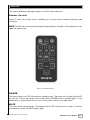
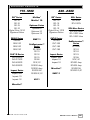
Figure 3 shows the remote control, enabling you to easily choose whatever listening mode
you desire.
NOTE: The SPL-Ultra remote can be attached magnetically to the back of the subwoofer in the
upper left hand corner.
Figure 3. Remote Control
POWER
This button forces your SPL-Ultra unit into standby mode. The woofer will not play and the LED
will turn off. The unit will remain in this mode until the POWER button is pressed again. To fully
deactivate (i.e. power down) the unit, turn off the power switch on the back panel.
MUTE
This button mutes the subwoofer. The display will show “00” when the unit is muted. To unmute
the subwoofer, press the MUTE button again.
.
www.velodyne.com
SPL-Ultra User’s Manual
11