1
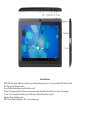
External Buttons
MINI USB- This makes USB devices usable on your tablet (keyboard, mouse, etc.). Use your included OTG cable to do this.
DC- Plug your wall charger into here.
Power- Hold this button down to turn the tablet on or off.
Volume- Pressing the top half will increase volume and pressing the bottom half will lower the volume of the speakers.
TF card- You can expand the hard drive up to 32GB. Insert a MicroSD card here if needed.
Earphone- Plug in headphones here.
MIC- Do not plug in anything here. This is for recording sound.