1
4.5.2 Adjust Display settings
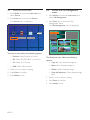
1. Press Enter to access the Setup Menu and
select Display.
The Display menu is displayed:
Slideshow
Display
Calendar
Misc.
Default
4.5.3 Adjust Calendar settings
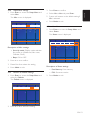
1. Press Enter to access the Setup Menu and
select Calendar.
The Calendar menu is displayed.
Status
Slideshow
Display
Calendar
Misc.
Default
Contrast
Date
02 - 18 - 2008
Brightness
Clock
17 : 46 : 43
Show Effect
Auto Tilt
No Effect
OFF
Calendar Display Mode
Language
English
Wallpaper
Default
Power-off
Description of Display settings:
• Contrast: Contrast Ratio Adjustment.
• Brightness: Brightness Adjustment.
• Show Effect: Image Effects Selection
(None, Rich, Vivid, Black and White, Sepia).
• Auto Tilt: Image Auto Position
Adjustment Selection (On or Off).
Calendar + Picture
Clock Display Mode
Power-on
Alarm
Status
Digital
OFF
OFF
OFF
12 : 00
12 : 00
12 : 00
Description of Calendar settings:
• Date: Date Adjustment (MM - DD YYYY).
• Clock: Clock Adjustment (HH: MM: SS).
• Calendar Display Mode: Calendar
Display Adjustment (Calendar+Picture /
Calendar+Clock).
• Clock Display Mode: Clock Display
Adjustment (Digital/ Graphic).
• Language: Language Selection
(English, Français, Deutsch, Italiano,
Español, Русский, Brazilian Portuguese,
Portuguese).
• Power-On: Auto Power-on time setting
(Off, On) - (HH: MM).
• Wallpaper: Background Image Mode
Selection (Default, User).
• Power-Off: Auto Power-off time setting
(Off, On) - (HH: MM).
2. Press < or > to confirm.
3. Press V or Λ to select the setting.
4. Press Mode to exit.
• Alarm: Alarm Time Setting (Off, Once,
Everyday) - (HH: MM).
2. Press < or > to confirm.
3. Please V or Λ to select the setting.
4. Press Mode to exit.
EN-12