1
3. Press Enter to confirm.
1. Press Enter to access the Setup Menu and
select Misc.
4. Select Yes or No and press Enter.
The Misc. menu is displayed:
5. System will restore to the default setting if
Yes is selected.
6. Press Mode to exit.
Slideshow
Display
Calendar
Misc.
Default
Status
4.5.6 View Status
Start-up mode
1. Press Enter to access the Setup Menu and
select Status.
Slideshow
Beep
OFF
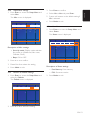
The Status menu is displayed:
Slideshow
Display
Calendar
Free Momory
Description of Misc. settings:
F/W
Misc.
Default
25038848
Bytes
V0.37
V0.9C
Status
• Start-Up mode: Display mode selection
for power on (Slideshow, Main menu,
Calendar, Clock).
• Beep: ON or OFF.
2. Press < or > to confirm.
3. Please V or Λ to select the setting.
Description of Status settings:
4. Press Mode to exit.
• Free Memory: Free memory
• F/W: Firmware version
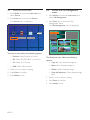
4.5.5 Restore to Default settings
1. Press Enter to access the Setup Menu and
select the Default.
2. Press Mode to exit.
The Default menu is displayed:
Slideshow
Display
Calendar
Misc.
Default
Status
ON
2. Press V or Λ to select the setting.
EN-13
ENgLISH
4.5.4 Adjust Misc settings