1
User manual
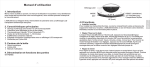
LCD display
Thank you for purchasing this product. This user manual will help you to familiarise
yourself with all the features of your new device, so please do take the time to read it
thoroughly.
RESET
°C/°F/DOWN
Battery compartment
MODE
SET
UP
The AMC530 is a stylish battery-powered alarm clock, thermometer and calendar with
a transparent LCD display.
2. Main Features
Digital clock with 12 or 24 hour display
Calendar with date and day display
Thermometer in Celsius (°C) or Fahrenheit (°F)
Adjustable snooze function: 1-60 minutes
8 selectable alarm tones
Stylish design with transparent LCD display
Powered by 2xAAA batteries
3. Package content
Digital alarm clock
2 x AAA batteries
User manual
4.2 Functions
Installing the batteries
Open the battery compartment, on the bottom of the device, and insert the 2 supplied
AAA batteries. The AMC530 will beep and the LCD display will activate upon correct
insertion. Replace the battery cover.
Setting the time and date
When the time is displayed on the LCD screen, press SET to start adjusting the time
and date. The UP and DOWN buttons change the flashing value and the SET button
cycles through the adjustable values in this order: hour – minutes – year –month – day .
Press the mode button to finalise your settings and return to clock mode. The device
will automatically return to clock mode after a minute's inactivity.
Setting the alarm clock
First select alarm mode. The mode button switches between clock mode and alarm
mode, alarm mode is indicated by a bell on the left hand side of the LCD screen and
whilst in clock mode, the colon between the hour and minute display flashes. Press
the UP button to select from the following alarm modes:
4. Parts & Functions
-1-
-2-
English
1. Introduction