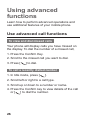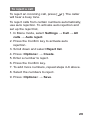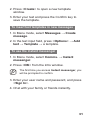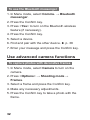
1
1
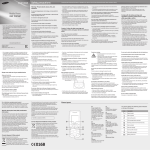
4-way navigation key
In ldle mode, access userdefined menus; Make a fake
call (down); In Menu mode,
scroll through menu options
Depending on your service
provider, pre-defined menus
may differ
► "Make fake calls"
2
Volume key
In Idle mode, adjust the key
tone volume; Send an SOS
message
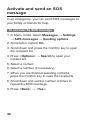
► Activate and send an SOS
message
3
Dial key
Make or answer a call; In Idle
mode, retrieve recently dialled,
missed, or received numbers
4
Voice mail service key
In ldle mode, access voice
mails (press and hold)
5
Keypad lock key
In Idle mode, lock the keys
6
Softkeys
Perform actions indicated at
the bottom of the display
7
Confirm key
Select the highlighted menu
option or confirm an input;
In Idle mode, access Menu
mode or launch the web
browser
Depending on your service
provider or region, the key may
perform differently
8
Power/End key
Turn the phone on or off
(press and hold); End a call; In
Menu mode, cancel input and
return to Idle mode
9
Alphanumeric keys
10
Silent profile key
In ldle mode, activate or
deactivate the silent profile
(press and hold)
7