1
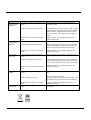
Problem
No light for the
Power supply
indicator.
No light for the
consum ption
indicator.
The register
can’t run.
Check
Is AC power supply connected to the
meter ?
Solution
Check switch or circuit-breaker and fuse or
therm al cut-off.
Is the 1 and 4 connecting correct ?
Reinstall term inal screws on the 1 and 4. Make
sure all screws are fixed. Than there should be a
230V 50Hz AC voltage between the terminal
screws on the 1 and 4 when power supply is
input.
Maybe there is a fault in the inside
circuit.
Is the load running ?
Please contact your technical supporter to
replace this m eter.
Only when load is running, this LED will flash.
Is the operating power too low ?
If the operating power is too low, the spacing
interval of flashing will take some more time,
this is why it seem s like LED isn’t burning.
Maybe there is a fault in the inside
circuit.
Please contact your technical supporter to
replace this m eter.
Is there a power supply inside the
meter ?
Check that the power supply
Is the operating power too low ?
If the operating power is too low, the spacing
interval of the pulses will take som e m ore tim e,
this is why it seem s like the m eter won’t count.
Maybe there is a fault in the inside
circuit.
No pulse
output.
Pulse output
rate wrong.
indicator is on.
Please contact your technical supporter to
replace this m eter.
Is DC power supply connected to the
meter ?
Check the external voltage source (Ui) is 5-27V
DC.
Is the connecting correct ?
Check correct connecting:
connect 5-27V DC to connector 20 (anode), and
the signal wire (S) to connector 21 (cathode).
Maybe there is a fault in the inside
circuit.
Maybe there is a fault in the inside
circuit.
Please contact your technical supportr to
replace this m eter.
Please contact your technical support to replace
this m eter.