1
Specifications (continued)
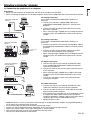
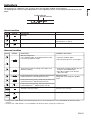
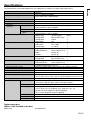
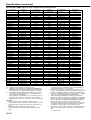
Specification of RGB signals in each computer mode of the projector
Signal mode
TV60, 480i (525i)
TV50, 576i (625i)
1080i 60 (1125i 60)
1080i 50 (1125i 50)
480p (525p)
576p (625p)
720p 60 (750p 60)
720p 50 (750p 50)
1080p 60
1080p 50
CGA70
CGA84
CGA85
VGA60
VGA72
VGA75
VGA85
SVGA56
SVGA60
SVGA72
SVGA75
SVGA85
SVGA95
XGA43i
XGA60
XGA70
XGA75
XGA85
WXGA60
WXGA60a
WXGA60b
WXGA60c
SXGA70a
SXGA75a
SXGA85a
SXGA60b
SXGA75b
SXGA43i
SXGA60
SXGA75
MAC13
MAC16
MAC19
HP75
HP72
SUN66a
SUN76a
SUN66
SUN76
SGI72
SGI76
*1 :
*2 :
*3 :
Resolution
(H x V)
640 x 400
640 x 400
640 x 400
640 x 480
640 x 480
640 x 480
640 x 480
800 x 600
800 x 600
800 x 600
800 x 600
800 x 600
800 x 600
1024 x 768
1024 x 768
1024 x 768
1024 x 768
1024 x 768
1280 x 768
1280 x 800
1360 x 768
1366 x 768
1152 x 864
1152 x 864
1152 x 864
1280 x 960
1280 x 960
1280 x 1024
1280 x 1024
1280 x 1024
640 x 480
832 x 624
1024 x 768
1024 x 768
1280 x 1024
1152 x 900
1152 x 900
1280 x 1024
1280 x 1024
1280 x 1024
1280 x 1024
Horizontal
frequency (kHz)
15.73
15.63
33.75
28.13
31.47
31.25
45.00
37.50
67.50
56.25
31.47
37.86
37.86
31.47
37.86
37.50
43.27
35.16
37.88
48.08
46.88
53.67
59.97
35.52
48.36
56.48
60.02
68.68
47.77
49.70
47.71
47.50
63.85
67.50
77.49
60.00
75.00
46.43
63.98
79.98
35.00
49.72
60.24
62.94
78.13
61.85
71.81
71.68
81.13
76.92
82.01
Available only when the input signal is YCBCR.
Available with the signal for the DVI-D terminal.
Available for the signal from the COMPUTER/COMPONENT
VIDEO IN terminals. Images are displayed simply with some
pixels dropped, so the original image quality is not obtained.
*4 : Set WXGA in the FEATURE menu to AUTO for these signals.
Some signals may not display images of WXGA signal correctly. See page 36 for details.
•
When ASPECT in the FEATURE menu is set to REAL, images are
displayed in their original size. In the REAL mode, images are
black-framed when the image resolution is lower than 1280 x 768.
Important:
• Some computers aren’t compatible with the projector.
• The projector’s maximum resolution is 1280 x 768 pixels. It may
not display images of higher resolutions than 1280 x 768 correctly.
• Images with SYNC on G (Green) signal may jitter.
• Images with SYNC on G (Green) signal may be tinged with
green.
EN-38
Vertical
frequency (Hz)
59.94
50.00
60.00
50.00
59.94
50.00
60.00
50.00
60.00
50.00
70.09
84.13
85.08
59.94
72.81
75.00
85.01
56.25
60.32
72.19
75.00
85.06
94.89
86.96
60.00
70.07
75.03
85.00
59.87
59.81
60.02
59.75
70.01
75.00
85.06
60.00
75.00
86.87
60.02
75.02
66.67
74.55
75.02
74.92
72.00
66.00
76.64
66.68
76.11
72.30
76.00
•
•
•
•
•
•
Normal mode
(H x V)
1024 x 768
1024 x 768
1280 x 720
1280 x 720
1024 x 768
1024 x 768
1280 x 720
1280 x 720
1280 x 720
1280 x 720
1228 x 768
1228 x 768
1228 x 768
1024 x 768
1024 x 768
1024 x 768
1024 x 768
1024 x 768
1024 x 768
1024 x 768
1024 x 768
1024 x 768
1024 x 768
1024 x 768
1024 x 768
1024 x 768
1024 x 768
1024 x 768
1280 x 768
1228 x 768
1280 x 722
1280 x 720
1024 x 768
1024 x 768
1024 x 768
1024 x 768
1024 x 768
960 x 768
960 x 768
960 x 768
1024 x 768
1024 x 768
1024 x 768
1024 x 768
960 x 768
980 x 768
980 x 768
960 x 768
960 x 768
960 x 768
960 x 768
Real mode
(H x V)
640 x 400
640 x 400
640 x 400
640 x 480
640 x 480
640 x 480
640 x 480
800 x 600
800 x 600
800 x 600
800 x 600
800 x 600
800 x 600
1024 x 768
1024 x 768
1024 x 768
1024 x 768
1024 x 768
1280 x 768
1228 x 768
1280 x 722
1280 x 720
1024 x 768
1024 x 768
1024 x 768
1024 x 768
1024 x 768
960 x 768
960 x 768
960 x 768
640 x 480
832 x 624
1024 x 768
1024 x 768
960 x 768
980 x 768
980 x 768
960 x 768
960 x 768
960 x 768
960 x 768
*1
*1
*2
*2
*2
*2
*3
*3
*2
*2
*2
*2, *4
*2, *4
*2, *4
*2, *4
*2
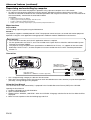
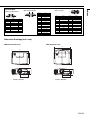
If the resolution and frequency of your computer aren’t shown
on the table, find the compatible resolution and frequency by
changing the resolution of your computer.
If colors aren’t displayed correctly when the projector is connected to a high-definition video device having R, G, and B output
terminals, set COMPUTER INPUT to RGB in the SIGNAL menu.
In the case of SXGA, the right side of the image may not appear.
In this case, adjust TRACKING in the SIGNAL menu.
TV60 and TV50 are equivalent to 480i and 576i respectively.
When these signals are supplied to the VIDEO IN or S-VIDEO IN
terminals, the signal mode is indicated as TV60 or TV50. When
they are supplied to the COMPUTER/COMPONENT VIDEO IN
terminals, the signal mode is indicated as 480i or 576i.
Video signals having resolution exceeding the maximum resolution supported by this projector are reduced to the maximum
resolution size of the projector even in the REAL mode.
This projector doesn’t support 480i, 576i and 480p signals from
video devices having 5 lines (R, G, B, H, V) or 4 lines (R, G, B,
CS*).
* : Composite Sync