1
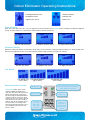
Odour Eliminator Operating Instructions
Tree logo indicates PCO,
‘CLEAN’ function
Photoplasma and
indicates that
negative ions are on.
Ozone is on
Default Setting:
When the screen only shows the ‘–ion’ (tree logo) this means all functions are on without Ozone (showing Low, Medium & High fan
speed). Use this setting for occupied rooms when people or animals are present
On Low without ozone
On Medium without ozone
On High without ozone
Maximum Setting:
Maximum setting: All settings on with Ozone (Clean sign). Use this maximum setting for toilets & hallways etc. where people aren’t
present for long periods of time or use this maximum setting on high speed if you need a fast solution
On Low with ozone
On Medium with ozone
On High with ozone
Fan Speed:
Fan Speed: Low
(10 m2 room)
Remote Control Functions:
Please note: Under ‘Auto’ mode,
only the POWER and AUTO keys
work, the other keys will not function.
When using the Auto mode for the
first time, keep the Odour Eliminator
on Auto mode for one hour in order
to allow the sensor to cleanse the old
data. Please do not shift to another
mode or turn off the machine for the
first hour when it is running under
Auto mode otherwise the auto sense
system will be insensitive the next
time it is used.
Fan Speed: Medium
(20 m2 room)
On/Off button
Ozone controls
Fan speed:
Low = 10 m2
Med = 20 m2
High = 30 m2
Room size
Fan Speed: High
(30 m2 room)
Auto mode: Automatically senses bad
odours & air pollution - takes 60 mins to
gather data before functioning
All functions
except ozone
Timer: Set the
machine to run
for a period of
time in one hour
increments up to
12 hours