1
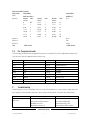
Color Charge DMX Personality
Color Charge
(v1.5)
Control Mode
Control Mode
DMX1 Look Select
RGBA [4ch]
Channel 1
Channel
Level %
Look
Channel
Level %
Look
Channel
Level %
Look
0
OFF
31-35
7
66-70
14
1–5
1
36-40
8
71-75
15
6-10
2
41-45
9
76-80
16
11-15
3
46-50
10
81-85
17
16-20
4
51-55
11
86-90
18
21-25
5
56-60
12
91-95
19
26-30
6
61-65
13
96-100
20
Red
Channel 2
Green
Channel 3
Blue
Channel 4
Amber
Total
2.8
1 DMX channel
4 DMX channels
Pre-Programmed Looks
The Color Charge has 20 internal pre-programmed looks that are set as default. They can be modified and overwritten in the
Look Store menu. Reset to Defaults menu will restore the looks.
Look 1
Blackout
Look 11
Fast pastel roll
Look 2
White
Look 12
Slow rainbow roll
Look 3
Red
Look 13
Medium rainbow roll
Look 4
Yellow
Look 14
Fast rainbow roll
Look 5
Green
Look 15
32k White
Look 6
Cyan
Look 16
56k White
Look 7
Blue
Look 17
Red-Blue roll
Look 8
Magenta
Look 18
Blue-Green roll
Look 9
Slow pastel roll
Look 19
Cyan-Magenta roll
Look 10
Medium pastel roll
Look 20
Magenta-Yellow step
3.
Troubleshooting
Troubleshooting is a process of elimination. First, rule out the other field factors (i.e. bad connections, faulty cables and
power supplies). For technical advice and/or parts, please contact your selling dealer or the offices listed in this manual.
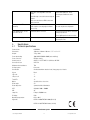
Symptom
Possible Cause
Solution
Fixture does not respond to
DMX control.
Set to wrong or different DMX address.
Check DMX address and Mode settings.
No/poor wireless DMX connection.
Reset wireless DMX station.
WiredDMX menu is off.
Repeat wireless link search.
Wired-Wireless menu is off.
Repeat “Wireless DMX” activation.
www.chroma-q.com
Color Charge User Manual
11
V1.4 September 2012