1
bâàwÉÉÜ fÑxxw WÉÅx fxÜ|xá |Ñ@åÇxà
⊙ Table of Contents
1. Introduction
Features
5
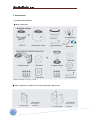
Product & Accessories
7
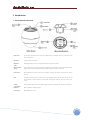
Parts Name & Functions
8
2. Installation
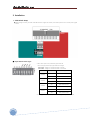
Dip Switch Setup
9
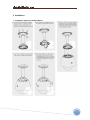
Installation Using the Wall Mount
11
Installation Using the Pendant Mount
12
Wire Connections
13
3. Operation
Check Points before Operation
15
Preset and Pattern Function Pre-Check
22
Starting OSD Menu
22
Preset
22
Swing
22
Pattern
23
Group
23
Other Functions
24
4. OSD Menu
OSD Display of Main Screen
25
General Rules of key Operation for Menu
26
Main Menu
26
Display Setup
26
Privacy Zone Mask Setup
27
Camera Setup(27x
ISS2765N(P) models)
28
Camera Setup(36x
ISS2965N(P)X
30
Motion Setup
EXview Models)
32
Preset Setup
33
Swing Setup
35
Patten Setup
36
Group Setup
37
System Initialize
39
5. IP Network Part
3
System Administration
40
Operating The Camera
41
Live View
43
Status Window
45
Configuring Users
47
Setting Date & Time
49
Configuring Multi Viewer
51
Configuring PTZ
53
Maintaining Server
55
Generating Log Report
57
Configuring Audio
59
Co n f i gu ri n g Vi de o
61