1
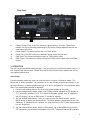
Rear Panel
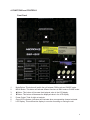
8
9
10
11
8.
9.
10.
11.
12.
12
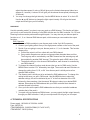
Channel Fuses: Each of the four channels is protected by a 10A fuse. These fuses
prevent unit from overloading and damaging. Be sure to always replace them with the
exact same type fuses.
Power Switch: This switch controls the unit’s main power.
Power Cord: Plug this cord into a rated main power supply for your area.
DMX Input: This connector allows the input of DMX control signal.
DMX Output: This connector allows the output of DMX control signal to the next DMX
device
3. OPERATION
The unit has two switchable working modes. It can be used as a four-channel chaser or as a 1, 2,
or 4 channel DMX dimmer pack. Please follow up the instructions below to operate the unit for
your desired performance.
CHASE MODE
Use this operating mode only when you want the device to act as a 4-channel chaser. This
device has 16 built-in programs. You can select to run any of these programs specifically, or set
the unit to chase in a random sequence among all 16 built-in programs for a more dramatic show
effect. The chase speed can also be adjusted.
1. Connect your lighting effect to any of the eight power sockets on the pack.
2. Use the mode button to select chase mode: Chase mode is indicated in LCD display as
“PA” followed by numbers 01-16. “PA” stands for Program Applied. If an “A” appears in
the LCD display, you are in DMX mode, “A” stands for address.
3. Set you desired chase pattern: Once you have selected the chase function, use the
MENU button to select your desired chase. The chase pattern is represented in the LCD
display by “P” followed by two numbers. You may select any of the 16 built-in programs to
run at a single time.
4. Set your desired chase speed: While in chase mode, tap on the MENU button until the
³63´IROORZHGE\WZRQXPEHUVLVGLVSOD\HGLQWKH/&'7KHQXVHWKHŸaQGźEXWWRQVWR
5