1
Step 1: Attach TV Brackets
There are a wide variety of TVs available offering an assortment of screw sizes. We provide a selection of mounting
screws to fit most TVs. If you have any concerns about this mounting hardware or installation call us direct at 1-888848-2643 or email at [email protected] .
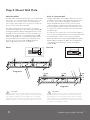
Step 1.1 Select the correct size of bolt.
Step 1.2 Attach TV bracket arms to the back of the TV
Kanto provides 3 bolt diameters (Metric sizes M5, M6 and
M8) in various lengths.
Now that you have selected the correct bolt length, it’s
time to attach the arms to the TV, as shown in Diagram
A.
Part items: A, B, C, D, E, F or G.
Select the correct diameter screw and hand screw into
the back of the TV to determine the correct length. Use
the longest available bolt without reaching the bottom of
the TV threads.
Use the washer (H) for bolts A-D (sizes M5 and M6). The
washer will work for both screw sizes.
Please note: The washer is not required for M8 size bolts
(E, F & G).
If your TV has a curved back, you can use the spacers (J).
Quick-Lock TV bracket (R)
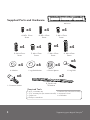
Screws (A thru G)
Washer (H) used
with screws A thru D
Quick-Lock TV bracket (R)
Spacer (J), if necessary
for curved TVs
Diagram A
WARNING
Never over-tighten a screw into the back of your flat panel TV.
Do not lay the TV face down on its glass front. Use a wall or a TV stand.
4