1
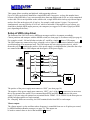
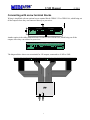
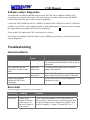
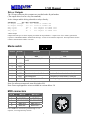
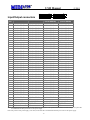
UM2 Manual 2001 3) Connect MIDI (see page 9 for MIDI connector pinout) Connect MIDI IN to your source (i.e. MIDI OUT of computer, synthesizer, or other MIDI device). 4) Connect Outputs Connect your outputs to the 40-pin headers in the back of the UM2 (see page 10 for pinout); optionally use our terminal adaptors (see page 5). 5) Connect Power supply The UM2 requires 7 to 25 volts power supply; this is usually tapped from the main supply of your system. The negative of the power supply connects to the NEG pins of the 40-pin headers in the back of the UM2 (see page 10 for pinout); in most cases this is also ground of the system. We recommend that all NEG pins connect to the power supply negative; this is simplified if you use our terminal adaptors (see page 5). The positive of the power supply (5-25 volts) connects to the POS pins of the 40-pin headers in the back of the UM2 (see page 10 for pinout); usually, this is also the common to all the relays or switches in the system. The UM2 is a positive driver, it switches its outputs to POS; we recommend that all POS pins connect to the power supply positive; this is simplified if you use our terminal adaptors (see page 5). Introduction The UM2 is a MIDI decoder-driver: it receives MIDI messages and activates its outputs accordingly. The outputs can be used to drive organ pipe relays, lamps and other accessories. The UM2 has two internal partitions (the UM2-64 has only one). Each partition can be used independently as 64 outputs with each a different MIDI channel; or the two partitions can be combined into a single 128 output partition. Installation In the following sections, the examples show organ manuals (keyboards) and organ pipes (with relays) connected to UM2s. These are just the most common items used with the UM2; here are a few examples of what the UM2 can control: • Other musical instruments such as trumpets, xylophone, bells, drums, etc… • Electric lights, with or without relays, depending on voltage/power • Garage doors, alarm systems, model trains… Other control applications involving a computer • 2