1
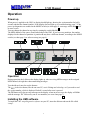
UM2 Manual 2001 Operation Power up When power is applied to the UM2, its display should light up, showing the version number for half a second, and then the channel number. If the display does not light up, see troubleshooting, page 7. If the power up diagnostics are enabled at the MODE switch (see chart page 9), a message will be displayed if an error occurs. You can change the channel at any time by rotating the switch labeled CH. The MIDI channel of the source should match that of the UM2. If you have two partitions, the number displayed is the channel of partition A; partition B may have a different channel, according to the MODE switch (see chart page 9) or software setup (see page 6). Operation During operation, the left dot on the display lights up when receiving MIDI messages on the assigned MIDI channel, the right dot when transmitting messages. You should rarely need to use the buttons: The RST is the reset button, like the one on a PC; use it if things are locked up, or if you need to read the version number, which is displayed for half a second after reset is pressed. The OK button will clear an error message on the display: when an error occurs, the display will blink with the message “Er” followed by one or two numbers (see error chart page 7). Installing the UM2 software To install the UM2 setup/diagnostics software on your PC, insert the diskette and run the file called “setup”. 6