1
Accessories/Optional Accessory
(Continued)
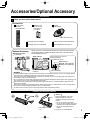
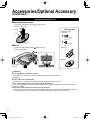
Attaching the pedestal to TV
■Assembling the pedestal
Fix securely with assembly screws A . (Total 4 screws)
Tighten screws firmly.
A
Accessories
Bracket
Assembly screws
(4 of each)
Front
A
XSS4+16FJK
M4 × 16
B
■Set-up
Base
Fix securely with assembly screws
Tighten screws firmly.
XYN4+F12FJK
M4 × 12
. (Total 4 screws)
Bracket (1)
B
B
Base (1)
Foam mat or thick
soft cloth
WARNING
Do not disassemble or modify the pedestal.
Otherwise the TV may fall over and become damaged, and personal injury may result.
Caution
Do not use any other TV and displays.
Otherwise the TV may fall over and become damaged, and personal injury may result.
Do not use the pedestal if it becomes warped or physically damaged.
If you use the pedestal when it is physically damaged, personal injury may result. Contact your nearest Panasonic
Dealer immediately.
During set-up, make sure that all screws are securely tightened.
If sufficient care is not taken to ensure screws are properly tightened during assembly, the pedestal will not be strong
enough to support the TV, and it might fall over and become damaged, and personal injury may result.
6
tc_L42_ls24_eng_簡易_0575.indb 6
2010/01/25 18:58:31