1
Basic Connection (Continued)
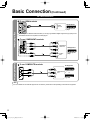
AV cable connections
To use HDMI terminals
AV Equipment
HDMI
AV OUT
e.g. Blu-ray Disc
player
High-Definition
Connecting to the HDMI terminals will enable you to enjoy high-definition digital images and high-quality sound.
The HDMI connection is required for a 1080p signal.
To use COMPONENT terminals
Y
green
green green
blue
blue blue
PB COMPONENT
red
white
VIDEO OUT
PR
red
red
L
white white AUDIO
R OUT
red
red
AV Equipment
e.g. Blu-ray Disc
player
red
Standard-Definition
To use COMPOSITE terminals
AV Equipment
yellow
yellow
white
white
yellow
L
white
COMPOSITE
OUT
e.g. DVD Recorder
or
R
red
red
red
e.g. VCR
Note
For more details on the external equipment’s connections, please refer to the operating manual for the equipment.
8
tc_L42_ls24_eng_簡易_0575.indb 8
2010/01/25 18:58:33