1
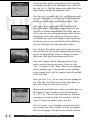
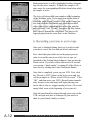
The Casablanca
Avio
V
e
r
s
i
o
n
1
C a s a b l a n c a
A v i o
O w n e r
m a n u a l
f o r
V e r s i o n
1
Copyright © 2000 Draco Systems, Inc., Boulder, Colorado USA and MacroSystem Digital Video AG, Wetter,
Germany. All Rights Reserved.
Our thanks go out to the many people connected with the creation and production of this owner’s manual for
the Casablanca Avio nonlinear digital video editor, starting with the original Casablanca creators: Jörg Sprave,
president of MacroSystem Digital Video AG, and Eric Kloor, president of Draco Systems, Inc.
Content and design for this manual were provided by Scott Curl and Cory Hodnefield of Draco Systems, and
Rafael Dyll of MacroSystem Digital Video. Additional help was provided by Rick Barron, Rob Herron, Justin
edit
play
Philpott and Matt Olson of Draco Systems.
Our thanks go out to the many thousands of Casablanca users who have provided us with suggestions for
enhancing the Casablanca learning experience.
Third edition
Boulder, Colorado USA & Wetter, Germany
Draco Systems, Inc.
MacroSystem Digital Video, AG
5485 Conestoga Court
Schöllinger Feld 28
Boulder, CO 80301
58300 Wetter
USA
Germany
telephone
303.440.5311
Avio tech support 303.440.5399
phone +49 (0)2335 960-0
fax
fax
+49 (0)2335 960-100
email
[email protected]
email
303.440.5322
[email protected]
V i s i t
o u r
w e b
s i t e s
a t :
w w w . d r a c o . c o m
w w w . m a c r o s y s t e m . d e
ii
Getting star ted
1.1
Settings
2.1
Record
3.1
Edit
4.1
Finish
5.1
Tr ansitions
6.1
I.P. effects
7.1
Titling
8.1
Audio record/edit
9.1
record
edit
play
Audio mix
10.1
Appendix A
A.1
tutor ials - making a mo vie , b lue box & k e yboard
Appendix B
B .1
FAQs and technical info
Index
I.1
getting
Welcome to the w or ld of Avio
We want to thank you for purchasing the Casablanca Avio video editor.
We sincerely appreciate the trust you have placed in our company and
our product and we hope you’ll soon discover that the Avio meets and
exceeds all of your expectations.
We would also like to wish you well on your journey, because soon you
will be embarking on quite an adventure; one that will expand your
creativity and help you preserve ideas and memories for generations to
come. Best of all, the journey will be fun.
It will be fun because the Avio will revolutionize the ways in which you
communicate with friends and family members as it helps transform your
stacks of home videos into actual movies. It might also radically change
your business, allowing you to produce videos in-house or complete projects in a faster, more cost-effective way.
started
Avio can help you accomplish this because it follows a unique philosophy—your ability to create great video productions should never be
hindered by the process of operating the video editor. We have worked
hard to simplify every step of the editing process without sacrificing editing features or the quality of the output. By integrating all of the components you need for high quality video editing into a single, easy to use
box, we’ve eliminated the perils of changing configuration settings and
the pitfalls of incompatible cards and programs. And the logical design of
our editing software protects you from the confusion and technical minutia that can take the fun out of creating a video project.
As this first chapter’s title suggests, we’ll help you get started by covering what you will find when you first open the Avio box, explaining all
of the plugs and cables and introducing you to the buttons and tools
you’ll find within the software interface. The subsequent chapters will
describe all of the ins and outs of all the screens within the Avio interface, and the appendicies will actually take you through a simple, stepby-step tutorials that will help you “get your feet wet” as you learn to use
your powerful new editor to actually make your own movie.
g e t t i n g
s t a r t e d
1.1
Cong r atulations!
getting
You’ve just purchased most powerful, easy-to-use video editor on the market today. You can use the Avio to
turn your birthday, school event and holiday videos into “classic” movies that your friends and family will
enjoy viewing over and over again. You’ll also have a lot of fun doing it.
But before we jump right into the ins and outs of video editing, let’s open up the Avio box and take a look
at what you’ll find inside.
Opening the box
When you first open up the Avio shipping box, you’ll
notice that the editor is “sandwiched”
between two pieces of packaging.
Tip: Please do not throw this packaging away; if you ever
started
need to send your Avio in for repair, you’ll need this packaging to help keep your machine safe during shipping.
Once you begin to unpack the box, you’ll find:
- Your new Avio editor
- A sleeve containing your Avio’s
system software on a SmartMedia card
- This user manual
- New owner’s package info that includes
your registration card, a connection poster,
product information and warranty options
- A power cable for the Avio
- A trackball
- A Scart adapter
to convert the European Scart port
on the back of the Avio into Y / C (S-video)
and composite (RCA) connectors.
If you think that you’re missing one or more of these items, please call your Avio dealer with your missing
part information.
1.2
g e t t i n g
s t a r t e d
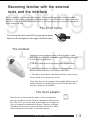
Becoming familiar with the exter nal
tools and the interface
getting
The Avio features a very straightforward interface. This minimalist approach can help you without
limiting the Avio’s power; we basically simplified the process so you don’t have to simplify your ideas.
But before you embark on the editing path, however, let’s stop and note some of the basic tools that are
used to operate the Avio.
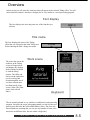
The on/off button
You can turn the Avio on and off by pressing the power
button on the front panel, in the upper left-hand corner.
The tr ac kball
started
Selecting screens and buttons is done with the trackball, a handheld device that’s similar to a computer mouse. Every trackball has
at least three key components:
1. The ball, which moves the on-screen pointer and the sliders.
2. The left (Select) button. Use this to select an option once you
have positioned the pointer over a button on the screen.
3. The right (Cancel) button. This button can either cancel an operation or return you to the previous screen.
(Note: Your Avio may be equipped with a slightly different style of
trackball than the one in the picture to the left, but the basic functions are common to all trackballs.)
The Scar t adapter
Since the Avio is used around the world, a variety of connection
ports are provided to meet the electronic standards of different countries. The “Scart” ports on the back of the machine, for example, are
a type of connector used primarily in Europe. Therefore, an adapter
is included with your unit to convert the Scarts into the RCA and Svideo ports that are used in the U.S. and other countries.
A v i o
t o o l s
1.3
getting
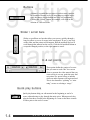
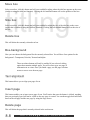
Buttons
A button is a symbol that you press in order to start a particular operation. Because we try to keep things as simple as possible, the names of most buttons are fairly self-explanatory.
Clicking the “Delete” button, for example, will result in the
deletion of a selected scene.
Slider / scroll bars
Sliders or scroll bars are bars that allow you to move quickly through a
long list effects or a row of scenes in the storyboard. To use it, just click
on the slider and the pointer will disappear. Roll the trackball and you’ll
scroll through the material on the screen. Click the left trackball button to
accept the changed position, or the right button to cancel.
started
In & out points
These points define the portion of a scene
that you want to work with. You can use
them to separate the video material that you
want to keep in a scene, mark the entry and
exit points of a special effect or indicate
where an audio segment will begin and end.
This is also known as “splitting” or “trimming” scenes or selecting a “range.”
Quic k play b uttons
Quick play buttons help you edit material at the beginning or end of a
scene without having to play through the entire piece. When pressed, they
play the first three seconds at the beginning of a scene or the three seconds
of video prior to the end of a scene.
1.4
A v i o
b u t t o n s
getting
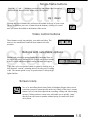
Single-fr ame buttons
Press the “<” and “>” buttons to move the in / out points either forward or
backward one frame at a time within your video project.
Up / do wn
Clicking this type of button once will move the toolbar to the top of your screen
(in case it obstructs your view of material on the bottom); clicking it a second
time will return the toolbar to the bottom of the screen.
Video control b uttons
These buttons record, stop and play your audio and video. The
icons we use match those found on most commercial video
recorders.
started
Buttons with selectab le options
Buttons with selectable options feature three horizontal lines in
the upper left corner. Whenever you click on one of these buttons,
a list of several additional options and/or functions will appear.
Tip: Once you’ve selected a button or option by clicking on it, it
then becomes “current” (meaning that it’s the one you’re working
with). The current option is easy to spot because it’s always highlighted in blue.
Screen icons
No, we’re not talking about James Dean or Humphrey Bogart; these screen
icons help you move around quickly in the Avio. Many of the Avio’s screens
feature a row of icons that represent the recording, editing, and video-setting
screens. Clicking on these screen icons will enable you to quickly “jump”
directly from one screen to another without having to return to the main
Avio screen.
A v i o
b u t t o n s
1.5
getting
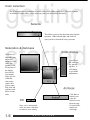
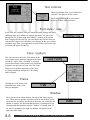
Color selection
You’ll have quite few opportunities to select colors while editing on the Avio. The Avio’s palette
of millions of colors allows you to select any color you need quickly and easily.
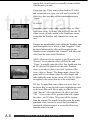
Selector
This allows you to select the main color from the
spectrum. Slide left and right, and click left
once you have selected the color you want.
started
Satur ation & dar kness
Color display
Click here to
adjust the saturation and
darkness of the
color. The
pointers to the
left and top of
the display
box will tell
you roughly
where you are
within the
color range.
Again, once
you are satisfied, click left
with the trackball to set the
color.
You will see
the color you
are generating here. It
will change
as you make
adjustments.
Archives
Click here to
archive your
color for
future use (see
the next pagefor more information on
archiving).
OK
Once you’ve selected the
color you want, click here
to return to your editing.
1.6
A v i o
b u t t o n s
getting
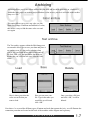
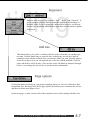
Archiving
Archiving allows you to save colors and text on your Avio and use them again later on, whether it’s
within the same project or another project.Whether a color or text, your Avio will refer to the Archive
entry as a “file.”
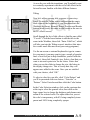
Color archive
This option allows you to save any color you like.
With Avio’s range of millions and millions of colors,
this makes it easy to find the same color over and
over again.
Text archive
The Text archive appears within the Edit/change text
screen and it allows you to save your data and place it
on another scene. It’s the perfect solution when
you’ve, say, just typed in two pages of text and set
the font, color, size, and placement, but then you
decide that you’d like the title on a different video
scene.
started
Sa ve
Load
Here’s where you select the
color or text file that you
want to load.
Here you can save your
file. Type in the name you
would like to call it and
click “OK.”
Delete
Once you select a file here
and click “OK,” it will be
deleted.
Now that we’ve covered the different types of buttons and tools that operate the Avio, we will illustrate the
connection ports that are located on the back of the machine with a diagram and a glossary.
A v i o
b u t t o n s
1.7
Setting up y our Avio
getting
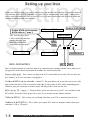
startBefore you can begin using your Avio to make movies, you need to make sure that it’s properly connected
to a videotape player (a VCR, camcorder, etc.) and a TV (or video monitor). Don’t panic - setting up the
Avio is easier than setting the clock on most VCRs. So let’s take a look at the back of the Avio editor and
examine the different ports and connectors.
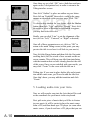
audio in L & R (RCA)
RCA out to TV / *scart 1
S-video & RCA out to recorder
& RCA-video in / *scart 2
video in (RCA)
*The Avio may have these
s-video and RCA connectors
running through a scart
adapter that needs to be
plugged into the scart port.
power cable port
video in (S-video)
Avio connectors
trackball port
usb 2
usb 1
Here’s a brief description of each of the main Avio connection ports, starting with the Power cable port in
the upper left corner and moving around the machine in a clockwise direction.
P ow er ca b le por t - This is where you plug in the Avio’s removeable power cable. The Avio does not
have a battery, so it won’t run unless it’s plugged in.
S-video & RCA out to r ecor der / scar t 2 - This port allows you to run video out to your video
tape recorder (such as a VCR or camcorder) with either S-video cables or RCA cables (depending upon
whichever type your video tape recorder accepts) and bring an RCA feed into the Avio.
RCA out to TV / scar t 1 - This port allows you to run video out to your TV set (or monitor) with
RCA cables. You need to hook up the Avio to your TV set in order see the software interface.
Video in (RCA) - This is where you can bring video from your VCR or camcorder into the Avio.
A udio in L & R (RCA) - This is where you connect RCA cables to bring the sound in from your
camcorder, VCR or CD player.
1.8
c a b l e s
a n d
c o n n e c t i o n s
getting
Avio connectors (contin ued)
Tr ac kball por t - This is the port that your trackball connects to. Make sure that you
plug your trackball into the correct port (and not the similar-looking s-video port near the
middle of the machine); otherwise, you will not be able to operate the Avio editor.
USB 1 - This is where you can attach an external USB keyboard (optional).
USB 2 - This is an additional USB port for future product developments.
Video in (S-video) - this is where you would plug in an S-video cable to bring video
into the Avio from an SVHS player, camera or deck.
Now that we’ve examined the various ports and connectors on the back of the Avio, we
can sort out the cabling “alphabet soup” and cover the differences between RCA cables
and S-video cables.
started
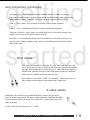
RCA cab les
RCA cables are connection cables that can carry audio and video into, and
out of, nearly any A/V device. With red and white caps typically surrounding
the right and left plugs, they are also the type of cables that most people are
familiar with, primarily because of their widespread use (they are included
with nearly all consumer audio and video devices).
RCA cables are also called “CVBS” or “Composite” cables, due to the fact
they combine several separate video signals into a single feed.
S-video cab les
Although S-video cables are less common than RCA cables, they do offer a
superior quality transmission. The reason is that rather than combining the different video signals into one feed (like RCA cables do), S-video cables carry each
signal separately.
S-video cables are also known as “Y/C” cables.
c a b l e s
a n d
c o n n e c t i o n s
1.9
getting
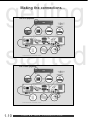
Making the connections ...
started
1.10
c a b l e s
a n d
c o n n e c t i o n s
Installation
getting
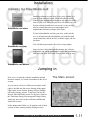
Installing the Smar tMedia card
SmartMedia card sleeve
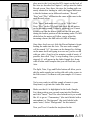
Installing software on your Avio is very easy, whether it is
your System Software or new effects, all software will be
loaded via the SmartMedia card port on the upper left of the
front of your Avio. Although your Avio will already have the
System software loaded when you receive it, but you may
need to reinstall the software or add updates and
supplemental software packages in the future.
To load a SmartMedia card into your Avio, make sure the
Avio is off and insert the SmartMedia card with the small
corner notch first (and on the left,) with the copper side facing down.
You will then be presented with a few screen prompts.
started
SmartMedia card (top)
Once you have clicked through the prompts, the software
will install, you will be prompted to remove the SmartMedia
card, and your Avio will restart. You are now ready to edit.
SmartMedia card bottom
J umping in
Now we’ve covered the software installation and the
interface controls, we’ll turn our attention to the Avio’s
screens.
The Main screen
As you can see, the Avio’s Main screen (shown to the
right) is divided into four areas. Starting in the upperright corner are the System Settings, Project Settings
and Video Settings screens. To the lower left are the
Record, Edit and Finish screens. To the lower right are
the Transitions, Image Processing and Titling screens.
And to the lower left are the Audio Record/Edit and
Audio Mix screens.
In the chapters that follow, we’ll examine each of these
screens in order, starting with the Settings screens.
S o f t w a r e
i n s t a l l a t i o n
1.11
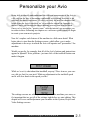
Personalize your A vio
settings
Being able to identify and understand the different components of the Avio is
a big step on the way to becoming comfortable with editing, but there is no
substitute for direct experience. So after you study the next ten chapters that
break down the Avio’s interface, we’ve provided a tutorial in Appendix A
that will walk you through the movie-making process from start to finish.
Once you’ve tried a few “practice runs” with the tutorial, we encourage you
to return to these following ten chapters as a reference guide when you begin
to create your own movie projects.
Now let’s explore each feature of the machine in a little more detail. What
better place to start than the Settings screens, which allow you to make
adjustments to the ways in which the Avio will operate and “personalize” the
machine.
Would you prefer, for example, that all of the Avio’s buttons and instructions
appear in Spanish? Not a problem - just one click of the trackball button can
make it happen.
While we’re at it, what about that trackball, anyway? Does it move your cursor a bit too fast for your taste? Make an adjustment to the trackball speed
and it will slow down to the speed you like.
The settings screens are where you can truly make the machine your own, so
it’s important that we get all of the settings right before we start editing. This
chapter will cover each adjustment you can make in the System, Project and
Video Settings screens.
s e t t i n g s
s c r e e n s
2.1
Overview
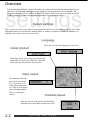
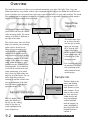
The Avio has three different screens that enable you to adjust and fine-tune the settings that help you
edit video. The System settings screen is where you set the parameters of your machine, the
Project settings screen is where you modify the details of the movie you are working on and the
Video settings is where you adjust the appearance of your incoming video.
settings
System settings
This is where you can set some general system parameters before you start working with the Avio. These
adjustments tend to be one-time only modifications; so with the exception of software installation, you
probably won’t return to this screen very often.
Language
Here you can select the language for your Avio.
Install product
This button allows you to unlock and install additional software (such as the “Blue box” and other
effects) that you can purchase for your Avio.
V ideo output
This determines the output of your Avio movie.
Y/C (if you have an SVideo cable connection)
or CVBS (if your connection is through standard
RCA, or “composite,”
cables).
Trackball speed
Here you can select the speed at which that the
trackball moves the pointer around your screen.
2.2
s y s t e m
s e t t i n g s
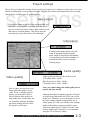
Project settings
This is where you adjust the settings for the specific project that you’re working on, such as the screen size
and the overall quality of your picture and sound. You can also see how much material has been recorded
and check the available space on your hard drive.
settings
New project
Clicking this button erases all of the recorded audio and
video data on the currently selected project and starts a
new one. It does not remove effects, fonts, archived texts
and colors or selected settings. This affects only the
selected project, the other two are left unchanged.
Information
Clicking on this button brings up a submenu of important statistics (project
name, length of storyboard, total number
of storyboard scenes and total number of
storyboard effects) on your currently
selected project.
Audio quality
V ideo quality
Here is where you can select a setting to adjust the quality of your
video. If you’ve already started a
project, you will only be able to
choose from the three quality settings within your current range, not
six. Generally speaking, the higher
the quality setting, the more harddrive space it will require.
p r o j e c t
Audio quality can be set to one of three levels:
VCR Mono 20Hz - 14kHz
HiFi-Stereo Stereo 20Hz - 14kHz
CD-Quality Stereo 20 Hz - 20kHz
Note: you cannot change the audio quality once a
project has been started.
Although the highest setting does produce CD-quality sound, most camcorders and VCRs can’t record
at that level. Therefore, you can normally use one of
the lower settings without an appreciable loss of
sound quality. As is the case with the video settings,
higher audio quality means less hard drive space.
Sound can require up to 170 Kbytes/second, using
all three audio tracks. Therefore, we reccommend
using the "Hi Fi (Stereo)" setting.
s e t t i n g s
s c r e e n
2.3
Project selection
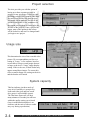
The Avio provides you with the option of
having up to three separate projects in
progress at any given time. When you start
an editing session, you’ll want to come here
first and select which of the three projects
you would like to work on. The rest of the
options in this panel set the parameters for
the current project (these will need to be set
for each of the projects). Once a project has
begun, most of the options in this screen
will be locked in, and can’t be changed until
you begin a new project.
settings
Image size
This determines the size of the recorded video
picture. We reccommendthat you first try a
setting of “Large.” A few cameras, however,
are not able to always record images that are
as large as the Avio’s “Large” image displaysetting. If this is the case, a black border may
appear around these images. To correct this,
select a smaller Image size setting on the Avio
and the borders will vanish.
System capacity
This bar indicates just how much of
your Avio’s hard drive is occupied by
audio and video (red) and how much
drive space is still available (green).
The Total time figures tell you how
many minutes or seconds you still have
within the quality setting you selected
(keep in mind that this number is an
estimate, and the ratio of video to audio
may vary during a production).
2.4
p r o j e c t
s e t t i n g s
s c r e e n
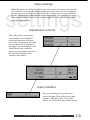
V ideo settings
Within this screen you can directly influence the video signal as it’s being recorded onto the
Avio’s hard drive. You can make additional corrections to the video once the recording has
been done but if you want to achieve the best results, it’s better to have a good signal from
the start. Making changes afterwards has its limitations; despite your corrections, a picture
that’s initially too dark will never be as crisp and bright as it would if it had been digitized
within the right parameters.
settings
Adjustment controls
These sliders allow you to change
your incoming video’s brightness,
contrast and saturation. Once these
are set, they will remain in effect until
you reset them. This is important to
remember if you are bringing in video
from different sources and tapes,
because you will probably want to set
this each time the quality of the
incoming video changes.
Input indicator
Here you can change the type of the active
audio/video input. The Avio has several input
options - CVBS (RCA video + RCA audio
cables), YC (SVHS+RCA audio cables) or Scart.
v i d e o
s e t t i n g s
s c r e e n
2.5
How do I get my video into the Avio?
record
Before you can begin to “edit” and then “play,” as our slogan suggests,
you have to record. And while you can’t physically place your video tapes
inside the Avio, recording the footage from those tapes onto the Avio’s
hard drive is a snap.
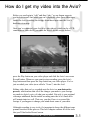
Once you’ve connected your Avio to a video player (which can be a VCR,
camcorder or video deck), you enter the Avio’s record screen (below),
press the Play button on your video player and click the Avio’s on-screen
Record button. Whenever you want to stop recording, press the Avio’s
Stop button and then press the Stop button on your video player. You’ve
just recorded your video (now called a “Scene”) into the Avio!
Editing video that you’ve recorded onto the Avio is a non-destructive
process, which means that all of the changes you make to your footage
are made to digital copies of what you recorded. Not only is your original
videotape unharmed, but the initial recording onto the Avio’s hard drive
will remain intact as well. That way, you don’t have to re-record the
footage if you happen to change your mind about some of your edits.
Although recording is easy to do, it’s important to know the different components involved in the process. This brief chapter outlines all of the tools
that you’ll find in the Record screen.
r e c o r d
s c r e e n
3.1
Overview
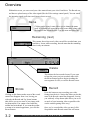
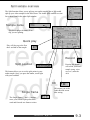
Within this screen, you can record your video material onto your Avio’s hard drive. The Record con-
record
trol bars are placed on top of the video signal (like the Video settings control panel). You can watch
the incoming signal at all times and choose what to record.
Name
Clicking on the scene’s name allows you to change the name
itself. A keyboard will appear next to the scene name, along with
the length of the recorded scene. Type the name and press OK.
Remaining (rest)
This counter shows how much video can still be recorded onto your
hard drive. It runs while recording, but take note that the remaining
time is only an estimate.
Delete
This deletes the last recorded scene. If you want
to keep the scene you just recorded, either click
the Record button again to begin recording the
next segment of video, or exit the Record screen.
Record
Shrink
Clicking on this button makes most of the record
control bar disappear from view, leaving you
with only the Record and Up / down buttons
(this allows you to see most of your image without obstruction). You cannot record when the
toolbar has been shrunk. If you want the toolbar
to return to its normal appearance, just click the
Record button.
3.2
r e c o r d
Press this button to start recording your video
footage into the Avio. Notice that when you do this,
most of the Record control bar disappears, leaving
you with only a Stop button (this allows you to see
as much of your incoming video as possible without the controls getting in the way).
Once you’ve recorded the video you need, click
Stop and the main Record control bar will return.
s c r e e n
o v e r v i e w
edit
The heart of the machine
The Edit screen is where you’re likely to spend most of your time when
making your movie. It’s where you split your video footage into separate
scenes, trim them, add special effects, name the new scenes and place
them in the order in which you’d like them to appear in your final movie.
The Edit screen really is the “heart” of the Avio.
This movie assembly takes place in the Edit screen’s “storyboard.” The
concept behind the storyboard is nearly as old as the film industry itself.
Since the advent of the modern movie, filmmakers have used a storyboard
to help organize the layout of their project.
A good storyboard allows a director to quickly review nearly every stage
of a movie by displaying each individual scene (usually represented by the
scene’s first frame) in order, providing an album of snapshots of the final
film. Traditionally, the storyboard would actually be a large board composed of hand-drawn pictures that represent every scene. As a result, the
storyboard would often look like a large comic-strip version of the film.
The Avio modernizes this time-honored concept with its own digital storyboard. Within this storyboard, scenes are represented by their names and
the first frame of the scene; the playing order is from left to the right. As
you begin to assemble your scenes in the storyboard, you actually see your
movie “grow” from the opening title sequence to the final shot.
One way to conceptualize editing with the Avio is to imagine an artist creating a painting. The source video that you recorded onto the Avio from
tapes can be thought of as the “paint.” When that source video is recorded
onto the hard drive and edited, it is like an artist placing paint on a palette
and mixing it to form a variety of new colors. Now, just as the artist would
take the colors from the palette and arrange them on a canvas to create a
painting, you will take your scenes from the scene bin and move them up
to your “canvas,” the storyboard, to create your movie project.
This chapter will describe all of the functions and features that you will
use as you begin to create a movie within the Edit screen.
e d i t
s c r e e n
4.1
edit
Overview
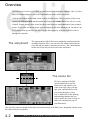
The Edit screen is where you’re likely to spend most of your time when editing a video. It is here
that you’ll make changes to your scenes and build your movie in the storyboard.
Click the Edit button on the Main screen to enter the Edit screen. The top portion of this screen
contains the storyboard and the bottom half features the scene bin . You will see a series
of small, framed pictures in the scene bin; these small icons are representations of your recorded
scenes. Every scene you record on the Avio will appear in this area, although you can only see up
to 12 scenes at any given time. You can view the other scenes by using the scroll bar to move
through the scene bin.
The storyboard
The upper portion of the Edit screen contains the storyboard and its
assembly functions. Here, you can select the edited scenes from the
scene bin and use them to construct your movie. The control buttons
in this area all act only on the scenes in the storyboard.
The scene bin
The lower portion of the Edit
screen contains the scene bin,
which stores and controls your
video scene clips. Here you may
split, trim, and add effects to the
raw scenes themselves. Once
you’ve finished all of the splitting
and trimming changes that you
want to make, the scene is ready to
add to the storyboard as part of
your final movie.
Now let’s take a more in-depth look at these two main sections of the Edit screen, beginning with the scene
bin, followed by the storyboard.
4.2
e d i t
s c r e e n
o v e r v i e w
edit
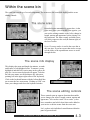
W ithin the scene bin
The scene bin is made up of several components: The scene area, the scene-info display and the scene
editing controls.
The scene area
Recorded scenes automatically appear here, in the
scene area. Once your recorded scene appears, you
can use the editing controls on the left to change its
length, motion and appearance before placing it in
the storyboard. The most recently recorded scenes
will always appear at the end (the bottom right) of
the list of scenes.
Up to 12 scenes can be viewed in the scene bin at
any one time. If you have more than twelve scenes,
use the slider or the up and down arrows to scroll
through the bin.
The scene info display
This displays the name and length (in minutes, seconds
and frames) of a highlighted scene. To rename a scene,
highlight it and then click on its name in the yellow display box. An on-screen keyboard will appear. To delete
the old scene name, use the backspace key (the arrow
pointing left in the upper-right corner of the keyboard).
Click on the keyboard buttons with the left trackball button to enter the new scene name. Clicking on "OK" confirms your changes and closes the keyboard window.
The scene editing controls
These controls open up separate functions that enable
you to change your scene’s length, content, motion and
appearance. You can also create “New scenes” (color
bars, countdown and solid colors) that can be added to
your movies or delete scenes from the scene area.
Let’s explore each individual control button within the
panel in greater detail.
w i t h i n
t h e
s c e n e
b i n
4.3
edit
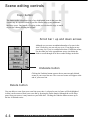
Scene editing controls
Copy button
This button makes a duplicate copy of any highlighted scene in the scene bin.
A scene may be copied as often as you like without using up any additional
hard drive space. One benefit of copying is that you can alter the copy as much
as you like without affecting the original.
Scroll bar / up and down arrows
Although you can store an unlimited number of scenes in the
Avio’s scene bin, you can only see up to 12 on display at any
given time. So if you’ve recorded more than 12 different scenes,
use the slider bar or the up and down arrows just below the
slider to scroll through all of the recorded footage in the bin.
Undelete button
Clicking the Undelete button restores the ten most-recently deleted
scenes to your scene bin area. The recovered scenes will appear at the
end of your scene bin.
Delete button
You can delete a scene from your scene bin at any time. A selected scene (its frame will be highlighted
in blue) can be removed from your scene bin by pressing the Delete button. Although the scene disappears from your screen, it may remain on your hard drive. Clicking the Undelete button restores up to
the last 10 deleted scenes.
4.4
s c e n e - e d i t i n g
c o n t r o l s
edit
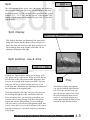
Split
The Split function allows you to cut a video scene into numerous
shorter scenes. Once you split a clip, you will still have the original scene (named “S1,” for example) and a number of new scenes
(named “S1.1,” “S1.2,” etc.) that are “pieces” of the original. The
lengths of these scenes are determined by you while you are splitting the scene.
Split display
This displays the name and duration of the scene that’s
being split. Notice that the duration always begins at 1
frame; this time will increase as the Split position is set.
The remaining time in the original scene that you are
splitting is displayed at the right.
Split position, use & drop
Clicking on “Split Position” allows you to begin “splicing” pieces out of a video scene. When you click this button, the bulk of the Split screen toolbar disappears; this
lets you see as much of the image as possible. The only
tools you will see are a blue bar that increases as you
scroll right and a duration meter displaying the amount of
time remaining in the original scene.
Scroll the trackball to the right, and you will notice you
are scrolling through the video, and that the blue bar
below increases. Once you reach the point where you
want the video to stop playing, click the left trackball
button (this sets the split position). If you’re unhappy
with your choice, you can click Split position again, and
reset it. Once this is set, you must indicate if you want to
keep the section you’ve selected (click Use) or discard it
(click Drop).
s c e n e - e d i t i n g
Play
This button will play the segment
you selected with the Split Position
tool. If haven’t split the scene yet,
this will play the entire scene. Once
the split position has been moved,
however, it will play only the segment represented by the blue bar just
beneath the Split Position button.
c o n t r o l s
-
s p l i t
4.5
edit
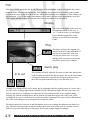
Trim
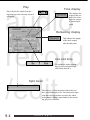
Trim allows you to manipulate the In and Out points of the highlighted scene so you can decide at what
points the scene will start and stop playing. Once trimmed, the scene will run according to those points
every time the scene is played in the scene bin, and in the storyboard, once added there. These changes are
not permanent. If you’re not happy with changes you’ve made, you can always highlight the scene and
Trim it again (and then remember to replace the scene in storyboard, if already added).
Display
This tells you the name of the scene you
are trimming (which, in this case, is
“S1.3”) and the scene’s overall length.
Notice that the length of the scene
changes as you alter the In and Out
Points.
Play
This button will play the segment you
trimmed with the In and Out buttons. If
you haven’t trimmed the scene, this
will play the entire scene. If you are
unhappy with your choices, the In and
Out points can always be changed.
Quick play
In & out
These buttons will play either the first three seconds after the In point
or the last three seconds before the Out point. This can be useful when
selecting the trim points, especially the Out point (it allows you to
check the Out point without having to view the entire clip).
Clicking these buttons allows you to change the In (beginning) and Out (ending) points of a scene. Once
you click on In, scrolling right with the trackball will take the In point further into the scene. Once you
click on Out, however, scrolling to the right takes the Out point toward the scene’s original ending.
Scrolling left with the trackball moves the In point back toward the original start of the scene, while
scrolling left once you’ve clicked on Out moves toward the beginning of the scene. (Notice that the duration of the scene changes as you manipulate the In and Out points.)
The arrow buttons just below the In and Out buttons allow you to change the end points one frame at a
time. The blue bar between the In and Out buttons shows how much of the scene is currently selected.
Notice as you scroll either the In or Out points, the bar gets changes length, accordingly.
4.6
s c e n e - e d i t i n g
c o n t r o l s
-
t r i m
edit
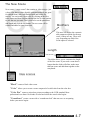
The New Scene
New scenes (“empty scenes” that contain no video images– just
colors, color bars or other digitally generated material) are great
for introductions, end-credit backgrounds and leaders for
movies. You can create a New scene by clicking on the New
scene button and then scrolling through the list of scene options
to pick the one you want. Then you need to set the parameters
and length and click the OK button. The new scene will be
created and added to your Scene area.
Modifiers
This area will display the customizable parameter options for the new
scene, if there are any. These will
vary, depending on which New
Scene option is selected.
Length
This slider allows you to customize the length
of the New scene. If you need a scene that is
longer than the slider will allow, make more
than one scene and add them together on the
storyboard.
New scenes
“Black” creates a black video scene.
“Color” allows you to create a scene composed of a solid color from the color box.
“Color Bar” creates a striped test picture according to the CCIR standard. Most
professionals use about 10 seconds of color bars before the actual video begins.
“Countdown” creates a scene with a “countdown clock” that can serve as an opening
before your movie begins.
scene-editing
controls
-
new
scene
4.7
edit
Special
The Special option allows you to add an incredible number of special effects to
scenes that are selected within the Scene area. Once you pick out the effect you
want and add it to your video, a new scene is created that combines your original video with the effect. This new scene appears in the scene bin next to the
original video scene. Thus, your original, unaltered scene is still available just
as you shot it in case you don’t care for the effect.
Special effects are ideal for placing multiple effects on a single scene. While most of the Special effects are
identical to the effects in the Image Processing screen (see Chapter 7), they are applied in different ways.
The Special effects can be applied to video clips within the Scene area, while the Image Processing screen
effects are only applied to scenes that you’ve placed in the storyboard. Special effects scenes can be adjusted with the other Scene editing controls (they can be split, trimmed, etc.)
Below, we cover the Special options that are unique to the Special screen, then we’ll cover the I.P. effects
that can be accessed through both the Special and I.P. screens.
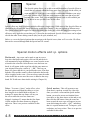
Special motion ef fects and i.p. options
Backwards - Any scene can be made to run in reverse.
Just select the Backwards option, click on OK and the Avio
will automatically begin building a new scene from the scene
selected in the scene bin. After the new scene has been rendered, it will appear in the scene bin with the same name as
your original scene plus a suffix of “_BW.” This lets you
know at a glance that this is your backwards scene. Note that
both the video and the sound is affected when the backwards
effect is applied to the scene. (You can always mute the audio
in the Audio Mix screen once the scene is added to the storyboard. We’ll talk more about Audio mixing in Chapter 10.)
Jitter - To create a “jittery” strobe effect, select
Quick motion - This will generate a new
the Jitter option and adjust the slider to set just
how long the Avio should hold each frame. A
setting of 4 means that one frame will stay on
the screen while the next four frames are
skipped. A setting of 3 means that the first frame
is held, and the next three frames are skipped,
and so on. There is no preview available for this
effect.
scene that’s a sped-up version of a video clip.
Once you select a scene and the Quick motion
button, you need to set an acceleration factor
(two times as fast, three times as fast and so on),
then click the OK button. Once the scene has
been created, the new scene will appear in your
scene bin bearing the suffix “_QM,” indicating
that it is a quick-motion scene. To improve your
resolution, use lesser values. There is no preview
available for this effect
4.8
scene-editing
controls
-
special
edit
Slow motion - This option creates a scene copy that is identical to the original except that it runs
more slowly. The “slowness rate” or Delay can be set with the slider: A high rate (10) leads to an
extremely slow version 10 times the length of the original, while the lowest rate (2) creates a scene
that’s only twice as long as the original. The scene’s original sound is also played in slow motion, but
you can mute it in the audio mix screen once the scene is added to the Storyboard. The new slow motion
scene will appear in your scene bin with the suffix “_SM,” indicating that it is a slow motion scene.
Scene -> sample - This option creates an audio sample (like a sound bite) from a scene’s audio,
making it possible for you to use the audio sample elsewhere in your movie. Once you select a scene
and click this button, the scene’s sound will appear in the list of audio samples in the Audio/record and
Audio/mix screens. From there, you can work with it as you would with any other audio sample.
Still scene - The Avio can create perfectly stable still shots from any point in any scene. Select a
scene and the first frame will become a still once you click on the “Still” button. If you want a still of a
frame that’s located further into the scene, you can make a copy of the original scene, then trim it down
so that the precise frame that you want is the starting point. Note that a still frame does not have sound.
Image processing ef fects - Each of the remaining effects (such as “Binarizer,”) can also be
found within the Image Processing screen. Each of these effects will have its own set of variable
parameters that you can select, most of which are self-explanatory. Perhaps the best way to familiarize yourself with what each effect actually does is to experiment with each one on your own - it’s a
lot of fun, and you can be as creative as you want with the effects.
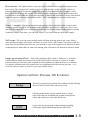
Special controls: Preview, OK & Cancel
This lets you preview the selected effect without actually affecting
the scene itself. Not all effects can be previewed.
Clicking on this button creates (renders) the new special
effect scene that you assembled (the original scene plus the
effect) and returns you to the main Edit screen.
Cancel exits the special menu without changing anything.
Clicking the right trackball button has the same effect.
scene-editing
controls
-
special
4.9
edit
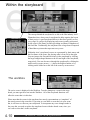
W ithin the storyboard
The concept behind the storyboard is as old as the film industry itself.
Filmmakers have always used a storyboard to help organize the layout
of their project. A good storyboard allows a director to quickly review
every stage of a project by displaying each scene (usually represented
by the scene’s first frame) in order, providing an album of snapshots of
the final film. Traditionally, the storyboard was a large board composed
of hand-drawn pictures that represent every scene.
Within the Avio’s storyboard, scenes are represented by their names and
the first frame of the scene; the playing order is from left to the right.
You can jump to the first and last scenes in the storyboard by clicking
the large triangle-shaped buttons to the left and right of the storyboard,
respectively. You can also move through the storyboard by clicking the
small scene-by-scene arrows (< >) above the Replace button, or by
clicking on the slider bar to the left of the scene-by-scene arrows.
The workbox
The active scene is displayed in the Workbox. To make changes to a scene in the storyboard, you must get the scene into the Workbox. All of the storyboard functions will
affect the scene that is in this box.
Please note that the scenes in the storyboard are merely representations or “snapshots” of
the actual scenes in the scene bin. If you trim or even delete a scene that’s in your scene
bin, it will have no effect on your storyboard. To incorporate any scene changes made in
the scene bin you need to replace the storyboard scene with the altered scene, since you
can’t edit a scene that’s in the storyboard.
4.10
within
the
storyboard
edit
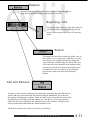
Replace
Press this button to remove the current storyboard scene and replace it
with the selected (blue-framed) scene from the scene bin.
Beginning / end
Clicking the large arrows on either side of the storyboard will take you to the beginning (the left
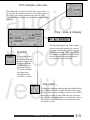
arrow) or the end (the right arrow) of your storyboard.
Search
This button will locate the original clip of the scene in
the workbox. Let’s say that you would like to re-trim a
scene that’s in the storyboard. Place the storyboard
scene within the workbox and press Search. The Avio
will locate the scene within the scene bin that has the
same name (if you haven’t already deleted this scene
or renamed it). Once it’s found, you may trim that
scene down, return to the edit screen and press
Replace.
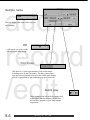
Add and Remove
You place a scene into the storyboard by selecting the scene from the scene bin that you
want to add (it becomes framed in blue) and pressing the Add button. The scene will
then appear within the gray workbox. When you add a scene next to the first scene in the
storyboard, you will need to indicate whether you want the new scene to be placed in
front of (to the left) or behind (to the right) the scene in the workbox. All other scenes
will be automatically added after the current workbox scene.
The Remove button removes the scene in the gray workbox.
storyboard
controls
4.11
edit
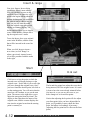
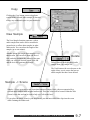
Insert & range
Your Avio features Insert editing
capabilities. What’s insert-editing?
Well, say you have a scene on the
storyboard that is an interview of a
person who begins talking about her
parents. At that point, you would like
the video to cut to a shot of the parents, but you still want the audio
from the original scene (the person
talking) to continue playing. The
Insert function allows you to insert a
scene within another, without affecting the original scene’s audio.
To use the Insert, place your original
scene in the Workbox, and the scene
that will be inserted in the scene bin
below.
When you click Insert to insert a
new scene (or click "Range" to
adjust a previously inserted scene),
you will be presented with the menu
to the right.
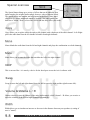
Start
In & out
Click here to select the point at which the
inserted scene will begin playing over the
original scene. Notice that as you scroll right
you move through the original scene. Once
you have found the desired point, left-click to
set the starting point. You will notice that the
menu bar will condense as you set the start
point. The arrows to the right allow you to
adjust the start point frame-by-frame. The
display to the right shows the name of the
original scene, and the counter displays the
time into the original scene that the starting
point is currently at.
4.12
storyboard
The In and Out points here adjust the scene that’s
being inserted, NOT the original scene. It’s usually best to have the scene already trimmed before
you insert it, so you can see the scene as you
make changes to its In and Out points.
Notice that adjusting the In point will also adjust
your Start point. After you have adjusted the In
point, you’ll probably want to check the Start
point, and adjust it accordingly if necessary
(adjusting the Out point has no effect on the Start
point).
controls
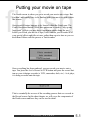
Putting your movie on tape
finish
The Finish screen is where you go to record your movie onto a tape. But
you don’t necessarily have to be finished with your movie to work within
this screen.
One powerful feature happens to be located within the Finish area: The
Create Storyboard button. While this option can be used to “tidy up any
loose ends” (effects you may have forgotten to render along the way)
before you record your movie to tape, it also enables you to render all of
your special effects and titles at once, rather than one at a time as you created them. Editors call this process a “batch render.”
Once everything has been rendered, you can record your movie onto a
tape. You press the Avio’s Record to VCR button and press the record button on your videotape recorder (a VCR, camcorder, deck, etc.). As it plays,
it is being recorded onto the tape.
This is essentially the reverse of the recording process that we covered in
the Record screen. In this short chapter, we will cover the components of
the Finish screen and how they can be used in detail.
f i n i s h
s c r e e n
5.1
Overview
finish
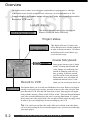
The Finish screen is where you record your completed movie project out to a videotape.
Although the screen is fairly straightforward, it does have several components to it: The
Length display , the Render status indicator, the Create storyboard option and the
Record to VCR control.
Length display
This displays the total length of your storyboard in
minutes, seconds and frames (000.00:00).
Project status
This display tells you if you have any
effects that need to be created (rendered)
in order to finish your movie. All effects
and audio must be created before you
can record out to tape.
Create Storyboard
Record to VCR
Some people choose to run a “batch
render,” meaning that all audio and
video changes are rendered at once
instead of rendering each effect as
they go along. To do this yourself,
just click on the Create storyboard
button and the Avio will render all
unrendered material. Once it’s finished, you can record your movie out
This button allows you to record your finished movie to tape. Before you begin to
actually record your project to tape, you need to turn on your video recorder, then
press Record to VCR. After this, the first frame of your video project will appear
along with the message “Please switch VCR to record.” Press the Record button on
your video recorder and then press the Avio’s on-screen Start button. It’s a good
idea to start your video project with a few seconds of black video (an empty scene)
in order to give you enough time to start recording on your VCR.
Tip: You could even end the video with a fade-out to a black scene–this allows
you to avoid recording the Avio screen that appears once you have played through
your entire project.
5.2
f i n i s h
s c r e e n
o v e r v i e w
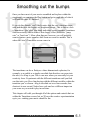
Smoothing out the bumps
transitions
Once you have most of your movie assembled and in place within the
storyboard, you can press the Play button and get a rough idea of what it
will look like once it’s finished.
If you do this, though, you’ll likely notice that the cuts (when one scene
ends and the next one begins) are rough and abrupt. This is due to a lack
of transitions - the “glue” that binds individual scenes together. Sometimes
directors actually want to achieve this choppy effect (known as “jump
cuts” or “hard cuts”). More often than not, however, you will probably
want to feature a more seamless shift from one scene to another. This is
where the Avio’s Transitions screen comes in.
The transitions can be as flashy as a three-dimensional explosion, for
example, or as subtle as a simple crossfade that dissolves one scene into
the next; it’s all up to you. This is one area where you can really let your
creativity loose. Experiment with the different transitions until you find
one that suits you. Have fun playing with the different variables within the
transition you’ve chosen - drag a crossfade out over four seconds, then
shorten it to one second. Notice how each one has a different impact on
your scene as you watch it play in real-time.
This chapter will walk you through all of the options and controls that are
within the Transitions screen, but we’ll leave the creative experimentation
up to you - making your movie should be fun.
t r a n s i t i o n s
s c r e e n
6.1
Overview
Once your storyboard is organized, you can add transitions between scenes if you think your project needs
them. (You could, of course, use simple cuts between scenes and avoid transitions altogether, depending on
your individual editing style.) If you do decide to “smooth over” the jumps from one scene to another, the
Avio has a full array of transitions for you to use, ranging from gentle crossfades to wipes. And, given the
Avio’s real-time capabilities, the2D transitions can simply be inserted and immediately played without having to wait for them to render (some of the more complex 3D effects will require rendering, however).
Real-time effects are all labeled in the Effects list with a small green triangle.
transitions
A scene’s original source audio is automatically crossfaded whenever a transition has been added. This
means that the sound from the first scene becomes quieter while the sound from the second scene becomes
louder. You should remember to change the volume of a loud scene before placing the effect.
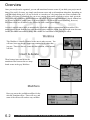
W orkbox
This Workbox is virtually identical to the ones in other screens. You
will note, however, that two scenes are contained in it, rather than
just one. These are the two scenes that the transition, when inserted,
will link.
Insert & delete
These buttons insert and delete the
transition effect between the two storyboard scenes in the gray Workbox.
Modifiers
Here you can set the available modifiers for the
selected Transition effect. These will vary, and
some of the effects will not have any variables.
6.2
T
t rr aa nn ss i i tt i i oo nn ss ss cc rr ee ee nn oo vv ee rr vv i i ee ww
Transition duration
When you first insert a transition effect, its duration is automatically
set at one second. You can change this by selecting one of these buttons, which will set the length at one-half of a second, one second, two
seconds or the number of seconds you specify (this number cannot
exceed the length of the shortest scene that the effect is being applied
to). A transition can only be as long as the shorter of the two scenes it’s
applied to. A transition effect that is placed between two scenes will
shorten the total length of the storyboard by the length of that transition. Transitions cannot overlap. In the case of a five-second scene
next to an eight second scene, for example, the total length of the transitions attached to it cannot exceed five seconds.
transitions
Preview & Create
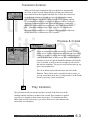
If you are using an effect that needs to be created, Preview
allows you to see how the transition will look with your video
before you create it. Clicking the Preview button produces a
window in the middle of your screen. This window displays a
real-time preview of what the finished transition will look like
once it’s created, as well as the two seconds of video before
and after the transition. The preview itself will not take up any
space on your hard drive.
The Create button will render and create the effect in the
Workbox. These effects can be created here one at a time, or
you can create them all at once (a “batch render”) in the Finish
screen by pressing “Create storyboard.”
Play transition
This play button will play out the last three seconds of the first scene in the
Workbox and the first three seconds of the second. If no transition is applied,
you will see a straight cut between the two scenes. If a transition has been
added (and created, if necessary), you will be able to view the transition and
ensure that it is satisfactory.
t r a n s i t i o n s
s c r e e n
o v e r v i e w
6.3
Transition options
transitions
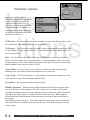
Here is a list of the available
Transition options. Real-time effects
have a small green triangle in the
upper left corner of the icon. To
select one, click on the box, and the
blue highlight bar will appear; you
can then select the slider and scroll
up and down through the list to find
the one you want to try.
3d Mosaic- The first scene breaks up into a number of squares that fly forward to reveal
the second scene. The number of squares can be set from 1 - 15.
3d Stripes - The first scene is slowly covered as stripes containing the second scene fold
in. The number of stripes can be set from 2 - 30 and the direction of the folding stripes can
be set to Up or Down.
Bars - The first scene wipes away in the form of sliding bars to reveal the second scene.
The first scene can either wipe away with the bars, or remain stationary and be covered by
the incoming bars. There are six different directions for the bars’ movement to choose from,
and the number of bars can be set from 2 to 200.
Circle Wipe - The first scene is covered by the second in the form of a growing or
shrinking circle. The motion of the movement can be set to In or Out.
Color Fade - The first scene fades to a color, and then fades into the second scene. The
color can be set to any color, including Archived Colors.
Crossfade - The first scene dissolves into the second.
Double Exposure - Both scenes are double-exposed so both can be seen at the same
time over the course of the transition. The mode can be set to Crossfade or In/Out Fade.
Crossfade will begin with the first scene and end with the second scene, while In/Out Fade
will fade to the double exposure, and then fade back to the first scene. When using the
In/Out Fade mode, set the duration of the transition to be as long as the second scene for
best results.
The fade time can be set from 0 – 10 seconds, and the mix percentage can be set from 0% 100% (this affects how much of each scene will be seen - 50% means both scenes will be
mixed evenly).
6.4
t r a n s i t i o n s
s c r e e n
o v e r v i e w
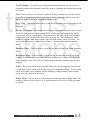
Field Changer - Over the course of this transition, the fields from the first scene are
alternated with the fields from the second. The result is a lightning-fast strobing between the
two scenes.
transitions
Gate- The first scene is covered as if a shutter is closing, and opens to reveal the second
scene. The direction of the shutter can be set to up/down or left/right, and the color of the
shutter can be set to any color, including Archived colors.
Page Clap - The second scene folds over the first. The foldover can be set to one of four
directions.
Picture in Picture - The second scene will appear as a picture-in-picture inset over the
first scene. The duration of the transition MUST be set to equal the length of the second
scene for this effect to work properly. The position of the PIP inset can be set to anywhere
on the screen. Also, the size of the inset can be set to any size. The second scene will be
scaled to fit into the inset. A drop-shadow (the size of the shadow can be set from 0 – 50)
and a border (the border’s width can be set from 0 – 50) can both be placed around the
inset.
Random Lines - The first scene is covered by the second in the form of thin horizontal
lines.
Rectangle Wipe - The first scene is covered by the second in the form of a growing
rectangle. As the rectangle grows, more and more of the scene is revealed. The movement
of the rectangle can be set to Out or In, and the position that the rectangle begins at can be
changed.
Scale - This is very similar to the Rectangle Wipe, but with one exception; the incoming
(or outgoing) scene is scaled to fit into the growing (or shrinking) rectangle. The movement
can be set to either Grow or Shrink, and the starting (or ending) position of the rectangle
can be set to any position on the screen.
Stripe Fade - The first scene is covered by the second in the form of fading stripes. The
number of stripes can be set from 2 to 32, and the stripes can be set to be either horizontal
or vertical.
t r a n s i t i o n s
s c r e e n
o v e r v i e w
6.5
Special effects time
i.p.
effects
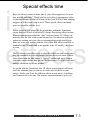
Have you always wanted to make one of your videos appear as if it were
shot in black and white? Would you like to be able to superimpose video
of your best friends in front of footage of the Great Wall of China, making
it appear as if they took a trip to Asia? These special effects (and many
more) are possible with the Avio.
If your creativity was piqued by the possibilites within the Transitions
screen, then you’ll have a ball with I.P. (Image Processing) effects screen.
Whereas transitions provided the “glue” between scenes, I.P. effects can
radically alter the look of the scenes themselves. You have fun with such
options as washing out your color or superimposing people and objects
from one scene into another with the Avio’s Blue Box effect (available as
standard in the ST model and as an upgrade in the LT model) - the choice
is yours.
The I.P. effects screen allows you to place the effects on your scenes once
they are assembled in your storyboard. You can also access most of these
same effects with the Edit Screen’s “Special” toolbar and apply them to
your video scenes before they go into the storyboard, if you prefer to add
multiple effects on top of one another.
As we did with the Transitions, this I.P. effects screen chapter will focus
on all the elements that you can use to create special effects in your
movies. Maybe you’ll use five different effects in one movie, or perhaps
you’ll choose not to use any. The creative experimentation is up to you.
i . p .
e f f e c t s
s c r e e n
7.1
Over vie w
i.p.
effects
In this screen, you can apply filter-like effects to the scenes that are in your Storyboard. These
image-processing (or “I.P.”) effects can be placed over the entire scene, a portion of the scene
or the entire storyboard by using the Range button. If you want to apply effects to scenes in
your scene bin, you need to use the Special button in the Edit screen (see Chapter 4 on the Edit
screen for more information).
Previe w
If you are using an effect that needs to be created, Preview allows you to
see how the effect will look with your video before you create it. Clicking
the Preview button produces a window in the middle of your screen with a
preview of what the finished effect will look like once it’s created. The preview itself will not take up any space on your hard drive.
The Create button will create (render) the effect in the Workbox. These
effects can be rendered here one at a time, or you can batch render them in
the Finish screen by pressing “Create storyboard.”
Wor kbox
Whichever scene you place within the gray Workbox in center of the
storyboard will be the one on which the image-processing effect is
applied.
Inser t & remo ve
These buttons insert and remove the effect
on the scene in the gray Workbox.
7.2
Ii . p
P.
e f f e c t s
s c r e e n
o v e r v i e w
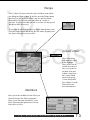
Range
i.p.
effects
An I.P. effect will always alter the entire workbox scene unless
you adjust the effect’s range. To do this, press the Range button
and you’ll be able to set the effect’s new In- and Out-points.
(Remember: You can only place one effect on a scene at
one time. To place more than one I.P. on a scene, use the Special
function in the Edit screen.)
If you want the effect to be longer or shorter than the host scene,
press the Range button and choose the first frame (In-point) and
last frame (Out-point) for your effect.
Create effect
The Create button
will render the effect
in the Workbox.
These effects can be
created here one at a
time, or you can create them all at once
(called a “batch render”) in the Finish
screen by pressing
“Create storyboard.”
(See Chapter 5 on the
Finish screen for
more information.)
Modifiers
Here you set the modifiers for the effect you
selected from the list. These parameters
allow you to alter and “personalize” each
effect. The individual parameters will vary
from effect to effect.
i . p .
e f f e c t s
s c r e e n
o p t i o n s
7.3
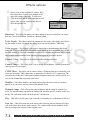
Effects options
i.p.
effects
Here is a list of the available I.P. effects. Realtime effects have a small green triangle in the
upper left corner of the icon. To select one,
click on the box and the blue highlight bar will
appear; then you can scroll up and down to
move through the list.
Binar iz er - This effect will make your video appear in any two colors that you choose
from the Color Selection Box. Similar to a duotone photo.
Color De pth - This effect reduces the amount of color in the video image. Any flickering that might occur as a result of this effect can be corrected with the CVBS filter.
Color to g r a y - The original color scene is turned into a monochromatic black and
white one. If you intend to have your entire movie appear in black and white, you can use
the video settings to lower the saturation to zero before recording the material and avoid the
long creation times associated with applying color to gray to your entire project.
Contr ol Color - This effect is for Red/Green/Blue (RGB) correction.
Contr ol Ima g e - This effect allows you to change the brightness, contrast, gamma and
color aspects of your images.
CVBS F ilter - This effect can be used to reduce a flickering that can occasionally occur
when you are using CVBS connections, as opposed to S-video (or Y/C) connections. The
reason for this is that the CVBS signal combines brightness and color, which can lead to a
loss of video bandwidth (especially with color).
Doub ler - This effect doubles your image and overlaps the two in such a way that it
appears as if your scene is being viewed with blurred vision.
Dynamic r ang e - This effect reduces the brightness and the range of contrast for a
scene. Try experimenting with different settings and check the preview window before rendering. The scale mode retains all of the picture’s information.
Flip - This effect can flip your scene vertically, horizontally or a combination of the two.
Line Ar t - This effect turns the scene into a kind of moving line-art drawing (all edges
will seem to have been drawn with a pencil). The contrast slider sets the darkness of the
lines according to the contrast of the original scene.
7.4
i . p .
e f f e c t s
s c r e e n
o p t i o n s
Mir r or - With this effect, a scene is mirrored horizontally, vertically or both.
i.p.
effects
Mosaic - This effect enlarges the pixels in a scene to mask details (such as a person’s face
or a license plate on a car).
Ne g a tiv e - Similar to an actual photographic negative. Although it is often used to merely
alter the scene, you could also apply it in other areas. You could use the macro function of a
video camera to record video of a negative. The Casablanca’s negative effect could then be
used to turn the negative back into a positive image to be used in a video project.
NOP - This effect has no impact on your editing whatsoever; it’s a tool used by software
developers to test the Avio’s software.
Out of f ocus - This effect allows you make a portion of your video appear as if it is out
of focus. You can set when the blurriness fades in and fades out.
Rectangle - A rectangle is rendered into the scene. You determine the rectangle’s size,
dimension, color and transparency.
Relief - The scene is turned into a 3D relief, ultimately resembling an image chiseled in
stone. The light slider changes the direction of the light source.
Shar pen - You can use this effect to improve your overall picture sharpness if, for exam-
ple, your archived material needs to be restored. The sharpness grade can be regulated in 8
steps.
Solar iz e - This effect alters the scene’s colorization, as black and gray shades change to
orange, yellow, green, cyan and blue. This process is often used in science to demonstrate
different levels of brightness; the human eye can only recognize about 100 different levels
of brightness, but it can discern over 100,000 color variations. Hard cuts can lead to flickering edges if you use CVBS, but the CVBS filter and Soften effects can correct this problem.
Spr ead - This effect spreads your image’s pixels apart.
W hite balance - Sometimes cameras do not have the proper color balance. This colorcorrection option allows you to select a section of your video image to be adjusted to white,
so that the Avio will then correctly balance other colors to match.
Zoom - This effect allows you to select a portion of your video that you can zoom in and
zoom out on (great for zooming in on a player in sports videos).
i . p .
e f f e c t s
s c r e e n
o p t i o n s
7.5
Roll the credits
titling
The Avio’s Titling screen is where you can create titles, subtitles and credits for your movies. Whether you want to add a simple touch, such as having the words “Happy Sixth Birthday, Sara” appear before video of your
daughter’s birthday party, or proudly declare that your movie is “A Mark
Smith Production,” the Avio’s titler will help you do it quickly and easily.
In fact, the Avio’s titler works very much like the Transitions and I.P.
effects screens that we covered in the previous two chapters. The titler
even features the same Range, Preview, Create and Play functions that are
used with transitions and I.P. effects. The biggest difference is that instead
of adding a crossfade or a page-turn effect to one of your scenes, the Avio
uses the same process to digitally mix text into your movie.
The titler is sharp, scrolls gently, features a wide range of fonts and can
display text in any color. You can also choose just how your titles will
appear on the screen (such as scrolling up from the bottom or fading in) or
whether they have a background box behind them or not.
Once you select a title, you type the text in with the digital onscreen keyboard, which can be controlled with either the trackball or a USB PC
keyboard (sold separately).
In this chapter, we examine all of the Titling screen’s features and options,
so you will be able to create great-looking titles for your movies.
t i t l i n g
s c r e e n
8.1
Overview
titling
The titler works very much like the Transitions and I.P. screens. Instead of adding a crossfade or a
filter effect to one of your scenes, the Avio uses the same process to digitally mix text into your
scene.
Range
Once inserted, a title will default to run for the entire length of the scene it is
applied to. However, you can adjust the title’s running time to let it run for a shorter or longer period. The Range screen is similar to the Trim screen. Instead of
marking the active part of a scene, you set the effective time for the title. The text
starts at whatever frame you set (In-point) and ends at the last frame (Out-point).
Return to the titling menu once you have made your selections and your scene
should now bear the titling icon. If your titles spill over into other scenes, they’ll
be marked with the icon as well.
Insert / Remove
“Insert” will apply the selected Titling
option to the scene in the workbox. (Note
that this can be done before or after the
title has been created in the Edit/change
text screen). “Remove” will remove a
Titling effect that has been applied to the
scene in the workbox.
Option modifiers
Here is where you set the modifiers for the title selected from
the list. These will vary by the
titling option selected.
8.2
t i t l i n g
s c r e e n
o v e r v i e w
Titling options
titling
This is a list of your
available titling
options. Each will
have its own set of
parameters to the
right, once the
option is selected.
Fading V-Scroll - Your text fades in and then fades out as it scrolls up. The
“height” (the point at which the title begins to fade) can be set from 10 to 200.
Horizontal scroll - With this option, your text crawls across the screen horizontally, from right to left.
In/out fading pages - This titling option fades one page of text into another.
You can set the length of the fade-in (a setting from 0 to 10) and the duration that
each page remains on the screen (a setting from 0 to 10).
Moving pages - With this option, you can set the direction in which your body
of text comes onto the screen and the direction in which it moves. The Movement
setting is the amount of time that the setting takes your text to move across the
screen.
Pages - This option allows you to create static text blocks (“pages”).
Through fading pages - This is quite similar to the Pages option, but here you
can have the pages fade from one to the next (similar to a Crossfade transition).
V-Scroll - Your body of text will scroll vertically across your screen.
t i t l i n g
s c r e e n
o v e r v i e w
8.3
Preview
The Preview button plays the title in a real-time preview. The
running time will be about as long as that of the final version. The
preview requires no additional space on your hard drive.
titling
W orkbox
The title that you choose will be placed on the
scene that’s within the Workbox.
Create
When you click this button, the
Avio will create the Titling effect
that you applied to your video
scene.
Play
Pressing Play will allow you to view
the scene within the Workbox with
the new title added to it once the title
has been created.
Enter / edit text
When you click on this button, the Avio will bring up a digital keyboard.
You use this virtual keyboard or an external USB keyboard, if you prefer, to
type in the text for your titles.
On the next several pages, we describe the Enter /edit text screen and its
functions in more detail.
8.4
t i t l i n g
s c r e e n
o v e r v i e w
Overview
In this screen you will enter the actual text that will appear in the selected Titling effect. You will
notice that this window’s interface is designed to be very similar to a word processing program.
Font display
This box displays the style and point size of the font that you
selected.
Title name
This box displays the name of the Titling
effect that you selected in the main Titling area
before entering the Edit / change text menu.
The scene that was in the
workbox in the Titling
screen will appear here
and display any changes
made with the keyboard
or with the titling
options. The slider and
arrows on the right allow
you to scroll up and
down through the text if
you have entered more
text than can fit on the
screen. (Note: The slider
won’t work with all
fonts.).
W ork scene
Keyboard
The on-screen keyboard is very similar to a traditional word-processing
program. Just place the cursor (the ponting hand) over the key that you
want to press and click the left trackball button. (Note: The Avio uses
line-oriented text, meaning that you can use any number of fonts, sizes
and colors on different lines, but not within a single line).
e n t e r
/
e d i t
t e x t
o v e r v i e w
8.5
Text controls
titling
These four buttons allow you to adjust how
your title’s text appears on the screen.
You’ll find a closer look at each control
and how it affects your text below.
Font style / -size
Seven fonts are available with your standard system package and many
additional fonts are available on separate font disks. You can scroll
through the list of fonts using the trackball. A sample of the current
font is displayed below the list. You can choose any font size that you
want and the sample text will reflect your changes. In the case of some
extremely large fonts, you might only see parts of the text, but the actual version will appear its entirety.
Color / pattern
Here you can select the color of the letters in the
text or add a texture pattern to appear on the letter
instead of a color. Once “Textured” is selected,
you can then choose which texture you would like
to appear over the letters of your text. The slider
allows you to set the transparency of the color;
0% being completely transparent, 100% being
entirely opaque.
Frame
Clicking here will outline each
individual letter with a color
that you designate.
Shadow
Here you can create a drop shadow for each of the letters in your
text. There are two options; selectable color for the shadow, and an
arrow that lets you select which side of the letter you would like the
shadow to appear. The direction that the arrow is pointing tells you
what direction the light that casts the "shadow" is coming from. If
the arrow is pointing to the right, the shadow will appear on the
right side of the letter.
8.6
e d i t / c h a n g e
t e x t
o v e r v i e w
Alignment
titling
There are three ways to align your text: “Left,” “Right” and “Centered.” If
you’re typing text directly onto the scene, this alignment will berelative to
the entire scene. If you’re typing into a textured box, however, it will designate the text’s alignment within the box, regardless of where that box appears
in the scene.
Add box
This button allows you to place a variable-sized box on the screen that you can then type
text onto. Click the button once to create the box. At that point, you can move the box
around on screen with the trackball. Once you placed it where you want, left-click again to
set the box in place. Now you can adjust the size of the box with the trackball. Click left
again, and the box will be in place. (You can also use the Tab button to maneuver through
boxes or even change the size of boxes to reach text boxes underneath.)
Page options
Clicking this button will bring up a sub-menu (containing Move box, Size box, Delete box, Boxbackground, Text, Insert page and “Delete page options) that allows you to customize the text box
and insert or delete entire pages of text.
On the next page, we take a look at each of these options in more detail, starting with Move box.
e d i t / c h a n g e
t e x t
o v e r v i e w
8.7
Move box
Select a text box, click this button and roll your trackball to adjust where the title box appears on the scene
(similar to using the Add box function). Clicking the left trackball button will set the position of the box.
titling
Size box
Select a text box, click this button and roll your trackball to adjust the size of the title box on the scene
(again, this is similar to using the Add box function). Clicking the left trackball button will set the size of
the box.
Delete box
This will delete the currently selected text box.
Box-background
Here you can choose the background for the currently selected box. You will have four options for the
background - Transparent, Unicolor, Textured and Alpha.
These next three buttons will only be enabled if you selected a titling
option that contains multiple pages. You will want to type one page of
information in at a time. Once you finish a page, use the page selection
arrows to move on to the next page.
Text alignment
This button allows you to align your page of text.
Insert page
This button enables you to insert a new page of text. You’ll notice that once the button is clicked, anything
that you previously typed will not be visible as the new page is created. You can then toggle back and forth
between the old page and the new page by using the Page arrows.
Delete page
This will delete the page that’s currently selected in the workscreen.
8.8
e d i t / c h a n g e
t e x t
o v e r v i e w
The sound of music
audio
record
/edit
One of the final touches that you can add to your movie will likely be one
of the most important - editing the sound. Whether you want to add a
voice-over narration or include one of your favorite songs from a CD, your
soundtrack will help set the tone and mood of your movie.
But before you can add audio to your movie, you must first record it into
your Avio with the Audio record/edit screen. This screen is where you
record and manipulate all of your additional audio tracks, whether they
include music, speech or sound effects.
Although the Audio record/edit screen’s interface has a rather unique look,
it functions very much like the video recording and editing tools you read
about in previous chapters. The biggest difference is that once audio is
recorded onto the Avio, those files are called “samples,” not “scenes” as
the video files are called.
The audio Split, Trim, Copy and Delete functions are also very similar to
their video counterparts in the Edit screen. In fact, just as the Edit screen’s
“Special” menu allowed you to create special video effects, the Audio
record/edit screen also enables you to add special sound effects to your
audio material.
This chapter will help you familiarize yourself with the unique functions
and buttons within the Audio record/edit screen, but it will be helpful if
you recall the video recording and editing steps that we’ve already
covered.
audio
record/
edit
screen
9.1
Over vie w
The Audio Record screen is where you record and manipulate your audio. The Split, Trim, Copy and
Delete functions are very similar to their video counterparts in the Edit screen. Within the Audio Record
screen’s interface you can record, trim, split, copy, name and add effects to your audio material. The sound
files resulting from a recording (whether they be music, voice-overs or sound effects) are called samples
and are placed in the Sample List to the right.
audio
record
/edit
Input/free
capacity
Decibel control
The Decibel Control slider allows
you to lower and raise the volume
of the incoming audio. The actual
change in decibels is displayed to
the right of the slider.
The Audio Input selector is where you indicate the type of audio
input you are using:
RCA, Scart & Like
Video (Like Video
means the Avio uses the
same settings that you
selected in the Video
Settings screen.)
The volume meter above the slider
helps you monitor your incoming
audio signal’s decibel levels.
When you record audio to the
Avio’s hard drive, you should
ensure that the decibel meters
only register in red (high) during
the loudest portions of the audio
sample. If the meters are consistently within the red area, you
should lower the volume of your
incoming audio. If you intend to
work with several tracks at once
when constructing your soundtrack, don’t use high volume settings for all of the tracks. The volumes of all three tracks are
summed up and this could lead to
an over-modulation of the final
sound. Each bar on the display
represents about 5 dB.
Free Capacity tells you
the amount of available
time remaining in the
audio partition for the
current project.
Sample list
This box displays the
names and running
times (minutes: seconds: frames) of your
audio samples. If you
want to select a sample, click anywhere
within the box and
scroll up and down
with the trackball
until the sample you
want is highlighted,
then click on the left
trackball button to
confirm it.
Sample name/time
This box displays the
name and duration of
the clip you are editing,
which is also the currently highlighted clip
in the Sample List.
9.2
audio
record/
edit
screen
over view
Split sample o ver vie w
audio
record
/edit
The Split function allows you to split up your audio samples just as you would
split up your video samples in the Edit screen. The Audio Split controls are similar to those found in the video Split window.
Sample name
This box displays the name of the
clip you are splitting.
Quic k play
Play will play up to the first
three seconds of the sample.
Record
Split position
Pressing this button
will record your audio
sample (song, voiceover, etc.) onto the
Avio.
This button allows you to set the split points in your
audio sample. Once you press the button, scroll right
with your trackball.
OK
OK returns you to the
Audio Record screen
after saving.
Single fr ame
The Single frame ( < and > ) buttons
move your selected split points backward and forword one frame at a time.
audio
split
9.3
Play
Time display
audio
record
/edit
Play will play the sample from the
beginning up to the currently selected
split point.
This displays the
length of the portion of the scene
up to the currently selected split
point.
Remaining display
This indicates the length
of the audio sample
after the split point.
Use and drop
Use retains the audio segment
that you just scrolled through,
while Drop discards it.
Split meter
This meter is a visual depiction of the audio you
have scrolled through so far. The blue portion represents the selected portion in regard to the whole
audio sample (which is represented by the remaining gray area of the bar).
9.4
audio
split
Tr im sample o ver vie w
This button takes you into the Audio Trim screen, where
you can alter the In and Out points of your audio samples.
The Audio Trim controls function much like the Video
Trim controls (see Chapter 4 for more information on video
trimming).
audio
record
/edit
Play / stop & display
The Play button plays your audio sample
from the selected In point to the selected
Out point, while the Stop button stops the
sample from playing. The display shows
the length of your trimmed audio sample
from the In point; the length changes as
you adjust the In and Out points.
In point
Clicking the In button and scrolling the
trackball allows you
to change the point
at which your sample begins playing.
The arrows beneath
the button move
through the scene
one frame at a time.
Out point
Clicking the Out button and scrolling the trackball allows
you to change the point at which the audio sample stops
playing. Once you stop scrolling to the left, you will hear
the last few seconds of audio before the Out point until
you click the left trackball button to confirm the position.
The arrows beneath the button move through the scene
one frame at a time.
audio
tr im
9.5
Sample name
audio
record
/edit
This box displays the name of the clip you
are trimming.
OK
OK returns you to the Audio
Record screen after saving.
Tr im meter
This meter is a visual representation of the audio sample
according to the In and Out points. The blue portion represents the selected portion in regard to the whole audio sample
(which is represented by the remaining gray area of the bar.)
Quic k play
These buttons to the left of the In counter and
to the right of the Out counter play the first
and last three seconds of your audio sample,
respectively.
9.6
audio
tr im
Copy
audio
record
/edit
Clicking the Copy button creates a duplicate
version of the selected audio sample; it does not
occupy any additional space on your hard drive.
Ne w Sample
The New Sample function generates a silent
audio sample that can be used to mask background noise or affect other samples in other
audio tracks. You can select the length of the
sample (up to one minute).
Another option is a sample that contains a continuous tone. You can select from 440 Hz or 1
kHz, and also designate the volume of the tone.
Once you select the desired length, click OK
and the Avio will generate the sample.
Delete
Delete removes the highlighted audio
sample from your sample list.
The Undo button (the curved arrow to the
right) allows you to restore the last ten
audio samples that have been deleted.
Sample -> Scene
Sample -> Scene generates a new scene that consists of empty, black video accompanied by a
selected audio sample in the original audio track. This new scene will be located within the Edit
screen’s scene bin and can be used to help you "edit to the beat."
If you place the empty scene in your storyboard, you can insert-edit video clips into the scene
while retaining the audio track.
audio
record/
edit
controls
9.7
Special o ver vie w
audio
record
/edit
The Special button brings up a variety of effects that can be added to your
audio samples (the original audio sample, however, always remains intact).
The special effects are modular and will expand in the future. Note: Most
effects involve stereo sound and cannot be applied if the audio quality has
been set to "Mono." Here’s a list of the effects and how they affect your audio.
Copy
Copy allows you to replace either the right or left channel with a duplicate of the other channel. Left->Right
places the audio data from the left channel in both left and right channels.
Mono
Mono blends the audio data from the left and right channels and plays the combination over both channels.
Mute
Mute allows you to mute the audio data on either the left or the right channel.
NOP
This is not an effect - it is merely a device for the developers to test the Avio’s software with.
Sw ap
Swap reverses the left and right channel data (the left becomes the right and the right becomes left).
Volume & Volume L / R
Volume raises or lowers the volume of the entire audio sample, while Volume L / R allows you to raise or
lower the volumes of the left and right channels independently.
Width
Width allows you to simulate an increase or decrease in the distance between your speakers (a setting of
zero is "mono").
9.8
special
audio
options
Become a mix master
audio
mix
Once you’ve recorded your audio samples, you’ll then need to integrate
them with the movie you have built in your storyboard. This all happens in
the Audio Mix screen, where you can arrange all of your recorded samples
in whichever order you like. You can even regulate their volumes, causing
them to fade in or out, or even mute portions of them entirely.
The Audio Mix screen is quite similar to the video Edit screen. To the left
you’ll find the recorded samples and at the top is the storyboard. Unlike
the video storyboard, however, this storyboard features three horizontal
bars representing the three audio tracks:
Original source audio (whatever was recorded by your video camera’s
microphone when you were taping), Commentary (where you can place a
voice-over narration that you recorded on a mixer or tape deck) and
Background (music) tracks.
In this chapter, we will discuss the ins and outs of the Audio Mix screen,
paying particular attention to each button and slider bar and how they
affect your audio. For a detailed tutorial on how to use more advanced
audio editing techniques, see the appendix that follows this chaper.
audio
mix
screen
10.1
Overview
This screen allows you to arrange your edited audio samples and regulate their volumes. While in the
Audio Mix screen, the controls for moving around in the storyboard are quite similar to the video Edit
screen. In this screen, the "active sample" is the audio sample that is currently highlighted in blue, either
in the Storyboard soundtrack or down below in the sample list.
audio
mix
W orkbox
In this screen, the gray Workbox’s main purpose is to give you a
starting point when adding audio samples. Any audio sample, once
added, will be placed at the beginning of the scene that is in the
workbox.
Storyboard slider
This allows you to move
through the storyboard
scenes in order to place
whatever scene you want
into the gray Workbox.
This can also be done by
placing the pointer over
the scene and clicking
left with the trackball.
Insert / Remove
Insert adds the active sample into the storyboard. Initially, audio samples are placed at
the start of the scene in the gray Workbox.
If a sample is already present at the beginning of the scene, the Avio will automatically insert your new audio at the end of the
old sample. Audio samples can’t overlap, so
this will only work if you have enough
space remaining in the storyboard after the
first sample.
The Remove button removes the active
sample from the commentary and background tracks (you can’t remove your
original source audio). Remember that if
you remove audio samples you’ll need to
re-render the storyboard.
10.2
audio
mix
Create
Avio can play all three tracks together only if they have
been created (uncreated samples appear in red within a
bar above the original track; created samples appear in
green). Create a sample by clicking on it and pressing
the Create button.
The Avio will then create the segment of the storyboard
soundtrack covered by the active sample. The time needed for creating depends on the length of the sample.
screen
overview
Play
Sample list
audio
mix
This will play the
active sample from the
storyboard soundtrack.
If the segment has been
created, you will hear
all three tracks. If the
segment has not been
created, you will only
hear the active sample.
This is the same list
of samples as in the
Audio Record window. You will have
to highlight an
audio sample here
to be able to add it
to the storyboard
soundtrack.
Active sample display /
play button
Range
This function allows you to do two
very separate things. First, the Start
button allows you to select the point in
the scene where the active audio sample will begin playing. Remember: it’s
automatically placed at the beginning.
Click Start and begin scrolling right.
You will notice you are scrolling
through the scene. Once the desired
starting point for the active audio sample is found, click left and the start
point will be set. (To change it again,
click Start again.)
This displays the active audio
sample. Note that this functions
in two different ways. The active
sample can be either in the
Sample list to the left, or in the
storyboard above.
The Play button beneath the display will play the original version
of the sample. If you would like
to hear the sample as it appears in
the Storyboard, use the play button above.
Secondly, you can change the In &
Out points of the Active sample.
Simply make the changes as you
would using the Trim function in the
Edit window. Remember: Once the In
point is trimmed, the active sample
will still begin at the set Start point.
audio
mix
screen
10.3
Track icons
audio
mix
These icons help you identify what you are using the
available tracks for. The Camera Icon is the Original
Source Audio track; this is the audio that comes with
your original video footage. This audio can be muted,
but not removed. The Microphone represents the
Commentary track, and the Musical notes represent
the Background music track. Note how these icons
correspond to the same icon next to the volume sliders down below. Please see the Audio Slider explanation below to see how these volume sliders allow you
to make minute audio volume adjustments.
Audio sample
This is how an audio sample appears
once it has been added to one of the
audio tracks.
Volume controls / mute
These are the sliders that allow you to
adjust volume levels. Moving the slider to
the far left mutes the sample.
Fade in / out
The top slider lets you set a Fade in for the active audio sample, while the bottom slider lets you set a Fade out. Set the slider for the desired length of the
fade.
Volume adjustment tips
Don’t adjust any of the volume sliders until you have highlighted a sample in the audio timeline to make it
the Active sample (if no sample is highlighted, adjusting the sliders will not affect any of your samples).
Once you’ve highlighted an audio sample, then you can start adjusting the sliders to manipulate audio for
the sample you have highlighted, or to have it affect the volumes of the other two tracks if desired. If you
change one or both of the other tracks, the effect it has on those tracks will last for the duration of the highlighted sample.
10.4
audio
mix
screen
More audio mixing tips
Here are some examples of how you can adjust sample volumes on a variety of tracks. For the purposes of this example, the four scenes are 15 seconds long, and the audio sample (“Song”) is 60 seconds long.
audio
mix
1. If you highlight the audio sample that we’ll call “Song”
and then drop the Original Source Audio (the Camera icon)
slider to MUTE, all four of the Source Audio tracks would
then be muted. Remember that you affect the other audio
tracks for the duration of the highlighted sample. In this
case, this is faster than highlighting each of the audio samples on the Source Audio track and muting them idividually.
If you want to change the volume of the entire sample
(“Song”), highlight it and make the desired adjustment to
the Background track (the Music note icon). When an audio
sample affects itself, the adjustment will affect the entire
audio sample.
2. Highlight the audio sample called “Scene 3” and then
adjust the Background music slider to –15dB; you are
affecting the “Song” sample from the sample “Scene 3.”
The sample “Song” will play at normal volume until it
reaches the point where it is being affected by the sample
“Scene 3.” The volume of “Song” will then drop –15dB
until Scene 3 has played through and its affect on “Song’
ends. The volume of the sample “Song” will then return to
normal.
Affecting other tracks in this way will always produce a
rather abrupt change in volume. To get a smooth fading volume change in the above scenario (once “Scene 3” is highlighted and you’ve affected the slider for the Background
music track), set the Fade In and Fade Out at one second
each. This will then gradually change the audio volume
level in the sample “Song.” (It will also cause the audio in
the sample “Scene 3” to fade in and out as well.)
Remember that these changes are cumulative. Say you have
a scenario where you have audio on all three tracks at the
same point in time. Highlight the sample on the
Commentary (the Microphone icon), and take the Camera
slider to –5db. Highlight the sample on the Background
music track and again take the Original audio slider to
–5db. This will then have a total reduction of –10db on the
Original Source (Camera) track.
audio
mix
screen
10.5
The following movie-making tutorial will get you “up and
running” in no time as it takes you through some basic
editing steps that cover the fundamentals of editing with
the Avio. For a more detailed explanation of what a particular function or button does, please refer to Chapters 1
through 10.
tutorial
Turn the Avio on by pressing the power button on the
front panel, in the upper left-hand corner.
First you will see the Casablanca Avio logo for a moment,
followed by the Avio main menu screen. From the Main
Menu, you can get to any of the Avio’s work screens by
placing the cursor over the desired location and clicking
left on the trackball.
1. Getting y our Avio r ead y to edit
Before you begin working with your Avio, there are a few
settings that you’ll want to adjust whenever you begin a
new project. Once the project has begun, you won’t think
about them very often, if at all.
Go to the System Settings screen (to select a button on the
Avio, place the pointer over the button, and click the left
trackball button). Set the following:
• Language - Your Avio will be pre-set to English
• Output - This should reflect how you have your Avio
cabled to the TV (remember: YC = SVHS and CVBS =
RCA cables)
• Trackball speed - Select any speed with which you are
comfortable
Once these are set, return (right click on the trackball) to
the Main screen.
Now go into the Project Settings screen, where you’ll set
the parameters for each project (notice that you have the
option of editing up to three projects at the same time; for
this tutorial, you’ll only use one).
s h o r t
m o v i e
t u t o r i a l
A.1
Select and set the following:
• Video Quality - Set to 6, which is the highest quality.
Notice that as you lower the quality, more space becomes
available on your Avio’s hard drive.
• Audio Quality - Set to “HiFi Stereo.”
• Image size - Set to “Medium.”
tutorial
Once these have been set, you can return to the Main
Screen. Your Avio is now set up and ready to edit!
2. Loading in video
Now you can load some video into your Avio. First, you
need to prepare the tape that’s in the VCR or camera by
rewinding it to the beginning. For the purpose of this
tutorial, please use video that contains at least three different scenes.
Go to the Video Settings screen and select the proper
input, which is either “Y/C” for SVHS, “CVBS” for RCA
cables from a player (a VCR, camcorder) or “Scart.”
Press “Play” on the player and look at the incoming
video. Click on the Brightness, Contrast and Saturation
sliders and notice how they affect the incoming video.
Return them to their original positions (or however you
would like them to be set; just remember that this is how
the video will look once it is loaded into your Avio).
Go into the Record screen. You can do this quickly by
clicking on the small Record screen icon
in the lower right hand corner.
Once in the Record screen, you’ll see that your video is
still visible. Click the Record button. You are now loading the video you see on screen into the Avio. Let it run
until you have a few minutes of video loaded. To stop
recording the incoming video, just click the Avio’s “Stop”
button.
A.2
s h o r t
m o v i e
t u t o r i a l
Recor ding tips:
• Always start the player before clicking Record on the
Avio.
• While recording, always click Stop on the Avio before
pressing Stop or Pause on the player. If you do not
follow these two guidelines, the incoming video may not
be usable.
tutorial
The video that you just watched is now loaded into your
Avio. Click “Stop” on the player, and turn the player off
with its power button.
Notice that the displays show that the video you just
loaded in is named “S1.” To change the name, click on it
and type in the new name using the on screen keyboard (if
you have purchased an external keyboard, you can use it
as well). Click on “OK” and the scene will be renamed.
The length of “S1” in minutes/seconds/frames is displayed
just to the right of the Scene Name display. Your Avio
does not display hours, only total minutes, so it’s a good
idea to always keep in mind the relationship between time
and video:
• 1 hour = 60 minutes
• 1 minute = 60 seconds
• 1 second = 30 frames of video
The display to the right (labeled “Rest”) tells you how
much recording space is still available in your Avio.
If you decide you do not want to save scene S1, click
“Delete,” and S1 will be deleted from your Avio. To
record more video, start the player again, and click
Record.
3. Editing with y our Avio
Now that you have some video loaded, you’re ready to
begin editing. Go into the Edit screen, where you will see
your video (scene S1) in the Scene Bin.
s h o r t
m o v i e
t u t o r i a l
A.3
The Scene Name display at the bottom of the Scene Bin
will display the name of the highlighted scene (which, in
this case, is S.1). The Play button to the right of the Scene
Name display will play the displayed scene.
tutorial
Now that we’ve seen our video, let’s split it up into smaller scenes. Highlight S1 (it should already be highlighted
in blue, as it’s the only scene loaded) and click “Split.”
Once you’re in the Split menu, click “Split Position.”
Most of the menu will disappear from your screen, and
you will see a small command bar. Scroll right, and you
will see that you are scrolling through the video clip (the
time display to the right will tell you how far you have
scrolled into the scene). Scroll until you find a good spot
for the new scene to end, and click the left trackball button; this will return you to the main split window.
Now, click the Play button, and you’ll see the portion of
the scene that you just selected, ending at the point where
you set the Split Position. If you are unhappy with the
Split point, click Split Position again and reset it.
Once you’re happy with the Split point, decide if you
want to use the scene in your movie. If you do, click
“Use;” if you don’t, click “Drop.” When you are splitting,
you are making copies of the portions you are selecting,
so the original clip S1 will be complete, and still available
in the Scene Bin.
Once you click “Use,” you are ready to begin splitting the
rest of the clip. Click Split position and repeat until you
have split S1 into at least four new scenes.
Return to the main Edit screen, where you should now see
the original S1 plus a number of other scenes labeled
S1.1, S1.2, etc. These are the scenes that you will build
your movie’s storyboard with. If you needed to split the
scene S1.2 into even smaller scenes, you can.
Next, let’s trim a scene. Trimming is a quick and useful
way to adjust your scene’s length. Let’s say, for example,
that you are unhappy with the first two seconds of scene
A.4
s h o r t
m o v i e
t u t o r i a l
S1.3. (You could always re-split it, but it’s far easier to
just trim those two seconds away.)
To trim a scene, you need to highlight it (in this case it
will be S1.3) and then click the “Trim” button. This will
bring up the main Trim window. The In and Out buttons
determine the points that the video in scene S1.3 will start
and stop playing. Click “In,” and scroll to the right until
you find a point that you would like the scene to start
playing at. Once you have found it, click the left trackball
button to set the point for the video to start playing. If you
are unhappy with your decision, click “In” and reset the
In point (you can set the Out point in the same way).
tutorial
To see if you’re happy with your selection, you can either
press “Play” to play the entire clip, or the Quick play
arrows next to the In & Out points to play the first and
last three seconds of the scene. Once you’re satisfied with
the results, return to the main Edit screen. (If you want to
practice, go ahead and trim your other scenes).
Now you’re ready to build your storyboard. You will probably want to start and end the storyboard with an empty
black scene. To do this, click on the “New Scene” button.
You’ll be presented with a number of options, but choose
“Black.” Set the length to 10 seconds and click “OK.”
Return to the main Edit screen.
You’ll now see a scene named “Black” in the Edit scene
bin. Highlight it and click “Add” to place it in your storyboard. Now highlight S1.3 and click “Add.” You then will
be asked where you would like the scene to be placed either in front of, or behind, the scene that’s in the storyboard’s Workbox. (You’re only asked this when the scene
in the Workbox is the first scene in the storyboard.
Otherwise, the scene being added will go behind the scene
in the Workbox.) Select “Behind” and add the rest of your
scenes in any order you’d like.
If you’re unhappy with your placement of a scene, just
move the storyboard slider until it’s positioned within the
Workbox and click “Remove.” The scene will be removed
from the storyboard, but it will still be available in the
s h o r t
m o v i e
t u t o r i a l
A.5
Scene Bin. Now go ahead and place it wherever you want.
Notice that once a scene’s been added from the scene bin
to the storyboard, the scene bin version will have a small
dot in the upper right hand corner indicating that it’s in
your movie’s storyboard. That way, you can tell at a
glance what’s been used and what hasn’t.
tutorial
Stor yboar d tip: If you are using a scene in the storyboard, you do not want to change the trim points of the
original scene below in the Edit scene bin. Either remove
the scene from the Storyboard first, or highlight the scene
in the Edit Scene bin and click Copy. This will make a
duplicate of the scene. (Making a copy does not use up
extra space on the Avio.)
Now your Storyboard is assembled. If you click the Play
button up near the storyboard, it will play from the beginning of the scene in the Workbox through the last scene
you added.
If you’re unhappy with a scene in the Scene Bin, highlight
it and click Delete. The scene will be removed from your
Avio. Should you change your mind, click the curved
arrow just to the right of Delete, and the scene will reappear in the Scene Bin.
Clicking Search will highlight the corresponding original
version of the scene that is currently in the gray Workbox,
down below in the Scene Bin.
Replace will take the highlighted scene in the Scene bin
and replace it with the scene that’s currently in the gray
Workbox.
4. Ad ding Tr ansitions, Ima g e Pr ocessing
Eff ects, and Titles
Right now, you could play your storyboard and get a
rough idea of what your movie would look like, but there
will be a “hard cut” whenever one scene ends and another
A.6
s h o r t
m o v i e
t u t o r i a l
begins. Some directors like to use hard cuts to achieve a
certain rough look to their projects, but more often than
not, you’ll want a smoother blend between scenes. To do
that, you can add transitions between the scenes to make
the storyboard flow more smoothly.
tutorial
First, go into the Transitions screen. Notice that the
Workbox now contains two scenes (the transition will be
added between them). Get the first scene in your storyboard into the left side of the gray Workbox.
Use the slider to scroll through the list of Transition
options in the lower left side of your screen (transitions
that have a green arrow in the Transition list require no
rendering) until you get to the one called “Crossfade.”
Click the Insert button and the transition will be applied
between the two scenes. Click “Play” and you will see
how the Crossfade transition looks between your two
scenes (if you’re not satisfied with it, click “Remove” and
the transition will disappear from the storyboard).
The first time a transition is added, its default length is set
at one second (after that, the range defaults to the previous
setting). If you want it to be longer or shorter, you have
four different length buttons just to the right of “Add” and
“Remove.” They are “1/2 s,” “1s,” “2s” and “Xs” (which
will let you set a variable length for the transition,
although the transistion can only be as long as the shorter
of the two scenes). You’ll notice that the transition icon in
the Workbox is green, which means that you won’t have
to wait for it to be created.
Now go to another part of the storyboard and insert the
“Bars” transition between two different scenes. “Bars” is a
3-D effect that will need to be created, as indicated by the
red border on the transition icon in the gray Workbox. To
see the Bars transition before you render it, however, click
on the Preview button. To actually render the effect so it
can be seen when played from the storyboard, just click
on “Create.”
You can have a lot of fun experimenting with the rest of
the transitions in the list. Each one will have different
s h o r t
m o v i e
t u t o r i a l
A.7
options that you will want to eventually become familiar
with the more you edit.
Tr ansition tip: If you want to place both an I.P. effect
and a transition on a scene, you will need to add the I.P.
effect first, then you may add the transitions and press
“Create.”
tutorial
I.P. effects
Sometimes you’ll want to add a special effect, or “filter,”
to an entire scene. To do this, you need to go into the I.P.
effects screen (it looks similar to the Transitions screen,
except that the Workbox only contains one scene, not
two).
Position any transitionless scene within the Workbox, then
scroll through the list of effects to find “Negative.” Click
the Insert button and the effect will be applied to the
Workbox scene (remember that “Remove” will delete the
effect from the scene in the Workbox).
All I.P. effects need to be created, so you’ll need to click
“Preview” to see what the effect will look like and
“Create” to actually make the effect. You should note that
an I.P. effect will be placed over the entire Workbox
scene, so in order to place it over just a portion of the
scene, click on “Range.” The Range menu’s In and Out
points will let you change where the effect begins and
ends within the scene. In this screen, all of the I.P. effects
are applied to the scenes that are in the storyboard.
I.P. tip: To apply these same effects to a scene that’s in
the Scene Bin, go into the Edit screen, highlight the scene
in the Scene Bin you’d like to apply an effect to, then
click “Special.” Select the desired I.P. effect, and click
“OK.” A new scene will be generated that will contain
the video + the I.P. effect. This scene will be separate
from the original. The benefit from this is that the newly
generated scene can now be moved freely around the
storyboard without having to re-create the effect every
time the scene is moved.
A.8
s h o r t
m o v i e
t u t o r i a l
As was the case with the transitions, you’ll probably want
to eventually experiment with the rest of the effects in the
list and become familiar with their different features.
Titling
tutorial
Now let’s add an opening title sequence to your storyboard. Go into the Titling screen and position the empty
black scene at the beginning of your storyboard into the
Workbox (the Insert, Remove, Range, Preview and Render
buttons work exactly the same in this screen as the ones in
the I.P. effects screen).
Scroll through the list of title effects to find the one called
“V-scroll.” Click the Insert button to add the title to the
scene in the Workbox, then click “Enter /Edit Text,” which
will take you into the Titling screen’s interface (this interface works much like most word processing programs).
Use the on-screen or external keyboard to type in a name
for your movie (you may want to type a couple of practice
lines of text first just to help familiarize yourself with the
interface), then click Fontstyle/-size. Select a font that you
want to use and a point size for the letters. Notice that
when you use the slider to change the size, the letters in
the display change size. This is exactly how they will
appear once added to the scene. Once you are satisfied
with your choices, click “OK.”
To select a color for your title, click “Color/Pattern” and
you’ll be presented with two choices: “Unicolor” or
“Pattern.” Select Unicolor and then click the Color button.
In the Color Selection window, click on the spectrum bar
at the top to select the general color, then click on the
large square box to change the darkness and chroma saturation of the selected color. The alpha slider lets you set
the color’s transparency, with 0% being completely transparent and 100% being completely opaque.
s h o r t
m o v i e
t u t o r i a l
A.9
Once these are set, click “OK” twice (both here and once
again on the Color/pattern box) in order to return to the
Titling interface screen.
Now click “Outline” to place an outline on your letters.
First click on “Enabled,” then select a color in the same
manner as described on the previous page. Click “OK.”
tutorial
To select a drop shadow for your letters, click the Shadow
button, then click “Type” and select “Strong.” Next, click
the arrow to select a direction for the shadow to appear;
you may then select the color.
Finally, you can click “Line” to set the alignment of the
text (set it to “Left,” “Centered,” or “Right” as desired).
Once all of these parameters are set, click on “OK” to
return to the main Titling screen (at this point, you may
preview the title to see how it will look in your movie).
Now click the Range button and then click the Out point,
scrolling back (left) for a total of two seconds on the onscreen counter. This will keep your title from interfering
with the transition that we have already placed at the end
of this scene. Once you are satisfied with your results, you
may click “Create” to the scene with the title on it.
Titling tip: If you want to place both a title and a transition on the same scene, you’ll need to add the title first.
Once that’s done, you may add the transition and click
“Create.”
5. Loading audio into y our Avio.
Now we will record a song into the Avio that will be used
as the soundtrack for your movie in the storyboard.
First, pick out a piece of music that you’d like to feature
in your movie (it will be easiest to have the music come
from a CD) and then hook up a CD player (or some other
music source, if you do not have a CD player that you can
A.10
s h o r t
m o v i e
t u t o r i a l
place next to the Avio) into the RCA inputs on the back of
the Avio (as described in Chapter 1) and go into the Audio
Record screen. Once there, the steps for loading audio are
nearly identical to loading in video; the biggest difference
is that the buttons are in different locations. “Record,”
“Stop” and “Play” all function the same as the ones in the
main Record screen.
tutorial
Click “Input” and make sure it is set to “Like Video.”
Press “Play” on the CD player and check the dB meters
on the incoming sound. Generally speaking, you’ll want
to make sure that the meters peak into the red area only
during the loudest portions of the incoming audio. The dB
slider below the meters will allow you to adjust the
incoming volume (the 0dB refers to 0dB of change).
Once these levels are set, click the Record button to begin
loading the audio into the Avio. The new audio sample
will be named “A1” (its name can be changed by clicking
on the name itself and typing in a new one, just as we did
with our video.) Load in a few minutes worth of music, if
possible, then click “Stop” to stop loading. Once you have
stopped, A1 will appear in the Audio Sample list, along
with all other audio samples that you will load into your
Avio.
The Split, Trim, Copy and Delete buttons all allow you to
edit the audio sample just as they did with video scenes in
the Edit screen. Use them to edit your sample A1 if necessary.
You’re now ready to add this sample of music to your
Storyboard, so go into the Audio Mix screen.
Make sure that A1 is highlighted in the Audio Sample
List, then position your second scene into the Workbox
and click “Insert.” You’ll be asked which track you would
like A1 to go on: “Commentary” (the track labeled with a
microphone) or “Background” (the track labeled with
music notes.) Select “Background” for this tutorial.
Now you’ll see A1 under the storyboard in the
s h o r t
m o v i e
t u t o r i a l
A.11
Background track (it will be highlighted in blue, designating it as the active sample). To adjust the sample’s volume, move the corresponding dB slider down below while
the sample is active.
tutorial
The Avio will always add your samples at the beginning
of the Workbox scene. If you want to move the point at
which the audio begins, however, click on the Range button, then click the Start button and scroll the trackball
either right or left (depending upon when you want the
audio to start). Click “Create,” then press the Play button
that’s directly beneath the storyboard. The movie will
begin playing from the scene that’s in the Workbox.
6. Recor ding y our mo vie out to ta pe
Once you’ve finished editing, then you’re ready to take
your movie out of the Avio and put it back onto tape!
First, check that your cables are in the proper ports in
order to record the movie out of the Avio to tape (as
described in the Getting Started chapter), then go into the
Finish screen. If you have effects that need to be created,
you can run a “batch render” (creating all of the effects at
once) here by clicking the Create Storyboard button.
Once this is completed, power up your VCR. Next, click
the “Record to VCR” button on the Avio screen and you
will be prompted to “Please switch VCR to record.” Click
“OK”, and then press your VCR’s Record button immediately, because your storyboard will begin playing your
movie (this is why we suggest putting at least a 10-second
empty black scene at the beginning of every movie).
Once the storyboard has played through, press stop on the
VCR, and you now have a videotape of your movie to
show to your friends, family or clients.
A.12
s h o r t
m o v i e
t u t o r i a l
The Blue Box effect (also known as the "Chroma Key"
effect) replaces an area of solid color in a scene with
video footage of your choice. One common, everyday
example of the Blue Box effect can be seen when TV
newscasts show weather forecasters standing in front of
changing weather maps. In reality, the person is standing
in front of a blue or green screen, and the weather maps
are superimposed behind them. This is precisely what
your Blue Box transition will do, once you enable and
apply the effect.
tutorial
1. Ena b ling the Blue Bo x eff ect
Although the Casablanca Avio ST comes with the Blue
Box pre-loaded into its system software, you have to
enable the effect before you can use it. First, locate your
Casablanca Avio’s SmartMedia card. On the card’s plastic
outer sleeve, you’ll notice three sets of numbers. The bottom line should read "Blue Box" with a 12-digit number
next to it – that number is the code that enables your Blue
Box transition. (Once you locate the number, it’s a good
idea to write it down in case you happen to lose the plastic sleeve. Writing it in this Casablanca Avio Owner
Manual on page A.15 is ideal.)
When you are ready to enable Blue Box, turn on your
Casablanca Avio. Go into the System Settings screen,
click on the "Install Product" button and the Install
Product menu will appear. Within this menu, you will be
able to select from two different options: "Blue Box V1.0"
or "Bonuseffects V1.0." For the sake of this tutorial, highlight "Blue Box V1.0" (the gray bar will run across it) and
click on "License." (Note: You will receive the unlocking
code for the other option, "Bonuseffects," once you have
registered your Casablanca Avio with Draco Systems.)
A “Product Unlock” menu will then appear on your
screen. Use the on-screen keypad to type in the 12-digit
code number and click on “OK.” The word “Active” will
appear next to the Blue Box V1.0 line, indicating that you
have access to this transition in the Transitions screen.
s h o r t
b l u e
b o x
t u t o r i a l
A.13
2. A Blue Bo x Pr oject
Before you begin, take some footage of a person, animal
or object in front of a blue or green background and load
it into the Avio. It could be any object or title on any colored background – how you decide to use it is up to you.
For this tutorial, however, we used a shot of a dog named
Mesa sitting in a chair with green fabric. Once loaded into
the Avio, the scene was renamed “Mesa.” A second scene
of background footage should then be loaded into the
Avio (for this tutorial, we created a second scene named
“S2” that contains footage of the mountains).
tutorial
Next, add the clip that you want to use as a background
(S2) to the storyboard, followed by the clip of Mesa in
front of the green background. Both clips should be the
same length.
Place the Blue Box effect between the two clips, and set
the length of the transition to match the scene length (if
each scene is 25 seconds long, for example, the Blue Box
transition duration will need to be set to 25 seconds).
Once you place the Blue Box effect, you can adjust four
different settings: “Color Choice,” “Color Span,” “Include
Area” and “Exclude Area.”
Click on “Color Choice” and use the box to select a portion of the blue background that you would like to “key
out” (replace with the background video). Note: It’s
important that the Color Choice box only contains the
color you wish to key out.
Next, click on “Include Area,” and make sure that the box
encompasses the entire image. Click on “Exclude Area”
and make sure that the box is as small as possible (preferably in the corner of the image).
The most technical aspect of using the Blue Box effect is
setting the Color Span slider. By adjusting this setting,
you are determining the tolerance for the color that is
being keyed out (which, in this example, is green). If the
A.14
s h o r t
b l u e
b o x
t u t o r i a l
percentage is too low, you will see green shadows and
edges around the dog’s body. If the percentage is too high,
parts of the dog will become transparent too. There is no
ideal number to set this at, though it’s best to start testing
the range around 85%. There really is no ideal or recommended setting for this option; you’ll need to experiment
with it on your own in order to become familiar with its
range.
tutorial
Once these adjustments have been set, click “OK,” then
click on “Preview” to see what your effect will look like.
If you’re not quite happy with the effect, you can always
go back and change some of the settings. Assuming that
your background is evenly lit, and the person in the foreground isn't wearing any blue, making fine-tuned adjustments to the Color Span should bring about excellentlooking results.
If you are happy with the results, though, go ahead and
click “Create” to render the effect. Congratulations you’ve just created your first Casablanca Avio Blue Box
effect!
My Blue Bo x/Bon us eff ects codes ar e:
s h o r t
b l u e
b o x
t u t o r i a l
A.15
Avio Ke yboard Shor tcuts
There are a number of ways in which you can use your Casablanca
Avio keyboard to save time and physical energy during editing.
These keyboard shortcuts can save you from unnecessary operations
and endless scrolling during extremely long scenes
short
cuts
1. F ast Scr olling
One keyboard shortcut is called “fast scrolling.” This technique can
really come in handy when you would need to scroll through long
scenes with the trackball in order to to set Trim points, Split points
and Ranges.
First, plug your keyboard into your Casablanca Avio and power up
the machine. Locate the four Cursor Arrows (Left arrow, Right
arrow, Up arrow and Down arrow) on the keyboard between the lettering keypad and the numbering keypad.
Now, go into the Edit screen and highlight the longest scene you
have in your scene bin. (Generally speaking, the precise scene
length doesn't matter, but it is easier to familiarize yourself with
how the keys work if the scene is over 10 minutes.) Click on the
on-screen Trim button, then click on the In button to set the In
point.
At this point, you would normally begin scrolling to the right with
the trackball to advance into the scene and set the In point. But by
using the keyboard “fast scrolling” technique, however, you can
move quickly through the scene just by pressing a button. Click on
the keyboard’s Right arrow key once. This moves the In point one
frame into the scene. If you hit the right arrow key and hold it
down, you will scroll through the scene in real time. The left arrow
key works in the same fashion, only it scrolls back toward the
beginning of the scene.
To move faster into the clip, hold down the Right arrow key and
press the Control button at the same time. You will now scroll into
the scene in three-minute increments instead of single-frame increments. (If both keys are pressed and the scrolling doesn’t work,
continue to press Control and release the Right arrow, then press the
Right arrow again.) This can also be done with just one click by
using the Page Up and Page Down buttons on the keyboard.
2. F ir st/last fr ame jumps
If you hold down the Right (or Left) arrow and Control keys and
then press the Shift key, you will instantly jump to the last selec-
A.16
k e y b o a r d
s h o r t c u t s
table frame (using the Right arrow) or the first selectable frame
(using the Left arrow).
You can also jump directly to the end of the scene by clicking the
End button. This will instantly jump to the last selectable In point,
which is one frame before the current Out point. Pressing the Home
key will scroll you back to the first selectable In point, which is the
very first frame of the scene. This can save you a lot of time when
editing very long scenes.
short
cuts
3. Other editing shor tcuts
The directional arrows will also work with the sliders on any screen
in your Avio, whether it is the Storyboard Slider in the Edit screen,
the sliders on the Color Selection Palette or the slider that allows
you to scroll through the list of Transition options.
Simply click on the slider to enable it and then us the arrows to
scroll up, down, left or right.
The ESC button in the upper-left corner works as an Abort button
(it has the same effect as clicking the right trackball button).
Clicking the Enter button works as a Confirm button (it has the
same effect as clicking the left trackball button).
4. Titling shor tcuts
The following keys can be used as shortcuts while in the Enter/Edit
text mode within the Titling screen.
F5 - Clicking this key is just like clicking on the Insert Page button
in the Page Options screen: It inserts a page of text in front of the
page you’re currently working on.
F6 - This key adds a box to the page you are currently working on,
just like clicking on the Add Box button.
F7 - Clicking this key will halve the Text Box you are working on
into two separate text boxes. (If there is no Text Box, it will simply
split the entire screen in half as if the text box filled it.)
It’s best to split the box before entering any text. The Font and other
text parameters will be the same for both new boxes unless you
manually change them. Once the Text Box has been halved, simply
move the cursor into the desired box and click left to make changes
to the text in that box.
k e y b o a r d
s h o r t c u t s
A.17
This can be particularly useful if you want to split credits on the left
and right sides of the screen, or when you desire multiple columns
of text.
To get multiple columns, click F7 once to split the box in half, then
click on each half and click F7 again. This can be repeated as many
times as necessary to produce the number of columns you need.
(Keep in mind, that since the boxes are being halved, it is only possible to get an even number of columns of the same width. To get
an odd number of evenly spaced columns, you would have to create
them manually.)
short
cuts
F8 - Clicking this is the same as clicking Size Box in the Page
Options screen. This will allow you to change the size of the Text
Box you are currently working on.
F9 - This is the same as clicking “Move Box”in the Page Options
screen. Once the box has been moved to the desired location, leftclick on the trackball to set the position and you will then have the
option to re-size the box if necessary. Click left again to set the size,
and you’ll be ready to edit text.
F10 - This deletes the Text Box you are currently working on (the
same as clicking “Delete Box” in page Options)
A.18
k e y b o a r d
s h o r t c u t s
Q: How do I power up my Avio?
A: You can power up the Avio by pressing the power button on the front panel,
in the upper left-hand corner.
Q: Should I use the top or bottom Euroscart port?
A: We suggest that you use the bottom EuroScart, switched to Out, for SVHS
video, composite (RCA) video and audio
output.
FAQs
When switched to In, the bottom Scart
can also be used for composite (RCA)
video and audio in.
Q: Why is the SVHS footage that I recorded to my Avio through
the Euroscart in black & white.
A: The bottom EuroScart can input composite (RCA) video only.
To input SVHS footage, use the SVHS port on the back of the Avio (next to the bottom EuroScart).
Q: The image on my monitor is in black & white, improperly aligned and/or scrolling.
What’s happening?
A: Your Avio has the European PAL software loaded on it. Install the NTSC version of software from the
SmartMedia card in the box.
Q: How do I install software?
A: See page 1.10 of the Avio manual.
Turn the Avio off. Insert the SmartMedia card into the slot on the
front of the machine (gold side down, notched end first), then turn
the Avio on. When prompted, choose English, then OK. Click
Installation, then Yes to the warning. Remove the SmartMedia card
when prompted.
Q: When I record my finished project to tape, why does it have
poor video quality?
A: Check the Video Output setting in the Avio’s System Settings
window. Choose CVBS if you are outputting to a composite
(RCA) device. Choose YC for SVHS output.
Q: What kind of keyboard can I use with the Avio?
A: Use a PC-compatible USB keyboard without additional USB
ports for other devices.
A v i o
FA Q s
T he Smar tMedia
car d is inser ted with
the notc h f orw ar d
and to the left
B .1
Q: Why is there nothing on the tape when I try to record to my VCR? Why am I getting audio but
no video when I try to record to my VCR?
A: The problem is the VCR’s input setting. Most professional and consumer model VCRs enable you to
“tell” theVCR where to look for the video signal. If the VCR is pointing to the wrong input, either nothing
will be recorded, or possibly just audio will be recorded.
FAQs
On a professional video deck, there may be a switch on the front that allows you to choose whether it is
supposed to be recording from the Composite, S-Video or another input on the deck. Just make sure that
this switch is set to whichever input you are plugged in to, and try recording again.
On a consumer type of VCR (particularly VHS and SVHS decks), it is sometimes harder to figure out how
to set the input. Most VHS machines default to the coaxial video connector (the screw-on connector that
carries Cable TV and antenna signals). The way in which these VCRs switch their input to S-video or composite varies greatly between different manufacturers and models.
- There may be a button on the front that says “TV/Video” or “Input Select.”
- There may be buttons located only on the remote control.
- There may be a menu setting that must be changed on the On-Screen Display.
- Sometimes the different inputs are accessed by changing the channel selector to “AUX,”
“VIDEO” or “L-1.”
For example, on some older consumer VCRs, you simply need to press an “Input” button on the remote
contol until the channel goes from a number to “AUX” on the screen. Then it looks at the RCA video and
audio inputs on the back, and your setup is complete.
On some higher-end models like the the JVC HR-S3500U SVHS deck, there are multiple steps that need
to be taken in order to get it to look at the S-Video input. After turning the deck on, you need to push the
TV/VCR button, which will allow you to see the VCR's blue screen and channel display on your monitor.
Then push the menu button, call up the “Function Set” menu, skip to the second screen, and change the
“Rear Aux Input” to S-Video. Back out to the blue screen and change the channel to “L-1” (not “F-1,”
which is the front inputs). After all of that, the VCR is ready to record from the S-Video inputs.
Unfortunately, the technicians here at Draco cannot possibly know how to change the inputs on every
VCR, so they may not be of much help in many setup situations. But by consulting your VCR’s manual,
the manufacturer’s web site or the dealer who sold you the equipment these answers can be easy to find.
B .2
A v i o
FA Q s
Technical specifications and data
System
technical
Processor: Intel Pentium MMX
Storage: Internal fixed 12 GB (LT) or 20 GB (ST) IDE hard drive. Software on Smart
Media card, 4-32 MB capacity
Graphics: Integrated graphics and video display on TV
Memory: Integrated SDRAM
Connectors: 2 USB ports for keyboard, trackball, etc.
Video
Principle: MPEG-2 compression, editable, full IBP-frame method, dual stream decoding, real-time effects
Data rate: 0.3 –1.2 MB/Sec., Bitrate control
Inputs: Composite and SVHS, optional IEEE 1394
Outputs: Composite and SVHS, optional IEEE 1394
Standard: NTSC or PAL (software-based)
Audio
Principle: 3 stereo tracks, maximum 48 KHz, 16 Bit (CD quality)
Inputs: Stereo RCA, optional IEEE 1394
Outputs: Stereo RCA, optional IEEE 1394
info
Dimensions
Measurements: 17.7” x 3.5” x 13.4”
Weight: Approximately 11 lbs
A v i o
d a t a
B .3
A
up/down 1.5
video control 1.5
with selectable options 1.5
About this edition ii
Adjustment controls (video) 2.5
Archive
color 1.6-1.7
explained 1.7
text 1.7
Audio input
explained 9.2
ports 1.8
Audio mix 10.1-10.5
explained 10.1
Audio quality 2.3
Audio record 9.1-9.8
explained 9.1
Audio split & trim 9.3-9.6
Audio tracks
explained 10.1
icons 10.4
index
C
B
Background audio track
adjusting volume 10.4-10.5
explained 10.1
Bars 6.4
Batch render 5.2
Binarizer 7.4
Blue box 7.1, A.13-A.15
Bonus codes A.13, A.15
Brightness 2.5
Buttons
explained 1.4
quick play 1.4
shrink 3.2
single frame 1.5
Cables 1.9
CD-quality audio 2.3
Circlewipe 6.4
Code entry for additional software 2.2
Color bars 4.7
Color depth 7.4
Color fade 6.4
Color selection
explained 1.6
within the Special screen 4.7
Color to gray 7.4
Commentary audio track
adjusting volume 10.4-10.5
explained 10.1
Composite cables (see RCA cables)
Connecting the cables 1.8-1.0
Contrast 2.5
Control color 7.4
Control image 7.4
Copy button
audio 9.7
video 4.4
Create (render)
i.p. effects 7.3
storyboard 5.2
titles 8.4
transitions 6.3
Crossfade 6.4
CVBS cables (see RCA cables)
CVBS filter 7.4
i n d e x
I.1
D
H
Decibel/volume control
mixing 10.4
recording 9.2
Delete & undelete 4.4
Dissolve 6.4
Double exposure 6.4
Drop and use (splitting)
audio 9.3
video 4.5
Dynamic range 7.4
Hard drive (or “harddisk”)
sizes available B.1
system capacity 2.4
index
I
Icons 1.5
Image quality (see Video quality)
Image size 2.4
In and out points
audio editing 9.5
explained 1.4
range (audio) 10.3
video editing 4.6
Insert editing 4.12
Installation
product 2.2
SmartMedia 1.10
software updates 1.10, 2.2
system software 1.10
Interface controls
I.P. effects 7.1-7.5
explained 7.1
modifiers 7.3
options 7.5-7.5
E
Edit screen (video) 4.1-4.12
explained 4.1
Enter/edit text 8.4
F
Fade in/out (audio) 10.4
FAQs B.1
Field changer 6.5
Finish screen 5.1-5.2
explained 5.1
Flip 7.4
Fonts
attributes 8.6
explained 8.6
K
G
Gate 6.5
Getting started 1.1-1.10
internal/external tools 1.3-1.7
installation 1.10
opening the box 1.2
set up 1.8-1.9
I.2
Keyboard
attaching externally 1.8-1.9
onscreen explained 8.5
renaming scenes 4.3
L
Language setting 2.2
i n d e x
Left and right audio channels 9.8
Line art 7.4
M
Main screen 1.10
Mirror 7.4
Modifiers
i.p. effects 7.3
new scenes 4.7
titles 8.2
transitions 6.2
Mono 2.3
Mosaic 7.5
Mosaic (3d) 6.4
Mute 10.4
Power cable
connecting 1.8
in box 1.2
Preview
i.p. effects 7.2
titles 8.4
transitions 6.3
Processor chip B.1
Project settings 2.3-2.4
explained 2.3
Project selection 2.4
Projects
new 2.3
selection 2.4
index
Q
N
Negative 7.5
New project 2.3
NOP
audio 9.8
video 7.5
Quality settings
audio 2.3
video 2.3
Quick motion 4.8
Quick play buttons
explained 1.4
O
R
On/off button 1.3, A.1
Original audio track 10.1, 10.4
changing the volume of 10.5
Out and in points (see In and out
points)
Random lines 6.5
Range
audio mix 10.3
image processing 7.3
insert editing 4.12
titling 8.2
RCA
cables 1.9
ports 1.8-1.9
Scart adapter 1.2-1.3, 1.8
Real time effects 6.4
P
Packaging 1.2
Page clap 6.5
Pages (titling) 8.7-8.8
Picture-in-picture 6.5
Ports 1.8-1.9
i n d e x
I.3
Record (audio)
button 9.3
screen 9.1-9.8
Record (video) 3.1-3.2
button 3.2
screen 3.1
toolbar 3.2
Record movie to VCR 5.2
Rectangle 7.5
Rectangle wipe 6.5
Relief 7.5
Renaming scenes 4.3
Render (see Create)
Scenes with selectable functions 1.5
Screen icons 1.5
Scroll bar (see Slider)
Search and replace 4.11
Settings screens 2.1-2.5
project 2.3-2.4
system 2.2
video 2.5
Sharpen 7.5
Shrink button 3.2
Single frame advance button
Slider 1.4
Slow motion
SmartMedia
explained 1.11
in box 1.2
Soften
Solarize 7.5
Special
audio effects
motion effects 4.8-4.9
Split
audio 9.3-9.4
video 4.5
Software
installing 1.10
in box with the Avio 1.2
SmartMedia card 1.10
Still 4.9
Storyboard 4.10-4.12
explained 4.10
Stripe fade 6.5
Stripes (3d) 6.4
S-video
cables 1.9
in Scart adapter 1.2-1.3, 1.8
ports 1.8-1.9
index
S
Sample (audio) 9.2, 9.7
Sample-->scene 9.7
Saturation
color selection 1.6
video settings 2.5
Scale 6.5
Scart
adapter explained 1.3
adapter in the box 1.2
explained 1.3
port 1.8
Scene
area 4.3
explained 3.1
in scene bin 4.3-4.9
in storyboard 4.10-4.12
Scene bin
explained 4.2
scene area 4.3
scene editing controls 4.3-4.12
scene info display 4.3
Scene-->sample 4.9
I.4
i n d e x
Swap audio 9.8
System capacity 2.4
System settings 2.2
T
output 2.2
quality 2.3
settings 2.5
Volume (decibel) control
mixing 10.4
recording 9.2
Volume left and right 9.8
index
Table of contents i
Titling 8.1-8.8
explained 8.1
Trackball
connecting 1.8-1.9
explained 1.3
in box with the Avio 1.2
speed 2.2
Transitions 6.1-6.5
duration 6.3
explained 6.1
modifiers 6.2
options 6.4
Trim
audio 9.5-9.6
video 4.6
Tutorial A.1-A.12
W
White balance 7.5
Workbox
audio mix 10.2
edit screen 4.10
i.p. effects screen 7.2
transitions screen 6.2
title screen 8.4
Z
Zoom 7.5
U
Unpacking the Avio box 1.2
Up / down buttons 1.5
Use and drop (splitting)
audio 9.4
video 4.5
V
Video
control buttons 1.5
frame rate A.3
input 2.5
i n d e x
I.5