1
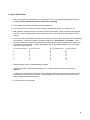
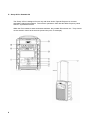
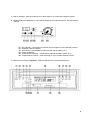
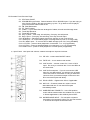
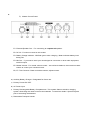
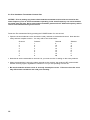
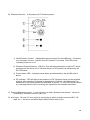
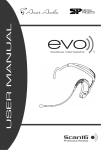
Group.X Evo Portable Group.X Evo Lite Portable Table of Contents Page 1. Care and Use (you really should read this section) 2 2. Wireless Notes 2 3. Quick Start Guide 3 4. Group.X Evo Portable PA 4 5. Evo Headworm Microphone with Transmitter 5.1 Charging the Evo 5.2 Evo transmitter channel set 8 10 6. Group.X Evo Lite Portable PA 11 7. System Specifications 15 8. Troubleshooting 16 9. Warranty 17 10. Notes 9 17 1. Care and Use of your Group.X Evo and Group.X Evo lite Portable PA Thank you for purchasing the the only portable PA systems featuring the Evo True Wireless transmitter. This Patent Pending PLL synthesized wireless microphone system operates in an FCC approved UHF band frequency with 16 selectable channels. Please read this instruction manual carefully before operating your system. This manual covers the function and operation of the wireless microphone system and portable PA system. Some things to remember: While the Evo headset is water and sweat resistant, the portable PA units are not. They should not be stored in humid environments (around the pool, for example). Not all CDs are created equal. No CD player can guarantee 100% compatibility 100% of the time with 100% of the CDs available. You may find CDs that will play reliably at home, but not on your portable PA. You may find CDs that will play reliably on your portable PA that will not play at home. If you are playing CDs that you burned yourself, make sure you start with good quality CDs, and burn them with high quality settings. If your unit has wheels, remember that they are there as a convenience and that it is not an off-road vehicle. Don't slam through doorways, over bumps or down stairs. Even though the internals of your PA are designed for durability, use good judgment and caution – protect your investment. Do not spill liquid on the Group.X and do not drop either unit. If you have the Group.X Evo Lite, be certain to charge your portable PA every two weeks. This helps to maintain and lengthen the service life of your battery. Failure to do this may damage the battery. After charging or setting the channel on your headset, always close the covers to maintain moisture resistance. For heavy use installs, periodically apply silicone grease (Part No. SP-SG-10 or SP-SG-5) to the charging connector of your Evo headset. You only need a very slight film, and only inside the barrel of the headset connector. Just put a small amount – the size of a BB - on the tip of the silver charging jack and insert as normal to charge. Too much will just be messy. Do not place the units near heat sources such as radiators, amplifiers, or etc. Do not store in direct sunlight, extremely dusty or humid conditions. 2. Wireless Notes Before setting up, make sure that the transmitter and receiver are tuned to the same frequency. Do not use two transmitters tuned to the same frequency. You may, however, use multiple PA systems with receivers tuned to the same channel. This is particularly effective if you want to spread the sound around the room more evenly. You may have one PA unit addressing the first few rows of the class, and another PA unit in the middle (aimed away from the instructor) to cover the back of the class. Always operate your system with a fully charged battery. While checking sound, move the transmitter around the area where you use the system to look for dead spots (loss of signal). If you find any dead spots, change the receiver position. If it does not work, avoid such places. To help avoid interference, do not put the receiver too near substantial metal or reflective objects and avoid obstructions between transmitter and receiver. Avoid the interference from TV, radio, other wireless appliances and etc.. Wireless systems depend on fully charged batteries. Low batteries will seriously degrade performance. Be certain to allow charge time prior to use. Be certain that the Group.X portable PA is exposed and in 'line of sight' with the transmitter. 2 3. Quick Start Guide Fully charge the Evo transmitter by connecting the Evo to the supplied wall plug transformer. Leave your Evo transmitter powered OFF while charging. Fully charge the Group.X or Group.X Lite Portable PA. Set master volume to minimum, switch Group.X portable PA power on. Leave Evo off. With wireless receiver turned on, but with volume turned down, set the receiver to the desired channel. If the RF lights (with the Evo transmitter OFF), select another channel with no RF activity. Turn on your Evo transmitter and select the matching channel. Note the below table describing the channels! Note that position 0 indicates channel 16. See Section 7 for details. Also – be sure to watch the receiver RF indicator for activity as you select the transmitter channel, as described in the next step. If the RF lights lights fully on one switch position, you have likely found the correct channel. Evo Transmitter Switch 1 2 3 4 5 6 7 8 Transmit Channel 1 2 3 4 5 6 7 8 Evo Transmitter Switch 9 A B C D E F 0 Transmit Channel 9 10 11 12 13 14 15 16 Raise wireless volume to approximately midway. Slowly raise main PA volume to desired level. If needed, wireless volume may also be adjusted. If setting up a second Evo and PA receiver (optional), follow the first five steps for the second unit before checking volume on each. It is good practice to skip at least one channel when using multiple transmitter/receivers. Go forth and be truly wireless! 3 4. Group.X Evo Portable PA The Group.X Evo is designed for use only with Ansr Audio / Special Projects 16- channel selectable channel transmitters. The receiver operates in UHF 682-697 MHz frequency band with PLL synthesized control. While the Evo headset is water and sweat resistant, the portable PA units are not. They should not be stored in humid environments (around the pool, for example). 4 A) Built-in Storage: Ideal for external mics, MP3 players, AC power and charging cables. B) Wireless Receiver Module(s): LED channel displays the channel number. Second receiver optional. B1: B2: B3: B4: B5: B6: RF Indicator – illuminates to indicate signal reception on the selected channel Selected Channel Display AF Indicator – illuminates to indicate audio signal (talking, etc.) Channel Selector Power On/Off Indicator – illuminates to indicate wireless system is on Power/Volume Control – after switching on, this controls wireless volume C) Multi-input CD Player (optional): USB and SD inputs for easy MP3 playback. 5 CD Controls From Previous Page: C1: CD Power On/Off C2: CD/USB/SD Input Select: Switch between CD or SD/USB input. If you are trying to play from the USB or SD and get nothing, try this. To go back to the CD player, you must set this switch back to CD. C3: FB: Fast Backwards C4: FF: Fast Forward C5: Folder – If your audio files are arranged in folders, this will scroll through them C6: Track Skip Reverse C7: Track Skip Forward C8: Play / Pause – From stop, this will play; from play, this will pause C9: Stop / Eject – From play, this will stop; from stop, this will eject C10: IR Window – Receives control signal from remote; do not cover this up C11: USB Input – To connect MP3 player or storage device (note C2 if using USB) C12: SD / MMC Input – To connect SD or MMC storage (note C2 if using SD/MMC) C13: LO PITCH – press to slow playback in increments -1 to -10 (if applicable) C14: HI PITCH – press to speed playback in increments +1 to +10 (if applicable) C15: NOR PITCH – press to reset playback to normal speed (if applicable) D) Input Panel: Line input and volume, external microphone input and volume. D1: CD VOL - volume with ON/OFF switch D2: TAPE VOL - is not used on this version D3: LINE IN VOL – volume control for ¼ inch or RCA input. Do not try to use both the ¼ inch and RCA at the same time. D4: LINE IN Connections - If you do not use the USB input for your MP3 player, you will use one of these. The most common connection is using a cable that connects from your earbud output connector to the RCA connectors (red and white). D5: ECHO LEVEL – Digital echo effect, if applicable. D6: MIC VOL – External, wired mic volume control associated with the ¼ inch and XLR inputs immediately below. D7: WIRELESS MIC PRIORITY – In the ON position, music will be lowered when the wireless mic is used. In fitness applications, this will likely be left OFF. D8: MICROPHONE INPUT – For use with a dynamic microphone (no phantom power). Do not use both the ¼ inch and XLR inputs at the same time. 6 E) Master Control Panel: E1: External Speaker Out - For connecting an unpowered speaker. E2: DC IN – Function not used on this model. E3: Battery Charge Indicator: Will flash green when charging. Meter indicates battery level during use. E4: Mix Out - If you want to send your mixed signal to a recorder or other audio equipment, use this output. E5: Master Volume: For overall volume control – set mic/music balance, then use this master volume to control your overall mix level. E6, E7: Tone Controls: Bass and treble controls, adjust to taste. F) Auxiliary Battery Charger: Designated for future use. G) Primary Power ON /OFF H) AC Power Input I) Primary Rechargeable Battery Compartments: This system features a built-in charging system, eliminating the need to remove the batteries. Contact Ansr Audio / Special Projects prior to accessing the batteries. J) Retractable Transport Handle 5. Evo True Wireless Headworn Transmitter 7 1. Microphone Element: Shown without the windscreen. Always be sure the side with the yellow dot is toward the mouth. In the event that you experience a low audio level with excessive feedback, check the direction of the microphone element. DO NOT twist the element. 2. Flexible Boom: Adjust so that the microphone element is at the corner or just under the mouth. To prevent feedback, the Evo uses a noise-canceling element. Mic placement is very important for a good experience. If you notice the volume 'dip', check to be certain the element is placed properly. 3. Power On/Off Switch: Turns transmitter power on and off. Press and hold one second to power on, three seconds to power off. The LED will flash to indicate a change in power status. After powering on, LED will flash red at 4-5 second intervals to indicate the Evo is on. 4. Channel Selector and Cover: Lift cover to set the transmitter channel via the rotary selector with the included mini screwdriver. Always be certain that this cover is completely closed prior to use. Failure to do so may affect water resistance and void your warranty! 5. LED Indicator: Green indicates charging, single red indicates power ON, multiple red indicates power OFF. 6. Adjustable Strap: The Evo headband is designed so that most users can comfortably use the system with no adjustment. If you need a more snug fit, you may slip this strap forward. Also see (7) below. 7. Recessed Antenna: Prior to use, always be certain the antenna is securely recessed into the headband. If you need to adjust the strap, be certain the antenna is still properly recessed. 8. Form Fitting Headband: The Evo headband is designed for maximum comfort on most users without adjustment. See points (6) and (7) for details. The headband will flex for comfort, but don't test it's limits by spreading it wider than a human head! Really, we know someone out there will... 9. Charging Connector and Cover: For use with the supplied external charging adapter. Be certain to replace the cover before use – failure to do so may void your warranty. 8 5.1 Charging The Evo True Wireless Fitness Transmitter NOTICE: Prior to use, it is necessary to fully charge your Evo transmitter. Initial charge from a depleted state may take up to two hours or more. NOTICE: The supplied charger is designed specifically for use with the Evo True Wireless system. Use of any other charger may cause system damage and will void your warranty. Do not use the receiver DC out to charge the Evo! Open the charger cover and insert the charging connector into the Evo as illustrated below. Only the supplied wall charger should be used. Do not use the receiver’s DC out to charge the Evo. Insert the charging cable into the charging adapter as illustrated at right. Insert the cable fully. Connect the charging transformer to AC power (that's 'manual talk' for 'plug it in to the wall'). Note that the Evo transmitter should be powered OFF while charging. GREEN LED indicates battery charging. GREEN LED will turn off when battery is charged. While the system will stop charging, no headset should be left plugged in longer than the time needed to fully charge. When the green charging light goes out, unplug the charger. IMPORTANT : If your Evo was supplied with a YELLOW, removable charging adapter (part 9 on page 8), be certain to dry the headset and charging points before charging and remove the adapter before use. If your Evo was supplied with a BLACK charging adapter and cover, DO NOT attempt to remove it. Just charge normally and replace the cover before use. 9 5.2 Evo Headworn Transmitter Channel Set NOTICE: Prior to setting up, please check that the transmitter and receiver are tuned to the same frequency. Two or more transmitters operating in the same frequency can not be used at the same time and area. So for each extra transmitter, please select a different frequency which can be used simultaneously at local area. Power the Evo transmitter ON by pressing the POWER button for one second. Open the channel selector cover and set the rotary selector to the desired channel. Note that the rotary selector is alpha-numeric. You may refer to the chart below: Channel 1 2 3 4 5 6 7 8 Selector 1 2 3 4 5 6 7 8 Channel 9 10 11 12 13 14 15 16 Selector 9 A B C D E F 0 Note that to set the transmitter to channel 16, you must use the '0' setting on the rotary selector. When the transmitter is set to the same channel as the receiver, the receiver’s RF meter should indicate a strong signal, regardless of whether or not you are speaking into the mic. Be certain that the selector cover is securely closed prior to use. Failure to close the cover may affect water resistance and void your warranty. 10 6. Group.X Evo Lite NOTICE: PRIOR TO USE, BE CERTAIN TO FULLY CHARGE THE INTERNAL BATTERY. SEE (H) BELOW FOR DETAILS. The Group.X Evo Lite is designed for use only with Ansr Audio / Special Projects 16channel selectable channel transmitters. The receiver operates in UHF 682-697 MHz frequency band with PLL synthesized control. While the Evo headset is water and sweat resistant, the portable PA units are not. They should not be stored in humid environments (around the pool, for example). 11 A) USB Control: Supports a variety of MP3 players and USB storage devices. 1) On/Off/Volume: Independent volume control for the USB input. Clockwise turn increases volume. Leave in the OFF position if not used. 2) Error LED: Will flash to indicate a read error. 3) Stop: Just that – the 'stop' button. 4) EQ/Repeat: Scroll through EQ presets (normal, jazz, pop, classical, rock, live) by momentarily pressing this button. Holding for 3 seconds will set the player to repeat the current selection. 5) Play/Pause: No surprises here – press to play, press to pause. 6) Fast Forward: Searches forward. 7) Reverse: Searches backward. 8) USB Input: Compatible with most any USB storage device. 12 B) Wireless Receiver: 16 frequency UHF wireless system. 1) On/Off/Volume Control: Independent volume control for the USB input. Clockwise turn increases volume. Leave in the OFF position if not used. PW LED below indicates power on or off. 2) Wireless Channel Selector: With Evo True Wireless transmitter turned OFF, select a channel on the Group.X Evo Lite that shows no RF present, as indicated by the RF LED below. 3) Power Status LED: Indicates power status as determined by the On/Off control above. 4) RF Indicator: LED will light in the presence of RF (wireless signal) on the selected channel. After selecting a channel as described in (2) above, and setting the Evo transmitter to the same channel as described in Section 7.2, this LED should remain on, indicating that the unit is receiving the signal from the headset transmitter. C) External Microphone Input: ¼ inch input for use with a dynamic microphone. Volume is controlled by the Main Volume control (G). D) Aux Input: 1/8 inch (3.5 mm) input for connecting a variety of audio sources (MP3, CD, tape, etc.). Volume is controlled by the Main Volume control (G). 13 E) Mix Output: 1/8 inch (3.5 mm) output for connecting to an external recorder or audio system. For example, if you wish to record a presentation, an audio recorder could be connected to the Mix Out. This would preserve your mix of relative levels (mic to music). F) Tone: Applies a tone control over the entire output. If your sound is 'muffled', try setting the tone toward the High setting. If your sound is 'thin', try setting the tone toward the Low setting. G) Main On/Off/Volume: Controls the overall volume, preserving your relative mix/mic blend. H) DC Input: Charging input. While charging, the green CG (charging) LED will flash, turning solid when fully charged. During use, the red BL (battery level) LED will remain solid. A flashing BL LED indicates an insufficient charge. It is very important that you charge the unit every two weeks. Lightweight lithium-ion batteries may be damaged if completely discharged. Don't worry – the unit shuts off before the battery is completely discharged. Just remember to never let the unit sit unused and uncharged for more than two weeks. I) Battery Compartment: Stores the lithium-ion battery pack. As the charger is built-in to the unit, there is no need to remove the battery pack. J) Shoulder Strap Anchors: Shoulder strap included. 14 7. System Specifications Evo True Wireless Transmitter Carrier Frequency Range: RF Power Output: Microphone Element: Battery: Operating Range: Talk Time: UHF band, 682 – 697 MHz 7.5 mW Noise canceling, bi-directional condenser Rechargeable Lithium-Polymer Up to 300 feet Up to 4+ hours, depending on use Group.X Evo Portable PA System Carrier Frequency Range: Power Output: Frequency Response: Speakers: Operating Range: Battery: Talk Time: Charge Time: Weight: Dimensions: Accessories: UHF band, 682 – 697 MHz 120W RMS, 190W peak 40 Hz – 15kHz +/- 3dB 10 inch LF, 1 inch HF drivers Up to 300 feet 12V, 4.5 Ah (x2), recharging 3-10 hours, depending on volume use 6-8 hours, depending on charge status 34 pounds, including battery 11.4 (D) x 12.6 (W) x 19.7 (H) Storage case Group.X Evo Lite Portable PA System Carrier Frequency Range: Power Output: Frequency Response: Speaker: Operating Range: T.H.D.: S/N: Battery: Talk Time: Charge Time: Weight: Dimensions: Accessories: UHF band, 682 – 697 MHz 40W RMS, 80W peak 60 Hz – 15kHz +/- 3dB 5.25 inch full range Up to 300 feet <0.1% >90 dB Rechargeable 14.4 V Lithium 6-8 hours, depending on volume use Up to 4.5 hours, depending on charge status 4.8 pounds, including battery 11.4 (D) x 6.3 (W) x 8.3 (H) Shoulder strap, storage case 15 8. Troubleshooting NOTICE: Most 'problems' associated with wireless systems are caused by low transmitter battery power. Always keep your transmitter fully charged. If operating your Group.X units on battery power, be certain that you are operating on a full charge for best performance. Symptom Possible Solution No sound Be certain that the Group.X primary power and the components (receiver, CD) are switched ON. Be certain that the Evo transmitter is switched ON. Be certain that both receiver and transmitter are set to the same frequency. Re-check all levels on your PA system. Be certain that the transmitter is not out of range. Audio interference If using two or more systems, be sure all systems are operating in different frequencies. Re-check your operating frequency according to the procedure noted in the Quick Start Guide (Section 5). Note that interference can come from a variety of sources. If interference is experienced on multiple channels, the source is likely nearby (other electronic systems in the same building). Note that some cell phone signals are known to interfere with audio systems, regardless of operating frequency. Distortion Check the receiver’s volume control – if it is too high, it may overload your system. Those with loud voices may move the element away from the mouth. Below the lips or to the side of the mouth are recommended positions. Incorrect placement may cause distortion by overloading the microphone. Diminished performance Be certain the transmitter battery is fully charged. Be certain the Group.X battery is fully charged. 16 9. Warranty Your Evo True Wireless Fitness System is covered for one year against defects in materials and workmanship (excluding the optional CD player, see below*). In the event of such defects, Ansr Audio will repair our product free of charge unless otherwise specified in detail, or replace, at our discretion, with a new product of equal or greater value .This warranty excludes defects due to normal wear, shipping damages or failure to use products according to instructions for proper use. This warranty is void in the event of unauthorized repairs or modifications not made by Ansr Audio. Any attempt to open or service any component of your wireless system will void this warranty. If you have any questions, please call us at 866491-2677 or email [email protected]. Any equipment sent for repair, either warranty or non-warranty, must include a Repair Authorization Form, found under the Support tab at specialprojectsaudio.com. *Although we believe we have found and offer the most rugged CD player on the market, because of the fragile nature of CD players and the environments where portables are used, we cannot warranty the optional CD player any longer than 15 days, to guarantee that it works when delivered. 10. NOTES What kind of notes? How about which channel worked well in different locations? Default volume settings in different classes? Any particular points you might tend to forget (like be sure to close the channel selector cover!). You can even use it for your grocery list, it's up to you – we're just offering this space to use as you see fit. 17 Ansr Audio, Inc. 3800 HWY 271 N Powderly, TX 75473 Phone: 866-491-2677 Fax: 866-746-4366 www.ansraudio.com www.specialprojectsaudio.com