1
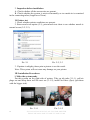
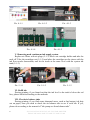
Pic. 3-4-1
Pic. 3-4-2
Pic. 3-4-3
5. Check tube length
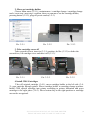
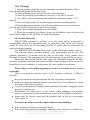
Move cartridge holder to the left side (3-5-1), then right side (3-5-2) and check
whether ink tube is too long or too short. Move cartridge holder to the cartridgechanging place and check whether Ink tube will fall on the paper board. Generally, we
have adjusted ink tube to the right size before shipment (lf it is too long or too short,
please double check before printing).
Pic. 3-5-1
Pic. 3-5-2
6. Adjust tube length
If step 6 is ok, then there is no need to go through this step.
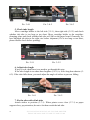
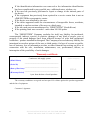
If the tube length is too short then lengthen (3-6-1) it, if too long then shorten (36-2). If the tube falls down, you need adjust the angle of sticker to prevent falling.
Pic. 3-6-1
Pic. 3-6-2
7. Fix the other side of ink tube
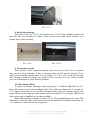
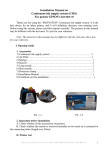
Attach sticker to position (3-7-1). When printer cover close (3-7-1) or paper
support close, pay attention, do not to let them crush the ink tube.
4
INSTALLATION MANUAL ON CISS FOR PRINTER
EPSON ME Office 600F/ TX 600F/ TX 300F/ Nx300