1
Enabling External IPoIB Storage in Oracle VM Manager
Figure 7.14 The Create LUN dialog
If you wish to access these LUNs as physical disks within Oracle VM Manager, you must configure Oracle
VM Manager first. Refer to Section 7.3.4.1, “ISCSI Configuration” for more information.
7.3.4 Enabling External IPoIB Storage in Oracle VM Manager
If you intend to use your ZFS appliance to provide storage for use directly by Oracle VM, to host
repositories and virtual machines, you must configure the storage within Oracle VM Manager before you
are able to use it. The configuration steps that you must perform depend on whether you have configured
iSCSI or NFS on your ZFS Storage Appliance. This section provides a brief outline of the steps that
you must perform to configure Oracle VM Manager for each of these technologies. For more detailed
information, you should refer to the Oracle VM documentation.
If you only intend to make this storage available to individual virtual machines and do not intend to use the
storage for underlying Oracle VM infrastructure, you do not need to perform any of the steps documented
in this section, but you will need to configure each virtual machine directly to access the storage either over
NFS or iSCSI.
7.3.4.1 ISCSI Configuration
The following configuration steps should be performed in Oracle VM Manager if you have configured
your storage appliance for iSCSI. The process to add a File Server in Oracle VM Manager is clearly
documented in the Oracle VM User's Guide for Release 3.2 available at:
http://docs.oracle.com/cd/E35328_01/E35332/html/vmusg-storage-manage.html
1. Log into Oracle VM Manager on the Oracle PCA
2. Select the Storage tab to configure your storage
3. Click on the Discover SAN Server icon to load the wizard
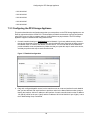
4. Enter the DNS name of the storage appliance in the Name field. In the Storage Type field, use the
drop-down selector to select iSCSI Storage Server. In the Storage Plug-in field, you must select
the Oracle Generic SCSI plugin. Note that alternate storage plugins are not supported in this
configuration. Click Next.
73