1
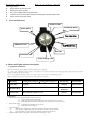
S k y t r a q V e n u s 6 W a t c h o f T r a v e l H o n e y 6 5 c h a n n e l s Photo Tagger Software: Support Windows XP, and Vista systems Multi-languages support available Able to export to KMZ, NMEA183, and GPX formats Available to read the speed and altitude and production management track upload picture editor Support Video play program(AVI, MP4) 5. Icons and Indicators Direction LEDs POI Setting Button Power Switch Time Adjust Button USB Power Jack DL/LF Switch Button GPS LED Destination LED Power Charging LED 6. Button and Lights indicator description A. Explanation for Buttons DL/LF switch button is shows different mode by flashing type of GPS LED. DL:Data Logger mode(flash in every second);POI is used to record position of interest button during DL mode; upload recorded data to Photo Tagger software and tag will be showing LF:Location Finder mode (flash in every 5 sec.); POI is used to save current location during LF mode. Timer Adjustment Button: pull out this button for adjust timer of Travel Honey. LED status 1 GPS (Green) 2 Power (Red) Flash GPS position is located DL mode:Flash in every sec.;LF mode:Flash in every 5 sec. Low Power OFF GPS Searching Not Connected Charging Sufficient Power <15M to destination 3 Destination (Blue) 4 Direction (Red) ON Set up the destination ( All direction LEDs flash ) <50m to destination (Flash in 1 sec.) Indicate the direction LED Indicators GPS Indicator (Green): Automatic search for GPS after power on (i) Position will not search for steady light (ii) Steady flash indicates located, the GPS position in DL mode (flash in every second) (iii) Steady flash indicates located, the GPS position in LF mode (flash in every five seconds). 2. Power Indicator (Red): (i) Insufficient power (blinking once per second) (ii) Steady light on power charging 3. 8 Direction Indicator : (i) All the direction of light flashing at the same time after set the destination up successful. (ii) All the direction of light flashing at the same time after set the track record up successful. (iii) Set up destination in LF mode, the direction indicator is light and indicator the way. 4. Destination Indicator (Blue): Steady light on indicate distance to destination is <15M 1. 2 Not Connected