1
4. Projector registration
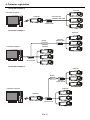
4.1. Connection
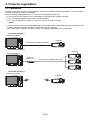
Connect the controller computer and the projector, which have installed “ProjectorView Global+”, to a commercially
available LAN cable or wireless LAN adapter.
When connecting multiple projectors, use a commercially available ethernet hub.
• A LAN terminal or 802.11b/g/n wireless LAN adapter is required for the controller computer.
• Use a LAN cable compatible with Category 5 and 100BASE-T.
(In the case of connection examples 5, see the instruction manual of the router.)
<Note>
• The LAN function may be unavailable depending on the standby mode setting of the projector. To enable the LAN
function, change the setting referring to the User Manual of your projector.
• Some USB wireless adapters cannot be used for your projector depending on the specifications.
Connection example 1
Controller computer
Projector
Commercially available LAN cable
Connection example 2
Projector
Controller computer
External
ethernet hub
Commercially available LAN cable
Connection example 3
Controller computer
Projector
EN-9