1
fi-6130 / fi-6230 Image Scanner Operator's Guide
TROUBLESHOOTING
CONTENTS MAP
TOP
6.3 Remedying Typical Troubles
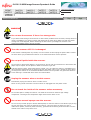
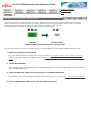
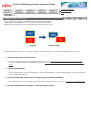
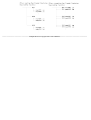
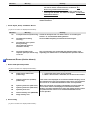
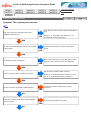
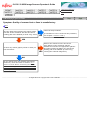
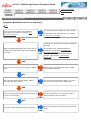
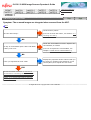
Symptom: Pickup errors occur frequently.
Back
Do the documents satisfy the conditions
described in Precautions in Section "7.2
Document Quality"?
Use documents that satisfy the requirements.
NO
(For details of the requirements, see Section
"7.2 Document Quality.")
YES
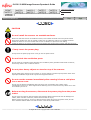
Were the documents fanned before loaded
onto the ADF paper chute?
Fan the documents before loading, or reduce
the number of sheets of the documents.
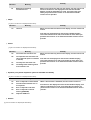
NO
YES
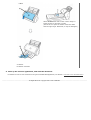
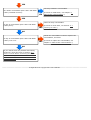
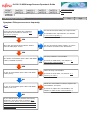
Correctly install the consumables.
Are all the consumables (Pick rollers and Brake
rollers) installed correctly?
NO
(For how to install them, see Chapter "5
REPLACING CONSUMABLES.")
YES
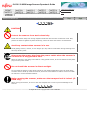
Clean the dirty consumables.
Is any of consumables (Pick rollers and Brake
rollers) dirty?
YES
(For how to clean them, see Section "4.3
Cleaning the ADF.")
NO
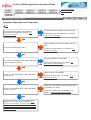
Check the consumables counters. Replace the
consumables, if needed.
Is any of consumables (Pick rollers and Brake
rollers) worn out?
YES
NO
If you cannot solve the problem after taking
measures, check the items in Section "6.4
Items to Check Before Contacting the Dealer
Where You Bought the Scanner" and contact
the dealer or an authorized FUJITSU scanner
service provider.
(For how to replace the consumables, see
Chapter "5 REPLACING CONSUMABLES.")