1
CAUTION
RISK OF ELECTRIC SHOCK
DO NOT OPEN
CAUTION :
The lightning flash with arrowhead symbol, within an equilateral
triangle is intended to alert the user to the presence of uninsulated
"dangerous voltage" within the product's enclosure that may be of
sufficient magnitude to constitute a risk of electric shock to persons.
TO REDUCE THE RISK OF ELECTRIC SHOCK,
DO NOT REMOVE COVER (OR BACK).
NO USER SERVICEABLE PARTS INSIDE.
REFER SERVICING TO QUALIFIED
SERVICE PERSONNEL.
The exclamation point within an equilateral triangle is intended to
alert the user to the presence of important operating and maintenance
(servicing) instructions in the literature accompanying the appliance.
Regulatory Notice
This device complies with Part 15 of the FCC Rules. Operation is subject to the following two conditions :
(1)This device may not cause harmful interference, and (2) this device must accept any interference received, including interference that may
cause undesired operation.
This equipment has been tested and found to comply with the limits for a Class A digital device, pursuant to Part 15 of the FCC Rules. These
limits are designed to provide reasonable protection against harmful interference in a residential installation.
This equipment generates, uses, and can radiate radio frequency energy and, if not installed and use in accordance with the instructions, may
cause harmful interference to radio communications.
Operation of this equipment in a residential area is likely to cause interference, in which case the user will be required to correct the interference
at his own expense.
WARNING - Changes or modifications not expressly approved by the manufacturer could void the user's authority to operate the
equipment.
Feature
• 1/2.8” Sony “Exmor” CMOS Sensor
• Full HD Resolution: 1080p 30fps/ 720p 60fps
• 12 IR LEDs (Dome), 24 IR LEDs (Bullet)
• 3.6mm Fixed Lens
• WDR (Wide Dynamic Range)
• DNR (Digital Noise Reduction: 2D + 3D)
• Privacy Mask Function
• Intelligent Motion Detection
• Defog Function: Defogging foggy video image
• Dome size :75Ø (Dome)
• Plastic housing for indoor application (Dome)
• IP 66 for outdoor application (Bullet)
• LANGUAGE : Select language.
► English / Simplified Chinese / Traditional Chinese / Japanese
CAUTION : To prevent electric shock and risk of fire hazards:
HD Camera Series
.
The design and specifications are subject to be changed without notice.
P/N:38801K405
- Dome Camera
- Bullet Camera
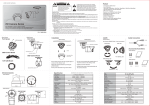
Part Names
• Power Supply : This camera must always be operated a DC 12V
• Handling of the unit : Be careful not to spill water or other liquids on the unit.
• Operating and storage location : Avoid viewing a very bright object (such as light fittings) during an extended period.
Avoid operating or storing the unit in the following locations.
- Extremely hot or cold places (operating temperature -10 °C ~ 50 °C, however, we recommend that the unit be used within a temperature
range of 0 °C ~ 45 °C)
- Damp or dust place , places exposed to rain and places subject to strong vibration
• Close to generators of powerful electromagnetic radiation such as radio or TV transmitters.
• Handing of the Unit
- Remove dust or dir t on the surface of the CMOS sensor with a blower.
- Avoid the use of volatile solvents such as thinners, alcohol, benzene and insecticides.
They may damage the surface finish and/or impair the operation of the camera.
3-AXIS
Installation
Part Names
- Dome Camera
IR
Cable Connection
- Dome Camera
- Bullet Camera
OSD Control Board
HD-SDI
Set Camera DIRECTION (3-axis movement)
SCREW
MOUNT BRACKET
Ceiling Type
Wall Type
MOUNT FIX SCREW
DC12V
BASE ASSY
Accessories And Others
IR TYPE
OSD Control Board
- Dome Camera
Screw
HOUSING BACK
HOUSING FRONT
Decoration Ring
OSD Control Knob
Dome cover
TILT SWIVEL 355°
Screw
User's Manual
PAN SWIVEL 355°
- Bullet Camera
12 IR LED Board
•Fix the base housing with the supplied 2pcs of
screws on the ceiling or wall.
•Fix the mount bracket with supplied 3pcs of
mount fix screws on the ceiling or wall.
•Adjust the camera direction by turning the
gimbal bracket.
•Adjust the camera direction.
•Firmly fix the decoration ring into the base.
OSD CONTROL KNOB
Screw
•Firmly fix the screw in the bracket after set
the camera direction.
Anchor bolt
User's Manual
CAMERA 25°~ 145°(recommended angle 45°~ 145°)
Dimensions(mm)
Specification
Specifications are subject to be changed without notice.
Specifications are subject to be changed without notice.
75.0
Model
Image Sensor
78.5
- Dome Camera
1/2.8" SONY CMOS Sensor
HLC
Off / On
Total Pixels
2,000(H) x 1,121(V), 2.24M Pixels
DNR
Auto / Off / Low / Middle / High
Active pixels
1 1,936(H) x 1,105(V), 2.12M Pixels
ACE
38.0
Scanning system
Resolution
105.0
Min. illumination
84.0
Video Output
- Bullet Camera
S/N Ratio
Shutter speed
120°
67
75
60
4,5
60
85
26
Model
Progressive
Defog
Low / Middle / High
Off / On(Auto / Manual)
Digital : 1920x1080p(1080p/30fps) , 1280x720p(720p/60fps)
GAMMA
Analog : 700TVL
E.Zoom
Off / Max x2 ~ x32
Color : 1.0 lux , BW : 0.5lux
PRIVACY
Off / On (24 points)
Color DSS : 0.002 lux , BW DSS : 0.001 lux
MOTION
Off / On (3 points)
0.45 / 0.50 / 0.55 / 0.60 / 0.65
HD : HD-SDI
Defect
One Push
Analog : NTSC, PAL(without WDR)
System
NTSC / PAL
more than 50dB (AGC off)
Auto / Manual ( 1/30(1/25) ~ 1/60000 )
HD Format
Comm
DSS
Off / x2 / x3 / x4
AGC
Off / On
Power Source
Flickerless
Off / On
WDR/BLC
Off / WDR / BLC
Power Consumption
Power Input
1080P / 720P
Baud Rate : 2400 / 4800 / 9600 / 19200 / 38400 / 57600 / 115200
Protocol : VISCA / Pelco-D / Pelco- P / Update
DC12V±10%
120mA(IR ON : 300mA)
Connector
DAY&NIGHT
Auto / Day / Night / Ext-in
Video Output(HD-SDI)
MMCX Connector
WHITE BAL
Auto / One Push / Manual / Indoor / Outdoor
Operating Temperature
-10℃ ~ +50℃ (Humidity : 0%RH ~ 80%RH)
Storage Temperature
-20℃ ~ +60℃ (Humidity : 0%RH ~ 90%RH)
Camera menu is subject to be changed without prior notice to upgrade and quality increase and we may
use slip sheet for the change.
Please check the camera version and the slip sheet if the camera menu and this manual menu is not
matched.
MAIN MENU
Functions can be setup using “Menu Key Command” of Visca protocol.
The menu consists of the “Main Menu” and “Sub Menu”.
The main menu is displayed where 6 camera functions can be selected.
To the push of each main menu selection, the sub-menu is displayed
MENU
EXPOSURE
WHITE BAL
IMAGE
INTELLIGENCE
SPECIAL FUNC
DISPLAY
[EXIT]
[SAVE]
[DFLT]
If you want save the menu, select [SAVE].
If you want not save the menu, select [EXIT]
(After select, Power off -> on)
If you want default the menu, select [DFLT]
EXPOSURE
MENU
EXPOSURE
EXPOSURE
WHITE BAL
IMAGE
INTELLIGENCE
SPECIAL FUNC
DISPLAY
[EXIT]
[SAVE]
MODE
BRIGHTNESS
SHUT SPEED
DSS
AGC
FLICKERLESS
WDR/BLC
DAY&NIGHT
[DFLT]
[BACK]
NORMAL
[SAVE]
[DFLT]
◈ MODE : Select LENS type
► NORMAL, DEBLUR
◈ BRIGHTNESS : Adjust brightness level
► 0(dark) ~ 20(bright) steps
◈ SHUT SPEED : Can be set in AUTO or MANUAL
► AUTO / x2, x3, x4, 1/30(25),1/60(50),1/120(100),1/240,1/500,1/1000,1/2000,1/4000,1/8000,
1/16000,1/30000,1/60000 sec
◈ DSS : Select maximum DSS(Digital Slow Shutter)
► OFF / x2, x3, x4
◈ FLICKERLESS : Select Flickerless mode
► OFF / ON (remove screen flicker)
◈ AGC : Select Auto Gain Control
► OFF / ON
1
2
MENU
[EXIT]
[SAVE]
MENU
WHITE BAL
MODE
RED GAIN
BLUE GAIN
CHROMA
[DFLT]
[BACK]
AUTO
----10
[SAVE]
[DFLT]
◈ AWB : Select WHITE BALANCE mode
► AUTO / ONE PUSH / MANUAL / INDOOR / OUTDOOR
▷ AUTO : Automatically adjusts color according to the available lighting.
▷ ONE PUSH : It is a fixed white balance mode that may be automatically readjusted only
by pressing ONE PUSH
▷ MANUAL↲ : Color can be corrected when the user increases or decreases
“RED GAIN” or “BLUE GAIN”.
▷ INDOOR : Set color temperature to be Indoor light (3700°K)
▷ OUTDOOR : Set color temperature to be Outdoor light (5100°K)
◈RED GAIN : Adjust R gain value
► 0 ~ 20 steps
◈BLUE GAIN : Adjust B gain value
► 0 ~ 20 steps
◈ CHROMA : Adjust CHROMA gain value
► 0 ~ 20 steps
IMAGE
EXPOSURE
WHITE BAL
IMAGE
INTELLIGENCE
SPECIAL FUNC
DISPLAY
[EXIT]
[SAVE]
HLC
DNR
MIRROR
SHARPNESS
ACE
DEFOG
FREEZE
GAMMA
E.ZOOM
[DFLT]
[BACK]
AUTO
OFF
5
OFF
OFF
OFF
0.55
OFF
[SAVE]
[DFLT]
◈ HLC : Select High Light Compensation.
When extremely bright light is projected to the camera masking is used on
the portion to prevent partial saturation on the monitor.
▷ MODE : OFF / ON / NIGHT
▷ LEVEL : 0 ~ 20 steps
▷ COLOR : 0 ~ 13 steps
◈ DNR : Select Digital Noise Reduction
► AUTO / OFF / LOW / MIDDLE / HIGH
◈ MIRROR : Select a flip mode
► OFF / H / V / H&V
▷ H : You can flip the picture horizontally on the screen
▷ V : You can flip the picture vertically on the screen
▷ H&V : You can flip the picture horizontally & vertically on the screen
4
INTELLIGENCE
INTELLIGENCE
[EXIT]
[SAVE]
PRIVACY
MOTION
[DFLT]
[BACK]
OFF
OFF
[SAVE]
[DFLT]
◈ PRIVACY : Hide an area you want to hide on the screen
► OFF / ON↲
▷ MASK# : Select mask area number (1 ~ 24)
▷ MODE : Mask enable or disable (OFF / ON)
▷ POSITION : Adjust the mask position
▷ SIZE : Adjust the mask size
▷ COLOR : Select mask color (0 ~ 13)
▷ TRANS : Select mask transparency level (0 ~ 4)
◈ MOTION : When there is movement of the subject in the screen, there will be an motion detection
► OFF / ON↲
▷ AREA# : Setting 3 areas(1~3) of motion detection
▷ MODE : OFF / ON (Limit and define areas of motion detection)
▷ SENSITIVITY : Adjust sensitivity of MD (0 ~ 20 steps) More sensitive to setting to low step with sensitivity
▷ POSITION : Adjust the Area position
▷ SIZE : Adjust the Area size
▷ INTERVAL TIME :Select the alarm interval time (0 ~ 255sec)
▷ DWELL TIME : Select the duration time about changing MD mode (0 ~ 255sec)
7
◈ SHARPNESS : Adjust sharpness level
► 0 ~ 10 steps
◈ ACE : Select Digital WDR (Wide Dynamic Range)
► OFF / LOW / MIDDLE / HIGH
◈ DEFOG : Carry out defog function
► OFF / ON↲
▷ MODE : AUTO / MANUAL
▷ LEVEL : LOW / MIDDLE / HIGH
※ Can’t use DEFOG and ACE at the same time
(When ACE On, DEFOG is Off. And when DEFOG is On, ACE is Off)
◈ Freeze : Select real or still mode
► OFF / ON
◈ GAMMA : Select GAMMA
► 0.45 / 0.50 / 0.55 / 0.60 / 0.65
◈ E.ZOOM
► OFF / ON
▷ LIMIT : Max x2 ~ x19, x21, x23, x25, x28, x32
▷ POSITION : Select maximum digital zoom magnification.
※ Can’t use Digital Zoom when the motion detection is turned on.
5
MENU
[SAVE]
MENU
SPECIAL FUNC
EXPOSURE
WHITE BAL
IMAGE
INTELLIGENCE
SPECIAL FUNC
DISPLAY
[EXIT]
6
DISPLAY
SPECIAL FUNC
MENU
EXPOSURE
WHITE BAL
IMAGE
INTELLIGENCE
SPECIAL FUNC
DISPLAY
3
IMAGE
WHITE BALANCE
EXPOSURE
WHITE BAL
IMAGE
INTELLIGENCE
SPECIAL FUNC
DISPLAY
8
AUTO
OFF
ON
OFF
OFF
◈ WDR/BLC : Select WDR(Wide Dynamic Range) or BLC(Back Light Compensation)
► WDR↲
▷ LEVEL : Adjust WDR level.
► LOW, MID-LOW, MIDDLE, MID-HIGH, HIGH
※ WDR doesn’t work in Shutter Manual Mode.
► BLC↲
▷ POSITION : Adjust the window position
▷ SIZE : Adjust the window size
※ Can’t use WDR and BLC at the same time.
(When WDR On, BLC is Off. And when BLC is On, WDR is Off)
◈ DAY&NIGHT : Select Day&Night
▷ MODE : AUTO / EXT-IN / DAY / NIGHT
► AUTO↲ (When using D&N and COLOR model)
▷ POLARITY : ACTIVE LOW / HIGH
► EXT-IN↲ (When using IR-CDS model)
▷ POLARITY : ACTIVE LOW / HIGH
※ To turn on the IR, set the mode to ACTIVE LOW.
▷ DELAY : 0 ~ 255 sec
▷ THRS : 0 ~ 28
Day↔Night switching level in Auto Mode.
Switching in lower lux with higher threshold level.
▷ GAP : LOW, MID-LOW, MIDDLE, MID-HIGH, HIGH
Margin between Day →Night switching level and Night →Day switching level.
▷ ANTI-SAT : LED saturation improves. (0~20)
▷ BURST : OFF / ON
DEFECT
SYSTEM
HD FORMAT
COMM
[DFLT]
[BACK]
[SAVE]
NTSC
1080P
[DFLT]
◈ DEFECT : Compensates for bad pixels that may occur. Occurs when the whole screen is
in full black or if there is bad pixelation and it changes the THRS values until
the screen is fixed.
◈ SYSTEM : Select NTSC(30fps) or PAL(25fps). (NTSC / PAL)
◈ HD FORMAT : Select Digital output 1080P or 720P. (1080P / 720P)
◈ COMM : Set up the camera ID, baud rate, protocol
▷ ID : Select the camera ID
► 1 ~ 255
▷ BAUD RATE : Select serial communication speed
► 2400 / 4800 / 9600 / 19200 / 38400 / 57600 / 115200bps
▷ PROTOCOL : Select operating protocol
► VISCA / PELCO-D / PELCO-P / UPDATE
8
DISPLAY
EXPOSURE
WHITE BAL
IMAGE
INTELLIGENCE
SPECIAL FUNC
DISPLAY
[EXIT]
[SAVE]
DISP SEL
SET TITLE
INIT SEL
SET INIT MSG
LANGUAGE
[DFLT]
[BACK]
[SAVE]
ON
ON
ENGLISH
[DFLT]
◈ DISP SEL : Select display item.
► OFF / ON↲
▷ ID : OFF / ON
▷ TITLE : OFF / ON
▷ ZOOM RATIO : OFF / ON
▷ SYSTEM MSG : OFF / ON (MD Alarm and Wait message)
◈ SET TITLE : Select camera title menu (Text edit)
◈ INIT SEL : Select display initial message.
► OFF / ON↲
▷ ID : OFF / ON
▷ BAUDRATE : OFF / ON
▷ PROTOCOL : OFF / ON
▷ VERSION : OFF / ON
▷ INIT MSG : OFF / ON
◈ SET INIT MSG : modify initial message. (Text edit)
9