1
LIGHT Switch for Meter and Filters
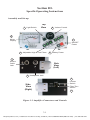
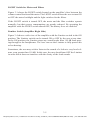
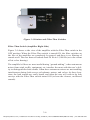
Figure 3-1 shows the LIGHT switch located on the amplifier’s face between the
volume control knob and the meter. The LIGHT switch allows the user to turn ON
or OFF the meter backlight and the light switches for the filters.
If the LIGHT switch is turned OFF, the meter and the filter switches operate
normally, but their power consumptions are greatly reduced. By operating the
amplifier with the LIGHT switch turned OFF, the battery lives are doubled.
Limitter Switch (Amplifier Right Side)
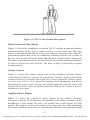
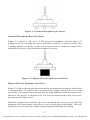
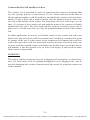
Figure 3-4 shows a side view of the amplifier with the Limitter switch in the ON
position. The Limitter switch can be turned ON or OFF by the user at any time.
In the ON position, the Limitter stops any sound louder than 110 dB from passing through to the headphones. The user can use the Limitter to fully protect his
or her hearing.
Sometimes, the user may wish to listen to the sounds of a leak at a very loud volume, even greater than 110 dB. In this case, the user should turn OFF the Limitter
in order that it does not interfere with the clarity of the loud sounds.
3-5
[email protected] | 13309 Beach Ave. Marina del Rey, CA 90292 | Phone: 800-WCT-PROD (800-928-7763) | Fax: 310-306-9343