1
Phantom 3 Advanced User Manual
Preparing the Aircraft
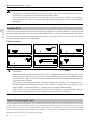
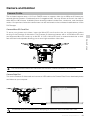
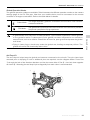
Removing Gimbal Clamp
Remove the gimbal clamp by sliding it to the right (when facing the nose of the aircraft), as shown below.
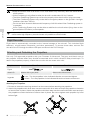
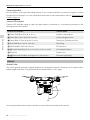
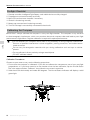
Mount the propellers with black dots on to motors with black axes and spin counter-clockwise to secure.
Mount the propellers with sliver dots on to motors with sliver axes and spin clockwise to secure. Be sure
all propellers are securely in place.
Place all propellers onto the correct motors and tighten by hand to lock them in position.
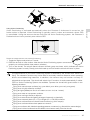
Preparing the Remote Controller:
The mobile device holder is designed for securing tablet or mobile device. Tilt the mobile device holder to
the desired position, then adjust the antennas so they are facing outward.
1. Press the button on the top right side of the mobile device holder to release the clamp, then adjust the
clamp to fit the size of your mobile device.
2. Secure your mobile device in the clamp by pressing down, and connect your mobile device to the
remote controller using a USB cable.
3. Plug one end of the cable into the mobile device, and the other end into the USB port on the back of
the remote controller.
2
1
3
© 2015 DJI. All Rights Reserved.
7
Product Profile
Attaching the Propellers: