1
Chapter 6. Configuration Menu
Trap IP Address
Enter up to five IP addresses of the SNMP managers to which the TSU ESP
should send traps.
Telnet Options
Telnet Password
View/edit the Telnet password. The default is adtran.
Telnet Timeout
Select the inactivity time limit. If the unit is idle for the designated amount
of time the unit times out, closing the Telnet session.
Choices: 10 MINUTES, 30 MINUTES, and 60 MINUTES
Test Config
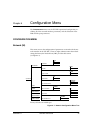
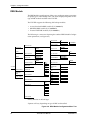
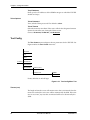
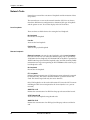
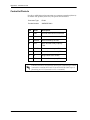
The TEST CONFIG menu configures the test parameters for the TSU ESP. See
Figure 6-10 for the TEST CONFIG menu tree.
1)NETWORK
2)UNIT
3)PORT
2)CONFIG 4)DBU MODULE
5)MANAGEMENT
6)TEST CONFIG
1)TIMEOUT (SEC)
2)ANSWER TEST
DISABLE
ENABLE
Factory defaults are in bold type.
Figure 6-10. Test Config Menu Tree
Timeout (sec)
The length of time that a test will remain active after it is initiated. Once the
timeout is reached, the active test will be automatically disabled. If the timeout is set to zero, any tests that are initiated will have to be manually disabled.
60
TSU ESP User Manual
61200169L1-1