1
11
COPY
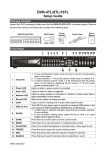
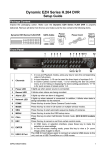
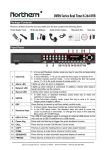
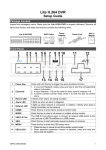
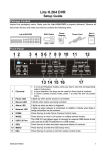
This key is used for marking time in quick video export function.
12
DOME
Press this key to enter Dome Camera Control mode.
13
SEQ
Press this key to start automatic sequence display of cameras.
14
FREEZE
Press this key to freeze the current viewing screen.
15
PLAY/STOP
Press once to start the playback of recorded video. Press again to exit.
16
MODE
Press this key to view in full-screen or multiple window modes.
17
SEARCH
Press this key to search recorded video by date/time or event.
18
MENU
Press this key to enter the OSD setup menu.
Rear Panel
1
LAN 10/100M
(RJ-45)
The DVR is capable of networking. Once the unit is connected to the LAN
network, users can remotely access the DVR through the remote
software on a PC.
2
Main MonitorVGA(optional)
The DVR can connect to a monitor via an optional VGA connector.
3
Audio In
4
Call Monitor
Audio Out
5
Call Monitor
(BNC)
6
7
8
9
10
11
2
Video In
(BNC)
USB Port
Alarm I/O &
RS-485
Main Monitor
Audio Out
Main MonitorBNC
Power Jack
Audio In connectors are for the DVR to connect audio source devices.
For 4CH models, 4 RCA Audio In connectors will be provided; whereas
for 8CH and 16CH models, a D-Sub Audio In connector is provided.
Call Monitor Audio Out RCA connectors are provided for the DVR to
connect audio output devices (e.g. amplified speakers). (8CH & 16CH
models only)
The call monitor is used to display full screen video of all installed
cameras in sequence. The BNC Call Monitor connector allows users to
connect the DVR with an optional call monitor. (8CH & 16CH models
only)
A group of BNC connectors is provided for video input streams from
installed cameras.
This USB port allows users to connect a PS/2 mouse via a converter.
The DVR provides alarm I/O and RS485 ports that offer users the
flexibility required to connect the DVR to other devices.
Main Monitor Audio Out RCA connectors are provided for the DVR to
connect audio output devices (e.g. amplified speakers).
The DVR can connect to a monitor via a BNC connector.
The DVR has a free voltage DC power connection jack. Please connect
the power supply adapter shipped with the unit.