1
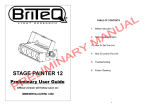
L A U TABLE OF CONTENTS N A 1. Safety Instruction 2. Technical Specification A N Y R I M48 I STAGE COLOR L E Preliminary User Guide R P M 3. How To Set The Unit 4. How To Control The Unit 5. Troubleshooting 6. Fixture Cleaning Official version will follow soon on: WWW.BRITEQ-LIGHTING .COM 1C The housing, the lenses must be replaced if they are visibly damaged. 1. Safety Instruction Please read carefully the instruction, which includes important Caution information about the installation, usage and maintenance. WARNING There are no user serviceable parts inside the unit. Do not open the housing or attempt L A U any repairs yourself. In the unlikely event your unit may require service, please contact Please keep this User Guide for future consultation. If you sell the unit to another user, be your nearest dealer. sure that they also receive this instruction booklet. Unpack and check carefully there is no transportation damage before using the unit. Installation Before operating, ensure that the voltage and frequency of power supply match the power N A The unit should be mounted via its metal hole on the bracket. Always ensure that the unit requirements of the unit. is firmly fixed to avoid vibration and slipping while operating. Always ensure that the It’s important to ground the yellow/green conductor to earth in order to avoid electric structure to which you are attaching the unit is secure and is able to support a 10 times shock. weight of the unit. The unit is for indoor use only. Use only in a dry location. The unit must be installed in a location with adequate ventilation, at least 50cm from Y R adjacent surfaces. Be sure that no ventilation slots are blocked. M 2. Technical Specification Disconnect main power before replacement or servicing. DMX 512 control channels: 4/7/8/11/16/19 channels switchable Individual control of each LED cluster Great built-in programs under Master/Slave mode triggered by music Dimmer and Strobe adjustable High efficiency optical system Available in 15 degree and 25 degree LCD display for easy addressing and setting malfunction. Please contact the nearest authorized technical assistance center. Always Voltage: AC 100-240V~50/60Hz use the same type spare parts. Power consumption: 56.6W Light Source: total:48pcs, red: 12pcs, green: 12pcs, blue:12pcs, white/amber:12pcs Fuse: T 6.3A Dimension: 422 x 169 x 174 mm Weight: 4.9 kgs Make sure there is no flammable materials close to the unit while operating as it is fire A N hazard. Use safety cable when fixes this unit. Maximum ambient temperature is TA: 40℃. Don’t operate it where the temperature is I IM higher than this. In the event of serious operating problem, stop using the unit immediately. Never try to repair the unit by yourself. Repairs carried out by unskilled people can lead to damage or L E Do not touch any wire during operation as high voltage might be causing electric shock. Warning R P For power supply, do not connect in series much more than 10 units, use another mains supply for next 10 units. To prevent or reduce the risk of electrical shock or fire, do not expose the unit to rain or moisture. Do not open the unit within five minutes after switching off. 2C 3C 3. How To Set The Unit 3.2 Main Function To select any of the given functions, press the MENU button up to when the required one is 3.1 Control Panel showing on the display. Select the function by ENTER button and the display will blink. Use DOWN and UP button to change the mode. Once the required mode has been selected, L A U Press ENTER button to store. Back to the main functions without any change press the MENU button or wait for 8 seconds. Hold MENU button to quit menu mode, the unit will run the built-in program you selected. N A At this time you can press DOWN and UP Display button to change show, the new show will To show the various menus and the selected functions effect immediately. If you change to show 1-8 LED or Auto Fade, you can press ENTER button On DMX input present to choose speed. The unit will run in the MASTER On Master Mode speed that selected or it will run to the music. SLAVE On Slave Mode SOUND Flashing Sound activation MENU To select the programming functions DOWN To go backward in the selected functions UP To go forward in the selected functions ENTER To confirm the selected functions drawing: Connect to supply mains power. L E Mains output Connect to supply mains power for other units. R P For over current protection. DMX input/output A N I IM Mains input Y R The main functions are shown on the Button Fuse M DMX DMX Address Press the MENU button up to when the DMX Address is showing on the display. Press ENTER button and the display will blink. Use DOWN and UP button to change the DMX512 address. Once the address has been selected, press the ENTER button to store. Back to the main functions without any change press the MENU button or wait for 8 seconds. Channel Mode Press the MENU button up to when the For DMX512 link, use 3/5-pin XLR plug cable to link the unit together. Channel Mode is showing on the display. Only for remote control Press ENTER button and the display will By connect to the 1/4’’ microphone jack to control the unit for Stand by, Function and Mode blink. Use DOWN and UP button to select the function. 4, 7, 8 , 11, 16 or 19 channels mode. Once Safety Ring selected, press the ENTER button to store. Keep the installation safe. Back to the main functions without any 4C 5C change press the MENU button or wait for 8 seconds. Black Out Show Mode Press the MENU button up to when the Black Out is showing on the display. Pressing Press the MENU button up to when the Show Mode is showing on the display. Press ENTER button and the display will blink. Use DOWN and UP button to select the yes (yes ENTER button, the display will blink. Press DOWN and UP button to select Show 0 (Auto blackout) or no (no blackout) mode. Once selected, press the ENTER button to store. Back show), Show 1 or … or Show 8 or Auto Fade, once selected, press MENU button to store to the main functions without any change press the MENU button or wait for 8 seconds. and back to the last menu, then the unit will run to music. If you choose Show 1-8 or Auto Back Light Fade, press the ENTER button to confirm, then you can press DOWN and UP button to Press the MENU button up to when the Back Light is showing on the display. Pressing select Speed 1 (slow speed) or Speed 2 (middle speed) or Speed 3 (fast speed), press ENTER button and the display will blink. Use DOWN and UP button to select the on (back ENTER button to store, the unit will run in the speed that selected. Back to the main light on) or off (back light off 1 minute after auto show) mode. Once selected, press the functions without any change press the MENU button or wait for 8 seconds. ENTER button to store. Back to the main functions without any change press the MENU Color Mode button or wait for 8 seconds. Press the MENU button up to when the Color Mode is showing on the display. Press Auto Test ENTER button, the display will blink. Press DOWN and UP button to select Manu (manual Press the MENU button up to when the Auto Test is showing on the display. Pressing setting), Color 1 or … or Color 32, once selected, press MENU button to store. If you ENTER button and the display will show Test… and the unit will run self-test by built-in Y R choose Maun, press the ENTER button to confirm, you can press DOWN and UP button to select Red or Green or Blue or White/Amber, press ENTER button to confirm and press DOWN and UP button to adjust the value, then press ENTER button to store. Back to the A N main functions without any change press the MENU button or wait for 8 seconds. Slave Mode I IM Press the MENU button up to when the Slave Mode is showing on the display. Press L A U N A M program. To go back to the functions press the MENU button. Manual Test Press the MENU button up to when the Manual Test is showing on the display. Press ENTER button and Red 1 will blink, use DOWN and UP button to choose Green 1 or Blue 1 or White/Amber 1 or Red2 or … or White/Amber 4 or Dimmer or Strobe, press ENTER button to enter, then press DOWN and UP button to adjust the value and press ENTER ENTER button and the display will blink. Use DOWN and UP button to select the slave 1 or button to choose next optional. Back to the main functions without any change please press slave 2 mode. Once selected, press the ENTER button to store. Back to the main functions the MENU button. without any change press the MENU button or wait for 8 seconds. White Balance L E Sound State Press the MENU button up to when the White Balance is showing on the display. Press Press the MENU button up to when the Sound State is showing on the display. Press ENTER button and the r 255 will blink, press DOWN and UP button to adjust the value, ENTER button and the display will blink. Use DOWN and UP button to select the on (sound press ENTER button to store and g 255 will blink on the display, press DOWN and UP R P control on) or off (sound control off) mode. Once selected, press the ENTER button to store. button to adjust the value, press ENTER button to store and b 255 will blink on the display, Back to the main functions without any change press the MENU button or wait for 8 press DOWN and UP button to adjust the value, and press ENTER button to store. Back to seconds. the main functions without any change please press the MENU button. Sound Sense Fan Speed Press the MENU button up to when the Sound Sense is showing on the display. Press Press the MENU button up to when the Fan Speed is showing on the display. Pressing ENTER button and the display will blink. Use DOWN and UP button to adjust the sound ENTER button and the display will blink. Use DOWN and UP button to select Auto Speed sensitively (1-100) of the unit. Once the value has been selected, press the ENTER button (When the temperature of the unit under 40℃, FAN stops; between 45℃~55℃, FAN runs at to store. Back to the main functions without any change press the MENU button or wait for 8 half speed; above 60℃, FAN runs at full speed. The LEDs will be off if the temperature seconds. 6C 7C higher than 75℃)or High Speed, press ENTER button to store. To go back to the functions 4.2 Easy Controller press the MENU button. The easy remote control is used only in master/slave mode. By connecting Fixture Temp to the 1/4” microphone jack of the first unit, you will find that the remote Press the MENU button up to when the Fixture Temp is blinking on the display. Pressing controller on the first unit will control all the other units for Stand by, ENTER button and the display will show the temperature of the unit. To go back to the Function and Mode selection. L A U functions press the MENU button. Fixture Time Stand By Blackout the unit Press the MENU button up to when the Fixture Time is blinking on the display. Pressing Function 1. Sync. Strobe Select ENTER button and the display will show the number of working hours of the unit. To go back 2. Async strobe Manual Color to the functions press the MENU button. 3. Sound Strobe N A Firmware Version Press the MENU button up to when the Firmware Version is blinking on the display. Mode Pressing ENTER button and the display will show the version of software of the unit. To go back to the functions press the MENU button. Sound (LED OFF) LED On Select Speed 1-8 or Auto 1. Fast fade 2. Middle 3.Slow Slow blinking Fast blinking M 4.3 DMX Controller Y R or Color 1-32 Select show Use universal DMX controller to control the units, you have to set DMX address from 1 to 4. How To Control The Unit 512 channel so that the units can receive DMX signal. You can operate the unit in three ways: Press the MENU button up to when the DMX Address is showing on the display. Press A N 1. By master/slave built-in preprogram function 2. By easy controller 3. By universal DMX controller I IM 4.1 Master/Slave Built In Preprogrammed Function ENTER button and the display will blink. Use DOWN and UP button to change the DMX512 address. Once the address has been selected, press and keep ENTER button to store when. To go back to the functions without any change press the MENU button or wait for 8 seconds. By linking the units in master/slave connection, the first unit will control the other units to L E give an automatic, sound activated, synchronized light show. This function is good when you want an instant show. 2-light show In slave mode, slave 1 means the unit run as the master unit and slave 2 means 2-light show. R P In order to create a great light show, you can set slave 2 on the second unit to get contrast movement to each other, even if you have two units only. 8C Please refer to the following diagram to address your DMX512 channel for the first 4 units: Channel Mode Unit 1 Unit 2 Unit 3 Unit 4 4 channels 1 5 9 13 7 channels 1 8 15 22 8 channels 1 9 17 25 11 channels 1 12 23 34 16 channels 1 17 33 49 19 channels 1 20 39 58 9C 4.4 DMX 512 Configuration L A U R P 10C M A N I IM L E Y R N A 11C 4.5 DMX512 Connection L A U N A M 1. If you using a controller with 5 pins DMX output, you need to use a 5 to 3 pin adapter-cable. Y R 2. At last unit, the DMX cable has to be terminated with a terminator. Solder a 120 ohm 1/4W resistor between pin 2(DMX-) and pin 3(DMX+) into a 3-pin I IM A N L E R P XLR-plug and plug it in the DMX-output of the last unit. 3. Connect the unit together in a `daisy chain` by XLR plug from the output of the unit to the input of the next unit. The cable can not branched or split to a `Y` cable. DMX 512 is a very high-speed signal. Inadequate or damaged cables, soldered joints or corroded connectors can easily distort the signal and shut down the system. 4. The DMX output and input connectors are pass-through to maintain the DMX circuit, when power is disconnected to the unit. 5. Each lighting unit needs to have an address set to receive the data sent by the controller. The address number is between 0-511 (usually 0 & 1 are equal to 1). 6. The end of the DMX 512 system should be terminated to reduce signal errors. 7. 3 pin XLR connectors are more popular than 5 pin XLR. 3 pin XLR: Pin 1: GND, Pin 2: Negative signal (-), Pin 3: Positive signal (+) 5 pin XLR: Pin 1: GND, Pin 2: Negative signal (-), Pin 3: Positive signal (+) Pin 4/5: Not used. 12C 13C 5. Troubleshooting 6. Fixture Cleaning The cleaning of internal and external optical lenses and/or mirrors must be carried Following are a few common problems that may occur during operation. Here are out periodically to optimize light output. Cleaning frequency depends on the some suggestions for easy troubleshooting: environment in which the fixture operates: damp, smoky or particularly dirty L A U surrounding can cause greater accumulation of dirt on the unit’s optics. A. The unit does not work, no light and the fan does not work Clean with soft cloth using normal glass cleaning fluid. 1. Check the connection of power and main fuse. Always dry the parts carefully. 2. Measure the mains voltage on the main connector. Clean the external optics at least every 20 days. Clean the internal optics at least 3. Check the power on LED. N A every 30/60 days. B. Not responding to DMX controller 1. DMX LED should be on. If not, check DMX connectors, cables to see if link properly. 2. If the DMX LED is on and no response to the channel, check the address settings and M EC - Declaration of Conformity DMX polarity. Y R 3. If you have intermittent DMX signal problems, check the pins on connectors or on PCB of the unit or the previous one. We declare that our products (lighting equipments) comply with the 4. Try to use another DMX controller. A N 5. Check if the DMX cables run near or run alongside to high voltage cables that may cause damage or interference to DMX interface circuit. I IM C. Some units don’t respond to the easy controller 1. You may have a break in the DMX cabling. 2. Check the LED for the response of the master/ slave mode signal. L E D. No response to the sound 1. Make sure the unit does not receive DMX signal. R P 2. Check if the sound sensitively is too low. E. One of the channels is not working well 1. The cable connected to the PCB may broken. following specification and bears CE mark in accordance with the provision of the Electromagnetic Compatibility (EMC) Directive 89/336/EEC. EN55014-2: 1997 A1: 2001, EN61000-4-2: 1995; EN61000-4-3: 2002; EN61000-4-4: 1995; EN61000-4-5: 1995, EN61000-4-6: 1996, EN61000-4-11: 1994. & Harmonized Standard EN60598-1: 2000+ALL: 2000+A12: 2002 Safety of household and similar electrical appliances Part 1: General requirements 14C 15C